

TL;DR
Choose Eleven v4 for audiobooks, narration, and character performances where production quality takes priority. Choose Eleven v4 Turbo for voice agents and interactive applications where response time matters. ElevenLabs says both share the same expressive range; Turbo’s published API character rate is 50% lower. Make the final choice using your own scripts, listening tests, and end-to-end latency measurements.
Key Takeaways
- For produced audio: Start with the standard variant and evaluate delivery, consistency, and editing effort.
- For live interaction: Start with Turbo and measure the complete time from user input to audible response.
- For cost: Turbo’s published character rate is 50% lower, before accounting for retries or other services.
- For benchmarks: The published preference results compare the standard model with competing systems; they do not establish a direct quality margin over Turbo.
- For integration: Native streaming and third-party asynchronous generation have different operational requirements.
Eleven v4 vs v4 Turbo at a Glance
The 150 ms figure comes from ElevenLabs’ September 2026 comparison using identical scripts and default settings. It measures the start of audible speech, rather than the full delay of a voice-agent conversation. Voice-registration limits apply to the Text to Dialogue WebSocket endpoint.
Eleven v4 vs v4 Tu
Eleven v4 vs v4 Turbo: Overview and Specifications
Eleven v4: Produced Audio and Multi-Speaker Performances
The standard model’s published positioning is highest-quality speech production, including natural multi-speaker dialogue and long-form narration. That makes it a sensible first candidate when a recording can be reviewed and edited before release. The relevant question is whether its delivery remains convincing across complete passages and regenerated lines.
Eleven v4 Turbo: Real-Time Expressive Speech
Eleven v4 Turbo is designed for real-time agents, assistants, and interactive characters. ElevenLabs says it retains Eleven v4’s full expressive range and supports Professional Voice Clones, while prioritizing low-latency generation.
Evaluate it while audio is being streamed and played, because a convincing isolated clip does not establish that the full conversation responds promptly. Its low inference latency is a starting specification, not a guarantee for an entire application.
A short instructional voiceover may sound equally acceptable on both, while a dramatic scene may reveal differences that justify a more expensive generation.
Architecture and Evaluation Scope
The official architecture announcement describes Eleven v4 as built on an entirely new architecture and says Turbo brings the same technology to low-latency use cases. It does not disclose enough detail to compare parameter counts, layer structure, training compute, or the specific changes responsible for the speed difference. Treat those details as undisclosed rather than inferring that Turbo is smaller or distilled.
Native Limits and Voice Controls
Check the input limit for the model and endpoint you plan to use before splitting a long script. A limit published for one interface does not automatically apply to another, and an omitted limit does not mean unlimited input.
Both variants offer Stability and Similarity controls. When you select a Professional Voice Clone with Eleven v4, an additional Clone Strength slider adjusts how closely the output follows the clone’s training recordings. Lower values allow more flexible delivery with slight voice smoothing; higher values preserve more of the original performance and distinctive vocal traits, including accents. ElevenLabs recommends starting at 0% for most voices. Style and Speed sliders are unavailable in the native v4 experience, and SSML is not supported.
The implication for migration is practical: preserve the meaning of your existing voice instructions, but review how they are expressed. An old SSML-heavy script should be adapted and auditioned rather than copied unchanged.
Eleven v4 vs v4 Turbo: Performance
Published Benchmarks and Source Boundaries
Two official results matter here: listening preference and response latency. They answer different questions.
| Published evidence — official benchmark methodology | Reported result |
|---|
The published listening tests compare Eleven v4 with competing speech models. They do not establish how much, if at all, listeners prefer it to Eleven v4 Turbo. For that choice, compare both variants using the same scripts and voices in your own blind listening test.
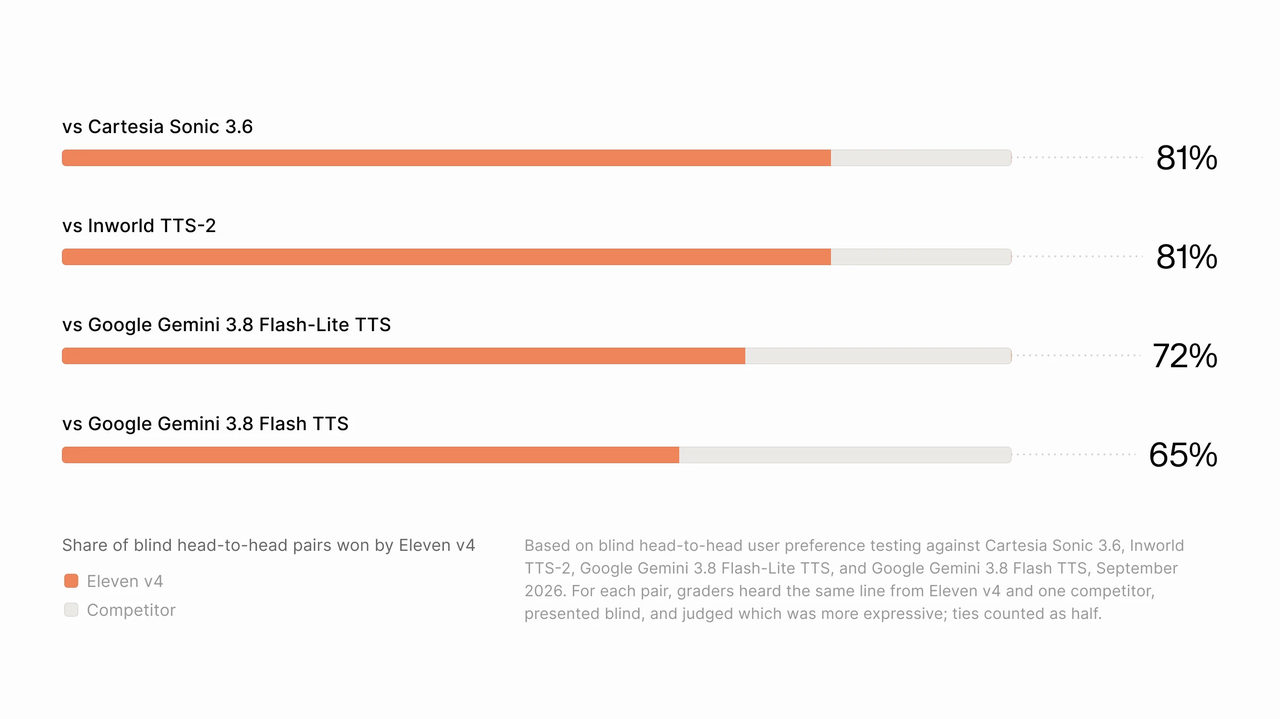
Official ElevenLabs preference chart. It compares Eleven v4 with competing speech models; it does not measure a direct quality gap against Turbo.
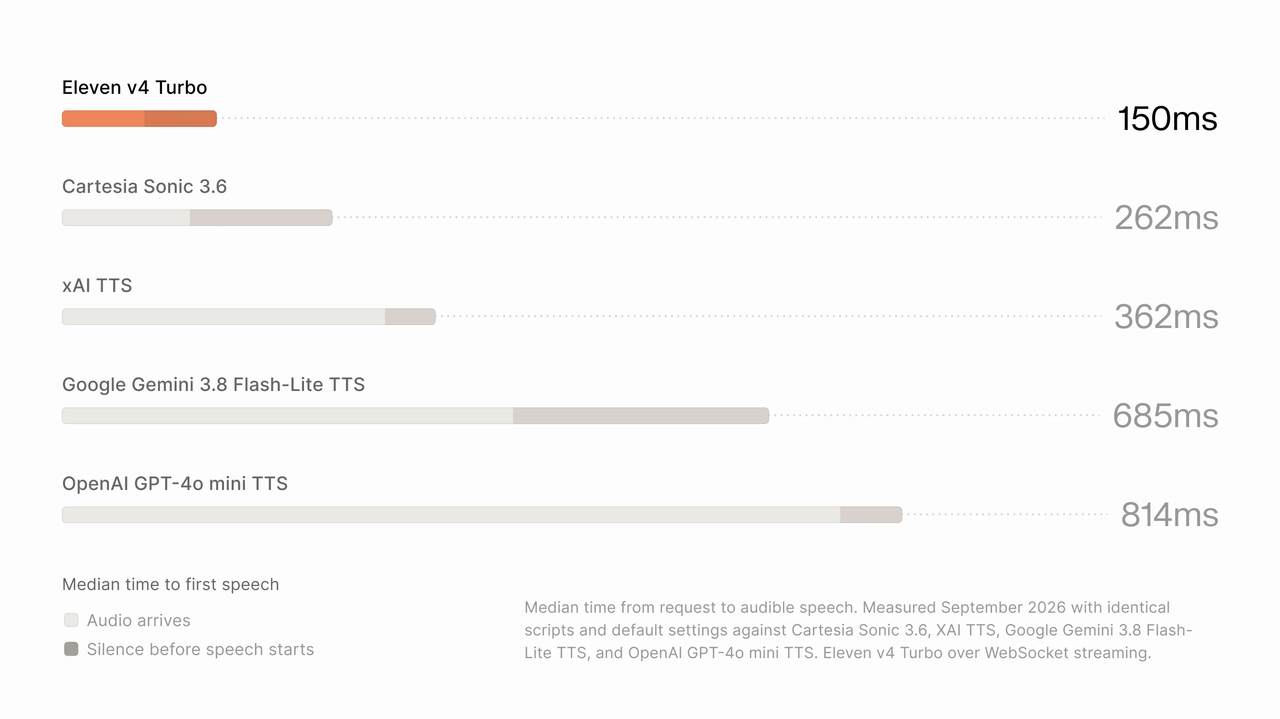
Official ElevenLabs latency chart. Its reported timing excludes measured network latency.
Evaluation Conditions
The official September 2026 listening study used blind paired comparisons of the same line from Eleven v4 and a competing model, judging expressiveness and naturalness; ties counted as half. The compared systems and per-system preference rates appear in the official chart below. These vendor-reported results compare Eleven v4 with competing systems. They do not quantify a listening-quality difference between Eleven v4 and Eleven v4 Turbo.
The September 2026 latency comparison used identical scripts and default settings, removed measured network latency for every system, and ran Turbo over WebSocket streaming. The reported 150 ms measures request to audible speech; it is a different metric from the approximately 100 ms inference figure. The cited methodology does not provide a full hardware, region, load and sample-size breakdown, so it does not establish a production latency guarantee.
Voice Quality and Production Consistency
ElevenLabs highlights Professional Voice Clone support, improved speaker consistency across regenerated lines, and request stitching for long-form audio. Evaluate these claims with a full passage and a replacement line inserted into an existing recording.
For recorded audio, separate expressive delivery from production consistency. Listen for emphasis, emotion, pronunciation and whether the same speaker remains recognizable across passages. The standard model is the vendor’s quality-first option, but a simple instructional script may not reveal a useful difference. Compare accepted takes rather than assuming that a higher-priced generation will always need less editing.
Voice Direction and Multilingual Delivery
Both variants support expressive delivery, but useful expression depends on the script and the voice you choose. Start with a small number of clear directions, then listen for whether they improve the intended meaning.
A reassuring support response can combine a warm tone with a brief pause:
[warm, reassuring] I found your reservation.
[short pause] Let me confirm the arrival time with you.
This is an illustrative prompt, not a measured performance result. Test it alongside an untagged version. Additional directions are useful only when they improve the output.
For pauses, ElevenLabs recommends audio tags, punctuation, and text structure for v4 instead of SSML break tags.
Localization also deserves a separate listening pass. According to the native product guide, same-language generation preserves the reference voice’s original accent, while cross-language generation adopts natural target-language pronunciation instead of carrying over the source-language accent.
That behavior may suit a localized product tutorial, but a fictional character with a deliberately recognizable foreign accent could need additional direction. Evaluate pronunciation, identity, and intended accent separately; a voice can sound fluent while missing the creative brief.
Latency and Reliability
For a production voice agent, speech synthesis is only part of the delay. Speech recognition, turn detection, language-model output, network travel, and audio buffering can all affect when the user hears a response.
Measure both median and slower-tail response times in your own application. A low median can coexist with occasional pauses that make a conversation frustrating.
Eleven v4 vs v4 Turbo: Cost
Official API Character Prices
The native API comparison below uses published rates checked on October 19, 2026. Volume totals are calculations from those rates, rather than separate package quotations.
These figures describe character-based speech generation, not an entire voice-agent bill. Subscription allowances, other services, and applicable commercial terms should be considered separately.
CometAPI Pricing and Billing Conditions
CometAPI displays token-denominated pricing, while the native rates above are per character. Compare costs only after confirming how the selected endpoint measures and bills usage. If you need Turbo, confirm that the model is available on your chosen CometAPI route before planning the integration.
Cost per Accepted Recording or Interaction
For budgeting, use:
Speech generation cost = billable characters ÷ 1,000 × applicable character rate
For content production, a more useful operational measure is cost per accepted recording. Include regenerated takes and editing time. If the cheaper variant repeatedly misses a difficult performance, its unit-price advantage may shrink.
For live agents, compare the cost of completed interactions at your required quality and response time. A low synthesis bill has limited value if users abandon slow or confusing conversations.
Eleven v4 vs v4 Turbo: Comparison and Selection
Capability and Workload-Based Selection
The following recommendations combine the published positioning with practical evaluation criteria. They are starting points for testing, rather than additional benchmark results.
For audiobooks, advertising and dramatic scenes, test Eleven v4 with a neutral passage, an emotional passage and a regenerated line inserted into an existing recording. Listen for consistent voice identity, pacing and pronunciation across the joins. Choose the standard variant when the accepted performance or time saved in editing justifies its higher generation cost.
For support agents and interactive characters, test Turbo across the complete conversation: user speech, turn detection, response generation, synthesis and playback. Include slow connections, connection failures and interruptions. Confirm that playback stops promptly when the user interrupts and that the next response begins cleanly. Choose Turbo when it meets both your listening-quality threshold and your response-time target.
- Build a representative test set: include a neutral explanation, a reassuring response, an emotional passage, names or abbreviations, and multilingual text your audience uses.
- Keep the script, voice, and output settings as comparable as each interface allows.
- Review recordings without model labels. Record pronunciation errors, inconsistent voice identity, and the corrections each take needs.
- Measure live response time separately from listening quality, including both median latency and slower-tail delays.
- Set acceptance thresholds before choosing a route: pronunciation, voice consistency, editing effort, median response time, and slow-tail response time.
- Run representative traffic through the endpoint you will deploy. Track rejected outputs, retries, and playback or connection failures.
- Compare cost per accepted recording or completed interaction, including regenerated takes and editing effort.
Where Can You Access Eleven v4 and v4 Turbo?
Official Provider Access
Use the native provider route that matches the workload: generated speech and dialogue for produced audio, and Text to Dialogue WebSocket streaming for Turbo interaction. The official example below documents the streaming connection and its voice-registration restrictions. Verify the current endpoint schema, authentication requirements and account limits before connecting a production workload.
ElevenLabs’ official streaming example uses the Text to Dialogue WebSocket endpoint for Turbo:
Eleven v4 Turbo WebSocket endpoint:
wss://api.elevenlabs.io/v1/text-to-dialogue/stream-input?model_id=eleven_v4_turbo
The same reference specifies exactly one registered voice per Turbo connection, compared with up to ten for the standard variant on that endpoint. These are connection-level rules, not a universal statement about every interface.
CometAPI Access
Eleven v4 API in CometAPI provides a route for generating speech through a Runway-compatible interface. Its October 10, 2026 integration announcement documents the provider-specific behavior summarized below.
These are provider-specific integration details. The native 10,000-character limit and native UI controls should not be substituted for this interface’s documented behavior. Likewise, the asynchronous workflow does not establish that Turbo’s native WebSocket performance is available through this route.
A practical integration sequence is to submit a short script, follow the documented task-status workflow, retrieve the result, and check pronunciation and output duration before increasing volume.
Conclusion
Choose Eleven v4 when its accepted recordings deliver enough performance quality or production savings to justify the higher character rate. Choose Eleven v4 Turbo when it passes your listening threshold and supports the responsiveness needed for a live conversation. Make the final decision on the endpoint you will deploy, with representative scripts, retries and total operating cost included.
FAQ
How should long Eleven v4 scripts be split for production?
Split at paragraph, sentence or scene boundaries rather than in the middle of a word or a speaker turn. Leave room for any direction text within the endpoint’s permitted input, keep a record of the script and voice settings for each segment, and audition the joins after assembling the audio. Compare loudness, pacing, pronunciation and voice identity across boundaries; accepting each clip individually does not establish that the combined recording is seamless. Use the limit of the actual provider endpoint, since the native and CometAPI request limits differ.
How should an interrupted Eleven v4 request be retried?
Track the original request or task identifier and determine its state before submitting the same text again. For an asynchronous provider workflow, check whether the original task has completed and whether its result remains retrievable. For a live stream, record which audio was already played and decide whether to replay the utterance or recover at a clean boundary. Confirm the endpoint’s retry, idempotency and billing rules; do not assume that repeating a request is free or produces identical audio.
How can teams regression-test an Eleven v4 voice release?
Maintain a fixed acceptance set containing brand names, abbreviations, numbers, difficult pronunciations, emotional passages and the languages used by the product. Archive the script, model identifier, voice identifier, available settings, generation date and accepted reference recordings. When a model, voice or integration changes, listen to new samples against those references and document any required corrections. Separate a reproducible test procedure from an assumption of identical waveforms: passing one recording does not guarantee every subsequent generation will pass.