
TL;DR
GPT-6.1 Terra is OpenAI's efficiency-focused model, officially released on October 26, 2026. It combines detailed visual reasoning, computer use, and natural writing with a 1,050,000-token context window. Standard API rates are $1 per million input tokens and $5 per million output tokens, half the rates of GPT-6.1 Sol.
Its biggest improvement is agent efficiency. On Agents' Last Exam, OpenAI reports a 15-percentage-point gain over GPT-5.6 Terra at medium reasoning effort, at roughly one-third the cost per task. The model also reaches 50.3% on Terminal-Bench 4.0 at maximum effort, more than double its predecessor's score.
For developers, Terra provides a balance between the economical GPT-6 Luna and the more powerful GPT-6.1 Sol and GPT-6 Astra. GPT-6.1 Terra API in CometAPI is now available, with published rates of $0.80 per million input tokens and $4.00 per million output tokens as of October 27, 2026.
Key Takeaways
- GPT-6.1 Terra release: OpenAI launched the model on October 26, 2026, for the API, ChatGPT Work, and Codex.
- GPT-6.1 Terra capabilities: Text and image input, a 1.05M-token total context window, and up to 128K output tokens support visual document and application workflows.
- GPT-6.1 Terra performance: OpenAI reports a 15-percentage-point improvement over GPT-5.6 Terra on Agents’ Last Exam at medium reasoning effort and 50.3% on Terminal-Bench 4.0 at maximum effort.
- GPT-6.1 Terra API pricing: OpenAI Standard lists $1 input and $5 output per million tokens. CometAPI lists $0.80 input and $4 output, as checked on October 27, 2026.
- Choosing a model: Start with GPT-6.1 Terra for routine visual agents; evaluate GPT-6.1 Sol or GPT-6 Astra for harder coding and research.
What Is GPT-6.1 Terra, and When Was It Released?
GPT-6.1 Terra is an OpenAI model designed to connect visual understanding with practical actions across applications. Announced on October 26, 2026, it is an efficiency-focused member of the GPT-6 family.
The official introduction emphasizes detailed visual reasoning, precise computer use, and clearer, more natural writing. Its target workloads include drafting proposals, interpreting technical drawings, operating business software, and completing repetitive professional tasks.
GPT-6.1 Terra at a glance
The OpenAI model documentation confirms the following specifications.
| Essential specification | GPT-6.1 Terra |
|---|---|
| API model ID | gpt-6.1-terra |
| Input and output | Text and image input; text output |
| Context and output limits | 1,050,000-token total context; up to 128,000 output tokens |
| Reasoning effort | none, low, medium (default), high, xhigh, max |
| Tools | Function calling, computer use, web search, file search, and MCP through the Responses API |
| Standard API price | Input $1; output $5 per million tokens |
1.05M-Token Context Window
A context window of 1,050,000 tokens can accommodate long documents, large code excerpts, and extensive tool histories in a single request. Potential uses include comparing contracts, working across documentation repositories, and combining screenshots with detailed instructions.
The model's 128,000-token output maximum is part of the overall context budget. Reserving the full output allowance leaves about 922,000 tokens for the input.
Which Reasoning Effort Should You Choose?
Start with medium for everyday visual and application tasks. Choose none or low for simple rewriting and extraction; try high, xhigh, or max when a difficult coding or multistep task needs more reasoning. Compare the result with the extra time and token cost before raising the setting for every request.
How Does GPT-6.1 Terra Perform on Benchmarks?
OpenAI’s benchmarks cover professional workflows, visual reasoning, desktop automation, and coding. The results show where Terra has improved and where Sol or Astra may still be the better fit.
What Do the Vision, Desktop, and Coding Results Mean?
The comparison uses maximum reasoning effort unless otherwise stated. For complete methodology and the original graphical results, consult the official release benchmarks.
| Benchmark | GPT-6.1 Terra | GPT-5.6 Terra | GPT-6.1 Sol | GPT-6 Astra |
|---|---|---|---|---|
| Agents' Last Exam v1 | 60.0% | 50.7% | 58.6% | 59.3% |
| MMMU-Pro (Vision) | 85.5% | 81.7% | 86.3% | 86.7% |
| OSWorld 2.1, offline | 74.2% | 57.1% | 78.0% | 80.9% |
| Terminal-Bench 4.0 | 50.3% | 21.5% | 55.9% | 58.2% |
| Terminal-Bench-Science 0.1 | 58.3% | — | 57.0% | 68.1% |
Read these scores as a comparison of the tested agents and environments. Differences in reasoning effort, tool configuration, and task selection can change the ranking in your own application.
Note:
- MMMU-Pro: The small gap from GPT-6.1 Sol and GPT-6 Astra makes Terra worth evaluating for visual interpretation. Test difficult scans, dense charts, and unfamiliar layouts separately.
- OSWorld 2.1: Better desktop results support testing repeatable application tasks. Measure recovery from pop-ups, changed layouts, and missing data before allowing unattended execution.
- Terminal-Bench 4.0: Terra’s score is about 2.34 times its predecessor’s. Start with scoped fixes and clear acceptance checks; the table still favors GPT-6.1 Sol and GPT-6 Astra for demanding command-line work.
- Terminal-Bench-Science: Terra outperforms GPT-6.1 Sol in this particular evaluation. That result supports a task-specific trial rather than a general claim that Terra is the stronger coding model.
Agents’ Last Exam: What Does the Cost–Quality Curve Show?
Agents’ Last Exam evaluates professional workflows that combine reasoning, visual material, and software execution. The curve shows why cost per completed task is more useful than token price alone: a model that needs fewer retries may be cheaper even when individual requests are longer.
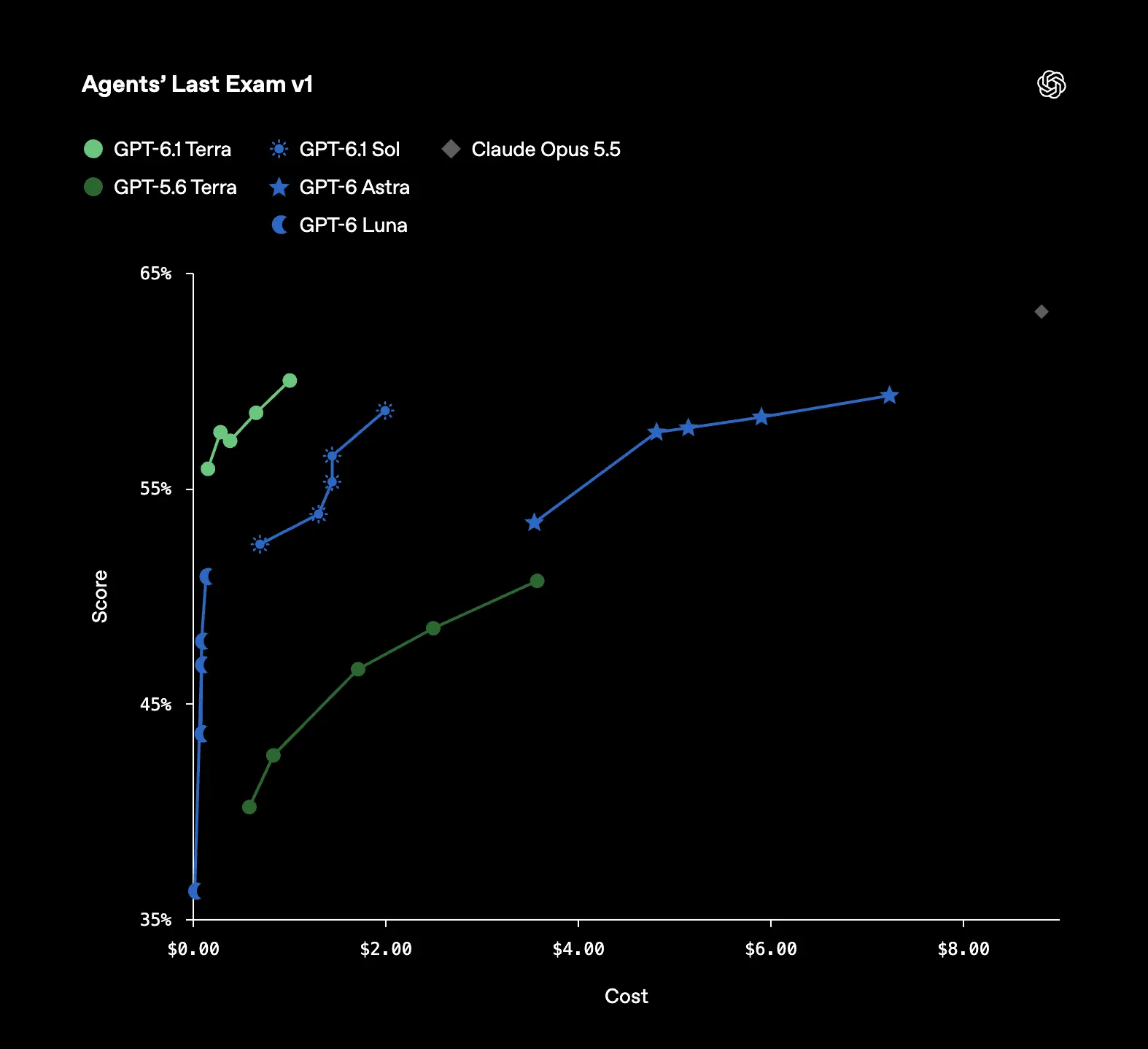
At medium effort, OpenAI reports a 15-percentage-point gain over the previous Terra generation at about one-third the task cost. Its reported completion-time advantage over GPT-6.1 Sol and GPT-6 Astra applies to this benchmark; actual API latency depends on your request and environment.
Does GPT-6.1 Terra Reduce Hallucinations?
OpenAI reports much lower factual-error rates on an internal evaluation using deliberately error-inducing prompts.
| Evaluation setting | GPT-5.6 Terra | GPT-6.1 Terra | Change |
|---|---|---|---|
| Low effort | 53.6% | 16.7% | −36.9 percentage points |
| Maximum effort | 22.3% | 4.3% | −18.0 percentage points |
At low effort, the relative reduction is approximately 68.8%. These figures are not the model's universal hallucination rate: the dataset is intentionally difficult, and error rates will differ for other tasks. Important financial, legal, and technical outputs still need verification.
Does GPT-6.1 Terra Reduce Hallucinations?
OpenAI reports much lower factual-error rates on an internal evaluation using deliberately error-inducing prompts.
| Evaluation setting | GPT-5.6 Terra | GPT-6.1 Terra | Change |
|---|---|---|---|
| Low effort | 53.6% | 16.7% | −36.9 percentage points |
| Maximum effort | 22.3% | 4.3% | −18.0 percentage points |
At low effort, the relative reduction is approximately 68.8%. These figures are not the model's universal hallucination rate: the dataset is intentionally difficult, and error rates will differ for other tasks. Important financial, legal, and technical outputs still need verification.
How Does GPT-6.1 Terra Compare?
GPT-6.1 Terra brings stronger visual reasoning and coding at a lower cost than GPT-5.6 Terra. At maximum reasoning effort, OSWorld 2.1 rises from 57.1% to 74.2%, while Terminal-Bench 4.0 rises from 21.5% to 50.3%: gains of 17.1 and 28.8 percentage points.
Factual accuracy improves too. On OpenAI’s internal test of error-inducing prompts, the error rate at low effort falls from 53.6% to 16.7%. At maximum effort, it falls from 22.3% to 4.3%. These results describe the tested prompts, rather than a universal error rate.
Speed is another advantage. In the Agents’ Last Exam comparison described in OpenAI’s release announcement, Terra completes tasks more than three times as fast as GPT-6 Astra and GPT-6.1 Sol. At medium effort, it also scores 15 percentage points above GPT-5.6 Terra at roughly one-third the cost per task. Together, these gains make Terra an appealing option for frequent visual and application workflows.
| Model | Position in the lineup | When to choose it |
|---|---|---|
| GPT-5.6 Terra | Previous Terra generation | Use it as the baseline when evaluating an existing Terra integration. |
| GPT-6.1 Terra | Efficient visual reasoning, computer use, and writing | Choose it for document assistants, screen-based workflows, and routine coding tasks. |
| GPT-6 Luna | Economical option for focused, high-volume work | Start here for straightforward classification and short extraction. |
| GPT-6.1 Sol | More capability for complex work | Choose it for difficult code changes and sustained professional reasoning. |
| GPT-6 Astra | Highest-capability option for demanding work | Choose it for difficult engineering, research, and ambiguous problems. |
For most visual agents, GPT-6.1 Terra is a practical starting point: it offers a step up from the previous Terra while keeping cost central to the choice. Use Luna for simpler high-volume requests, and move to Sol or Astra when the task needs deeper reasoning. Compare the models on your own examples before choosing a default.
See the OpenAI model catalog for the current lineup.
| Model | Position in the lineup | When to choose it |
|---|---|---|
| GPT-5.6 Terra | Previous Terra generation | Use it as the baseline when evaluating an existing Terra integration. |
| GPT-6.1 Terra | Efficient visual reasoning, computer use, and writing | Choose it for document assistants, screen-based workflows, and routine coding tasks. |
| GPT-6 Luna | Economical option for focused, high-volume work | Start here for straightforward classification and short extraction. |
| GPT-6.1 Sol | More capability for complex work | Choose it for difficult code changes and sustained professional reasoning. |
| GPT-6 Astra | Highest-capability option for demanding work | Choose it for difficult engineering, research, and ambiguous problems. |
For most visual agents, GPT-6.1 Terra is a practical starting point: it offers a step up from the previous Terra while keeping cost central to the choice. Use Luna for simpler high-volume requests, and move to Sol or Astra when the task needs deeper reasoning. Compare the models on your own examples before choosing a default.
See the OpenAI model catalog for the current lineup.
How Much Does the GPT-6.1 Terra API Cost?
GPT-6.1 Terra combines the performance gains above with lower Standard API prices than GPT-5.6 Terra. Input drops from $2 to $1 per million tokens, a 50% reduction; output drops from $12 to $5, a reduction of about 58.3%. The saving on a complete request depends on its input and output mix.
| OpenAI Standard | GPT-5.6 Terra | GPT-6.1 Terra | Reduction |
|---|---|---|---|
| Input / 1M tokens | $2.00 | $1.00 | 50% |
| Output / 1M tokens | $12.00 | $5.00 | About 58.3% |
These rates come from the official GPT-5.6 Terra and GPT-6.1 Terra model pages. The table below compares current processing options and CometAPI’s listed rates. Prices are USD per million text tokens, checked on October 27, 2026. CometAPI’s listed ordinary input and output rates are 20% below OpenAI Standard; cache and tool charges may differ.
| Provider / processing option | Input | Cached input | Output |
|---|---|---|---|
| OpenAI Standard | $1.00 | $0.050 | $5.00 |
| OpenAI Batch / Flex | $0.50 | $0.025 | $2.50 |
| OpenAI Fast | $2.00 | $0.100 | $10.00 |
| OpenAI Standard: over 272K input tokens | $2.00 | $0.100 | $7.50 |
| CometAPI GPT-6.1 Terra | $0.80 | Confirm in your account | $4.00 |
For OpenAI, the long-context multiplier applies to the full request once input exceeds 272K tokens. Standard cache writes cost $1.25 for 30-minute retention or $2.50 for 12-hour retention before that adjustment. Regional processing and tool use can add charges.
How Can You Access GPT-6.1 Terra?
ChatGPT Work and Codex
GPT-6.1 Terra is available in ChatGPT Work and Codex on Plus, Pro, Business, Enterprise, and Edu plans. In the ChatGPT desktop app or Work on the web, open the model list under Advanced and select GPT-6.1 Terra. Work also supports Terra on mobile. It is available in Work rather than Chat; Enterprise access depends on your workspace and administrator settings. See the official availability and access guide.
OpenAI API
For a direct integration, use an OpenAI API key and the model ID gpt-6.1-terra. The model documentation lists the supported endpoints and usage tiers. API access is billed separately from a ChatGPT subscription.
Use the Responses API for tool calling. GPT-6.1 Terra requires this endpoint for functions and other tools. A text-only Chat Completions example does not demonstrate tool use.
CometAPI
Create a CometAPI key, store it as COMETAPI_API_KEY in your environment, and install the OpenAI Python SDK with pip install openai. The following example sends a text request through CometAPI’s OpenAI-compatible Chat Completions endpoint.
import os
from openai import OpenAI
client = OpenAI(
api_key=os.environ["COMETAPI_API_KEY"],
base_url="https://api.cometapi.com/v1",
)
response = client.chat.completions.create(
model="gpt-6.1-terra",
messages=[{
"role": "user",
"content": "Rewrite this customer update clearly: Your order ships tomorrow."
}],
)
print(response.choices[0].message.content)
See CometAPI’s quickstart for API-key and SDK setup. This example sends a text-only request through Chat Completions. For an agent that calls tools, use the Responses API and check that your CometAPI account supports the model and tools you need.
What Are the Best Use Cases for GPT-6.1 Terra?
GPT-6.1 Terra is well suited to work that combines visual information, clear writing, and actions across applications:
- Visual understanding and document processing: Extract invoice fields, reconcile product photos with catalog entries, or interpret technical drawings. Validate important fields against the source and send unreadable items for review.
- Computer use and business automation: Complete forms and prepare business-record updates across applications. Start with a narrow workflow and require approval before committing sensitive changes.
- Software development: Triage a reproducible bug, propose a focused patch, and run the project’s checks. Measure accepted fixes and manual recovery time rather than the volume of generated code.
Conclusion
For developers creating document assistants, invoice processors, business application agents, and routine coding workflows, Terra is a strong model to evaluate. GPT-6.1 Terra API in CometAPI now provides an additional integration option at published input and output prices 20% below OpenAI Standard.
Begin with medium reasoning effort, test the tasks that actually matter, and compare cost per successful outcome with GPT-6 Luna, GPT-6.1 Sol, and GPT-6 Astra. The best model is the one that consistently meets your quality threshold at the lowest sustainable operating cost.