Start with GPT-6.1 Terra for high-volume, verifiable, cost-sensitive tasks. Evaluate GPT-6.1 Sol for complex coding, multi-step tool use, and workflows where failures are expensive. A practical default is to use Terra first and escalate to Sol when predefined tests or validation checks fail.
Key Takeaways
Standard token pricing: On OpenAI Standard, Terra costs $1 per million input tokens and $5 per million output tokens; Sol costs $2 and $10, respectively.
Task-specific performance: At maximum reasoning effort, Terra narrowly leads on Agents’ Last Exam v1 and Terminal-Bench-Science 0.1, while Sol leads on Terminal-Bench 4.0 and OSWorld 2.1.
Shared context capacity: Both models offer a 1.05-million-token context window and accept text and image inputs.
Reviewed for clarity, source attribution and current API terminology.
Different reasoning controls: Terra supports disabling reasoning with none; Sol requires at least low reasoning effort.
Operational cost matters: Compare spending per successfully completed task, including retries and tool calls, and track human-review costs separately.
GPT-6.1 Terra vs GPT-6.1 Sol: Overview and Specifications
The overview below summarizes the trade-offs. The detailed sections explain the evidence, billing assumptions, and limits behind each choice.
Decision factor
GPT-6.1 Terra
GPT-6.1 Sol
Starting workload
Routine visual work and repeatable agents
Complex coding and sustained professional reasoning
Context and modalities
Same total context capacity; text and image input
Same total context capacity; text and image input
Reasoning control
Includes a reasoning-off option
Requires at least low reasoning effort
Published performance pattern
Lower-cost performance on repeatable agent tasks
Stronger on several difficult coding and desktop tests
API access
OpenAI and CometAPI
OpenAI and CometAPI
GPT-6.1 Terra: Efficient Visual and Agent Workflows
OpenAI introduced GPT-6.1 Terra on October 26, 2026. It combines visual reasoning, computer use, and general-purpose text generation for routine professional workflows. Its lower token rates make it a useful starting point when tasks are frequent and results can be checked.
GPT-6.1 Sol: Complex Coding and Professional Reasoning
GPT-6.1 Sol launched on September 29, 2026. It targets demanding coding and professional work. Evaluate it when an unfamiliar repository, a long chain of dependent actions, or expensive corrections makes additional reasoning capability valuable.
Context, Reasoning, and API Specifications
Specification
GPT-6.1 Terra
GPT-6.1 Sol
Official release date
October 26, 2026
September 29, 2026
API model ID
gpt-6.1-terra
gpt-6.1-sol
Context window
1,050,000 tokens
1,050,000 tokens
Knowledge cutoff
June 1, 2026
April 30, 2026
Input / output
Text and images / text
Text and images / text
Reasoning effort
none, low, medium, high, xhigh, max
low, medium, high, xhigh, max
Default reasoning effort
medium
medium
API features: Both models support Structured Outputs, streaming, and the Batch API. Tool calling uses the Responses API, and fine-tuning is not supported. Check that your chosen provider and endpoint offer the features your application needs.
Both models allow up to 128,000 output tokens within a 1,050,000-token context window. Reserving the full output allowance leaves 922,000 tokens for the rest of the exchange, including your input, system instructions, and tool history. This is a planning calculation, not a separate fixed input limit.
Architecture disclosure: The linked public model specifications do not provide enough internal architecture detail for a reliable comparison. Context capacity and reasoning settings should not be treated as evidence of parameter count or architecture.
Reasoning controls: Terra’s none setting is useful for straightforward transformations and extraction. For the first comparison, use the same supported reasoning setting on both models, then tune each model against the quality and latency your workload requires.
Both models have the same published context capacity, but that does not imply identical retrieval accuracy or long-context reasoning quality. Model selection should therefore consider reasoning quality, workflow efficiency, cost, and task-specific retrieval performance.
GPT-6.1 Terra vs GPT-6.1 Sol: Performance
The reported results show a mixed picture: Terra narrowly leads on some agent and scientific-coding evaluations, while Sol scores higher on general terminal coding, desktop automation, and vision. The comparisons below separate OpenAI’s launch results from independent evaluations and explain what each can—and cannot—tell you about production performance.
Official Benchmark Results and Test Conditions
The following results come from OpenAI’s Terra launch evaluations. Terra is shown at medium and maximum reasoning effort; Sol is shown at maximum effort. The final column compares only the maximum-effort configurations.
OSWorld uses the offline 2.1 evaluation. The factuality test uses OpenAI’s internal prompts designed to induce errors. These are vendor-reported results from specific evaluation setups, rather than measurements of your production workload.
Benchmark
GPT-6.1 Terra (medium)
GPT-6.1 Terra (max)
GPT-6.1 Sol (max)
Comparison at max effort
Agents’ Last Exam v1
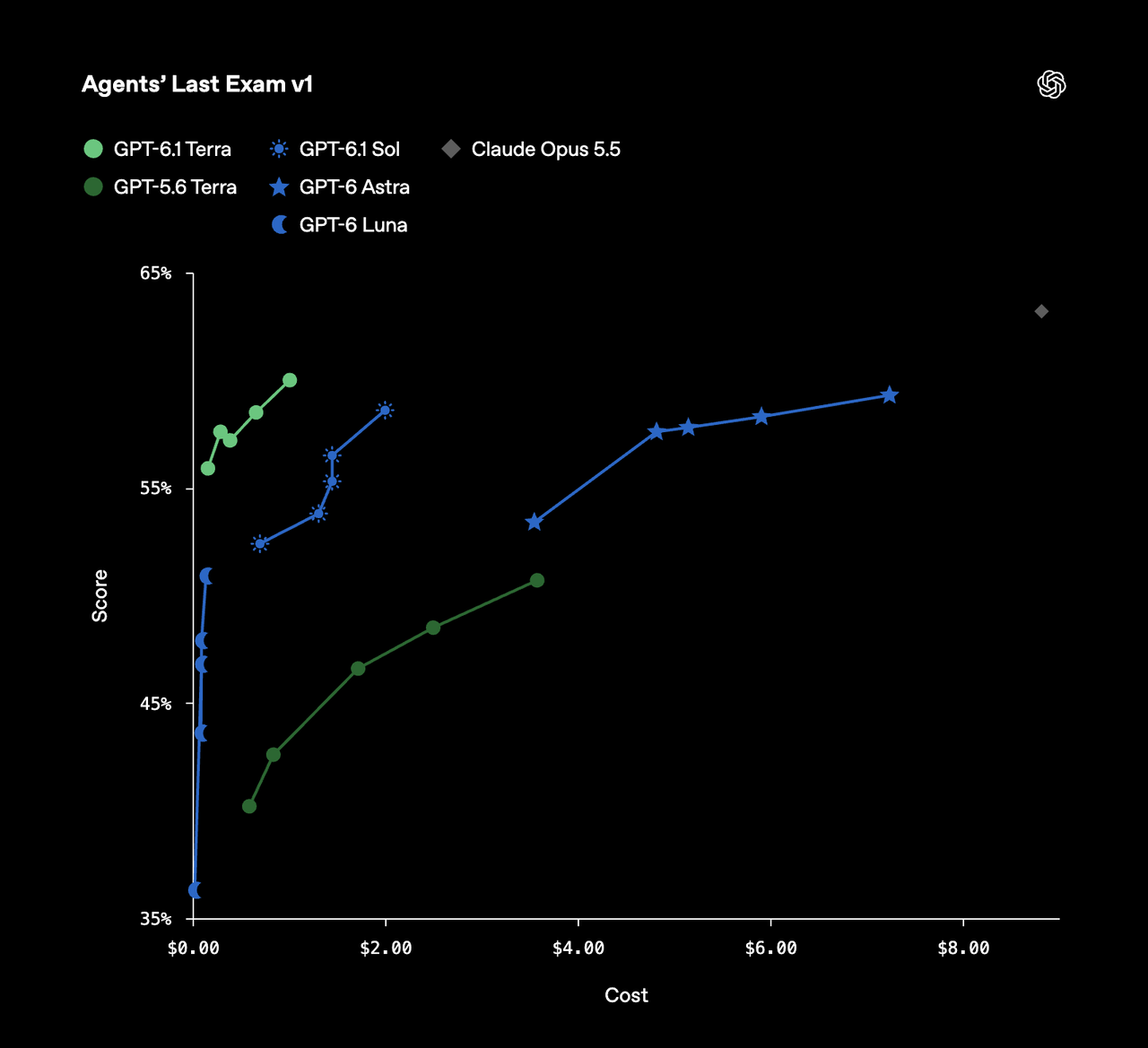
57.60%
60.00%
58.60%
Terra +1.4 pp
MMMU-Pro (Vision)
84.60%
85.50%
86.30%
Sol +0.8 pp
OSWorld 2.1, offline
66.70%
74.20%
78.00%
Sol +3.8 pp
Terminal-Bench 4.0
35.80%
50.30%
55.90%
Sol +5.6 pp
Terminal-Bench-Science 0.1
34.30%
58.30%
57.00%
Terra +1.3 pp
Factual error rate on difficult prompts
10.10%
4.30%
4.40%
Terra 0.1 pp lower
All scores are percentages; differences are expressed in percentage points (pp). Lower is better only for factual error rate. The 0.1-point error-rate difference alone does not establish a meaningful reliability advantage.
For software engineering, Sol’s Terminal-Bench lead and Terra’s narrow Terminal-Bench-Science lead suggest that results depend on the type of coding task. For application workflows, Sol’s higher OSWorld score supports evaluating it for desktop automation, while Terra’s Agents’ Last Exam result makes it a candidate for professional agent tasks. Neither pattern establishes a universal winner.
Agent scaffolding, tool access, and environment configuration can affect these results. Use the figures to identify candidates for testing, then validate them against the repository changes and application workflows you actually need to complete.
OpenAI’s Agents’ Last Exam v1 chart plots scores against estimated task costs across model configurations. It adds a cost-efficiency perspective to the score table above; the plotted costs are specific to the evaluation setup.
Independent Intelligence and Coding Evaluations
Artificial Analysis’s October 26 evaluation places Terra four points below Sol on its Intelligence Index at maximum reasoning effort. Its Coding Agent Index v2.0 gives Terra 48 and Sol 54. These are separate evaluations with their own methods and scoring scales; they should not be combined numerically with OpenAI’s benchmark results.
The same analysis identifies Terra’s low and medium reasoning settings as particularly cost-efficient on the intelligence evaluation. This supports testing practical configurations alongside maximum-effort settings. Evaluation costs remain specific to the test setup and should not be treated as estimates of your application’s spending.
Speed and Latency: Task Completion vs. Token Generation
OpenAI reports that Terra completes the evaluated Agents’ Last Exam tasks more than three times faster than Sol. This is an end-to-end task measurement that includes reasoning and software interactions. It does not imply threefold higher output-token throughput or the same speedup for every API request.
For interactive applications, distinguish time to first token, which measures the wait before output begins, from output tokens per second, which measures how quickly the answer continues. For agents, prioritize end-to-end completion time, including tool calls, retries, and recovery.
Compare both models using the same prompts, tools, supported reasoning setting, and acceptance criteria. Record latency alongside task success: a faster response has limited value if it requires more correction or fails to complete the workflow.
Vision and Long-Context Performance: What the Results Establish
Sol’s 0.8-percentage-point lead on MMMU-Pro at maximum effort is one reported vision result, rather than a guarantee of better performance on every visual workflow. Test small labels, poor scans, dense diagrams, and unfamiliar layouts using representative inputs.
The evaluations above do not establish which model is better at long-context retrieval or reasoning. Although both have the same published context capacity, capacity alone does not demonstrate retrieval accuracy or memory across sessions. Test whether each model can locate and use relevant evidence in your documents, and maintain application state explicitly across requests.
GPT-6.1 Terra vs GPT-6.1 Sol: Cost
Token prices are the starting point for comparing costs. Retries, reasoning tokens, tool calls, and human review also affect how much you spend to complete a task successfully.
The following rates are in USD per million tokens and pricing.
Provider and token category
GPT-6.1 Terra
GPT-6.1 Sol
OpenAI Standard — input
$1.00
$2.00
OpenAI Standard — cached input
$0.05
$0.10
OpenAI Standard — output
$5.00
$10.00
OpenAI Standard — 30-minute cache write
$1.25
$2.50
OpenAI Standard — 12-hour cache write
$2.50
$5.00
CometAPI ordinary input
$0.80
$1.60
CometAPI ordinary output
$4.00
$8.00
OpenAI API Pricing
Terra’s listed Standard rates are half Sol’s across these categories. Actual charges depend on the request configuration: long-context requests, processing tiers, regional processing, and tool use may have different terms. Check the applicable OpenAI pricing documentation before estimating production costs.
CometAPI Pricing
CometAPI is a third-party access route with its own pricing and feature availability. Its listed ordinary input and output rates are shown separately below.
At these rates, CometAPI’s ordinary input and output prices are 20% below the OpenAI Standard rates above. Confirm current prices, long-context charges, caching support, and tool availability for your account before deployment.
Example Cost for 1,000 Requests
Suppose an application makes 1,000 requests, each using 2,000 uncached input tokens and 500 billable output tokens. This produces a total of 2 million input tokens and 500,000 output tokens.
For 1,000 requests, each using 2,000 uncached input tokens and 500 billable output tokens, the estimated costs are:
Terra via OpenAI: $2.00 for input and $2.50 for output, totaling $4.50.
Sol via OpenAI: $4.00 for input and $5.00 for output, totaling $9.00.
Terra via CometAPI: $1.60 for input and $2.00 for output, totaling $3.60.
Sol via CometAPI: $3.20 for input and $4.00 for output, totaling $7.20.
These calculations use the ordinary rates listed above, without a Batch API discount. They exclude cache writes, separate tool charges, and retries. Any reasoning tokens billed as output must be included in the output total.
Effective Cost per Successful Task
In this article, a successful task is one that passes the predefined quality, schema where applicable, and completion checks without additional human correction.
Lower token prices do not always produce lower operational costs. Terra’s savings may shrink if it needs more attempts, reasoning tokens, or human intervention. Sol’s higher rates may be worthwhile if it completes more tasks successfully on the first attempt.
Effective model-and-tool cost per successful task = total model and tool spending across all attempts ÷ number of successful tasks.
Track human-review and correction costs separately. Choose the model that meets your quality target at the lowest combined cost, rather than comparing token prices alone.
Which Model Should You Choose: GPT-6.1 Terra or GPT-6.1 Sol?
Choose based on task complexity, verifiable output quality, and total completion cost. Terra is a useful starting point for routine workflows; Sol is worth evaluating when difficult reasoning or costly failures justify additional spending.
When to Choose GPT-6.1 Terra
Start with Terra for high-volume extraction, document drafting, catalog matching, and predictable application workflows. These tasks are good candidates when results can be checked against source documents, required fields, or automated validation rules.
Choose Terra when it meets your accuracy and completion targets within the allowed retry and human-review budget. Lower token rates offer little benefit if repeated failures erase the savings.
When to Choose GPT-6.1 Sol
Evaluate Sol for difficult debugging, repository changes involving many dependencies, and desktop workflows with long chains of dependent actions.
Choose Sol when testing shows that it produces more accepted patches, passes more tests, or requires less manual correction. Its higher token cost is justified when those improvements reduce the total cost of completing the work.
When to Use Terra First and Escalate to Sol
A hybrid workflow can use Terra for the initial attempt and escalate to Sol when predefined checks fail. Base escalation on observable results rather than the model’s confidence alone.
For example, a code-generation workflow could:
Ask Terra to produce the requested change.
Run the relevant tests and validation checks.
Escalate to Sol if the change fails those checks or falls outside Terra’s verified capability.
Send unresolved cases for human review once the retry budget is exhausted.
When escalating, preserve the original request, relevant context, failed output, and validation results. Record both models’ usage so the cost comparison includes the full workflow.
Production Evaluation Checklist
Before selecting a default model or deploying an escalation workflow:
Use representative tasks: Include routine requests and cases where failure is expensive.
Keep comparisons controlled: Use comparable instructions, evidence, tools, and acceptance criteria. Record model IDs, endpoints, reasoning settings, and test dates.
Measure accepted outcomes: Check accuracy, schema validity where applicable, test results, and completion without manual correction.
Measure time and spending: Track median and tail latency, billed tokens, tool calls, retries, and human-review effort.
Repeat the comparison: Run tasks multiple times and alternate model order to reduce the influence of one-off results.
Define operating limits: Set retry budgets, escalation triggers, and human-approval requirements before deployment.
Compare the complete workflow: Include unsuccessful attempts and escalation costs when calculating spending per successful task.
Where Can You Access GPT-6.1 Terra and GPT-6.1 Sol?
Official Provider Access
Both models are available through the OpenAI API. For text requests, Chat Completions is supported; tool calling requires the Responses API. Confirm the model’s supported parameters, your account limits, and the tools available on the route you intend to use.
CometAPI Access
To use either model through CometAPI, follow its quickstart guide to set up the OpenAI-compatible SDK. Supply your CometAPI key securely through the COMETAPI_KEY environment variable and set the base URL to https://api.cometapi.com/v1. Choose gpt-6.1-terra or gpt-6.1-sol as the model identifier, and confirm that the route is enabled for your account.
For a first comparison, give both models the same representative tasks and use medium reasoning effort. Keep the instructions and acceptance criteria consistent, repeat each task, and alternate model order. Compare successful results, elapsed time, billed tokens, and retries rather than judging either model from a single response.
Conclusion
Start with GPT-6.1 Terra for frequent, verifiable workflows where lower token pricing and faster task completion matter. Evaluate GPT-6.1 Sol when difficult coding, multi-step tool use, or costly failures make higher reasoning capability valuable. The final choice should be based on accepted-task cost under a representative evaluation set, not on price or a single benchmark alone.
For many applications, the useful next step is a small, representative trial with clear pass conditions and a bounded escalation route. Let the measured result determine the model, rather than relying on price or one benchmark alone.