
TL;DR
Grok Voice 3.0 is xAI’s real-time speech-to-speech model, released on October 14, 2026. Its API model name is grok-voice-3.0; as of November 3, 2026, grok-voice-latest points to this version. The launch announcement lists voice sessions at $0.08 per minute ($4.80 per hour). It combines conversation, interruption handling, and tool use for voice assistants and customer support. With basic Python, an xAI API key, and the websockets library, you can send a prompt and save a spoken reply. Start with the example below, then add recorded audio, live microphone streaming, and business tools as your application grows.
Key Takeaways
- Grok Voice 3.0 exchanges speech and text in real time. Your application sends and receives session events over WebSocket throughout the conversation.
- Your first test can be a single text-to-audio turn. A playable reply confirms that authentication and audio generation work before you add a microphone.
- Audio input requires a matching format and a clear turn boundary. Your application can submit recorded PCM audio with manual turn completion or stream microphone audio with server-side voice detection.
- Your application controls business actions. It validates function arguments and user permissions, executes the approved action, and returns the result so the voice agent can continue.
- Browser and mobile clients use short-lived credentials. Your server keeps the permanent API key and issues temporary tokens for client connections.
What Is Grok Voice 3.0?
Grok Voice 3.0 is a real-time conversational voice model developed by xAI, operating under the SpaceX Super Intelligence branding. It accepts spoken or text input and can return audio and text within an ongoing session. The model is optimized for voice-agent use cases, rather than serving as a drop-in replacement for general text-only Grok models.
Traditional voice assistants often chain speech recognition, a language model, and speech synthesis. Grok Voice instead exposes a speech-to-speech session with integrated conversational behavior and tool support. That architecture can simplify a developer's orchestration layer, although applications still need audio capture, transport, authorization, business integrations, and monitoring.
The Grok Voice 3.0 model definition identifies text and audio as its input and output modalities. For this tutorial, the first useful checkpoint is a playable reply from a server-side Python script.
Key Features and Capabilities of Grok Voice 3.0
- Hold a live conversation: exchange speech and text over WebSocket throughout a session.
- Handle interruptions: use server-side voice detection and stop queued playback when the caller starts speaking.
- Use business tools: connect your own functions for tasks such as order lookup and scheduling.
Grok Voice 3.0 Benchmark Performance
The official launch report cites these Artificial Analysis results, dated October 13, 2026:
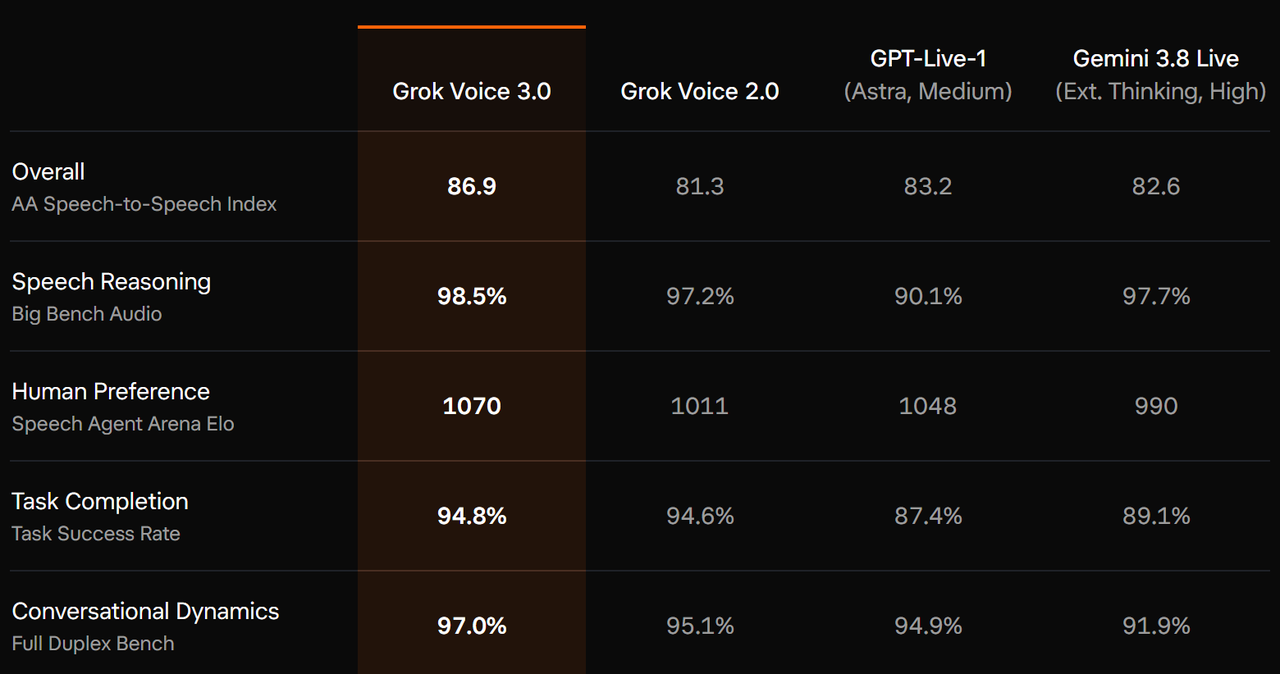
These are published benchmark results, not guarantees for your deployment. Test your own accents, noise conditions, tools, and escalation paths before using the agent with customers.
What Do You Need Before Calling the Grok Voice 3.0 API?
Create or sign in to an account in the xAI Console, generate an API key, and check that your account has access and available usage credit. Use a local terminal or a trusted server for the Python example.
- Python 3.11 or later and pip available in the same environment.
- A valid xAI API key stored as XAI_API_KEY.
- A network connection that permits outbound secure WebSocket connections.
- A media player to open the generated WAV file.
Generate a key in the xAI Console. Store it in an environment variable rather than hard-coding it in the application.
Set the API key for the current Bash terminal.
export XAI_API_KEY="your_xai_api_key"
On Windows PowerShell:
Set the API key for the current PowerShell session.
$env:XAI_API_KEY="your_xai_api_key"
Install the WebSocket client in your Python environment.
python -m pip install "websockets>=14,<18"
Run the remaining commands in the same terminal session. If you use a virtual environment, activate it before installing the package.
How to Use the Grok Voice 3.0 API with Python
The native Realtime API uses a WebSocket connection. Unlike ordinary text chat completions, it exchanges ongoing session events and streams audio chunks while a conversation is in progress.
Step 1: Select a fixed model and configure the session
The API accepts a versioned model name in the WebSocket URL. The example uses grok-voice-3.0 so the requested version is explicit. A session.update event sets the voice, audio format, and manual turn handling; wait for session.updated before submitting the prompt.
Step 2: Send text and collect the spoken response
Save the following script as grok_voice_demo.py. It submits one text prompt, collects base64-encoded audio chunks, and writes a mono, 24 kHz, 16-bit PCM WAV file. It also stops on API errors, unsuccessful completion, or a response that produces no audio.
Create one spoken reply from a text prompt and save it as a WAV file.
import asyncio, base64, json, os, wave
import websockets

SAMPLE_RATE = 24000

async def receive_event(ws):
    event = json.loads(await asyncio.wait_for(ws.recv(), 60))
    if event.get("type") == "error":
        raise RuntimeError(event)
    return event

async def main():
    url = "wss://api.x.ai/v1/realtime?model=grok-voice-3.0"
    headers = {"Authorization": f"Bearer {os.environ['XAI_API_KEY']}"}
    async with websockets.connect(url, additional_headers=headers) as ws:
        await ws.send(json.dumps({"type": "session.update", "session": {
            "voice": "eve", "turn_detection": {"type": None},
            "audio": {
                "input": {"format": {"type": "audio/pcm", "rate": SAMPLE_RATE}},
                "output": {"format": {"type": "audio/pcm", "rate": SAMPLE_RATE},
                           "transport": "json"}}}}))
        async with asyncio.timeout(30):
            while (await receive_event(ws)).get("type") != "session.updated":
                pass
        await ws.send(json.dumps({"type": "conversation.item.create", "item": {
            "type": "message", "role": "user",
            "content": [{"type": "input_text", "text": "Explain Grok Voice 3.0 briefly."}]}}))
        await ws.send(json.dumps({"type": "response.create"}))
        chunks = []
        async with asyncio.timeout(120):
            while True:
                event = await receive_event(ws)
                if event["type"] in ("response.output_audio.delta", "response.audio.delta"):
                    chunks.append(base64.b64decode(event["delta"]))
                elif event["type"] == "response.done":
                    if event.get("response", {}).get("status") != "completed":
                        raise RuntimeError(event)
                    break
    if not chunks:
        raise RuntimeError("The response contained no audio.")
    with wave.open("grok_response.wav", "wb") as wav:
        wav.setparams((1, 2, SAMPLE_RATE, 0, "NONE", "not compressed"))
        wav.writeframes(b"".join(chunks))
    print("Saved grok_response.wav")

asyncio.run(main())
Step 3: Run the script and check the result
Run the Python voice example.
python grok_voice_demo.py
After a successful response, the terminal prints Saved grok_response.wav. Open that file in a media player and check that you hear a complete reply at normal speed. A missing or unplayable file is a reason to inspect the returned events and audio configuration before adding more features.
The realtime event reference describes the session acknowledgement and response lifecycle used here. The script waits for the whole turn before writing the file; an interactive voice application should play audio chunks as they arrive.
How Do You Send Audio to Grok Voice 3.0?
Recorded audio with manual turn completion
This example uses a mono, 24 kHz, 16-bit PCM WAV file. Grok Voice 3.0 also supports other PCM sample rates, μ-law, A-law, and Opus. The actual format must match the session.update configuration. Replace only the conversation.item.create block in the previous script with the snippet below. Keep the following response.create call and the existing receive loop.
Replace the text-message block with a recorded-audio upload inside main().
with wave.open("request.wav", "rb") as source:
    if (
        source.getnchannels() != 1
        or source.getsampwidth() != 2
        or source.getframerate() != SAMPLE_RATE
        or source.getcomptype() != "NONE"
    ):
        raise ValueError("Use mono, 24 kHz, 16-bit PCM WAV audio.")
    pcm = source.readframes(source.getnframes())

if len(pcm) < SAMPLE_RATE * 2 // 10:
    raise ValueError("Use a spoken recording longer than 100 ms.")

for offset in range(0, len(pcm), 4800):
    await ws.send(json.dumps({
        "type": "input_audio_buffer.append",
        "audio": base64.b64encode(pcm[offset:offset + 4800]).decode("ascii"),
    }))
await ws.send(json.dumps({"type": "input_audio_buffer.commit"}))
while (await receive_event(ws)).get("type") != "input_audio_buffer.committed":
    pass
Indent this replacement to the same level as the original text-message block, inside the WebSocket context. It sends raw PCM samples from the WAV file, not the WAV container header. The first script explicitly selects manual turn handling, so committing the buffer and then requesting a response are separate actions.
Live microphone capture and immediate playback
For an interactive conversation, capture audio continuously, convert it to the configured input format, and send short chunks while a separate receive loop handles responses. Select server_vad for automatic turn detection instead of the manual mode used in the recorded-file example. Avoid adding a second response.create when the server is already creating the reply.
On interruption, stop playing queued assistant audio promptly. Network cancellation alone does not remove sound already buffered by your application. Keep the playback queue small and track how much audio the listener actually heard so your application can keep the conversation state consistent.
How to Add Tools to a Grok Voice 3.0 Agent?
Applications can expose tools such as order lookup, scheduling, or account verification. The agent can interpret a complex spoken request, call an authorized function, and use the result to continue. This is particularly useful when a customer requests several related changes in one call.
The API supports custom functions and server-managed tools. For a custom function, your application implements the action; defining a tool does not connect the model to your database by itself.
- Declare the function name, description, and JSON argument schema in session.tools.
- Handle response.function_call_arguments.done, parse the arguments, and validate the caller's permission before executing the function.
- Return the result as a conversation.item.create event with item.type set to function_call_output and the matching call_id.
- Send response.create after the required function results have been submitted. If several calls arrive together, return all of their results before asking the model to continue.
Begin with a read-only tool, such as checking an order's delivery status. For actions that change bookings, issue refunds, or place orders, enforce identity checks, confirmation, and duplicate-request protection in the application.
How to Use Grok Voice 3.0 in Browser and Mobile Apps
Use ephemeral credentials for client-side connections. Your server requests a short-lived token with its permanent API key and passes the token to the client. Authenticate requests to your own token endpoint and apply usage limits so it does not become an unrestricted gateway.
Keep microphone consent, recording controls, and connection status visible in the interface. Handle connection loss explicitly: stop stale playback, tell the user the connection is recovering, and avoid replaying actions that may already have completed.
How to Troubleshoot Common Grok Voice 3.0 API Errors
- Authentication failure: confirm that XAI_API_KEY is set in the terminal running the script and that the key belongs to an account with access. Do not paste the key into logs or support messages.
- Unexpected client-library arguments: verify that pip installed the requested websockets version into the Python environment used to run the script.
- No audio output: inspect error events and response.done, confirm that session.updated acknowledged the configuration, and check that a response was requested for the manual turn.
- Distorted playback: compare the actual bytes with the configured codec, sample rate, channel count, and WAV header. Renaming an MP3 file to WAV does not convert it.
- Timeout: check network access and service status, then inspect the last successful event. Retry a failed connection separately from any business action that might already have run.
What Should You Budget for Grok Voice 3.0 API Calls?
Voice usage and custom integrations can generate separate charges. For this tutorial, the relevant published rates are the realtime session and text inputs; standalone transcription and speech-generation products are separate services.
- Speech-to-speech session: $0.08 per minute, equivalent to $4.80 per hour.
- Text input during a voice session: $0.004 per text input.
Rates checked on October 29, 2026. See the official pricing page for current charges.
For example, 500 billable session minutes correspond to $40 in base voice charges. That estimate excludes text inputs, optional tools, telephony, and your own infrastructure. Start with short test sessions and close idle connections when the conversation ends.
Conclusion
Start with one complete Grok Voice 3.0 API turn: connect, configure the session, submit a prompt, receive audio, and play the result. Once that path works, add recorded speech, then build microphone capture and streaming playback around it. Introduce business tools only after the conversation and error-handling paths are reliable.