
TL;DR
DeepSeek-V4.1-Flash is open-weight and can be self-hosted, but “local” does not mean “on a gaming PC.” DeepSeek describes it as a 552B-parameter Mixture-of-Experts backbone using a Causal Encoder-Decoder architecture, with only 8B parameters active during prompt processing and 16B during generation. The full model remains a frontier-scale deployment target.
The current vLLM deployment recipe puts the checkpoint at roughly 511 GB on disk and about 614 GB minimum VRAM, making an 8×H200-class server or comparable high-memory system far more realistic than a consumer workstation.
For teams that only need access rather than weight-level control, the DeepSeek V4.1 Flash API in CometAPI is substantially simpler than maintaining a multi-GPU inference server.
Key Takeaways
- DeepSeek-V4.1-Flash uses a 552B MoE backbone with 8B active parameters during prefill and 16B during decode; active parameters do not represent the resident-memory requirement.
- Its 1,048,576-token context and 890-byte-per-token global KV cache reduce cache pressure, but the model weights still dominate capacity planning.
- The official checkpoint is about 511 GB on disk. The vLLM recipe estimates roughly 614 GB of aggregate usable VRAM as the minimum budget for loading the model and its runtime overhead; this is a baseline estimate, not a guarantee for every batch size, context length, or multimodal configuration.
- vLLM is the clearest production-serving path, while SGLang targets advanced distributed inference; Ollama's current route is cloud-hosted rather than full local inference.
- Self-hosting is most compelling for privacy, air-gapped operation, weight-level research, or sustained cluster utilization; most developers will find a hosted API simpler.
What Is DeepSeek-V4.1-Flash? Architecture, Parameters, and Model Size
DeepSeek officially released V4.1-Flash on September 10, 2026 as the smallest model in its new architecture family, with native visual understanding. Despite the “Flash” name, it is not a small dense model.
Its key architectural change is the Causal Encoder-Decoder (CED) design. The model divides computation asymmetrically between prompt ingestion and token generation, reducing active compute while retaining a very large expert pool.
| Specification | DeepSeek-V4.1-Flash |
|---|---|
| Architecture | Multimodal MoE with Causal Encoder-Decoder |
| Backbone parameters | 552B |
| Active parameters, input | 8B |
| Active parameters, output | 16B |
| Transformer layers | 40: 20 encoder + 20 decoder |
| Context window | 1,048,576 tokens |
| Global KV cache | 890 bytes/token |
| Modalities | Text + image input, text output |
| Weight license | MIT |
| Recommended sampling | Temperature 1.0; top_p 0.95 or 1.0 |
| Official weights | Hugging Face |
| Primary local serving options | vLLM, SGLang, DeepSeek reference inference |
The distinction between active parameters and resident parameters is essential. MoE routing reduces the amount of computation used for an individual token, but the server still needs access to the expert weights that could be selected. That is why an “8B active” model can still require hundreds of gigabytes of storage and accelerator memory.
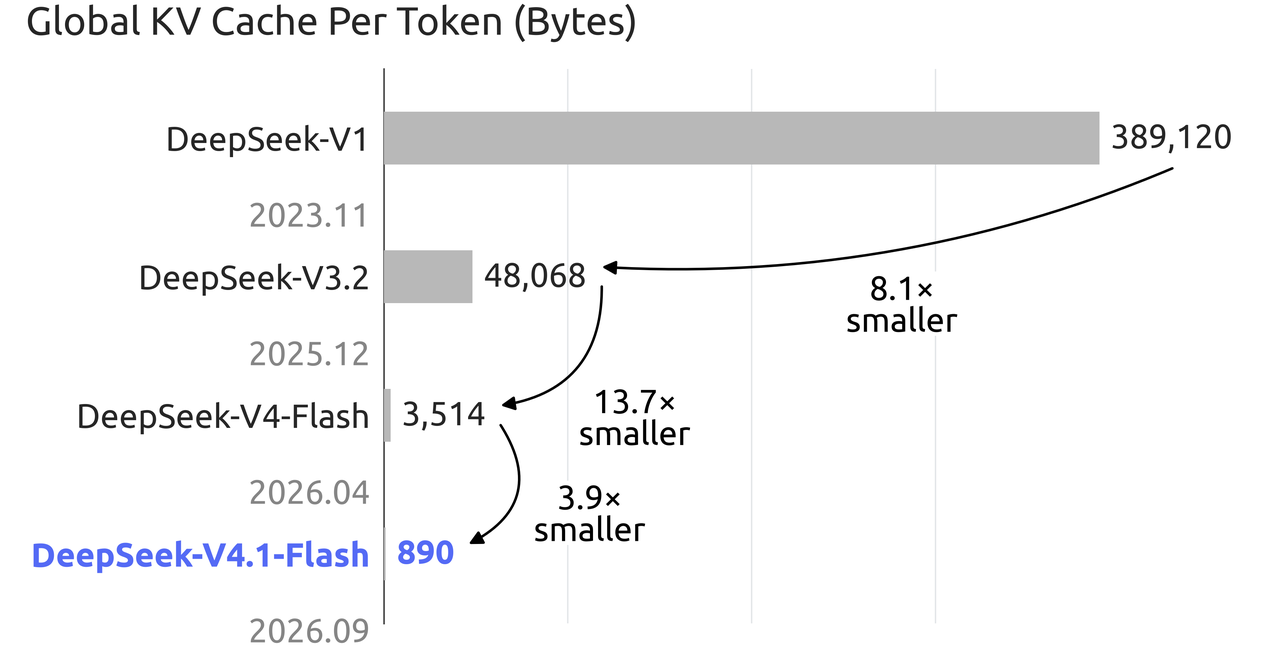
DeepSeek's official KV-cache chart shows the global cache falling from 3,514 bytes per token in V4 Flash to 890 bytes per token in V4.1 Flash, a reduction of about 3.9×. That matters for million-token inference, but it does not eliminate the much larger memory requirement created by the model weights themselves.
How Good Is DeepSeek-V4.1-Flash Before You Deploy It?
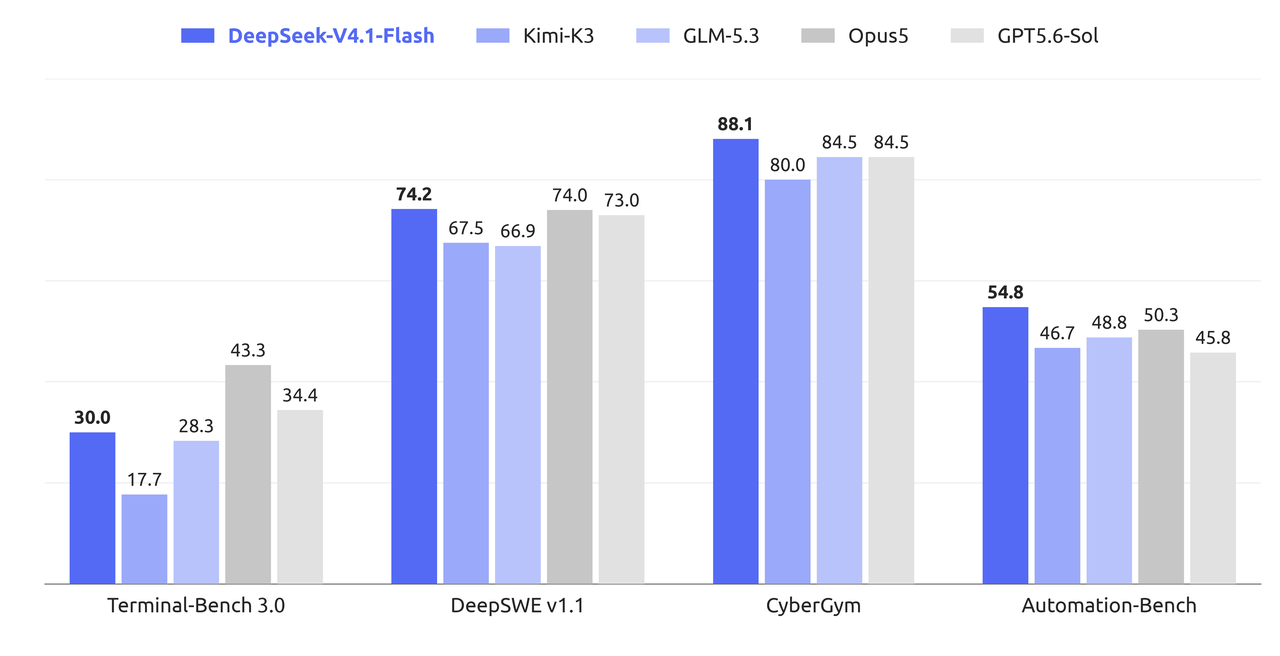
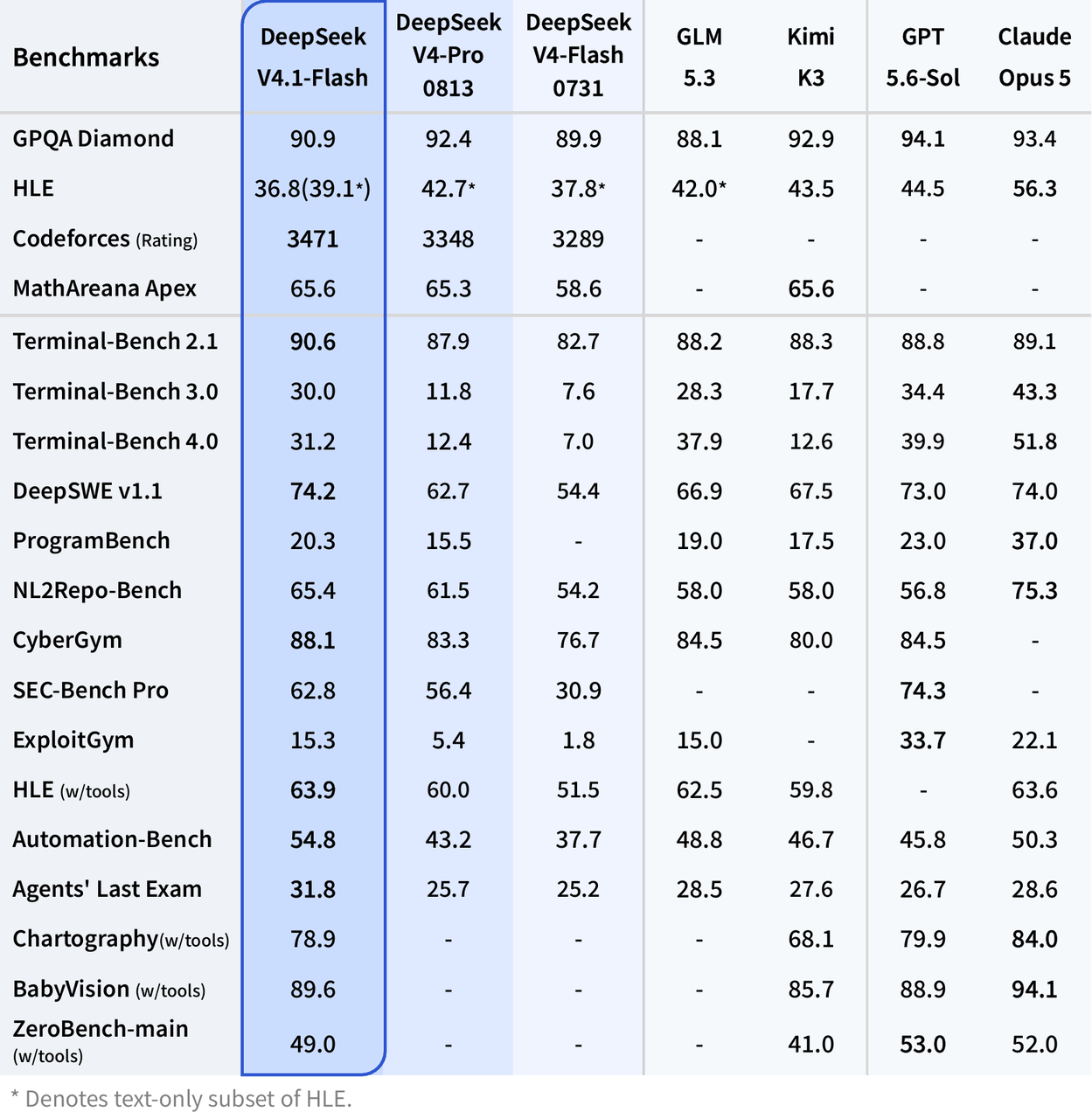
DeepSeek's published benchmark table positions V4.1-Flash primarily as a major upgrade in agentic coding, terminal operation, automation, and software-engineering workloads. These are vendor-reported benchmark results, so they should be treated as reference measurements rather than guaranteed application performance.
For reproducibility, the official model card recommends temperature 1.0 and top_p 0.95, while reasoning effort and token budgets vary by evaluation. The figures below are vendor-run reference results, not hardware-neutral performance guarantees; benchmark-specific harness details should be consulted before reproducing them.
| Benchmark | DeepSeek V4.1 Flash | DeepSeek V4 Pro 0813 | DeepSeek V4 Flash 0731 |
|---|---|---|---|
| GPQA Diamond | 90.9 | 92.4 | 89.9 |
| Codeforces Rating | 3471 | 3348 | 3289 |
| MathArena Apex | 65.6 | 65.3 | 58.6 |
| Terminal-Bench 2.1 | 90.6 | 87.9 | 82.7 |
| Terminal-Bench 3.0 | 30.0 | 11.8 | 7.6 |
| Terminal-Bench 4.0 | 31.2 | 12.4 | 7.0 |
| DeepSWE v1.1 | 74.2 | 62.7 | 54.4 |
| NL2Repo-Bench | 65.4 | 61.5 | 54.2 |
| CyberGym | 88.1 | 83.3 | 76.7 |
| Automation-Bench | 54.8 | 43.2 | 37.7 |
| Agents' Last Exam | 31.8 | 25.7 | 25.2 |
The pattern is more important than any single score. V4.1-Flash does not lead every benchmark, but the jump from V4 Flash 0731 is especially large on Terminal-Bench, DeepSWE, automation, and cybersecurity workloads. This makes local deployment particularly relevant for private coding agents, repository-scale analysis, internal automation, and air-gapped agent infrastructure.
Can You Really Run DeepSeek-V4.1-Flash Locally?
Yes, but the word “locally” needs qualification. The latest vLLM DeepSeek-V4.1-Flash recipe breaks down the checkpoint at roughly half a terabyte and recommends a much larger VRAM budget once runtime overhead is included.
| Component | Approximate stored size |
|---|---|
| Routed + DSpark experts | 259.5 GiB |
| Engram tables | 183.1 GiB |
| Attention, dense projections and routers | 6.9 GiB |
| Embeddings, LM head and norms | 3.9 GiB |
| UE8M0 block scales | 21.9 GiB |
| Full checkpoint | ~476 GiB / ~511 GB |
| vLLM recommended minimum VRAM budget | ~614 GB |
The key surprise is that V4.1-Flash is already heavily compressed internally. Routed expert weights use low-precision formats, so the official checkpoint is not simply a huge BF16 model waiting for an easy 4-bit conversion.
DeepSeek-V4.1-Flash Hardware Requirements
| Hardware configuration | Practical status | Comments |
|---|---|---|
| 1× RTX 4090 / 5090 | No | Far below the model's memory footprint |
| 2–4 consumer GPUs | No for the official full checkpoint | Aggregate VRAM remains insufficient |
| 128 GB workstation | No | Active parameters do not determine resident weight memory |
| 256 GB workstation | No for official serving path | Still well below the official checkpoint footprint |
| 512 GB system RAM + GPU offload | Experimental | Community/offload territory, not equivalent to verified production serving |
| 4× high-memory datacenter GPUs | Hardware-dependent | Possible with sufficiently large modern accelerators; check the runtime recipe |
| 8× H200 | Yes, documented class | Around 1,128 GB aggregate HBM |
| GB200 NVL4-class system | Yes | vLLM cites a 768 GB tray as fitting the model |
Important: 8B active parameters does not mean 8 GB of VRAM. “Active” describes how much of the MoE network participates in a token's computation. The complete expert set still has to be stored somewhere accessible to the inference engine.
Which Runtime Should You Use for DeepSeek-V4.1-Flash?
| Runtime | Current V4.1-Flash status | Best use |
|---|---|---|
| vLLM | Current deployment recipe available; recent image required | Production OpenAI-compatible serving |
| SGLang | Supported through current DeepSeek-V4.1 deployment builds | High-performance distributed inference |
| DeepSeek reference inference | Official TP8 reference implementation | Architecture research and validation |
| Transformers | Model integration exposed on Hugging Face | Development and experimentation; hardware still required |
| Ollama | Official library route currently uses :cloud | Convenient cloud invocation, not equivalent to self-hosting |
For production self-hosting, vLLM is currently the clearest starting point. SGLang deployment guidance provides another supported path for advanced distributed inference.
How to Run DeepSeek-V4.1-Flash Locally with vLLM
This is the practical route for a multi-GPU Linux server.
All command examples below are reformatted as language-specific code blocks with concise English descriptions.
Step 1: Check Your Environment
- Linux.
- Docker.
- NVIDIA Container Toolkit.
- Several hundred gigabytes of free SSD space.
- A supported multi-GPU configuration.
- Roughly 614 GB aggregate usable accelerator memory for the current official-weight serving profile.
- A fast network if the model is not already cached locally.
Step 2: Download the DeepSeek-V4.1-Flash Weights
The official weights are hosted in the DeepSeek-V4.1-Flash Hugging Face repository under the MIT license.
python -m pip install -U huggingface_hub
hf download deepseek-ai/DeepSeek-V4.1-Flash
Make sure the filesystem holding ~/.cache/huggingface has substantially more than 511 GB free. Temporary files and additional engine artifacts can increase peak disk usage.
Step 3: Start DeepSeek-V4.1-Flash with vLLM
As of the current vLLM recipe, DeepSeek-V4.1 support requires a sufficiently recent vLLM image. A text-only eight-GPU starting configuration can look like this:
docker run --rm \
  --gpus all \
  --ipc=host \
  -p 8000:8000 \
  -v ~/.cache/huggingface:/root/.cache/huggingface \
  -e VLLM_ENGINE_READY_TIMEOUT_S=3600 \
  vllm/vllm-openai:nightly \
  deepseek-ai/DeepSeek-V4.1-Flash \
  --host 0.0.0.0 \
  --port 8000 \
  --tensor-parallel-size 8 \
  --language-model-only \
  --tokenizer-mode deepseek_v41 \
  --tool-call-parser deepseek_v41 \
  --reasoning-parser deepseek_v41 \
  --enable-auto-tool-choice \
  --gpu-memory-utilization 0.90 \
  --max-model-len 131072
There are two deliberate choices here. First, --language-model-only disables the vision encoder for text-only workloads. Second, starting at 131,072 tokens is safer than immediately enabling the full one-million-token context. Once the server is stable, you can increase it:
--max-model-len 1048576
The appropriate tensor-parallel setting depends on the accelerator topology, so do not copy --tensor-parallel-size 8 blindly to every server.
Step 4: Test the Local DeepSeek-V4.1-Flash Endpoint
curl http://localhost:8000/v1/chat/completions \
  -H "Content-Type: application/json" \
  -d '{
    "model": "deepseek-ai/DeepSeek-V4.1-Flash",
    "messages": [
      {
        "role": "user",
        "content": "What is 17 * 19? Return only the integer."
      }
    ]
  }'
323
Step 5: Call Your Local DeepSeek-V4.1-Flash Server with Python
from openai import OpenAI

client = OpenAI(
    base_url="http://localhost:8000/v1",
    api_key="local"
)

response = client.chat.completions.create(
    model="deepseek-ai/DeepSeek-V4.1-Flash",
    messages=[
        {
            "role": "user",
            "content": "Explain the difference between TCP and UDP in three bullets."
        }
    ],
    temperature=1.0,
    top_p=0.95
)

print(response.choices[0].message.content)
How Do You Enable DeepSeek-V4.1-Flash Thinking Mode Locally?
V4.1-Flash supports explicit reasoning controls through its chat template. One example is:
from openai import OpenAI

client = OpenAI(
    base_url="http://localhost:8000/v1",
    api_key="local"
)

response = client.chat.completions.create(
    model="deepseek-ai/DeepSeek-V4.1-Flash",
    messages=[
        {
            "role": "user",
            "content": "Find the most efficient algorithm for this scheduling problem."
        }
    ],
    extra_body={
        "chat_template_kwargs": {
            "thinking": True,
            "reasoning_effort": 50
        }
    }
)

print(response.choices[0].message.content)
If the model appears to return little or no final content with a small max_tokens value, check whether thinking mode is consuming the generation budget before assuming the deployment is broken.
How Do You Run DeepSeek-V4.1-Flash with Reference Code?
DeepSeek also includes a minimal TP8 inference implementation inside the model repository. It is intended primarily as readable reference code rather than a high-throughput production server.
cd inference
python -m pip install -r requirements.txt
export HF_CKPT_PATH=/path/to/DeepSeek-V4.1-Flash-HF
export SAVE_PATH=/path/to/DeepSeek-V4.1-Flash-TP8
export MP=8

python convert.py \
  --hf-ckpt-path "${HF_CKPT_PATH}" \
  --save-path "${SAVE_PATH}" \
  --model-parallel "${MP}" \
  --expert-dtype fp4 \
  --tokenizer-path "${HF_CKPT_PATH}"
export CKPT_PATH=/path/to/DeepSeek-V4.1-Flash-TP8
export MP=8

torchrun --nproc-per-node "${MP}" generate.py \
  --ckpt-path "${CKPT_PATH}" \
  --config config.json \
  --interactive \
  --temperature 0.6
This route is useful for inspecting CED, MoE routing, Engram memory, speculative decoding, and related implementation details. For normal production serving, vLLM or SGLang is easier to operate.
Can You Run DeepSeek-V4.1-Flash Locally with Ollama?
Not in the same sense as running a normal 7B or 32B Ollama model. Ollama currently exposes V4.1-Flash through:
ollama run deepseek-v4.1-flash:cloud
The important part is :cloud. The current Ollama library entry uses a cloud route, so this command is not equivalent to downloading the complete model and performing inference entirely on your machine.
DeepSeek-V4.1-Flash Local Deployment vs API: Which Makes More Sense?
| Dimension | Local DeepSeek-V4.1-Flash | Hosted API |
|---|---|---|
| Up-front hardware | Very high | None |
| Accelerator memory | ~614 GB practical official target | Managed by provider |
| Model control | Full | Limited |
| Data stays on premises | Yes | No |
| Weight modification | Yes | No |
| Maintenance | Your responsibility | Provider managed |
| Setup complexity | High | Low |
| Scaling | Requires infrastructure | API-based |
| Best for | Air-gapped, private, research, high-utilization clusters | Most developers and production apps |
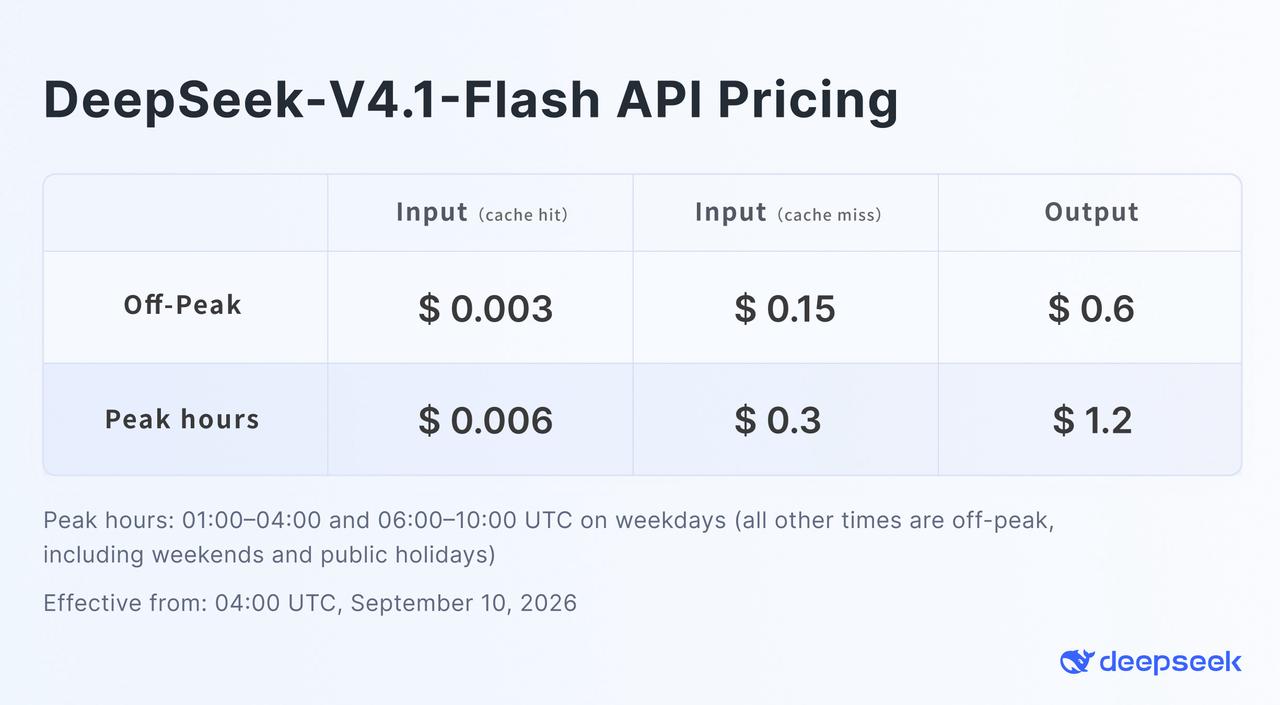
DeepSeek's official off-peak pricing is shown in its V4.1-Flash pricing graphic. For developers who do not need physical possession of the weights, the DeepSeek V4.1 Flash API in CometAPI provides an OpenAI-compatible alternative.
The following example uses CometAPI's model identifier. It is not the identifier used by DeepSeek's official API.
from openai import OpenAI
import os

client = OpenAI(
    api_key=os.environ["COMETAPI_KEY"],
    base_url="https://api.cometapi.com/v1"
)

response = client.chat.completions.create(
    model="deepseek-v4.1-flash",
    messages=[
        {
            "role": "user",
            "content": "Review this Python function and identify possible race conditions."
        }
    ]
)

print(response.choices[0].message.content)
The practical decision is straightforward: local deployment becomes compelling when privacy, air-gapped operation, weight-level experimentation, predictable heavy utilization, or regulatory requirements outweigh infrastructure cost. For ordinary application development, a hosted endpoint avoids hundreds of gigabytes of model management and multi-GPU orchestration.
What Problems Can You Encounter When Running DeepSeek-V4.1-Flash Locally?
The server runs out of memory before generation starts
The full checkpoint, not the 8B/16B active-parameter number, determines most of the memory requirement. Check tensor parallelism, GPU memory utilization, vision loading, and available HBM.
DeepSeek-V4.1-Flash takes a long time to start
A half-terabyte checkpoint takes time to download, map, initialize, and shard. Long engine-ready timeouts are normal for this class of model.
The response is empty or ends with finish_reason=length
Thinking mode may be consuming the generation budget. Increase max_tokens, lower reasoning effort, or disable thinking for simple requests.
Tool calls do not parse correctly
Make sure the server is using the DeepSeek V4.1 tokenizer, tool-call parser, reasoning parser, and auto-tool-choice flags.
Vision input does not work
If you launched with --language-model-only, you intentionally disabled the visual encoder. Restart with multimodal support enabled before testing images.
Should You Run DeepSeek-V4.1-Flash Locally?
DeepSeek-V4.1-Flash is unusually interesting from a self-hosting perspective because its architecture substantially reduces per-token compute and KV-cache cost, but it does not turn a frontier-scale open-weight model into a desktop model.
For a research lab, enterprise AI platform, private coding-agent stack, or air-gapped environment, vLLM and SGLang make self-hosting technically realistic. For a developer with one or two GPUs, it is not a practical full-model deployment target. In that case, using DeepSeek V4.1 Flash through CometAPI gives access to the model without turning serving into a large infrastructure project.
FAQ
Is DeepSeek-V4.1-Flash open source?
Its model weights and repository are released under the MIT license, which permits broad use, modification, and redistribution subject to the license terms.
Can I run DeepSeek-V4.1-Flash on an RTX 4090 or RTX 5090?
Not the official full model. A single consumer GPU has only a small fraction of the memory required by the full checkpoint.
Does 8B active parameters mean DeepSeek-V4.1-Flash only needs 8 GB of VRAM?
No. The 8B figure describes the parameters participating during prompt processing. The full expert network and supporting state still have to be stored and accessible.
How much VRAM does DeepSeek-V4.1-Flash need?
The current vLLM recipe uses about 614 GB as a planning figure for the official checkpoint plus runtime overhead. Actual needs vary with hardware, batch size, context, vision support, and serving configuration.
How large is DeepSeek-V4.1-Flash on disk?
The current vLLM breakdown puts the checkpoint at roughly 476 GiB, or about 511 GB.
Can DeepSeek-V4.1-Flash run a 1M-token context locally?
The architecture supports up to 1,048,576 tokens, but practical memory use also depends on batch size, runtime buffers, vision state, and other overhead.
Can I run DeepSeek-V4.1-Flash locally with Ollama?
The current Ollama entry uses a :cloud route, which is not the same as running the complete weights entirely on your own machine.
Is vLLM or SGLang better for DeepSeek-V4.1-Flash?
Both target high-performance serving. vLLM currently has a particularly detailed V4.1-specific recipe, while SGLang is also suitable for advanced distributed deployments.
What is the easiest way to use DeepSeek-V4.1-Flash without local hardware?
Use a hosted API. DeepSeek provides its own API, while CometAPI provides an OpenAI-compatible DeepSeek-V4.1-Flash endpoint alongside other AI models.