How to Run MiniMax M3.1 Flash Locally: GPU, vLLM & SGLang Guide
Learn how to run MiniMax M3.1 Flash locally. Explore its 428B/23B MoE architecture, GPU requirements, vLLM and SGLang setup, benchmarks, API alternatives.
MiniMax M3.1 Flash brings open-weight AI to demanding coding and agent workflows, but running it locally requires serious hardware. Its 428B-parameter MoE architecture activates only 23B parameters per token, reducing computation without eliminating the need to store the full model. Developers with supported multi-GPU systems can deploy it using vLLM or SGLang. For those who want to skip infrastructure management, the MiniMax M3.1 Flash API in CometAPI offers a simpler way to get started.
Key Takeaways
The published vLLM configurations use four supported Blackwell or AMD MI355X GPUs, or eight H100/H200 GPUs.
Reviewed for clarity, source attribution and current API terminology.
Hardware is the biggest barrier.
Long context comes with memory costs. The model supports up to one million tokens, but practical serving limits depend on available GPU memory and concurrency.
Deployment is hardware-specific. Use a compatible inference engine, quantization format, and accelerator configuration rather than a generic installation command.
Benchmarks are only a starting point. Evaluate coding accuracy, agent task completion, latency, and throughput under your own workloads.
Local and hosted inference serve different needs. Self-hosting offers greater infrastructure control, while API access reduces setup complexity and maintenance overhead.
What Is MiniMax M3.1 Flash?
MiniMax M3.1 Flash accepts text, images, and video and generates text. It is designed for coding, automation, computer interaction, and security workflows. The weights are distributed under the MiniMax Community License. Before offering a commercial service, read the license supplied with the checkpoint and check the conditions that apply to your use.
MiniMax M3.1 Flash specifications
Specification
MiniMax M3.1 Flash
Developer
MiniMax
Model family
Native multimodal MoE
Total parameters
Approximately 428B
Active parameters
Approximately 23B per token
Maximum context
1,048,576 tokens (model capability)
Input types
Text, images, and video (route dependent)
Output
Text
Attention
MiniMax Sparse Attention in every layer
Quantization
MXFP8 dense layers / NVFP4 experts
Draft decoding
DSpark integrated draft head
Reasoning effort
Low, medium, high, xhigh, max
Reported output speed
200+ tokens/s in favorable conditions; P50 170+ tokens/s
License
MiniMax Community License
Documented inference
vLLM, SGLang
Typical topology
4 supported Blackwell or MI355X GPUs; 8 H100/H200 GPUs
How does MiniMax M3.1 Flash use its 428B/23B architecture?
A Mixture-of-Experts (MoE) model routes each token through selected experts. In MiniMax M3.1 Flash, approximately 23B parameters are active for a token, while the complete parameter pool is approximately 428B. Sparse activation reduces computation; it does not turn the checkpoint into a dense 23B model.
What Changed in MiniMax M3.1 Flash?
Sparse attention: Applied throughout the model to reduce attention work on long inputs; the benefit depends on the serving kernels and prompt.
Mixed-precision weights: MXFP8 dense components and NVFP4 experts reduce storage and compute demands, but still require compatible hardware and kernels.
DSpark decoding: An integrated draft head can speed up generation in supported recipes; results depend on token acceptance and workload.
Power-aware serving: Infrastructure-level scheduling can improve utilization, but is not a feature you automatically get by downloading the weights.
What Hardware Is Needed for MiniMax M3.1 Flash?
Budget GPU memory in four parts: checkpoint weights, key-value (KV) cache for previous tokens, runtime buffers, and workload headroom. The estimates below cover raw parameter storage only. Mixed precision, quantization scales, multimodal components, and serving overhead change the real requirement.
Validated GPU topologies
Accelerators
Published topology
Notes
NVIDIA GB200/GB300/B200/B300
4 GPUs, tensor parallel
Blackwell NVFP4-native path
NVIDIA H100/H200
8 GPUs, tensor parallel
FP8 caches and Marlin MoE path
AMD MI355X
4 GPUs, tensor parallel
Requires supported ROCm and AITER settings
24–32 GB consumer GPU
No full-checkpoint reference recipe
Not sufficient for simple single-GPU loading
CPU-only workstation
No validated practical deployment
Offloading experiments are not production guidance
Memory estimate: Raw storage for 428B parameters is roughly 856 GB at BF16, 428 GB at 8-bit, or 214 GB at an idealized 4-bit. The official checkpoint mixes formats, so these figures are not runtime VRAM requirements. Allow for quantization scales, KV cache, runtime buffers, and concurrency; use the actual checkpoint files and the recipe for your GPU to size the system.
Reserve NVMe space for the checkpoint, temporary downloads, and a rollback copy.
Which Deployment Method Should You Choose?
For a supported local cluster, vLLM is a practical starting point with reference configurations and familiar API integration; SGLang suits teams exploring serving customization after checking compatibility, while CometAPI offers a hosted route for prototyping and model switching.
Requirement
Local vLLM
Local SGLang
CometAPI
Weights and GPUs
Download weights; operate supported GPUs
Download weights; operate supported GPUs
Provider-managed inference; no local weights
Blackwell / AMD MI355X
Hardware-specific recipes
Hardware-specific recipes
Hardware managed by provider
H100/H200
Documented eight-GPU recipe
Check the current support matrix
Hardware managed by provider
Decoding and parallelism
DSpark on supported paths; tensor and distributed serving
Hardware-specific decoding; tensor and expert parallelism
Limited to options exposed by the route
Control and data processing
Your environment; you manage scaling
Your environment; you manage scaling
External provider; provider manages scaling
Choose the framework with a validated recipe for your hardware, then compare latency and throughput using the same prompts, precision, and concurrency.
How to Run MiniMax M3.1 Flash Locally With vLLM?
The following steps assume a Linux host equipped with four compatible NVIDIA Blackwell GPUs, a supported driver/CUDA environment, and access to the official checkpoint. Use a validated vLLM build; an ordinary installation on unsupported GPU hardware may fail even if package installation succeeds.
Ensure the installed wheel and CUDA runtime match your GPU family. If a project-specific development build is required, follow the reference installation notes before using the launch arguments.
Use an appropriate Hugging Face access token if required, preserve the directory structure, and verify the complete shard download before launching the server.
Wait until the server finishes loading and reports that it is ready before sending a request. The command above limits context to 32,768 tokens and concurrent sequences to four for an initial smoke test. These reduced limits are not benchmarked settings; adjust them after measuring memory use and request behavior on your hardware.
If the served identifier differs from the directory name, call `/v1/models` and use the exact returned ID. A successful text response validates only basic inference; test vision, tool calling, concurrency, and long context separately.
Step 5: Integrate with an OpenAI-compatible Python client
The example listens on 127.0.0.1 for local testing. Before connecting remote clients, put access controls in front of the endpoint and configure client timeouts, bounded retries, and monitoring.
H100/H200 variant: use the eight-GPU Hopper recipe
On eight H100/H200 GPUs, use the Hopper-specific FP8 cache and Marlin MoE path rather than the Blackwell NVFP4 configuration. The command below follows the official vLLM Hopper recipe with context and concurrency reduced to 32K and four sequences for an initial test. It disables video input in line with that recipe. Keep this endpoint behind your existing access controls.
SGLang offers hardware-specific M3.1 deployment recipes and OpenAI-compatible serving. At the October 23 snapshot, the documentation includes dedicated development container images, so a generic SGLang installation should not be assumed to contain all model-specific support.
Pull the dedicated container image
# NVIDIA development image
docker pull lmsysorg/sglang:dev-minimax-m31-flash

# AMD MI350X/MI355X development image
docker pull lmsysorg/sglang:dev-minimax-m31-flash-mi35x
Next, follow the SGLang MiniMax M3.1 cookbook for your accelerator. Pulling an image only downloads the runtime; you still need to start a container with GPU access and launch the matching serving configuration inside it. Use the cookbook’s complete hardware-specific command, wait for readiness, then query the endpoint’s model list before sending a test request. The documented NVIDIA and AMD paths use different dependencies and should be configured separately.
How Does MiniMax M3.1 Flash Compare on Benchmarks?
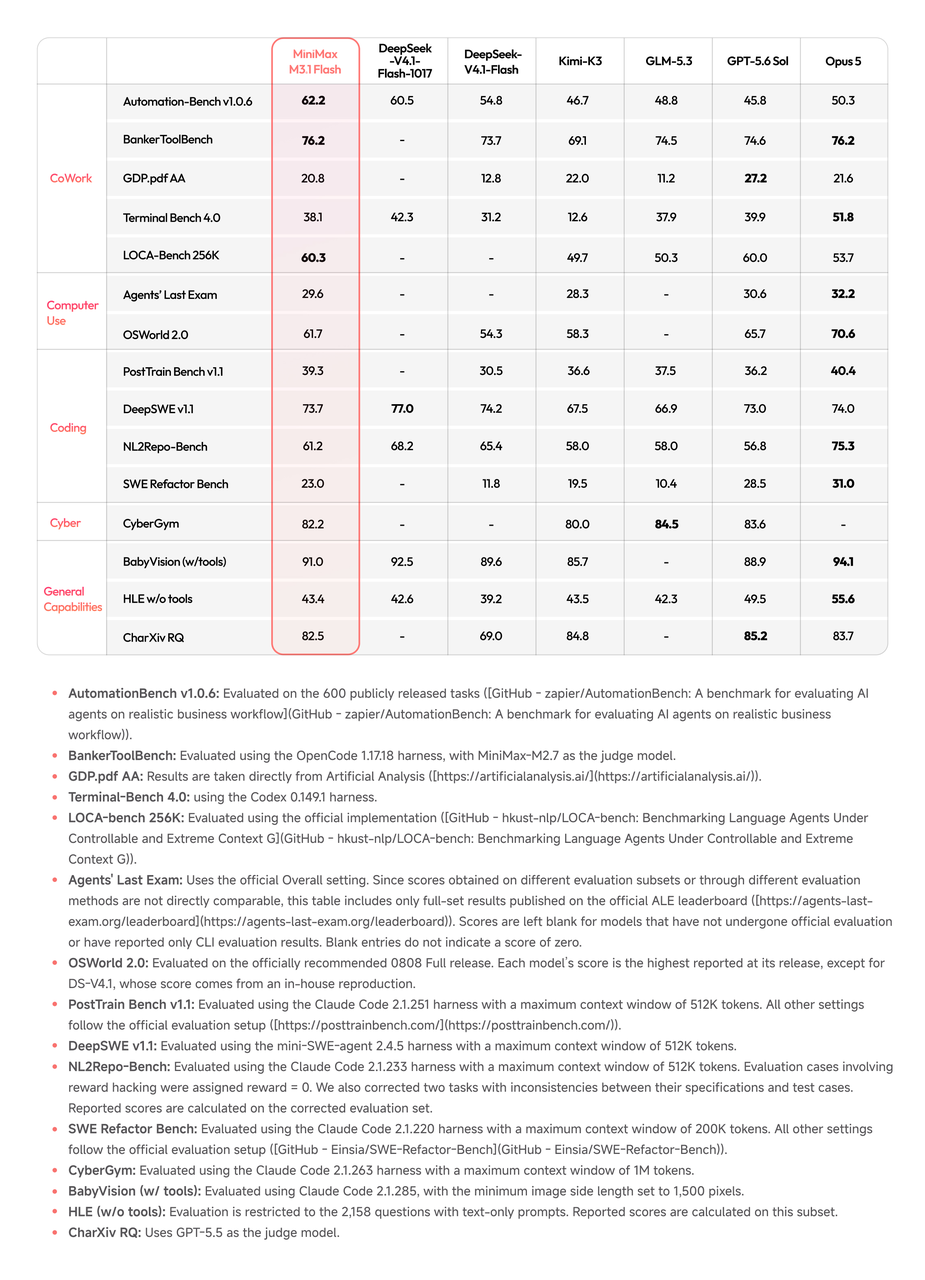
Once your endpoint passes its basic checks, use published benchmarks to decide which workloads to test next. The figures below are vendor-published evaluations, not measurements of your local deployment.
Benchmark
M3.1 Flash
DeepSeek V4.1 Flash 1017
Kimi K3
Automation-Bench v1.0.6
62.8
60.5
46.7
DeepSWE v1.1
73.7
77.0
67.5
Terminal Bench 4.0
38.1
42.3
12.6
OSWorld 2.0
61.7
N/A
58.3
NL2Repo-Bench
61.2
68.2
58.0
BabyVision with tools
91.0
92.5
85.7
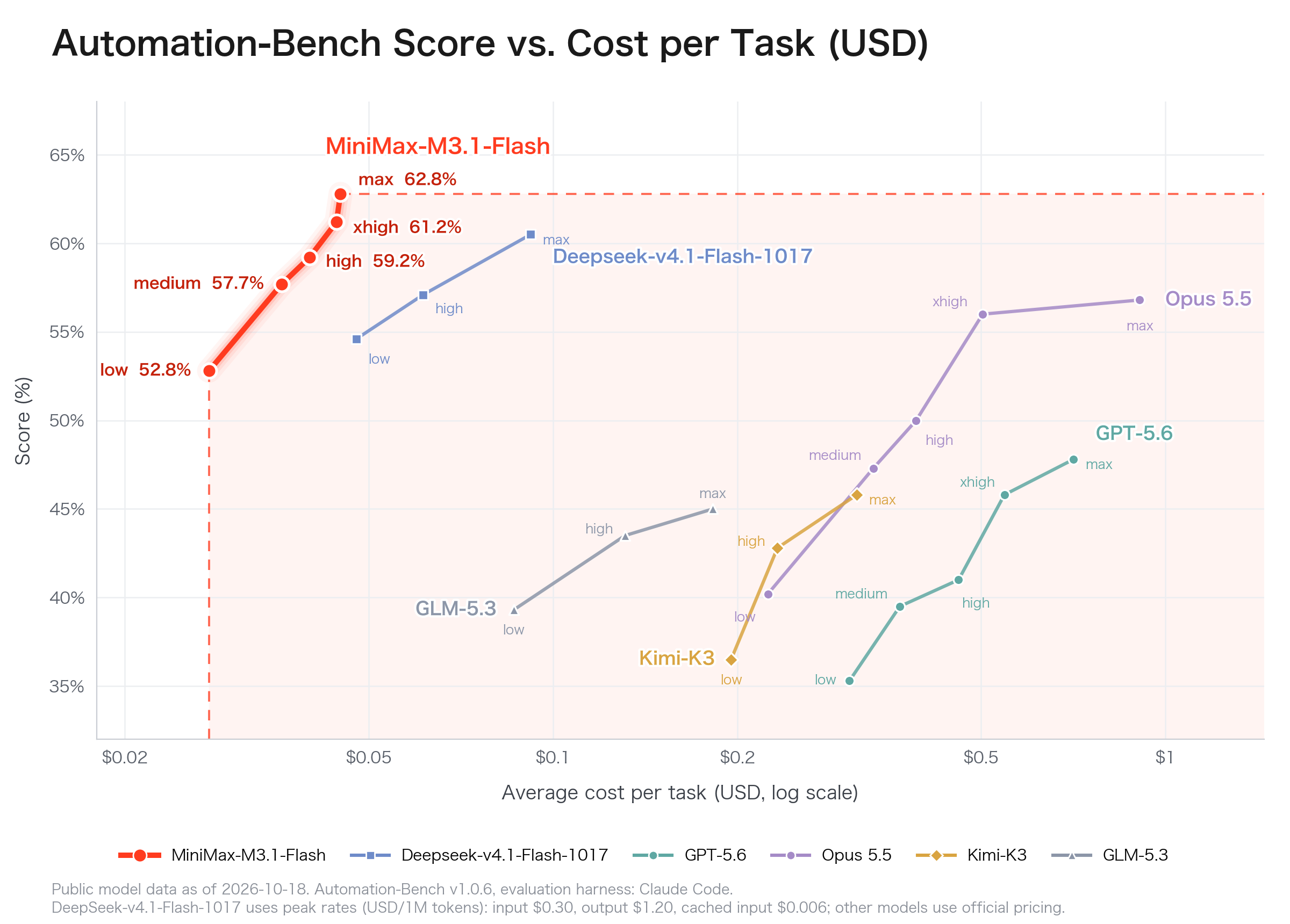
In this comparison, MiniMax leads the listed models on Automation-Bench, while DeepSeek leads several coding benchmarks. Read the model card and evaluation settings before drawing conclusions, and test the prompts and tools your application actually uses. Scores from different benchmark versions or setups are not directly comparable.
How Can You Optimize MiniMax M3.1 Flash Performance?
Control context and concurrency
After the first successful request, increase one load variable at a time: input length, output length, or concurrent requests. Record peak memory and response latency for each run. Keep the last stable settings as your rollback point, so a failed experiment does not become your new baseline.
Choose reasoning effort deliberately
M3.1 Flash supports low, medium, high, xhigh, and max effort. Higher settings can improve demanding task scores but often require more reasoning tokens and longer latency. Use task completion quality and elapsed compute cost together.
For local vLLM requests, the recipe shows reasoning-effort settings under chat_template_kwargs. Check both the final answer and any separately returned reasoning field when validating your client, since hosted and local endpoints can expose these fields differently.
Track cost per completed task
For agents, tokens per second is not enough. Record time to first token, output rate, acceptance rate for speculative decoding, concurrent throughput, tool-call failures, memory utilization, and completed-task cost. A slower response with fewer failed tools may yield better overall economics.
How Can You Use MiniMax M3.1 Flash API in CometAPI?
Teams that do not need dedicated accelerator infrastructure can use an OpenAI-compatible hosted endpoint. This eliminates checkpoint download and GPU operations but moves request processing outside the self-hosted environment.
export COMETAPI_KEY="YOUR_COMETAPI_KEY"

curl https://api.cometapi.com/v1/chat/completions \
  -H "Authorization: Bearer $COMETAPI_KEY" \
  -H "Content-Type: application/json" \
  -d '{
    "model": "minimax-m3.1-flash",
    "messages": [{"role":"user","content":"Review this Python function for edge cases."}],
    "max_tokens": 2048
  }'
Confirm the model identifier in your CometAPI console before running this example. Use the gateway when a common API across providers helps your application; compare its current quote with direct access for your expected usage.
MiniMax M3.1 Flash API pricing
Price per million tokens
MiniMax official API
CometAPI
Input
$0.15
$0.80
Output
$0.60
$3.20
Cached input
$0.015
Confirm current route quote
MiniMax direct API rates in the October 19, 2026 launch announcement are $0.15 input, $0.60 output, and $0.015 cached input per million tokens. For CometAPI, check the active model route, input/output rates, caching rules, and any account discount before estimating spend. Compare the total cost for your expected token mix and retries.
What Problems Might Occur When Running MiniMax M3.1 Flash?
Out of memory during loading or requests
If weights fail to load: Check the failing stage in the startup log, confirm the checkpoint is complete, and verify that the GPU topology and quantization backend match the recipe. If the weights exceed available memory, use a configuration with sufficient capacity; shortening a request cannot fix a weight-loading failure.
If weights load but cache allocation fails at startup: Check the cache settings and available memory, then reduce the configured context or concurrency as appropriate for the recipe.
If the server starts but a request runs out of memory: Retry a short prompt with one request at a time, then increase input length, output length, and concurrency separately while monitoring memory.
Incompatible quantization or attention kernels
NVFP4 execution differs between Blackwell, Hopper, and AMD hardware. Match inference-engine versions, quantization backends, CUDA/ROCm versions, and accelerator families instead of reusing flags indiscriminately.
Sparse-attention cache configuration
If startup reports an unsupported cache layout, compare the complete cache configuration with the hardware-specific recipe. The current vLLM recipe requires --block-size 128 for the MSA sparse/index cache. If startup reports a cache-layout or block-size error, compare the complete configuration with the recipe for your hardware.
Unexpected model identifiers
A local path and remote gateway model name are not necessarily identical. Query the local `/v1/models` response and avoid hardcoding assumptions from another endpoint.
Poor observed throughput
Separate slow prompt processing from slow token generation. Compare runs with the same input length and output limit, then check GPU utilization and interconnect behavior before increasing batch size. A provider-hosted speed figure is not a baseline for your local cluster.
Conclusion
Choose your first deployment path from the hardware you can operate today. Use the vLLM walkthrough for a supported local cluster, the hardware-specific SGLang cookbook for an alternative serving stack, or a hosted API when you want to focus on application integration. Keep the configuration that meets your task-quality and latency targets at a sustainable operating cost.
The most reliable way to select a serving method is to optimize for correct completed work per dollar and minute, not only peak tokens per second.
FAQ
How do I make a deployment reproducible after upgrading the runtime?
Pin the checkpoint revision, runtime image or package versions, driver stack, and launch settings. Run the same small acceptance set before each upgrade, and keep the previous working configuration available for rollback.
How should I handle retries when an agent calls tools?
Separate retrying the model from repeating a tool action. Use idempotency keys for actions that change data, check whether the first attempt succeeded, and validate complete tool arguments before execution.
Can I switch between a local endpoint and CometAPI without changing application behavior?
Keep the endpoint, credentials, and model ID configurable. Test streaming, tool calls, reasoning fields, and multimodal inputs on both routes, and confirm your data-routing requirements before enabling fallback.
What should I test before accepting multimodal inputs?
Test representative images and videos, including low-quality and unsupported files. Check preprocessing, size limits, answer quality, and timeouts separately; a successful text request does not validate the multimodal path.
How do I know whether a deployment is ready for real users?
Set targets for task success, valid tool calls, latency, errors, and cost. Test realistic traffic, verify monitoring and fallback behavior, then expand from a small rollout only while those targets hold.