
TLDR Claude Haiku 5.5 calling it the cheapest, fastest, and most capable small model it has ever shipped. Designed for high-volume, latency-sensitive workloads such as classification, extraction, routing, summarization, and subagent tasks, it delivers a 1-million-token context window, up to 128K output tokens, adaptive thinking with adjustable effort levels.
On average it costs around 75% less to run than Haiku 4.5 while posting large gains on agentic and computer-use benchmarks. Developers can access it via the official Claude API (claude-haiku-5-5), Amazon Bedrock, Google Cloud, Microsoft Foundry, or cost-optimized gateways such as CometAPI (starting at $0.08 / $0.40).
Key Takeaways
- Release & Positioning: Launched October 7, 2026 as the small, high-throughput model in the Claude 5.5 family—ideal for real-time support, document processing, and delegated agent steps.
- Core Specs: 1M-token context, 128K max output (300K via Batch API beta), adaptive thinking (default medium effort), text + image input → text output, knowledge cutoff June 2026.
- Pricing Advantage: $0.10 input / $0.50 output per million tokens for prompts up to 100K (≈90% cheaper than Haiku 4.5 on most requests); higher tier above 100K. Cache reads as low as $0.01. CometAPI offers ≈20% lower Standard rates.
- Performance Leap: Major gains vs Haiku 4.5 (e.g., OSWorld 72.4% vs 15.7%, Terminal-Bench 39.2% vs 0%, GDPval-AA 1620 vs 735 Elo) while remaining competitive with or ahead of GPT-6 Luna on many tests.
- Developer Features: Effort parameter (
low–max), prompt caching, Batch API (50% off), computer/browser use (beta SDK support). Temperature/top_p/top_k must be omitted or a 400 error occurs.
What Is Claude Haiku 5.5 and Why It Matters in 2026
Claude Haiku 5.5 is Anthropic’s latest entry in the lightweight tier of the Claude family. Unlike the more expensive Opus 5.5 and Sonnet 5.5 models optimized for complex reasoning and long-horizon agents, Haiku 5.5 is purpose-built for high-volume, cost-sensitive, and latency-critical workloads. Anthropic describes it as “the cheapest, fastest, and most capable small model we’ve ever released.”
Typical production uses include:
- Ticket classification and routing in customer support
- Field extraction and summarization from long documents
- Compaction of conversation history for larger models
- Database-style queries and structured data tasks
- Fast subagents that handle narrow coding, tool use, or browser steps while a stronger model orchestrates
Because it is dramatically cheaper and faster than its predecessor while closing much of the quality gap on practical agentic tasks, many teams are re-architecting pipelines so that Haiku 5.5 handles the majority of requests and only escalates difficult cases to Sonnet or Opus. Early customer feedback from Asana, HubSpot, Box, and others highlights 30%+ latency reductions and measurable accuracy lifts on high-volume internal evals.
Technical Specifications of Claude Haiku 5.5
| Specification | Value | Notes |
|---|---|---|
| Model ID (Claude API) | claude-haiku-5-5 | No date suffix |
| Amazon Bedrock | anthropic.claude-haiku-5-5 (or global/us/eu/au/jp profiles) | |
| Context window | 1,000,000 tokens | ≈555k words with new tokenizer |
| Max output (Messages API) | 128,000 tokens | 300K with Batch API + beta header |
| Input modalities | Text + images | |
| Output modality | Text | |
| Thinking | Adaptive (on by default) | Controlled via effort |
| Default effort | medium | Options: low, medium, high, xhigh, max |
| Knowledge cutoff | June 2026 | |
| Retirement commitment | Not before October 7, 2027 | |
| Tokenizer | Newer (same family as Claude 4.7+) | Same text ≈30% more tokens than Haiku 4.5 |
Source: Anthropic model overview and platform documentation.
The larger context and output limits, combined with adaptive thinking, make Haiku 5.5 far more usable for real production systems than earlier small models that required aggressive truncation or fixed thinking budgets.
Responses and completion checks
Read content blocks by type, rather than assuming content[0] is the visible answer. Inspect stop_reason before accepting output: max_tokens indicates a truncated generation and refusal requires an explicit application response. For tool-enabled requests, process tool-use blocks and return tool results in native format instead of treating them as a completed text answer.
What Changed Compared With Claude Haiku 4.5 API?
Capacity, behavior and pricing changes
| Dimension | Haiku 4.5 | Haiku 5.5 | Sonnet 5.5 |
|---|---|---|---|
| Context window | 200K | 1M | 1M |
| Maximum output | 64K | 128K | 128K |
| Adaptive effort | No | Yes | Yes |
| Anthropic input / MTok | $1.00 | $0.10 | $2.00 |
| Anthropic output / MTok | $5.00 | $0.50 | $10.00 |
| Positioning | Legacy fast model | Routine work at scale | Harder complex tasks |
Haiku 5.5 prices in this comparison apply to prompts up to 100,000 tokens; larger prompts cost more. These are Anthropic Standard rates, not CometAPI rates. The comparison is a routing starting point, not a claim that the models perform identically.
For Haiku 4.5 integrations, the key implementation changes are adaptive thinking instead of a manual budget, effort controls, selective parsing of content blocks and updated token counts. The same text can use approximately 30% more input tokens. Recount representative prompts rather than reusing Haiku 4.5 token estimates. The migration section turns these changes into a deployment checklist.
Reported benchmark improvements
| Benchmark | Haiku 4.5 | Haiku 5.5 | Sonnet 5.5 |
|---|---|---|---|
| OSWorld 2.1 (offline subset; partial credit) | 15.7% | 72.4% | 83.9% |
| Terminal-Bench 4.0 | 0.0% | 39.2% | 70.6% |
| Humanity’s Last Exam (no tools) | 10.2% | 45.9% | 56.9% |
| Chartography (no tools) | 6.4% | 46.4% | 61.6% |
| GDPval-AA v2.1 (Elo) | 735 | 1,620 | 1,840 |
Anthropic reports the scores above in its launch benchmark summary. They are reported evaluation results, not live tests of the CometAPI examples in this guide. OSWorld's 72.4% is partial credit, not a strict task-completion rate.
The Haiku 5.5 system card describes the evaluation conditions. Standard Haiku 5.5 evaluations use adaptive thinking at max effort and default sampling unless noted; the product default is medium. OSWorld uses 82 offline tasks, no internet access, 1080p resolution and a 500-action limit. Terminal-Bench 4.0 uses Claude Code in bare mode, no internet egress and 10 trials per task for Haiku 5.5; Sonnet's setup differs. HLE and Chartography rows above are tool-free. GDPval-AA reports an Elo rating from Artificial Analysis evaluations. Match the relevant harness, effort and tool settings when comparing results.
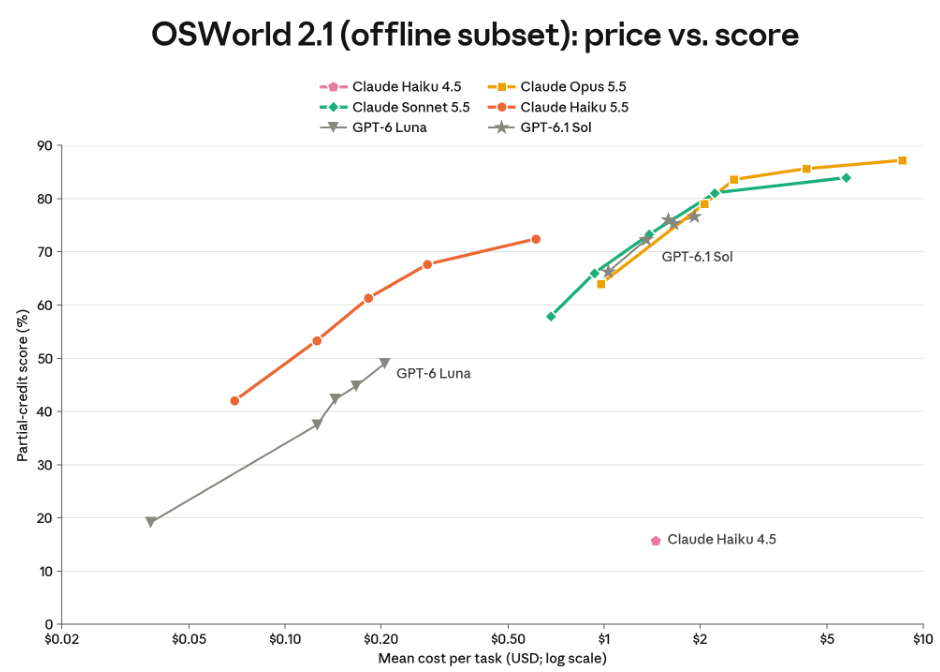
Anthropic's original OSWorld graphic shows the relationship between effort, per-task cost and partial-credit score. It does not measure API latency or guarantee the same performance on your workload.
The scores indicate much stronger computer-use and general-task performance than Haiku 4.5, but they do not guarantee the same results in your application. Run a representative evaluation set before committing production traffic.
The benchmark table and supplied graphic are retained as model comparisons. They are reported evaluations rather than live tests of the CometAPI examples. Use the same task distribution, effort and tool settings when evaluating an application; a benchmark score does not establish gateway latency or your own success rate.
How to Use Claude Haiku 5.5 API Through CometAPI
Create a key and choose the native route
Create a CometAPI account, confirm access to claude-haiku-5-5 and generate a server-side API key. Set COMETAPI_KEY in your environment. Keep the key outside source control and browser code. Anthropic and CometAPI keys belong to different providers; use the CometAPI key for every example in this revised guide.
export COMETAPI_KEY="your_cometapi_api_key"
pip install --upgrade anthropic
$env:COMETAPI_KEY="your_cometapi_api_key"
| Integration | SDK base URL | Request path | Credential |
|---|---|---|---|
| Anthropic-compatible Messages | https://api.cometapi.com | /v1/messages | COMETAPI_KEY |
| OpenAI-compatible Chat Completions | https://api.cometapi.com/v1 | /chat/completions | COMETAPI_KEY |
CometAPI supports Claude’s native Messages and content-block format. Use the Anthropic SDK with the CometAPI root base URL. Native Messages is the preferred route in this guide for Claude-specific thinking and content blocks. The compatible Chat Completions route is an option for an existing OpenAI-style application. Confirm advanced-field support on the exact gateway route.
Send a minimal request and verify the result
curl https://api.cometapi.com/v1/messages \
  -H "Content-Type: application/json" \
  -H "x-api-key: $COMETAPI_KEY" \
  -H "anthropic-version: 2023-06-01" \
  -d '{
    "model": "claude-haiku-5-5",
    "max_tokens": 2048,
    "output_config": {"effort": "low"},
    "messages": [{"role": "user", "content": "Summarize three AI uses in customer support."}]
  }'
import os
import anthropic

client = anthropic.Anthropic(
    api_key=os.environ["COMETAPI_KEY"],
    base_url="https://api.cometapi.com",
    timeout=60.0,
    max_retries=2,
)

response = client.messages.create(
    model="claude-haiku-5-5",
    max_tokens=2048,
    output_config={"effort": "low"},
    messages=[{"role": "user", "content": "Classify this ticket: I cannot log in."}],
)
if response.stop_reason != "end_turn":
    raise RuntimeError(f"Unaccepted completion: {response.stop_reason}")
print("".join(block.text for block in response.content if block.type == "text"))
print(response.usage)
Save the Python example as example.py and run python example.py. A successful checkpoint is a completed response with visible text and usage fields. An authentication error means the key needs checking; a model/route error means the model ID, endpoint or account access needs checking.
Use the same native format from JavaScript
npm install @anthropic-ai/sdk
import Anthropic from "@anthropic-ai/sdk";

const client = new Anthropic({
  apiKey: process.env.COMETAPI_KEY,
  baseURL: "https://api.cometapi.com",
  timeout: 60_000,
  maxRetries: 2,
});
const response = await client.messages.create({
  model: "claude-haiku-5-5",
  max_tokens: 2048,
  output_config: {effort: "low"},
  messages: [{role: "user", content: "Extract product, quantity and price: 3 laptops at $900 each."}],
});
if (response.stop_reason !== "end_turn") {
  throw new Error("Unaccepted completion: " + response.stop_reason);
}
for (const block of response.content) {
  if (block.type === "text") console.log(block.text);
}
Use a supported Node.js release. Save the file as example.mjs, set COMETAPI_KEY and run node example.mjs. Record the SDK version you validate for deployment.
Adapt an existing OpenAI-compatible application
If your application already uses Chat Completions, install the openai package and configure the separate client below. This route returns choices instead of native content blocks. Keep route-specific parsing separate and test thinking, images and tools before relying on gateway translation.
import os
from openai import OpenAI

client = OpenAI(
    api_key=os.environ["COMETAPI_KEY"],
    base_url="https://api.cometapi.com/v1",
)
response = client.chat.completions.create(
    model="claude-haiku-5-5",
    max_tokens=2048,
    messages=[
        {"role": "system", "content": "Be concise and helpful."},
        {"role": "user", "content": "Explain API rate limits."},
    ],
)
print(response.choices[0].message.content)
Sending images to Claude Haiku 5.5 API
Use an image together with an instruction that specifies the evidence and output you need. The official vision interface accepts image content blocks with base64 data, an image URL, or a supported uploaded file reference. This example reads a local PNG, places the image before the question, and asks for values that can be checked against the source.
Analyze a real local PNG through the native Anthropic Messages API.
import os
import base64
from pathlib import Path
import anthropic

# Replace dashboard.png with a real PNG file you are authorized to analyze.
image_data = base64.b64encode(Path("dashboard.png").read_bytes()).decode("ascii")
anthropic_client = anthropic.Anthropic(api_key=os.environ["ANTHROPIC_API_KEY"])
response = anthropic_client.messages.create(
    model="claude-haiku-5-5",
    max_tokens=2048,
    output_config={"effort": "low"},
    messages=[{
        "role": "user",
        "content": [
            {"type": "image", "source": {
                "type": "base64", "media_type": "image/png", "data": image_data
            }},
            {"type": "text", "text": (
                "Read the visible dashboard metrics. List anomalies with their "
                "labels and values, and state when text is unreadable."
            )},
        ],
    }],
)
for block in response.content:
    if block.type == "text":
        print(block.text)
Use the MIME type that matches the actual file. Check readability, image dimensions and request-size limits before submission; avoid sending high-resolution media that does not help the task. For CometAPI, change the key and root base URL as shown in its Messages example, and verify image support on the exact route.
Controlling Claude Haiku 5.5 reasoning
Haiku 5.5 uses adaptive thinking by default. The official thinking configuration explains when disabled is accepted and how thinking blocks are returned. Set effort through output_config.effort; do not reuse legacy budget_tokens.
| Effort | Good starting use case | Trade-off |
|---|---|---|
| low | Short classification, simple extraction | Typically lower token use and latency |
| medium | Support responses, routine agent work | Balanced default |
| high | Multi-step document analysis | Potentially more reasoning |
| xhigh | Difficult evaluations | More processing and cost |
| max | Reasoning-intensive cases | Highest potential reasoning expenditure |
Configure adaptive thinking with low effort.
import osimport anthropicanthropic_client = anthropic.Anthropic( api_key=os.environ["ANTHROPIC_API_KEY"],)response = anthropic_client.messages.create( model="claude-haiku-5-5", max_tokens=4096, thinking={"type": "adaptive"}, output_config={"effort": "low"}, messages=[{"role": "user", "content": "Classify as billing, technical, or account: cannot log in."}],)for block in response.content: if block.type == "text": print(block.text)
Developers can disable thinking at low, medium and high effort, but not at xhigh or max. Thinking consumes billed output tokens and the max_tokens budget even when its text is hidden. An empty thinking field can still carry a signature; it does not prove that no reasoning occurred. Keep returned content blocks unchanged when continuing tool conversations.
Example request with thinking disabled
Send a native request body with thinking disabled.
{ "model": "claude-haiku-5-5", "max_tokens": 1024, "thinking": {"type": "disabled"}, "output_config": {"effort": "low"}, "messages": [ {"role": "user", "content": "Return sentiment only: positive, neutral, negative."} ]}
Streaming Claude Haiku 5.5 responses
Streaming delivers visible text incrementally and improves responsiveness in interactive applications. Treat streamed text as provisional until the request completes successfully.
Stream visible text with the Anthropic Python SDK.
import osimport anthropicanthropic_client = anthropic.Anthropic( api_key=os.environ["ANTHROPIC_API_KEY"],)with anthropic_client.messages.stream( model="claude-haiku-5-5", max_tokens=4096, output_config={"effort": "low"}, messages=[{"role": "user", "content": "Explain API caching."}],) as stream: for text in stream.text_stream: print(text, end="", flush=True)
Claude Haiku 5.5 API Pricing
Compare token rates and prompt-length bands
Rates checked October 8, 2026. The table compares Anthropic Standard pricing with published CometAPI rates, in USD per million tokens. The band is determined by prompt length: up to 100,000 tokens versus more than 100,000. Longer requests use the applicable higher-band rates, not merely a surcharge on the excess tokens. Account billing, cached usage and optional tools must be reconciled separately.
| Token category | Anthropic ≤100K | CometAPI ≤100K | Anthropic >100K | CometAPI >100K |
|---|---|---|---|---|
| Input | $0.10 | $0.08 | $0.50 | $0.40 |
| Output | $0.50 | $0.40 | $2.50 | $2.00 |
| Cache read | $0.01 | $0.008 | $0.05 | $0.04 |
| 5-min cache write | $0.125 | $0.10 | $0.625 | $0.50 |
| 1-hour cache write | $0.20 | $0.16 | $1.00 | $0.80 |
The original article’s rate snapshot is retained above. Check the current CometAPI listing and account billing before purchase or deployment; the listing’s starting input rate is not a complete quotation for every prompt-length band, cache operation or optional tool.
Example: Cost of 100,000 support requests
Assume 100,000 monthly requests, each with 2,000 input tokens and 300 billed output tokens, including any generated thinking. Every prompt qualifies for the up-to-100K band. Exclude caching, tool charges and retries.
| Component | Usage | Anthropic | CometAPI |
|---|---|---|---|
| Input | 200M tokens | $20.00 | $16.00 |
| Output | 30M tokens | $15.00 | $12.00 |
| Total | 100,000 requests | $35.00 | $28.00 |
Under these assumptions, the illustrative difference is $7 per month, or 20%. Production costs depend on request lengths, hidden reasoning, caching and retry behavior.
Use the model’s current token counts in the calculation. Cost = input tokens × applicable input rate / 1,000,000 + billed output tokens × applicable output rate / 1,000,000, plus separately applicable cache, tool and retry charges. Thinking tokens are part of billed output.
Reduce cost without losing accepted-task quality
| Optimization | Action | Benefit |
|---|---|---|
| Effort tuning | Use low where quality allows | Lower reasoning overhead |
| Prompt reduction | Remove redundant conversation history | Fewer input tokens |
| Prompt caching | Keep reused context stable | Lower repeated input cost |
| Streaming | Render tokens as they arrive | Better perceived responsiveness |
| Schema validation | Reject malformed records early | Less downstream rework |
| Model routing | Escalate complex tasks | Better cost-quality balance |
| Batch processing | Batch eligible offline requests | Potential additional savings |
Do not automatically select the lowest effort. A cheaper individual call may increase total costs if it produces more retries. Evaluate accuracy, p50/p95 latency, token use and cost per successful task.
For prompt caching, reuse a stable prefix and inspect cache creation and cache read usage rather than assuming a hit. Haiku 5.5 has a 512-token minimum cacheable prompt on the documented Claude API. Changing effort can invalidate cached prefixes; keep settings stable within a conversation. A 1M context window is a capacity ceiling, not a recommendation to send every document on every turn.
Keep a stable reusable prefix for caching, shorten unnecessary inputs and benchmark effort changes. Streaming improves perceived responsiveness rather than automatically reducing billed usage. Compare cost per accepted task across the complete workflow, including retries and tool calls.
Claude Haiku 4.5 to Haiku 5.5 Migration Guide
Update the integration and request format
| Area | Migration action |
|---|---|
| Model ID | Replace with claude-haiku-5-5 |
| Thinking | Replace manual budget_tokens with adaptive thinking |
| Effort | Use output_config.effort if needed |
| Sampling | Omit temperature, top_p and top_k; any top_k value is unsupported |
| Response parser | Handle multiple content-block types |
| Output budget | Allow sufficient room for reasoning and final output |
| Prefill | Remove unsupported assistant prefilling |
| Caching | Retest prompts when changing effort |
| Tool integrations | Verify supported tool versions |
For the CometAPI route used here, retain COMETAPI_KEY and the native base URL while changing the model ID and request configuration. Replace legacy enabled thinking with a budget by adaptive thinking and effort. Remove assistant prefilling and omit sampling parameters. Preserve the distinction between Claude’s native content array and the compatible route’s choices response.
Preserve state and recalculate budgets
The official Haiku 5.5 migration guide reports approximately 30% more input tokens for identical text than Haiku 4.5. Recount representative prompts and retune limits before moving traffic. Returned thinking blocks work only in the account that produced them or a linked account; an account change can silently drop those blocks. Preserve an append-only conversation prefix rather than modifying earlier messages after generation. Inspect stop_reason, including max_tokens and refusal, and handle them explicitly before accepting output.
Recount representative prompts with the target model and retune max_tokens, latency limits and request-cost estimates. Test stored conversations against the account and gateway route that will replay them; do not assume signed thinking blocks are portable across unrelated accounts or rewritten conversation prefixes.
Conclusion
Claude Haiku 5.5 represents a genuine inflection point for cost-efficient, high-throughput AI. By delivering dramatically better agentic and computer-use performance at roughly one-tenth the previous Haiku price on the majority of requests, Anthropic has made large-scale deployment of capable small models practical. Whether you call the official API, route through Amazon Bedrock, or use a unified gateway such as CometAPI for further savings and operational simplicity, the combination of speed, capability, and price opens new product possibilities that were previously uneconomical.