
TL;DR
Claude Sonnet 5.5 is a fast model for well-scoped coding, document, and tool-using workflows. Anthropic reports more than 30% faster output than Sonnet 5 at the same standard token rates. Start with a CometAPI key, the model ID claude-sonnet-5-5, and a small Messages or Chat Completions request. Existing agents should retest thinking, tool choice, and history replay before rollout.
Key Takeaways
- Use Claude Sonnet 5.5 and match the request format to your endpoint.
- Start with one short request before adding images, tools, or long context.
- Use Messages for Claude-specific controls; use Chat Completions for an existing OpenAI SDK application.
- Review thinking and tool-selection changes before migrating existing agent loops.
- Compare accepted-task quality, latency, token usage, and cache hits before expanding traffic.
What Is Claude Sonnet 5.5?
Claude Sonnet 5.5 API is the programmatic interface for Anthropic’s Sonnet 5.5 model. It is designed for tasks such as software development, repository analysis, customer-support automation, document processing, image understanding, tool-using agents, and structured professional workflows.
Anthropic positions Sonnet 5.5 as a faster, lower-cost complement to Opus 5.5, the second model in the Claude 5.5 family, optimized for well-scoped coding, bug fixing, document and slide creation, and everyday professional tasks. Developers can access Claude Sonnet 5.5 API in CometAPI using claude-sonnet-5-5.
| Specification | Claude Sonnet 5.5 |
|---|---|
| Provider | Anthropic |
| Model ID | claude-sonnet-5-5 |
| Release date | September 28, 2026 |
| Context window | 1M tokens |
| Maximum synchronous output | 128K tokens |
| Batch maximum output | Up to 300K tokens in supported beta configuration |
| Inputs | Text, images |
| Output | Text |
| Thinking | Adaptive thinking |
| Default Claude API effort | High |
| Knowledge cutoff | June 2026 |
| Input price (Anthropic / CometAPI) | $2.00 / $1.60 per 1M tokens |
| Output price (Anthropic / CometAPI) | $10.00 / $8.00 per 1M tokens |
Anthropic confirms a 1M-token context window and 128K synchronous output limit. Batch output can reach 300K tokens only through Message Batches with the output-300k-2026-03-24 beta header. Gateway feature support must be checked separately from model-level support.
How Does Claude Sonnet 5.5 Perform on Official Benchmarks?
The compact comparison below helps identify workloads to evaluate before adopting the API. Benchmark results do not substitute for testing your own prompts and tool loops.
| Benchmark | Claude Sonnet 5.5 | Claude Sonnet 5 | Claude Opus 5.5 |
|---|---|---|---|
| Terminal-Bench 4.0 | 70.6% | 10.3% | 66.4% at Xhigh |
| FrontierCode 1.1 Main | 46.2% at Max / 52.1% at Xhigh | 42.4% | 54.4% |
| CursorBench 4.0 | 55.5% | 34.1% | 57.8% |
| GDPval-AA v2.1 | 1844 | 1449 | 1846 |
| OSWorld 2.1, partial | 80.1% | 57.0% | 81.8% |
| AA-Briefcase v1.1 | 1811 | 1359 | 1822 |
| Humanity’s Last Exam, with tools | 64.5% | 54.9% | 67.7% |
| Chartography, no tools | 61.6% | 15.6% | 64.4% |
Anthropic’s benchmark results and evaluation notes provide the basis for this comparison. Opus 5.5’s Terminal-Bench result uses Xhigh effort; FrontierCode reports separate Max and Xhigh results for Sonnet 5.5; OSWorld is a partial evaluation. GDPval-AA and AA-Briefcase were run by Artificial Analysis on a pre-release Claude Platform deployment with a structured-output bug that likely understated Sonnet 5.5's score; Anthropic says the bug has since been fixed. These results should guide workload testing rather than guarantee production outcomes. Humanity’s Last Exam uses tools; Chartography does not. The new rows use Anthropic’s published scores. The original image below is retained; the expanded table includes three additional evaluations.
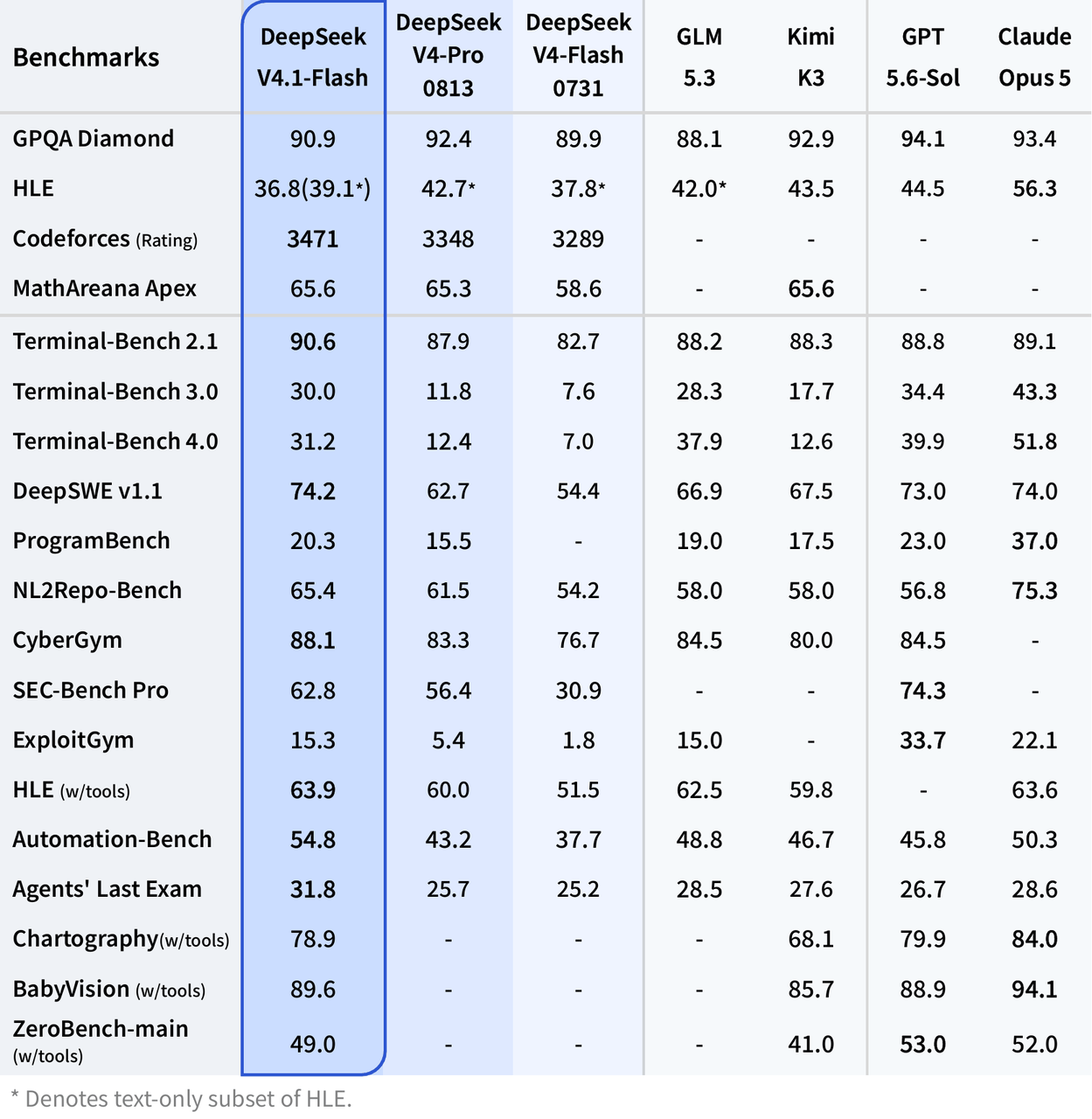
Official Claude Sonnet 5.5 benchmark comparison
What Changed in Claude Sonnet 5.5 API From Sonnet 5?
| Dimension | Claude Sonnet 5.5 | Migration impact |
|---|---|---|
| Output speed | 30%+ faster reported generation | Re-baseline latency |
| Official token rates | Same $2 input / $10 output per MTok | Compare total task cost |
| Lowest thinking setting | between_tools replaces disabled | Update thinking configuration |
| Forced tool choice | any and named forcing rejected | Use auto; sequence required steps in code |
| Thinking history | Signed to conversation and account | Preserve blocks and stable history |
| Computer use compatibility | computer_20251124 rejected on Claude API / Google Cloud | Migrate to computer_toolset_20260801; verify gateway support |
| Advisor model compatibility | Earlier advisor pairings rejected | Choose a supported advisor, such as Opus 5.5 |
The migration changes for thinking, tool choice, and history replay affect existing agent loops. The table summarizes these operational changes; it is not a complete feature inventory.
Breaking Changes to Check
Check all five breaking changes: replace disabled thinking with between_tools; remove forced tool choice; preserve compatible thinking blocks and unchanged conversation history; migrate computer_20251124 to computer_toolset_20260801 on the Claude API and Google Cloud; and replace unsupported advisor pairings. Amazon Bedrock still accepts computer_20251124. Unsupported advisors include Opus 4.8, 4.7, 4.6, Sonnet 5, Sonnet 4.6, and Haiku 5.5. Opus 5.5 is one supported replacement. Read response blocks by type. Verify platform and gateway compatibility before rollout. Official migration guide.
Additional Capabilities and Workflow Changes
Use the official feature guide to review progress updates, per-message effort, and mid-conversation controls. Confirm gateway support before enabling beta features.
What Do You Need Before Using the Claude Sonnet 5.5 API?
- A CometAPI account, API key, model access, and available billing balance.
- A terminal with cURL; Python and pip or Node.js and npm for SDK examples.
- A selected endpoint:
/v1/messagesor/v1/chat/completions. COMETAPI_KEYstored in the server environment, plus network access tohttps://api.cometapi.com.- A short test prompt and a clear check for usable output, completion status, and token usage.
How Do You Access Claude Sonnet 5.5 API Through CometAPI?
| API style | Endpoint | Best for |
|---|---|---|
| Claude-native Messages API | POST /v1/messages | Claude-specific tools, thinking controls, agent workflows, Anthropic response structures |
| OpenAI-compatible Chat Completions | POST /v1/chat/completions | Existing OpenAI SDK projects, model routers, cross-model applications |
Choose the Messages API when Claude behavior itself matters. Choose the OpenAI-compatible API when your application already switches among Claude, GPT, Gemini, DeepSeek, or other models through the same abstraction layer.
Step 1: Store the API Key
Create a key in the CometAPI API key console, then set it in your runtime environment.
Set the CometAPI key in a POSIX shell
export COMETAPI_KEY="YOUR_COMETAPI_KEY"
Set the CometAPI key in PowerShell
$env:COMETAPI_KEY="YOUR_COMETAPI_KEY"
Step 2: Make the First Messages Request
Send the first Anthropic-compatible Messages request
curl https://api.cometapi.com/v1/messages \
  -H "Authorization: Bearer $COMETAPI_KEY" \
  -H "Content-Type: application/json" \
  -d '{
    "model": "claude-sonnet-5-5",
    "max_tokens": 2048,
    "messages": [{"role": "user", "content": "Explain exponential backoff in three bullet points."}]
  }'
Inspect the content blocks, stop_reason, and usage before adding more controls. The cURL syntax above uses a POSIX shell.
Step 3: Use the Anthropic Python SDK
Install the Anthropic Python SDK
pip install anthropic
Read text blocks and usage with the Anthropic SDK
import os
import anthropic

anthropic_client = anthropic.Anthropic(
    api_key=os.environ["COMETAPI_KEY"],
    base_url="https://api.cometapi.com",
)

response = anthropic_client.messages.create(
    model="claude-sonnet-5-5",
    max_tokens=4096,
    messages=[{"role": "user", "content": "Review this migration plan and list the three biggest risks."}],
)

for block in response.content:
    if block.type == "text":
        print(block.text)
print("Completion:", response.stop_reason)
print("Usage:", response.usage)
Step 4: Use the OpenAI Python SDK
Install the OpenAI Python SDK
pip install openai
Call Sonnet 5.5 through OpenAI-compatible Chat Completions
import os
from openai import OpenAI

client = OpenAI(
    api_key=os.environ["COMETAPI_KEY"],
    base_url="https://api.cometapi.com/v1",
)

response = client.chat.completions.create(
    model="claude-sonnet-5-5",
    messages=[
        {
            "role": "system",
            "content": "You are a concise software engineering assistant."
        },
        {
            "role": "user",
            "content": "Review this function and identify the highest-risk bug."
        }
    ],
)

print(response.choices[0].message.content)
This approach is useful when an application already uses the OpenAI SDK interface. A basic text integration may require only a new base URL, API key, and model ID, but production migrations should still verify supported parameters, response formats, tool calls, streaming events, timeouts, and token accounting.
Step 5: Use JavaScript in Node.js
Install the OpenAI Node.js SDK
npm install openai
Call Sonnet 5.5 from a Node.js ES module
import OpenAI from "openai";

const client = new OpenAI({
  apiKey: process.env.COMETAPI_KEY,
  baseURL: "https://api.cometapi.com/v1",
});

const response = await client.chat.completions.create({
  model: "claude-sonnet-5-5",
  messages: [
    {
      role: "user",
      content: "Create a TypeScript function that validates an email address.",
    },
  ],
});

console.log(response.choices[0].message.content);
For backend Node.js applications, keep COMETAPI_KEY in the server environment rather than sending it to a browser client.
Claude Sonnet 5.5 Thinking and Effort Levels
The API defaults to high effort; Claude applications and Claude Code use medium. Select effort using accepted-task quality, latency, and token cost. The table below is an editorial starting point, not an official workload classification.
| Workload | Suggested starting effort |
|---|---|
| Extraction | Low |
| Classification | Low |
| Routine support response | Low or Medium |
| Code explanation | Medium |
| Bug fixing | Medium |
| Repository-level coding | High |
| Complex agent workflow | High |
| Expensive production review | High, then evaluate against Opus |
| Demanding, long-horizon coding or agent work | Xhigh, only when evaluation shows a quality gain |
| Most capability-sensitive tasks with an accepted cost budget | Max, only when evaluation justifies additional latency and tokens |
Avoid automatically assigning the highest effort setting to every request. Agent workloads can become materially more expensive when additional reasoning also creates more tool calls and longer outputs. Select the setting with task-level evaluation. Use adaptive thinking for Xhigh and Max, then compare accepted-task quality and total cost with lower levels. Official effort guidance.
Configure Effort Through Messages
This example uses the Anthropic client initialized above. Test the same controls on your CometAPI route before rollout.
Configure adaptive thinking and high effort
response = anthropic_client.messages.create(
    model="claude-sonnet-5-5",
    max_tokens=8192,
    thinking={"type": "adaptive"},
    output_config={"effort": "high"},
    messages=[{"role": "user", "content": "Audit this service migration plan."}],
)
Turn Off Up-Front Thinking
Use thinking={"type": "between_tools"} at low, medium, or high effort. Use adaptive thinking for xhigh or max. between_tools takes no display or budget_tokens field and does not permit changing effort mid-conversation.
Preserve Thinking in Tool Loops
Return original assistant content blocks before appending tool results. Preserved thinking depends on the model, conversation prefix, and producing account. Prefix binding is enforced by default on the Claude API, Amazon Bedrock, and Google Cloud for accounts created on or after August 31, 2026, 00:00 UTC. Do not assume every gateway exposes the same binding controls.
How to Stream Claude Sonnet 5.5 Responses
Stream Long Responses
Streaming is useful for chat interfaces, coding assistants, and long responses because users can see output before generation finishes.
Stream text through OpenAI-compatible Chat Completions
from openai import OpenAI
import os

client = OpenAI(
    api_key=os.environ["COMETAPI_KEY"],
    base_url="https://api.cometapi.com/v1",
)

stream = client.chat.completions.create(
    model="claude-sonnet-5-5",
    messages=[
        {
            "role": "user",
            "content": "Explain how a retrieval-augmented generation pipeline works."
        }
    ],
    stream=True,
)

for chunk in stream:
    if not chunk.choices:
        continue
    delta = chunk.choices[0].delta.content
    if delta:
        print(delta, end="", flush=True)
Streaming does not normally reduce the total number of generated tokens. Its main benefit is perceived latency. Applications should also handle interrupted streams, partial outputs, network retries, and cancellation explicitly.
Use Tools With Automatic Selection
Use tool_choice={"type": "auto"}. Validate every tool name and argument, apply authorization and timeouts, return structured results, and cap iterations. Required tool execution belongs in application orchestration.
Define a ticket lookup tool and request automatic selection
tools = [{
    "name": "lookup_ticket",
    "description": "Retrieve a support ticket by ID",
    "input_schema": {
        "type": "object",
        "properties": {"ticket_id": {"type": "string"}},
        "required": ["ticket_id"],
        "additionalProperties": False,
    },
}]

response = anthropic_client.messages.create(
    model="claude-sonnet-5-5",
    max_tokens=4096,
    tools=tools,
    tool_choice={"type": "auto"},
    messages=[{"role": "user", "content": "Look up ticket T-123 and summarize its status."}],
)
A tool_use block requests an action; this first call does not execute it. Validate the request on your server, run the operation, append the assistant content unchanged, and send a matching tool_result. The schema in this example still requires application validation; strict tool support should be checked on the selected route.
Use Prompt Caching for Repeated Context
Prompt caching is useful when requests repeatedly contain the same large prefix, such as system policies, tool schemas, repository maps, product documentation, reusable instructions, or reference manuals.
Sonnet 5.5 requires a cacheable prompt prefix of at least 512 tokens. Shorter prefixes are processed without caching, even with cache_control. Check cache_creation_input_tokens and cache_read_input_tokens; both being zero means no cache was used. Confirm support on your gateway route. Prompt caching reference.
Arrange stable context before dynamic request content
Stable system instructions
Stable tools
Stable repository or knowledge context
---------------- cache boundary ----------------
Current user request
Current retrieved context
The current CometAPI cache-read rate is $0.16 per million tokens, compared with $1.60 for fresh input. Cache writes are billed separately. Verify cache hits in usage metadata before estimating savings.
Caching is especially useful for coding agents and enterprise assistants that reuse large context prefixes across turns. The economics still depend on actual cache hits; frequently rewriting the stable prefix can remove most of the expected benefit.
Send Images Using the Selected Endpoint Schema
Sonnet 5.5 accepts text and image input. The JSON below is an OpenAI-compatible Chat Completions payload; replace the example image URL with a publicly accessible image you control. Messages uses a different image-block schema.
Send an image in a Chat Completions payload
{
  "model": "claude-sonnet-5-5",
  "messages": [
    {
      "role": "user",
      "content": [
        {
          "type": "text",
          "text": "Find the three most important UI problems in this screenshot."
        },
        {
          "type": "image_url",
          "image_url": {
            "url": "https://example.com/interface.png"
          }
        }
      ]
    }
  ]
}
The exact multimodal request shape can differ between Claude-native and OpenAI-compatible interfaces, so use the schema for the endpoint you actually deploy rather than assuming the two formats are interchangeable.
Handle Safeguards and Retained Data
Record refusals and fallback behavior as explicit application states. Anthropic describes safeguards and zero-data-retention availability for its service. Verify your gateway’s applicable retention and routing arrangements separately before sending production material.
Claude Sonnet 5.5 vs Sonnet 5 vs Opus 5.5
The qualitative labels below are editorial routing guidance based on task scope, not official performance grades. Validate these roles on representative workloads. Detailed architecture is not inferred from benchmark scores.
| Dimension | Claude Sonnet 5 | Claude Sonnet 5.5 | Claude Opus 5.5 |
|---|---|---|---|
| Routine coding | Strong | Stronger and faster | Often unnecessary |
| Repository work | Strong | Very strong | Best fit for harder cases |
| Well-scoped agents | Strong | Primary fit | Useful for harder workflows |
| Ambiguous long-running work | Good | Very good | Primary fit |
| Output speed | Baseline | 30%+ faster than Sonnet 5 | Optimized more for capability than low-cost throughput |
| Official input | $2/M | $2/M | $4/M |
| Official output | $10/M | $10/M | $20/M |
| Typical production role | Existing Sonnet workloads | Default Sonnet candidate | Escalation / high-complexity tier |
| Context window | 1M tokens | 1M tokens | 1M tokens |
| Input / output | Text and images / text | Text and images / text | Text and images / text |
| Thinking | Adaptive | Adaptive; between_tools at high or below | Adaptive, always on |
| API availability | Existing CometAPI integration | CometAPI Messages and compatible Chat Completions | Available through CometAPI |
Route difficult tasks to an escalation model
Routine task
    ↓
Claude Sonnet 5.5
    ↓
Confidence / validation failure?
    ├── No → Return result
    └── Yes → Escalate difficult case
                 ↓
              Opus-class model
This routing pattern can reduce cost while preserving access to a stronger reasoning tier for difficult cases.
Claude Sonnet 5.5 Pricing Through CometAPI
| Pricing type | Anthropic | CometAPI |
|---|---|---|
| Input | $2.00 / 1M tokens | $1.60 / 1M tokens |
| Output | $10.00 / 1M tokens | $8.00 / 1M tokens |
| Cache read | $0.10 / 1M tokens | $0.16 / 1M tokens |
| Cache write (5-minute TTL) | $2.50 / 1M tokens | $2.00 / 1M tokens |
Checked October 10, 2026: CometAPI input/output remain $1.60/$8 per million tokens, 20% below Anthropic’s $2/$10. CometAPI cache read/write remain $0.16/$2; Anthropic’s current cache read/write are $0.10/$2.50 for a five-minute write. The launch page still shows $0.20 cache reads; this revision uses the current caching reference. Gateway prices can change independently.
The difference between token price and task cost matters for agent applications. A coding agent may generate fewer tokens but still perform multiple rounds of tool calls, cache reads, code inspection, retries, and validation. Cost per successfully completed task is therefore usually more informative than input-token price alone.
Estimate fresh-input and output-token charges
Input:
100,000 / 1,000,000 × $1.60 = $0.16

Output:
5,000 / 1,000,000 × $8.00 = $0.04

Estimated model-token cost:
$0.20
Tool charges, cache operations, repeated agent steps, or other billable features can change the final cost.
Rates rechecked October 10, 2026 against CometAPI’s current model page. Fresh input/output prices are unchanged, so the worked example remains $0.16 + $0.04 = $0.20 for 100,000 fresh input and 5,000 output tokens. It excludes cache writes, cache reads, tool fees, and retries. Recheck route-specific billing before budgeting.
Control Cost per Accepted Task
There are several practical ways to reduce spend without immediately switching models. First, define completion criteria clearly:
Define a focused response acceptance format
Return only:
1. the root cause;
2. the affected file;
3. the smallest safe fix;
4. one regression test.
Second, trim retrieved context before sending it. A 1M-token context window is a capacity limit, not a target. Third, reuse stable context through prompt caching. Fourth, select effort by workload rather than setting High for every request. Fifth, measure cost per accepted task:
Calculate cost per accepted task
Total API cost
÷
Number of outputs accepted without rework
A cheaper request is not necessarily a cheaper workflow if it causes extra retries, corrections, or tool calls.
How Do You Migrate From Sonnet 5 to Claude Sonnet 5.5 API?
- Keep the previous production configuration available for rollback.
- Change the model ID from claude-sonnet-5 to claude-sonnet-5-5.
- Apply the thinking, tool-selection, and history changes described above.
- Replay representative requests, including tools, images, and streaming.
- Compare accepted outputs, human correction rate, p50/p95 latency, and total task cost.
- Test retries, refusals, cancellations, and interrupted streams.
- Verify cache hits and output-budget behavior from usage metadata.
- Release a small traffic canary and expand only after acceptance thresholds pass.
Troubleshooting Claude Sonnet 5.5 API Errors
| Symptom | What to check |
|---|---|
| 400: invalid thinking setting | Replace disabled with between_tools at high or below; use adaptive for xhigh/max. |
| 400: forced tool selection | Remove any or named tool forcing; use auto. |
| 400 after replaying history | For accounts enforcing prefix binding, keep signed thinking and preceding history unchanged; check model/account compatibility and the selected route. |
| 401 / 403 | Check credentials, permissions, and model access. |
| 429 / retryable 5xx | Use bounded exponential backoff with jitter and honor Retry-After when supplied. |
| Response contains no ordinary text | Inspect content types, completion status, refusal, and fallback behavior. |
| Output ends early | Inspect stop_reason or finish_reason; adjust the output budget and use streaming. |
| Cache never hits | Check the stable prefix and cache usage metadata. |
| Stream disconnects | Retain partial output and retry according to application idempotency rules. |
Do not retry malformed requests or authentication failures unchanged. Prevent duplicate tool actions when replaying interrupted agent runs.
Claude Sonnet 5.5 Production Best Practices
Choose a workload, define an acceptance gate, and evaluate the complete application. Log model ID, endpoint, effort, latency, token and cache usage, tool failures, completion status, and accepted-task outcome. Keep keys server-side and configure timeouts, bounded retries, and agent-iteration limits.
Measure Workflow Quality and Reliability
| Metric | Why it matters |
|---|---|
| Task success rate | Measures actual workflow completion |
| Human correction rate | Reveals hidden quality problems |
| Input tokens | Controls context cost |
| Output tokens | Controls generation cost |
| Cache-hit rate | Determines caching value |
| Tool-call count | Detects inefficient agents |
| Invalid tool calls | Measures orchestration reliability |
| Retry rate | Exposes API or workflow instability |
| p50 latency | Typical user experience |
| p95 latency | Long-tail user experience |
| Cost per accepted task | Connects quality and economics |
For coding agents, also track tests passed, files unnecessarily modified, reverted patches, and successful completion without human intervention.
Example: Fix a Well-Scoped Repository Bug
Provide the failing test, relevant source files, and the expected behavior. Ask for a focused patch with a regression check. The acceptance gate is a reproducible fix, passing relevant tests, and no unrelated edits. Compare total API and tool cost against accepted patches.
Example: Triage a Support Ticket
Retrieve the customer’s issue and approved knowledge-base passages. Ask the model to classify the problem, draft an evidence-backed response, and flag cases requiring escalation. Accept a result only when its claims match the retrieved material and the routing decision follows the support policy.
Example: Review a Document and Screenshot
Supply an approved procedure and a screenshot of the corresponding interface. Ask for discrepancies with references to the relevant passage and visible UI element. Require a reviewer to confirm the findings before changing the procedure.
Conclusion
Claude Sonnet 5.5 gives teams a practical candidate for fast coding, support, document, and tool-using workflows. Begin with a working CometAPI request, then add the controls your application needs.
Migration requires more than replacing the model ID: check thinking settings, automatic tool selection, response parsing, and history replay. Promote the model when your workload evaluations show an acceptable balance of quality, latency, and cost; reserve a stronger tier for tasks that fail your acceptance gate.
FAQ
How Should Teams Rotate a Claude Sonnet 5.5 API Key Without Downtime?
Store keys in a server-side secret manager and let workers reload credentials without embedding them in application code. If the provider supports overlapping active keys, introduce the replacement first, validate a small request, switch workers gradually, then revoke the previous key. Monitor authentication errors during the change and avoid logging either key.
How Can a Claude Sonnet 5.5 Job Resume After a Worker Restart?
Persist a job identifier, the last completed step, request configuration, and tool execution records. Resume from a verified checkpoint. Before replaying a tool action, check whether it already completed and whether it is safe to repeat. A saved transcript alone does not prevent duplicate tickets, messages, or database writes.
How Should Teams Detect Claude Sonnet 5.5 Behavior Changes Over Time?
Keep a dated evaluation set with accepted answers or acceptance checks, together with SDK versions and request settings. Re-run it periodically and after provider, SDK, prompt, or routing changes. Compare task success, correction rate, latency, and total cost. If an account offers version pinning, confirm its guarantees before relying on it; keep a rollback route for critical workflows.