
TL;DR
Function calling gives a model a way to request a tool. MCP gives an application a standard way to discover and call tools on a server. Use direct function integration for a small toolset your application owns. Add MCP when you want to consume an existing compatible service or expose tools through a shared interface. Below, you will connect the same order lookup both ways through CometAPI, using one complete agent loop.
Key Takeaways
- Start with direct dispatch when a few tools serve one application; use MCP when a compatible tool service or a shared tool interface makes the integration easier to maintain.
- Both paths need a complete loop: describe the tool, receive a call, execute it, return the result and let the model answer.
- You can keep the same model-facing function while changing its execution from a direct handler to an MCP client.
- Keep tool contracts narrow and check results against the task you want the agent to complete.
How Function Calling and MCP Fit Together
A support agent can explain a shipping delay, but it needs access to the order system to tell a customer where their package is. Function calling gives the model a way to request that lookup. Your application runs the lookup and returns the result. The handler can use a local library, a database or a remote API.
To fulfill that request through MCP, the application uses a client to discover server tools with tools/list and invoke them with tools/call. The application still decides which discovered tools to expose to its model.
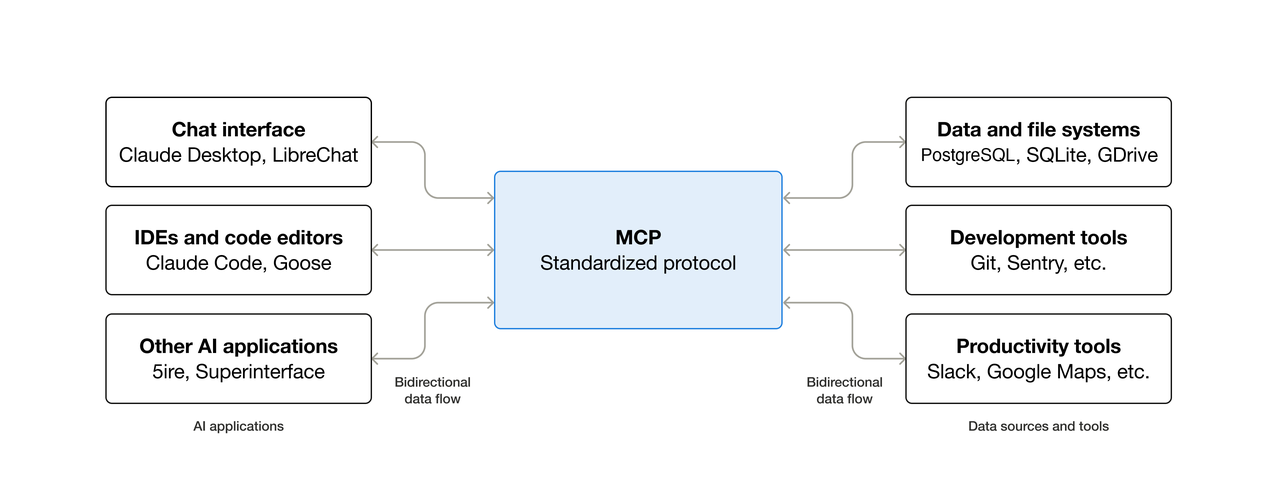
Figure 1. MCP provides a common interface between AI applications and external systems. Source: official MCP introduction. © 2024–2025 Anthropic, PBC and contributors. Reproduced unchanged under the MIT License; full image credits and permission notice.
MCP vs Function Calling: Key Differences
That last row is the key to building with both. A model can request get_order_status, while the application chooses whether to call its own handler or an MCP server. The model’s function definition can stay the same.
Choose the integration your application needs
We recommend starting with direct integration when you own a few tools used by one application. There is less to deploy, and the path from a model request to your business code is easy to follow.
MCP becomes useful when a compatible server already provides the capability, or when several AI applications need a common tool interface. The same order tool could serve a support assistant and an internal operations application, with each host controlling how its users access it.
A dispatcher can support both internal functions and MCP services, routing each operation to its implementation. Libraries and REST APIs can also be shared; choose MCP when its standard discovery and invocation interface is useful to the applications that consume the tools.
Build a complete tool loop through CometAPI
We will use one read-only operation, get_order_status, and one fictional order, ORD-104. The example first calls the operation directly, then runs it through a local MCP server. Both modes use the CometAPI Responses API for model inference.
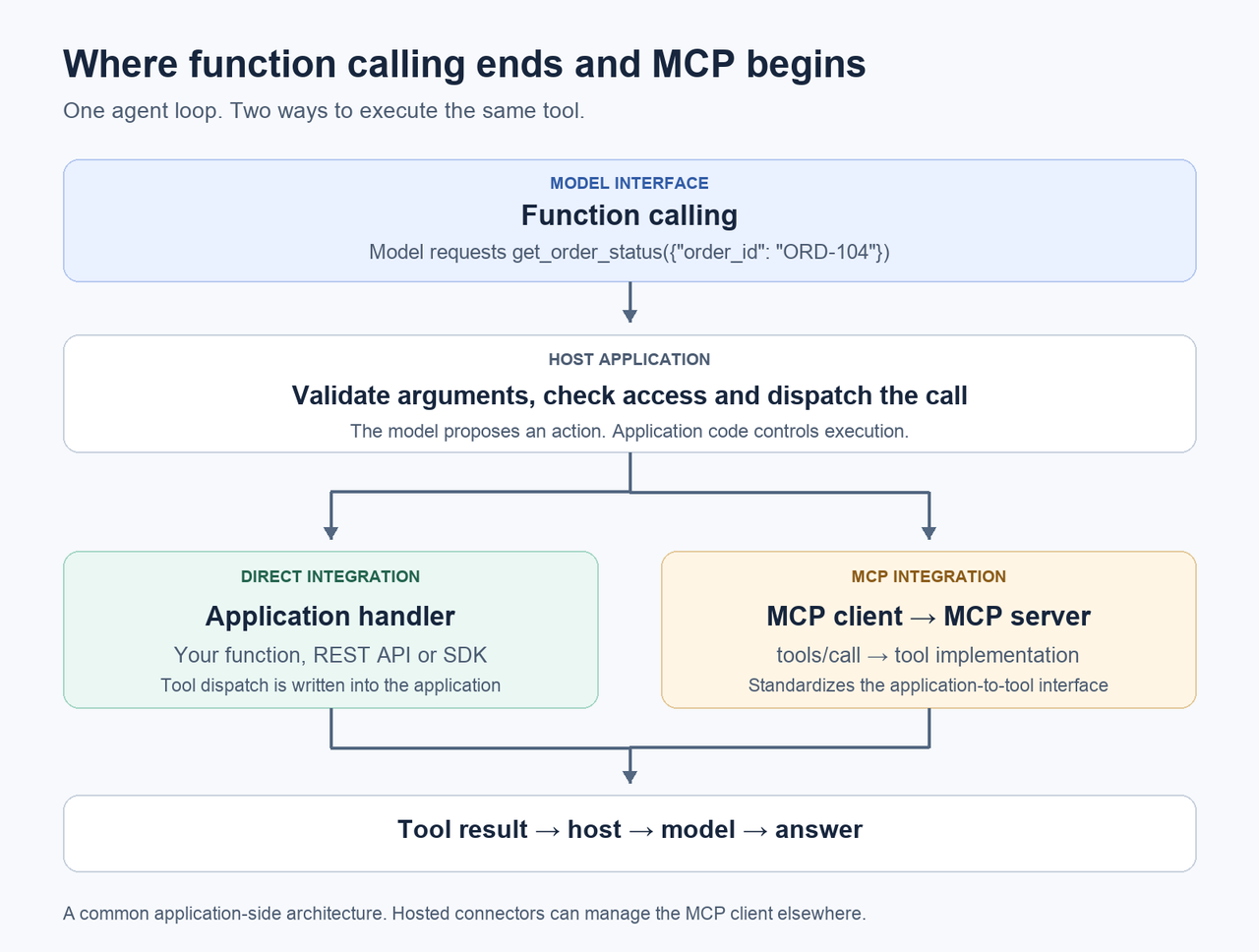
Figure 2. One agent loop can support direct and MCP execution. Original illustration, based on the MCP architecture and CometAPI function-calling flow.
Step 1 Set up the project
Use Python 3.11 or later and a CometAPI API key. This walkthrough was tested with Python 3.12.14 and mcp==2.3.0. Follow the CometAPI quickstart to create a key. In a macOS or Linux shell, create a project and activate a virtual environment:
mkdir mcp-agent-demo
cd mcp-agent-demo
python3 -m venv .venv
source .venv/bin/activate
python -m pip install "mcp==2.3.0"
export COMETAPI_KEY="YOUR_COMETAPI_KEY"
Replace the placeholder with your key and keep it out of public source code. This walkthrough pins the MCP SDK used by the example; the official Python server guide targets the 2.x API. The two agent commands below send requests to CometAPI and consume API credit.
Step 2 Define the order lookup
Save this as orders.py. Fixed data keeps the walkthrough self-contained; later you can replace the lookup with your own service.
"""Read-only, invented order data; never connects to a real order system."""

import re


def get_order_status(order_id: str) -> dict[str, str]:
    """Look up an invented order; ORD-104 is the only available record."""
    if not isinstance(order_id, str) or not re.fullmatch(r"ORD-[0-9]{3}", order_id):
        raise ValueError("order_id must have the form ORD-104")
    if order_id != "ORD-104":
        raise ValueError("Order not found in this demo")
    return {"order_id": order_id, "status": "shipped", "source": "fictional_demo"}
Calling get_order_status("ORD-104") returns this fixture:
{"order_id": "ORD-104", "status": "shipped", "source": "fictional_demo"}
Step 3 Add the agent loop
Save the following complete script as agent.py. It registers the function, sends the question to CometAPI, executes requested calls and returns each result using the original call_id.
The model-facing definition uses the CometAPI Responses API’s parameters field. MCP supplies an inputSchema; this example checks the discovered contract against the one-string order_id schema before exposing the reviewed function.
"""A deliberately narrow direct/MCP bridge, not a general MCP adapter."""

import argparse
import asyncio
import json
import os
from pathlib import Path
import sys
from urllib.request import Request, urlopen

from mcp import Client, StdioServerParameters
from mcp.client.stdio import stdio_client

from orders import get_order_status

NAME = "get_order_status"
SCHEMA = {"type": "object", "properties": {"order_id": {"type": "string"}},
          "required": ["order_id"], "additionalProperties": False}
TOOL = {"type": "function", "name": NAME, "description": "Look up fictional order ORD-104.",
        "parameters": SCHEMA, "strict": True}


def validate_arguments(arguments):
    # Exact validation for SCHEMA above; deliberately not a JSON Schema engine.
    if (not isinstance(arguments, dict) or set(arguments) != {"order_id"}
            or not isinstance(arguments["order_id"], str)):
        raise ValueError("Expected exactly one string argument: order_id")


def validate_catalog(tools):
    if len(tools) != 1 or tools[0].name != NAME:
        raise RuntimeError("Unexpected MCP tool catalog")
    schema = tools[0].input_schema
    if (schema.get("type") != "object" or schema.get("required") != ["order_id"]
            or set(schema.get("properties", {})) != {"order_id"}
            or schema["properties"]["order_id"].get("type") != "string"):
        raise RuntimeError("MCP schema does not match this reviewed demo tool")


async def dispatch(name, arguments, client=None):
    if name != NAME:
        raise ValueError("Tool is not allowlisted")
    try:
        validate_arguments(arguments)
        if client is None:
            return {"is_error": False, "data": get_order_status(**arguments)}
    except ValueError as error:
        return {"is_error": True, "error": str(error)}
    result = await client.call_tool(name, arguments)
    if getattr(result, "result_type", "complete") != "complete":
        raise RuntimeError("Input-required MCP results are outside this demo")
    if any(block.type != "text" for block in result.content):
        raise RuntimeError("Non-text MCP content is outside this demo")
    return {"is_error": bool(result.is_error),
            "content": [block.text for block in result.content],
            "structured_content": result.structured_content}


async def run_agent(send, execute, question, max_rounds=4):
    history = [{"role": "user", "content": question}]
    seen_call_ids = set()
    for _ in range(max_rounds):
        response = send({"model": "gpt-6-astra", "input": list(history),
                         "tools": [TOOL], "reasoning": {"effort": "low"}})
        if response.get("status") != "completed" or response.get("error"):
            raise RuntimeError("Model response failed or did not complete")
        output = response["output"]
        # CometAPI's documented manual replay: keep ALL items, omit top-level ids.
        history.extend({key: value for key, value in item.items() if key != "id"}
                       for item in output)
        blocks = [block for item in output if item["type"] == "message"
                  for block in item.get("content", [])]
        if any(block["type"] == "refusal" for block in blocks):
            raise RuntimeError("Model refused the request")
        calls = [item for item in output if item["type"] == "function_call"]
        if not calls:
            text = "\n".join(block["text"] for block in blocks
                             if block["type"] == "output_text")
            if not text:
                raise RuntimeError("No final text returned")
            return text
        for call in calls:
            call_id = call["call_id"]
            if not isinstance(call_id, str) or not call_id or call_id in seen_call_ids:
                raise ValueError("Missing or duplicate function call_id")
            seen_call_ids.add(call_id)
            try:
                arguments = json.loads(call["arguments"])
            except (ValueError, TypeError):
                result = {"is_error": True, "error": "Arguments must be JSON text"}
            else:
                result = await execute(call["name"], arguments)
            print(json.dumps({"tool": call["name"], "arguments": call["arguments"],
                              "result": result}), file=sys.stderr)
            history.append({"type": "function_call_output", "call_id": call_id,
                            "output": json.dumps(result)})
    raise RuntimeError("Tool loop reached its round limit")


def send_live(payload):
    key = os.environ["COMETAPI_KEY"]  # Only live mode reads the caller's key.
    request = Request("https://api.cometapi.com/v1/responses",
                      data=json.dumps(payload).encode(),
                      headers={"Authorization": f"Bearer {key}",
                               "Content-Type": "application/json"})
    with urlopen(request, timeout=45) as response:
        return json.load(response)


def server_parameters():
    return StdioServerParameters(command=sys.executable,
                                 args=[str(Path(__file__).with_name("server.py"))])


async def main():
    parser = argparse.ArgumentParser(description=__doc__)
    parser.add_argument("--mode", choices=["direct", "mcp"], required=True)
    parser.add_argument("--question", default="Use the tool to check order ORD-104.")
    args = parser.parse_args()
    if args.mode == "direct":
        answer = await run_agent(send_live, dispatch, args.question)
    else:
        async with Client(stdio_client(server_parameters())) as client:
            discovered = await client.list_tools()
            validate_catalog(discovered.tools)
            async def execute(name, arguments):
                return await dispatch(name, arguments, client)
            answer = await run_agent(send_live, execute, args.question)
    print(answer)


if __name__ == "__main__":
    asyncio.run(main())
The loop keeps the original question and every returned response item. Following the CometAPI Responses conversation format, it removes the output items’ top-level id fields before replay and appends a function_call_output for each call. Preserving the rest of the returned items also preserves any reasoning items needed for the next turn.
Step 4 Run the direct path
Run:
python agent.py --mode direct
The application describes get_order_status to the model. When the model requests it, dispatch() checks the name and arguments, then calls the function in orders.py. The result goes back into the conversation, and the model can turn it into an answer.
Use the tool trace printed to your terminal to check that the lookup used ORD-104 and returned status: shipped. The final answer should reflect that result; its wording can vary. You now have the complete function-calling loop, from the user’s question to an application-executed operation and a follow-up model response.
The next step keeps the model and conversation loop in place. It moves execution behind an MCP server and lets the application discover and invoke the tool through a client.
Step 5 Expose the lookup as an MCP tool
Save this as server.py, beside the other two files:
"""One read-only MCP tool, served over stdio. No stdout logging."""

from mcp.server import MCPServer
from mcp.server.mcpserver.exceptions import ToolError

from orders import get_order_status as lookup_order

server = MCPServer("fictional-orders")


@server.tool(structured_output=True)
def get_order_status(order_id: str) -> dict[str, str]:
    """Look up fictional order ORD-104; this demo has no real customer data."""
    try:
        return lookup_order(order_id)
    except ValueError as error:
        raise ToolError(str(error)) from error


if __name__ == "__main__":
    server.run(transport="stdio")
The SDK builds a tool definition from the function signature and docstring. The server uses stdio, where the client launches it as a subprocess and exchanges protocol messages over its standard streams. Keep application logs off the server’s standard output.
Step 6 Run the MCP path
Run:
python agent.py --mode mcp
The mcp branch in main() starts server.py, calls list_tools() and checks the order tool’s contract. When the model requests the lookup, the same dispatcher now uses client.call_tool(). The server runs the function, and the application returns its result to the model.
Compare the two runs against the same criteria: the correct tool, ORD-104 as its argument, a successful result containing shipped, and a final answer consistent with that result. The execution path has changed; the task and model-facing function have stayed the same.
All three source files are included above. The example package also contains them and the offline checks for convenient reuse. Those checks exercise a real local MCP server with scripted model responses; live model output is separate from that local verification.
Adapt the example to your own tools
Replace the fixed order data with the smallest operation your application actually needs. For a shipping question, return an order ID and useful status fields. A compact result gives the model less irrelevant material to interpret and makes the answer easier to check.
Keep the tool’s description and argument contract specific. This example accepts exactly one string, and the host checks the requested tool name before dispatch. The MCP security guidance calls for servers to validate inputs and implement access controls. For a real order service, derive the customer’s identity from trusted application context and enforce access to that customer’s order inside the service. A model-supplied order ID cannot establish ownership.
Once the tool works, evaluate completed tasks, end-to-end time and actual cost. Add MCP where its service interface helps the applications that need the tool, and keep direct handlers where they are simpler to operate.
FAQ
Does MCP replace function calling?
They handle different interfaces: MCP connects the application’s client to a server. In this example, the model requests a function and the application fulfills that request through an MCP client. Both participate in the same agent loop.
Can an MCP tool call an existing REST API?
Yes. Replace the lookup inside the MCP tool with a call to your API. The MCP server publishes the tool contract and handles tool calls; your existing service continues to provide its business behavior.
When should I use a remote MCP server?
Use a remote service when clients need to reach a separately deployed server rather than launch a local process. MCP defines Streamable HTTP for that connection and stdio for a client-launched subprocess. Configure the remote server’s authorization for its intended callers.
Conclusion
For a single application, replace the fictional record in orders.py with one read-only query from your service and start with direct mode.
If you need an existing MCP service or a shared tool interface, use the MCP path and keep the same checks: the right operation, the right record and an answer supported by the returned data.