
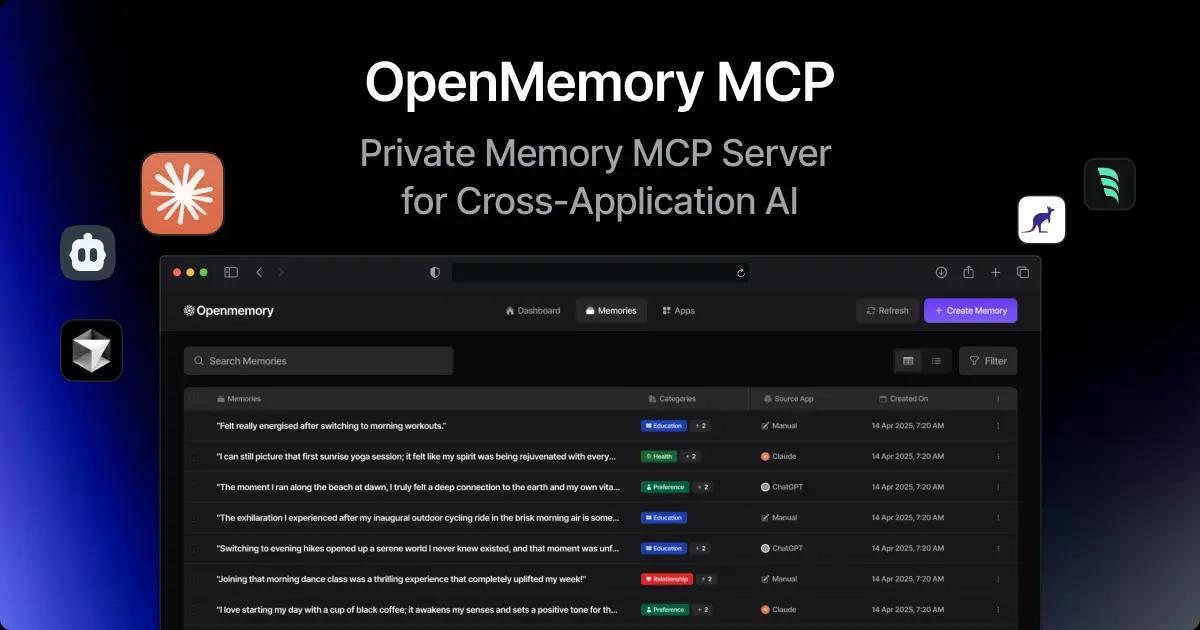
OpenMemory MCP has rapidly emerged as a pivotal tool for AI developers seeking seamless, private memory management across multiple assistant clients. Announced on May 13, 2025, by Mem0, the OpenMemory MCP Server introduces a local‑first memory layer compliant with the Model Context Protocol (MCP), enabling persistent context sharing between tools like Cursor, Claude Desktop, Windsurf, and more .
Within 48 hours of its Product Hunt debut on May 15, it amassed over 200 upvotes, signaling strong community interest in a unified, privacy‑focused memory infrastructure . Early technical write‑ups from Apidog and Dev.to have lauded its vector‑backed search and built‑in dashboard, while AIbase and TheUnwindAI highlighted its real‑world applicability in multi‑tool AI workflows . User feedback on Reddit underscores its intuitive dashboard controls and the promise of uninterrupted context handoff, cementing OpenMemory MCP’s status as a next‑generation solution for private AI memory management
Launch and Overview
The OpenMemory MCP Server officially launched on May 13, 2025, via a Mem0 blog post authored by Taranjeet Singh, positioning it as a “private, local‑first memory server” that runs entirely on the user’s machine.
It adheres to the open Model Context Protocol (MCP), offering standardized APIs—add_memories, search_memory, list_memories, and delete_all_memories—for persistent memory operations.
By eliminating cloud dependencies, it guarantees data ownership and privacy, addressing a critical concern in AI workflows where token costs and context loss are persistent challenges .
Core Features
- Local‑First Persistence: All memories are stored locally with no automatic cloud sync, ensuring full user control over data residency.
- Cross‑Client Context Sharing: Memory objects—complete with topics, emotions, and timestamps—can be created in one MCP‑compatible client and retrieved in another without re‑prompting .
- Unified Dashboard: An integrated web UI at
http://localhost:3000allows users to browse, add, delete, and grant or revoke client access to memories in real time - Vector‑Backed Search: Leveraging Qdrant for semantic indexing, OpenMemory matches queries by meaning rather than keywords, accelerating relevant memory retrieval.
- Metadata‑Enhanced Records: Each memory entry includes enriched metadata—topic tags, emotional context, and precise timestamps—for fine‑grained filtering and management .
Technical Architecture
Under the hood, OpenMemory MCP combines:
- Dockerized Microservices: Separate containers for the API server, vector database, and MCP server components, orchestrated via
make up). - Model Context Protocol (MCP): A REST+SSE interface that any MCP‑client can hook into by installing the MCP client package and pointing it at
http://localhost:8765/mcp/<client>/sse/<username>. - Vector Database (Qdrant): Stores embeddings of memory text to facilitate fast, semantic similarity search, minimizing token usage for large context lookups.
- Server‑Sent Events (SSE): Enables real‑time updates in the dashboard and immediate memory availability across connected clients .
Installation and Setup
Clone and Build:
git clone https://github.com/mem0ai/mem0.git cd openmemory make build make up
Configure Environment:
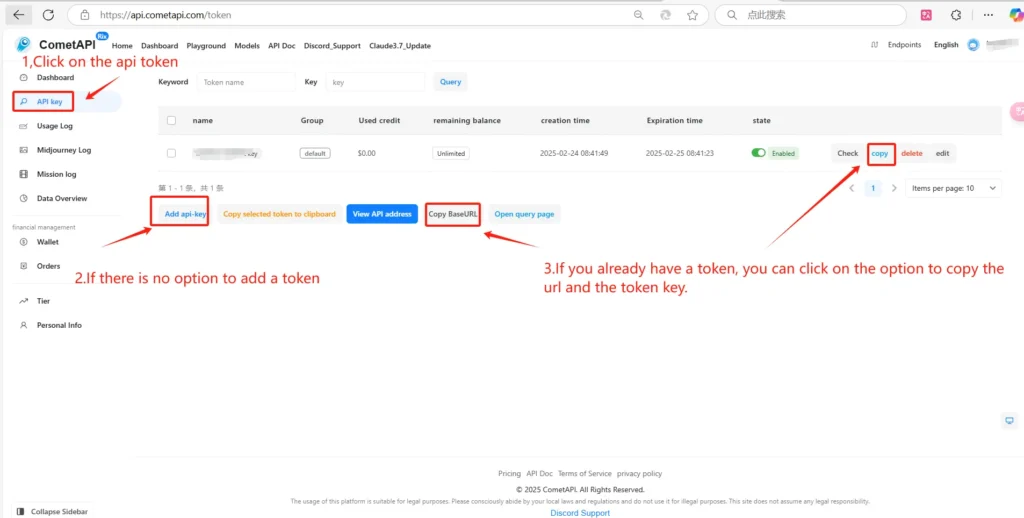
Create an .env file under api/ with OPENAI_API_KEY=your_CometAPI_key_here .
CometAPI provides a unified REST interface that aggregates hundreds of AI models—including ChatGPT family—under a consistent endpoint, with built-in API-key management, usage quotas, and billing dashboards. Instead of juggling multiple vendor URLs and credentials.Please refer tutorial.
Obtain Your CometAPI Credentials:
- Sign in to yourCometAPI dashboard.
- Navigate to API Tokensand click Add Token. Copy the newly created token (e.g.
sk-abc...) and note your base URL (it will be shown ashttps://api.cometapi.com) . - Keep these two pieces of information handy for the Cursor configuration.
Launch Frontend:
cp ui/.env.example ui/.env make ui The dashboard becomes available at http://localhost:3000 .
Connect MCP Clients:
Install the MCP client package and register your client:
npx install-mcp i "http://localhost:8765/mcp/<client>/sse/$(whoami)" --client <client>
Ecosystem and Client Support
OpenMemory MCP is compatible with any tool that implements the MCP, including:
- Cursor AI
- Claude Desktop
- Windsurf
- Cline
- Future MCP‑enabled platforms .
As more AI assistants adopt MCP, the value of a shared memory infrastructure will compound, fostering richer cross‑tool experiences .
Real‑World Use Cases
- Research Agents: Combine browser‑scraping and summarization agents across tools; store findings in OpenMemory for consistent reference during report generation .
- Development Pipelines: Preserve debugging context when switching between code editors and REPL environments, reducing setup time and cognitive load.
- Personal Assistants: Maintain user preferences and past queries across daily tasks, enabling more personalized and contextually aware responses.
Future Roadmap
The Mem0 team has hinted at “Full Memory Control” features, allowing users to set expiration policies and granular access permissions per client .
Ongoing developments include plugin architectures for custom memory filters and cloud‑backup options for hybrid workflows; details will be shared on the official blog as they mature .
With the rapid adoption curve and open‑source development model, OpenMemory MCP is poised to become the de facto memory layer for the next generation of AI assistants.