Technical Specifications of Grok Imagine Image Quality
| Item | Specification |
|---|---|
| Model Name | grok-imagine-image-quality |
| Provider | xAI |
| Model Type | Text-to-Image & Image Editing |
| Input Modalities | Text, Reference Images |
| Output | AI-generated Images |
| Default Resolution | 2K output |
| Image Editing | Yes (supports reference images and masks) |
| Primary Optimization | High-fidelity image quality |
| Typical Use | Professional illustrations, photorealism, typography-heavy images |
| Relative Speed | Slower than grok-imagine-image |
What is the Grok Imagine Image Quality Model?
Grok Imagine Image Quality (model identifier: grok-imagine-image-quality) is xAI's premium image generation and editing model. It prioritizes fidelity, detail, and adherence over raw speed, making it ideal for professional applications.
Key Capabilities
- Higher Realism: Fine details, accurate textures, natural skin pores/imperfections, realistic lighting, physics, and material rendering.
- Stronger Text Rendering: Clean, legible, multilingual text integration in images — a historical weakness for many AI generators.
- Superior Creative Control: Tighter prompt adherence, deeper scene understanding, consistent character/brand outputs, and effective reference image usage.
- Resolution: Supports up to 2K (2048x2048) outputs.
- Editing Features: Image-to-image transformations, style transfers, object addition/removal, and multi-step refinements.
It builds on xAI's Aurora engine foundation and integrates seamlessly with video generation for end-to-end workflows (image-to-video with native audio).
Benchmark Performance and Rankings
Grok Imagine Image ranks among the strongest models on independent leaderboards and specifically highlights Text-to-Image Arena — 12, citing the Arena state as of July, 2026.
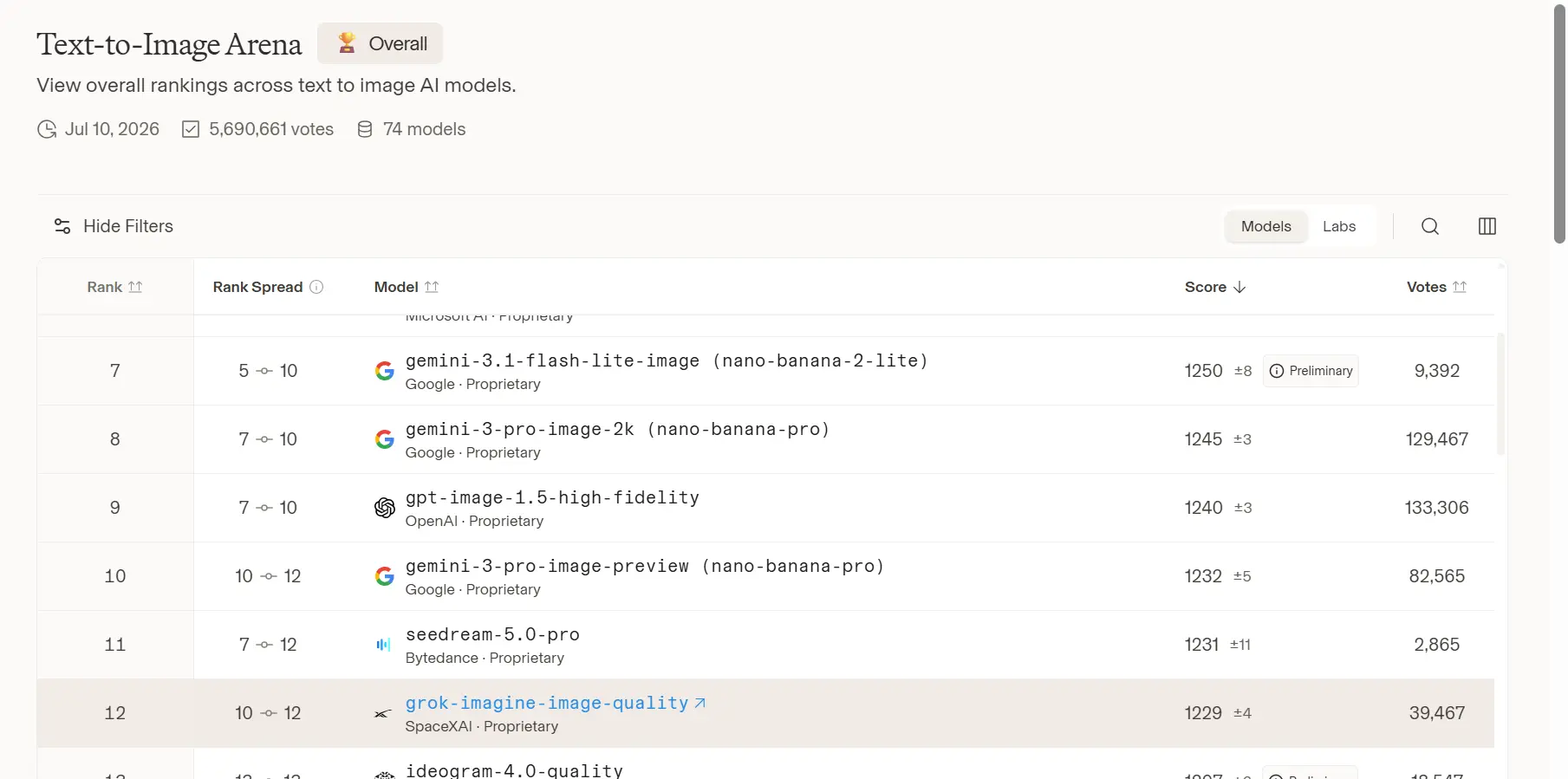
Artificial Analysis and Other Metrics:
- High Elo scores in image quality arenas, particularly for photorealism, composition, and text rendering.
- Competitive latency-quality trade-off; Quality Mode prioritizes fidelity (e.g., ~4-20+ seconds per image depending on platform and resolution).
Core advantages of Grok Imagine Image Quality
1) Better realism and texture fidelity
Judging from the official case studies, this mode is able to capture extremely natural skin textures, pore details, and complex light and shadow variations. Whether simulating the film texture of medium format editorial photography or recreating the dappled shadows of trees on an Italian summer afternoon, the new model demonstrates greater professionalism in material representation and architectural composition.
Quality Mode significantly improves:
- Depth of field accuracy
- Skin texture realism
- Lighting gradients
- Architectural composition
- Material rendering (fabric, metal, glass)
2) Stronger text rendering
Text inside images is one of the classic pain points for image models. xAI specifically calls out clean, multilingual text capabilities, which is a notable selling point for banners, posters, packaging concepts, social graphics, and event assets.
3) Better prompt following
Grok Imagine Image Quality offers tighter prompt following, deeper scene and world understanding, and more consistent brand results. That matters because many image models can make pretty pictures, but they break down the moment you ask for specific composition, layout, or brand constraints. xAI is clearly leaning into that gap.
Quality Mode offers tighter prompt following and deeper scene understanding. That means the model is optimized not only for visual polish, but also for adherence to your creative brief. In practice, this is what reduces “close, but not quite” outputs.
Grok Imagine Image Quality vs Similar Models
| Model | Best For | Strength |
|---|---|---|
| Grok Imagine Image Quality | Premium image generation | Highest fidelity, sharper details, stronger typography |
| Grok Imagine Image | Fast generation | Lower latency with good overall quality |
| GPT Image | General-purpose multimodal creation | Strong editing and broad ecosystem integration |
| FLUX Pro | Artistic and photorealistic rendering | Excellent prompt following and lighting realism |
How to Use Grok Imagine Image API
Grok Imagine Image uses flat per-image pricing rather than token-based image pricing like text models. Second, the platform limits requests to a maximum of 10 images per request, generated URLs are temporary, and content moderation is applied to generated outputs. Those are the kinds of details that matter when you are shipping to users instead of testing in a sandbox.
Step 1: Access via xAI or Aggregator
Access CometAPI for unified access and better rates.
Step 2: Authentication and Setup
- Obtain API key from CometAPI dashboard.
- Use Python SDK or REST/compatible clients.
Key Parameters
- Seed: For reproducibility.
- Prompt: Detailed natural language.
- Reference Images: For consistency.
- Resolution: 1K or 2K.
- Editing Modes: Image-to-image, inpainting, etc.
Multi-image editing
The images.edit() method in the OpenAI SDK does not support xAI image editing because OpenAI's workflow uses the <script> tag for multipart/form-data, while xAI requires the <script> tag for application/json. xAI recommends using its own SDK, the Vercel AI SDK, or sending a direct HTTP request for image editing. The CometAPI implements xAI's image API mode. This is an important implementation detail for any user needing to deliver practical applications.
Grok Imagine Image Quality Model also supports multi-image editing with up to three source images. This as useful for combining subjects, transferring styles across references, and composing scenes from multiple visual inputs. That is a serious creative lever for ads, product visuals, character consistency, and reference-driven design.
Why use CometAPI to access grok imageine for image generation?
CometAPI is a unified AI API aggregator that provides access to 500+ models (including xAI’s Grok models and Grok Imagine for image/video generation) through a single OpenAI-compatible endpoint. People use it for Grok Imagine image generation primarily for convenience, cost savings, and simplified developer workflows rather than going directly to xAI’s official API.
Key reasons to use CometAPI for Grok Imagine
- Lower pricing (typically 20–40% cheaper than official rates): CometAPI frequently undercuts direct vendor pricing. For Grok Imagine video (closely related and often bundled in the same family), examples include ~$0.04/sec for 480p or ~$0.056/sec for 720p—up to ~43% cheaper than official figures around $0.07/sec. Similar discounts apply to Grok text models (e.g., Grok 3/4 input/output tokens discounted). Pay-as-you-go with no monthly fees or minimums.
- Free starter credits: New users often receive $1–$5 in trial credits (sometimes after a simple request), enough for initial testing of image or short video generations without immediate payment.
- No vendor lock-in and easy model switching: Instantly switch between Grok Imagine and alternatives (or other Grok variants) by changing the model name. Useful for A/B testing quality, cost, or style without re-integrating.
- Developer-friendly extras: Unified dashboard for usage/analytics/budget alerts, playground for quick tests, async support, integrations with tools like n8n/Make/Dify, and claims of high uptime/low latency. Supports both image generation/editing and related video capabilities under the Grok Imagine umbrella.