


TL;DR
Create a free CometAPI account, use the $0.10 signup credit, and send a request to muse-wonder. No credit card or monthly subscription is needed to get started. Below, we walk through a small JavaScript bug fix so your first trial produces something you can check and use.
Key Takeaways
- Use CometAPI’s signup credit to try Muse Wonder without an initial payment.
- Create an API key and call
muse-wonderthrough CometAPI’s Chat Completions endpoint. - Start with one self-contained task and test the result before moving on to a larger project.
- Free access comes from the starter credit; continued usage is billed by consumption.
How to Test Muse Wonder with a JavaScript Bug Fix
We recommend using your first Muse Wonder request to solve one small problem you can verify. A bug fix is a good starting point: you can provide the entire function, define the behavior you want, and check whether the returned code works.
For this walkthrough, we will fix an average() function. It calculates the mean of a non-empty array, but returns NaN for an empty one:
function average(xs) {
  return xs.reduce((a, b) => a + b, 0) / xs.length;
}
We want Wonder to preserve the normal calculation and throw a RangeError for an empty array. That gives the trial a clear finish line: a corrected function that passes three checks.
Five steps to try Muse Wonder with free CometAPI credit: create an account, create an API key, request a code fix, run three checks, and review token usage and cost.
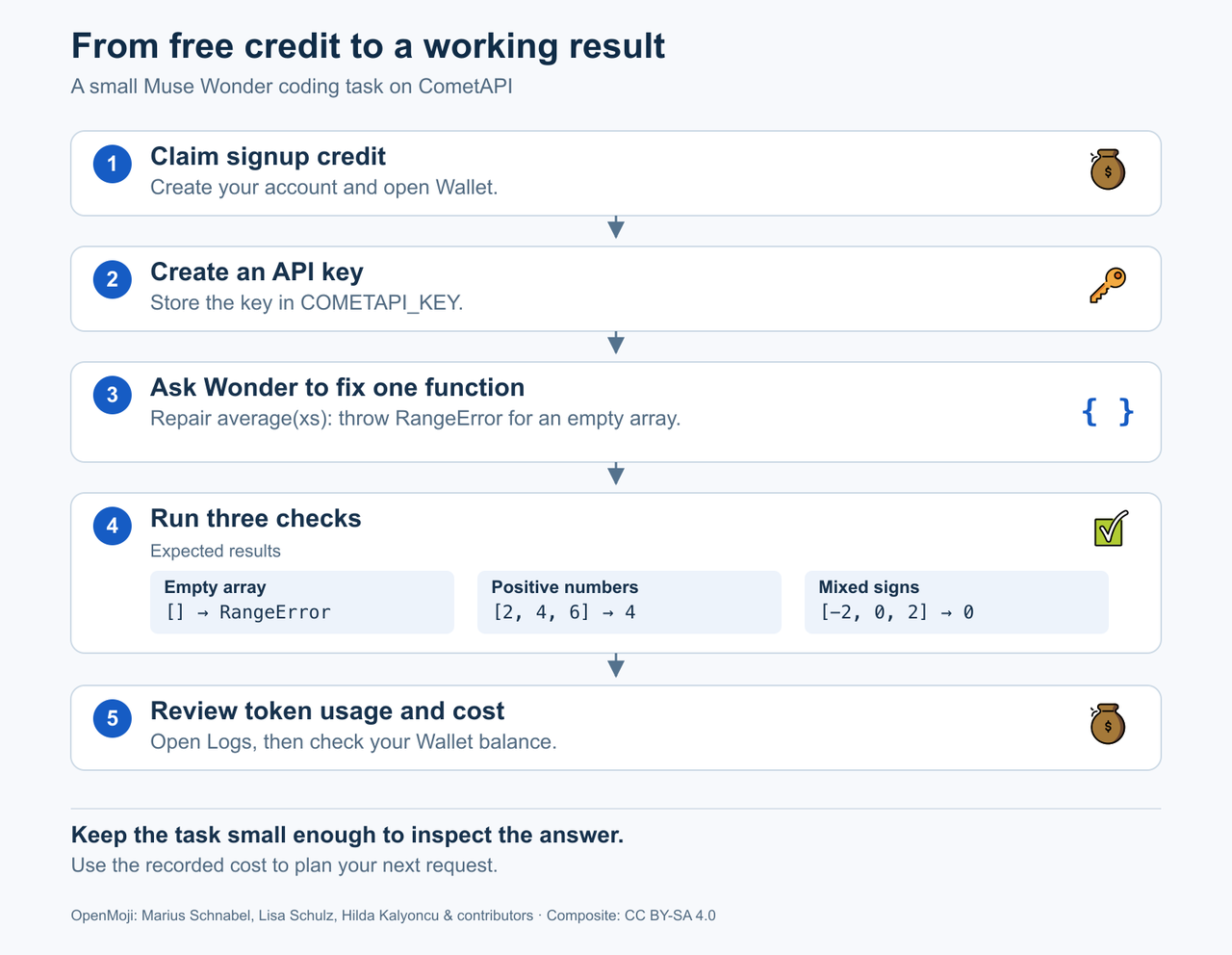
Figure 1. A focused trial takes you from starter credit to a result you can verify. Original explanatory layout incorporating OpenMoji graphics, with proportional scaling and a new arrangement. Licensed under CC BY-SA 4.0; full image credits and license.
How to use Muse Wonder for free on CometAPI
Step 1 Create your account and claim the credit
Open the CometAPI signup page and create an account. Once you are signed in, open Wallet to see your $0.10 signup credit. It is added automatically; there is no separate redemption step.
This credit funds your first Muse Wonder requests. You can leave payment setup for later and work through the example with the starter balance.
Prefer to start in your browser? Open the Wonder model page and select Playground. You can submit the function and empty-array requirement there using the same account credit; the API steps below show how to make the request from your terminal.
Step 2 Create an API key
Open API Keys, click Create API Key, give the key a name such as wonder-trial, and click Create. Copy the key and set it in your local terminal:
export COMETAPI_KEY="YOUR_COMETAPI_KEY"
Replace the placeholder with your own key. Keep the real key out of browser-side code and public repositories. The API quickstart shows the account and key-creation screens.
Step 3 Send the bug-fix request
The following command works in a Bash or Zsh terminal with curl installed. It calls Muse Wonder using model ID muse-wonder through CometAPI’s /v1/chat/completions endpoint:
curl "https://api.cometapi.com/v1/chat/completions" \
  -H "Authorization: Bearer $COMETAPI_KEY" \
  -H "Content-Type: application/json" \
  -d '{
    "model": "muse-wonder",
    "messages": [
      {
        "role": "user",
        "content": "Fix this JavaScript function. For non-empty arrays, preserve the arithmetic mean. For an empty array, throw a RangeError. The function must return 4 for [2, 4, 6], return 0 for [-2, 0, 2], and throw RangeError for []. Return only the corrected JavaScript function named average, without Markdown fences, explanations, or tests. Use no external packages. Function: function average(xs) { return xs.reduce((a, b) => a + b, 0) / xs.length; }"
      }
    ]
  }'
The prompt supplies the code and required behavior in one request, and asks for only the function. That keeps the answer focused and leaves the checks below independent of the model’s own test code.
In the JSON response, the answer is in choices[0].message.content, as shown in the Chat Completions response format. Copy the returned function into a file named average-test.cjs.
Step 4 Check whether the fix works
Read the function first: it should check for an empty array before dividing by its length. Then place these checks below it in average-test.cjs:
const assert = require("node:assert/strict");

assert.equal(average([2, 4, 6]), 4);
assert.equal(average([-2, 0, 2]), 0);
assert.throws(() => average([]), RangeError);

console.log("All three checks passed.");
With Node.js installed, run:
node average-test.cjs
The checks serve different purposes:
| Check | Required result | What it establishes |
|---|---|---|
| average([2, 4, 6]) |
If all three pass, you have a working answer for this small specification. They do not prove the function is ready for arbitrary inputs: strings, missing arguments and other cases need their own requirements and tests. Keep the scope clear when judging the model’s work.
If a check fails, follow up with the exact failure and the returned function. A specific failure gives Wonder a concrete correction to make.
Step 5 Review the request’s consumption
Open Logs in your CometAPI account and expand the request. Review its token consumption and cost, then check the remaining balance in Wallet. The account guide explains where to find the detailed calculation.
You now have both parts of a useful trial: a result you can evaluate and a record of what it consumed. Keep those together when deciding what to try next.
How to Reduce Token Usage When Testing Muse Wonder
A focused prompt does more work per request. In the example, the function, error-handling requirement and test cases are all present from the beginning. Use the same pattern for your own task: provide the relevant input, say what must change, and define how you will judge the result.
For writing, that might mean editing one paragraph while preserving every name and number. For document work, it might mean extracting a few named fields from a short passage. Choose a task whose source material and expected result you can inspect yourself.
Keep follow-up messages specific. “The empty-array check still fails; here is the error” gives the model a better target than “try again.” For an unrelated task, start a fresh request so you do not resend conversation history that the new task does not need.
How much can you try with the free credit
Muse Wonder currently costs $3.20 per million input tokens and $16 per million output tokens on CometAPI.
For scale, a hypothetical request with 2,000 uncached input tokens and 500 billable output tokens costs:
(2,000 × $3.20 + 500 × $16) ÷ 1,000,000 = $0.0144
This is a budget example, not a measurement of the code-fix request above. The amount of work your credit covers depends on actual billable tokens and any additional calls. Use the first request’s recorded consumption to plan your next task, rather than turn the balance into a fixed number of messages.
FAQ
Do I need a credit card to start?
No. You can create a CometAPI account with free trial credit without adding a credit card. A paid monthly subscription is not required for this API trial.
What happens when the starter credit runs out?
Further usage needs funding. Check the remaining balance before continuing: a final request can cost more than the credit left and make the balance negative.
Conclusion
Create your CometAPI account, use the signup credit and give Muse Wonder one useful job. For this walkthrough, success means a corrected function that passes the three checks, with its consumption recorded in Logs.
Once you are ready to connect Wonder to your own application, continue with the CometAPI Muse Wonder API guide. You will already have an API key, a working request and a concrete example of how you want the model to help.