Step 5 Preview is StepFun’s flagship AI model for software engineering, financial research, and complex agent workflows. It combines competitive task performance with cost-efficient inference, although its results vary across benchmarks. Developers can access it through a hosted API or deploy its open weights, depending on their budget, infrastructure, and performance requirements.
Key Takeaways
Architecture: Step 5 Preview uses a sparse MoE architecture with 600B total parameters and 27B active per token, balancing model capacity and inference efficiency.
Context and multimodal support: The model supports a 1M-token context window, text, image, and video inputs, and up to 64K output tokens through its hosted API.
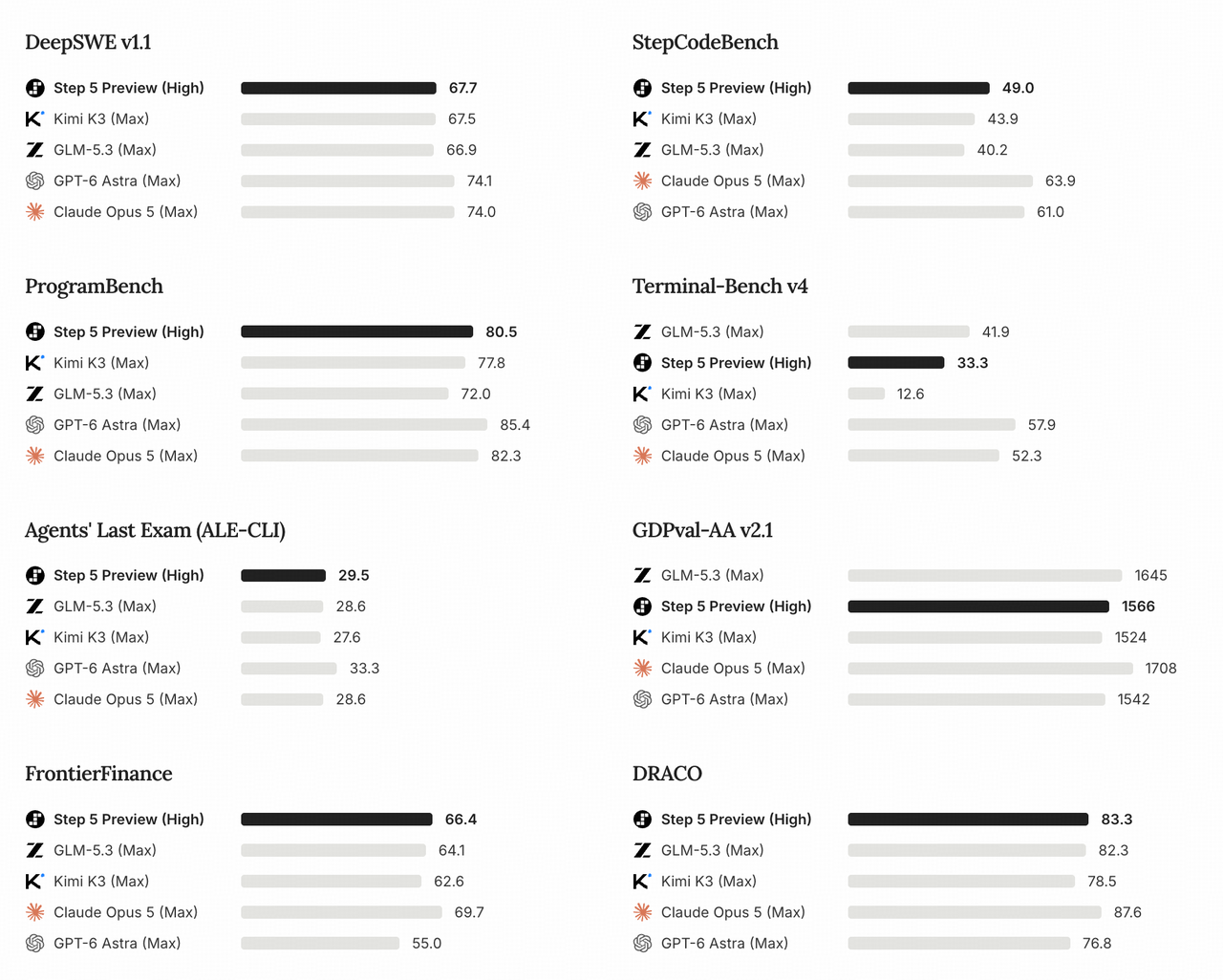
Step 5 Preview achieves 67.7% on DeepSWE v1.1 and 66.4% on FrontierFinance, although it trails several competitors on Terminal-Bench v4.
Reviewed for clarity, source attribution and current API terminology.
Benchmark performance:
API pricing: StepFun charges $1.00 for uncached input, $0.10 for cached input, and $2.70 for output per million tokens.
Deployment flexibility: Developers can access Step 5 Preview through StepFun’s hosted API or self-host its released weights using compatible frameworks such as vLLM, SGLang, and Transformers.
What Is Step 5 Preview?
Step 5 Preview is a large multimodal reasoning model developed by StepFun (阶跃星辰). It targets workloads requiring extended reasoning, repeated tool execution, and analysis across large collections of information. StepFun provides hosted API access and publishes downloadable model weights.
Unlike general-purpose assistants optimized primarily for conversational responses, Step 5 Preview emphasizes agentic execution: the ability to plan, use tools, inspect intermediate results, correct mistakes, and continue toward a complex objective.
Key Specifications
The official model card documents its sparse architecture, parameter counts, and deployment configurations. The hosted API specifications separately define supported inputs, generation limits, and serving features. These are different layers of the deployment contract.
Specification (model card and API documentation linked above)
Step 5 Preview
Developer
StepFun
Model identifier
step-5-preview
Model category
Multimodal reasoning and agentic LLM
Architecture
Sparse Mixture-of-Experts
Total parameters
Approximately 600B
Active parameters per token
Approximately 27B
Active parameter proportion
Approximately 4.5%
Context window
Up to 1M tokens
Supported inputs
Text, images, and video on the hosted API
Hosted API maximum output
64k tokens
Primary output
Text
Reasoning modes
low, medium, high; reasoning_effort on Chat Completions
Tool calling
Supported
Structured output
JSON Mode and JSON Schema on the hosted API
Prompt caching
Supported
Hosted API status
Available as of October 19, 2026
Weight availability
The hosted API documents a 64k-token maximum output, while the model card lists a sequence-generation capability of up to 1M tokens. The latter is not a promise that the hosted endpoint accepts a 1M-token completion. For self-hosted vLLM examples, the configured 1M-token sequence budget covers input and output together; available KV-cache memory and concurrency can reduce usable capacity.
How the 600B/27B MoE Architecture Works
A conventional dense transformer activates most of its model parameters during inference. Step 5 Preview instead uses sparse routing to select relevant experts. With approximately 27B active parameters out of 600B, around 4.5% of its total parameter count participates in a typical token’s computation.
This distinction helps explain the model’s cost-efficiency strategy. However, 27B active does not mean a 27B deployment footprint. The full expert weights must still be stored and accessed, making GPU memory capacity, expert parallelism, and interconnect bandwidth essential considerations.
Supported Inputs and Output Limits
The hosted API accepts text, images, and video, with a context window of up to 1M tokens and a maximum output of 64k tokens. These inputs support tasks such as repository analysis, financial document research, and visual interpretation. For self-hosting, usable sequence length depends on runtime configuration, available memory, and concurrency.
Multimodal support and API capabilities can differ between hosted and self-deployed configurations.
How Does Step 5 Preview Perform on Benchmarks?
The following are StepFun-reported results. Step 5 Preview uses the High reasoning setting; the comparison models use Max. Matching label names would not establish equal compute, and these published scores do not measure application latency or cost per successful task.
The original official chart summarizes the publisher’s evaluation results. The tables below extract the coding, reasoning, and finance scores relevant to this analysis.
Coding and Agentic Performance
Benchmark
Step 5 Preview (High)
Kimi K3 (Max)
GLM-5.3 (Max)
GPT-6 Astra (Max)
Claude Opus 5 (Max)
DeepSWE v1.1
67.7
67.5
66.9
74.1
74.0
StepCodeBench
49.0
43.9
40.2
61.0
63.9
ProgramBench
80.5
77.8
72.0
85.4
82.3
Terminal-Bench v4
33.3
12.6
41.9
57.9
52.3
Agents’ Last Exam (ALE-CLI)
29.5
27.6
28.6
33.3
28.6
Scores are percentages, with higher values indicating better performance on each benchmark. DeepSWE v1.1 uses the SWE-agent harness with temperature=1.0 and top_p=0.95; StepCodeBench reports avg@4, while ProgramBench reports pass rate. Each benchmark measures a different task under its own evaluation setup, so the percentages are not interchangeable accuracy measures. The published comparison does not establish identical hardware or execution budgets across models.
On DeepSWE v1.1, Step 5 Preview scores 67.7%, narrowly exceeding Kimi K3 and GLM-5.3. This suggests competitive performance for coding agents working with repositories and automated software engineering tasks.
ProgramBench provides another positive signal. Step 5 Preview reaches 80.5%, compared with 77.8% for Kimi K3 and 72.0% for GLM-5.3.
However, Terminal-Bench v4 exposes a meaningful limitation: Step 5 Preview’s 33.3% result falls behind GLM-5.3 at 41.9%, while GPT-6 Astra reaches 57.9%. The implication is that Step 5 Preview is competitive in repository-oriented software engineering, but its relative advantage does not extend uniformly to terminal-driven execution and complex debugging.
Reasoning and Knowledge Performance
Benchmark
Step 5 Preview (High)
GLM-5.3 (Max)
Kimi K3 (Max)
GPT-6 Astra (Max)
GPQA Diamond
93.5%
91.7%
93.5%
96.1%
Humanity’s Last Exam
46.5%
42.3%
46.9%
54.7%
AA-LCR v1.1
88.3%
79.7%
88.7%
80.7%
CritPt
20.9%
19.1%
23.4%
31.7%
Step 5 Preview scores 93.5% on GPQA Diamond, matching Kimi K3 and trailing GPT-6 Astra at 96.1%. On AA-LCR v1.1, its 88.3% result is slightly below Kimi K3's 88.7% and above GPT-6 Astra's 80.7%. It also trails Kimi K3 and GPT-6 Astra on Humanity's Last Exam and CritPt. The results point to competitive knowledge and long-context reasoning, with relative strengths that vary by task.
Financial Research and Valuation Performance
Financial research is one of Step 5 Preview’s most distinctive application areas. The model is designed to combine quantitative reasoning, evidence retrieval, and structured analysis. These capabilities are especially relevant to valuation, financial document interpretation, and investment research.
StepFun introduced FinStepBench to evaluate financial research at multiple stages, from gathering information to producing defensible conclusions.
Benchmark
Step 5 Preview (High)
Kimi K3 (Max)
GLM-5.3 (Max)
GPT-6 Astra (Max)
Claude Opus 5 (Max)
FrontierFinance
66.4
62.6
64.1
55.0
69.7
FinStepBench LiveSearch
74.5
70.9
73.3
74.5
76.2
FinStepBench CorporateValuation
60.6
60.6
56.1
77.3
69.7
FinStepBench DeepResearch
55.8
48.9
53.3
45.0
59.1
Higher scores indicate stronger benchmark performance. FinStepBench is developed by StepFun, so independent validation is particularly important.
Step 5 Preview achieves 66.4% on FrontierFinance, exceeding Kimi K3, GLM-5.3, and GPT-6 Astra under the reported configurations. However, Claude Opus 5 remains ahead with 69.7%.
The FinStepBench DeepResearch result is particularly notable. Step 5 Preview reaches 55.8%, compared with 48.9% for Kimi K3 and 53.3% for GLM-5.3. This suggests that the model may be well suited to financial research workflows requiring retrieval, synthesis, and extended analysis.
Its CorporateValuation score tells a more nuanced story. At 60.6%, Step 5 Preview trails GPT-6 Astra’s 77.3% by a substantial margin. Therefore, Step 5 Preview should not be considered universally superior for financial analysis. Its relative ranking is stronger on DeepResearch than on CorporateValuation, supporting task-specific evaluation rather than a broad claim of financial superiority.
For production applications, financial outputs still require independently validated calculations, documented assumptions, and traceable supporting evidence.
Step 5 Preview vs Other AI Models
Step 5 Preview competes with both hosted alternatives and proprietary frontier services. Benchmark results help identify candidate models; API access, input support, deployment control, and actual workload cost determine which candidate fits a production application.
CometAPI offers access to Kimi K3, GLM-5.3, GPT-6 Astra, and Claude Opus 5. These alternatives provide useful comparison points for workload quality, latency, and cost.
Step 5 Preview offers a documented 600B/27B sparse MoE checkpoint and a self-hosting option. For the alternatives, weight availability, parameter counts, context limits, and accepted inputs depend on the model and endpoint. Published benchmarks can help build a shortlist; representative coding and research tasks reveal how each service behaves in practice.
Step 5 Preview vs Kimi K3
Step 5 Preview performs slightly better on DeepSWE v1.1, ProgramBench, and FrontierFinance. Kimi K3 remains competitive in reasoning and certain other technical evaluations. The practical distinction is less about a decisive intelligence advantage and more about the cost, serving conditions, and task-specific reliability available to developers.
Step 5 Preview vs GLM-5.3
Step 5 Preview leads GLM-5.3 in several financial and software development evaluations. However, GLM-5.3’s stronger Terminal-Bench v4 score suggests an advantage in the reported terminal-oriented tasks. For coding agents, compare successful repository modifications, tool-call errors, execution time, and patch correctness rather than relying on one aggregate score.
Step 5 Preview vs GPT-6 Astra and Claude Opus 5
The proprietary frontier models generally perform better on the hardest software engineering benchmarks. Step 5 Preview’s principal attraction is that it approaches competitive capability on selected workloads while providing an open-weight deployment option and relatively accessible API pricing.
Choose a premium model when the cost of failure is high and incremental task accuracy justifies additional expense. Consider Step 5 Preview when price, deployment control, and repeated agent execution carry greater weight.
How Much Does Step 5 Preview API Cost?
Step 5 Preview's value depends on both task capability and operating cost. Agent workflows may involve dozens of calls, repeated document retrieval, and retries, so a lower token price only helps when the model completes the task reliably. Cost per successfully completed task is a useful complement to the rates below.
API Availability and Token Pricing
This October 19, 2026 snapshot compares StepFun's native API rates with the CometAPI rates linked in the model comparison section. All prices are in US dollars per million tokens. The services have different billing, cache, and endpoint conditions; “not listed” means this article's source snapshot does not provide a cached-input rate.
Model
Service channel
Model ID
Uncached input / 1M tokens
Cached input / 1M tokens
Output / 1M tokens
Step 5 Preview
StepFun native API
step-5-preview
$1.00
$0.10
$2.70
Kimi K3
CometAPI
kimi-k3
$2.40
Not listed
$12.00
GLM-5.3
CometAPI
glm-5.3
$1.12
Not listed
$3.53
GPT-6 Astra
CometAPI
gpt-6-astra
$8.00 (short-context tier)
Not listed
$40.00 (short-context tier)
Claude Opus 5
CometAPI
claude-opus-5
$4.00
Not listed
$20.00
The GPT-6 Astra short-context tier applies up to 272,000 tokens; the quoted long-context rates are $16 for input and $60 for output per million tokens. Listed rates exclude tools, retries, and infrastructure. Step 5 Preview availability through CometAPI is not established by this comparison; the Step 5 Preview example below uses StepFun's native endpoint.
The cache-hit input rate is 90% below the uncached rate. The uncached price includes writing new content to the cache, while output billing includes both reasoning and final-answer tokens. Repeated prompt text only earns the lower rate when the service reports a qualifying cache hit; visible answer length alone understates billable output.
Example Cost Calculations
API workload
Uncached input
Cached input
Output
Estimated cost
Short analytical request
10K
0
5K
$0.0235
Medium coding workflow
100K
0
20K
$0.154
Repeated agent request
10K
90K
20K
$0.073
Large document analysis
500K
0
30K
$0.581
Long-context cached workflow
100K
400K
50K
$0.275
Cost formula: C = (Tu × Pu + Tc × Pc + To × Po) / 1,000,000, where Tu/Tc/To represent uncached input, cached input, and billable output tokens, respectively, and Pu/Pc/Po are their prices per million tokens.
Consider two StepFun requests with the same 100,000 input tokens and 20,000 billable output tokens:
The cache-hit example saves $0.081, or about 52.6%, with the same input and output volumes. The saving depends on a qualifying cache hit reported by the service. Both examples exclude external tools, retries, and infrastructure costs.
Token prices alone do not determine the best-value model. An agent requiring several retries can be more expensive than a higher-priced model that succeeds on its first attempt. For a reliable cost comparison, use cost per successfully completed task alongside token pricing.
Is Step 5 Preview Open Source, and Can It Run Locally?
StepFun publishes downloadable weights through its official Hugging Face repositories, with FP8, BF16, and NVFP4 variants available as of October 19, 2026. Weight access enables self-deployment, but does not make the model equivalent to a small dense model in memory requirements.
Available files include the Step 5 Preview checkpoint, BF16 version, and NVFP4 version.
The terminology matters: Step 5 Preview provides open weights under StepFun Model License 1.0. The license includes model-specific attribution and commercial-license conditions. Evaluate those terms for your planned use and distribution before deployment.
FP8 with vLLM: 4 × NVIDIA B300 or 8 × NVIDIA H200, serving an OpenAI-compatible API.
BF16 with vLLM: 8 × NVIDIA B300 or 16 × NVIDIA H200, serving an OpenAI-compatible API.
FP8 with SGLang: 4 × NVIDIA B300, serving an OpenAI-compatible API; FP8 with Transformers: 8 × NVIDIA H200 for offline generation.
These are reference configurations, not minimum guarantees for every checkpoint, runtime, context length, or concurrency setting. Sparse activation reduces computation, but expert weight storage and KV cache memory remain major considerations.
A 600B model also presents challenges beyond memory capacity, including multi-GPU communication, framework compatibility, checkpoint loading, and long-context throughput. For teams without large GPU clusters, a hosted API is usually the more practical starting point.
How Can Developers Use the Step 5 Preview API?
StepFun supports an OpenAI-compatible Chat Completions interface. Set STEPFUN_API_KEY in the environment before running the following Python example; max_tokens bounds this request’s generated output. Use the API key and billing terms for the selected regional platform: this example retains the api.stepfun.ai endpoint, while the dollar prices above come from StepFun’s international platform.
Python example: send a bounded text request to the StepFun API and print the returned answer.
import os
from openai import OpenAI
client = OpenAI(
    api_key=os.environ["STEPFUN_API_KEY"],
    base_url="https://api.stepfun.ai/v1",
)
response = client.chat.completions.create(
    model="step-5-preview",
    messages=[{
        "role": "user",
        "content": (
            "Analyze the architectural risks of migrating "
            "a monolithic application into microservices."
        ),
    }],
    max_tokens=4000,
)
print(response.choices[0].message.content)
Before production use, confirm the selected StepFun endpoint's accepted parameters and generation limits. Reasoning effort, prompt caching, tool schemas, and output budgets can all affect reliability, latency, and the final bill.
Step 5 Preview in Agent Workflows
Read repository documentation and relevant files.
Identify the requested change and propose a plan.
Modify selected code and execute tests through external tools.
Inspect failures and revise the implementation.
Produce a final explanation of validated changes.
The model generates reasoning and tool requests; the application provides actual file access, execution environments, permissions, and safety checks. Model capability alone does not guarantee autonomous execution.
Alternative Model APIs in CometAPI
CometAPI provides access to the alternative models linked above through a shared integration service. Select each model’s documented endpoint and request format, then compare success rates, token usage, retries, and end-to-end latency on the same workload.
The example above uses StepFun's native endpoint. Switching to a gateway requires confirmed Step 5 Preview availability and the gateway's documented model identifier, endpoint, and billing terms.
When Should You Choose Step 5 Preview?
Choose it for repository coding and document-heavy research when representative tests confirm reliable results. Its long context and published coding and finance scores make it a candidate, while terminal-task and valuation results show why workload-specific testing matters.
Choose the hosted API when you want to start without operating a large GPU cluster. Compare cost per accepted task, cache-hit rates, retries, and latency; a large context window does not guarantee fast responses or lower total cost.
Choose self-hosting when deployment control justifies the hardware and operations burden. Budget for full expert-weight storage, KV cache, multi-GPU communication, and license requirements. For consequential financial or engineering work, include source checks, error detection, and human review.
FAQ
How should you choose Step 5 Preview’s reasoning effort?
Start with a small set of representative tasks and compare low, medium, and high using the same acceptance criteria. Record correctness, billable output, latency, and tool failures. Use the lowest setting that consistently meets the quality threshold; the published High benchmark scores do not predict the behavior of low or medium. Follow the reasoning configuration guide and set reasoning_effort explicitly on Chat Completions when comparing configurations.
Why can a Step 5 Preview request stop before 64k output tokens?
The documented maximum is a ceiling, not a target length. A request can stop earlier because it reached its max_tokens budget, returned a natural stop, or produced a tool call that the application must handle. Inspect the returned finish reason and any tool requests before automatically retrying. A completed shorter answer does not indicate a context-window failure.
How should you test Step 5 Preview video inputs?
Begin with a short, representative clip and a question whose answer you can verify. The hosted API video-input specification accepts video by URL, Base64, or a stepfile reference; its documented formats include MP4, QuickTime, and Matroska. For URL input, the documentation specifies individual MP4 files under 128 MB and recommends less than five minutes. Confirm format and size limits before batching, and test temporal questions as well as single-frame recognition.
Which metrics reveal Step 5 Preview’s real agent cost?
Measure accepted task completions, total input and output tokens across all turns, cache hits, retries, external tool charges, and elapsed time. Divide total run cost by successful completions, keeping the success criterion fixed across models. This captures the economic effect of a cheaper call that requires more attempts, or a higher-effort run that reduces later failures.
Conclusion
Step 5 Preview is worth evaluating when an application needs long-context processing, repeated tool use, or control over model deployment. StepFun’s published results make it a candidate for repository coding and financial research, while Terminal-Bench v4 and CorporateValuation show areas where listed alternatives score higher. Compare models using fixed acceptance criteria, total cost per accepted task, and end-to-end latency. For self-hosting, include infrastructure costs and license requirements in the decision.
Official FP8, BF16, and NVFP4 repositories available