
TL;DR
DeepSeek-V4.1-Flash is the current multimodal Flash model served by the DeepSeek API under model ID deepseek-flash. It supports a 1M-token context, up to 384K output, and image input; under the current Vision guide, each image uses at most 1024 tokens after automatic resizing.
Its strongest positioning remains agent-oriented vision: inspecting screenshots, charts, interfaces, and image-based documents before continuing with code or tools. The benchmark results later in this article belong to the retired Vision-Exp launch and should be read as historical, vendor-reported evidence—not as a fresh benchmark of DeepSeek-V4.1-Flash.
CometAPI currently keeps deepseek-v4-flash-vision-exp as its catalog model ID, while DeepSeek's direct API recommends deepseek-flash and serves the request with DeepSeek-V4.1-Flash. Start with a text-plus-image request, then evaluate the exact route on your own screenshots and visual tasks.
Key Takeaways
- Current route: DeepSeek-V4.1-Flash is the active multimodal Flash model. The retired
deepseek-v4-flash-vision-expname remains accepted only as a compatibility alias on DeepSeek's API. - Large text workspace: 1M-token context and up to 384K output support long documents, code repositories, tool histories, and images in one conversation.
- Current image accounting: DeepSeek automatically resizes each image and caps it at 1024 input tokens. Images below roughly 544×544 total pixels are scaled up; larger images are scaled toward roughly 1300×1300 total pixels.
- Agent-focused vision: the official comparison emphasizes screenshot, chart, browser, coding, and visual-tool workflows rather than image generation.
- Broad interface support: DeepSeek documents the supported API interfaces: Chat Completions, Anthropic-compatible Messages, and Responses API. The CometAPI examples below use Chat Completions.
- Production caution: route aliases, automatic image resizing, and harness-sensitive benchmark results still make workload-specific testing essential.
What Is DeepSeek-V4-Flash-Vision?
DeepSeek's current documentation identifies deepseek-flash as DeepSeek-V4.1-Flash, with text-and-image input and text output. The earlier Vision-Exp model has been retired; its legacy model names are compatibility aliases routed to the current Flash model.
The target use case is multimodal agency. A visual agent can inspect a rendered application, identify a button or layout failure, reason about the next action, call a tool, and then examine the next screenshot. The same pattern applies to chart analysis, visual quality assurance, document extraction, browser automation, and coding agents that must compare a design reference with a rendered page.
Naming note: for DeepSeek's direct API, use deepseek-flash; it currently maps to DeepSeek-V4.1-Flash. The legacy names deepseek-v4-flash and deepseek-v4-flash-vision-exp are still accepted by DeepSeek, but the corresponding models are retired and requests are served by DeepSeek-V4.1-Flash. CometAPI continues to expose deepseek-v4-flash-vision-exp as its own catalog route.
Technical Specifications
| Specification (official docs) | Current value |
|---|---|
| Official model ID | deepseek-flash |
| Status | Active multimodal Flash API route; legacy Vision-Exp model retired |
| Inputs / output | Text + image input; text output |
| Context window | 1,048,576 tokens (1M) |
| Maximum output | Up to 384K tokens |
| Legacy Vision-Exp checkpoint listing | 305B parameters on the official Hugging Face repository |
| Legacy Vision-Exp text backbone | 43 layers; hidden size 4,096; 64 attention heads |
| Legacy Vision-Exp MoE routing | 256 routed experts; 6 selected per token; 1 shared expert |
| Legacy Vision-Exp vision encoder | 32 layers; width 1,024; 16 heads; patch size 14 |
| Image representation | Maximum 1024 image tokens per image on the current DeepSeek API |
| Image formats | JPEG, PNG, GIF, WebP |
| Image input methods | Base64 data URL, external URL, DeepSeek Files API file_id |
| API styles | Chat Completions, Anthropic-compatible Messages, Responses |
| Reasoning modes | Thinking and non-thinking; effort levels low, high, max |
| License | MIT for the official model repository |
The architecture fields above come from the official configuration. The repository interface lists a 305B-parameter checkpoint, but DeepSeek does not separately publish an activated-parameter count for the complete vision model. It is safer to report the repository value than to assume that the text-only V4-Flash active count transfers unchanged after adding the visual stack.
How DeepSeek-V4-Flash-Vision-Exp's Legacy Architecture Works
V4-Flash Text Backbone
The language side retains the V4 design themes that make long-context agent work practical. The official repository documents the V4 architecture components: sparse Mixture-of-Experts routing, DFlash attention, Hyper-Connections, and DSpark. This makes the release more inspectable than an API-only model even though local deployment remains demanding at this scale.
Vision Encoder and Aligner
For the retired Vision-Exp checkpoint, the published configuration used a 32-layer visual encoder, patch size 14, vision width 1,024, 16 visual attention heads, and a 384-token image representation. These architecture details describe the historical checkpoint and should not be assumed to document the current DeepSeek-V4.1-Flash serving stack.
Current 1024-Token Image Limit
DeepSeek's current vision tokenization rules scale images below roughly 544×544 total pixels up and larger images down while preserving aspect ratio. Large inputs are resized toward roughly the pixel area of a 1300×1300 image, producing an upper bound of 1024 tokens per image. A 2000×2000 image and a 5000×5000 image therefore consume the same number of image tokens after resizing.
Practical implication: crop the region containing small labels, code, or UI controls before sending the image. Higher source resolution alone does not defeat the current 1024-token ceiling.
Legacy Vision-Exp Benchmark Performance
DeepSeek's official model card evaluation compares the vision model with DeepSeek-V4-Flash-0731 and Claude Opus 4.8 across text-agent and multimodal-agent tasks. The vision model generally improves over the text-only Flash model while remaining competitive with, but not uniformly ahead of, the capability-first competitor.
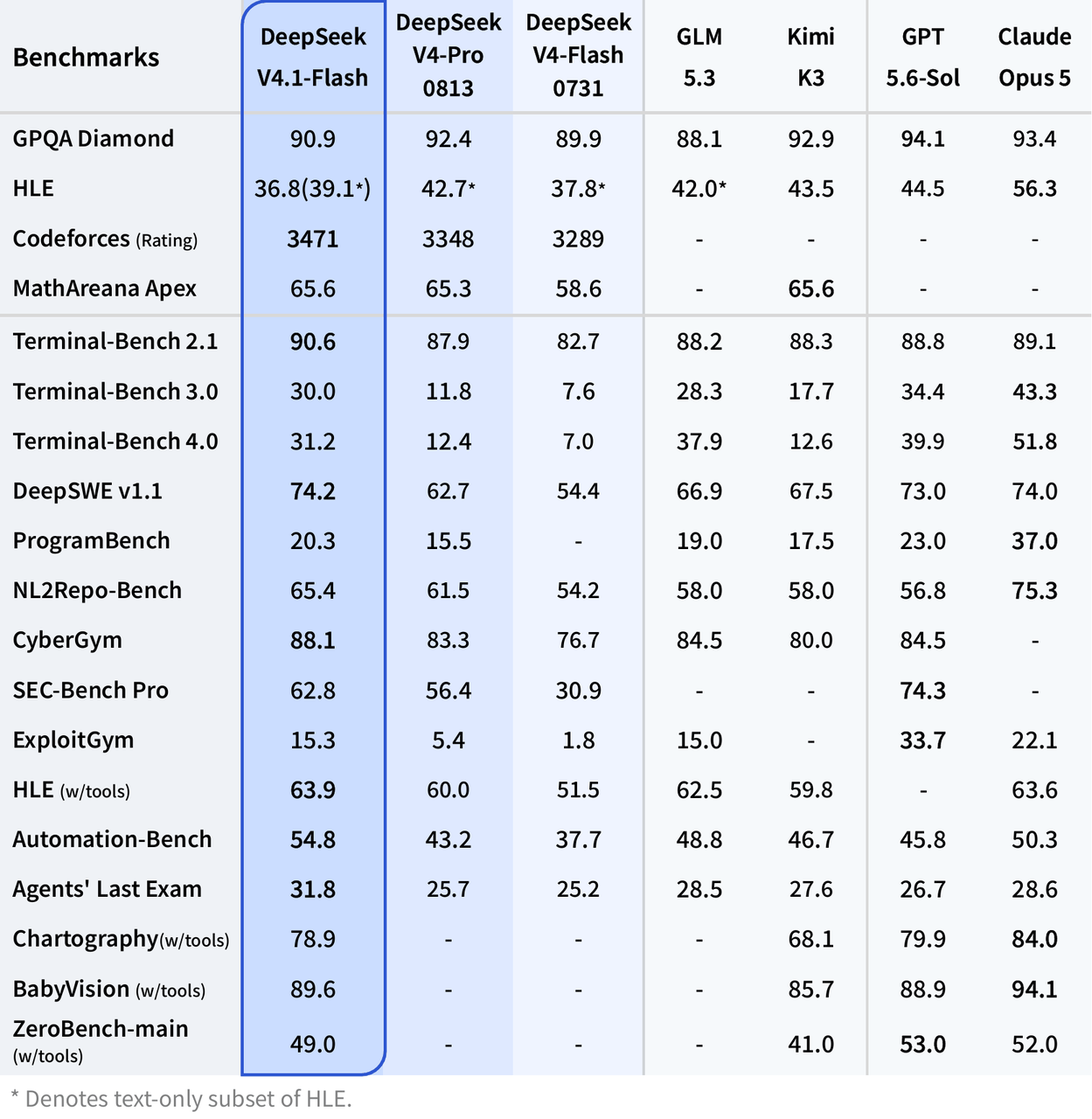
Official benchmark comparison for text and multimodal agent evaluations. Source: DeepSeek official release
| Official benchmark | Vision-Exp | V4-Flash-0731 | Opus-4.8 |
|---|---|---|---|
| Terminal Bench 2.1 | 83.9 | 82.7 | 85.0 |
| NL2Repo | 57.7 | 54.2 | 69.7 |
| Cybergym | 75.3 | 76.7 | 78.3 |
| DeepSWE | 59.3 | 54.4 | 58.0 |
| Toolathlon-Verified | 75.9 | 70.3 | 76.2 |
| DSBench-Hard | 63.6 | 59.6 | 71.7 |
| AutomationBench (Public) | 25.7 | 25.1 | 27.2 |
| ApexBench (Pass@1) | 36.5 | 26.2* | 39.4 |
| Agents' Last Exam | 27.3 | 25.2* | 25.7 |
| Chartography | 64.3 | - | 65.0 |
| ZeroBench (Pass@5) | 35.0 | - | 34.0 |
* In ApexBench and Agents' Last Exam, the text-only V4-Flash model ignored the multimodal elements in the input. DeepSeek evaluated its text-agent tasks with DeepSeek Harness minimal mode, max reasoning effort, temperature 1.0, and top_p 0.95.
Benchmark note: these are DeepSeek-reported launch results, not an independent reproduction. Agent scores are especially sensitive to the harness, tool definitions, token budget, and retry policy, so they should be treated as directional evidence.
What the Benchmark Results Mean
The cleanest result is the improvement over text-only V4-Flash when visual evidence matters. ApexBench increases from 26.2 to 36.5, and the vision model adds competitive Chartography and ZeroBench results that the text-only model does not report. The model also improves on several text-agent tasks, including Terminal Bench 2.1, NL2Repo, DeepSWE, Toolathlon-Verified, and DSBench-Hard, although Cybergym is slightly lower.
Against Opus 4.8, the outcome is mixed. Vision-Exp is higher on DeepSWE, Agents' Last Exam, and ZeroBench in this table, while the competing model is higher on Terminal Bench, NL2Repo, Cybergym, Toolathlon, DSBench-Hard, ApexBench, and Chartography. DeepSeek's multimodal benchmark claim is therefore directional rather than proof of general equivalence across every vision, reasoning, or reliability dimension.
DeepSeek-V4.1-Flash vs DeepSeek-V4-Flash-Vision-Exp vs Claude Opus 4.8 vs Gemini 3.7 Flash
| Dimension | DeepSeek Vision-Exp | DeepSeek V4 Flash | Claude Opus 4.8 | Gemini 3.7 Flash |
|---|---|---|---|---|
| Status | Experimental | Public beta / current Flash route | Generally available | Generally available |
| Input modalities | Text, image | Text | Text, image, documents | Text, image, video, audio, PDF |
| Output | Text | Text | Text / structured data / code | Text |
| Context | 1M | 1M | Up to 1M depending on platform | 1,048,576 |
| Max output | 384K | 384K | 128K | 65,536 |
| Main strength | Low-cost visual agents | High-throughput text agents | High-autonomy complex agents | Broad multimodal workhorse |
| Best first test | Screenshots, charts, UI, visual coding | Coding and text automation | Hardest long-horizon tasks | Rich media and Google tool workflows |
Choose Vision-Exp when image perception must be added to an inexpensive agent loop. Choose V4 Flash when every input is textual and throughput is more important than visual understanding. Opus 4.8 remains the capability-first option in DeepSeek's own comparison, while Gemini 3.7 Flash is the broader multimodal alternative when video, audio, PDFs, and Google-native tools matter.
What Can DeepSeek-V4-Flash-Vision Do?
- Screenshot-to-code and UI review - compare a rendered page with a design, identify layout or accessibility problems, and generate implementation guidance.
- Visual browser agents - use screenshots as observations when DOM or accessibility-tree data is incomplete, then select the next tool action.
- Chart and dashboard analysis - explain trends, identify anomalies, and connect visible metrics to a larger text or tool workflow.
- Image-based document understanding - extract information from scanned forms, diagrams, slides, tables, and screenshots before structured processing.
- Multimodal coding agents - combine source code, bug screenshots, IDE states, and rendered outputs in a single debugging loop.
- Visual quality assurance - compare product screenshots across devices, detect missing elements, and generate structured defect reports.
- Multi-image comparison - evaluate a sequence of screenshots or alternative designs in one request, subject to request-size and image-count limits.
Official visual-agent example from the DeepSeek launch page (animated GIF in Word). Source: DeepSeek official release
Pricing and Availability
DeepSeek bills image tokens together with text input tokens. Its official pricing table uses peak and off-peak rates, while the CometAPI model page publishes a single current route price. The numbers should not be collapsed into one generic price because the cheapest route changes with DeepSeek's time window.
| Route / source | Cache-hit input | Cache-miss input | Output | Condition |
|---|---|---|---|---|
| DeepSeek official - off-peak | $0.003 | $0.15 | $0.60 | All hours outside peak windows, including weekends and Chinese public holidays |
| DeepSeek official - peak | $0.006 | $0.30 | $1.20 | 01:00-04:00 and 06:00-10:00 UTC, Mon-Fri, excluding Chinese public holidays |
| CometAPI current route | Not listed separately | $0.352 | $1.056 | Current unified route price |
All prices are USD per 1M tokens. DeepSeek's current Flash rates are $0.003/$0.15/$0.60 off-peak and $0.006/$0.30/$1.20 peak for cache-hit input, cache-miss input, and output respectively. CometAPI currently lists $0.352 per 1M input tokens and about $1.06 per 1M output tokens for its compatibility route. Images use at most 1024 input tokens each on DeepSeek's current API; always re-check live route pricing before production use.
Pricing note: model prices can change. Keep price figures linked to live pricing pages and re-check them immediately before publication or production rollout.
How to Use DeepSeek-V4-Flash-Vision with CometAPI
CometAPI currently lists deepseek-v4-flash-vision-exp through its OpenAI-compatible /v1/chat/completions endpoint, so the CometAPI examples retain that catalog ID. For DeepSeek's direct API, use deepseek-flash instead.
Step 1: Create an API Key
- Create or sign in to a CometAPI account.
- Open the API token console and create a key.
- Store it in the COMETAPI_KEY environment variable. Never place a production key in client-side code or commit it to source control.
export COMETAPI_KEY="your-cometapi-key"
Step 2: Send a Base64 Image with cURL
Base64 is useful for local files and server-side jobs where the image is already in memory. Replace the placeholder with the encoded image bytes, without adding spaces or line breaks.
curl https://api.cometapi.com/v1/chat/completions \
  -H "Authorization: Bearer $COMETAPI_KEY" \
  -H "Content-Type: application/json" \
  -d '{
    "model": "deepseek-v4-flash-vision-exp",
    "messages": [
      {
        "role": "user",
        "content": [
          {
            "type": "text",
            "text": "Read this dashboard and return the three most important findings."
          },
          {
            "type": "image_url",
            "image_url": {
              "url": "data:image/png;base64,<BASE64_DATA>"
            }
          }
        ]
      }
    ],
    "max_tokens": 1200
  }'
Step 3: Analyze a Local Image with Python
The OpenAI Python SDK can call CometAPI by changing the base URL. Use extra_body for DeepSeek-specific thinking controls when your SDK does not expose them directly.
import base64
import os

from openai import OpenAI

client = OpenAI(
    api_key=os.environ["COMETAPI_KEY"],
    base_url="https://api.cometapi.com/v1",
)

with open("dashboard.png", "rb") as image_file:
    encoded = base64.b64encode(image_file.read()).decode("utf-8")

response = client.chat.completions.create(
    model="deepseek-v4-flash-vision-exp",
    messages=[
        {
            "role": "user",
            "content": [
                {
                    "type": "text",
                    "text": (
                        "Analyze the chart. Return JSON with keys: trend, "
                        "anomalies, evidence, and confidence."
                    ),
                },
                {
                    "type": "image_url",
                    "image_url": {
                        "url": f"data:image/png;base64,{encoded}"
                    },
                },
            ],
        }
    ],
    max_tokens=1500,
    extra_body={
        "thinking": {"type": "enabled"},
        "reasoning_effort": "high",
    },
)

print(response.choices[0].message.content)
Step 4: Use a Public Image URL with JavaScript
An image URL keeps the JSON request small, but the URL must be publicly reachable by the upstream model. Avoid temporary, private, or authentication-protected links unless your application first converts the image to Base64.
const response = await fetch(
  "https://api.cometapi.com/v1/chat/completions",
  {
    method: "POST",
    headers: {
      Authorization: `Bearer ${process.env.COMETAPI_KEY}`,
      "Content-Type": "application/json",
    },
    body: JSON.stringify({
      model: "deepseek-v4-flash-vision-exp",
      messages: [
        {
          role: "user",
          content: [
            {
              type: "text",
              text: "Identify the UI issue and propose a concrete CSS fix.",
            },
            {
              type: "image_url",
              image_url: {
                url: "https://example.com/screenshot.png",
              },
            },
          ],
        },
      ],
      max_tokens: 1200,
    }),
  }
);

if (!response.ok) {
  throw new Error(`CometAPI request failed: ${response.status}`);
}

const data = await response.json();
console.log(data.choices[0].message.content);
Step 5: Send Multiple Images
Place multiple image_url blocks in the same user message and tell the model how to label them. Explicit labels reduce accidental cross-image references.
{
  "model": "deepseek-v4-flash-vision-exp",
  "messages": [
    {
      "role": "user",
      "content": [
        {
          "type": "text",
          "text": "Compare Image A and Image B. List every visible regression."
        },
        {
          "type": "image_url",
          "image_url": {"url": "https://example.com/image-a.png"}
        },
        {
          "type": "image_url",
          "image_url": {"url": "https://example.com/image-b.png"}
        }
      ]
    }
  ],
  "max_tokens": 1800
}
Input Methods and Limits
| Limit | Official DeepSeek value |
|---|---|
| Supported formats | JPEG, PNG, GIF, WebP |
| External URL length | Up to 8,192 characters |
| Request body | 48 MiB |
| Single image via Base64 / URL | 32 MiB |
| Single image via DeepSeek Files API | 64 MiB |
| Maximum images per request | 600 |
| Total image size | 64 MiB without file_id; up to 200 MiB including file_id |
| Maximum dimension | 8,192 px per side; 4,096 px when request has 15+ images |
| Image message role | User messages only |
The official DeepSeek API also supports reusable file_id image references through its Files API. The CometAPI quick path documented here uses image_url blocks with either a public URL or a Base64 data URL. Verify provider-specific file upload and file_id passthrough before relying on that workflow through an aggregation route.
How to Prompt the Model Effectively
A reliable visual-agent prompt should state what the image is, what evidence to inspect, what action to take, and what output contract to follow. Vague prompts such as describe this image leave too much freedom and make results harder to validate.
- Context - identify the screenshot, chart, document, or interface and its role in the workflow.
- Task - specify the decision, diagnosis, comparison, or extraction that matters.
- Evidence - require visible evidence, labels, coordinates, values, or quoted UI text.
- Constraints - forbid unsupported assumptions and tell the model how to handle unreadable details.
- Output - define JSON keys, a checklist, severity levels, or another machine-checkable structure.
You are reviewing a web application screenshot.

Task: identify layout, accessibility, and state-consistency defects.
Evidence: cite the visible element, label, position, or color that supports each finding.
Constraints: do not infer hidden DOM state; mark unreadable text as uncertain.
Output: return JSON with arrays named critical, major, minor, and follow_up_checks.
Production Best Practices
- Crop before upload when small text or controls matter; the image-token ceiling means irrelevant background consumes scarce visual resolution.
- Test thinking effort rather than enabling max for every request. Simple OCR or classification usually needs less reasoning than multi-step UI diagnosis.
- Require evidence in every structured finding. This makes hallucinated visual claims easier to reject automatically.
- Separate perception from action in high-risk automation. Let the model describe the state, validate it, then allow a controlled tool layer to act.
- Protect image URLs because a public URL may expose sensitive screenshots. Prefer server-side Base64 for private data and apply your own retention policy.
- Benchmark end to end with the same screenshot capture, prompt, tools, retries, and success criteria used in production.
- Track experimental changes by pinning prompts and evaluation data. An -exp endpoint can change behavior faster than a mature general-availability model.
- Log request IDs and failures so that provider errors, model errors, and application parsing errors can be distinguished.
Limitations
The most important limitation is route transparency: the legacy Vision-Exp name may still be accepted even though the request is served by DeepSeek-V4.1-Flash. Log the provider, requested model ID, returned model metadata, and request ID; use explicit evaluation gates before assigning autonomous actions. Historical launch scores are not a substitute for reproducible testing on the intended route.
The second limitation is visual detail. Automatic resizing and the current 1024-token image ceiling make costs predictable but may still suppress tiny text, fine chart marks, or dense interface elements. Crop, tile, or zoom the relevant region and preserve the original image for human review.
The model returns text only. It can analyze an image and propose code or structured actions, but it does not generate or edit images. It also accepts images only in user messages, and the official documentation states that image content in system or assistant messages returns a 400 error.
Finally, local deployment is infrastructure-heavy. The official repository lists a 305B-parameter model and provides reference inference code rather than a turnkey lightweight runtime. For most teams, managed API evaluation is the practical starting point.
Common Errors and Fixes
| Symptom | Likely cause | Recommended fix |
|---|---|---|
| 400: model does not support image | Wrong model ID | Use deepseek-v4-flash-vision-exp |
| 400 for message content | Image placed in system or assistant message | Move image blocks into a user message |
| Image download failure | Private, expired, or slow URL | Use Base64 or a stable public URL |
| Fine details are missed | Automatic downscaling / 384-token ceiling | Crop or tile the relevant region |
| Unexpectedly high cost | Long output, retries, or repeated turns | Cap max_tokens and log per-turn usage |
| Inconsistent agent result | Harness or tool-state variation | Fix the prompt, tools, retries, and evaluation rubric |
FAQ
Is DeepSeek-V4-Flash-Vision the same as DeepSeek-V4-Flash?
No. Vision-Exp adds native image input and multimodal training. The text-only Flash route does not provide the same visual perception capability.
What model ID should I use?
Use deepseek-flash on DeepSeek's direct API. On CometAPI, use the catalog ID deepseek-v4-flash-vision-exp while that route remains available.
Can it analyze multiple images?
Yes. DeepSeek documents up to 600 images per request, subject to request-size and dimension limits. Practical limits may be lower in an application because latency and prompt clarity degrade as the image set grows.
How many tokens does an image use?
On DeepSeek's current API, images are resized and converted to tokens with a maximum of 1024 tokens per image. Multiple images are counted independently.
Does it support image generation?
No. It accepts text and images and returns text.
Is it ready for production?
Yes, but only after route-specific evaluation. Use monitoring, fallbacks, task-specific acceptance tests, and model-route logging because legacy aliases may resolve to DeepSeek-V4.1-Flash.
Should I use CometAPI or DeepSeek's direct API?
CometAPI is useful when one key, one billing layer, and easy model switching matter. DeepSeek direct access may be preferable when you need provider-specific features such as official Files API semantics or off-peak pricing. Test both routes against the same workload.
Conclusion
DeepSeek-V4.1-Flash is now the active multimodal Flash route on DeepSeek's API. Its 1M context, 384K output ceiling, multi-interface support, and 1024-token-per-image ceiling make it attractive for screenshot understanding, chart analysis, visual coding, and browser or GUI automation. The Vision-Exp architecture and launch benchmarks in this article are retained as historical context.
The decision should remain workload-driven. Public benchmark evidence for the retired Vision-Exp model is primarily vendor-reported, current route aliases can obscure which model is serving the request, and image resizing can still limit fine-detail tasks. Test the exact provider route on representative images, measure successful-task cost rather than token price alone, and keep a fallback until the route proves reliable in your production harness.