
TL;DR
Devin AI is an autonomous software engineering agent developed by Cognition that can explore repositories, plan changes, write and test code, and prepare pull requests. Unlike editor-based code completion tools, Devin can inspect a repository, modify multiple files, run commands and tests, and prepare a reviewable change.
In 2026, Devin has expanded beyond its original cloud agent into Devin Cloud, Devin Desktop, Devin CLI, and the cost-optimized Devin Fusion architecture. Users can begin with a free tier, while Pro starts at $20 per month. Deploying Devin usually means connecting a repository, configuring an execution environment, defining permissions, and integrating its output into an existing review and deployment pipeline.
This guide is for developers and engineering leads who understand Git and basic testing. It explains Devin’s capabilities and evidence, then shows how to run a bounded repository pilot. The command examples assume a Python project and a Bash shell.
Key Takeaways
- Devin supports multi-step engineering workflows from code exploration and implementation through testing and pull-request preparation.
- Devin supports hosted workflows and local CLI execution. CometAPI can power separate custom agents; neither a local CLI nor a model API reproduces Devin’s proprietary platform.
- Devin Fusion uses frontier and smaller models together to reduce agent execution costs while preserving competitive coding performance.
- Devin AI pricing includes Free, Pro ($20/month), Max ($200/month), Teams ($80/month minimum, with full developer seats at $40/month each, counting toward the minimum), and custom Enterprise plans.
- The original 2024 SWE-bench result of 13.86% is a historical milestone rather than a benchmark for the current Devin platform.
What Is Devin AI?
Devin AI is an autonomous AI software engineering platform created by Cognition. Introduced in March 2024, Devin was designed to move beyond code suggestions and perform end-to-end engineering tasks within a controlled development environment.
A conventional coding assistant typically helps developers write code inside an editor. Devin can take a higher-level assignment, inspect the repository, make a plan, edit multiple files, run commands, investigate failures, and produce a proposed implementation for human review.
Cognition’s original Devin announcement demonstrated debugging, code generation, and multi-step problem-solving. Subsequent releases introduced interactive planning, repository exploration, collaborative development environments, and flexible deployment workflows.
Devin is an agent platform, not a single large language model. Its capabilities come from model reasoning combined with tool access, repository context, execution environments, planning, and verification.
Devin AI specifications at a glance
| Specification | Devin AI |
|---|---|
| Developer | Cognition |
| Category | Autonomous software engineering agent |
| Initial announcement | March 12, 2024 |
| Main interfaces | Devin Cloud, Desktop, CLI |
| Primary inputs | Natural-language requests, repositories, issues, development context |
| Outputs | Code changes, tests, docs, pull requests, reports |
| Execution | Hosted environments or local CLI workflows |
| Repository workflows | GitHub, GitLab, and Bitbucket |
| Capabilities | Planning, editing, debugging, testing, browser and terminal workflows |
| Model architecture | Multi-model system including Fusion |
| API | Platform API, subject to access |
| Entry price | Free; Pro from $20/month |
Model context windows and specifications for individual underlying models should not be confused with universal limits of the Devin product.
Devin also exposes a REST API for session and workflow automation. Organization and Enterprise scopes have different capabilities and permission requirements; platform API access is distinct from purchasing a model API.
How Does Devin AI Work?
Devin uses an agent execution loop: interpret objectives, plan work, select tools, inspect the codebase, modify files, run tests, evaluate feedback, and iterate. The final output is commonly a reviewable pull request, not an automatically approved production release.
Workflow: Task / GitHub issue → Planning and model reasoning → Codebase search, terminal and browser actions → Validation and iteration → Pull request → Human review → CI/CD deployment.
From Repository Understanding to Pull Request
Devin first inspects the repository, identifies relevant files and dependencies, and develops a plan around the requested outcome. It then edits code, runs commands and tests, and investigates failures. The workflow culminates in a proposed pull request with changes and validation results for human review; passing tests does not replace checking business requirements.
Devin Fusion and multi-model orchestration
Devin Fusion combines a frontier model with a cheaper supporting model. More difficult decisions can use the stronger model, while routine coding and exploration can use a smaller one. Savings vary by workload.
The official Fusion description assigns major decisions and important edits to the lead model, with exploration, reads and test runs handled by a cheaper sidekick.
What Are Devin AI’s Main Features?
| Feature | Function | Practical benefit |
|---|---|---|
| Autonomous coding | Creates or changes multiple files | Less repetitive implementation work |
| Interactive planning | Breaks tasks into stages | Clearer task visibility |
| Repository exploration | Searches code and architecture | Faster onboarding |
| Debugging | Reproduces and investigates errors | Less manual troubleshooting |
| Test generation | Creates and runs tests | More verification coverage |
| Pull request workflow | Prepares reviewable diffs | Fits existing team processes |
| DevinWiki | Repository documentation and codebase knowledge | Faster onboarding and better knowledge sharing |
| Devin Cloud | Remote long-running execution | Asynchronous work |
| Devin CLI | Operates in a local terminal | Fits developer tooling |
| Devin Fusion | Distributes work across models | Potential agent cost reduction |
In practice, bounded tasks such as dependency upgrades, repeatable migrations, targeted bug fixes, test additions, and small refactors are easier to evaluate. Outcomes are harder to judge when business requirements are ambiguous or success depends on stakeholder decisions.
Who Should Use Devin AI?
Devin is most useful for developers and engineering teams with a defined backlog, accessible repositories, and someone available to review the resulting changes. Engineering leads can delegate bounded tickets, while maintainers can use a pilot to assess whether automation reduces repetitive implementation work without increasing review effort.
Good starting tasks include dependency upgrades, small bug fixes, regression tests, documentation updates, and repeatable migrations. Choose work with observable success criteria: a failing test should pass, an endpoint should return the expected response, or a migration should preserve existing behavior. Keep the first assignment small enough for a reviewer to understand the complete diff.
Before starting, provide repository access, installation and test commands, relevant documentation, and explicit boundaries. Identify files the agent may change, credentials it may use, and actions that require approval. Confirm that the environment can reproduce the problem and that the team can inspect logs, test results, and proposed code changes.
Tasks with unresolved product decisions, unclear acceptance criteria, or major architectural tradeoffs need human clarification first. Split broad goals into independently testable steps, and retain human approval for production releases. Evaluate the pilot using accepted changes, total spend, review time, and regressions, including unsuccessful attempts. Expand only when the results justify the additional coordination and operating cost.
How Does Devin AI Perform on Coding Benchmarks?
Devin’s performance should be evaluated separately across historical issue-resolution results and newer end-to-end agent efficiency measurements. Benchmarks for different versions, tasks, and levels of assistance are not interchangeable.
Devin’s original SWE-bench results
In Cognition’s March 2024 evaluation, Devin resolved 13.86% of 570 sampled SWE-bench issues under an autonomous-agent setup. The reported unassisted baseline was 1.96%, while a Claude 2 assisted baseline reached 4.80%. A separate 100-issue experiment with ground-truth tests reported 23.00%.
These figures are historical results from a specific evaluation setup and should not be compared directly with current coding-agent leaderboards.
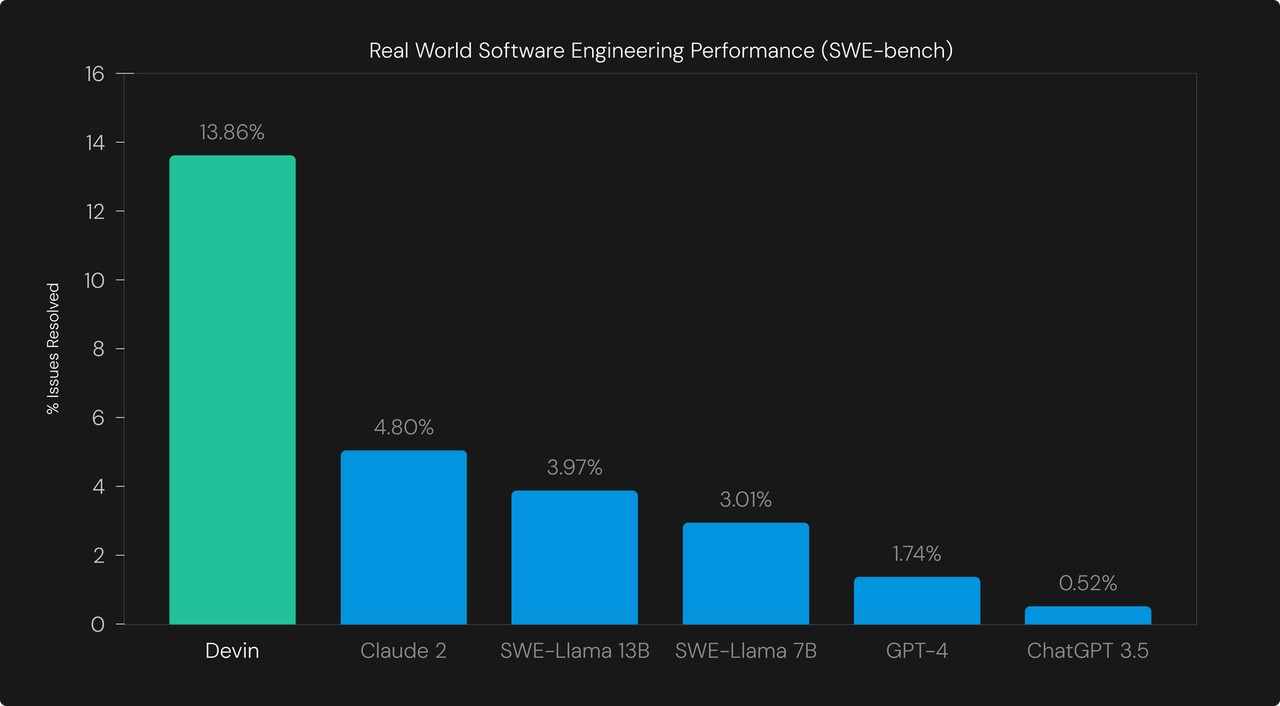
Cognition’s original benchmark chart shows historical results with assisted baselines. It is reproduced without redrawing; the conditions differ from today’s agent evaluations.
These results illustrate the early development of repository-navigation and debugging agents; they should not be used as a present-day leaderboard comparison.
Devin Fusion performance in 2026
The following Coding Agent Index 1.5 results are displayed by Cognition and attributed to independent testing by Artificial Analysis. Scores refer to agent configurations, and costs refer to complete benchmark runs, not per-token API pricing.
| Configuration | Score | Cost/run | Cost reduction |
|---|---|---|---|
| Claude Code + Fable 5.1 | 62.2 | $12.36 | Baseline |
| Devin Fusion + Fable 5.1 + SWE-2 | 61.7 | $7.90 | 36.1% |
| Codex + Astra 6 | 61.6 | $7.47 | Baseline |
| Devin Fusion + Astra 6 + SWE-2 | 58.9 | $4.54 | 39.2% |
The published Fusion results attribute the Coding Agent Index 1.5 measurements to Artificial Analysis. These are reported external results, not tests performed for this article. The product summary does not specify a complete reproducible environment, run budget or repetition count, so the table supports a limited cost–score comparison rather than a universal performance ranking.
The Fable 5.1 pairing cuts reported cost by 36.1% with a 0.5-point score decrease; the Astra 6 pairing cuts cost by 39.2% with a 2.7-point decrease. Developers can separately access Claude Fable 5.1 API in CometAPI and GPT-6 Astra API in CometAPI. Those API routes are distinct from the tested agent configurations and do not inherit their benchmark scores.
Practical evaluation metrics
- Task completion rate and merged PR rate
- Agent expenditure per accepted change
- Human review time and correction frequency
- Test success rate and post-merge regressions
- End-to-end lead time from issue to deployment
Benchmark scores vary by model, task, tool access, time limit, and evaluation setup. Teams should also track accepted changes, review time, cost per accepted change, and post-merge regressions.
Devin AI vs Claude Code vs Codex
| Dimension | Devin AI | Claude Code | OpenAI Codex |
|---|---|---|---|
| Positioning | Engineering agent platform | Agentic coding assistant | Coding agent |
| Code and tests | Yes | Yes | Yes |
| Pull requests | Yes | Yes | Yes |
| Model options | CLI model selection | Mainly Anthropic | Mainly OpenAI |
| Notable benefit | Delegated tickets | Developer-directed coding | OpenAI coding tooling |
| Consideration | Review and agent cost | Usage and oversight | Execution controls and cost |
Devin AI advantages
Devin fits organizations that delegate bounded issues and collect reviewable changes through hosted engineering processes.
Interactive coding workflows
Claude Code and Codex are often better suited to highly interactive coding, iterative implementation, debugging, and close developer direction.
Team selection criteria
Use the same repository tasks and quality gates when evaluating tools. Select on merged-change quality, review burden, cost and lead time rather than a single leaderboard score.
How Much Does Devin AI Cost in 2026?
Cognition revised self-service pricing in April 2026. Plans distinguish included entitlements from metered usage, and actual spend depends on activity.
| Plan | Monthly starting price | Audience | Billing approach |
|---|---|---|---|
| Free | $0 | Evaluation | Limited included access |
| Pro | $20 | Individuals | Subscription with quota |
| Max | $200 | Heavy individual users | Larger included quota |
| Teams | $80 minimum; $40/full developer seat | Engineering teams | Monthly minimum plus per-seat pricing |
| Enterprise | Custom | Large organizations | Contract and ACU billing |
The Teams plan has an $80 monthly minimum, with each full developer seat costing $40 per month. Seat charges count toward this minimum rather than always being added on top of it. For example, two full seats cost $80/month, while three cost $120/month. Free flex seats are also available, with their usage drawn from shared on-demand credits.
According to Cognition's Enterprise billing documentation, Enterprise customers are charged in Agent Compute Units (ACUs) at contract-specific rates. In contrast, self-service plans use included quotas and dollar-denominated charges for additional usage. Actual costs depend on model selection, task complexity, and consumption.
Total cost drivers
- Agent execution time and retries
- Frontier-model versus Fusion configuration
- Human correction and review time
- Testing infrastructure, CI/CD and monitoring
How to Deploy Devin AI: Step-by-Step Guide
Devin offers several ways to start or supervise work: Cloud, Desktop, CLI, @Devin in Slack or Microsoft Teams, automations, and Review. These are interfaces and workflows rather than interchangeable hosting models. Devin Mobile is another access point: its official page currently offers a waitlist for early access, with sessions running in the cloud. The guide below focuses on repository setup for Cloud and local CLI workflows. Local CLI execution does not imply local hosting of all underlying AI services. See the official product overview and workflow documentation.
Step 1: Create a Devin account
Visit Devin’s official site and select the available plan that fits the pilot. Define authorization and approval responsibilities before connecting production assets.
Step 2: Connect a Git repository
In Settings > Connections, connect your source-control provider and select the repository Devin may access. Enterprise administrators must also grant the organization repository access. Follow the official environment setup procedure, and confirm Devin can clone the selected repository before assigning a change.
Step 3: Prepare the development environment
Supply installation, build, test, and environment setup instructions. A conventional Python example is:
python -m venv .venv
source .venv/bin/activate
python -m pip install -r requirements.txt
python -m pytest tests/ -q
These are sample project commands, not required Devin service commands. Windows activation syntax differs.
Step 4: Give Devin a bounded task
Repository: example-org/customer-api
Task: Fix the incorrect HTTP status for a missing customer.
Requirements:
1. Find the endpoint and error handler.
2. Return 404 for missing records.
3. Preserve successful responses.
4. Add regression tests.
5. Run relevant tests.
6. Prepare a PR with a change summary.
Constraints: Do not modify the schema, credentials, or production deployment.
Completion: A reviewed PR with passing tests.
Step 5: Review the changes
Inspect the diff, test output, dependency updates, and assumptions. Apply the same lint, integration, security, and review checks used for human-authored pull requests.
Step 6: Validate the PR and prepare a release
name: Validate Application
on:
  pull_request:
    branches: [main]
permissions:
  contents: read
jobs:
  test:
    runs-on: ubuntu-latest
    steps:
      - uses: actions/checkout@v4
      - uses: actions/setup-python@v5
        with:
          python-version: "3.12"
      - run: pip install -r requirements.txt
      - run: pytest tests/ -q
This sample validates a Python PR; it does not perform production deployment. Use a separately approved release stage for production deployments, with observability and rollback provisions.
How to Install and Use Devin CLI Locally
Devin CLI works with the local repository and tools while using supported Devin services. It should not be described as a self-hosted release of Devin’s proprietary model weights.
Review scripts and organization policy before executing remote installers.
Step 1: Install Devin CLI
Install Devin CLI on macOS or Linux:
curl -fsSL https://cli.devin.ai/install.sh | bash
Step 2: Start a local session
cd ~/projects/my-app
devin
Complete authentication when prompted.
Step 3: Plan before editing
/plan
Review authentication and propose a minimal expired-session fix.
Do not edit files until the plan is agreed.
The /ask mode may also help with read-only exploration.
Step 4: Run tests and inspect changes
Implement the approved plan, execute tests, and inspect git diff. Select permission and approval controls based on the risk of the repository.
Step 5: Hand off to Devin Cloud
/handoff open a PR
The Devin CLI documentation covers installation, authentication and cloud handoff. A successful handoff creates a cloud session; review its status before closing local work.
Which Devin AI Deployment Option Should You Choose?
| Dimension | Devin Cloud | Devin CLI | Custom API agent |
|---|---|---|---|
| Location | Hosted | Local tools | Developer-defined |
| Repository setup | Integration | Local repository | Custom |
| Orchestration | Managed | CLI runtime | Developer-built |
| Infrastructure | Low overhead | Low–moderate | Moderate–high |
| Model selection | Platform dependent | CLI supported | Provider dependent |
| Long-running work | Strong | Cloud handoff | Custom orchestration |
| Model self-hosting | No general weights | No general weights | Possible for open models |
| Best fit | Team delegation | Interactive local work | Specialized workflows |
| Core capability | Managed engineering agent | Interactive agent with local tools | Model access combined with developer-built tools |
| Code execution | Managed execution environment | Local commands within granted permissions | Execution sandbox and tool integration must be built |
| Cost | Subscription and usage | Plan entitlements and usage | API usage plus infrastructure and maintenance |
For strict isolation needs, confirm enterprise deployment arrangements with Cognition rather than assuming a particular subscription includes fully self-hosted execution.
Can CometAPI Replace or Complement Devin AI?
Devin is a managed engineering agent platform; CometAPI provides API access to supported AI models for building custom applications. They are separate products. Developers can build specialized code-review or repository-documentation services using model APIs without reproducing Devin’s proprietary runtime.
Developers can access Claude Fable 5 API for the example below. This is a model request that returns a review suggestion; it does not inspect a repository, run tests or create a pull request by itself.
Step 1: Obtain a CometAPI key
Create credentials and store them in environment variables, not source code.
Step 2: Install the Python client
python -m pip install --upgrade openai
export COMETAPI_KEY="your_api_key"
Step 3: Request a code review
import os
from openai import OpenAI

client = OpenAI(
    api_key=os.environ["COMETAPI_KEY"],
    base_url="https://api.cometapi.com/v1",
)

response = client.chat.completions.create(
    model="claude-fable-5",
    messages=[
        {"role": "system", "content": "You review code and propose minimal fixes."},
        {"role": "user", "content": "Review: def divide(a,b): return a/b; suggest tests."},
    ],
)
print(response.choices[0].message.content)
The example uses the documented claude-fable-5 model ID and OpenAI-compatible chat-completions route. It requires an enabled CometAPI account, a valid key and available credit. A successful request prints review text; inspect that text and write and run tests separately. An autonomous agent additionally needs retrieval, execution tools, persistent state and permission controls.
CometAPI supports both OpenAI-compatible Chat Completions and Responses APIs. Chat Completions uses messages, while Responses supports multimodal input, reasoning, structured output, streaming, web search, and function tools. Exact support depends on the selected model.
What Are the Limitations of Devin AI?
Task Ambiguity and Scope Control
An agent can produce plausible code while misunderstanding the intended business behavior. Broad assignments also encourage repeated attempts, scope expansion, and changes that are difficult to review. Define acceptance criteria, provide relevant context, and divide large tasks into small, testable work packages. Set file and time boundaries, inspect progress at agreed checkpoints, and stop to clarify requirements when the requested outcome remains ambiguous.
Production security
Agents may interact with files, secrets, services, and commands. Apply least privilege, isolation, and approval checkpoints.
Cost variability
Session duration, retries, model choice, and validation affect spend. Set budgets and monitor outcomes.
Human accountability
Software teams remain responsible for architecture, security, compliance, business correctness and releases.
Conclusion
Devin AI has evolved into a software engineering platform spanning hosted agents, a local CLI, collaborative workflows and multi-model cost optimization. Its clearest value lies in bounded, verifiable tasks such as bug fixes, migrations, testing and pull-request preparation.
Fusion results suggest that model orchestration can improve cost efficiency, but savings do not remove testing and review. Start with a limited repository pilot, measure accepted task outcomes, and expand only when engineering throughput improves. Developers who need custom automation can separately explore CometAPI-supported models.
FAQ
Why can Devin not see a connected repository?
A connection alone may not grant the target organization access. For Enterprise setups, an administrator must assign repositories to the organization before environment configuration. Check the selected organization and repository permissions, then confirm that a new session can clone the repository. The environment setup guide separates these access steps.
Will a Devin session change the next session’s environment?
Session changes do not automatically update the saved environment snapshot. Treat an ad hoc installation as temporary until the environment configuration is updated and a new snapshot is built. If repeated sessions fail on the same missing dependency, fix the blueprint rather than repeatedly installing it in task prompts.
How should teams measure a Devin pilot with failed tasks?
Use all assigned tasks as the denominator, including failures and abandoned attempts. Track accepted changes, total agent spend and human review minutes separately. Compare tasks of similar difficulty, and record why each attempt failed; excluding unsuccessful sessions can make cost per accepted change look artificially low.
How can a custom API review avoid exposing private code?
Send the smallest code excerpt that answers the review question, remove credentials and personal data, and enforce repository access checks before retrieval. Confirm the selected provider’s data-handling terms before sending proprietary code. A custom application must enforce these controls itself; a model API key does not provide repository authorization.