Technical specifications of MiniMax M3.1-Flash-Preview
| Item | MiniMax M3.1-Flash-Preview |
|---|---|
| Model ID | MiniMax-M3.1-Flash-Preview |
| Model family | MiniMax M3.1 series, Preview coding model |
| Release status | Preview; announced September 27, 2026 |
| Primary focus | Everyday software development, from bug fixes to complete feature work |
| Context window | 1,000,000 tokens |
| Input modalities | Text, image, and video |
| Output modality | Text |
| Reasoning control | reasoning_effort: low, medium, high, xhigh, max |
| Thinking behavior | Adaptive thinking is required; public documentation reviewed does not support disabling thinking |
| Maximum output | Not separately published in the public materials reviewed |
| Parameter count | Not publicly disclosed |
| Open weights | No public checkpoint/model repository identified |
MiniMax announced M3.1-Flash-Preview for MiniMax Code on September 27, 2026, positioning it around everyday development tasks such as bug fixing and full feature delivery. Current public coverage consistently identifies a 1M-token context window and adjustable reasoning effort, while noting that a standalone benchmark table and per-token price have not been published.
What is MiniMax M3.1-Flash?
MiniMax M3.1-Flash-Preview is a Preview coding-oriented text model designed for iterative software-development workflows rather than only code generation. MiniMax describes the workflow as spanning requirement understanding, problem localization, implementation, regression testing, and verification of changes against existing functionality.
Its distinguishing documented controls are its long context and five-level reasoning-effort ladder. The available levels are low, medium, high, xhigh, and max, allowing developers to trade reasoning depth and latency according to task complexity.
Main features of MiniMax M3.1-Flash-Preview
- 1M-token context: The published model description gives the Preview model a million-token context window, making it suitable for large repositories, long specifications, and extended coding-agent sessions.
- Native multimodal input: Public model descriptions list text, image, and video as inputs, while the model returns text.
- Five reasoning-effort levels:
low,medium,high,xhigh, andmaxprovide finer control over reasoning depth than a simple on/off thinking switch. - End-to-end coding workflow: MiniMax specifically positions the model for bug localization, implementation, boundary-case handling, regression-test completion, and validation of changes.
- Preview-oriented deployment: The initial public rollout is through MiniMax Code and Token Plan rather than a fully documented standalone pay-as-you-go model offering.
- Coding-agent fit: The model is intended for repeated development interactions where repository context, tool output, tests, and iterative corrections matter more than one-shot code generation.
MiniMax M3.1-Flash-Preview vs other MiniMax coding models
| Model | Focus | Context | Public benchmark data | Access/status |
|---|---|---|---|---|
| M3.1-Flash-Preview | Everyday coding, iterative development | 1M | Not yet published | Preview; MiniMax Code / Token Plan |
| M3 | Frontier coding + agentic work, native multimodality | Up to 1M | Published by MiniMax | API, Token Plan, MiniMax Code |
| M2.7 | Software engineering + broad agent/productivity work | Not used here as a copied M3.1 specification | Published by MiniMax | API, Token Plan, Agent |
M3 is the more thoroughly documented reference point: MiniMax publishes its architecture, coding/agent evaluation methodology, and API availability. M2.7 likewise has a public benchmark record and API integration. M3.1-Flash-Preview is newer and currently has a narrower public documentation footprint, so comparisons should focus on documented positioning rather than claiming a benchmark winner. 4
Representative use cases
- Repository-scale bug fixing: Give the model a large codebase, issue description, logs, and tests and use its long context to preserve relevant project context.
- Feature implementation: Use the model to move from a natural-language requirement through code changes and regression testing.
- Code review and remediation: Ask it to identify boundary cases, propose patches, and verify that changes do not break existing behavior.
- Multimodal debugging: Supply screenshots, diagrams, or video alongside textual requirements when visual context is part of the engineering problem.
- Long-running coding-agent sessions: Use the large context window for specifications, repository files, terminal output, and iterative test results.
- Speed-sensitive development: Select a lower reasoning-effort level for routine edits and increase effort for more complex multi-step changes.
How to access MiniMax M3.1-Flash-Preview API
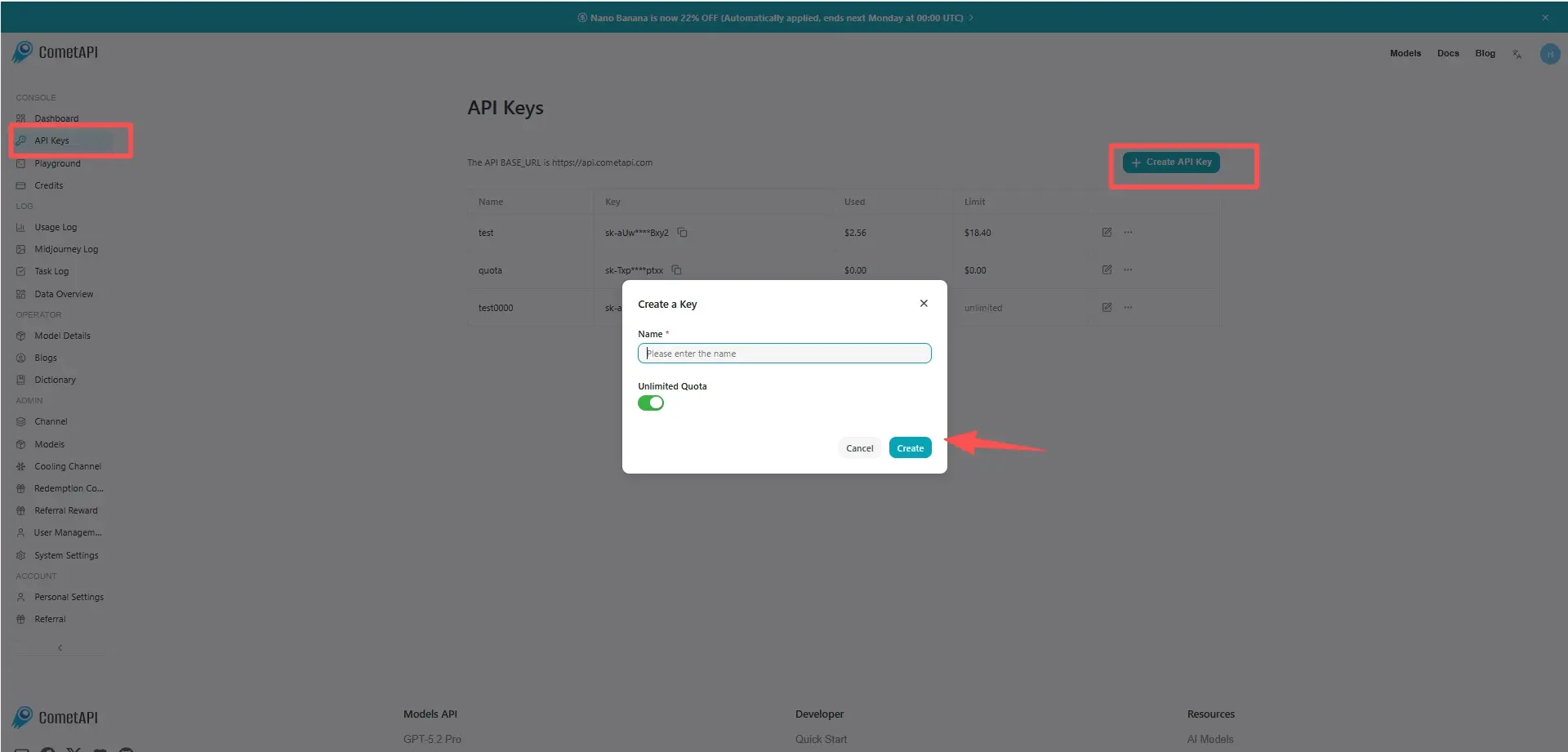
Step 1: Sign Up for API Key
Log in to cometapi.com. If you are not our user yet, please register first. Sign into your CometAPI console. Get the access credential API key of the interface. Click “Add Token” at the API token in the personal center, get the token key: sk-xxxxx and submit.
Step 2: Send Requests to MiniMax M3.1-Flash-Preview API
Select the “minimax-m3.1-flash-preview” endpoint to send the API request and set the request body. The request method and request body are obtained from our website API doc. Our website also provides Apifox test for your convenience. Replace <YOUR_API_KEY> with your actual CometAPI key from your account. base url is Chat Completions .
Insert your question or request into the content field—this is what the model will respond to . Process the API response to get the generated answer.
Step 3: Retrieve and Verify Results
Process the API response to get the generated answer. After processing, the API responds with the task status and output data.