Technical Specifications of Grok Imagine Image 2.0
| Item | Grok Imagine Image 2.0 |
|---|---|
| Model ID | grok-imagine-image-2.0 |
| Provider | xAI |
| Model family | Grok Imagine |
| Model type | Image generation and editing |
| Input modalities | Text, Image |
| Output modality | Image |
| Generation endpoint | POST /v1/images/generations |
| Editing endpoint | POST /v1/images/edits |
| Output resolutions | 1K, 2K |
| Quality modes | Low, Medium |
| Default quality | Medium |
| Aspect ratios | 1:1, 3:4, 4:3, 9:16, 16:9, 2:3, 3:2, 9:19.5, 19.5:9, 9:20, 20:9, 1:2, 2:1, auto |
| Images per request | Up to 10 |
| Reference images | Supported for image editing |
| Response formats | URL, Base64 JSON |
| API compatibility | OpenAI-compatible image API |
| Release date | August 7, 2026 |
| API status | Generally available |
xAI's official documentation confirms that grok-imagine-image-2.0 supports both image generation and editing, with 1K/2K resolution and configurable aspect ratio and quality.
What Is Grok Imagine Image 2.0?
Grok Imagine Image 2.0 is xAI's latest image-generation and editing model in the Grok Imagine family, designed around precise instruction following, typography, layout control, and preservation of reference-image characteristics.
xAI describes Image 2.0 as being designed for "real creative work." Its major improvement is not simply higher image quality; the model is specifically optimized to follow detailed prompts, maintain visual elements during iterative edits, and handle compositions containing typography and multiple structured elements.
The model became generally available on August 7, 2026, initially as the new Quality Mode on Grok Imagine and subsequently through the API.
Main Features of Grok Imagine Image 2.0
Precise Prompt Following
Grok Imagine Image 2.0 is designed to preserve detailed instructions across complex image-generation prompts. This is particularly useful when a prompt specifies multiple objects, spatial relationships, visual styles, or compositional constraints.
Strong Typography and Layout Generation
One of the model's explicit design goals is improved handling of typography and structured layouts. xAI highlights its ability to plan typography and layout for dense, multi-part visuals while maintaining readable small text.
This makes the model particularly relevant to:
- Posters
- Advertisements
- Infographics
- Product packaging
- Social-media graphics
- Presentation artwork
- Marketing banners
Image-to-Image Editing
The model supports image editing through the /v1/images/edits endpoint. Developers can provide an existing image and an editing instruction, such as changing its artistic style or adding/removing visual elements.
Reference-Image Preservation
Image 2.0 is designed to preserve important elements from reference images across generations and edits. This is useful for maintaining character appearance, product identity, composition, or visual style during iterative workflows.
1K and 2K Output
The API supports both 1K and 2K output resolutions. Developers can select the resolution according to whether they need faster drafts or higher-detail production assets.
Flexible Aspect Ratios
Grok Imagine Image 2.0 supports a broad range of aspect ratios, including square, portrait, landscape, cinematic, and mobile-oriented formats. This allows the same generation API to serve different publishing channels without forcing every output into a 1:1 canvas.
Batch Image Generation
The API can generate multiple images in a single request, with the official Imagine documentation supporting up to 10 images per request. This is useful for generating creative variations for advertising, product photography, thumbnails, and concept exploration.
Benchmark Performance of Grok Imagine Image 2.0
xAI reports that Imagine Image 2.0 ranks second on both the Text-to-Image and Image Edit Arena leaderboards, based on leaderboard data as of August 7, 2026. These are external arena evaluations cited by xAI, not internally constructed benchmark scores.
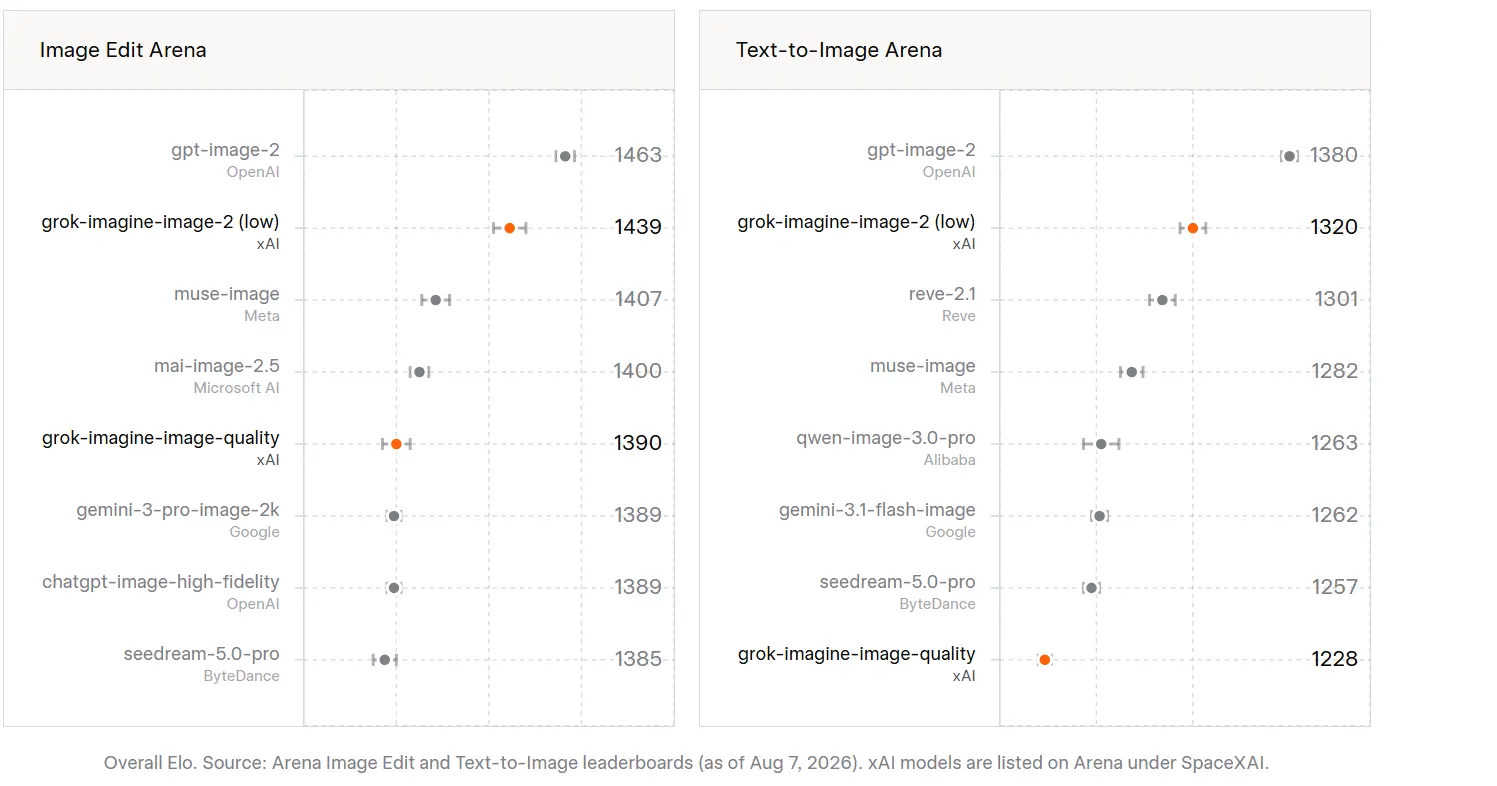
Because these rankings can change over time, they should be presented with the date attached rather than as a permanent model ranking.
Grok Imagine Image 2.0 vs Grok Imagine Image
| Feature | Grok Imagine Image 2.0 | Grok Imagine Image |
|---|---|---|
| Model ID | grok-imagine-image-2.0 | grok-imagine-image |
| Input | Text + Image | Text + Image |
| Output | Image | Image |
| 1K | Yes | Yes |
| 2K | Yes | Yes |
| Quality control | Low / Medium | Not documented as the same 2.0 quality control |
| Typography | Improved | Earlier generation |
| Layout following | Improved | Earlier generation |
| Image editing | Yes | Yes |
| Price | $0.04–$0.08/output image depending on quality/resolution | $0.02/image |
| Positioning | New-generation creative model | Previous Grok Imagine generation |
The older grok-imagine-image currently has a listed price of $0.02 per generated image, while Image 2.0 uses resolution/quality-dependent pricing.
Grok Imagine Image 2.0 vs GPT Image 2.0
| Aspect | Grok Imagine Image 2.0 | GPT Image 2 / ChatGPT Images 2.0 |
|---|---|---|
| Release | Aug 7, 2026 | Apr 21, 2026 |
| Core Focus | Precise editing + real-world useful outputs (infographics, product shots, UI mockups, game assets, storyboards) | High-fidelity generation + reasoning + complex multi-image consistency |
| Arena Ranking (Aug 2026) | #2 world in both text-to-image and image editing | #1 world in both text-to-image and image editing |
| Text Rendering | Strong improvement (crisp, layout-aware typography) | Best-in-class (especially small text, non-Latin scripts like Japanese/Korean/Chinese/Hindi/Bengali) |
| Multi-image / Consistency | Up to 5 reference images; templates for products/headshots/etc. | Up to 8 consistent images from one prompt (with thinking mode); strong character/object continuity |
| Special Features | Smart resize/outpainting, native multi-ref compositing, design-oriented planning | “Thinking” mode (reasons before generating, can search the web, create visual explainers from files) |
| Resolution / Ratios | 1K/2K common; flexible ratios via Smart Resize | Up to 2K (API higher options in some cases); wide range (e.g., 3:1 to 1:3) |
| Strengths | Precise local edits, product/reference work, practical creative workflows | Prompt adherence, text-heavy designs, multi-scene consistency, reasoning + web knowledge |
The two models target a similar category but emphasize somewhat different strengths.
Grok Imagine Image 2.0 is particularly attractive when the workflow depends on precise prompt adherence, poster-style layouts, typography, reference-image preservation, and iterative image editing.
GPT Image is better considered when the application is already built around OpenAI's broader multimodal ecosystem and needs image generation as part of a larger GPT workflow.
For a dedicated creative-image API, Grok Imagine Image 2.0's combination of generation + editing + 2K output + configurable quality + broad aspect-ratio support makes it a strong option for production creative pipelines.
Grok Imagine Image 2.0 vs Google Imagen
| Capability | Grok Imagine Image 2.0 | Google Imagen |
|---|---|---|
| Text-to-image | Yes | Yes |
| Image editing | Yes | Yes, depending on model/API |
| 2K output | Yes | Model-dependent |
| Typography/layout focus | Strong | Strong |
| Reference-image workflows | Yes | Model-dependent |
| OpenAI-compatible API | Yes | No |
| Aspect-ratio control | Extensive | Model-dependent |
| Multi-image generation | Up to 10/request | Model-dependent |
Grok Imagine Image 2.0 has a practical integration advantage for developers already using OpenAI-compatible SDKs because xAI exposes the image-generation endpoint using an OpenAI-compatible interface.
Use Cases for Grok Imagine Image 2.0
1. Marketing and Advertising Creative
Generate campaign artwork, promotional banners, product advertisements, and social-media graphics while specifying exact visual hierarchy and text placement.
2. Poster and Infographic Generation
The model's emphasis on typography and layout makes it suitable for posters, charts, event graphics, and information-dense visual assets.
3. Product Visualization
Developers can combine product reference images with instructions to create new environments, compositions, or marketing scenes while preserving the important visual characteristics of the product.
4. Image Restyling
The editing API can transform an existing image into a different artistic style without requiring the entire image to be regenerated from scratch.
5. Social Media Content
Its broad aspect-ratio support is useful when generating assets for mobile feeds, stories, landscape posts, thumbnails, and other platform-specific formats.
6. Creative Iteration
Because image editing can operate on an existing result, teams can use a generate → review → edit → refine workflow rather than repeatedly starting from a blank prompt.
How to Use Grok Imagine Image 2.0 API on CometAPI
For developers already using multiple AI image models, CometAPI can provide a unified access layer so that Grok Imagine Image 2.0 can be integrated into an existing application without creating a completely separate model-management workflow.
The basic integration flow is:
- Create or log in to your CometAPI account.
- Obtain a CometAPI API key.
- Select
grok-imagine-image-2.0. - Send a text prompt or image-editing request through the supported CometAPI image endpoint.
- Store the returned image URL or image data.
- Compare the result with other image models available through the same platform.