
You pass a user's message to GPT API, and instead of a natural-language answer, the model hands you back a structured JSON object telling you exactly which function to call and with what arguments. That's function calling — and it changes the kind of applications you can build with LLMs.
Most developers hear "function calling" and assume the model is executing code on their behalf. It isn't.
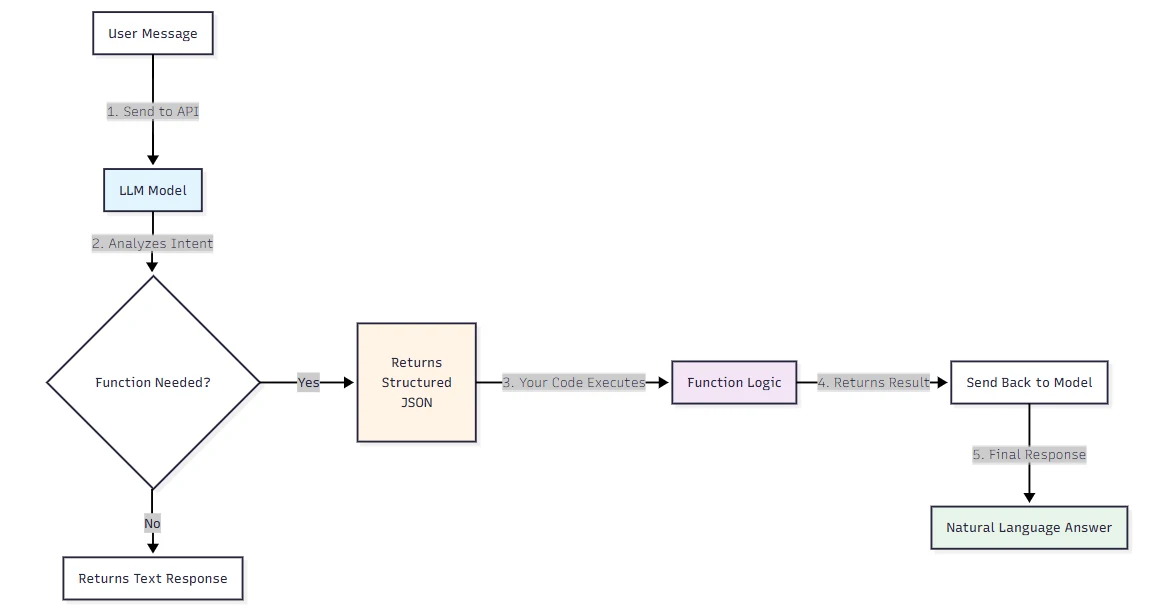
When using function calling, the LLM itself does not execute the function. Instead, it identifies the appropriate function, gathers all the required parameters, and provides the information in a structured JSON format.
Your application is still responsible for running the actual logic. The model is just telling you what to run and with which inputs.
That distinction matters more than it sounds, and it shapes everything from how you architect your integration to how you think about security.
What Function Calling Actually Is — and What People Keep Getting Wrong
Function calling (also known as tool calling) provides a powerful and flexible way for OpenAI models to interface with external systems and access data outside their training data.
The naming is the first source of confusion. People think the model is executing something. It isn't.
There are many names and explanations for function calling, yet it all boils down to one statement: "function calling is a type of structured output capability of a large language model." LLMs don't call any functions themselves; they suggest which function you should call from pre-defined functions which you provide to the LLM in a prompt.
The second confusion is around the old API surface.
The functions and function_call parameters have been deprecated with the release of the 2023-12-01-preview version of the API. The replacement for functions is the tools parameter.
If you're following a tutorial that uses the old functions parameter, you're already working with deprecated syntax. Use tools and tool_choice instead.
A function is a specific kind of tool, defined by a JSON schema. A function definition allows the model to pass data to your application, where your code can access data or take actions suggested by the model.
That schema is what gives function calling its reliability advantage over plain prompting — you're not hoping the model formats output correctly, you're enforcing structure at the API level.
How Function Calling Works in the OpenAI API — Step by Step
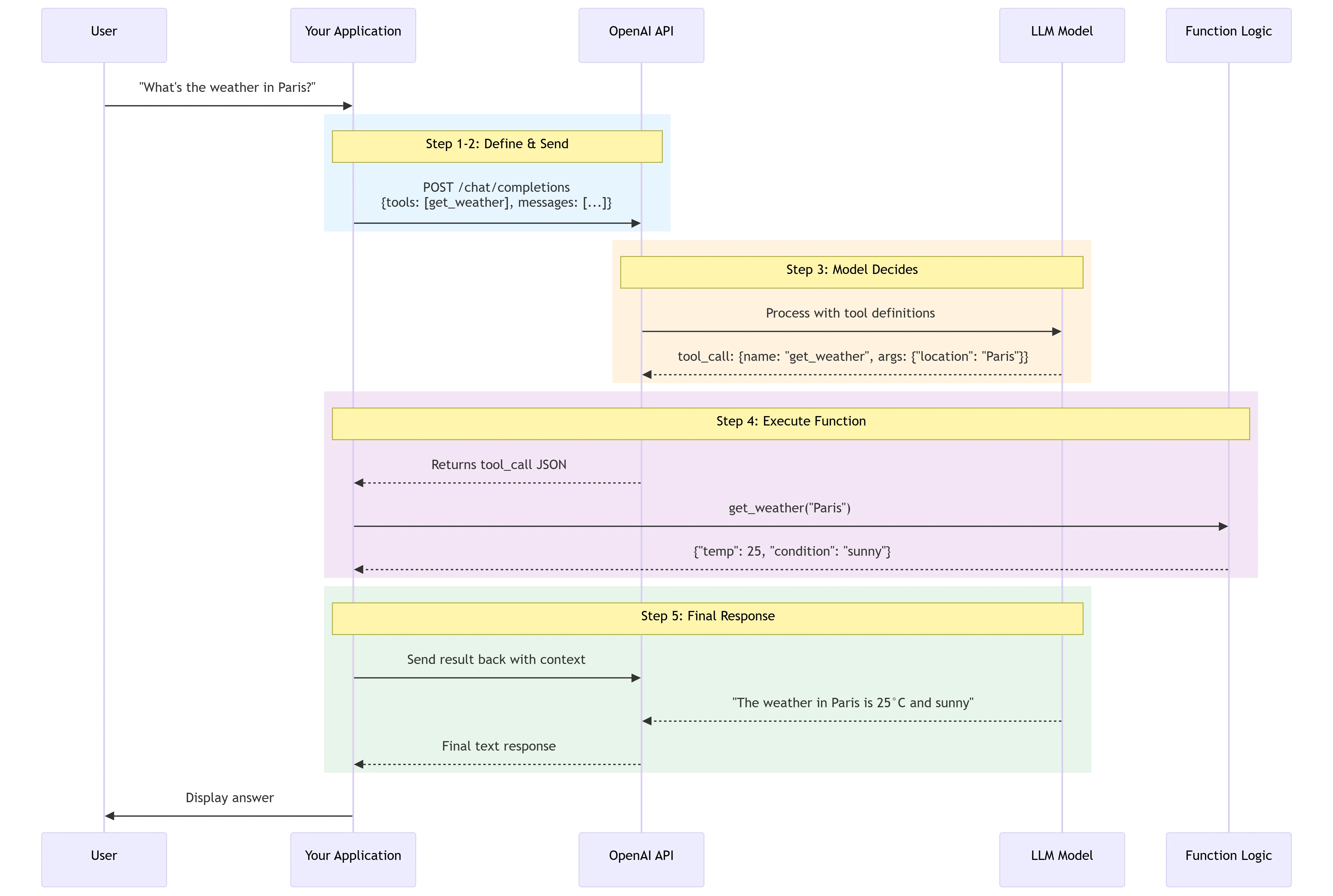
Tool calling is a multi-step conversation between your application and a model via the OpenAI API. The tool calling flow has five high-level steps: make a request to the model with tools it could call...
Here's what each of those steps actually looks like in practice.
Step 1: Define your function schemas. You describe each available function as a JSON object inside the tools parameter. The schema includes the function name, a natural-language description the model uses to decide when to invoke it, and a parameters block that follows JSON Schema conventions.
The more detailed your description is — in terms of the situations in which it can and should call the function — the better. Note, however, that function descriptions are part of the prompt and so consume tokens all the same.
Step 2: Send the request. You call the Chat Completions API with the user's message and your tools list. The model sees both.
Step 3: The model decides whether to call a function.
A function call refers to a special kind of response you can get from the model if it examines a prompt and determines that, in order to follow the instructions, it needs to call one of the tools available to it. If the model receives a prompt like "what is the weather in Paris?" it could respond with a tool call for the get_weather tool, with Paris as the location argument.
Step 4: Your code executes the function. You parse the model's response, extract the function name and arguments, and run the actual code in your runtime. The API returned structured JSON — you decide what to do with it.
Step 5: Send the result back.
You then send all of the tool definition, the original prompt, the model's tool call, and the tool call output back to the model to finally receive a text response
— something like "The weather in Paris today is 25°C."
One detail most tutorials skip:
when you set strict: true in your function definition, Structured Outputs guarantees that the arguments generated by the model for a function call exactly match the JSON Schema you provided.
Setting strict to true will ensure function calls reliably adhere to the function schema, instead of being best effort. OpenAI recommends always enabling strict mode.
Always. There's no good reason not to.
There's also parallel function calling to know about.
Depending on the user query, the model will invoke parallel function calling if using the latest models released on or after November 6, 2023.
This means a single request like "what's the weather in London and Tokyo?" can trigger two simultaneous tool calls rather than sequentially chaining them.
Function Calling Real-World Use Cases
The weather example is everywhere because it's clean. Real production use cases are messier and more interesting.
Customer support pipelines with live data
Function calling is useful for a large number of use cases — for instance, an AI assistant that needs to fetch the latest customer data from an internal system when a user asks "what are my recent orders?" before it can generate a response.
The model figures out intent, extracts the customer ID from context, and calls your CRM's internal API. No brittle regex. No prompt templates fragile enough to break on a missing comma.
Structured data extraction at scale
A data extraction pipeline that fetches raw text, converts it to structured data, and saves it in a database is another strong fit. You get consistent schemas across thousands of documents without hand-tuning parsing logic per document type.
Natural language to API translation
LLM-powered solutions for extracting and tagging data, applications that can help convert natural language to API calls or valid database queries, and conversational knowledge retrieval engines that interact with a knowledge base— all of these benefit from function calling's guarantee on output format. When you need the output to drive downstream systems, you can't tolerate variability.
Agentic workflows with multiple tools
For developers, function calling enables real-time data access to overcome training cutoffs by fetching live stock prices, weather, or recent database entries. It also enables action execution — transforming the LLM from a passive observer to an active participant that modifies state, like sending emails, updating CRMs, or deploying code.
The key distinction from a plain chatbot: the model isn't just generating text, it's orchestrating actual operations across your systems.
Function Calling Best Practices — What Developers Usually Get Wrong
This is the section most tutorials skip entirely, which is why teams end up debugging weird production failures at 2 AM.
Writing descriptions that are too vague. The model uses your function description to decide when to call it. If your description is generic — something like "processes user requests" — the model has no reliable signal for when to trigger it. Be specific about the trigger condition and the expected input shape. Think of the description as a contract, not a label.
Exposing too many functions at once
Function descriptions can consume a significant number of tokens in the input prompt.
Loading definitions for 50+ tools into the system prompt creates two problems: cost and latency, since tool definitions consume input tokens; and accuracy degradation, since as the number of tool options increases, the model's ability to select the correct one decreases.
Start with the smallest set of functions your use case actually needs.
Assuming the model won't hallucinate parameters. It will.
The model may hallucinate parameters
— especially for optional fields that aren't clearly bounded by an enum. This is exactly why strict: true matters: it removes the model's ability to invent fields outside your schema.
Not handling the multi-turn loop. Developers often build the happy path — user asks, model calls function, done.
The models may generate function calls that don't match the schema you defined or try to call a function you didn't include. If the model is generating unexpected function calls, try including a sentence in the system message that says "Only use the functions you have been provided with."
Build for the edge cases.
Skipping the confirmation step before write operations.
Be aware of the real-world impact of function calls that you plan to execute, especially those that trigger actions such as executing code, updating databases, or sending notifications. For functions that take actions, implementing a step where the user confirms the action before execution is strongly recommended.
If a function call can delete data, send money, or modify external state, a human should approve it first.
Security and Reliability Considerations
Function calling expands what an LLM can do. It also expands what an attacker can make it do.
The primary threat here is prompt injection.
The end goals of prompt injections vary but can include exfiltrating private data via downstream tool calls, taking misaligned actions, or otherwise changing model behavior in an unintended way.
When your function calls can send emails, query databases, or trigger webhooks, an injection attack isn't just a chatbot going off-script — it's a potential breach.
As AI systems move beyond chat and start calling tools and taking actions, prompt injection becomes a much more serious problem. A malicious instruction hidden in a webpage, document, or external tool can try to override system behavior, expose sensitive information, or trigger actions the model should never take.
The mitigation strategy has a few concrete layers.
Design workflows so untrusted data never directly drives agent behavior. Extract only specific structured fields — such as enums or validated JSON — from external inputs to limit injection risk from flowing between nodes.
On top of that,
always verify the function calls generated by the model. This includes checking the parameters, the function being called, and ensuring that the call aligns with the intended action.
One uncomfortable truth:
"Prompt injection, much like scams and social engineering on the web, is unlikely to ever be fully 'solved.'"
That's OpenAI's own assessment. The practical implication is that you shouldn't architect agentic function-calling systems on the assumption that the model will always behave as intended. Defense in depth — validation, scoped permissions, human-in-the-loop for destructive operations — is the only sensible posture.
Function Calling vs. Prompt Engineering — When to Use Which
This comparison comes up constantly. The short answer: they solve different problems, and conflating them leads to over-engineered prompts when function calling would do, or brittle function schemas when a well-crafted system prompt would be simpler.
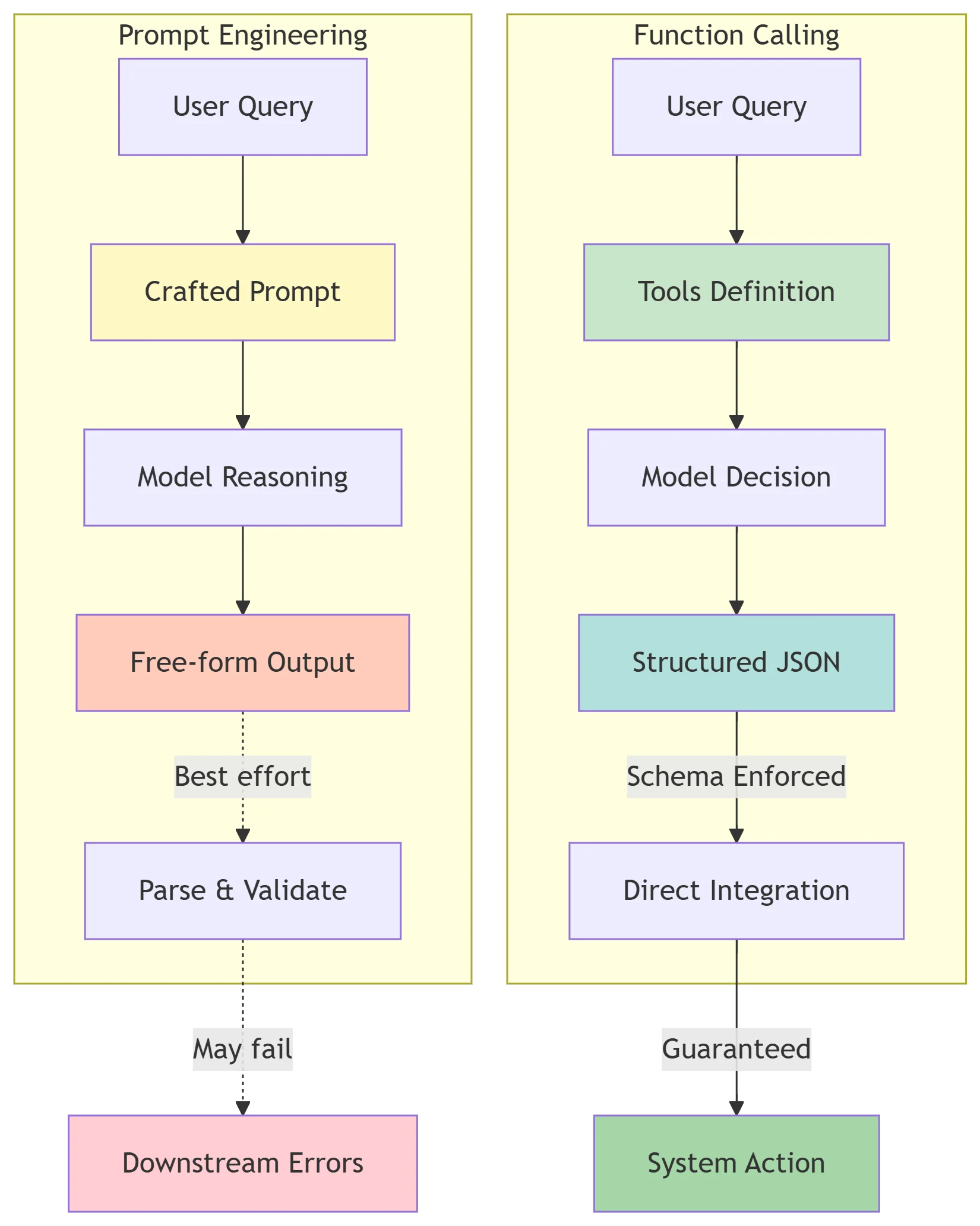
Prompt engineering involves crafting text inputs to guide the LLM's internal reasoning — asking it to "think step-by-step," for instance.
It shapes how the model reasons. Function calling, on the other hand, shapes what the model produces as output and routes it directly into your system.
Tool calling is the capability that allows the LLM to interact with external systems. While you use prompt engineering to help the model decide which tool to use, tool calling is the mechanism that actually executes the action. You likely need both, but they serve different purposes.
A key technical edge of function calling over prompt-based structured output:
tool calling is a concept baked right into the model. There's no need to waste tokens and energy trying to explain to the model that it should return a specific format.
When you craft a prompt that says "return your answer as JSON with fields X, Y, and Z," you're spending tokens on instructions the model might follow inconsistently. With function calling, the schema enforcement happens at the API level.
Function-calling APIs, now natively supported in many LLM platforms, provide a formal schema-driven interface that enables strict data validation and integration with programmatic workflows.
That's the real-world reason to choose it over prompt engineering for any data that has to flow into downstream systems: reliability isn't optional once you're in production.
| Dimension | Prompt Engineering | Function Calling |
|---|---|---|
| Primary purpose | Shape model reasoning and tone | Produce structured output for system integration |
| Output format | Free-form text (or text-shaped JSON) | Enforced JSON schema |
| Schema reliability | Best-effort; prone to drift | Guaranteed with strict: true |
| Token cost | Lower for simple outputs | Higher (function definitions add tokens) |
| When to use | Reasoning tasks, text generation, style control | Structured data extraction, API orchestration, agentic actions |
| Prompt injection exposure | Lower (no external tool execution) | Higher (function calls can trigger real-world actions) |
The practical heuristic: if the output needs to drive a downstream system — a database write, an API call, a decision branch in your code — use function calling. If the output is for a human to read, prompt engineering is usually sufficient and cheaper.
Key Takeaways
| Topic | What to Remember |
|---|---|
| What it is | The model outputs structured JSON describing which function to call — it does not execute the function |
| Current API surface | Use tools and tool_choice; the old functions and function_call parameters are deprecated |
| Strict mode | Always set strict: true in function definitions to enforce schema compliance |
| Parallel calling | Supported on models released after November 2023; one request can trigger multiple tool calls |
| Token cost | Function schemas consume input tokens; minimize the number of exposed functions |
| Security | Validate all function call outputs; never allow untrusted external content to directly drive tool calls |
| vs. Prompt Engineering | Function calling enforces output structure at the API level; prompt engineering shapes internal reasoning |
| Confirmation steps | Any function with real-world side effects (write, send, delete) should require user confirmation before execution |
If you want to experiment with function calling across different models — GPT-5.4, claude opus 4.7, gemini 3.1 pro — without maintaining separate API credentials for each, CometAPI gives you access to all of them through a single endpoint and key, which makes cross-model testing significantly less friction-heavy.
CometAPI solves the infrastructure overhead:
✅ Unified function calling syntax across 15+ models
✅ Single API key — no separate accounts for OpenAI/Anthropic/Google
✅ Automatic schema translation — write once, test everywhere
✅ Built-in cost tracking — compare token usage per model in real-time
Start testing with free credits → Get Access