Gemini 4 Carbon vs Kimi K3.1 Pro: Which Should You Choose?
Compare Gemini 4 Carbon and Kimi K3.1 Pro on specifications, benchmarks, pricing, deployment choices, and API access to choose a model for your workflow.
Gemini 4 Carbon targets cybersecurity and long-horizon engineering, but access is still being phased in. Kimi K3.1 Pro is available through Kimi’s applications and API, with a 1-million-token context window, multimodal input, and open weights. Choose Kimi as the default starting point when you need an accessible route today. Evaluate Carbon when your team has access and your workload centers on security validation or long-running engineering. At the prices cited in this article, Carbon’s introductory input and output rates match Kimi’s listed standard rates; the comparison changes if Carbon’s later pricing applies.
Key Takeaways
Kimi is available through its applications and API; Carbon access is being phased in.
Kimi is the practical default for coding, long documents, multimodal work, and self-hosting research. Carbon is worth evaluating for defensive security and long-horizon engineering.
Reviewed for clarity, source attribution and current API terminology.
Carbon reports a higher ExploitGym score, while Kimi has broader published evidence across coding, documents, science, and 3D tasks. These are separate evaluations.
Compare the official rates, cache charges, tool costs, retries, and human review time together.
Gemini 4 Carbon vs Kimi K3.1 Pro: Overview and Specifications
Carbon targets demanding engineering and defensive security work. Google announced a phased rollout to selected cyber defenders and trusted partners, rather than general developer access. That distinction matters if your project needs an API route you can deploy immediately.
Kimi is easier to map to everyday development work: understanding large repositories, analyzing documents, writing tool scripts, and completing multistep tasks. Moonshot offers Kimi K3.1 Pro through its applications and API. API access requires a funded account and remains subject to account-level rate limits.
Model Specifications and API Support
Carbon targets cybersecurity and long-running engineering tasks, while Kimi is positioned for coding, multimodal work, and knowledge tasks.
Dimension
Carbon
Kimi
Architecture and parameters
Not disclosed in the reviewed announcement
MoE; 2.8T total parameters, 104B active
Context window
Public API limit not confirmed
1,048,576 tokens
Inputs and outputs
Multimodal capabilities discussed; final public API schema unconfirmed
Text and image inputs; text output; video support depends on the service or API route
Weight access
Public weight access not mentioned in the reviewed announcement
Downloadable weights under a model-specific license
Access
Phased rollout
Applications and API; account requirements apply
Kimi’s published parameter count describes model scale, but it does not predict task quality or total serving cost.
Kimi’s model card lists text and image modalities. Kimi Code also supports video input; confirm video support and format for the API route you plan to use. Google’s announcement describes Carbon’s multimodal capabilities but does not specify a public API schema.
Long context is useful for tracing dependencies across files, but retrieval quality still matters. Keep filenames, document dates, and source locations in the input so the answer can be checked against the original material.
Gemini 4 Carbon vs Kimi K3.1 Pro: Performance
The scores below come from Google’s official release and Moonshot’s official model card. Google’s methods document identifies Artificial Analysis as the evaluator for the two terminal benchmarks and Collinear AI for CWE-bench. The table keeps the test conditions alongside each score; a dash means no matching result is reported in those sources.
Published Benchmark Results and Test Conditions
These provider-reported results come from different benchmarks and evaluation setups; they are not a controlled head-to-head comparison.
Benchmark
Carbon
Kimi
Evaluation setup
ExploitGym
54.80%
20.70%
Carbon: Antigravity, mitigations off, no internet. Kimi: Kimi Code, 6 hours per task. Google’s methods discuss 6- and 10-hour budgets without tying the reported score to one.
Kimi: 1,000-case Vision2Code subset; Claude Code with tools. Score is Voxel IoU.
OfficeQA Pro v2
—
64.4
Kimi: Claude Code; PDF corpus rendered as images.
Unless otherwise specified, Moonshot uses max reasoning, temperature 1.0, and top-p 0.95.
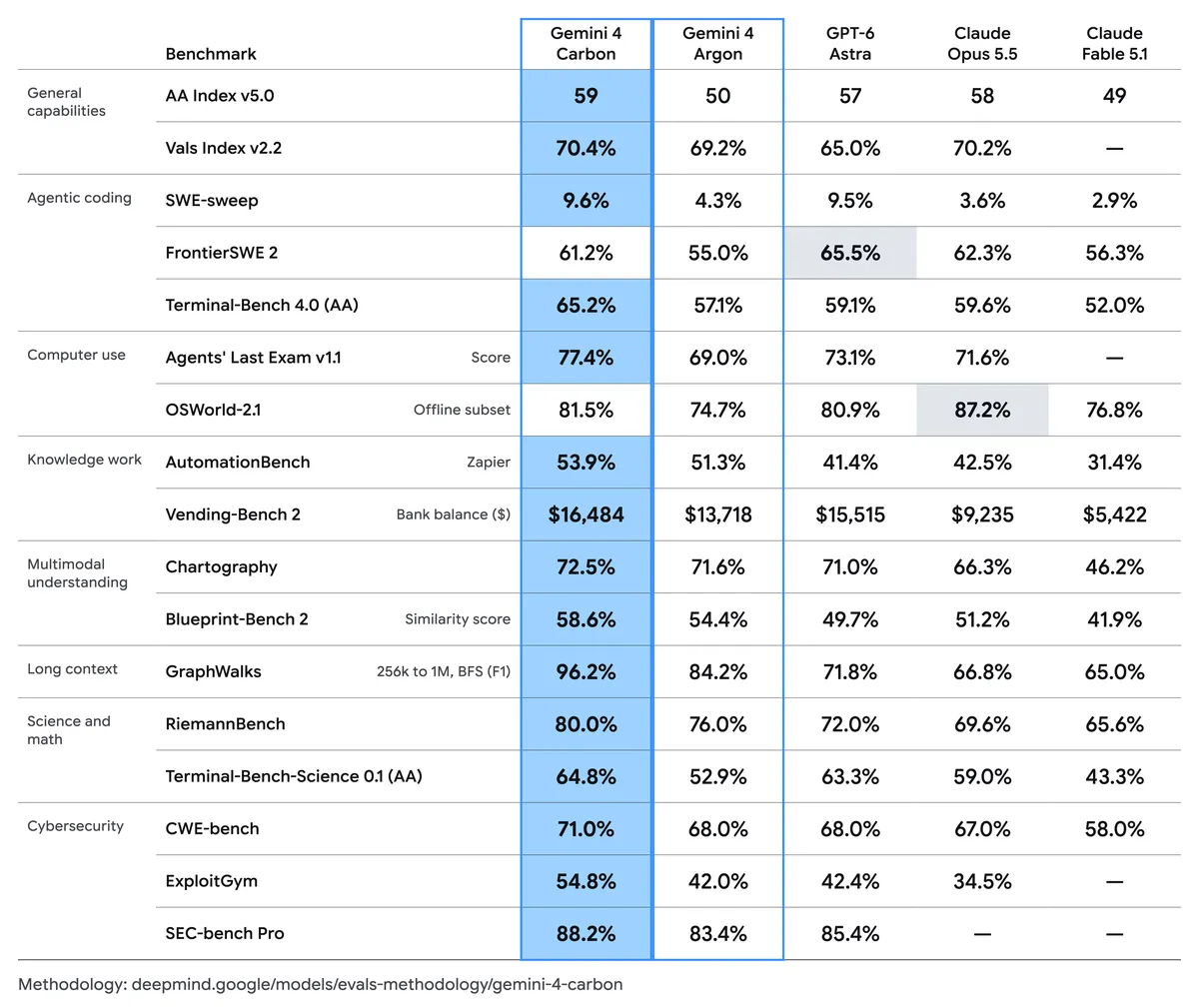
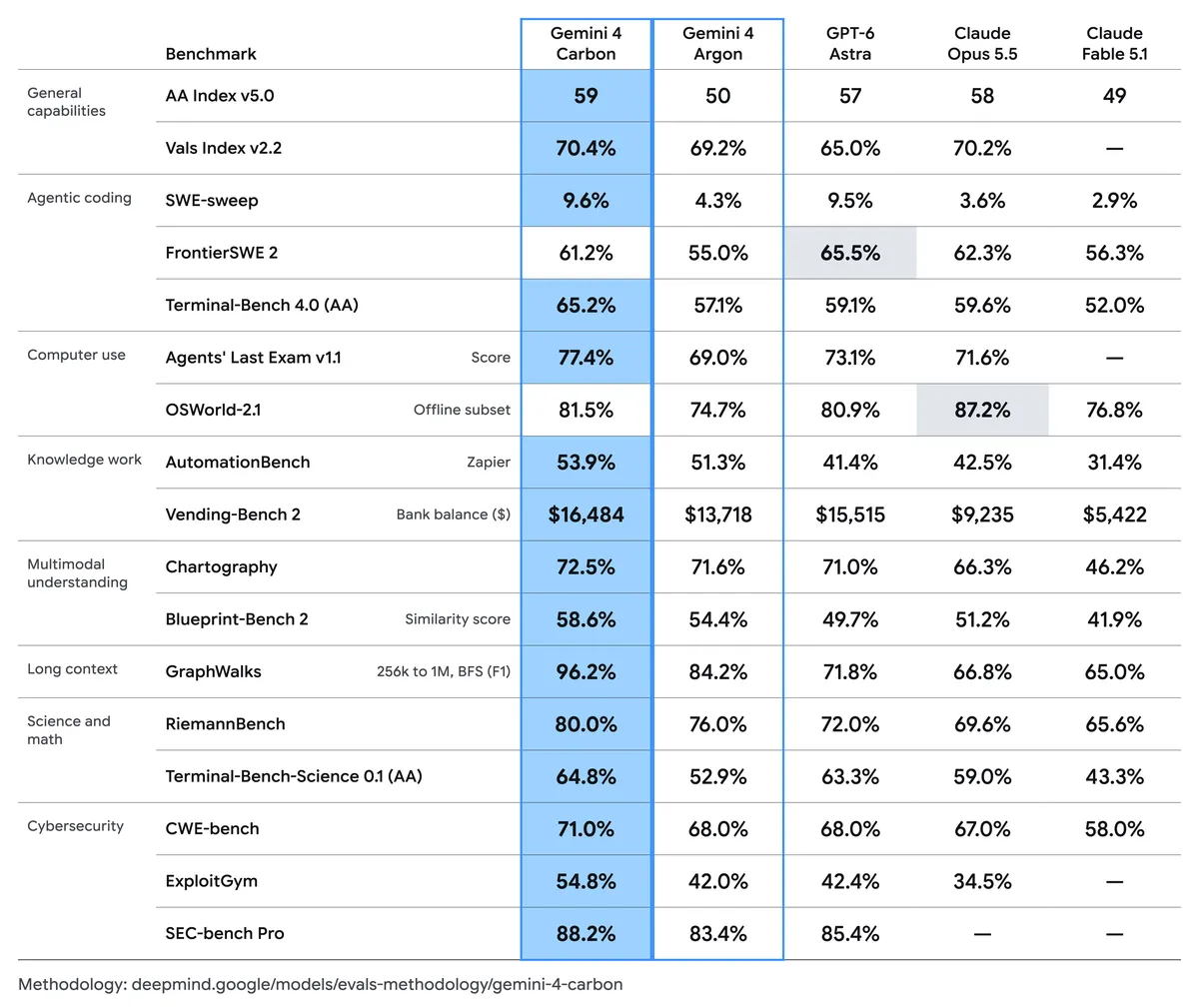
Google’s published benchmark chart includes coding, science, multimodal, and security results. The AA label identifies evaluations attributed to Artificial Analysis.
Cybersecurity
Carbon’s higher reported ExploitGym score makes it worth evaluating for vulnerability exploitation and risk validation. For a security team, the practical measures are reproducible findings, patches that pass regression tests, and the time spent resolving false positives or failed fixes.
Coding, Reasoning, and Document Analysis
The reported Terminal-Bench 4.0 scores are close. For coding applications, prioritize whether each model completes the required repository change and how much review or correction the result needs.
Carbon reports a higher score on Terminal-Bench-Science 0.1, while Kimi’s GPQA-Diamond result provides additional evidence of scientific knowledge and reasoning. For document-heavy workflows, Kimi’s OfficeQA Pro v2 result is particularly relevant to cross-document analysis and numerical reasoning.
Tool-Assisted CAD and 3D Creation
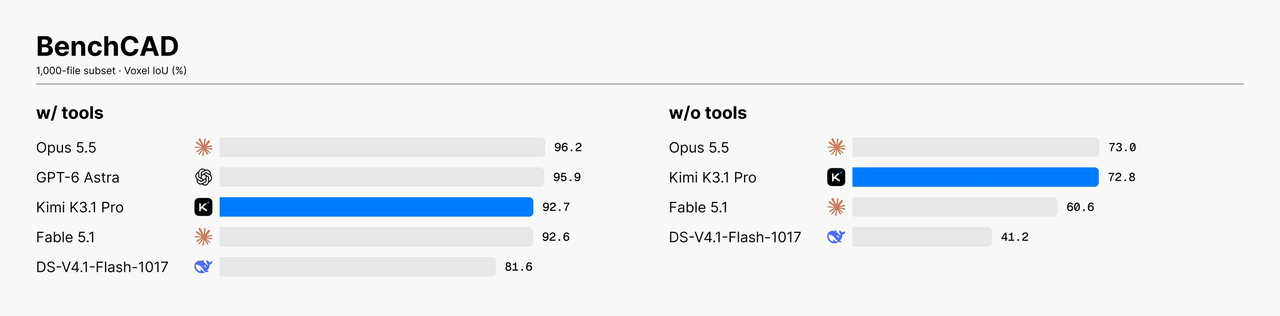
Moonshot reports BenchCAD scores of 72.8 without tools and 92.7 with tools on a 1,000-case Vision2Code subset. The tool-enabled run uses Claude Code, while the other uses single-shot generation. For CAD applications, evaluate the complete tool-assisted workflow: scripts should run, reproduce the intended geometry, and remain editable.
Moonshot’s official BenchCAD results. Voxel IoU measures reconstruction overlap, not task pass rate.
Speed and Long-Context Performance
For interactive applications, response latency matters; for agents, end-to-end task completion time is more useful than generation speed alone. Likewise, Kimi’s documented context capacity helps accommodate large inputs, but the practical test is whether it retrieves the right evidence and preserves dependencies across the task.
Gemini 4 Carbon vs Kimi K3.1 Pro: Cost
Compare prices using the same token counts and billing categories. The rates below are in USD per million tokens. Kimi K3.1 Pro’s official rates are $2 for input and $10 for output; Gemini 4 Carbon’s introductory rates are the same.
Official API Pricing
Billing category
Gemini 4 Carbon
Kimi K3.1 Pro
Uncached input
$2 introductory; $4 after the introductory period
$2
Output
$10 introductory; $20 after the introductory period
$10
Cached input
$0.10 introductory; $0.20 after the introductory period
$0.20 per cache-hit token
Cache write
Not specified in Google’s announcement
$2 per million tokens; billed separately
Google says Carbon’s cached input is discounted by 95% from its input rate. It does not specify the introductory period’s end date in the announcement. Kimi bills cache writes separately from cache-hit input.
Example Cost for a Repository-Scale Task
Assume a task uses 100,000 uncached input tokens and 20,000 output tokens:
Carbon at its introductory rates: $0.40
Carbon after the introductory period: $0.80
Kimi at its official rates: $0.40
These totals include input and output tokens only. They exclude cache writes, tool charges, and retries. With these assumptions, Carbon’s introductory token cost matches Kimi’s; the difference appears after Carbon’s introductory period.
CometAPI Pricing
Kimi K3.1 Pro API on CometAPI lists at $1.60 per million input tokens and $8 per million output tokens. For the example above, those rates produce a token cost of $0.32. The listing is for CometAPI’s route, not Moonshot’s official API; check the route’s current pricing and cache billing before estimating production costs. CometAPI lists Gemini 4 Carbon as coming soon, so there is no CometAPI Carbon price to compare yet.
Effective Cost per Successful Task
Token price alone does not show what it costs to complete a task. Define success first, such as a patch passing its tests or a document answer meeting its source and accuracy requirements.
Cost per successful task = total model and tool charges across all attempts ÷ number of accepted tasks.
Track human review and correction time separately; they can materially affect the total cost of an accepted task.
Which Model Should You Choose?
Choose based on the work you need to ship and the access route available to your team. Kimi K3.1 Pro is the practical starting point for teams that need an API, long context, multimodal input, or downloadable weights. Gemini 4 Carbon is worth evaluating for cybersecurity and long-running engineering tasks when your team has access. Google is still phasing Carbon access in to selected cyber defenders and trusted partners.
Your situation
Start with
Why
You need a model API for an application you are building now
Kimi K3.1 Pro
Available through Moonshot’s API, subject to account requirements and rate limits
You analyze large repositories or long documents
Kimi K3.1 Pro
Its API documents a 1,048,576-token context window
You build multimodal or tool-assisted CAD workflows
Kimi K3.1 Pro
Moonshot publishes relevant image, video, and BenchCAD capabilities
You want to evaluate open weights or self-hosting
Kimi K3.1 Pro
Downloadable weights are available under a model-specific license
Your main workload is vulnerability discovery, validation, or patching
Gemini 4 Carbon
Google reports strong results on cybersecurity benchmarks
You handle long-running engineering tasks and have Carbon access
Gemini 4 Carbon
Google positions Carbon for long-horizon engineering workflows
You are upgrading an established product
Test both, if available
Compare them on the same tasks, tools, and acceptance criteria
Use the table to choose which model to evaluate first, then verify it on representative tasks from your own workload. For self-hosting, include hardware, serving, maintenance, and license requirements in the decision. For a hosted API, compare account limits and total task cost alongside model performance.
Moonshot documents Kimi’s 1,048,576-token context window, API availability, and model-specific license. Google describes Carbon as targeting cybersecurity and long-horizon engineering, with access being phased in.
How to Evaluate the Models in Production
Evaluate both models on representative tasks from your own workload. Define success before testing, then compare accepted results, completion time, and total cost.
Build a representative task set. Include routine tasks and cases where errors are costly, such as code changes, security findings, document analysis, and tool-assisted workflows.
Keep the comparison consistent. Use the same task inputs, tools, permissions, and acceptance tests where possible. Record each model ID, endpoint, reasoning setting, and test date.
Measure accepted outcomes. Track results such as tests passed, calculations verified, sources traceable, and deliverables complete.
Record end-to-end effort. Measure completion time, billed tokens, tool charges, retries, and human review or correction time.
Repeat the tests. Run tasks more than once and alternate which model goes first so a single response does not determine the result.
If both models are available, route tasks by workload. Use Kimi for task types it completes reliably; send tasks to Carbon only when they match an approved security or engineering use case your team has evaluated. Do not route every failed Kimi request to Carbon automatically. Define the conditions for escalation, set a retry budget, and include all attempts when calculating cost per accepted task.
Where Can You Access Gemini 4 Carbon and Kimi K3.1 Pro?
Official Provider Access
Google’s announced Carbon rollout targets selected cyber defenders and trusted partners. Confirm eligibility and the available interface before planning an integration. Moonshot offers Kimi through its applications and API; downloadable weights provide a separate deployment option with their own license and infrastructure requirements.
CometAPI Access
For Kimi, confirm that kimi-k3.1-pro is enabled for your account and that the endpoint supports your required inputs, reasoning settings, and tool-call format. Run a small representative request before connecting the route to a production workflow.
Gemini 4 Carbon API in CometAPI still carries a Coming soon availability indication. A model identifier or sample request does not establish that an account has working access.
Once both intended routes are enabled, reuse the same evaluation set and acceptance checks. Record the actual endpoint and settings with each result so that a later provider or configuration change does not silently invalidate the comparison.
Conclusion
Choose the next step around your team’s main constraint. If the deadline is immediate, build a baseline with a route your account can already use. If security findings or difficult engineering tasks dominate the workload, reserve a Carbon trial when access becomes available. Expand beyond the pilot only after it demonstrates an operational benefit worth the migration effort.