See which Gemini API models are free in 2026, understand RPM, TPM, and RPD limits, Python setup and billing guidance, compare Google with CometAPI pricing.
Deon GoodwinAI model and API research team
Updated Nov 2, 2026 12 min read
Answer first
See which Gemini API models are free in 2026, understand RPM, TPM, and RPD limits, Python setup and billing guidance, compare Google with CometAPI pricing.
Use this summary for a fast answer, then read the guide for context, examples and implementation details.
The Gemini API free tier is available in October 2026 for selected models, including Gemini 3.8 Flash, Gemini 3.6 Flash, Gemini 3.5 Flash-Lite, and Gemini 3.1 Flash-Lite. You can start without setting up billing, but the quota available to your project determines how much you can actually run.
Start with Gemini 3.8 Flash for demanding coding and reasoning experiments, or a Flash-Lite model for routine extraction and classification. Before using real customer data, check the applicable data terms. If you need paid capacity, compare Google’s native rates with CometAPI’s separately billed access.
Key Takeaways
Gemini 3.8 Flash is the newest Flash option covered here, with multimodal input and adjustable reasoning effort.
remains a supported option for existing integrations; and target lighter workloads.
Reviewed for clarity, source attribution and current API terminology.
Gemini 3.6 Flash
Gemini 3.5 Flash-Lite
Gemini 3.1 Flash-Lite
Gemini 4 Argon requires paid API access. Free availability in another Google product does not establish free API eligibility.
Check quotas in AI Studio. A model’s context window is different from your project’s request and token allowance.
Compare the access routes. Google’s free quota and CometAPI’s prices, credits, and account limits are separate.
Is the Gemini API Free in 2026?
Google offers free input and output tokens for selected Gemini API models, subject to project-level quotas. You can start without enabling billing. This is a quota-based free tier rather than a one-time promotional credit.
The important distinction is that Google AI Studio, the Gemini API, and consumer Gemini subscriptions are separate access experiences. A model available in one interface is not necessarily available free through another.
Which Gemini API Models Are Free in October 2026?
The four models below are useful starting points for text and multimodal applications. They are not an exhaustive list of every free-eligible endpoint. Follow the model links to explore CometAPI access; Google specifications are linked below the table.
All four accept text, image, video, audio, and PDF input and produce text. Their published input limit is 1,048,576 tokens, with up to 65,536 output tokens. These model limits do not guarantee that your free project can send a request of that size.
Audio, Embeddings and Image Generation: Access and Limits
Google also lists free access for selected specialist models, such as Gemini 3.8 Live, Gemini 3.8 Flash TTS, and Gemini Embedding 2. Check the pricing entry for the exact model and endpoint before integrating: understanding an image or audio clip is a different capability from generating an image or a voice response.
API methods, request formats, and limits vary by capability. Check the documentation for the specific model and operation you plan to use.
Free access does not extend to every Gemini model or generation endpoint. Gemini 4 Argon requires paid Gemini API access, while premium image and video generation endpoints have their own eligibility rules. Before you integrate a feature, check the exact model and operation rather than assuming they share the same free allowance.
How Does Gemini 3.8 Flash Perform?
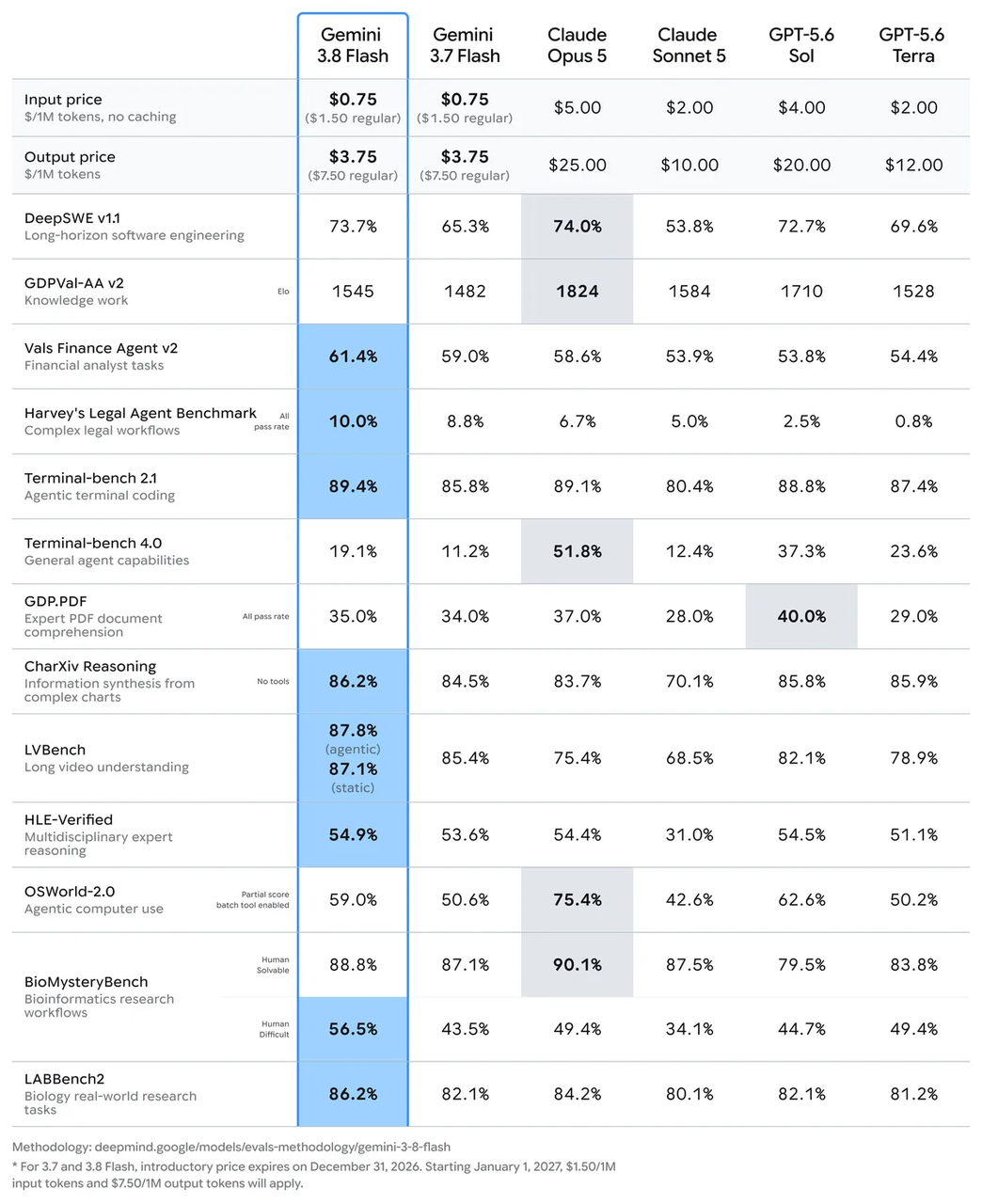
Google’s published evaluation compares Gemini 3.8 Flash with Gemini 3.7 Flash and other models. It reports 73.7% on DeepSWE v1.1, compared with 65.3% for 3.7 Flash—an increase of 8.4 percentage points. On HLE-Verified, the reported score rises from 53.6% to 54.9%.
Use these results to choose a model to test, then evaluate it on examples from your own application. For a document extractor, correct fields and stable output formatting may matter more than a coding benchmark. For a coding assistant, measure whether the proposed change works, how long it takes, and how many tokens it consumes.
What Are the Gemini API Free Tier Rate Limits in 2026?
The biggest misconception about Gemini's free tier is that every account receives the same fixed number of requests.
Open Google AI Studio, choose the project behind your API key, and review the active limits for your selected model. Google’s rate-limit guide explains the quota dimensions; the dashboard shows the allowance that applies to your account.
RPM (requests per minute): Limits how many requests you can send each minute. Watch for short bursts and parallel workers that send too many requests at once.
TPM (input tokens per minute): Limits the input-token volume you can send each minute. Large prompts, conversation histories and documents can use this allowance even when request counts are low.
RPD (requests per day): Limits your total daily request count. Plan your workload around the daily allowance and its reset time.
A million-token input limit describes the model's maximum supported input size. It does not guarantee that a free-tier project has enough TPM capacity to submit a million tokens in one request. Context capacity and rate-limit capacity must be evaluated separately.
Daily request quotas reset at midnight Pacific time. Multiple keys in one project share its usage limits, so creating another key does not add capacity. Other limits can apply to specialist models or operations.
Handle Gemini API 429 Errors
Read the error body before retrying. In the current Interactions API, a 429 can distinguish a short-term request or token limit from an exhausted daily quota. For a short-term limit, slow the queue and use exponential backoff with jitter. For daily exhaustion, wait for the reset or change the application’s capacity plan. A 503 signals temporary service unavailability instead. See Google’s API error reference.
How Do Google and CometAPI Prices Compare?
When Gemini API Billing Begins
Using up your free quota does not automatically switch your project to paid usage. Without an active billing account, requests that exceed the available free allowance encounter access or capacity restrictions instead of Standard paid-token charges.
To use paid capacity, you need to link billing. If your account is assigned to a prepaid plan, you must also add credits, starting with $5 or the local equivalent. Check your assigned plan and spending controls in AI Studio before you upgrade. Balances and usage accounting can update with a delay, so a displayed prepaid balance is not an instantaneous spending cutoff.
Google’s $300 Cloud welcome credit is separate from the Gemini API free tier. Accounts opened after March 2, 2026 cannot use that credit for Gemini API or AI Studio charges. Review the billing guide for the rules that apply to your account.
Google and CometAPI Token Prices
The table compares Google Standard token pricing with CometAPI’s published model rates checked on October 26, 2026. All amounts are USD per one million tokens; output includes billable reasoning where applicable. Google’s free input and output apply only to eligible requests within the project’s allowance.
Google’s introductory Flash prices above end December 31, 2026; 3.8 Flash and 3.6 Flash then move to $1.50 input and $7.50 output. Argon’s introductory price ends November 30, 2026, after which it becomes $4 input and $20 output. CometAPI rates should be checked independently when those promotions change. Tools, caching, storage, taxes, and other services can add charges.
A Small Workload Example
Suppose you send 1,000 text requests, each with 2,000 input tokens and 500 output tokens. That is two million input tokens and half a million output tokens. At the rates above, Gemini 3.8 Flash costs $3.375 through Google, or about $3.38, and $2.70 through CometAPI. An eligible Google free-tier workload costs $0 only if it fits the available quotas. These are token-cost estimates, not measured bills.
How Can You Start Using the Gemini API Free Tier?
You need an eligible Google account and region, an API key, and Python with pip available. The example below follows Google’s current getting-started guide and uses the Interactions API.
Create a Key and Install the SDK
In Google AI Studio, copy or create an API key for a project that has not enabled paid billing. Install the SDK, then set the key in your terminal environment. Keep the key on your server rather than embedding it in browser code.
pip install -U google-genai
On macOS or Linux:
export GEMINI_API_KEY="your_api_key"
In Windows PowerShell:
$env:GEMINI_API_KEY="your_api_key"
Send a Request and Check the Result
from google import genai

client = genai.Client()
interaction = client.interactions.create(
    model="gemini-3.8-flash",
    input="Explain vector databases in 100 words."
)
print(interaction.output_text)
Save this as a Python file and run it from the same environment. A successful request prints a short explanation. Then check AI Studio’s usage dashboard to confirm the project and model receiving the traffic. If it fails, inspect the error code and verify the key, model access, quota, and billing state before changing the code.
How Can Developers Access Gemini API Models Through CometAPI?
CometAPI provides a separate access route for supported Gemini models and other AI providers.
Choose this route when a shared interface across providers simplifies your application. Use a CometAPI key with its endpoint, then verify the supported model ID and account limits. Google’s free quota does not transfer to this service. The following example uses the OpenAI-compatible interface documented by CometAPI.
pip install -U openai
Set COMETAPI_KEY in your environment using the same shell-specific method shown above, then run:
import os
from openai import OpenAI

client = OpenAI(
    api_key=os.environ["COMETAPI_KEY"],
    base_url="https://api.cometapi.com/v1"
)
response = client.chat.completions.create(
    model="gemini-3.8-flash",
    messages=[{
        "role": "user",
        "content": "Summarize the benefits of RAG."
    }]
)
print(response.choices[0].message.content)
Before deployment, confirm that the intended model ID is supported by your CometAPI account. Google-native identifiers and provider-specific aliases are not guaranteed to match for every model.
What Privacy Restrictions Apply to the Gemini API Free Tier?
Under Google’s Gemini API Additional Terms of Service, unpaid-service prompts and outputs may be used to improve Google products, and human reviewers may examine them. Do not submit sensitive, confidential, or personal information to unpaid services. Paid API services have different data-use terms.
Regional rules matter: paid-service data-use provisions apply to certain unpaid usage in the EEA, Switzerland, and the UK, but making an API client available to users in those regions requires Paid Services. Those are separate conditions. Check the current terms for your users and deployment before release.
How Can You Optimize Gemini API Free Tier Usage?
Build around the quota you have measured. Keep a small set of representative tasks and record task success, latency, input and output tokens, and retries. Then change one part of the workload at a time:
Route by difficulty. Test Flash-Lite on routine extraction and use a larger model only where it improves the result.
Trim the input. Send the relevant document section and necessary conversation history instead of repeatedly resending everything.
Control generation. Request a useful output length and adjust reasoning effort only where the model and API support it.
Reuse work. Store repeated application results and check model-specific caching eligibility before assuming API caching is free.
Budget concurrency. Keep workers behind a shared queue so independent tasks do not create an avoidable burst.
Finally, monitor quality as well as consumption. A cheaper model that frequently fails or requires several attempts may create more work than a slightly more expensive model that succeeds on the first request.
A useful internal evaluation metric is:
Effective cost per successful task = Total inference cost / Number of successful tasks
For free-tier experimentation, an additional operational metric is successful tasks per available quota window.
FAQ
How can I tell whether a quota problem is caused by request bursts or large documents?
Compare the timestamps of failures with request count and input-token volume. A burst of short prompts points toward request frequency; a few long documents can exhaust token capacity even at low RPM. In the Interactions API, inspect the machine-readable error code and distinguish daily quota exhaustion from a short-term limit. Log token usage and worker concurrency together so you can change the relevant part of the queue.
What should I do if a request times out after I submit it?
A timeout does not always tell you whether a remote operation completed. For an interaction you have an ID for, check its state before starting another expensive task. Put an application-level task ID around your workflow and deduplicate downstream actions, especially emails, database writes, and tool calls. A retry of text generation should not silently repeat a business action. Google’s Interactions documentation describes interaction retrieval and execution states.
How should I compare Flash and Flash-Lite for document extraction?
Use the same documents, required fields, and acceptance rules for both models. Include noisy scans, missing fields, and ambiguous values. Score factual field accuracy and output validity, then count retries and manual fixes. A model that produces fewer tokens can still consume more effort if its errors require another request. Keep a held-out set of documents so prompt changes are not judged only on examples you have already tuned.
What should I check before switching an application from Google to CometAPI?
Test the exact endpoint, model ID, message format, and features your application uses. A compatible chat-completions request does not establish identical support for files, tools, caching, or reasoning settings. Compare returned usage fields and error handling as well as the text response, and review the intermediary’s and upstream provider’s data policies. Start with a small non-sensitive workload before moving the rest of your traffic.
How can I keep an integration stable as models and prices change?
Keep model IDs, endpoint settings, and price assumptions in configuration. Record the model and date with evaluation results, monitor deprecation notices, and rerun representative tasks before changing a model. Set budget alerts and revisit promotional rates before their end dates. Keep a tested fallback for essential workloads rather than assuming a free quota or a particular model alias will remain available indefinitely.
Conclusion
The Gemini API free tier is a useful way to validate an application before paying for capacity. Choose a model for the task, measure the quota available to your project, and check the data terms before using production inputs.
For a first experiment, make one small request and confirm it in AI Studio. Then measure a representative workload. If free capacity becomes the constraint, compare Google’s paid API with CometAPI using the same prompts, quality requirements, and complete token costs.
Model
Model ID
A practical starting use
Gemini 3.8 Flash
gemini-3.8-flash
Complex coding, reasoning, and tool-driven workflows
Gemini 3.6 Flash
gemini-3.6-flash
Existing Flash applications and general automation
Gemini 3.5 Flash-Lite
gemini-3.5-flash-lite
Document parsing and lightweight agent tasks
Gemini 3.1 Flash-Lite
gemini-3.1-flash-lite
Classification, translation, and straightforward extraction