
TL;DR
GPT-6.1 Sol is not a larger-context or more expensive replacement for GPT-6 Sol. It keeps the same 1.05-million-token context window, 128K maximum output, and $2/$10 standard API pricing, while improving coding, computer use, professional workflows, factual reliability, and agent behavior. The clearest pricing change is prompt caching: cached input falls from $0.20 to $0.10 per million tokens.
The practical result is that GPT-6.1 Sol is less about changing the shape of the API and more about getting substantially more useful work from roughly the same token budget.
Key Takeaways
- GPT-6.1 Sol is a capability upgrade to GPT-6 Sol, with the same 1,050,000-token context window and 128,000-token output ceiling.
- Standard API input and output prices stay at $2/M and $10/M; cached input falls from $0.20/M to $0.10/M.
- Official evaluations show stronger coding, computer use, business automation, and scientific workflows; results depend on the benchmark and reasoning setting.
- Migration requires checking both reasoning effort and API endpoint compatibility: GPT-6.1 Sol removes none and requires Responses API for tool calling.
- Validate task success, latency, actual cache hits, and end-to-end cost before replacing a stable GPT-6 Sol deployment.
What Is GPT-6.1 Sol, and Why Did It Arrive So Soon After GPT-6 Sol?
OpenAI introduced GPT-6 Sol on September 22, 2026. One week later, its September 29 system-card addendum announced GPT-6.1 Sol. OpenAI presents the new release as an upgrade to GPT-6 Sol rather than a separate pricing tier.
The short release interval matters because GPT-6.1 Sol is not positioned as a new product tier. OpenAI kept the Sol pricing tier and focused the update on difficult-task capability, cost efficiency, and agent reliability.
OpenAI positions GPT-6.1 Sol around agentic coding, computer use, and professional work. The important comparison is task success at a given cost, rather than the model name alone. The official benchmark summary below separates capability gains from unchanged API specifications.
That makes the comparison unusually straightforward: GPT-6.1 Sol is primarily a capability and efficiency upgrade rather than a context-window or base-price upgrade.
GPT-6.1 Sol vs. GPT-6 Sol: What Stays the Same?
Both models retain the same headline capacity, supported input/output modalities, and Standard input/output prices. The table also records differences in cutoff dates, reasoning options, tool calling, and cached-input rates; those differences should not be mistaken for shared specifications.
Shared Specifications and Compatibility Differences
| Specification | GPT-6.1 Sol | GPT-6 Sol |
|---|---|---|
| Model ID | gpt-6.1-sol | gpt-6-sol |
| Release date | Sep. 29, 2026 | Sep. 22, 2026 |
| Context window | 1,050,000 tokens | 1,050,000 tokens |
| Maximum output | 128,000 tokens | 128,000 tokens |
| Knowledge cutoff | Apr. 30, 2026 | Apr. 20, 2026 |
| Text input / output | Yes / Yes | Yes / Yes |
| Image input | Yes | Yes |
| Standard input price | $2.00 / 1M | $2.00 / 1M |
| Cached input | $0.10 / 1M | $0.20 / 1M |
| Cache write | $2.50 / 1M | $2.50 / 1M |
| Output price | $10.00 / 1M | $10.00 / 1M |
| Reasoning effort | low, medium, high, xhigh, max | none, low, medium, high, xhigh, max |
| Structured outputs | Yes | Yes |
| Function calling | Yes through Responses API; unavailable through Chat Completions | Yes through Responses API; Chat Completions only with reasoning_effort=none |
| Fine-tuning | No | No |
| Audio / video input | Not supported | Not supported |
| Native image output | Not supported; image generation is a separate tool | Not supported; image generation is a separate tool |
The two official model columns above document the same context and output limits. These numbers describe capacity; they do not establish equal retrieval accuracy or latency across every long-context workload.
The knowledge cutoff moves forward slightly, from April 20 to April 30, 2026. More importantly, GPT-6.1 Sol no longer supports reasoning.effort="none"; its available reasoning settings begin at low.
For developers that depend on minimal-latency behavior, this compatibility detail is worth testing because GPT-6 Sol still supports reasoning effort none.
Architecture: What Remains Undisclosed
Neither model page used for this comparison provides a parameter count or a detailed architecture breakdown. The official system-card addendum says GPT-6.1 Sol uses the same types of data and training as Astra; that statement does not prove that Sol and Astra have identical architectures. Architecture and parameter-scale differences therefore remain undisclosed in the cited material.
Base Pricing Is Unchanged; Cached Reads Are Cheaper
For ordinary uncached tokens, no. Standard input and output rates are unchanged. The main pricing improvement is cached input.
| Official API pricing — USD per 1M tokens | GPT-6.1 Sol | GPT-6 Sol |
|---|---|---|
| Input / 1M tokens | $2.00 | $2.00 |
| Cached input / 1M | $0.10 | $0.20 |
| Cache write / 1M | $2.50 | $2.50 |
| Output / 1M tokens | $10.00 | $10.00 |
GPT-6.1 Sol cuts cached input to $0.10 per million tokens, or 5% of the uncached input rate.
For example, reusing 100 million cached input tokens costs about $10 on GPT-6.1 Sol versus $20 on GPT-6 Sol. That difference is modest for one-off prompts but more meaningful for high-volume agents with stable prompt prefixes.
The official pricing conditions shown in the model documentation also apply: requests above 272K input tokens use 2x input and cache rates and 1.5x output pricing for the full request. GPT-6.1 Sol Fast mode is 2x Standard; Batch and Flex are 50% below Standard. Regional processing adds a 10% premium where available, and Fast mode is unavailable with EU data residency. Separate tool charges can apply. Budget using the selected processing mode, region, and actual cache hits.
What Has Improved in GPT-6.1 Sol?
The upgrade is best assessed across coding, agent workflows, professional documents, science, factuality, and failure recovery. The sections below group those improvements while retaining the original benchmark conditions and limitations.
Benchmark Overview: Reported Gains and Evaluation Conditions
The strongest case for GPT-6.1 Sol comes from task-level performance rather than raw specifications. OpenAI reports improvements across software engineering, business automation, computer interaction, scientific workflows, factuality, and agent alignment.
| Official benchmark / evaluation results | GPT-6.1 Sol vs. GPT-6 Sol | What the Change Means |
|---|---|---|
| DeepSWE v1.1 | +6.4 percentage points over GPT-6 Sol’s best result, at a lower reasoning effort and task cost; this is not a matched-effort comparison | Stronger long-horizon software engineering |
| AutomationBench 1.0.6 | +4.8 percentage points at medium effort for both Sol models; +2.2 points over Opus 5.5 at medium effort | Better multi-step business-agent execution |
| OSWorld 2.0 offline | +7 percentage points at max effort; partial reward on the offline set, release v2026.08.08; less than half the task cost | Better computer-use workflows |
| Terminal-Bench Science 0.1 | More than 2x GPT-6 Sol’s score at max effort, with less than half the cost per task | Large gain in scientific agent workflows |
| Difficult factuality evaluation | At low effort, error-containing responses decrease from 11.4% to 7.7%; this is a selected difficult-prompt evaluation | Fewer factual mistakes on difficult prompts |
| Broken-search alignment test | At maximum effort, failure to disclose broken search falls from 4.9% to 2.1%; deliberately adversarial tasks | Better recognition of tool failures |
These are OpenAI-reported results, not independent CometAPI measurements. OpenAI evaluated its models in its research environment or through its API; production behavior can differ with system prompts and available tools. Competitor figures come from public reports. Task cost reflects the tested configuration and is not the same as token price. Unreported details such as per-run budgets or scaffolds should not be inferred.
The official result in the benchmark table compares GPT-6.1 Sol at a lower reasoning effort with GPT-6 Sol’s best score. It should not be described as a controlled, equal-effort speed comparison. DeepSWE v1.1 evaluates original, long-horizon software-engineering tasks in real codebases.
For context, the original GPT-6 Sol launch reported 68.8% at maximum effort on DeepSWE v1.1.
Coding: Stronger Long-Horizon Software Engineering
Coding is arguably the clearest upgrade. DeepSWE v1.1 evaluates agents on original software-engineering tasks in real codebases that require sustained, multi-step work.
The DeepSWE improvement summarized above is relevant when an agent must inspect a repository, plan changes, use tools, and repair failures over many steps. Developers can compare this upgrade with the GPT-6 Astra API in CometAPI when deciding whether the hardest tasks justify a higher-cost model.
This matters more than a short coding benchmark because long-running coding agents accumulate cost through repeated reasoning, tool calls, file reads, patches, and context reuse. GPT-6.1 Sol improves both task completion and repeated-context economics without raising the standard $2/$10 token rate.
The GPT-6 Sol API in CometAPI remains useful for existing deployments and provides an OpenAI-compatible path for coding and agentic workloads.
AI Agents and Business Workflows: Automation and Computer Use
Yes, and the improvement extends beyond coding. AutomationBench evaluates whether an agent can complete end-to-end workflows using many tools across sales, marketing, operations, support, finance, and HR.
The matched-medium AutomationBench result in the benchmark summary is relevant to tool-heavy business workflows. It remains a benchmark result rather than a guarantee of success in a company’s own tool stack. The comparison also includes Claude Opus 5.5 API in CometAPI; evaluate all candidates with the same tools and success criteria before selecting one.
For computer use, the OSWorld result above uses the offline set and partial reward. A higher partial-reward score does not necessarily mean every task completed end to end. Browser state, permissions, recovery behavior, and the quality of the tool integration still affect deployment outcomes.
Professional Documents and Science: Broader Complex-Task Capability
GPT-6.1 Sol also pushes the Sol tier further into professional knowledge work. OpenAI evaluates complex document understanding with GDP.pdf, where models answer realistic questions based on PDFs containing tables, charts, diagrams, dense formatting, and fine-print details across fields including finance, healthcare, and law.
GDP.pdf adds evidence for professional PDF analysis beyond ordinary text-only question answering. Treat its result in the launch announcement as an evaluation of document understanding, not a guarantee that every chart, footnote, or scanned page will be interpreted correctly.
The Terminal-Bench Science result in the official benchmark summary covers workflows such as data analysis, simulation, and theorem proving. A useful local evaluation should score correctness and reproducibility of the final output, while measuring total tool and model cost.
This does not mean GPT-6.1 Sol universally replaces Astra. OpenAI continues to position Astra as its highest-capability model for the hardest end-to-end work. The important change is that the performance gap between Sol and Astra narrows while their token-price gap remains large.
Factuality and Agent Reliability: Fewer Errors and Better Failure Handling
OpenAI's factuality data points in that direction, although the evaluation should not be interpreted as a universal hallucination rate.
The official announcement directly reports a low-effort factuality improvement: error-containing responses fall from 11.4% with GPT-6 Sol to 7.7% with GPT-6.1 Sol, a 3.7-percentage-point decrease, or approximately 32% relative reduction. These selected conversations previously triggered errors; the figures are not a universal hallucination rate.
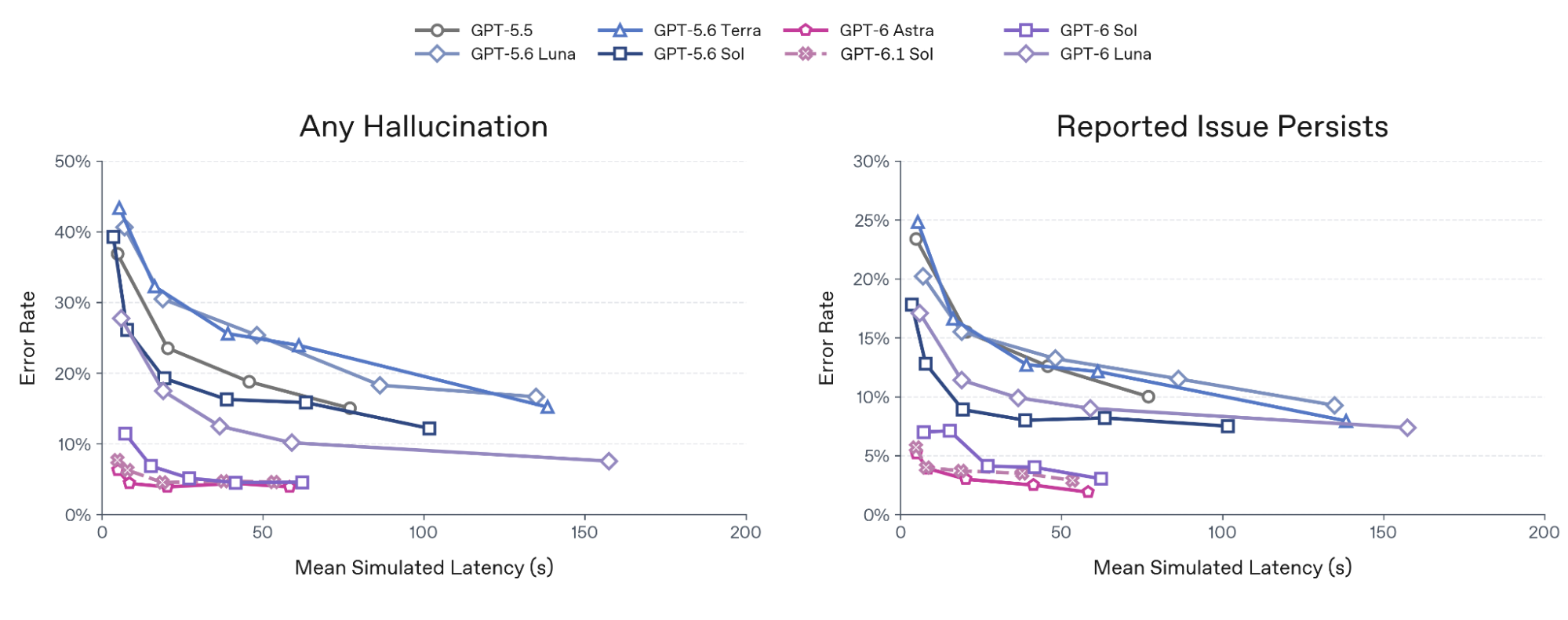
The original chart above is extracted directly from the OpenAI system-card PDF without redrawing. It plots selected difficult-conversation evaluations against simulated latency; the two panels measure any hallucination and persistence of the reported issue. It should not be read as a production-wide error estimate.
| Model | Broken-search Failure Rate — maximum effort |
|---|---|
| GPT-6.1 Sol | 2.1% |
| GPT-6 Sol | 4.9% |
| GPT-6 Astra | 1.5% |
| GPT-6 Luna | 28.7% |
The GPT-6 Luna API in CometAPI is another cost-oriented option, but its broken-search result here illustrates why an agent must be tested on failure handling as well as successful tool execution.
These are deliberately adversarial evaluations rather than representative production failure rates. They are useful as evidence that GPT-6.1 Sol is better at recognizing when tools are unavailable or broken instead of confidently continuing with unsupported claims.
GPT-6.1 Sol vs. GPT-6 Sol: Should You Upgrade?
For a new complex workflow, GPT-6.1 Sol is a strong evaluation candidate. For a stable GPT-6 Sol deployment, upgrade only when measured gains justify the migration. The shared context limit and base token prices make a fair comparison possible, but public benchmarks cannot decide whether your own application will become faster, more reliable, or cheaper.
When Upgrading Is Worth Testing
Prioritize a trial when repository-scale coding, multi-step business automation, computer use, or difficult document analysis accounts for a substantial share of your workload. The reported improvements in the preceding section are relevant to these use cases. Treat them as reasons to test, rather than a guarantee that your production success rate will rise by the same amount.
Repeated-context applications are another useful test case. The lower cached-read rate can reduce the input portion of the bill when requests actually reuse a stable prefix. If most spend comes from generated tokens, tools, or failed attempts, a cache discount alone may have little effect. Compare total cost per accepted result, including retries and review time.
When Keeping GPT-6 Sol Is Reasonable
Retain GPT-6 Sol when it already meets your quality, latency, and budget targets and the newer model produces no material benefit in a representative evaluation. A working integration also has value: avoid replacing a stable route solely because the model name is newer.
Compatibility can be decisive. GPT-6 Sol supports none reasoning; GPT-6.1 Sol starts at low. An application using Sol Chat Completions function calls at none must move its tool loop to Responses to use 6.1 Sol. Also audit sampling parameters and response parsing. These are migration changes, not a model-ID-only swap. See OpenAI migration guidance.
How to Make the Upgrade Decision
Create a fixed evaluation set with routine tasks, difficult cases, and tool failures from your intended workflow. Keep task definitions, tool permissions, and acceptance criteria consistent. Compare a validated Sol baseline with a valid 6.1 Sol configuration; record reasoning settings explicitly instead of pretending that none and low are equivalent.
- Quality: measure accepted completions, factual corrections, invalid tool calls, and human review effort.
- Speed: compare p50/p95 end-to-end latency, including retries and tool waits.
- Cost: record uncached input, cached reads, cache writes, output/reasoning tokens, tool charges, and engineering effort.
- Rollout: start with a small traffic slice, preserve a Sol fallback, and expand only when predefined thresholds are met.
Practical recommendation: choose GPT-6.1 Sol when the trial delivers better accepted-task economics or a needed capability gain without unacceptable regressions. Keep GPT-6 Sol for routes where compatibility and proven results outweigh the measured benefit. A mixed deployment is reasonable when only some task classes improve. These are workload-based recommendations, not a claim that either model wins universally.
How Do You Migrate From GPT-6 Sol to GPT-6.1 Sol?
At the simplest level, the model identifier changes from gpt-6-sol to gpt-6.1-sol.
A Responses API request can look like this:
from openai import OpenAI

client = OpenAI()

response = client.responses.create(
    model="gpt-6.1-sol",
    reasoning={"effort": "medium"},
    input="Analyze this repository and identify the cause of the failing tests."
)

print(response.output_text)
Changing the model identifier is only the first step. GPT-6.1 Sol supports low, medium, high, xhigh, and max, while GPT-6 Sol additionally supports none. Remove any explicit none setting and choose an allowed effort. Tool-using applications also need Responses API: GPT-6.1 Sol Chat Completions does not support tool calling, whereas GPT-6 Sol Chat Completions supports function calling only with none. The official model columns in the specification table document these endpoint restrictions.
Teams should retest latency-sensitive workflows, tool calling, prompt caching, long-context behavior, and any logic that explicitly sends reasoning.effort="none".
This example targets OpenAI directly using OPENAI_API_KEY; it is not a verified CometAPI endpoint example. Keep your GPT-6 Sol route available during a staged rollout, record task success and p95 latency, and roll back if your application’s acceptance criteria are not met.
Which GPT-6.1 Sol Workloads Benefit Most From the Upgrade?
| Workload | GPT-6.1 Sol Advantage |
|---|---|
| Coding agents | Higher DeepSWE performance |
| Repository-scale debugging | Better long-horizon software engineering |
| Browser/computer agents | +7 points on OSWorld 2.0 |
| Enterprise automation | Higher AutomationBench performance |
| Repeated-context agents | 50% cheaper cached input |
| Complex PDF analysis | Near-Astra professional-document performance |
| Scientific workflows | More than 2x GPT-6 Sol score in OpenAI's Terminal-Bench Science evaluation |
| Fact-sensitive workflows | Lower difficult-prompt factual-error rate |
| Tool-heavy agents | Better behavior when tools fail |
GPT-6 Sol remains useful where existing integrations are already stable or where developers specifically need the none reasoning setting. For new deployments centered on agents, coding, computer use, or repeated-context workflows, GPT-6.1 Sol changes the cost-performance equation without changing the normal input/output token price.
How Can CometAPI Help You Upgrade From GPT-6 Sol to GPT-6.1 Sol?
For developers already using the GPT-6 Sol API in CometAPI, upgrading to GPT-6.1 Sol can be handled as a relatively small migration rather than a full integration rewrite.
GPT-6.1 Sol is now available through CometAPI with the gpt-6.1-sol model identifier. CometAPI currently shows a starting short-context input price of $1.60 per million tokens, compared with OpenAI's official $2.00 rate, while output pricing starts at $8.00 per million tokens. This keeps the newer Sol model in the same discounted pricing structure as GPT-6 Sol while giving developers access to its stronger coding, agent, and computer-use performance.
Because CometAPI provides an OpenAI-compatible interface, existing GPT-6 Sol applications can usually keep the same SDK structure and request flow while switching the model ID to gpt-6.1-sol. CometAPI also provides tools for comparing models, testing prompts, estimating workload costs, and inspecting migration behavior before production rollout.
A safer upgrade process is to run the same representative prompts against GPT-6 Sol and GPT-6.1 Sol first, then compare output quality, latency, tool behavior, and total cost. This is especially important for applications that depend on reasoning settings, structured outputs, tool calls, or long-running agents, because model compatibility does not guarantee identical behavior on every workload.
For teams running repeated-context or agent-heavy workloads, the newer route can also improve economics. CometAPI currently prices GPT-6.1 Sol short-context cache reads at $0.08 per million tokens, versus OpenAI's official $0.10 rate, while short-context input and output rates are listed at 20% below official pricing.
In practice, CometAPI can make the GPT-6 Sol → GPT-6.1 Sol transition a three-step process:
- Replace
gpt-6-solwithgpt-6.1-sol. - Benchmark the same production prompts and agent workflows before switching traffic.
- Move workloads gradually once output quality, tool behavior, latency, and cost meet your requirements.
This approach lets developers adopt GPT-6.1 Sol without rebuilding their application around a new API stack, while still validating the behavioral differences introduced by the newer model.
Conclusion
GPT-6 Sol is not technically obsolete. It retains the same 1.05M context window, 128K output ceiling, structured outputs, image input, and $2/$10 Standard pricing. Its none reasoning option can also matter for existing integrations. The upgrade decision should turn on measured task outcomes and compatibility, not the version number alone.
However, OpenAI's GPT-6 Sol documentation now points developers to GPT-6.1 Sol as the newer Sol model.
For most complex workloads, the key question is therefore not whether GPT-6.1 Sol has a larger context window or higher token rate—it does not. The question is whether higher task success, cheaper cache reads, improved factuality, and stronger agent behavior justify changing the model identifier and retesting the workload.
FAQ
How do you migrate from GPT-6 Sol to GPT-6.1 Sol with tool calling?
No. First audit the endpoint and request fields, then move the tool loop to Responses API and test tool-call parsing, argument validation, retries, and error handling. Run a canary on representative tasks before increasing traffic; a successful text-only request does not verify a working tool loop.
Is GPT-6.1 Sol cheaper in real workloads?
Log cached and uncached input tokens, cache writes, reasoning and output tokens, processing mode, and tool charges. Compare cost per accepted task rather than cached-token price alone. Stable prefixes help only when requests actually hit the cache, and longer tool loops or failed attempts can offset cache savings.
How should you test GPT-6.1 Sol before switching from GPT-6 Sol?
Use a fixed set of production-like tasks and record successful completion, factual corrections, invalid tool calls, p50/p95 latency, and total cost. Define acceptable thresholds before testing. Keep a model-routing rollback path and expand traffic only after the new configuration meets those thresholds.
How do you test GPT-6.1 Sol with PDFs?
Build a small corpus with dense tables, footnotes, charts, and scanned pages representative of the intended workflow. Ask questions with verifiable answers and require page or table evidence. Score calculation accuracy, missing caveats, and unsupported answers separately; retain human review for outputs whose mistakes have material consequences.