
Running Qwen3.8-Max locally is now possible, but the phrase “Qwen 3.8 Max locally” needs one important clarification. Alibaba’s hosted Max product and the downloadable checkpoint are closely related, yet they are not identical products.
Qwen first launched the hosted Max service in early August 2026 and released Qwen3.8-2.4T-A95B as open weights on August 12, 2026. That checkpoint is the model you actually deploy on your own infrastructure.
This is not a normal Ollama-on-a-gaming-PC tutorial. The unquantized checkpoint is a 2.4-trillion-parameter Mixture-of-Experts model, and the current vLLM recipe sizes its BF16 weights at 4.45 TiB. Even production-oriented 4-bit floating-point variants still occupy roughly 1.3–1.5 TiB of weights.
Quick answer: full Qwen 3.8 Max-class self-hosting is a datacenter deployment. A practical production starting point is an FP4 checkpoint on 8× B300 or 8× MI355X GPUs; H200 deployments need more GPUs. For a normal workstation, use Qwen3.8-27B instead.
Qwen 3.8 Max vs. the Open Model You Actually Deploy
The downloadable Qwen3.8-2.4T-A95B checkpoint is officially described as a 2.4T-parameter causal language model with about 95B parameters activated per token. The hosted Max service adds product-layer capabilities that are not present in the current open checkpoint.
| Specification | Qwen3.8-Max hosted service | Qwen3.8-2.4T-A95B open checkpoint |
|---|---|---|
| Total parameters | 2.4T | 2.4T |
| Active parameters | ~95B | ~95B |
| Architecture | Sparse MoE | Sparse MoE |
| Input | Text, image, video | Text |
| Context | 1M managed context | 262,144 native; extensible to ~1.01M |
| Thinking behavior | Managed thinking / non-thinking options | Thinking required; reasoning effort configurable |
| Built-in tools | Available on managed service | Application must provide tools |
| Self-hosting | No weight management required | Yes; open checkpoint |
The hosted product exposes text, image, and video input with a 1,000,000-token context. By contrast, the open checkpoint is text-only and has a native 262,144-token context. This difference matters if your application depends on multimodal input or managed built-in tools.
Qwen 3.8 Architecture and Specifications
CometAPI already covers the model background in What is Qwen3.8 Max, so this deployment guide keeps the architecture discussion focused on the details that affect memory, parallelism, and serving.
| Deployment-relevant specification | Qwen3.8-2.4T-A95B |
|---|---|
| Total / activated parameters | 2.4T / ~95B per token |
| Layer layout | 92 layers: 69 Gated DeltaNet + 23 full attention |
| MoE routing | 512 routed experts; 10 routed + 1 shared active |
| Full-attention heads | 64 query / 4 key-value heads |
| Native context | 262,144 tokens |
| Extended context | Up to approximately 1,010,000 tokens |
| Multi-Token Prediction | Supported |
| Open-checkpoint modality | Text only |

Official Qwen hybrid model architecture used in the SGLang Qwen3.8 deployment guide.
Do not interpret “95B active parameters” as a 95B-model memory footprint. Sparse activation reduces compute per token, but the serving system still needs access to the full expert weight set.
Qwen 3.8 Max Benchmark Snapshot
Because CometAPI’s existing Qwen3.8 Max overview already discusses benchmarks in detail, this article uses only a deployment-relevant subset from the official Qwen model-card benchmark table.
| Benchmark | Qwen3.8-Max | Qwen3.7-Max | GPT-5.6 Sol (max) |
|---|---|---|---|
| Terminal Bench 2.1 | 86.6 | 74.5 | 88.8 |
| SWE-bench Pro | 67.7 | 60.6 | 64.6 |
| PaperBench | 93.0 | 64.8 | 90.5 |
| FrontierSWE | 73.5 | 40.7 | — |
| CoWorkBench | 74.8 | 64.6 | 71.5 |
| GPQA Diamond | 92.6 | 92.4 | 94.1 |
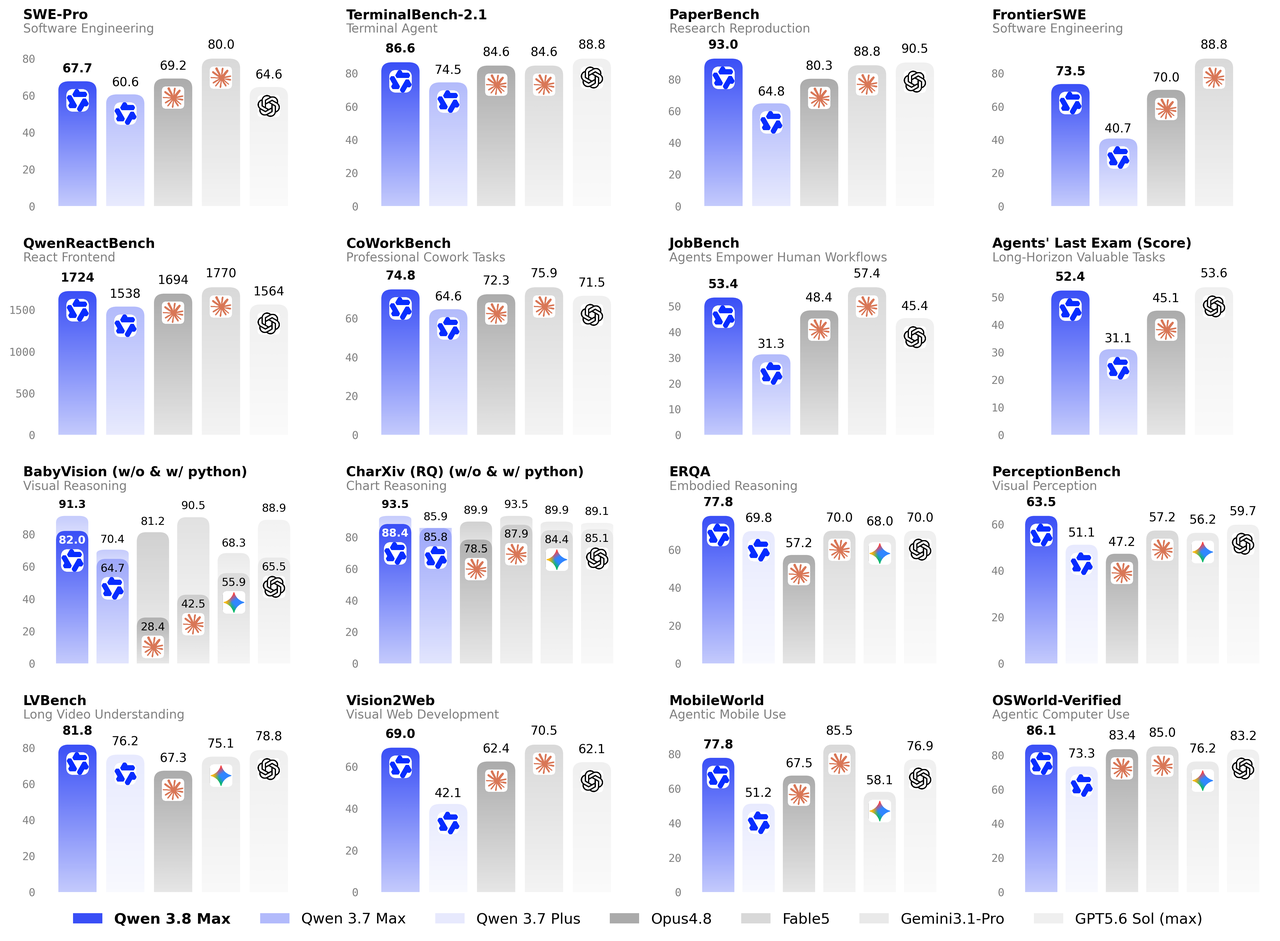
Official Qwen3.8 performance graphic published by the Qwen team.
The largest reported gains over Qwen3.7-Max in this subset are PaperBench and FrontierSWE. Qwen3.8-Max also exceeds GPT-5.6 Sol on SWE-bench Pro and PaperBench, while GPT-5.6 Sol remains ahead on Terminal Bench 2.1. For deployment decisions, treat these as capability context; the memory and serving-throughput measurements below are more operationally relevant.
Benchmark tables are not universal rankings. Harnesses, timeouts, context limits, tool access, and quantization can change results. Benchmark the exact checkpoint, precision, serving engine, and prompt distribution you plan to use.
What Hardware Does Qwen3.8 Need for Local Deployment?
GPU Requirements for Qwen3.8-2.4T-A95B
This is the key deployment question. The current vLLM Qwen3.8 recipe publishes checkpoint footprints and realistic GPU counts with runtime headroom, which is more useful than estimating VRAM from parameter count alone.
| Precision | Weight footprint | B300 (268 GB) | MI355X (288 GB) | H200 (141 GB) | Best fit |
|---|---|---|---|---|---|
| BF16 | 4.45 TiB | 24 GPUs | 24 GPUs | 48 GPUs | Maximum fidelity / research |
| FP8 | 2.27 TiB | 16 GPUs | 16 GPUs | 32 GPUs | High-fidelity production |
| MXFP4 | 1.45 TiB | — | 8 GPUs | 16 GPUs | Practical AMD deployment |
| NVFP4 W4A4 | 1.32 TiB | 8 GPUs | — | 16 GPUs | Practical NVIDIA deployment |
For most organizations that genuinely need self-hosted Qwen3.8, FP4 is the practical starting point. The standout NVIDIA configuration is NVFP4 W4A4 on 8× B300; the corresponding AMD route is MXFP4 on 8× MI355X.
An 8× H200 server is not enough for these recommended full-model deployments. The official recipe sizes H200 at 16 GPUs for FP4, 32 for FP8, and 48 for BF16.
VRAM Requirements for Qwen3.8-27B
Qwen3.8-27B is the practical workstation-class alternative. Raw weight memory is approximately 54 GB in BF16, 27 GB in FP8, and 13.5 GB at 4-bit precision. Runtime overhead and KV cache increase the actual requirement, especially at long context lengths.
| Precision | Approximate weight memory | Practical deployment guidance |
|---|---|---|
| BF16 | ~54 GB | Use a 64–80 GB GPU, depending on context and serving overhead. |
| FP8 / INT8 | ~27 GB | A 40–48 GB GPU provides more practical runtime headroom. |
| 4-bit | ~13.5 GB | A 20–24 GB consumer GPU can be viable at moderate context lengths. |
These figures are planning estimates derived from parameter count. Confirm the exact checkpoint, quantization format, serving engine, context length, and KV-cache settings before sizing production hardware.
Can Qwen3.8 Run on Consumer GPUs?
The full Qwen3.8-2.4T-A95B model is not practical on ordinary consumer GPUs, even when aggressively quantized. A community project has demonstrated an aggressively compressed 397 GB UD-Q1_0 build across four DGX Spark systems, but that route is an experimental extreme quantization rather than the baseline for quality-sensitive serving.
For a workstation or home lab, the more appropriate model is Qwen3.8-27B, whose open weights were released on August 14, 2026. The model is orders of magnitude easier to host and is the right option if “local” means one workstation rather than a GPU cluster.
Before You Install Qwen 3.8 Max
Plan the infrastructure before running an install command. You need Linux, a compatible accelerator stack, enough local or shared storage for the checkpoint, high-bandwidth GPU interconnects, and—when crossing nodes—a network designed for distributed inference. The vLLM recipe currently recommends vLLM nightly and Transformers 5.4.0 or newer.
bash
uv venv
source .venv/bin/activate

uv pip install -U vllm \
  --extra-index-url https://wheels.vllm.ai/nightly

uv pip install -U "transformers>=5.4.0"
How to Deploy Qwen 3.8 FP8 with vLLM
FP8 is a sensible choice when you want a Qwen-provided checkpoint and can afford multi-node infrastructure. The official checkpoint is Qwen/Qwen3.8-2.4T-A95B-FP8.
For a two-node, 16-GPU B300-class deployment, run the head node with:
bash
export HEAD_ADDR="10.0.0.10"

vllm serve Qwen/Qwen3.8-2.4T-A95B-FP8 \
  --tensor-parallel-size 16 \
  --nnodes 2 \
  --node-rank 0 \
  --master-addr "$HEAD_ADDR" \
  --max-model-len 262144 \
  --kv-cache-dtype fp8 \
  --reasoning-parser qwen3
On the worker node, use the same topology with a different node rank and no API server:
bash
export HEAD_ADDR="10.0.0.10"

vllm serve Qwen/Qwen3.8-2.4T-A95B-FP8 \
  --tensor-parallel-size 16 \
  --nnodes 2 \
  --node-rank 1 \
  --master-addr "$HEAD_ADDR" \
  --headless \
  --max-model-len 262144 \
  --kv-cache-dtype fp8 \
  --reasoning-parser qwen3
Do not copy the 16-GPU example onto H200 servers without resizing the topology. The same FP8 variant is currently sized at 32× H200 in the vLLM recipe.
How to Run Qwen 3.8 on One 8× B300 Server
For NVIDIA Blackwell, the most practical full-model configuration is NVFP4. vLLM currently validates NVFP4 W4A4 with tensor parallelism across eight B300 GPUs.
bash
vllm serve Inferact/Qwen3.8-2.4T-A95B-NVFP4 \
  --tensor-parallel-size 8 \
  --max-model-len 262144 \
  --kv-cache-dtype fp8 \
  --reasoning-parser qwen3 \
  --enable-auto-tool-choice \
  --tool-call-parser qwen3_coder
The Inferact NVFP4 build is a quantized checkpoint rather than the original BF16 Qwen artifact. Validate model quality on your own acceptance set before treating it as a drop-in replacement for BF16 or FP8.
How to Deploy Qwen 3.8 with SGLang
SGLang added Day-0 support for Qwen3.8 on August 12 and is especially attractive for high-throughput serving, prefix caching, expert parallelism, speculative decoding, and prefill/decode disaggregation.
bash
SGLANG_ENABLE_MOE_DEFERRED_FINALIZE=1 \
SGLANG_FLASHINFER_MNNVL_CUTEDSL_AR_FUSION=1 \
sglang serve \
  --trust-remote-code \
  --model-path RadixArk/Qwen3.8-2.4T-A95B-NVFP4 \
  --tp-size 8 \
  --context-length 200000 \
  --preferred-sampling-params '{"top_k": 20}' \
  --attention-backend trtllm_mha \
  --linear-attn-prefill-backend flashinfer \
  --linear-attn-decode-backend flashinfer \
  --reasoning-parser qwen3 \
  --tool-call-parser qwen3_coder \
  --host 0.0.0.0 \
  --port 30000
SGLang reports 346 output tokens/s at batch size 1 on TP8 B300 with MTP, and substantially higher aggregate throughput in disaggregated serving layouts. Treat those numbers as serving-stack measurements, not model-quality benchmarks.
Test the Local OpenAI-Compatible Endpoint
Both vLLM and SGLang expose OpenAI-compatible APIs, which makes application integration straightforward.
python
from openai import OpenAI

client = OpenAI(
    api_key="EMPTY",
    base_url="http://localhost:8000/v1",
    timeout=3600,
)

response = client.chat.completions.create(
    model="Qwen/Qwen3.8-2.4T-A95B-FP8",
    messages=[
        {
            "role": "user",
            "content": "Design a fault-tolerant Redis architecture for three regions."
        }
    ],
    temperature=1.0,
    top_p=0.95,
    max_tokens=8192,
)

print(response.choices[0].message.content)
The official model card recommends temperature=1.0, top_p=0.95, and top_k=20 as baseline sampling parameters. For agentic work, leave enough output budget for reasoning rather than sizing max_tokens only for the final visible answer.
Enable the 1M Context Window
The Qwen3.8-2.4T-A95B open checkpoint has a 262,144-token native context and can be extended to roughly 1.01M. The vLLM recipe documents the following pattern:
bash
VLLM_ALLOW_LONG_MAX_MODEL_LEN=1 \
vllm serve Qwen/Qwen3.8-2.4T-A95B-FP8 \
  --max-model-len 1010000 \
  --hf-overrides '{"max_position_embeddings": 1010000}' \
  --reasoning-parser qwen3 \
  ...
Do not make 1M the default just because it is supported. Larger maximum contexts reserve more cache capacity and can sharply reduce concurrency. Size --max-model-len to the real workload.
How to Improve Qwen3.8 Inference Performance?
Use MTP-3 to Reduce Single-User Latency
Qwen3.8 includes Multi-Token Prediction. In vLLM's published measurements, MTP-3 moves per-user output from 130 to 307 tok/s for FP8 TP16 and from 133 to 304 tok/s for NVFP4 TP8.
bash
--speculative-config '{"method":"mtp","num_speculative_tokens":3}'
Use fastsafetensors for Faster Startup
For terabyte-scale models, startup time matters. In one vLLM measurement, weight loading fell from 545 s to 306 s with fastsafetensors and lazy loading.
bash
--load-format fastsafetensors \
--safetensors-load-strategy lazy
Use Expert Parallelism to Increase Concurrent Throughp
For high concurrency, Qwen3.8 benefits from expert-parallel layouts because it has 512 routed experts. vLLM reports up to 3,200 total tok/s/GPU for FP8 EP and up to 4,300 total tok/s/GPU for an optimized NVFP4 DEP16 configuration.
Set --max-model-len to Balance VRAM and Concurrency
Set --max-model-len to the longest sequence the workload genuinely requires. A larger value reserves more KV-cache capacity, increases memory pressure, and can reduce the number of concurrent requests even when the model weights already fit.
Start with a representative production percentile instead of the model's maximum advertised context. Load-test the chosen limit with the same precision, batch pattern, and serving engine used in production, then raise it only when real requests need more context.
Qwen 3.8 Max Local Deployment vs. API
Open weights do not automatically make local inference economical. The correct decision depends on utilization, data residency, staffing, availability targets, and whether you actually need the managed model’s multimodal features.
| Dimension | Self-hosted Qwen3.8-2.4T-A95B | Qwen3.8-Max via CometAPI |
|---|---|---|
| Infrastructure | Multi-GPU server or cluster | No GPU infrastructure |
| Input modality | Text | Text, image, video |
| Context | 262K native; ~1.01M extended | Managed 1M |
| Data control | Maximum | Cloud API |
| Operations | You own monitoring, upgrades, and HA | Provider-managed |
| Best fit | Data residency, sustained utilization, infrastructure team | Most application teams and variable workloads |
If you already own suitable accelerators and have consistently high utilization, self-hosting can be justified. If you would purchase a cluster only for this model, Qwen3.8-Max on CometAPI is usually the lower-friction route. The existing API guide covers hosted integration, while the pricing guide covers cost modeling; this article therefore stays focused on local deployment.
Common Qwen 3.8 Local Deployment Problems
The Server Runs Out of GPU Memory During Startup
First reduce --max-model-len if the cache is the issue. If the weights themselves do not fit, context reduction will not solve the root problem; move to a validated lower-precision checkpoint or add GPUs.
Tensor Parallelism Fails with an Invalid Size
Qwen3.8 has 64 attention heads in its full-attention layers, so vLLM requires TP to divide 64. Straightforward TP sizes are 1, 2, 4, 8, 16, and 32. Raw aggregate VRAM is therefore not enough to choose a topology.
The Server Takes a Long Time to Start
Loading one to several terabytes of weights plus kernel JIT can take minutes. Increase VLLM_ENGINE_READY_TIMEOUT_S and probe a real inference endpoint rather than assuming a short startup window.
The Local Model Cannot Process an Image
That is expected. Qwen3.8-2.4T-A95B open checkpoint is text-only. This limitation is specific to Qwen3.8-2.4T-A95B. Qwen3.8-27B supports visual input when its separate vision projection files are loaded.
1M Context Dramatically Reduces Throughput
Reduce --max-model-len to the longest sequence your workload actually needs. The largest supported context window is not necessarily the best production setting; choose a context limit that balances workload requirements, KV-cache usage, and concurrency.
Can Ollama or LM Studio Run Qwen 3.8 Max?
The ecosystem can package heavily quantized Qwen3.8 weights for llama.cpp-style inference, but that should not be confused with a normal desktop Ollama workflow. A quantized build that occupies hundreds of gigabytes still requires hundreds of gigabytes of accessible memory and involves significant trade-offs in quality and performance.
For ordinary local development, Qwen3.8-27B is the appropriate target. The full 2.4T model should be treated as a server/cluster model even when extreme community quants make it technically bootable on unusual hardware.
Which Deployment Method Should You Choose?
For NVIDIA Blackwell, an 8× B300 NVFP4 deployment is currently the cleanest full-model starting point. For AMD, 8× MI355X with MXFP4 is the corresponding practical configuration. Use FP8 when you prioritize checkpoint provenance and quality over infrastructure size, and BF16 only when maximum fidelity justifies multi-rack-scale memory requirements.
For a workstation, use Qwen3.8-27B. For application teams that need Max capabilities without GPU-cluster operations, use the hosted Qwen3.8-Max model on CometAPI.
Conclusion
Qwen3.8-Max has crossed an important boundary since its initial API launch: the Max-class Qwen family now has an open 2.4T checkpoint that organizations can operate entirely on their own infrastructure.
But open weights do not mean consumer hardware. The 4.45 TiB BF16 footprint, 2.27 TiB FP8 checkpoint, and 1.3–1.5 TiB FP4 variants make Qwen3.8-2.4T-A95B one of the most infrastructure-intensive open models available. The practical upside is that vLLM and SGLang already support the architecture, and FP4 makes a one-node 8× B300 or 8× MI355X deployment feasible.
Self-host when data control, sustained utilization, and infrastructure ownership justify the cluster. Otherwise, use the managed Max API—or Qwen3.8-27B when what you really want is a strong Qwen model on one workstation.