
Quick Answer
FLUX 3 is Black Forest Labs’ multimodal video model for text-to-video and image-to-video generation with synchronized audio. On CometAPI, the production model ID is flux-3. The verified asynchronous workflow uses POST /v1/videos to create a task, GET /v1/videos/{task_id} to poll it, and GET /v1/videos/{task_id}/content to download the completed MP4.
Availability update (verified September 24, 2026): Black Forest Labs moved FLUX 3 Video beyond the July Early Access phase and made the initial text-to-video and image-to-video release generally available through the BFL API and selected partners on August 4, 2026. CometAPI added the production model ID flux-3 in its Video API format on August 13, 2026. Use the BFL release announcement and the live CometAPI model page as the source of truth for availability, fields, and prices.
What Changed Since FLUX 3 Early Access?
The important change is operational availability. Early coverage focused on the July application-based rollout, but BFL’s August release introduced a callable video endpoint, published constraints, and production pricing. CometAPI subsequently exposed flux-3 through its unified Video API workflow.
CometAPI’s earlier article, FLUX 3 API: Availability, Early Access, Video & Dev, remains useful for launch history and the preliminary July evaluation. The broader Best AI Video APIs in 2026 comparison covers market-level selection. This guide keeps those topics concise and focuses on working requests, polling, prompts, cost control, and production handling.
What Is FLUX 3?
FLUX 3 is BFL’s multimodal model family for video, audio, images, and action-related prediction. The current video release supports text-to-video, image-to-video, and video continuation through one provider-native endpoint.
For video developers, the headline capabilities are up to 20 seconds at 24 fps, HD or Full HD output, synchronized audio, multilingual speech with lip-sync, multiple shots in one generation, and as many as ten pinned keyframes for image-to-video control.
FLUX 3 API Specifications
| Specification | BFL official specification | CometAPI integration |
|---|---|---|
| Primary workflows | Text-to-video, image-to-video, video continuation | Text-to-video and image-to-video listed |
| Maximum duration | 5–20 s for T2V/I2V; 5–15 s for V2V | Use live quickstart values for gateway requests |
| Frame rate | 24 fps | Provider output |
| Resolution | rHD natively; FHD through the video upsampler. BFL’s current FLUX 3 Video documentation does not list 4K/UHD output. The “up to 4MP” specification applies to FLUX.2 image models, not FLUX 3 Video. | 720p and 1080p pricing listed |
| Native audio | Yes; enabled by default | Output feature follows the active integration |
| Image control | 1–10 keyframes in native I2V | Verify the current gateway reference-image mapping |
| Aspect ratios | 21:9, 2:1, 16:9, 4:3, 1:1, 3:4, 9:16 | Quickstart uses explicit dimensions such as 1280x720 |
| Invocation | Asynchronous | Create → poll → download |
| CometAPI model ID | — | flux-3 |
How Good Is FLUX 3 Video?
BFL reports a text-to-video Elo score of 1135 in its all-vs-all human-preference evaluation. In the same published comparison, FLUX 3 tied Seedance 2.0 in image-to-video preference and ranked ahead of the other tested models.
These results are useful positioning evidence, but they are vendor-run human-preference evaluations, not an independent production benchmark. They do not measure gateway latency, queue reliability, cost consistency, or repeated-generation stability, so production teams should still evaluate their own prompt set.
FLUX 3 Benchmark Performance
| Metric | Published result | Interpretation |
|---|---|---|
| Text-to-video all-vs-all Elo | 1135 | BFL reports FLUX 3 leading its internal comparison |
| Image-to-video preference | Tie with Seedance 2.0 | Directional vendor result, not a third-party leaderboard |
| Evaluation type | Human preference | Measures perceived output quality, not API infrastructure |
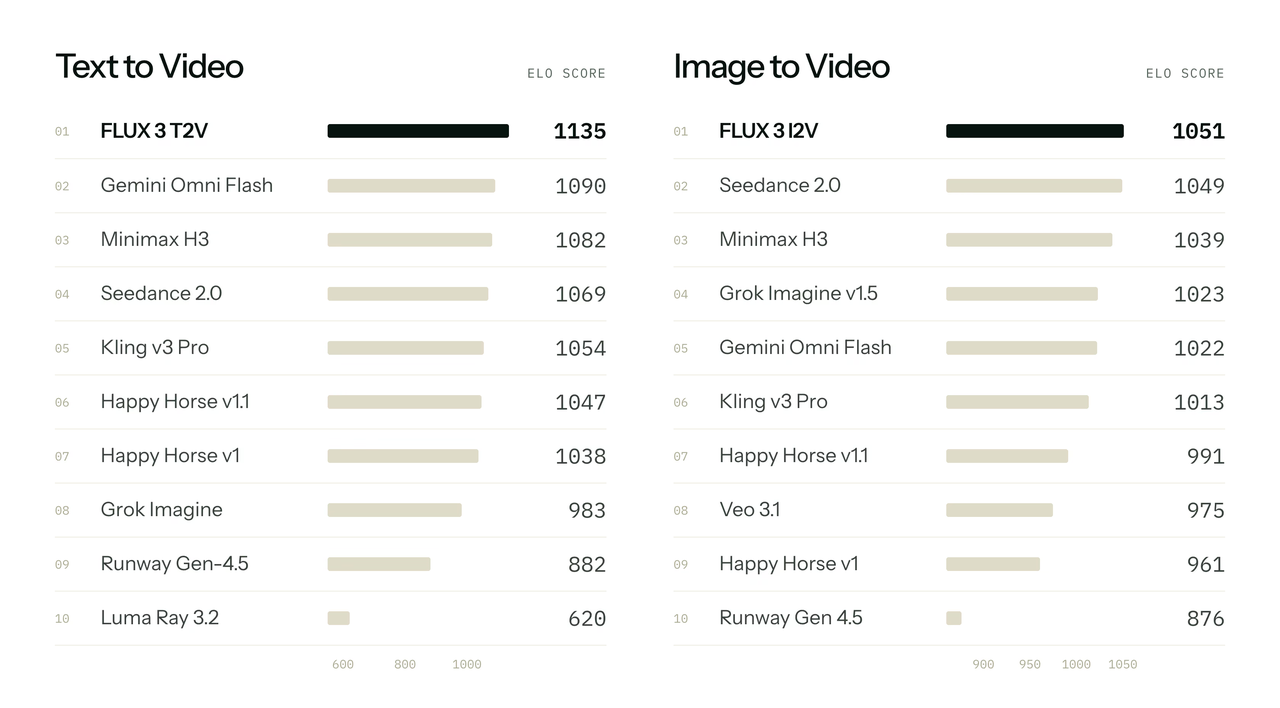
Source: Black Forest Labs — FLUX 3 Video, Part 1: Generation.
What You Need Before Using the FLUX 3 API
- A CometAPI account and an API key stored in a backend environment variable.
- A prompt that defines the subject, motion, camera direction, atmosphere, and any required audio or dialogue.
- A durable job-handling path because video generation is asynchronous.
- Enough credit for iterative testing; billing depends on generated duration and resolution.
Create the key in the CometAPI API dashboard. Do not place it in frontend JavaScript, mobile bundles, public repositories, or screenshots.
FLUX 3 Model ID and Endpoints
| Operation | Method and endpoint | Purpose |
|---|---|---|
| Create video | POST https://api.cometapi.com/v1/videos | Submit a generation task |
| Check task | GET https://api.cometapi.com/v1/videos/{task\_id} | Read status and progress |
| Download output | GET https://api.cometapi.com/v1/videos/{task\_id}/content | Download the completed MP4 |
How to Use FLUX 3 API with CometAPI
Step 1: Set Your API Key
On macOS or Linux:
export COMETAPI_KEY="your_api_key"
On Windows PowerShell:
$env:COMETAPI_KEY="your_api_key"
Step 2: Create a FLUX 3 Video
The current FLUX 3 quickstart uses a multipart request with model, prompt, seconds, and size. This example requests a five-second 720p clip:
curl https://api.cometapi.com/v1/videos \
  -H "Authorization: Bearer $COMETAPI_KEY" \
  -F "model=flux-3" \
  -F "prompt=A paper boat glides across a still pond in soft morning light" \
  -F "seconds=5" \
  -F "size=1280x720"
This request starts a job. Do not design the application around receiving a finished MP4 in the same HTTP response.
Step 3: Save the Task ID
Persist the identifier immediately after the create request succeeds:
{
  "id": "video_task_id",
  "status": "queued"
}
Store the task ID beside the user or job record before polling begins. A process restart should not lose a generation that has already been billed.
Step 4: Poll the Video Status
curl https://api.cometapi.com/v1/videos/{task_id} \
  -H "Authorization: Bearer $COMETAPI_KEY"
Start with a moderate interval such as ten seconds. Treat completed, succeeded, or success as terminal success states; treat failed, failure, cancelled, or canceled as terminal failures.
Step 5: Download the MP4
curl https://api.cometapi.com/v1/videos/{task_id}/content \
  -H "Authorization: Bearer $COMETAPI_KEY" \
  --output flux3_output.mp4
After completion, copy the file into your own object storage or media pipeline rather than keeping a temporary provider URL as the permanent asset.
Complete Python Workflow for FLUX 3 Video Generation
The following example creates a job, saves its ID, polls until completion, checks failure states, validates the MP4 signature, and writes the output to disk.
import os
import time
from pathlib import Path

import requests

api_key = os.environ["COMETAPI_KEY"]
base_url = "https://api.cometapi.com"
headers = {"Authorization": f"Bearer {api_key}"}

response = requests.post(
    f"{base_url}/v1/videos",
    headers=headers,
    files={
        "model": (None, "flux-3"),
        "prompt": (
            None,
            "A product bottle rotates slowly on wet black stone, "
            "soft rim lighting, macro lens, realistic reflections.",
        ),
        "seconds": (None, "5"),
        "size": (None, "1280x720"),
    },
    timeout=120,
)
response.raise_for_status()

task = response.json()
data = task.get("data") or {}
task_id = (
    task.get("id")
    or task.get("task_id")
    or data.get("id")
    or data.get("task_id")
)
if not task_id:
    raise RuntimeError(f"Create response has no task ID: {task}")

while True:
    response = requests.get(
        f"{base_url}/v1/videos/{task_id}",
        headers=headers,
        timeout=60,
    )
    response.raise_for_status()
    task = response.json()
    data = task.get("data") or {}
    status = str(task.get("status") or data.get("status") or "").lower()
    progress = task.get("progress") or data.get("progress") or "unknown"
    print(f"Status: {status or 'unknown'}; progress: {progress}")

    if status in {"failed", "failure", "cancelled", "canceled"}:
        raise RuntimeError(f"Video generation failed: {task}")
    if status in {"completed", "succeeded", "success"} or progress == "100%":
        break
    time.sleep(10)

response = requests.get(
    f"{base_url}/v1/videos/{task_id}/content",
    headers=headers,
    timeout=300,
)
response.raise_for_status()
video = response.content

if len(video) < 12 or video[4:8] != b"ftyp":
    raise RuntimeError("Content response is not a non-empty MP4 file")

output_dir = Path("output")
output_dir.mkdir(parents=True, exist_ok=True)
output_path = output_dir / f"{task_id}.mp4"
output_path.write_bytes(video)
print(f"Saved: {output_path} ({len(video)} bytes)")
How to Use Image-to-Video and Keyframes
The CometAPI FLUX 3 page lists image-to-video as a supported capability. Its current public sample demonstrates text-to-video, so verify the live gateway documentation before assuming a reference-image field copied from another model will work unchanged.
BFL’s native API is explicit: image-to-video uses mode i2v and the keyframes field. One image pins the start frame, two images can pin the beginning and end, and up to ten timed images can storyboard a continuous clip.
BFL-Native Keyframe Example
curl -X POST https://api.bfl.ai/v1/flux-3-video \
  -H "x-key: $BFL_API_KEY" \
  -H "Content-Type: application/json" \
  -d '{
    "mode": "i2v",
    "prompt": "They sprint through the lantern-lit alley as the camera tracks behind them.",
    "keyframes": [
      [0, "data:image/png;base64,<first-frame>"],
      [8, "data:image/png;base64,<last-frame>"]
    ],
    "duration": 8
  }'
Keep provider-native and gateway parameters in separate adapters. BFL uses fields such as mode, keyframes, start_video, resolution, and draft; CometAPI’s verified sample uses model, prompt, seconds, and size.
FLUX 3 API Parameters Explained
| Parameter | API | What it controls | Practical guidance |
|---|---|---|---|
| model | CometAPI | Model selection | Use flux-3 |
| prompt | Both | Scene, action, camera, audio | Describe visible change over time |
| seconds | CometAPI sample | Requested clip length | Begin with 5–8 seconds while tuning |
| size | CometAPI sample | Output dimensions | Start at 1280x720 for economical testing |
| mode | BFL native | t2v / i2v / v2v / draft_enhance | Do not send unless the gateway maps it |
| duration | BFL native | 5–20 s T2V/I2V; 5–15 s V2V | auto is supported by the native API |
| resolution | BFL native | hd or fhd; 4K/UHD is not currently listed for FLUX 3 Video | FHD finishes through the video upsampler |
| generate_audio | BFL native | Synchronized audio on/off | Defaults to true |
| draft | BFL native | Fast preview mode | Use for lower-cost creative iteration |
How to Write Better FLUX 3 Prompts
BFL’s video prompting guide recommends clear direction for the subject and action, camera, scene and atmosphere, motion quality, and continuity. For audio-led scenes, specify dialogue, voice, sound effects, and ambience.
A Practical Prompt Structure
Subject + Environment + Action + Camera + Lighting
+ Dialogue/Voice + Sound Effects + Ambience + Constraints
Cinematic Prompt
A lone cyclist rides through a rain-soaked neon street at midnight.
The camera begins low beside the rear wheel, then rises into a smooth tracking shot.
Reflections stretch across wet asphalt under moving cyan and magenta light.
Audio: steady rainfall, chain noise, distant traffic, no music, no dialogue.
Keep the same rider, bicycle, jacket, and weather throughout the shot.
Product Video Prompt
A premium stainless-steel espresso machine stands on a dark stone counter.
Begin with a macro close-up of water droplets on the metal housing.
Orbit clockwise as the machine brews; steam catches warm side light.
Finish on a clean three-quarter hero angle with the cup in the foreground.
Audio: pump vibration, steam hiss, ceramic contact, quiet cafe ambience.
Do not change the product shape, logo placement, material, or color.
Dialogue and Native-Audio Prompt
A young chef works alone in a compact Tokyo ramen shop at night.
Start close on boiling broth, then pull back as the chef sets down a bowl.
Warm tungsten lighting, natural reflections, documentary handheld motion.
The chef quietly says in Japanese: 「お待たせしました。」
Audio: bubbling broth, soft rain outside, distant street traffic.
No subtitles and no background music.
A prompt such as “make a cinematic ramen shop video” leaves motion, framing, sound, and continuity unspecified. Explicit direction produces a more testable production brief.
FLUX 3 API Pricing
BFL pricing is workflow-specific: full text-to-video and image-to-video renders cost $0.17/s in HD or $0.29/s in FHD, with HD Draft Mode at $0.06/s. Video continuation costs $0.43/s in HD or $0.54/s in FHD, with HD drafts at $0.12/s. CometAPI currently lists flux-3 at $0.136/s for 720p and $0.232/s for 1080p. Verify live pricing before a large batch.
| Provider / workflow | HD / 720p full | FHD / 1080p full | Draft | 5 s full render | 10 s full render |
|---|---|---|---|---|---|
| BFL T2V | $0.17/s | $0.29/s | $0.06/s (HD) | $0.85 / $1.45 | $1.70 / $2.90 |
| BFL I2V | $0.17/s | $0.29/s | $0.06/s (HD) | $0.85 / $1.45 | $1.70 / $2.90 |
| BFL V2V continuation | $0.43/s | $0.54/s | $0.12/s (HD) | $2.15 / $2.70 | $4.30 / $5.40 |
| CometAPI flux-3 | $0.136/s | $0.232/s | Not listed | $0.68 / $1.16 | $1.36 / $2.32 |
Reading the last two columns: values are shown as HD/720p first and FHD/1080p second.
How to Reduce Iteration Costs
- Prototype at 720p before moving a selected prompt to 1080p.
- Use five-second clips to validate composition, motion, and prompt interpretation.
- Change one major prompt variable at a time.
- When using the BFL native API, test Draft Mode before a full-quality render.
- Store successful prompts and reference decisions in application metadata.
FLUX 3 vs Wan 3.0 vs Seedance 2.5
Compare FLUX 3, Wan 3.0, and Seedance 2.5 by workflow rather than looking for one universal winner. The authoritative specification links remain in the table header below.
| Dimension | FLUX 3 Official specs | Wan 3.0 Official specs | Seedance 2.5 Official specs |
|---|---|---|---|
| Maximum clip length | Up to 20 s T2V/I2V | Up to 30 s | Up to 30 s |
| Synchronized audio | Yes | Yes | Yes |
| Text-to-video | Yes | Yes | Yes |
| Image-to-video | Yes | Yes | Yes |
| Reference strategy | Up to 10 native keyframes | Broad multimodal and Omni-Reference workflow | Large multimodal reference capacity |
| Continuation/editing | Native BFL v2v continuation | Long-form and editing workflows | Extension and editing workflows |
| Distinctive strength | Motion logic, multi-shot scenes, synchronized audiovisual output | Input breadth and 30-second generation | Long storytelling and reference-heavy control |
| CometAPI starting price | $0.136/s | $0.04/s | $0.0824/s |
| Best fit | Cinematic or realistic audiovisual shots | All-in-one multimodal production pipelines | Longer, identity-controlled storytelling |
Pricing note: Starting prices are not an apples-to-apples quality or resolution comparison. Use each live model page’s resolution-specific table for budgeting.
Which Video API Should You Choose?
- Choose FLUX 3 for realistic motion, synchronized sound, multi-shot logic, native keyframes, or continuation.
- Choose Wan 3.0 when the workflow begins with many input types and a 30-second generation window matters.
- Choose Seedance 2.5 for longer, reference-heavy storytelling with strong identity, product, and style control.
FLUX 3 API Production Best Practices
Persist Async Jobs as Durable State
Save the task ID immediately after submission. A server restart or worker retry should not force the user to pay for another generation because the application lost the original task.
Avoid Tight Polling
Start near a ten-second interval unless the live documentation recommends otherwise. Polling every second adds request pressure without materially improving the experience.
Validate the Download
Check content length and the MP4 signature before marking an asset complete. A successful HTTP response does not always prove that the body is a valid video.
Separate Native and Gateway Schemas
Maintain separate adapters for BFL-native and CometAPI requests. This prevents native fields such as mode, keyframes, and start_video from leaking into a gateway call that expects model, prompt, seconds, and size.
Store Full Failure Context
Log the HTTP status, response body, task ID, model ID, prompt version, size, duration, and internal job ID. Redact the API key.
Use a Small Evaluation Set Before Shipping
Build 10–30 representative prompts covering camera motion, people, products, typography, dialogue, high-motion scenes, and required aspect ratios. Run the same set when a model or integration version changes, and repeat important prompts because video generation is stochastic.
FAQ
What is the FLUX 3 model ID on CometAPI?
The current model ID is flux-3.
Which CometAPI endpoint does FLUX 3 use?
The verified Video API workflow uses POST /v1/videos, followed by GET /v1/videos/{task_id} and GET /v1/videos/{task_id}/content.
Is FLUX 3 synchronous?
No. Treat it as an asynchronous job: submit, persist the task ID, poll, and download.
How long can FLUX 3 generate?
BFL documents 5–20 seconds for T2V/I2V and 5–15 seconds for continuation.
Does FLUX 3 generate audio?
Yes. BFL documents synchronized audio enabled by default in its native API.
Does FLUX 3 support image-to-video?
Yes. CometAPI lists image-to-video support, while BFL’s native API implements it through i2v mode and keyframes.
Can I use BFL keyframes through CometAPI unchanged?
Do not assume so. The request schemas differ; verify the current CometAPI quickstart before shipping a gateway reference-image workflow.
How much does a five-second FLUX 3 video cost on CometAPI?
At the currently listed CometAPI rates, five seconds costs $0.68 at 720p or $1.16 at 1080p. See the consolidated pricing table above for the live reference link.
Is FLUX 3 better than Wan 3.0 or Seedance 2.5?
It depends on the workflow. FLUX 3 is compelling for motion-coherent audiovisual shots and BFL-native keyframe or continuation control; Wan 3.0 emphasizes input breadth; Seedance 2.5 emphasizes longer, reference-heavy storytelling.
Conclusion
FLUX 3 now has a working asynchronous Video API path on CometAPI, while BFL’s native documentation exposes deeper controls for keyframes, continuation, audio, and Draft Mode.
A safe integration path is straightforward: start with a short 720p text-to-video request, persist the task ID, poll conservatively, download and validate the MP4, then add prompt templates, storage, retry logic, and a repeatable evaluation set. Keep native and gateway schemas separate, and verify the live model page before hard-coding fields or prices.