

The fastest way to use the GLM-5.3 Flash API is to call the model through CometAPI's OpenAI-compatible chat-completions endpoint.The connection details are consolidated in the API specifications table below; keep the API key on the server.
Answer first: create a CometAPI key, install an OpenAI-compatible SDK, send a POST request to /v1/chat/completions, then add streaming, vision, JSON output, or tools only after the basic request succeeds.
What Is the GLM-5.3 Flash API?
GLM-5.3 Flash is Z.ai's efficiency-first native multimodal model in the GLM-5 family. It exposes reasoning, long context, visual understanding, and agent-oriented capabilities through a chat API. The model contains 320B total parameters but activates 18B per token; that architecture is important for cost, but developers mainly experience the result as a model that can stay active across long prompts and repeated tool calls.
This guide deliberately keeps architecture and benchmark coverage short. The companion model overview article already explains the hybrid attention design, open weights, complete launch benchmark matrix, pricing background, and model-family comparison. Here, the focus is integration behavior and production decisions.
API Specifications That Affect Integration
| API specification | Value | Practical meaning |
|---|---|---|
| Base URL | https://api.cometapi.com/v1 | Configure this once in the server-side client. |
| Endpoint | POST /v1/chat/completions | Use the OpenAI-compatible chat-completions route. |
| Compatible SDKs | OpenAI-compatible Python and JavaScript clients | Reuse familiar client patterns with the CometAPI base URL. |
| Authentication | Bearer API key | Keep the key in a server-side environment variable or secret manager. |
| Model code | glm-5.3-flash | Use this exact value in the request body. |
| Context window | 1,048,576 tokens | Suitable for large repositories, document packs, and long agent histories. |
| Maximum output | Up to 131,072 tokens | Set a lower application-specific cap to control cost and latency. |
| Native inputs | Text, image, video, file | Hosted-route support can differ; validate the exact CometAPI route before relying on every modality. |
| Output | Text | The model interprets media but does not directly return generated images or video. |
| Reasoning | low, high, max | Use effort levels to trade latency and token consumption for depth. |
| Thinking | Always enabled | Do not send a parameter that tries to disable thinking. |
| Developer features | Streaming, function calling, caching, structured output | Useful for interactive apps, agents, and machine-readable pipelines. |
Model capability and gateway capability are not identical. Treat the live CometAPI model page and API schema as the contract for the route you actually call, especially for video, files, strict JSON Schema, and provider-specific thinking fields.
Brief Performance Context
Z.ai reports strong launch results on tasks that matter to API builders: terminal work, software engineering, tool use, and automation. These are vendor-reported scores obtained with specific harnesses and tool policies, so they help identify likely strengths rather than establish a universal ranking.
| Benchmark | GLM-5.3 Flash | What it suggests for API workloads |
|---|---|---|
| Terminal-Bench 2.1 | 84.3 | Strong fit for terminal-driven coding agents. |
| DeepSWE v1.1 | 63.4 | Promising repository-scale software engineering. |
| Toolathlon Verified | 78.4 | Strong tool-selection and tool-use signal. |
| AutomationBench | 48.8 | Improved multi-step automation versus the predecessor. |
The practical implication is narrower than the benchmark table: GLM-5.3 Flash is a strong candidate when the workflow combines long context with tools or visual feedback. For a complete model comparison, use the existing model overview rather than duplicating it here.
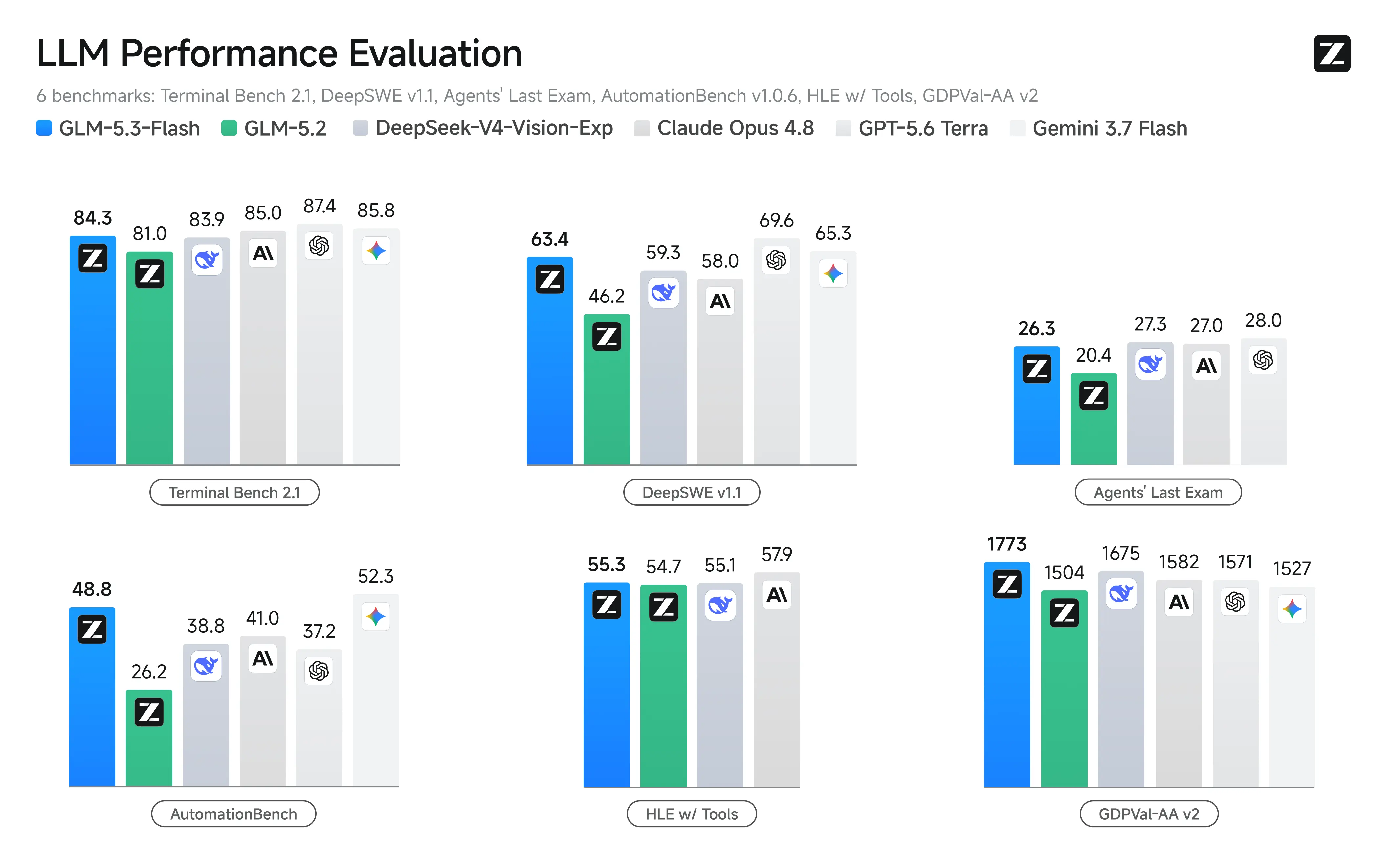
Source: Z.ai official benchmark graphic
The official benchmark graphic compares GLM-5.3 Flash performance across model and effort settings. For this API guide, it provides concise performance context rather than repeating the complete launch matrix. Applications should still measure task success, end-to-end latency, and total token usage on their own prompts.
Why Use GLM-5.3 Flash Through CometAPI?
CometAPI exposes GLM-5.3 Flash through an OpenAI-compatible interface. That lets a team reuse familiar SDK patterns, centralize credentials and billing, and switch models without rebuilding the entire request layer.
• One integration pattern. The same base client can call different supported models by changing the model ID.
• Centralized usage visibility. Teams can review usage and cost without maintaining a separate dashboard for every provider.
• Faster evaluation. A single request harness can compare response quality, latency, and errors across candidate models.
• Simpler fallback design. Applications can keep retry and routing logic in one gateway layer.
• Lower listed route price. The current model page lists $0.06 per million input tokens and $0.20 per million output tokens; verify the live page before budgeting.
Before You Start
You need a CometAPI account, an API key, and one of the following local environments:
• Python 3.9 or later with pip
• Node.js 18 or later with npm
• cURL for a minimal command-line test
Never place a production CometAPI key in browser JavaScript, a mobile application, a public repository, a screenshot, or client-side logs. Call CometAPI from a trusted server and keep the key in an environment variable or secret manager.
How to Use GLM-5.3 Flash API with CometAPI
Step 1: Create a CometAPI API Key
Sign in to CometAPI, open the API key console, create a key, and copy it once into your secret-management workflow. Use a separate key for development and production so you can rotate or revoke one environment without interrupting the other.
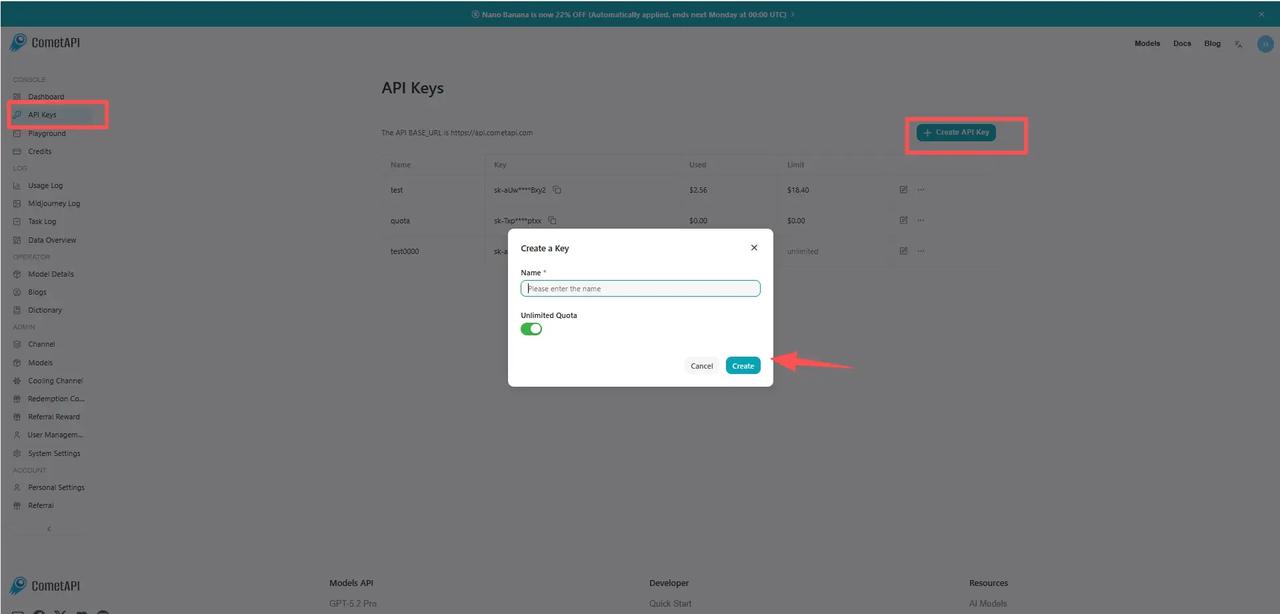
Source: CometAPI official API key guide image
Step 2: Store the Key as an Environment Variable
$env:COMETAPI_KEY = "your_cometapi_key_here"
export COMETAPI_KEY="your_cometapi_key_here"
For production, replace shell history with a deployment secret, container secret, or managed vault.

### Step 3: Install an OpenAI-Compatible SDK
python -m pip install --upgrade openai
npm install openai
```

### Step 4: Make the First Request with cURL

```
curl https://api.cometapi.com/v1/chat/completions \
  -H "Authorization: Bearer $COMETAPI_KEY" \
  -H "Content-Type: application/json" \
  -d '{
    "model": "glm-5.3-flash",
    "messages": [
      {
        "role": "system",
        "content": "You are a precise technical assistant."
      },
      {
        "role": "user",
        "content": "Explain three practical uses of a one-million-token context window."
      }
    ],
    "max_completion_tokens": 800
  }'
```

A successful response contains an assistant message under choices\[0].message.content plus usage metadata when the route returns it. Start with this small request before adding optional parameters.

### Step 5: Call the API from Python

```
import os
from openai import OpenAI

client = OpenAI(
    api_key=os.environ["COMETAPI_KEY"],
    base_url="https://api.cometapi.com/v1",
    timeout=60.0,
    max_retries=2,
)

completion = client.chat.completions.create(
    model="glm-5.3-flash",
    messages=[
        {
            "role": "system",
            "content": "You are a precise technical assistant.",
        },
        {
            "role": "user",
            "content": "Review this migration plan and list the top five risks.",
        },
    ],
    max_completion_tokens=1200,
)

print(completion.choices[0].message.content)
print(completion.usage)
```

### Step 6: Call the API from JavaScript

```
import OpenAI from "openai";

const client = new OpenAI({
  apiKey: process.env.COMETAPI_KEY,
  baseURL: "https://api.cometapi.com/v1",
  timeout: 60_000,
  maxRetries: 2,
});

const completion = await client.chat.completions.create({
  model: "glm-5.3-flash",
  messages: [
    { role: "system", content: "You are a precise technical assistant." },
    { role: "user", content: "Draft a safe rollout checklist for this API." },
  ],
  max_completion_tokens: 1200,
});

console.log(completion.choices[0].message.content);
console.log(completion.usage);
```

## How to Control Reasoning Effort

The [official model documentation](https://docs.z.ai/guides/vlm/glm-5.3-flash) supports [low, high, and max reasoning effort](https://docs.z.ai/guides/vlm/glm-5.3-flash). [Thinking remains enabled](https://docs.z.ai/guides/vlm/glm-5.3-flash); the effort setting changes how much reasoning budget the model can use.

| Effort | Good starting workloads                             | Trade-off                                            |
| ------ | --------------------------------------------------- | ---------------------------------------------------- |
| low    | Classification, rewriting, short extraction         | Lower latency and output-token use; less depth.      |
| high   | Code review, planning, document analysis            | Balanced default for many production tasks.          |
| max    | Complex debugging, tool agents, difficult reasoning | Highest depth; potentially greater latency and cost. |

```
completion = client.chat.completions.create(
    model="glm-5.3-flash",
    messages=[
        {
            "role": "user",
            "content": "Find hidden failure modes in this distributed rollout plan.",
        }
    ],
    max_completion_tokens=1800,
    extra_body={"reasoning_effort": "high"},
)

print(completion.choices[0].message.content)
```

*If the installed SDK exposes reasoning\_effort as a first-class argument, you may pass it directly. If the CometAPI route rejects a provider-specific field, remove it and use the route default. Do not try to disable thinking.*

## How to Stream Responses

Streaming is useful for chat, coding assistants, and long analysis because it lets the interface display output as it arrives. It does not reduce the total number of generated tokens, so keep the same output caps and cost controls.

### Python Streaming

**Python**

```
stream = client.chat.completions.create(
    model="glm-5.3-flash",
    messages=[
        {"role": "user", "content": "Create a staged database migration plan."}
    ],
    max_completion_tokens=1600,
    stream=True,
)

for chunk in stream:
    delta = chunk.choices[0].delta
    if delta.content:
        print(delta.content, end="", flush=True)
print()
```

### JavaScript Streaming

**JavaScript**

```
const stream = await client.chat.completions.create({
  model: "glm-5.3-flash",
  messages: [
    { role: "user", content: "Create a staged database migration plan." },
  ],
  max_completion_tokens: 1600,
  stream: true,
});

for await (const chunk of stream) {
  const text = chunk.choices[0]?.delta?.content ?? "";
  process.stdout.write(text);
}
```

• **Handle cancellation.** Stop reading the stream when the client disconnects and cancel upstream work when supported.

• **Buffer safely.** Do not assume each chunk contains a full word, JSON token, or tool-call object.

• **Record final usage.** Usage may appear only in the final event or route-specific metadata.

## How to Send Images

[GLM-5.3 Flash](https://www.cometapi.com/models/zhipuai/glm-5-3-flash/) accepts visual content through image\_url blocks in messages\[].content\[]. The official documentation recommends a reachable image URL or a Base64 Data URL. CometAPI's model page identifies image-to-text capability, but applications should still test formats, file size, and route behavior before production.

### Analyze an Image URL

**Python**

```
completion = client.chat.completions.create(
    model="glm-5.3-flash",
    messages=[
        {
            "role": "user",
            "content": [
                {
                    "type": "image_url",
                    "image_url": {
                        "url": "https://example.com/dashboard.png"
                    },
                },
                {
                    "type": "text",
                    "text": (
                        "Review this dashboard. Identify usability issues, "
                        "ambiguous metrics, and possible data-quality risks."
                    ),
                },
            ],
        }
    ],
    max_completion_tokens=1500,
)

print(completion.choices[0].message.content)
```

### Send a Local Image as Base64

**Python**

```
import base64
import mimetypes
from pathlib import Path

image_path = Path("dashboard.png")
mime_type = mimetypes.guess_type(image_path.name)[0] or "image/png"
encoded = base64.b64encode(image_path.read_bytes()).decode("utf-8")

completion = client.chat.completions.create(
    model="glm-5.3-flash",
    messages=[
        {
            "role": "user",
            "content": [
                {
                    "type": "image_url",
                    "image_url": {
                        "url": f"data:{mime_type};base64,{encoded}"
                    },
                },
                {
                    "type": "text",
                    "text": "Extract the chart title, axes, and main trend.",
                },
            ],
        }
    ],
    max_completion_tokens=1000,
)

print(completion.choices[0].message.content)
```

• Crop irrelevant whitespace before encoding an image.

• Downscale images that are much larger than the information being inspected.

• Ask a specific visual question instead of requesting a generic description.

• Do not assume a public webpage URL is a direct image URL.

• Test multiple-image ordering because each image should be clearly referenced in the prompt.

## How to Request Structured JSON

Structured output is valuable when the next component is code rather than a human reader. Use a narrow schema, validate the result, and keep a fallback for routes that do not expose strict JSON Schema in exactly the same form.

**Python**

```
import json

completion = client.chat.completions.create(
    model="glm-5.3-flash",
    messages=[
        {
            "role": "system",
            "content": "Return valid JSON only.",
        },
        {
            "role": "user",
            "content": (
                "Extract equipment, severity, observed symptom, and next action "
                "from this report: Feeder 12 showed repeated zero-sequence current "
                "spikes after rain; inspect insulation and compare adjacent sections."
            ),
        },
    ],
    response_format={"type": "json_object"},
    max_completion_tokens=800,
)

data = json.loads(completion.choices[0].message.content)
required = {"equipment", "severity", "symptom", "next_action"}
missing = required.difference(data)
if missing:
    raise ValueError(f"Missing fields: {sorted(missing)}")

print(data)
```

*JSON mode does not remove the need for validation. Check required fields, types, allowed values, and maximum lengths before storing the result or triggering another system.*

## How to Use Function Calling

Function calling lets the model decide when it needs external data, while application code remains responsible for authorization and execution. The safe pattern is: model proposes a tool call, the server validates it, the server executes the tool, and the model receives the result.

**Python**

```
import json

completion = client.chat.completions.create(
    model="glm-5.3-flash",
    messages=[
        {
            "role": "system",
            "content": "Return valid JSON only.",
        },
        {
            "role": "user",
            "content": (
                "Extract equipment, severity, observed symptom, and next action "
                "from this report: Feeder 12 showed repeated zero-sequence current "
                "spikes after rain; inspect insulation and compare adjacent sections."
            ),
        },
    ],
    response_format={"type": "json_object"},
    max_completion_tokens=800,
)

data = json.loads(completion.choices[0].message.content)
required = {"equipment", "severity", "symptom", "next_action"}
missing = required.difference(data)
if missing:
    raise ValueError(f"Missing fields: {sorted(missing)}")

print(data)
```

• **Validate arguments.** Treat tool-call JSON as untrusted input.

• **Enforce authorization.** The model does not decide what the current user is allowed to do.

• **Separate read and write tools.** Require confirmation for destructive or externally visible actions.

• **Limit the tool inventory.** Expose only tools relevant to the current workflow.

• **Cap the loop.** Set maximum tool rounds, total tokens, elapsed time, and cost.

## [GLM-5.3 Flash](https://www.cometapi.com/models/zhipuai/glm-5-3-flash/) API Parameters

| Parameter               | Purpose                           | Practical guidance                                        |
| ----------------------- | --------------------------------- | --------------------------------------------------------- |
| model                   | Selects the model route           | Use glm-5.3-flash.                                        |
| messages                | Conversation and multimodal input | Keep role order valid; preserve required tool messages.   |
| max\_completion\_tokens | Caps generated output             | Set per workflow instead of relying on the model maximum. |
| temperature             | Sampling behavior                 | Official recommendation is 1.                             |
| top\_p                  | Nucleus sampling                  | Official recommendation is 0.95.                          |
| reasoning\_effort       | Reasoning budget                  | Use low, high, or max; route support should be tested.    |
| stream                  | Incremental output                | Use true for interactive responses.                       |
| tools                   | Function definitions              | Keep schemas narrow and validate every call.              |
| tool\_choice            | Controls tool selection           | Start with auto unless the workflow requires a tool.      |
| response\_format        | Requests machine-readable output  | Validate support and the returned JSON.                   |

## Z.ai Direct API vs CometAPI

Both routes can be appropriate. The decision is mostly about integration ownership, model breadth, billing, and how quickly the application needs provider-native features.

| Dimension       | Z.ai Direct API                               | CometAPI                                           | Practical result                                               |
| --------------- | --------------------------------------------- | -------------------------------------------------- | -------------------------------------------------------------- |
| Account and key | Z.ai account and key                          | CometAPI account and key                           | Keys are not interchangeable.                                  |
| SDK pattern     | OpenAI-compatible                             | OpenAI-compatible                                  | Much client code can be reused.                                |
| Model coverage  | Z.ai model family                             | Multiple providers and model families              | CometAPI is useful for routing and comparison.                 |
| Native features | Earliest access to provider-specific behavior | Depends on gateway exposure and pass-through       | Test advanced fields on the selected route.                    |
| Billing         | Provider-specific                             | Centralized across supported models                | Unified billing can simplify multi-model operations.           |
| Fallback design | Requires another provider integration         | Can remain inside one gateway layer                | CometAPI can reduce switching friction.                        |
| Best fit        | Deep commitment to Z.ai-native capabilities   | Unified access, evaluation, and production routing | Choose based on the system architecture, not a generic winner. |

Use the direct API when the newest provider-native parameter or product feature is essential. Use CometAPI when one client, unified billing, and the ability to compare or replace models matter more. For production, run the same representative test suite against the exact route you plan to deploy.

## Cost Estimation and Token Budgeting

The current [CometAPI model page](https://www.cometapi.com/models/zhipuai/glm-5-3-flash/) lists [$0.06 per million input tokens](https://www.cometapi.com/models/zhipuai/glm-5-3-flash/) and [$0.20 per million output tokens](https://www.cometapi.com/models/zhipuai/glm-5-3-flash/). At those rates, estimated request cost is:

cost \= input\_tokens / 1,000,000 x 0.06 + output\_tokens / 1,000,000 x 0.20

| Workload                | Input tokens | Output tokens | Estimated cost |
| ----------------------- | ------------ | ------------- | -------------- |
| Short question          | 2,000        | 400           | $0.00020       |
| Code review             | 50,000       | 4,000         | $0.00380       |
| Large document analysis | 250,000      | 10,000        | $0.01700       |
| Long agent run          | 800,000      | 30,000        | $0.05400       |

*Pricing is time-sensitive. Confirm the live input, cached-input, and output rates before publication or production budgeting. Reasoning and tool loops can increase billed output and repeated input, so estimate complete workflows rather than one visible answer.*

## GLM-5.3 Flash API Production Best Practices

### Cost and Latency Controls

#### **Output caps**

Benchmark generation settings and production API limits are different. The cited HLE evaluation used a maximum generation length of 163,840 tokens, while some evaluations used 64K outputs; neither setting proves that every hosted API route can return more than 100,000 tokens. Set the cap from the live route schema and the workflow budget.Use small caps for classification and extraction, medium caps for analysis, and larger caps only for explicit long-form or agent tasks.

**Context control**

A one-million-token window is capacity, not a target. Retrieve relevant files, remove duplicated logs, place stable instructions near the beginning, and measure whether additional context improves task success.

### State and Reliability

#### **Preserve state**

Store complete assistant messages needed by the next turn, including tool calls and route-specific fields that your application has verified. Dropping structured history can break a multi-step tool loop even when the visible text looks complete.

#### Retry Selectively

• Retry transient 429, 500, 502, 503, and network timeout failures with exponential backoff and jitter.

• Do not blindly retry authentication errors, invalid parameters, or oversized requests.

• Attach an application request ID so duplicate work can be recognized.

• Use idempotency controls around external write operations, even if the model request itself is retried.

### Safety and Validation

#### **Validate machine-readable output**

Schema validation, allowed-value checks, length limits, and domain rules should sit between the model and every database, queue, or external API. A syntactically valid JSON object can still be incomplete or unsafe.

#### **Authorize tool calls**

Treat model-proposed tool calls as untrusted requests: validate arguments, enforce user authorization, separate read and write operations, and require confirmation for destructive actions.

### Observability and Fallback

#### **Measure workflow**

• Task success or human acceptance rate

• Time to first token and total latency

• Input, cached input, reasoning, and output tokens

• Tool-call count and tool failure rate

• Retries, rate limits, and provider errors

• Cost per completed task rather than cost per isolated call

#### **Design fallback**

Choose a fallback by workload, not reputation. A text-only fallback may be acceptable for document extraction but fail a screenshot-based task. Define which inputs and tool schemas are portable, which parameters must be removed, and when the user should see a recoverable error instead of an automatic model switch.

## Common Errors and Troubleshooting

| Symptom                 | Likely cause                                                       | What to check                                                                |
| ----------------------- | ------------------------------------------------------------------ | ---------------------------------------------------------------------------- |
| 401 Unauthorized        | Missing, malformed, or revoked key                                 | Confirm the Authorization header and server-side environment variable.       |
| 404 or model not found  | Wrong model ID or unavailable route                                | Use glm-5.3-flash and confirm availability on the live model page.           |
| 429 Rate Limit          | Request or token quota exceeded                                    | Back off, reduce concurrency, inspect account limits, and retry with jitter. |
| Unsupported parameter   | Provider-native field not exposed by the gateway                   | Remove optional fields, then add them back one at a time.                    |
| Context length exceeded | Prompt plus requested output exceeds route limit                   | Trim, retrieve, summarize, or lower max\_completion\_tokens.                 |
| Invalid image           | URL is inaccessible, format is unsupported, or Base64 is malformed | Test a direct HTTPS image URL and correct MIME prefix.                       |
| Broken streamed JSON    | Chunks were parsed as complete objects                             | Buffer the stream and parse only after the complete JSON payload arrives.    |
| Tool loop never ends    | No step budget or ambiguous tool results                           | Cap rounds, improve tool descriptions, and return explicit tool errors.      |

## When Should You Use GLM-5.3 Flash API?

### Good Fits

• Repository-scale code understanding and multi-file review

• Visual coding, screenshot analysis, and interface QA

• Long document packs and evidence-backed synthesis

• Tool-using agents with repeated planning and verification

• High-volume workflows where token cost materially affects unit economics

• Applications that benefit from switching or comparing models through one gateway

### Use Another Route or Model When

• The product needs image or video output rather than text output.

• The task is a tiny, low-risk classification that a smaller model can handle reliably.

• A provider-native feature is mandatory but not exposed on the gateway route.

• The workflow cannot tolerate always-on reasoning or its associated latency profile.

• The application has not yet tested the model on its own tools, data, and failure cases.

## FAQ

###

### What should I verify on the exact CometAPI route before launch?

Verify model availability, accepted multimodal formats, maximum output, reasoning fields, structured-output behavior, rate limits, and current pricing with representative requests.

### Which metrics should a production evaluation track?

Track task success, time to first token, total latency, input and output tokens, tool-call failures, retry rate, and cost per completed workflow??ot only cost per API call.

### How should I choose between Z.ai direct and CometAPI?

Use Z.ai direct when immediate access to provider-native behavior is essential. Use CometAPI when unified authentication, billing, model comparison, and gateway-level fallback are more important.

### What makes a fallback safe?

A safe fallback accepts the same input modality, preserves required tool schemas, removes unsupported parameters, stays within the task?? authorization boundary, and fails visibly when behavior cannot be preserved.

## Conclusion

[GLM-5.3 Flash](https://www.cometapi.com/models/zhipuai/glm-5-3-flash/) is most useful through an API when long context, visual input, reasoning, and tool use are part of one workflow. The basic CometAPI integration is small: one server-side key, one OpenAI-compatible client, the [glm-5.3-flash](https://www.cometapi.com/models/zhipuai/glm-5-3-flash/) model ID, and the chat-completions endpoint. Production quality comes from everything around that request: scoped prompts, output caps, schema validation, tool authorization, retries, observability, and workload-specific evaluation.

Start with a short text call, add one advanced capability at a time, and test the complete user journey before scaling. Confirm the live [GLM-5.3 Flash model page](https://www.cometapi.com/models/zhipuai/glm-5-3-flash/) for current availability, supported route behavior, and pricing.

## SEO Metadata

**Meta title:** How to Use GLM-5.3 Flash API: Developer Guide

**Meta description:** Learn how to use the GLM-5.3 Flash API with CometAPI, including Python and JavaScript examples, vision, streaming, tools, JSON output, and best practices.

**Keywords:** GLM-5.3 Flash API, how to use GLM-5.3 Flash, GLM-5.3 Flash Python, GLM-5.3 Flash JavaScript, GLM-5.3 Flash CometAPI, GLM API tutorial, multimodal API, reasoning API, function calling

**URL slug:** how-to-use-glm-5-3-flash-api