

TL;DR
GPT-6 Astra API in CometAPI is best suited to difficult, tool-rich workflows where completion quality matters more than the lowest token price. The model supports a 1,050,000-token context window, 128,000 output tokens, image input, structured outputs, streaming, function calling, and five reasoning levels. Start with the Responses API, medium reasoning, a narrow tool set, and an evaluation that measures cost per accepted task. CometAPI's current base token rates are 20% below the corresponding OpenAI rates.
Key Takeaways
- Astra is optimized for hard end-to-end work, including coding, computer use, research, and professional automation.
- Use the Responses API for new tool-driven integrations.
- Choose the lowest reasoning effort that passes your workload evaluation;
noneis not supported. - Keep prompts below the 272K long-context threshold whenever possible, because the higher schedule applies to the full request.
- Public evaluations show higher scores and lower estimated API cost per task in several difficult workloads, but production routing should be based on your own accepted-task rate.
GPT-6 Astra API Quick Start
- Create a CometAPI key and store it in an environment variable.
- Install the OpenAI SDK.
- Send a Responses API request with
model="gpt-6-astra". - Add a strict output contract and validate the result.
- Connect only the tools required by the workflow.
- Test the integration on representative tasks before production.
What Is the GPT-6 Astra API?
OpenAI's most capable model for the hardest end-to-end work is designed for complex reasoning, coding, computer use, research, and document creation. In an API application, Astra's value comes from maintaining intent across long workflows, calling tools, interpreting results, and continuing until the application's completion criteria are met.
GPT-6 Astra API Specifications
| OpenAI specification | GPT-6 Astra |
|---|---|
| Model ID | gpt-6-astra |
| Context window | 1,050,000 tokens |
| Maximum output | 128,000 tokens |
| Knowledge cutoff | April 30, 2026 |
| Input and output | Text and image input; text output |
| Reasoning effort | low, medium, high, xhigh, max |
| Supported features | Streaming, function calling, structured outputs |
| Responses API tools | Web search, file search, image generation, code interpreter, hosted shell, Apply Patch, computer use, MCP, and tool search |
| Fine-tuning | Not supported |
The integration challenge is orchestration: provide the right context, execute requested tools, inspect their results, and stop when the application’s completion criteria are met.
GPT-6 Astra API vs GPT-5.6 Sol: What Is New?
OpenAI's current model guidance describes Astra as stronger on difficult multistep workflows while often using fewer output tokens. It also adds controls that matter to long-running agents: asynchronous tool calls, mid-turn steering, reasoning changes during a conversation, and misalignment monitoring.
| Dimension | GPT-6 Astra | GPT-5.6 Sol |
|---|---|---|
| Primary role | Hardest end-to-end work | Complex professional work at lower token cost |
| Context / max output | 1.05M / 128K | 1.05M / 128K |
| Knowledge cutoff | April 30, 2026 | February 16, 2026 |
| Async tool calling | Supported | Use conventional tool-result coordination |
| Mid-turn steering | Supported through Responses WebSocket | Use a subsequent turn or application-managed restart |
| Change reasoning mid-conversation | configuration_update in compatible flows | Set effort at request level |
| none reasoning | Not supported | Supported |
| OpenAI Standard input / output | $10 / $50 per 1M | $4 / $20 per 1M |
| Best routing role | Escalation for high-complexity work | Default for broader complex traffic |
The upgrade is not a blanket replacement. Use Sol when it reliably passes the task; route to Astra when tool depth, long context, retries, or human correction make the cheaper model more expensive in practice.
Why Use GPT-6 Astra Through CometAPI?
The GPT-6 Astra API in CometAPI uses the OpenAI-compatible /v1/responses route. Its $8/M input and $40/M output short-context rates are 20% below the corresponding OpenAI Standard rates of $10/M and $50/M.
An existing OpenAI SDK integration can keep its client library while changing the key, base_url, and model ID. Use the same gateway when routing suitable work to GPT-5.6 Sol.
Step 1: Get a CometAPI API Key
Create a key in the CometAPI dashboard and store it outside the source code. Use a deployment secret manager in production.
export COMETAPI_KEY="your_api_key"
$env:COMETAPI_KEY = "your_api_key"
Step 2: Install the OpenAI SDK
Install the current SDK for your application language.
python -m pip install -U openai
npm install openai
Step 3: Make Your First Request
Use /v1/responses for new integrations, particularly when the workflow will later add tools or structured outputs.
import os
from openai import OpenAI

client = OpenAI(
    api_key=os.environ["COMETAPI_KEY"],
    base_url="https://api.cometapi.com/v1",
    timeout=120.0,
    max_retries=2,
)

response = client.responses.create(
    model="gpt-6-astra",
    input="Give three practical ways to reduce API latency.",
    reasoning={"effort": "medium"},
)

if response.status != "completed":
    raise RuntimeError(f"Unexpected status: {response.status}")

print(response.output_text)
Step 4: Test Before Production
Run representative tasks through both the candidate and fallback routes. Record accepted-task rate, latency, retries, input and output tokens, tool failures, and human correction time. Promote Astra only where the result improves the workflow's real completion economics.
Do not treat a successful demo prompt as production validation. Include ambiguous inputs, tool failures, missing data, and long-running requests in the test set.
How to Choose Reasoning Effort
The supported reasoning levels are low, medium, high, xhigh, and max. Use the lowest level that consistently meets your acceptance criteria.
| Effort | Practical starting point |
|---|---|
| low | Classification, rewriting, and straightforward extraction |
| medium | General development, analysis, and most first evaluations |
| high | Complex debugging, architecture, and multi-source synthesis |
| xhigh | Difficult research and long, multi-stage coding work |
| max | A small number of the hardest tasks after evaluation |
How to Use Image Input
Use an accessible image URL or a supported uploaded file. Combine the image with a specific inspection task instead of asking for a generic description.
vision = client.responses.create(
    model="gpt-6-astra",
    input=[{
        "role": "user",
        "content": [
            {"type": "input_text", "text": "Identify one UI defect and propose a fix."},
            {"type": "input_image", "image_url": os.environ["SCREENSHOT_URL"]}
        ]
    }]
)

print(vision.output_text)
How to Use Structured Outputs and Stream Responses
Structured outputs provide a machine-readable contract; streaming improves perceived responsiveness. They solve different problems and can be used together. Lifecycle events and text deltas should be handled separately.
stream = client.responses.create(
    model="gpt-6-astra",
    input="Create a deployment checklist.",
    stream=True,
)

completed = False
for event in stream:
    if event.type == "response.output_text.delta":
        print(event.delta, end="", flush=True)
    elif event.type == "response.completed":
        completed = True
    elif event.type in {"response.failed", "response.incomplete", "error"}:
        raise RuntimeError(event.type)

if not completed:
    raise RuntimeError("Stream closed before completion")
How to Maintain Stateful Conversations
For portable history, resend the user inputs and the model output items required by the next turn. Where supported by the provider, previous_response_id can reference a stored response instead.
history = [{"role": "user", "content": "Give three latency improvements."}]
history.extend(
    item.model_dump(exclude={"id"}, exclude_none=True)
    for item in response.output
)
history.append({"role": "user", "content": "Turn them into a checklist."})

follow_up = client.responses.create(
    model="gpt-6-astra",
    input=history,
)
print(follow_up.output_text)
How to Use Function Calling
A complete function loop has four parts: define the schema, receive a tool call, execute it in your application, and return a function_call_output item with the original call_id. Keep tool permissions minimal and validate every argument before execution.
import json

history = [{"role": "user", "content": "Check order A-1042."}]
turn = client.responses.create(model="gpt-6-astra", input=history, tools=tools)
history.extend(item.model_dump(exclude={"id"}, exclude_none=True) for item in turn.output)

for item in turn.output:
    if item.type == "function_call" and item.name == "get_order_status":
        args = json.loads(item.arguments)
        tool_result = {"order_id": args["order_id"], "status": "shipped"}
        history.append({
            "type": "function_call_output",
            "call_id": item.call_id,
            "output": json.dumps(tool_result),
        })

final = client.responses.create(model="gpt-6-astra", input=history, tools=tools)
print(final.output_text)
How to Use Async Tool Calling
Async tool calling lets Astra continue independent work while a long-running function or custom tool is pending. Set async: true in the tool definition, retain the original call_id, and return the result when the external work finishes. Your application remains responsible for the job queue, timeout policy, idempotency, and recovery.
Do not submit the same long-running job again merely because a polling window expired. Save the job ID and resume retrieval.
How to Prompt the GPT-6 Astra API
OpenAI's prompt guidance emphasizes initiative, instruction priority, style, delegation, and calibrated verification. A useful production prompt should state the task, available resources, completion test, boundaries, expected format, and how to handle missing information.
| Prompt component | What to specify |
|---|---|
| Task | The concrete outcome to produce |
| Resources | Files, tools, data, and context that may be used |
| Completion test | Conditions that make the work done |
| Boundaries | Actions allowed, prohibited, or requiring approval |
| Style and format | Length, structure, tone, and output schema |
| Uncertainty | What may be inferred and what must be clarified |
| Verification | Which checks are required and when to stop testing |
Task: Review this API design and identify the three highest-impact migration risks.
Resources: Use the attached schema and deployment notes.
Completion test: Return three risks, evidence for each, and one acceptance test per risk.
Boundaries: Do not change production systems. Infer routine implementation details.
Clarification rule: Ask only if a missing requirement would materially change the result.
Style: Use concise prose and a final three-row table.
Verification: Check that every risk has an executable acceptance test.
GPT-6 Astra Benchmarks: Higher Scores, Fewer Tokens
Public evaluations are most useful when quality and task economics are read together. The benchmark scores below show where Astra's gains are large; the reported savings are configuration-specific estimates rather than guarantees for every workload.
| Published evaluation | Astra | Sol | Difference |
|---|---|---|---|
| AutomationBench | 41.4% | 18.1% | +23.3 points |
| OSWorld 2.0 | 72.6% | 65.7% | +6.9 points |
| Terminal-Bench 4.0 | 57.9% | 37.3% | +20.6 points |
| MRCR v2, 512K-1M | 96.3% | 73.8% | +22.5 points |
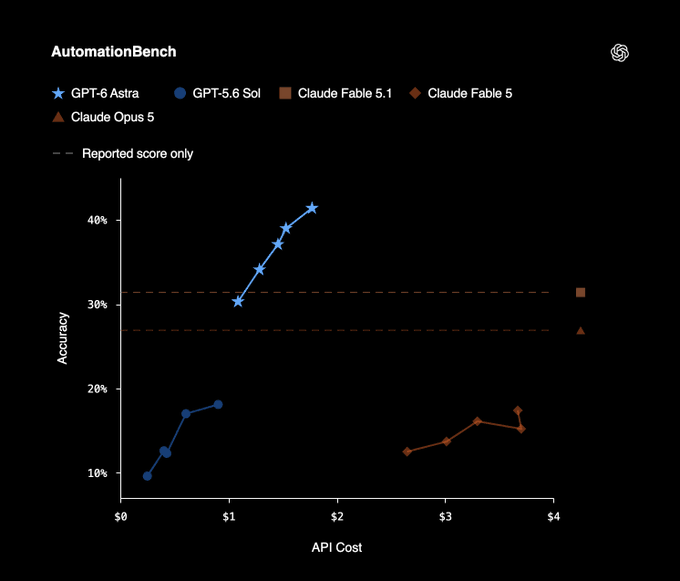
Official OpenAI AutomationBench chart: accuracy plotted against estimated API cost.
| Cost-per-task comparison | Quality configuration | Saving API cosost vs Sol |
|---|---|---|
| DeepSWE v1.1 | 74.1% vs 72.7%; highest-scoring configurations | About 32% |
| Database migration | 63.4% vs 42.7%; lower-cost Astra setting | About 38% |
| Terminal-Bench 4.0 | 57.9% vs 37.3%; reported configurations | About 9% |
The connection to pricing is twofold. First, fewer output tokens and fewer failed attempts can lower estimated API cost per completed task even when Astra has a higher per-token price. Second, CometAPI's current listed rates are 20% below the corresponding provider rates. These effects are separate: do not add the percentages together, and do not assume a benchmark saving will reproduce in production.
GPT-6 Astra API Pricing
Pricing is measured per million tokens. Once input exceeds 272K tokens, the long-context schedule applies to the full request.
| Current pricing | CometAPI short context | CometAPI long context | OpenAI Standard |
|---|---|---|---|
| Input | $8 | $16 | $10 short / $20 long |
| Cache read | $0.80 | $1.60 | $1 short / $2 long |
| Cache write | $10 | $20 | $12.50 short / $25 long |
| Output | $40 | $60 | $50 short / $75 long |
Prices and gateway policies can change. Verify the live pricing configuration before budgeting or hard-coding rates.
How to Reduce API Costs
- Keep stable prefixes cache-friendly. Put shared instructions and tool schemas before request-specific content.
- Avoid crossing 272K unintentionally. Retrieve and deduplicate only the context that can change the answer.
- Use the lowest passing reasoning effort. Escalate only when the acceptance rate improves.
- Route easy traffic elsewhere. Reserve Astra for work that benefits from its completion reliability.
- Measure cost per accepted task. Include retries, tool fees, and monetized human-review effort.
How to Migrate to GPT-6 Astra
When moving from GPT-5.6 Sol, make the smallest compatible change and re-run the same evaluation set.
- Set the model to
gpt-6-astra. - If the old route used
noneorminimalreasoning, begin atlow. - Use Responses for tool-calling workflows.
- Remove unsupported sampling parameters:
temperature,top_p, andtop_logprobs; remove Chat Completionslogprobsas well. - Re-test structured output, caching, streaming, tool loops, and provider-specific behavior.
- Compare accepted-task rate, latency, retries, tokens, and human correction before changing the default route.
prompt = "Review this API design and identify migration risks."

baseline = client.responses.create(
    model="gpt-5.6-sol",
    input=prompt,
)

candidate = client.responses.create(
    model="gpt-6-astra",
    input=prompt,
    reasoning={"effort": "medium"},
)
When Should You Use GPT-6 Astra?
Use Astra when task failure is expensive and the workflow combines reasoning with tools, long context, or multi-stage execution.
- Repository-scale debugging, migration, and test-and-retry loops.
- Browser or computer-use agents.
- Deep research across multiple sources and tools.
- Very long document or codebase analysis.
- Scientific and technical workflows that use code or external software.
- Professional automation where a failed run creates meaningful recovery cost.
Use a cheaper route for simple rewriting, short summaries, classification, and routine extraction when it already meets the quality target.
Common API Errors
401 Authentication Error
Confirm that the request sends Authorization: Bearer <COMETAPI_KEY> and that the process reads the correct environment variable.
400 Bad Request
Check for unsupported sampling parameters, an invalid schema, or an unsupported reasoning value such as none.
404 Model or Endpoint Error
Confirm model="gpt-6-astra" and the /v1/responses route.
429 Rate Limit
Use exponential backoff with jitter and a bounded retry count.
1 s -> 2 s -> 4 s -> 8 s -> capped retry window
5xx Server Error
Retry transient server failures, but do not retry malformed 4xx requests unchanged. Log request identifiers without unnecessarily storing sensitive prompt content.
FAQ
What model ID should I use?
Use gpt-6-astra.
Should I use Responses API or Chat Completions?
Use Responses for new integrations, especially for tools, structured outputs, streaming, state, and agent workflows. Keep Chat Completions only where compatibility requirements justify it.
Which reasoning effort should I start with?
Start with medium, then evaluate low for routine traffic and high or above for tasks that benefit measurably from deeper reasoning.
Can Astra accept images?
Yes. It accepts text and image input and returns text output.
Is the CometAPI route always 20% cheaper per completed task?
No. The listed token rates are 20% below the corresponding provider rates, but total task cost also depends on context size, output length, tool calls, retries, and review effort.
Should Astra replace Sol everywhere?
No. Sol remains the lower-cost choice for many bounded workloads. Use Astra where stronger execution, long-context reliability, or fewer failed attempts changes the total economics.
Conclusion
Astra is most valuable when an API call is one step in a difficult workflow rather than the end of one. Its long context, five reasoning levels, structured outputs, streaming, function calling, and new agent controls give developers more ways to carry complex work to completion.
Begin with Responses, medium reasoning, clear completion criteria, and the minimum tool access required. Measure accepted-task rate and cost per accepted task, then increase reasoning or route more traffic to Astra only when the evidence supports it.