
TLDR Kimi K3 is Moonshot AI's newest flagship model, launched in July 2026 for long-horizon coding, deep reasoning, multimodal understanding, and end-to-end knowledge work. Moonshot describes it as a 2.8-trillion-parameter open 3T-class model with native vision and a 1-million-token context window.
For developers who want fast access without managing separate provider accounts, CometAPI lists Kimi K3 as live under model ID kimi-k3, using an OpenAI-compatible /v1/chat/completions endpoint and base URL https://api.cometapi.com/v1. CometAPI's live Kimi K3 ’s input pricing at $2.40 per 1M tokens and output pricing at $12.00 per 1M tokens, compared with the official Kimi API's listed $3.00 cache-miss input and $15.00 output rates. Because Kimi K3 demand has already caused temporary subscription gating at Moonshot, production teams should use CometAPI not only for easy setup, but also for model comparison, usage monitoring, and fallback routing.
Key Takeaways
- For production, preserve complete assistant messages in multi-turn workflows, cap
max_completion_tokens, track token usage, and build fallback routes. - Kimi K3 is a 2.8T-parameter Mixture-of-Experts model from Moonshot AI with a 1M-token context window and native visual understanding.
- The CometAPI Kimi k3 model ID is
kimi-k3; the main endpoint isPOSThttps://api.cometapi.com/v1/chat/completions. - K3 always reasons. Use
reasoning_effortwithlow,high, ormax;maxis the default in Kimi's documentation. - Streaming is strongly recommended for long coding, research, and analysis tasks because users can see partial output while the model is still working.
- Vision input must use multimodal
contentarrays. Kimi's docs state that public image URLs are not supported for Kimi vision routes; use base64 or uploaded file references. - Kimi K3 supports structured output, JSON mode, tool calling,
tool_choice, dynamic tool loading, and context caching.
CometAPI is a practical way to evaluate Kimi K3 beside GPT, Claude, Gemini, DeepSeek, Qwen, and other models from one API layer.
What is Kimi K3: Moonshot AI’s Flagship Model
Moonshot AI released Kimi K3 on July 16, 2026, as its most capable model yet — a sparse Mixture-of-Experts (MoE) architecture with ~2.8 trillion total parameters (16 of 896 experts active per token). It features Kimi Delta Attention for up to 6.3x faster decoding in million-token contexts and Attention Residuals for ~25% training efficiency gains.
Key Specs (sourced from official and independent reports):
| Capability | Kimi K3 Details |
|---|---|
| Model ID | kimi-k3 |
| Context Window | 1,048,576 tokens (1M) |
| Parameters | 2.8T total (MoE) |
| Input | Text + native vision (images) |
| Reasoning | Always-on, max effort at launch |
| Features | Tool calling, structured/JSON output, streaming |
| Open Weights | Promised by July 27, 2026 (Modified MIT) |
It excels in long-horizon coding, agentic tasks, visual understanding, and knowledge work. Independent benchmarks place it competitively (e.g., 57.1 on Artificial Analysis Intelligence Index, strong in frontend coding arenas).
Latest News Context from businessinsider: Demand surged so high post-launch that Moonshot paused new subscriptions temporarily. It signals China's push in open-weight frontier models, with Moonshot eyeing a major IPO.
Full weights are scheduled for July 27, 2026
Moonshot's Kimi K3 documentation says full model weights will be released by July 27, 2026. Until that release is complete and third-party deployment tooling matures, most teams should treat hosted API access as the fastest practical route. Even after weights are available, serving a 2.8T-parameter MoE model is not the same as running a small open model on a single workstation. Moonshot's technical blog says it recommends supernode configurations with 64 or more accelerators for K3 deployment, which means a hosted API will remain the default choice for many SaaS teams, agencies, internal-tool builders, and AI product teams.
Benchmark Performance: Data, Sources, and Analysis
Kimi K3 delivers frontier results, especially in coding and agentic areas, while remaining competitive overall. Independent labs like Artificial Analysis confirm vendor claims with some caveats (e.g., hallucination rates).
Overall Intelligence
- Artificial Analysis Intelligence Index v4.1: 57.1 (4th overall; behind Fable 5 ~60, GPT-5.6 Sol ~59; ahead of Claude Opus 4.8 ~55.7).
- GDPval-AA v2 Elo: 1,668 (big jump from K2.6’s 1,190; beats Opus 4.8, trails Fable 5).

Source: reddit
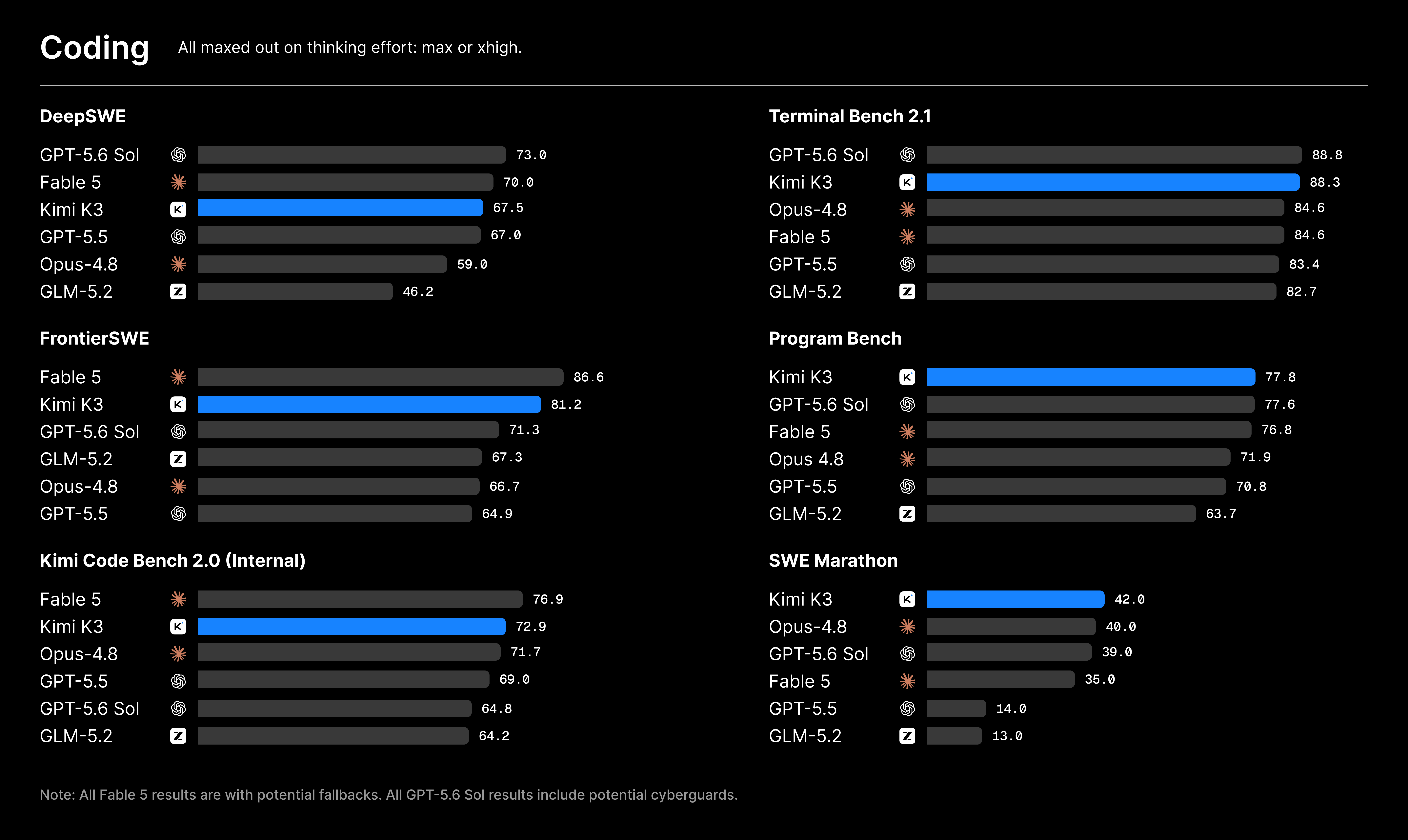
Coding Benchmarks (Vendor + Independent)
K3 shines here, topping Frontend Code Arena (1,679 Elo, #1 ahead of Fable 5 and Sol).
Source: Kimi
Coding Index (Artificial Analysis): Strong ~76, competitive with leaders.
K3 excels at repo-scale work, frontend with visual iteration, and tool-using agents. Developers report it as "Opus 4.8+ level" for many coding tasks.
What Is the Kimi K3 API?
Kimi K3 in plain developer terms
The Kimi K3 API gives developers hosted access to Moonshot AI's K3 model through a chat-completions style interface. A typical request sends a list of messages, selects model: "kimi-k3", and receives an assistant response. Beyond the basic chat format, K3 adds features that matter in production: configurable thinking effort, long context, visual input, streaming, JSON and schema-constrained output, tool calling, and context caching.
Kimi K3 is not best understood as a "cheap general chatbot." Its strongest value proposition is heavy work. If your product needs to feed a model a large repository, a long document pack, a dense spreadsheet export, multiple screenshots, a debugging transcript, or a complex tool plan, K3 is designed for that kind of session. If your app only needs short FAQ answers or classification over tiny inputs, a smaller model may be more cost efficient.
K3 New API Features and Usage
Kimi K3 builds on prior Kimi models with frontier-level enhancements:
- 1M Context: Process entire repositories, books, or long conversations without truncation.
- Native Vision: Analyze images directly in messages (base64 or URLs).
- Always-On Reasoning: Max effort by default; supports structured thinking traces (streaming exposes deltas).
- Tool Calling & Agents: Full OpenAI-style function calling for complex workflows.
- Structured Output: JSON mode for reliable parsing.
- Caching: Automatic prefix caching slashes costs for repeated contexts (90%+ hits reported in coding).
Key Capabilities of Kimi K3 API on CometAPI
1M-token context for long documents and large codebases
CometAPI lists Kimi K3 with a 1,000k token context window. That size changes how developers can design workflows. Instead of splitting every document into many chunks, you can test workflows that keep a much larger context in one request: architecture docs plus code excerpts, product requirements plus bug reports, research papers plus notes, or long customer-support histories.
This does not mean every request should use the full context. Long context is expensive and can slow first-token latency. Use it when the model needs global visibility, not as a replacement for clean retrieval design. A strong CometAPI production pattern is hybrid routing: use embeddings or search to retrieve the most relevant slices, but keep K3 available for the rare tasks where a broad context genuinely improves answer quality.
Always-on reasoning with configurable reasoning_effort
Kimi's documentation says K3 always reasons and supports the top-level reasoning_effort field with low, high, and max. Use lower effort for lighter tasks where latency and cost matter; use high or max effort for tasks like debugging, mathematical derivations, architecture review, code migration, long document synthesis, and multi-tool planning.
On CometAPI, pass reasoning_effort in the Chat Completions request when the Kimi K3 route supports provider-specific parameters. If your SDK version rejects the top-level field, send it through extra_body or use raw HTTPS.
Streaming responses for better user experience
Kimi's streaming docs explain that streaming sends tokens through Server-Sent Events instead of waiting for the full response. This is especially useful for K3 because deep reasoning and long outputs can take longer than small chat tasks. In a developer tool, stream a plan first, then code. In a research assistant, stream section summaries. In an internal analytics app, stream preliminary observations while the final structured answer is still being generated.
Vision input for screenshots, charts, and videos
Kimi K3 supports visual understanding. Kimi's vision docs state that K3 can understand image and video content, and that vision messages should use content arrays with image_url or video_url parts. The same docs say URL-formatted images are not supported; use base64 data URLs or uploaded file references. For CometAPI users, start with base64 image input in staging because it is simple, portable, and easy to log safely without depending on a public image host.
Structured output, JSON mode, and tool calling
Kimi K3 supports structured output through response_format, plus tool calling through JSON Schema function declarations. K3's newer API features include tool_choice and dynamic tool loading. These are important for agent products because tool inventory can become enormous. Instead of sending every tool definition on every request, your app can first expose a small search_tools function, retrieve only relevant tools, and dynamically insert those tool definitions into the conversation.
The practical decision is simple: do not choose by benchmark table alone. Use CometAPI to build a repeatable evaluation set from your own prompts. Include at least 20 to 50 real tasks: bug fixes, extraction jobs, screenshots, PDFs, customer questions, tool-call traces, and cost-sensitive requests. Route Kimi K3 to the jobs where its long context, reasoning, and vision support pay for themselves.
API Pricing: What Kimi K3 Costs
CometAPI Kimi K3 pricing
CometAPI's Kimi K3 model page lists:
| Provider route | Input price | Output price | Context | Model ID |
|---|---|---|---|---|
| CometAPI Kimi K3 | $2.40 per 1M tokens | $12.00 per 1M tokens | 1,000k tokens | kimi-k3 |
The same page compares those numbers with official prices of $3.00 input and $15.00 output per 1M tokens, showing a 20% discount on the live CometAPI listing. Prices can change, so verify the live CometAPI model page before publishing high-traffic pricing copy or committing production budget.
Official Kimi API pricing
Moonshot's technical blog lists Kimi API pricing at $0.30 per 1M cache-hit input tokens, $3.00 per 1M cache-miss input tokens, and $15.00 per 1M output tokens. It also says the official Kimi API achieves a cache hit rate above 90% in coding workloads. Treat that 90% figure as a provider-reported workload-specific claim, not a guarantee for every application. Your cache hit rate depends on how stable your prompts, tool definitions, repository prefixes, and session histories are.
Simple cost examples on CometAPI
| Example request | Input tokens | Output tokens | Estimated CometAPI cost |
|---|---|---|---|
| Short code review | 20,000 | 2,000 | $0.072 |
| Medium repository question | 100,000 | 5,000 | $0.300 |
| Large document analysis | 500,000 | 20,000 | $1.440 |
| Near-full-context synthesis | 950,000 | 50,000 | $2.880 |
Formula: (input_tokens / 1,000,000 * 2.40) + (output_tokens / 1,000,000 * 12.00).
Two notes matter. First, reasoning tokens are typically billed as output tokens when they are generated by reasoning models, so set max_completion_tokens thoughtfully. Second, long context should be intentional. It is powerful to send 500,000 tokens, but it is rarely wise to send that much context when 20,000 high-signal tokens would produce the same answer.
How to Use Kimi K3 API in CometAPI
Step 1: Create a CometAPI key
Create or sign in to your CometAPI account, open the API key page, and create a key. Store it as a server-side environment variable named COMETAPI_KEY. Do not put production keys in browser JavaScript, mobile apps, public repositories, screenshots, or client-side logs.
PowerShell:
$env:COMETAPI_KEY = "your_cometapi_key_here"
macOS or Linux:
export COMETAPI_KEY="your_cometapi_key_here"
Step 2: Install the OpenAI SDK
CometAPI supports OpenAI-compatible SDKs. In Python, install the SDK once:
python -m pip install --upgrade openai
Step 3: Make your first Kimi K3 API call
Use CometAPI's base URL and the kimi-k3 model ID:
import os
from openai import OpenAI

client = OpenAI(
    api_key=os.environ["COMETAPI_KEY"],
    base_url="https://api.cometapi.com/v1",
)

completion = client.chat.completions.create(
    model="kimi-k3",
    messages=[
        {
            "role": "system",
            "content": "You are a precise technical assistant for API developers.",
        },
        {
            "role": "user",
            "content": "Explain when I should use Kimi K3 for a coding agent.",
        },
    ],
    max_completion_tokens=1200,
)

print(completion.choices[0].message.content)
print(completion.usage)
The equivalent cURL request:
curl https://api.cometapi.com/v1/chat/completions \
  -H "Authorization: Bearer $COMETAPI_KEY" \
  -H "Content-Type: application/json" \
  -d '{
    "model": "kimi-k3",
    "messages": [
      {"role": "system", "content": "You are a precise technical assistant for API developers."},
      {"role": "user", "content": "Explain Kimi K3 in one paragraph."}
    ],
    "max_completion_tokens": 800
  }'
K3 New API Features and Usage
Thinking effort
Use reasoning_effort to control how much reasoning budget K3 applies. Kimi's docs list low, high, and max, with max as the default. For production, choose based on task type:
| Task type | Recommended effort | Why |
|---|---|---|
| Short summaries, rewriting, simple Q&A | low | Faster and cheaper for low-risk tasks |
| Code review, extraction, planning, analysis | high | Better balance of quality and cost |
| Complex debugging, math, agentic work, long-context reasoning | max | Best quality when deeper reasoning is worth the latency and output-token cost |
Python example:
completion = client.chat.completions.create(
    model="kimi-k3",
    reasoning_effort="high",
    messages=[
        {
            "role": "user",
            "content": (
                "Review this migration plan for hidden risks. "
                "Return the top 5 issues and a safer rollout sequence."
            ),
        }
    ],
    max_completion_tokens=2000,
)

message = completion.choices[0].message
print(message.content)
If your OpenAI SDK version does not accept reasoning_effort as a named argument, pass it through extra_body:
completion = client.chat.completions.create(
    model="kimi-k3",
    messages=[{"role": "user", "content": "Solve this scheduling problem."}],
    extra_body={"reasoning_effort": "high"},
)
Important implementation detail: Kimi's thinking docs say multi-turn K3 conversations should preserve the complete assistant message returned by the API, including fields such as reasoning_content and tool_calls. If you only store visible content, you can degrade reasoning continuity in long sessions.
Streaming responses
Use streaming when the answer may be long, when latency matters, or when you want to show progress in a chat UI.
stream = client.chat.completions.create(
    model="kimi-k3",
    messages=[
        {
            "role": "user",
            "content": "Create a detailed refactor plan for a 200k-line monolith.",
        }
    ],
    stream=True,
    stream_options={"include_usage": True},
    max_completion_tokens=3000,
)

for chunk in stream:
    choice = chunk.choices[0]
    delta = choice.delta

    reasoning = getattr(delta, "reasoning_content", None)
    if reasoning:
        # In most products, store reasoning securely or hide it from end users.
        pass

    if delta.content:
        print(delta.content, end="", flush=True)

    usage = getattr(choice, "usage", None)
    if usage:
        print("\n\nUsage:", usage)
Kimi's streaming docs emphasize that SSE streams end with data: [DONE]. In a raw SSE client, do not treat the stream as complete until that marker arrives.
Vision input
Kimi K3 can analyze images and videos. The safest first CometAPI test is a base64 image request. Use a multimodal content array, not a JSON string containing an array.
import base64
import mimetypes
from pathlib import Path

image_path = Path("dashboard-screenshot.png")
mime_type = mimetypes.guess_type(image_path.name)[0] or "image/png"
image_b64 = base64.b64encode(image_path.read_bytes()).decode("utf-8")

completion = client.chat.completions.create(
    model="kimi-k3",
    messages=[
        {
            "role": "user",
            "content": [
                {
                    "type": "image_url",
                    "image_url": {
                        "url": f"data:{mime_type};base64,{image_b64}",
                    },
                },
                {
                    "type": "text",
                    "text": (
                        "Review this dashboard screenshot. "
                        "Identify UX issues, missing states, and data-quality risks."
                    ),
                },
            ],
        }
    ],
    max_completion_tokens=1800,
)

print(completion.choices[0].message.content)
Kimi's vision docs list supported image formats such as PNG, JPEG, WebP, and GIF, and supported video formats such as MP4, MOV, AVI, WebM, and others. They also recommend keeping image resolution at or below 4K and video resolution at or below FHD because higher resolution can cost more processing time without improving model understanding.
Structured output with JSON Schema
For production pipelines, do not parse free-form prose if the next step expects structured data. Use response_format with JSON Schema when supported by the route.
import json

completion = client.chat.completions.create(
    model="kimi-k3",
    messages=[
        {
            "role": "user",
            "content": (
                "Extract implementation tasks from this request: "
                "Add SSO, migrate billing webhooks, and create admin audit logs."
            ),
        }
    ],
    response_format={
        "type": "json_schema",
        "json_schema": {
            "name": "implementation_tasks",
            "strict": True,
            "schema": {
                "type": "object",
                "properties": {
                    "tasks": {
                        "type": "array",
                        "items": {
                            "type": "object",
                            "properties": {
                                "title": {"type": "string"},
                                "risk": {"type": "string"},
                                "owner": {"type": "string"},
                            },
                            "required": ["title", "risk", "owner"],
                            "additionalProperties": False,
                        },
                    }
                },
                "required": ["tasks"],
                "additionalProperties": False,
            },
        },
    },
)

data = json.loads(completion.choices[0].message.content)
print(data["tasks"])
Tool calling and tool_choice
K3's tool-calling best-practice docs recommend avoiding huge tool inventories in a single request. The pattern is: expose a tool-search function first, force retrieval with tool_choice: "required" on the first turn, then dynamically load only the tools the model needs.
Minimal weather-style example:
import json

tools = [
    {
        "type": "function",
        "function": {
            "name": "get_order_status",
            "description": "Look up a customer's order status.",
            "parameters": {
                "type": "object",
                "properties": {
                    "order_id": {"type": "string"},
                },
                "required": ["order_id"],
                "additionalProperties": False,
            },
        },
    }
]

messages = [
    {"role": "user", "content": "Where is order A1024?"},
]

first = client.chat.completions.create(
    model="kimi-k3",
    messages=messages,
    tools=tools,
    tool_choice="required",
)

assistant_message = first.choices[0].message
messages.append(assistant_message.model_dump(exclude_none=True))

for call in assistant_message.tool_calls or []:
    args = json.loads(call.function.arguments)
    result = {"order_id": args["order_id"], "status": "Shipped", "eta": "2026-07-24"}
    messages.append(
        {
            "role": "tool",
            "tool_call_id": call.id,
            "content": json.dumps(result),
        }
    )

final = client.chat.completions.create(
    model="kimi-k3",
    messages=messages,
    tools=tools,
)

print(final.choices[0].message.content)
Kimi K3 Best Practice for Production Teams
Use Kimi K3 where its strengths are obvious
Kimi K3 is a strong candidate for repository analysis, frontend coding, bug reproduction, long document synthesis, spreadsheet reasoning, vision-assisted QA, and agentic workflows that need tools. It may be more model than you need for short copy generation, simple classification, or low-stakes support macros. On CometAPI, create model-routing rules so K3 receives the difficult work while lower-cost models handle routine traffic.
Build fallbacks because the launch is capacity constrained
AP's report about Moonshot pausing new subscriptions is a reminder that availability is part of model selection. Build fallbacks at the application level. If Kimi K3 returns a provider-capacity error, route to another CometAPI model with similar strengths, reduce context size, or retry with backoff. Keep the user experience graceful: show progress, preserve drafts, and make failures recoverable.
Preserve context carefully in multi-turn sessions
Kimi K3 was trained with preserved thinking history. Moonshot's technical blog warns that switching into K3 mid-session or failing to pass the full historical assistant message can reduce stability. In practice, store the full assistant message object returned by the API for developer tools and agents. Do not compress away tool_calls or provider-specific reasoning fields unless you have tested the impact.
Control output and reasoning cost
Always set max_completion_tokens. Kimi's API reference says K3 defaults to 131,072 max completion tokens and can be set up to 1,048,576, subject to the model context limit. That is powerful, but it can surprise a billing dashboard if your prompt invites a huge answer. For most product flows, define separate caps: 800 to 1,500 tokens for summaries, 2,000 to 4,000 for detailed analysis, and larger caps only for explicit long-form generation.
Design for caching
Kimi context caching works best when repeated initial context stays stable. Kimi's current context caching docs describe it as automatic: no manual cache creation, cache ID, or TTL management is required. For coding agents, keep repository instructions, tool definitions, and project policies in a consistent prefix. For document QA, keep the document pack stable across related questions. Avoid rewriting the system prompt every turn, and place fixed large context near the beginning of the messages array so the cache can recognize repeated prefixes.
Use vision deliberately
Vision input is valuable, but images and videos consume tokens based on content and resolution. Use images when they add information that text cannot capture: UI layout, charts, handwritten notes, design mocks, CAD screenshots, and error screens. Downscale overly large images, crop irrelevant whitespace, and combine the image with a precise question.
Conclusion & Recommendations
Kimi K3 on CometAPI delivers frontier capabilities — massive context, vision, and reasoning — at accessible prices with minimal integration friction. Whether building coding agents, multimodal apps, or scalable AI services, start with CometAPI for unified access, savings, and reliability. Sign up, experiment with the quickstarts above, and scale confidently.