
TL;DR
Use Qwen3.8-Omni-Flash to summarize recordings, interpret images and analyze videos with spoken content. It accepts text, images, audio and video and returns text. It supports a 1M-token context window, tool calling, web search, context caching, and adjustable reasoning effort. Developers can call it through Alibaba Cloud Model Studio’s OpenAI-compatible interface. Developers evaluating Qwen3.8-Omni-Flash API in CometAPI should confirm the current endpoint status in the model catalog or dashboard before publishing production-ready integration instructions.
Key Takeaways
- Use model ID qwen3.8-omni-flash for the standard non-real-time API.
- The model accepts text, image, audio, and video input and produces text output.
- The official context window is 1M tokens, with a documented maximum output of 131,072 tokens.
- Thinking is enabled by default; choose low, medium, or xhigh reasoning effort based on task complexity.
- Use structured, evidence-focused prompts for media analysis, and verify provider-specific model availability before deployment.
What Does Qwen3.8-Omni-Flash API Offer?
Qwen3.8-Omni-Flash API Explained
With Qwen3.8-Omni-Flash, you can summarize a meeting recording, extract key information from a screenshot, or analyze a video together with its spoken content. Send text, images, audio and video in the same request, then receive a text answer that connects the relevant evidence. Start with a concrete task and specify the output you need, such as action items, timestamps or a list of discrepancies.
The official documentation confirms Chat Completions and Responses API support. The examples below start with a basic call and then show image, audio and video inputs; reasoning controls and tool-assisted workflows are introduced later.
| Qwen3.8-Omni-Flash official specification | Value |
|---|---|
| Model ID | qwen3.8-omni-flash |
| Input | Text, image, audio, video |
| Output | Text |
| Context window | 1M tokens |
| Maximum input, non-thinking | 991,808 tokens |
| Maximum input, thinking | 983,616 tokens |
| Maximum output | 131,072 tokens |
| Thinking | Enabled by default |
| Recommended reasoning effort | low / medium / xhigh |
| Function calling | Supported |
| Web search | Supported |
| Context caching | Supported |
| Multichannel audio | Supported |
| APIs | Chat Completions / Responses |
The official production overview is embedded below rather than provided as a text-only link.
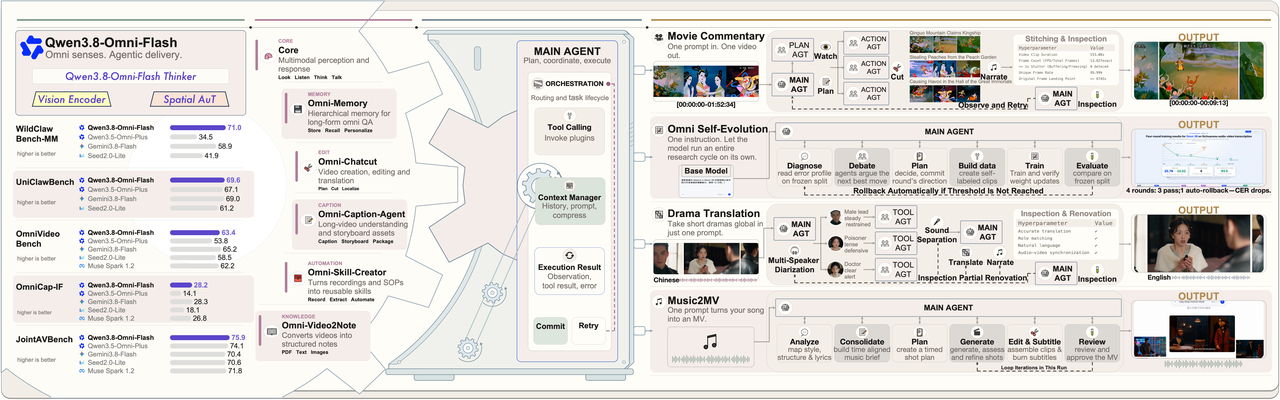
Qwen3.8-Omni-Flash and its applications in production. Source: Alibaba Cloud official launch article.
Qwen3.8-Omni-Flash Compared With Other Multimodal APIs
The practical difference is not only benchmark performance. Qwen3.8-Omni-Flash combines long context, native audio-video understanding, reasoning control, tool calling, web search, and multichannel audio in one API-oriented model.
| Capability | Qwen3.8-Omni-Flash API in CometAPI | Typical text/VL API | Dedicated ASR API |
|---|---|---|---|
| Text input | Yes | Yes | Limited |
| Image input | Yes | Often | No |
| Audio input | Yes | Varies | Yes |
| Video input | Yes | Varies | No |
| Joint audio-video reasoning | Yes | Varies | No |
| 1M context | Yes | Varies | N/A |
| Tool calling | Yes | Often | Usually no |
| Reasoning control | Yes | Varies | No |
| Spatial/multichannel audio | Yes | Rare | Varies |
| Primary output | Text | Text | Transcript |
This table is a category-level comparison, not a benchmark against a named competing product. “Typical” and “varies” describe common API patterns; teams should compare named endpoints before making a purchasing or architecture decision.
In the vendor-reported agentic comparison, OmniVideoBench improved from 63.4 to 67.8 in agentic mode, while token use per query fell from 145,736 to 79,117. The official test compares static inference with an agent mode using Qwen Code, and notes that agentic mode preserves context across turns. These are vendor-reported results, not an independent production benchmark.
How Do You Set Up and Call Qwen3.8-Omni-Flash API?
Getting a Qwen3.8-Omni-Flash API Key
Create an API key in Alibaba Cloud Model Studio / Qianwen AI Platform and keep it in an environment variable. The API key and endpoint should belong to the same supported region.
Bash — set the Alibaba Cloud Model Studio API key for the current shell:
export DASHSCOPE_API_KEY="your-api-key"
PowerShell — set the API key for the current session:
$env:DASHSCOPE_API_KEY="your-api-key"
Supported regions include Beijing, Singapore, Hong Kong, Tokyo, Frankfurt and Virginia. Use the API key and workspace-specific endpoint from the same region. The official endpoint guide recommends dedicated workspace domains. The Singapore example below requires replacing {WorkspaceId} with the workspace ID shown in your Model Studio console. Existing DashScope domains remain functional, but new examples should use the recommended workspace endpoint.
Endpoint — Singapore workspace OpenAI-compatible base URL:
https://{WorkspaceId}.ap-southeast-1.maas.aliyuncs.com/compatible-mode/v1
Making Your First Qwen3.8-Omni-Flash API Call
Because Alibaba Cloud exposes an OpenAI-compatible interface, the standard OpenAI Python SDK can be used with a different base URL and model ID.
Bash — install or update the OpenAI Python SDK:
pip install -U openai
Python — send a basic Chat Completions request:
import os
from openai import OpenAI

client = OpenAI(
    api_key=os.environ["DASHSCOPE_API_KEY"],
    base_url="https://{WorkspaceId}.ap-southeast-1.maas.aliyuncs.com/compatible-mode/v1",
)

response = client.chat.completions.create(
    model="qwen3.8-omni-flash",
    messages=[{
        "role": "user",
        "content": "Summarize the advantages of native omnimodal models.",
    }],
)

print(response.choices[0].message.content)
cURL — call the same compatible endpoint directly:
curl "https://{WorkspaceId}.ap-southeast-1.maas.aliyuncs.com/compatible-mode/v1/chat/completions" \
  -H "Authorization: Bearer $DASHSCOPE_API_KEY" \
  -H "Content-Type: application/json" \
  -d '{
    "model": "qwen3.8-omni-flash",
    "messages": [{
      "role": "user",
      "content": "Explain multimodal agent workflows in three bullet points."
    }]
  }'
How Do You Use Multimodal Inputs With Qwen3.8-Omni-Flash API?
Sending Images to Qwen3.8-Omni-Flash API
Images can be combined with text in the same message. This pattern is useful for dashboard interpretation, document understanding, visual QA, screenshots, and multimodal agents.
Python — combine an image URL with a task-specific instruction:
response = client.chat.completions.create(
    model="qwen3.8-omni-flash",
    messages=[{
        "role": "user",
        "content": [
            {
                "type": "image_url",
                "image_url": {"url": "https://example.com/dashboard.jpg"},
            },
            {
                "type": "text",
                "text": "Identify the main metrics and summarize any anomalies.",
            },
        ],
    }],
)

print(response.choices[0].message.content)
Sending Audio to Qwen3.8-Omni-Flash API
Audio input is useful for meeting summarization, speech understanding, sound-event analysis, and combined audio-visual reasoning. For long recordings, ask for a structured output such as speakers, decisions, action items, unresolved questions, and timestamps.
Python — analyze a reachable WAV file:
response = client.chat.completions.create(
    model="qwen3.8-omni-flash",
    messages=[{
        "role": "user",
        "content": [
            {
                "type": "input_audio",
                "input_audio": {
                    "data": "https://example.com/meeting.wav",
                    "format": "wav",
                },
            },
            {
                "type": "text",
                "text": "Summarize this meeting and extract action items.",
            },
        ],
    }],
)

print(response.choices[0].message.content)
For spatial audio, multichannel input is supported through use_multichannel.
Python — preserve channel information when it matters:
response = client.chat.completions.create(
    model="qwen3.8-omni-flash",
    messages=messages,
    extra_body={"use_multichannel": True},
)
Analyzing Video With Qwen3.8-Omni-Flash API
Video prompts should define the evidence and output structure you need. A generic “describe this video” request often wastes context on irrelevant details, while a task-oriented request makes the model focus on events, timestamps, spoken content, on-screen text, and discrepancies.
Prompt — request chronological, timestamped evidence:
Analyze this product demonstration video.

Return:
1. A chronological summary.
2. Important visual steps with timestamps.
3. Spoken instructions.
4. Product names or UI text visible on screen.
5. Any discrepancy between the narration and the demonstrated action.
Python — submit a video URL together with the structured prompt:
response = client.chat.completions.create(
    model="qwen3.8-omni-flash",
    messages=[{
        "role": "user",
        "content": [
            {
                "type": "video_url",
                "video_url": {"url": "https://example.com/demo.mp4"},
            },
            {
                "type": "text",
                "text": video_prompt,
            },
        ],
    }],
)
The launch article reports that agentic long-video understanding can focus computation on relevant segments, reducing token use by about 45.7% in the cited OmniVideoBench experiment. Treat the reduction as a vendor-reported result for that evaluation setup, not a guaranteed saving for every workload.
How to Set Reasoning Effort and Stream Qwen3.8-Omni-Flash Responses
Controlling Qwen3.8-Omni-Flash Reasoning
Qwen3.8-Omni-Flash supports low, medium, and xhigh reasoning effort, with xhigh documented as the default. The compatible API also accepts mapped values; use the model-specific documentation rather than assuming every OpenAI reasoning value has distinct behavior.
| reasoning_effort | Best suited to |
|---|---|
| low | Extraction, classification, simple summaries |
| medium | General analysis and balanced workloads |
| xhigh | Complex reasoning, agents, difficult multimodal tasks |
Python — choose reasoning depth explicitly:
response = client.chat.completions.create(
    model="qwen3.8-omni-flash",
    messages=[{
        "role": "user",
        "content": "Analyze the causes of the inconsistencies in this report.",
    }],
    reasoning_effort="medium",
)
For high-volume applications, explicitly set reasoning depth instead of leaving every simple request at the highest effort. Reserve deeper reasoning for workflows where additional analysis actually improves the outcome.
Streaming Qwen3.8-Omni-Flash Responses
Streaming reduces perceived latency in interactive applications and lets the UI display answer content as it arrives.
Python — iterate over incremental Chat Completions output:
stream = client.chat.completions.create(
    model="qwen3.8-omni-flash",
    messages=[{
        "role": "user",
        "content": "Analyze this multimodal task and propose a workflow.",
    }],
    reasoning_effort="medium",
    stream=True,
)

for chunk in stream:
    if not chunk.choices:
        continue
    delta = chunk.choices[0].delta
    if delta.content:
        print(delta.content, end="", flush=True)
How Can You Access Qwen3.8-Omni-Flash Through CometAPI?
Using Qwen3.8-Omni-Flash API in CometAPI
CometAPI provides an OpenAI-compatible integration layer for multiple providers. However, public model pages can change as new endpoints roll out. Confirm that Qwen3.8-Omni-Flash API in CometAPI is enabled for your account before treating the following example as executable production code.
The CometAPI Quickstart documents the base URL:
Endpoint — CometAPI OpenAI-compatible base URL:
https://api.cometapi.com/v1
Bash — set the CometAPI key only after confirming account access:
export COMETAPI_KEY="your-cometapi-key"
Python — conditional integration example:
import os
from openai import OpenAI

client = OpenAI(
    api_key=os.environ["COMETAPI_KEY"],
    base_url="https://api.cometapi.com/v1",
)

response = client.chat.completions.create(
    model="qwen3.8-omni-flash",
    messages=[{
        "role": "user",
        "content": "Summarize the following content.",
    }],
)

print(response.choices[0].message.content)
Before production deployment, verify the current model identifier, media-input support, availability, and pricing in CometAPI because newly released model endpoints can change as provider support is updated.
Which Parameters and Production Practices Matter Most?
Essential Qwen3.8-Omni-Flash API Parameters
| Parameter | Purpose | Practical guidance |
|---|---|---|
| model | Selects model | Use qwen3.8-omni-flash |
| messages | Conversation and multimodal input | Use typed content blocks for media |
| stream | Incremental output | Recommended for interactive apps |
| reasoning_effort | Reasoning depth | Choose low / medium / xhigh explicitly |
| enable_thinking | Thinking behavior | Prefer reasoning_effort for this model; check model-specific compatibility before using this non-standard field |
| preserve_thinking | Conversation reasoning state | Pass through extra_body; retained reasoning increases input-token usage |
| use_multichannel | Spatial audio | Enable only when channel information matters |
| max_tokens | Output control | Keep bounded for production |
Best Qwen3.8-Omni-Flash API Use Cases
The model is most useful when the relationship between modalities matters. Good candidates include meeting intelligence, long-form video analysis, media search, multimodal research agents, training-video extraction, customer-support recording analysis, and workflows where audio-visual evidence triggers tools.
Use Qwen3.8-Omni-Flash when the relationship between modalities matters, not merely when your application happens to contain several file types.
Common Qwen3.8-Omni-Flash API Errors
| Problem | Likely cause | Fix |
|---|---|---|
| 401 Unauthorized | Invalid or missing key | Check the environment variable and API key |
| Model unavailable | Region, provider, or rollout mismatch | Verify model availability in the selected region and provider account |
| Media cannot be fetched | Media URL not accessible | Use a supported, reachable media source |
| High latency | High reasoning effort on a simple task | Test medium or low reasoning |
| Unexpected token cost | Large media or retained history | Trim context and inspect retained conversation state |
| Spatial cues ignored | Multichannel mode disabled | Enable use_multichannel |
| Poor video answer | Prompt too broad | Specify events, timestamps, and output format |
| Very large response | Missing output constraints | Set explicit response length and schema |
For production systems, also add request timeouts, retries with exponential backoff, usage logging, structured-output validation, and safeguards around externally supplied media URLs.
Optimizing Qwen3.8-Omni-Flash API Cost and Latency
The largest savings usually come from controlling media volume and reasoning depth rather than micro-optimizing a short system prompt. Use low reasoning for extraction and classification, medium for routine analysis, and xhigh only when the extra reasoning is justified.
For long video, narrow the question and request timestamped evidence. For repeated large contexts, use supported caching where appropriate. Avoid carrying unnecessary prior reasoning or media across a long conversation when it no longer contributes to the next turn.
FAQ
Does Qwen3.8-Omni-Flash support images?
Yes. It accepts images alongside text, audio, and video.
Does Qwen3.8-Omni-Flash support audio?
Yes. Audio is a native input modality and can be used for transcription, meeting analysis, sound-event understanding, and multimodal reasoning.
Does Qwen3.8-Omni-Flash generate audio?
The standard non-real-time qwen3.8-omni-flash API documented here returns text. Qwen3.8-Omni-Flash-Realtime is a separate real-time product.
What is the Qwen3.8-Omni-Flash context window?
The documented context window is 1 million tokens.
What is the maximum Qwen3.8-Omni-Flash output?
Alibaba Cloud currently documents a maximum output length of 131,072 tokens.
Is Qwen3.8-Omni-Flash compatible with the OpenAI SDK?
Yes. Alibaba Cloud provides an OpenAI-compatible interface, so the standard OpenAI Python client can be used with the appropriate base URL.
Can Qwen3.8-Omni-Flash analyze video with sound?
Yes. Joint audio-video understanding is one of the model’s main use cases.
Does Qwen3.8-Omni-Flash support function calling?
Yes. Custom function calling is supported.
Can I use Qwen3.8-Omni-Flash through CometAPI?
Check the current CometAPI model page and your account dashboard. Publish runnable CometAPI examples only after the endpoint and required media modalities are confirmed for the target account.
Conclusion
Qwen3.8-Omni-Flash is most compelling when an application must reason across what it reads, sees, and hears instead of treating every modality as a separate preprocessing pipeline. Its long context, native audio-video understanding, reasoning controls, function calling, web search, and OpenAI-compatible interfaces make it especially suitable for multimodal agents, meeting intelligence, long-video analysis, and media automation.
For direct access, Alibaba Cloud Model Studio exposes the native Qwen API surface. For teams using a multi-provider gateway, CometAPI may offer a unified integration path after the model endpoint, modalities, and pricing are confirmed for the target account. In either case, production quality depends on deliberate control of media context, reasoning effort, conversation state, output constraints, and error handling.