
Quick Answer
Wan 2.7 is Alibaba's multimodal video-generation suite for text-to-video, image-to-video, reference-guided generation and editing workflows. Through Wan 2.7 on CometAPI, developers use model ID wan2.7 with the asynchronous POST /v1/videos endpoint. The integration has three operational stages: submit a task, poll the returned video ID, and download the completed MP4. The live route supports 720p and 1080p output and lists per-second pricing, so duration and resolution determine the estimated generation cost. Start with a 5-second 720p text-to-video request, validate the workflow, and then add image references or higher resolution only after the basic route works.
Important scope: This guide covers Wan 2.7 Video through CometAPI. It does not describe the separate Wan image-generation model, so image-only specifications such as 4K still-image output are not treated as Wan 2.7 Video capabilities.
Key Takeaways
- CometAPI exposes Wan 2.7 through an OpenAI-style asynchronous video endpoint rather than a synchronous chat response.
- The route uses model ID wan2.7 and POST /v1/videos.
- A complete integration must preserve the returned video ID, poll the status endpoint, handle terminal failures, and download the MP4 only after success.
- Alibaba's native Wan 2.7 text-to-video API supports 720P and 1080P with 2-15 second duration; the CometAPI route uses its own unified field names.
- Image-to-video, first/last-frame and continuation workflows exist in Alibaba's native model family, but advanced fields available through the unified route should be verified against live route documentation.
- Public benchmark evidence is strongest for video-to-video: Wan 2.7 topped the Design Arena category. That result should not be generalized to every text-to-video or image-to-video task.
- The most useful production metric is cost per accepted clip, not price per generated second alone.
What Is Wan 2.7?
Wan 2.7 in Plain Developer Terms
Wan 2.7 is not merely a prompt-to-video checkpoint. Alibaba describes a four-part video family spanning Wan2.7-t2v, Wan2.7-i2v, Wan2.7-r2v and Wan2.7-videoedit. Together, those variants cover generation from text, animation from images, reference-driven subject or style control, and transformation of existing video. This matters for application design: a simple marketing clip may use only text-to-video, while a character-consistent production pipeline may need reference inputs, anchored frames, audio guidance and iterative editing.
On CometAPI, the route intentionally compresses provider-specific naming into the customer model ID wan2.7. The underlying generation capability remains Wan 2.7, but authentication, endpoint paths and parameter names differ from Alibaba Cloud's native API.
Wan 2.7 Technical Specifications
| Specification | Wan 2.7 Video |
|---|---|
| Provider | Alibaba / Wan |
| CometAPI model ID | wan2.7 |
| Native text-to-video IDs | wan2.7-t2v, wan2.7-t2v-2026-06-12 |
| Native image-to-video ID | wan2.7-i2v-2026-04-25 |
| Main inputs | Text; image, audio or video in supported workflows |
| Main output | Generated video with supported audio behavior |
| Modes | T2V, I2V, R2V, video editing, first/last frame, continuation |
| Resolution | 720P and 1080P |
| T2V duration | 2-15 seconds; default 5 seconds |
| T2V aspect ratios | 16:9, 9:16, 1:1, 4:3, 3:4 |
| Prompt limit | 5,000 characters for native Wan 2.7 T2V |
| Negative prompt limit | 500 characters |
| Audio formats and limits | WAV/MP3; 2-30 seconds; up to 15 MB |
| Invocation | Asynchronous |
| Architecture / parameter count | Not comprehensively confirmed in official API documentation |
Specification boundary: Some catalog pages describe an architecture or parameter count, but Alibaba's official video API documentation does not publish a complete architecture specification for every Wan 2.7 variant. The safer editorial wording is that the full parameter count and architecture are not comprehensively disclosed.
What Can Wan 2.7 Do?
Text-to-video with timed multi-shot prompts.
Wan 2.7 can interpret shot changes written directly into a prompt. A developer can describe Shot 1, Shot 2 and Shot 3 with time ranges instead of relying on a separate shot-control field. This makes the prompt itself a compact storyboard.
First- and last-frame control.
The native image-to-video workflow accepts first-frame and last-frame media so the model can synthesize the motion between two visual anchors. This is useful for product transitions, pose changes and scene morphs.
Video continuation.
A native input of type first_clip conditions the next portion of the video. In this workflow, duration should be interpreted according to the provider's task rules, so applications should not assume it always means only the newly generated segment.
Audio-guided generation.
Alibaba documents audio as a driving source for timing and lip-sync behavior. Without an uploaded audio asset, the model can generate matching background music or sound effects. Audio longer than the requested video is truncated; shorter audio leaves the remaining video silent.
Prompt extension, negative prompts and watermarking.
The native API supports prompt rewriting, negative prompts and an AI-generated watermark option. These controls help teams standardize prompt quality and provenance behavior, although unified CometAPI fields may not map one-to-one.
What Do Public Benchmarks Say About Wan 2.7?
Video models do not have a single universally accepted benchmark equivalent to an LLM's MMLU or SWE-bench score. For Wan 2.7, the clearest published external signal is that it topped the Design Arena video-to-video category. The official publication's ranking image shows Wan 2.7 at an Elo rating of 1335 in that snapshot. This supports a claim about video transformation and editing preference; it does not prove universal leadership in text-to-video, image-to-video, audio quality or latency.
| Evidence | Public result | How to interpret it |
|---|---|---|
| Design Arena video-to-video | Ranked first; Elo 1335 in published image | Strong evidence for V2V preference |
| Official API specifications | 720P/1080P; 2-15 seconds for T2V | Production flexibility, not quality ranking |
| Standardized T2V score | Not publicly disclosed | Do not claim universal T2V leadership |
| Standardized I2V score | Not publicly disclosed | Use an internal A/B test |
| Latency or success-rate benchmark | Not publicly standardized | Measure on the selected route |
Benchmark Conclusion
- Use the Design Arena result as evidence for video-to-video competitiveness, not a blanket claim across every mode.
- Do not reuse Wan 2.1 benchmark numbers as Wan 2.7 results.
- For production selection, test the same prompts, source assets, resolution, duration and audio conditions across models.
- Track human acceptance rate, motion stability, identity preservation, latency, failure rate and cost per accepted clip.
Why Use Wan 2.7 Through CometAPI?
A Unified Video API
CometAPI exposes the model through a common asynchronous video lifecycle. The current Wan 2.7 model page publishes the customer model ID, route pricing and a working create-poll-download pattern. This reduces the amount of provider-specific integration code when a product needs to test or route between several video models.
POST /v1/videos GET /v1/videos/{video_id} GET /v1/videos/{video_id}/content
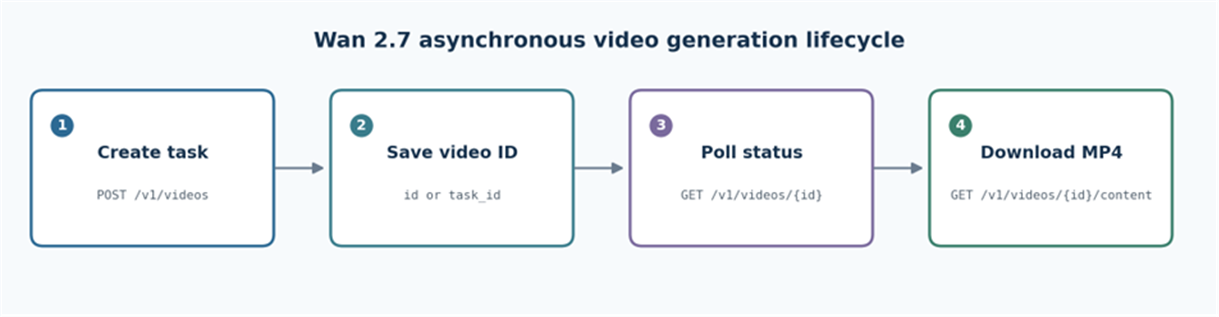
The CometAPI create-poll-download lifecycle for asynchronous video generation. Endpoint source: CometAPI API documentation**.
- One API key for multiple supported video models.
- A consistent pattern for task creation, status retrieval and file download.
- Centralized usage and billing visibility.
- Less application code tied to one provider's authentication and response schema.
- Faster A/B testing because model selection can change without replacing the whole task lifecycle.
A Necessary Compatibility Note
Route compatibility: CometAPI's unified /v1/videos schema does not necessarily expose every field in Alibaba Cloud's native T2V, I2V, R2V and video-editing APIs. Basic text-to-video and image-to-video are the safest starting points. Before shipping first/last-frame control, multi-reference input, audio-driving or video editing, verify the exact live route fields and media limits.
What You Need Before You Start
Create a CometAPI Account and API Key
Create or sign in to a CometAPI account, then generate an API key. Store it in an environment variable. Do not hard-code the key in source control, browser code or mobile applications.
export COMETAPI_KEY="your_api_key"$env:COMETAPI_KEY="your_api_key"
Know the Model ID and Endpoints
Model ID: wan2.7 Create endpoint: POST https://api.cometapi.com/v1/videos Status endpoint: GET https://api.cometapi.com/v1/videos/{video_id} Download endpoint: GET https://api.cometapi.com/v1/videos/{video_id}/content
Install the Python Package
python -m pip install --upgrade requests
The examples use raw HTTP requests because multipart form data, status polling and binary downloads are easier to understand without an additional SDK abstraction.
How to Use Wan 2.7 API with CometAPI
Step 1: Create a Text-to-Video Task
Send a multipart request with the model, prompt, duration and size. This 5-second 720p example is the lowest-risk way to validate credentials, routing and task creation.
curl https://api.cometapi.com/v1/videos \ -H "Authorization: Bearer $COMETAPI_KEY" \ -F "model=wan2.7" \ -F "prompt=A cinematic tracking shot of a futuristic train crossing a snowy mountain valley at sunrise, smooth camera motion, realistic light." \ -F "seconds=5" \ -F "size=1280x720"The response should include a task identifier under id or task_id. Log the full response during integration because providers and route versions may wrap status data differently.{ "id": "video_task_id", "status": "queued", "progress": 0 }
Step 2: Poll the Video Status
Use the returned ID in the status endpoint. Polling every 10-15 seconds is generally more appropriate than tight loops for a compute-intensive video task.
curl https://api.cometapi.com/v1/videos/{video_id} \ -H "Authorization: Bearer $COMETAPI_KEY"{ "id": "video_task_id", "status": "in_progress", "progress": 45 }
Your application should treat completed or success as successful terminal states and failed, error or FAILURE as failed terminal states. Preserve the complete failure payload for diagnosis.
Step 3: Download the Completed MP4
Download only after the task reaches a successful terminal state. Saving a response from an incomplete task can create an empty file or an error document with an MP4 extension.
curl https://api.cometapi.com/v1/videos/{video_id}/content \ -H "Authorization: Bearer $COMETAPI_KEY" \ --output wan2_7_output.mp4
Step 4: Generate Video from an Image
For image-to-video, upload the reference as multipart form data and use a prompt that describes movement, camera behavior and the intended temporal change. The unified route commonly uses input_reference. Confirm its current file-size, format and image-count rules before production.
curl https://api.cometapi.com/v1/videos \ -H "Authorization: Bearer $COMETAPI_KEY" \ -F "model=wan2.7" \ -F "prompt=The camera slowly pushes forward while the subject turns toward the warm window light; preserve identity, clothing and background composition." \ -F "input_reference=@reference.png" \ -F "seconds=5" \ -F "size=1280x720"
Image prompt tip: Do not spend most of the prompt redescribing static content already visible in the reference. Use the prompt budget for motion, camera direction, timing, changes and constraints.
Step 5: Build the Complete Python Workflow
The following program validates the API key, submits a task, normalizes wrapped status responses, applies a maximum wait, handles terminal failures and downloads the completed file.
import os import time from pathlib import Path import requests API_KEY = os.environ.get("COMETAPI_KEY") BASE_URL = "https://api.cometapi.com/v1" POLL_INTERVAL = 12 MAX_WAIT_SECONDS = 900 if not API_KEY: raise RuntimeError("Set COMETAPI_KEY before running this script.") headers = {"Authorization": f"Bearer {API_KEY}"} def parse_task_data(payload): return payload.get("data") or payload # 1. Submit the generation task. submit = requests.post( f"{BASE_URL}/videos", headers=headers, files={ "model": (None, "wan2.7"), "prompt": ( None, "A cinematic tracking shot of a futuristic train " "crossing a snowy mountain valley at sunrise." ), "seconds": (None, "5"), "size": (None, "1280x720"), }, timeout=60, ) submit.raise_for_status() submit_payload = submit.json() video_id = submit_payload.get("id") or submit_payload.get("task_id") if not video_id: raise RuntimeError(f"No video ID in response: {submit_payload}") print(f"Created video task: {video_id}") # 2. Poll until a terminal state or timeout. deadline = time.monotonic() + MAX_WAIT_SECONDS while time.monotonic() < deadline: response = requests.get( f"{BASE_URL}/videos/{video_id}", headers=headers, timeout=30, ) response.raise_for_status() payload = response.json() data = parse_task_data(payload) status = str(data.get("status", "unknown")) progress = data.get("progress", "unknown") print(f"status={status}, progress={progress}") if status in {"completed", "success"} or progress in {100, "100", "100%"}: break if status in {"failed", "error", "FAILURE"}: raise RuntimeError(f"Video generation failed: {payload}") time.sleep(POLL_INTERVAL) else: raise TimeoutError(f"Task {video_id} exceeded {MAX_WAIT_SECONDS}s") # 3. Download the completed MP4. video = requests.get( f"{BASE_URL}/videos/{video_id}/content", headers=headers, timeout=180, ) video.raise_for_status() output = Path("output") / f"{video_id}.mp4" output.parent.mkdir(parents=True, exist_ok=True) output.write_bytes(video.content) if output.stat().st_size == 0: raise RuntimeError("Downloaded file is empty.") print(f"Saved {output} ({output.stat().st_size} bytes)")
Step 6: Call Wan 2.7 with JavaScript
This Node.js example uses built-in fetch and FormData. Use Node.js 18 or later; the example writes the result with node:fs/promises.
import { mkdir, writeFile } from "node:fs/promises"; const apiKey = process.env.COMETAPI_KEY; const baseUrl = "https://api.cometapi.com/v1"; const pollIntervalMs = 12_000; const maxWaitMs = 15 * 60 * 1000; if (!apiKey) throw new Error("Set COMETAPI_KEY first."); const headers = { Authorization: `Bearer ${apiKey}` }; const sleep = (ms) => new Promise((resolve) => setTimeout(resolve, ms)); const form = new FormData(); form.append("model", "wan2.7"); form.append( "prompt", "A cinematic tracking shot of a futuristic train crossing " + "a snowy mountain valley at sunrise." ); form.append("seconds", "5"); form.append("size", "1280x720"); const submitResponse = await fetch(`${baseUrl}/videos`, { method: "POST", headers, body: form, }); if (!submitResponse.ok) throw new Error(await submitResponse.text()); const submitPayload = await submitResponse.json(); const videoId = submitPayload.id || submitPayload.task_id; if (!videoId) throw new Error(`No video ID: ${JSON.stringify(submitPayload)}`); const deadline = Date.now() + maxWaitMs; while (Date.now() < deadline) { const statusResponse = await fetch(`${baseUrl}/videos/${videoId}`, { headers }); if (!statusResponse.ok) throw new Error(await statusResponse.text()); const payload = await statusResponse.json(); const data = payload.data || payload; const status = String(data.status || "unknown"); const progress = data.progress ?? "unknown"; console.log({ status, progress }); if (["completed", "success"].includes(status) || [100, "100", "100%"].includes(progress)) { break; } if (["failed", "error", "FAILURE"].includes(status)) { throw new Error(`Generation failed: ${JSON.stringify(payload)}`); } await sleep(pollIntervalMs); } if (Date.now() >= deadline) throw new Error(`Task ${videoId} timed out.`); const videoResponse = await fetch(`${baseUrl}/videos/${videoId}/content`, { headers }); if (!videoResponse.ok) throw new Error(await videoResponse.text()); await mkdir("output", { recursive: true }); const outputPath = `output/${videoId}.mp4`; await writeFile(outputPath, Buffer.from(await videoResponse.arrayBuffer())); console.log(`Saved ${outputPath}`);
What Are the Wan 2.7 API Parameters?
| Parameter | Type | Required | Example | Purpose |
|---|---|---|---|---|
| model | string | Yes | wan2.7 | Selects the route |
| prompt | string | Yes | Scene description | Defines content, motion and style |
| seconds | integer | No | 5 | Controls duration and cost |
| size | string | No | 1280x720 | Controls resolution / aspect ratio |
| input_reference | file | I2V | reference.png | Provides a source image |
| Authorization | header | Yes | Bearer token | Authenticates the request |
CometAPI and Alibaba Native Parameter Mapping
| Concept | CometAPI | Alibaba native API |
|---|---|---|
| Model | wan2.7 | wan2.7-t2v or wan2.7-i2v-* |
| Duration | seconds | duration |
| Resolution | size | resolution plus ratio |
| Reference image | input_reference | media[].type=first_frame |
| Task identifier | id or task_id | output.task_id |
| Task status | GET /v1/videos/{id} | Provider task-query endpoint |
| Binary result | GET /v1/videos/{id}/content | Temporary result URL / provider response |
This mapping explains why examples copied from Alibaba Cloud cannot be pasted unchanged into CometAPI. The model capability is related, but the access layer and schema are different.
How to Write Better Wan 2.7 Prompts: Examples
A practical video prompt defines what should remain stable and what should change over time. Use this structure:
Subject + action + environment + camera movement + lighting + visual style + timeline + audio direction + constraints
Single-Shot Prompt
A red vintage roadster drives along a wet coastal highway at blue hour. The camera tracks low beside the front wheel, then rises smoothly to reveal ocean cliffs. Realistic reflections, restrained motion blur, cinematic 35mm look, no text or logos.
Multi-Shot Prompt
Create a cinematic detective sequence with consistent character identity. Shot 1 [0-2s]: a rain-soaked city street at night, neon reflected in puddles. Shot 2 [2-4s]: the detective enters an old building; slow handheld follow shot. Shot 3 [4-5s]: close-up of a clue under a narrow flashlight beam. Preserve the same coat, face and lighting palette across all shots. No captions.
Image-to-Video Prompt
Preserve the subject's face, clothing and background layout. The subject looks up, turns slightly toward the window and takes one step forward. Slow camera push-in, warm light gradually increases, natural hair and fabric motion, no new objects.
Negative Prompt Guidance
Use negative prompts to suppress recurring failure modes rather than to describe the desired scene a second time. A concise list such as low resolution, deformed hands, duplicated limbs, flicker, unstable face, unreadable text and watermark is usually more useful than a long contradictory paragraph.
How Much Does the Wan 2.7 API Cost?
The current CometAPI route lists Wan 2.7 at $0.08 per second for 720p and $0.12 per second for 1080p. Estimated cost is therefore a direct function of generated duration and selected resolution.
| Resolution | Price / second | 5 seconds | 10 seconds | 15 seconds |
|---|---|---|---|---|
| 720p | $0.08 | $0.40 | $0.80 | $1.20 |
| 1080p | $0.12 | $0.60 | $1.20 | $1.80 |
Estimated video cost = price per second x generated duration in seconds
Data source: CometAPI live model pricing**.
Pricing interpretation: Do not claim that an aggregator route is cheaper than Alibaba Cloud without comparing the same region, model variant, resolution, duration, audio mode and billing unit. CometAPI's clear per-second price and unified billing are integration advantages; a provider-price advantage requires an equal-basis comparison.
A 1080p clip that fails creative review is more expensive than its listed generation price because the team must regenerate it. For production planning, divide total spend by the number of clips accepted without rework.
Wan 2.7 vs Seedance 2.5 vs Vidu Q3 vs Veo 3.1
The most useful alternatives on the same platform are Seedance 2.5, Vidu Q3 and Veo 3.1. The table below compares workflow fit rather than declaring a universal winner. Route features can change, so verify advanced inputs before production.
| Dimension | Wan 2.7 | Seedance 2.5 | Vidu Q3 | Veo 3.1 |
|---|---|---|---|---|
| Main positioning | Controllable multimodal suite | Longer narrative and reference-heavy generation | Fast story-driven creation | Cinematic video with native audio |
| Text-to-video | Yes | Yes | Yes | Yes |
| Image-to-video | Yes | Yes | Yes | Yes |
| First/last-frame control | Native family support | Route dependent | Supported | Supported in selected workflows |
| Video continuation | Native family support | Editing-oriented | Route dependent | Extension workflows |
| Audio | Input guidance + automatic BGM/SFX | Joint audio-video | Native synchronized audio | Native synchronized audio |
| Common route duration | 2-15 s native T2V | 4-30 s listed route | 1-16 s listed route | 4/6/8 s official modes |
| Common maximum resolution | 1080p | Route dependent | 1080p | 1080p; other variants may differ |
| Best fit | Controlled production workflows | Longer multi-shot storytelling | Rapid narrative iteration | High-end cinematic shots |
Comparison Results
- Choose Wan 2.7 when first/last-frame control, continuation, audio guidance and a broad controllable workflow matter more than maximum single-clip length.
- Choose Seedance 2.5 when longer multi-shot storytelling and reference-heavy creative work are the priority.
- Choose Vidu Q3 when rapid narrative iteration, synchronized audio and creator-oriented workflows are central.
- Choose Veo 3.1 when cinematic quality, visual realism and integrated audio are worth a higher route cost.
- Do not select a winner from specifications alone. Use a fixed prompt and asset suite, then compare accepted-output rate and total production cost.
Production Best Practices
Task Lifecycle and Reliability
- Persist the task ID immediately after task creation.
- Use an idempotency strategy in your own application so a client retry does not create duplicate paid tasks.
- Poll with a 10-15 second interval and a maximum wait instead of an unbounded loop.
- Differentiate transient HTTP failures from provider-declared generation failures.
- Use exponential backoff for network or rate-limit errors, but do not blindly retry content-policy failures.
- Mark a job complete only after the output has been downloaded and validated as non-empty.
- Do not permanently depend on a temporary provider URL; copy accepted outputs into your own controlled storage where permitted.
Quality and Cost Control
- Prototype prompts at 720p and short duration before generating 1080p masters.
- Keep the prompt, negative prompt, model ID, route, resolution, duration, task ID and output hash together for reproducibility.
- Build a review rubric for prompt adherence, motion, temporal consistency, identity, hands, text artifacts, audio and safety.
- Measure cost per accepted output, not only cost per request.
- Maintain a small regression prompt set and rerun it before switching route versions or model providers.
Security and Governance
- Keep API keys on the server and rotate them when exposure is suspected.
- Validate image and video uploads before forwarding them to the generation route.
- Apply consent, likeness and intellectual-property controls for reference media.
- Add human review for advertising, news, political, medical or other high-impact uses.
- Retain provenance metadata and apply watermarking or disclosure policies required by your jurisdiction and platform.
Common Errors and Troubleshooting
| Error or symptom | Likely cause | Recommended fix |
|---|---|---|
| 401 Unauthorized | Missing, invalid or revoked key | Check the Bearer token and environment variable |
| 400 Bad Request | Unsupported field, size or duration | Start from the model-page example and add fields one at a time |
| No task ID | Unexpected response wrapper | Log the complete response and check data, id, and task_id |
| Queued for a long time | Provider load or capacity | Continue bounded polling; do not duplicate the task |
| Generation failed | Media, prompt, policy or provider error | Inspect the terminal payload before deciding whether to retry |
| Empty MP4 | Downloaded before completion or error body saved | Check status and Content-Type before writing the file |
| Reference rejected | Format, dimensions, size or media count | Convert to PNG/JPEG and follow live route limits |
| Unexpected cost | Long duration, high resolution or retries | Prototype at 720p and track accepted-output rate |
| Inconsistent result | Stochastic generation or vague motion prompt | Specify timing and constraints; compare several candidates |
Final Recommendation
Wan 2.7's practical value is the breadth of its controllable video workflow: text-to-video, image animation, anchored frames, continuation, reference-driven generation and audio-aware behavior. Through CometAPI, the fastest path is to validate a 5-second 720p request with the unified asynchronous endpoint, then add image inputs and 1080p output after task creation, polling and download are reliable.
For production, keep advanced native features behind explicit capability checks because CometAPI's unified schema may not expose every Alibaba field. Compare Wan 2.7 with alternatives using the same prompts and assets, and select the route that produces the lowest cost per approved video rather than the lowest headline price.
FAQs
What is the Wan 2.7 API?
It is an API-accessible multimodal video-generation family covering text-to-video, image-to-video, reference-guided workflows and video editing. CometAPI exposes the customer route through model ID wan2.7.
What is the Wan 2.7 model ID on CometAPI?
Use wan2.7. Do not replace it with Alibaba-native identifiers such as wan2.7-t2v unless you are calling Alibaba Cloud directly.
Which endpoint creates a Wan 2.7 video?
Send a multipart POST request to https://api.cometapi.com/v1/videos. Then query /v1/videos/{video_id} and download from /v1/videos/{video_id}/content.
Does Wan 2.7 support text-to-video and image-to-video?
Yes. Both are listed capabilities. Image-to-video adds a reference image and should use the route's current multipart field requirements.
What resolutions does Wan 2.7 support?
The published Wan 2.7 video route supports 720p and 1080p. Native text-to-video documentation also lists aspect-ratio-specific output dimensions for both tiers.
How long can a Wan 2.7 video be?
Alibaba's native Wan 2.7 text-to-video API allows integer durations from 2 to 15 seconds with a 5-second default. Use the values documented for the specific CometAPI route you call.
Does Wan 2.7 generate audio?
Alibaba documents audio-guided generation and automatic matching background music or sound effects when audio is omitted. Exact audio fields exposed through a unified route should be verified before production.
Can Wan 2.7 use first and last frames?
The native image-to-video family supports first-frame and first-plus-last-frame workflows. Confirm the corresponding unified route fields before relying on them in CometAPI.
Is the Wan 2.7 API synchronous or asynchronous?
It is asynchronous. Task creation returns an ID; your application must poll status and download the result after completion.
How much does Wan 2.7 cost on CometAPI?
The published route lists $0.08 per second for 720p and $0.12 per second for 1080p. A 5-second clip is therefore estimated at $0.40 or $0.60 respectively.
Should I use Wan 2.7, Seedance 2.5, Vidu Q3 or Veo 3.1?
Use Wan 2.7 for broad controllability, Seedance 2.5 for longer reference-heavy storytelling, Vidu Q3 for rapid narrative iteration, and Veo 3.1 for premium cinematic output. Validate the choice with a controlled A/B test.
Can Wan 2.7 continue an existing video?
Yes in the native model family through a first_clip workflow. Availability and parameter mapping on the unified CometAPI route must be checked.