
TL;DR
MiMo-V2.5 API in CometAPI provides access to Xiaomi's sparse mixture-of-experts model for coding, multimodal understanding, and agentic workloads. The MiMo-V2.5 API is the practical default when a project needs a 1-million-token context window, native multimodal input, and low token cost; MiMo-V2.5 Pro is the better fit when difficult coding, reasoning, or long-horizon tool use matters more than price. This guide shows how to call the API through CometAPI, stream responses, structure multimodal requests, estimate cost, and harden a production integration.
Key Takeaways
- The MiMo-V2.5 model uses 310B total parameters with 15B active parameters per token and supports a 1M-token context window.
- Use the MiMo-V2.5 route for multimodal work, large-context analysis, and cost-sensitive agents; choose MiMo-V2.5 Pro for the hardest coding and reasoning tasks.
- The OpenAI-compatible endpoint makes migration straightforward, but production systems still need timeouts, retry logic, token budgets, and provider-side capability checks.
- At the stated CometAPI rates, a request with 10,000 input tokens and 2,000 output tokens costs about $0.001568 on the MiMo-V2.5 route.
MiMo-V2.5 Model Overview
Xiaomi introduced the model on April 22, 2026. MiMo-V2.5 API in CometAPI exposes it through an OpenAI-compatible chat-completions interface, so existing clients can usually migrate by changing the base URL, API key, and model identifier.
According to the official model card, the model combines a sparse MoE language backbone with dedicated vision and audio encoders. It accepts text, image, video, and audio inputs while producing text output. Its large context window is useful for repository-scale code review, document sets, long transcripts, and multi-step agents.
| Specification | Value | Why it matters |
|---|---|---|
| Architecture | Sparse mixture of experts | Activates a limited portion of the network for each token. |
| Total parameters | 310B | Provides broad capacity without using every parameter per token. |
| Active parameters | 15B | Supports efficient inference relative to total model size. |
| Context window | 1,000,000 tokens | Handles large repositories and long document collections. |
| Maximum output | Up to 128K tokens through the current route | Supports long reports and extended code generation. |
| Native inputs | Text, image, video, audio | Enables unified multimodal workflows. |
| Output modality | Text | Responses are returned as generated text. |
| Vision encoder | 729M-parameter ViT | Processes visual content for image and video tasks. |
| Audio encoder | 261M-parameter Transformer | Processes speech and other audio inputs. |
| License | MIT | Permits broad commercial and research use under the license terms. |
The official multimodal benchmark image below reports results across image understanding, multimodal-agent, and video-understanding tasks.
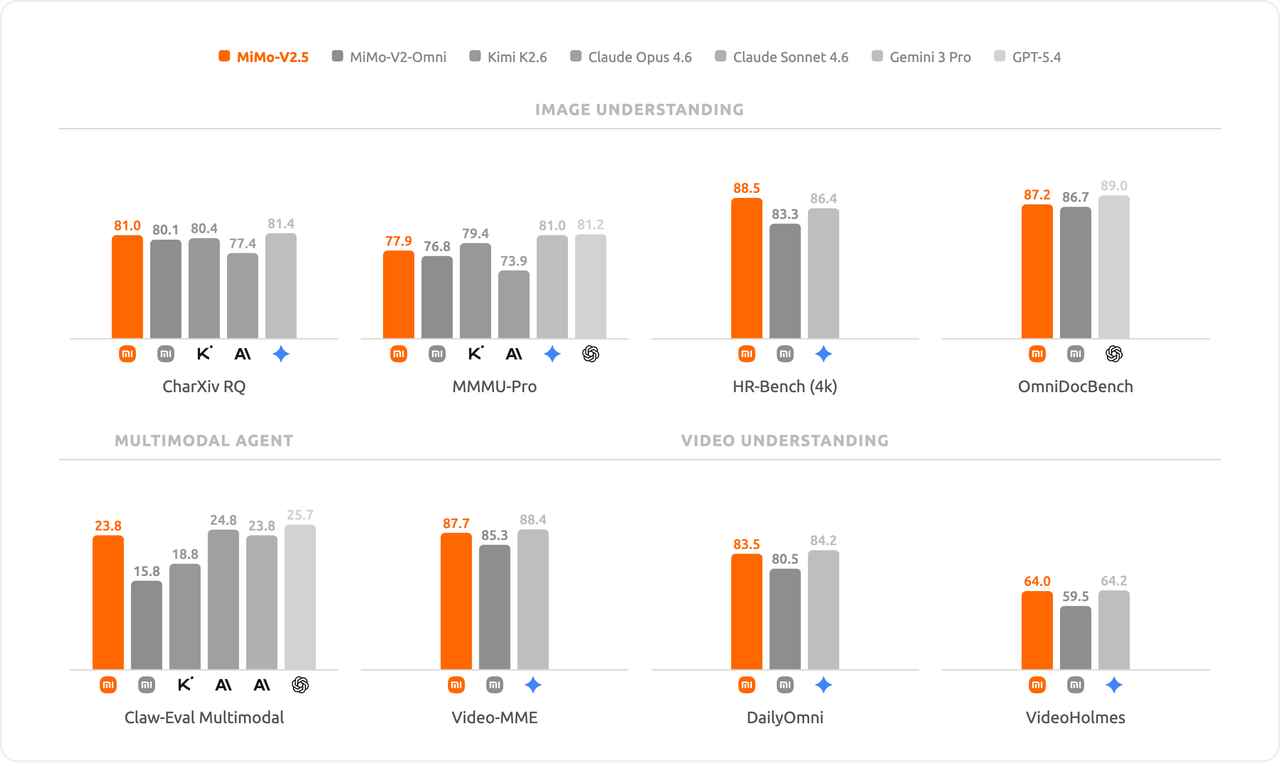
Official Xiaomi MiMo-V2.5 multimodal benchmark comparison
Provider routes can expose a narrower set of media formats than the underlying model supports. Validate the exact image, audio, and video payload format against the active endpoint before shipping a multimodal feature.
MiMo-V2.5 Benchmark Performance
Xiaomi reports strong results in coding, terminal use, and multimodal-agent evaluation. These numbers are useful for positioning the model, but they are not substitutes for tests on your own prompts, tools, latency targets, and failure conditions.
| Benchmark | Reported score | Evaluation focus |
|---|---|---|
| SWE-Bench Pro | 56.1 | Repository-level software engineering |
| Terminal-Bench 2.0 | 65.8 | Terminal-based agent tasks |
| Claw-Eval General | 62.1 Pass@3 | General agent capability |
| Claw-Eval Multimodal | 23.8 Pass@3 | Multimodal agent tasks |
| Claw-Eval Multi-Turn | 63.2 Pass@3 | Multi-turn agent behavior |
| ResearchClawBench | 16.91 | Research-oriented agent workflows |
The official coding comparison shows 65.8 on Terminal-Bench 2.0 and 56.1 on SWE-Bench Pro, while also placing the model in a broader coding-agent comparison.
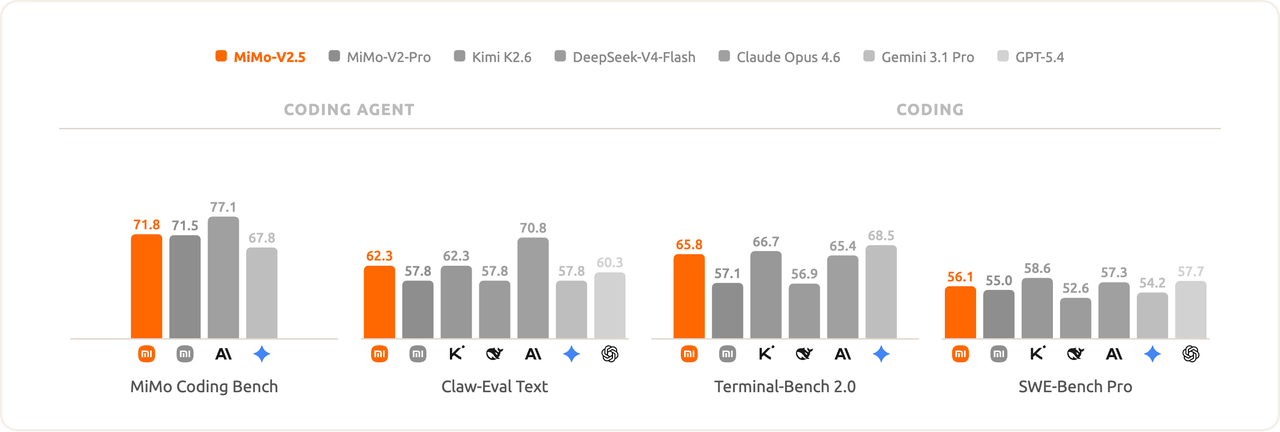
Official Xiaomi MiMo-V2.5 coding benchmark comparison
What the results suggest: the model is especially attractive for applications that combine code, tools, and mixed media. For deterministic production decisions, run an internal evaluation that measures task success, token use, end-to-end latency, retry frequency, and human correction rate.
MiMo-V2.5 vs MiMo-V2.5 Pro: A Multi-Dimensional Comparison
| Dimension | MiMo-V2.5 | MiMo-V2.5-Pro |
|---|---|---|
| Total parameters | 310B | 1.02T |
| Active parameters | 15B | 42B |
| Context window | 1M tokens | 1M tokens |
| Primary strength | Omnimodal and general agent workloads | Complex agents and demanding coding |
| Input price per 1M tokens | $0.112 | $0.348 |
| Output price per 1M tokens | $0.224 | $0.696 |
| Best fit | Multimodal, large-context, cost-sensitive systems | Hard reasoning, coding, and long-horizon execution |
| Official API input modalities | Text, image, video, audio | Text |
| Official API output modality | Text | Text |
Comparison result: start with the MiMo-V2.5 route when cost, throughput, or multimodal coverage drives the decision. Move selected requests to MiMo-V2.5 Pro when internal evaluations show a meaningful accuracy gain on difficult coding, reasoning, or tool-use cases. A tiered router often delivers a better cost-quality balance than sending every request to MiMo-V2.5 Pro.
How to Call the MiMo-V2.5 API
The API follows the familiar chat-completions schema. Keep the key on your server, load it from an environment variable, and never embed it in browser or mobile code.
Set the API key
export COMETAPI_KEY="your_api_key_here"
$env:COMETAPI_KEY = "your_api_key_here"
### Send a cURL request
curl https://api.cometapi.com/v1/chat/completions
-H "Authorization: Bearer $COMETAPI_KEY"
-H "Content-Type: application/json"
-d '{
"model": "mimo-v2.5",
"messages": [
{"role": "system", "content": "You are a careful coding assistant."},
{"role": "user", "content": "Explain the bug and propose a minimal patch."}
],
"temperature": 0.2
}'
### Use Python with the OpenAI SDK
import os
from openai import OpenAI
client = OpenAI(
api_key=os.environ["COMETAPI_KEY"],
base_url="https://api.cometapi.com/v1",
)
response = client.chat.completions.create(
model="mimo-v2.5",
messages=[
{"role": "system", "content": "You are a precise engineering assistant."},
{"role": "user", "content": "Review this migration plan for hidden risks."},
],
temperature=0.2,
)
print(response.choices[0].message.content)
> Do not log API keys, full authorization headers, or sensitive prompt content. Use a secrets manager in production and rotate credentials on a defined schedule.

## How to Stream MiMo-V2.5 API Responses

Streaming reduces perceived latency for long answers. The service returns incremental events, which the SDK exposes as chunks.
stream = client.chat.completions.create(
model="mimo-v2.5",
messages=[{"role": "user", "content": "Draft a safe database migration checklist."}],
stream=True,
)
for chunk in stream:
delta = chunk.choices[0].delta.content
if delta:
print(delta, end="", flush=True)
In a web service, forward deltas with Server-Sent Events or WebSocket messages, handle client disconnects, and stop upstream generation when the user cancels.

## MiMo-V2.5 API Multimodal and Structured Workflows

For image-aware tasks, send a text instruction plus an image object in the same user message. The exact accepted media representation can vary by provider route, so treat this as a payload pattern and confirm current route support.
{
"model": "mimo-v2.5",
"messages": [
{
"role": "user",
"content": [
{"type": "text", "text": "Extract the visible error and suggest the next diagnostic step."},
{"type": "image_url", "image_url": {"url": "https://example.com/error.png"}}
]
}
]
}

For machine-readable output, request a compact JSON object and validate it against your own schema. Never assume generated JSON is safe merely because it parses.
import json
raw = response.choices[0].message.content
result = json.loads(raw)
required = {"summary", "risks", "next_action"}
missing = required - result.keys()
if missing:
raise ValueError(f"Missing fields: {sorted(missing)}")
## MiMo-V2.5 API Pricing on CometAPI and Cost Control

| Route                          | Input per 1M tokens | Output per 1M tokens | 100-request example |
| ------------------------------ | ------------------- | -------------------- | ------------------- |
| MiMo-V2.5                      | $0.112              | $0.224               | $0.1568             |
| MiMo-V2.5 Pro                  | $0.348              | $0.696               | $0.4872             |
| Xiaomi pay-as-you-go reference | $0.14               | $0.28                | $0.1960             |

The example assumes 100 requests, each with 10,000 input tokens and 2,000 output tokens. Under those assumptions, the MiMo-V2.5 route is about 68% cheaper than MiMo-V2.5 Pro. Xiaomi's [published pay-as-you-go rates](https://platform.xiaomimimo.com/docs/zh-CN/integration/roocode) provide a useful reference point, while actual bills should be verified against the active provider price before deployment.
MiMo-V2.5 input: 100 × 10,000 / 1,000,000 × $0.112 = $0.1120
MiMo-V2.5 output: 100 × 2,000 / 1,000,000 × $0.224 = $0.0448
MiMo-V2.5 total: $0.1568
Pro input: 100 × 10,000 / 1,000,000 × $0.348 = $0.3480
Pro output: 100 × 2,000 / 1,000,000 × $0.696 = $0.1392
Pro total: $0.4872
Control cost with maximum-output limits, prompt compression, cached context, request classification, and a router that escalates only difficult tasks. Track cost per successful task rather than cost per request; a cheaper request that fails repeatedly can be more expensive overall.

## How to Design Long-Context MiMo-V2.5 API Requests

A 1M-token window makes larger inputs possible, but it does not remove retrieval and attention tradeoffs. Build the prompt so the model can locate the relevant evidence quickly.

* Place the task, output contract, and decision criteria near the beginning.
* Separate documents with stable identifiers and clear delimiters.
* Include only evidence that can affect the answer.
* Ask the model to cite document identifiers or line references in its result.
* Measure accuracy as context grows; do not treat maximum context as the ideal context.

> Long context increases both token cost and the chance that irrelevant material distracts the model. Retrieval, summarization, and hierarchical prompting remain important even when the full corpus fits.

## Production Reliability

### Retry only transient failures

Retry rate limits and temporary server failures with exponential backoff and jitter. Do not automatically retry invalid authentication, malformed payloads, or policy errors.
import random
import time
def delay_for(attempt: int) -> float:
return min(30.0, (2 ** attempt) + random.random())
for attempt in range(5):
try:
result = call_model()
break
except TransientAPIError:
if attempt == 4:
raise
time.sleep(delay_for(attempt))
### Set operational guardrails

* Use connection and overall request timeouts.
* Attach an idempotency key to workflows with external side effects.
* Record model ID, latency, input and output tokens, retry count, and final status.
* Redact secrets and personal data before logging.
* Require tool allowlists and confirmation for destructive actions.
* Maintain a fallback model or queue for provider outages.

## MiMo-V2.5 API Common Errors and Solutions

| Symptom       | Likely cause                                   | Recommended action                                               |
| ------------- | ---------------------------------------------- | ---------------------------------------------------------------- |
| 401 or 403    | Missing, invalid, or unauthorized API key      | Verify the server-side secret and project permissions.           |
| 400           | Malformed messages or unsupported media object | Validate JSON and confirm route-specific payload support.        |
| 413           | Request body is too large                      | Reduce media size or split the input.                            |
| 429           | Rate or quota limit                            | Back off with jitter and enforce client-side concurrency limits. |
| 5xx           | Temporary provider failure                     | Retry within a bounded budget or fail over.                      |
| Slow response | Large context, long output, or tool latency    | Stream output, cap tokens, and profile every stage.              |
| Invalid JSON  | Generation drift                               | Validate, repair once if safe, and reject persistent failures.   |

## Conclusion

The MiMo-V2.5 model is the strongest starting point for teams that need multimodal input, large context, and aggressive cost control. Pro should be a deliberate escalation path for tasks where measured quality gains justify the higher price. Begin with a small evaluation set, instrument every request, and promote the integration only after testing real payloads, long-context behavior, retry handling, and failure recovery.

## FAQ

### What endpoint should I use?

Use `/api.cometapi.com/v1/chat/completions`, or set `/api.cometapi.com/v1` as the base URL in an OpenAI-compatible SDK.

### What model identifier should I send?

Use `mimo-v2.5` for the MiMo-V2.5 route. Confirm the current identifier before launch if your account uses a provider-specific alias.

### When should I choose MiMo-V2.5 Pro?

Choose MiMo-V2.5 Pro when your evaluation shows a material advantage on difficult coding, reasoning, or long-running tool tasks. Keep routine or multimodal traffic on the MiMo-V2.5 route when its quality is sufficient.

### Does a 1M-token context mean I should send everything?

No. Large context is a capacity limit, not a prompt-design target. Retrieve and organize the evidence that can affect the answer, then measure quality and cost as the input grows.

### Can I call the API directly from a browser?

Do not expose a secret API key in frontend code. Call the provider from your backend and apply authentication, rate limits, logging, and data controls there.

### How do I verify multimodal support?

Test the exact media payload against the active provider route. The underlying model's native modalities do not guarantee that every route exposes every format in the same way.