TL;DR
Start with GPT Image 2.6 Sunburst for demanding visual work and precise revisions, or MiniMax H3-Image Standard for economical, large-format raster production. Flare suits early concepts; MiniMax Highspeed shortens waits within a MiniMax workflow. Your required dimensions, editing controls, and delivery format should decide the final choice.
Key Takeaways
- Stronger general preference results: GPT Image 2.6 Sunburst leads MiniMax H3-Image by 209 Arena points in text-to-image and 117 in single-image editing in the November 12 snapshot.
- Documented square 4K output: MiniMax H3-Image generates 4096 × 4096 images, useful for large backgrounds and crop-heavy production.
- Lower published image-output rates: MiniMax Standard costs $3.80 per million tokens, versus $7.60 for Highspeed and $30.00 for GPT Image 2.6 at the official rates.
- More editing and format options: GPT Image 2.6 offers markup-guided edits and SVG; animated GIF output requires the relevant preview access.
- Access both models through CometAPI: MiniMax H3-Image and GPT Image 2.6 are available through CometAPI, giving developers a unified API service for high-resolution generation and creative editing.
MiniMax H3-Image vs GPT Image 2.6: Overview
| Feature | MiniMax H3-Image | GPT Image 2.6 |
|---|---|---|
| Model options | Standard and Highspeed | Flare and Sunburst |
| Text-to-image and editing | Both supported | Both supported |
| Reference workflow | Up to 16 reference images | Multiple inputs and markup-guided editing |
| Output formats | JPEG, PNG, WebP | Raster images, SVG, and GIF with preview access |
| Regional editing controls | Text instructions and references; no masked edits | Text instructions, markup, and applicable mask workflows |
| Image-output rate per 1M tokens | $3.80 Standard; $7.60 Highspeed | $30.00 for either variant |
| Deployment | Hosted API or weights under the community license | Hosted proprietary service |
Prices are in USD. The price comparison uses rates checked on November 16, 2026; the Arena results use the November 12 snapshot.
What Is MiniMax H3-Image?
MiniMax H3-Image is an open-weight image generation and editing model built on the H3 architecture. Released on November 11, 2026, it combines high-resolution raster output with reference-based generation. Standard and Highspeed give developers a choice between lower token rates and shorter published median latency. It is a useful starting point for large campaign backgrounds, product environments, and applications that need deployment flexibility.
What Is GPT Image 2.6?
GPT Image 2.6 is OpenAI’s hosted image-generation and editing family, released on November 4, 2026. Sunburst is designed for detailed visual work, while Flare focuses on fast iteration. Its editing controls and additional output formats make it relevant to creative tools that need repeated revisions, targeted changes, or assets beyond a static raster image.
MiniMax H3-Image vs GPT Image 2.6: Features and Specifications
Both families accept text and image inputs. MiniMax supports up to 16 references, which can represent subjects, products, or visual styles. GPT Image 2.6 adds an annotation-based way to identify the part of an image you want to change.
GPT Image 2.6 offers markup-guided image editing: place a transparent annotation layer over the first input image and describe the intended change. This is useful when a text description alone makes the target ambiguous, such as choosing one vase in a furnished room.
Architecture and generation settings
MiniMax uses a dense, single-stream diffusion transformer. Its published architecture lists 33.1 billion parameters and 50 layers for the image diffusion component. Downloadable weights make it the option for teams that want to operate the model themselves.
GPT Image 2.6 separates planning complexity from rendering quality. Use low complexity for a focused change, medium for a typical composition, and high for dense layouts with interacting instructions. Increase complexity when the result misses the brief; adjust rendering quality separately.
Resolution and file formats
| Raster output | MiniMax H3-Image | GPT Image 2.6 Sunburst / Flare |
|---|---|---|
| Published size examples | 1024 × 1024; 2048 × 2048; 4096 × 4096 | Recommended: 1024 × 1024, 1536 × 1024, 1024 × 1536; custom sizes include 3840 × 2160 |
| Custom-size pixel limit | 655,360–20,000,000 pixels | 655,360–8,294,400 pixels; neither edge above 3840 |
| Aspect ratio and sizing | 1:3 to 3:1; custom width and height | 1:3 to 3:1; both dimensions divisible by 16 |
The two models use different 4K dimensions. MiniMax’s 4096 × 4096 square contains about 16.8 million pixels; GPT’s 3840 × 2160 landscape contains about 8.3 million. MiniMax therefore offers more raster area for cropping, while GPT cannot produce a 4096 × 4096 raster within these limits. These are output-size specifications, not a measure of visual quality. Sources: MiniMax output sizes and OpenAI size options, checked November 17, 2026.
For delivery, MiniMax supports JPEG, PNG, and WebP. GPT adds SVG and 2–16-frame animated GIFs, with preview access required for GIF generation. SVG is a vector format and should be evaluated separately from raster pixel limits.
MiniMax H3-Image vs GPT Image 2.6: Performance
The November 12, 2026, snapshots of the Arena text-to-image leaderboard and Arena single-image editing leaderboard place Sunburst first among these three entries in both tasks, followed by Flare and MiniMax. Arena measures human preferences across evaluated prompts.
| Arena task | MiniMax H3-Image | GPT Image 2.6 Sunburst | GPT Image 2.6 Flare |
|---|---|---|---|
| Text-to-image | 1197 ± 11 | 1406 ± 13 | 1384 ± 13 |
| Single-image editing | 1359 ± 9 | 1476 ± 11 | 1460 ± 10 |
Both GPT entries use Arena’s Medium label and were preliminary at the snapshot date. Text-to-image votes: MiniMax 3,277, Sunburst 2,697, Flare 2,532. Editing votes: 5,129, 3,493, and 3,534 respectively. Full per-entry generation configurations are not disclosed; “Leader” refers to the three entries compared here.
Sunburst leads MiniMax by 209 Arena points in generation and 117 in editing; Flare also leads by 187 and 101 points. These results favor GPT for general visual preference, but do not establish which model will deliver the most usable images for your brief. Sunburst is the stronger quality-first starting point; Flare is positioned for faster iteration. Their published token rates are identical, although actual token use can differ.
Generation speed and high-resolution throughput
MiniMax's launch emphasizes the speed of high-resolution image generation. The company published median latency measurements for Standard and Highspeed variants across different resolutions.
| Task | Resolution | Standard P50 | Highspeed P50 |
|---|---|---|---|
| Text-to-image | 1024 × 1024 | 10.6 s | 7.7 s |
| Text-to-image | 2048 × 2048 | 10.5 s | 7.6 s |
| Text-to-image | 4096 × 4096 | 16.0 s | 10.3 s |
| Editing, 1 reference | 4096 × 4096 | 18.2 s | 12.5 s |
| Editing, 3 references | 4096 × 4096 | 21.4 s | 14.4 s |
These provider-reported P50 values compare MiniMax Standard with Highspeed; they are not a matched-settings comparison with GPT Image 2.6.
For MiniMax 4K generation, Highspeed reduces the published median from 16.0 to 10.3 seconds—a 5.7-second, or 35.6%, reduction. That is a measurable benefit when someone is waiting for each result; scheduled batches may not need the premium.
To compare speed across providers, use the same delivery dimensions and record both median and slow-end response times. The MiniMax measurements above do not establish a speed winner against GPT.
MiniMax H3-Image vs GPT Image 2.6: Pricing
Token rates help you estimate spend, but a cheaper request is not always a cheaper finished asset. Include rejected attempts, revision rounds, and manual retouching when comparing production costs.
API pricing at a glance
USD per one million tokens. GPT prices below apply to both Sunburst and Flare; the CometAPI column covers GPT Image 2.6.
| Token category | MiniMax Standard | MiniMax Highspeed | GPT official | GPT via CometAPI |
|---|---|---|---|---|
| Text input | $2.30 | $2.30 | $5.00 | $4.00 |
| Image input | $1.50 | $3.00 | $8.00 | $6.40 |
| Image output | $3.80 | $7.60 | $30.00 | $24.00 |
Sources: MiniMax pricing, OpenAI’s Sunburst and Flare model pages, and CometAPI pricing. CometAPI lists GPT token rates 20% below the corresponding official rates for supported workflows. SVG currently requires the native OpenAI route while CometAPI completes its integration.
MiniMax Standard’s image-output rate is 87.3% below GPT’s official rate. This compares the price of a million tokens, not the price of equivalent images: token use, output settings, and revision counts still affect the bill.
Example costs for high-resolution image production
MiniMax’s published generation examples put 1K and 2K images at roughly $0.022–$0.023 each with Standard, or $0.035–$0.036 with Highspeed. At 4096 × 4096, regular example costs rise to about $0.069 and $0.130 respectively—approximately $6.88 or $13.00 for 100 requests. These are billing examples, not flat per-image prices.
The 50% launch discount applies to the total request cost when the delivered image contains at least 16.6 million pixels. It ends on November 17, 2026, at 16:00 UTC, so use regular prices for longer-term budget estimates.
For GPT, include text input, any reference images, and generated output at your chosen dimensions and quality. SVG generation also incurs reference-image and SVG-authoring charges.
The providers’ published editing examples show two useful workflows: changing a scene from references and revising a fashion image. Each example uses its own source image and instructions.
Reference-based scene editing with MiniMax H3-Image
MiniMax’s published editing workflow starts with two podcast hosts. The edited outputs remove the man’s headphones and show the hosts touching fists, while retaining the studio setting and the “MONEY TALKS” sign. The comparison presents the original on the left, local SGLang output in the middle, and MiniMax API output on the right.
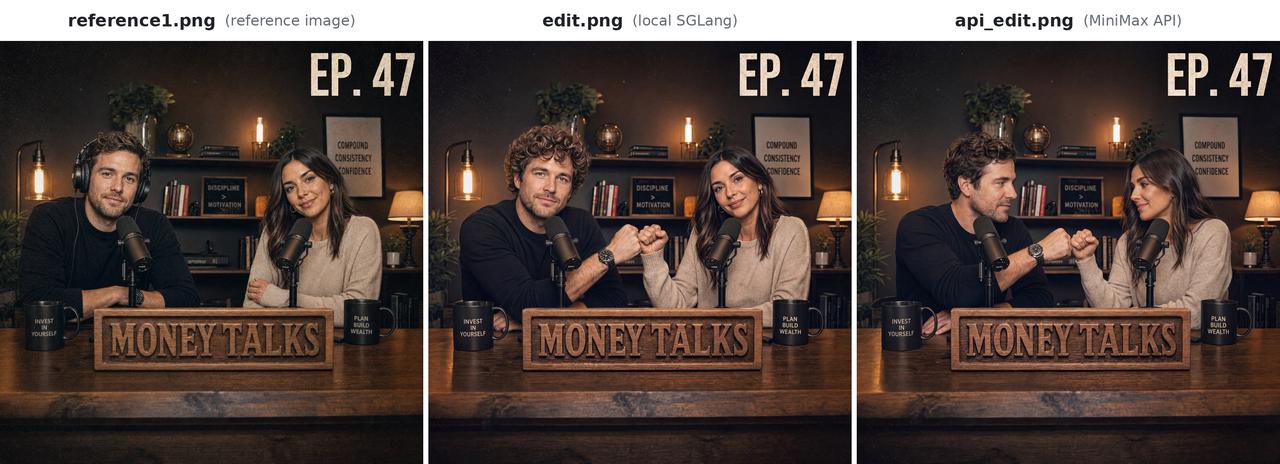
MiniMax’s official reference image and two edited outputs.
When testing a similar scene edit, inspect both the requested change and the details that should remain: faces, furniture, signage, and background objects. A successful pose change alone does not establish that the rest of the image was preserved.
Fashion and product revisions with GPT Image 2.6
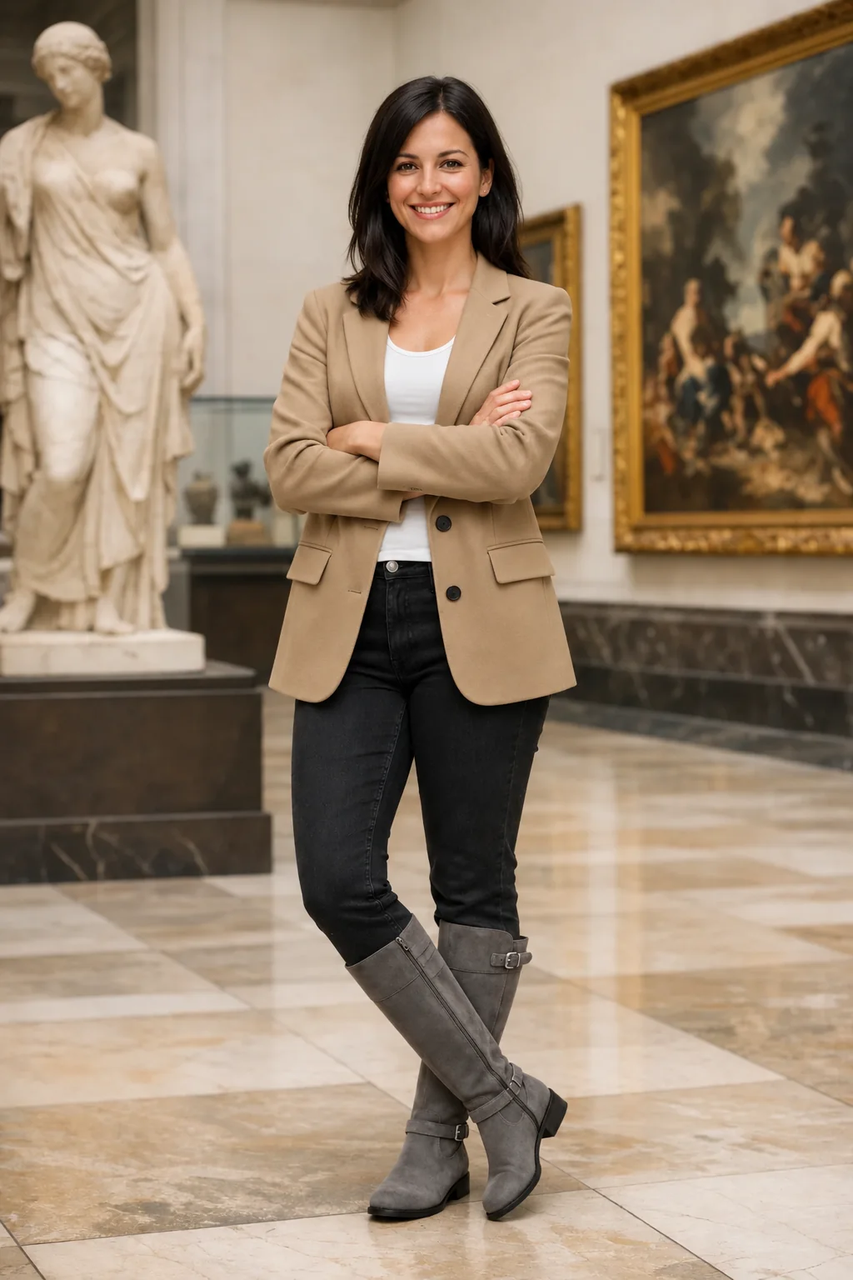
OpenAI’s GPT Image 2.6 Sunburst outfit-editing example.
For a clothing revision, specify the garment to change and the person, framing, and surroundings to preserve. Mark the target region if it is ambiguous, then inspect fit, fabric edges, and consistency across the final catalog images.
What Can Change Your Model Choice?
Editing and deployment requirements
MiniMax’s hosted API does not support masked edits or transparent backgrounds. For an asset that requires either feature, choose a GPT workflow exposing the required control or add a separate editing step. If operating the model on your own infrastructure is mandatory, MiniMax is the choice between these two, subject to its community license.
Output format and API route
For SVG, use GPT Image 2.6 through the native OpenAI API while CometAPI completes its SVG integration. For animated GIFs, use a GPT route with the required preview access. Resolve these format requirements before comparing price or generation speed.
Which Should You Choose: MiniMax H3-Image or GPT Image 2.6?
| Your main requirement | Start with | Why it fits | When to switch |
|---|---|---|---|
| Large raster backgrounds and batch generation | MiniMax Standard | 4096 × 4096 output and lower published token rates | Use Highspeed when users wait for each result |
| Quality-first generation and detailed revisions | GPT Image 2.6 Sunburst | Highest Arena scores among the compared entries; markup-guided edits | Use Flare for early concept exploration |
| Interactive concept exploration | GPT Image 2.6 Flare | Positioned for fast iteration | Use Sunburst for detailed final work; compare Highspeed for a MiniMax pipeline |
| Editable vector graphics | GPT Image 2.6 native SVG route | SVG output | Keep raster-only assets on the most economical suitable route |
| Operating model weights locally | MiniMax H3-Image | Downloadable weights under the community license | Use a hosted API when infrastructure control is unnecessary |
Select a model in three steps
1. Define the deliverable. Set the output dimensions, file format, required editing controls, and deployment constraints. Use the table above to narrow your shortlist.
2. Set acceptance criteria. Write down the visual standard, maximum wait, and budget per completed asset before testing.
3. Confirm the choice with ten representative briefs. Run each shortlisted model on the same briefs and source assets, using settings suited to the same delivery requirement. Score prompt completion, subject or product preservation, unwanted artifacts, and readiness at the final output size. Record accepted assets, billed revisions, median and slow-end latency, and retouching minutes.
Keep the option that meets your quality and turnaround targets at the lowest completed-asset cost. Track retouching time alongside the API bill so that a low generation price does not hide expensive manual work.
Where Can You Access MiniMax H3-Image and GPT Image 2.6?
MiniMax provides its own hosted image API and downloadable model weights. The API is the simpler starting point when you want to generate images without operating model infrastructure; local deployment requires the appropriate hardware and license conditions.
OpenAI provides GPT Image 2.6 through its image-generation and editing APIs, with model, format, and generation settings selected in the request.
CometAPI access
CometAPI offers unified access to AI models through a developer-oriented API service.
CometAPI provides access to the MiniMax H3-Image API and GPT Image 2.6 API through one service. Follow each model’s documented request format and supported features.
Create a CometAPI account, generate an API key, and send an image-generation or image-editing request for the selected model. Supply a prompt and model for generation; add source image inputs for editing. Use its supported routes for raster production and the native OpenAI route when your deliverable requires SVG.
FAQ
Can the same prompts move between MiniMax H3-Image and GPT Image 2.6?
Use the same creative brief, but adapt model-specific parameters and reference handling. MiniMax’s prompt enhancement and input limits affect how a request is interpreted: prompts can contain up to 32,000 characters, while disabling enhancement limits effective text to about the first 4,096 tokens. Preserve the intended result when comparing models, and record whether prompt enhancement is enabled.
Are GPT Image 2.6 SVG files ready for design handoff?
OpenAI’s SVG output specification describes static vector content without scripts, external resources, or embedded raster images. Open the result in your design software, inspect the geometry and text, and apply your brand styles before handoff. SVG is the useful choice when the next person needs to scale or edit the artwork.
How should teams measure the cost of failed image attempts?
Track all billed requests in a batch, including rejected outputs and paid revision rounds, then divide that spend by the number of accepted assets. Apply the same acceptance criteria to MiniMax H3-Image and GPT Image 2.6. Keep manual retouching time as a separate metric so a low API bill does not hide a workflow that consumes more designer time.
Conclusion
A good model choice holds up in the work you actually deliver. Start with the shortlist above, test representative briefs, and keep a record of accepted outputs, turnaround time, and total effort. Revisit the choice when your asset requirements change.