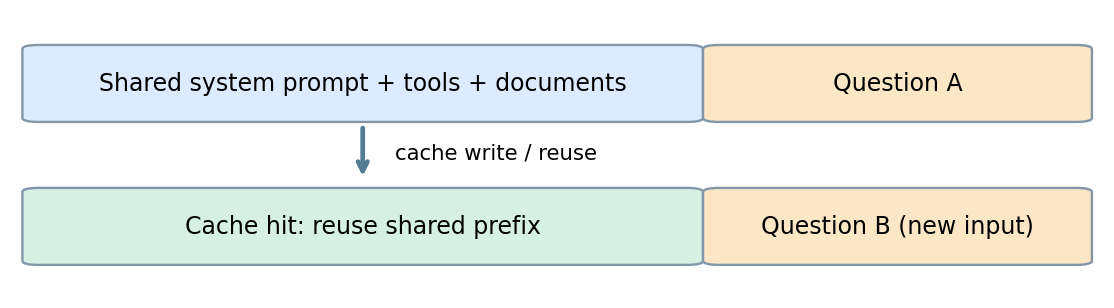
Prompt caching lets language models reuse previously processed prompt prefixes instead of repeating the same input computation. It can lower input-token costs and improve latency, especially for agent workflows, customer support, RAG, and large-document analysis. In 2026, OpenAI offers automatic caching and newer explicit cache controls, Claude supports automatic and block-level cache breakpoints, and Gemini emphasizes implicit caching for its newest models. Providers charge differently for cache writes, reads, and, where applicable, storage. Expiration can trigger another write or a full input charge, so actual savings depend on reuse frequency and measured cache hits.
This guide compares prompt caching in GPT-6.1 Sol, Claude Opus 5.5, and Gemini 4 Argon for developers building applications with repeated input. It focuses on cache controls, pricing, and how to verify reuse.
Key Takeaways
Prompt caching reuses processed input—not the model's previous answer.
OpenAI prompt caching depends on a stable prefix, supported model features, and model-specific minimums and retention settings.
Reviewed for clarity, source attribution and current API terminology.
Claude prompt caching offers 5-minute and optional 1-hour TTLs with automatic and explicit cache control.
Gemini context caching is implicit on modern models; explicit cache resources remain model-dependent.
Prompt caching savings depend on cache writes, reads, storage, and actual hits; verify endpoint support and cached-token billing when using CometAPI.
What Is Prompt Caching in LLMs?
Prompt caching is an inference optimization that enables reuse of computational state derived from a previously processed prefix. A prompt often contains stable instructions, tool definitions, or documents followed by a changing user question. If a later request repeats the eligible prefix, the provider may reuse cached key-value (KV) states and process only the uncached remainder. Unlike response caching, this does not replay a previous answer: the model generates a new response for the current request.
Prompt Caching Workflow:
First request: send a large, repeatable prefix and a specific question.
Cache creation: the provider stores eligible intermediate computational state.
Next request: reuse the identical prefix and replace the question.
Cache read: previously processed tokens are reused while new tokens are processed normally.
Conceptual illustration supplied with the original draft: repeated prompt material precedes a changing question. This is not an official provider architecture diagram.
The common design principle is prefix stability. The API contracts, eligible model families, cache lifetime, and fees are not interchangeable.
OpenAI, Claude, and Gemini Caching at a Glance
The same stable-prefix principle applies across providers, but the controls below are specific to the models used in this guide. Check the model and endpoint together before copying a setting.
Prompt Caching Controls and Python Examples
Each example sends the same reference material with two different questions. Keep the shared content unchanged, run the requests sequentially, and inspect usage to see whether the second request actually reused cached input.
OpenAI: Cache Controls and Python Example
OpenAI automatically matches cache-eligible prompt prefixes and, on supported newer models, permits explicit breakpoint and retention configuration. Cache reuse is especially useful when long system instructions, tool schemas, or repository context recur across requests. The required prefix length and token-price multipliers depend on the model generation and selected retention tier.
The example uses the Responses API with prompt_cache_options set to implicit mode and a 30-minute lifetime. Earlier model generations use different retention parameters; follow the settings for your exact model.
Install the openai SDK and set OPENAI_API_KEY. Use at least 1,024 visible tokens in the stable prefix. Run both requests sequentially and inspect input_tokens_details.cached_tokens and cache_write_tokens in usage. A positive cached-token count confirms a billed cache read; it does not promise lower latency on every request.
To run the examples, install the relevant Python SDK, set the provider's API key, and create a UTF-8 reference.txt file containing enough stable content to meet that model's caching minimum.
from pathlib import Path
from openai import OpenAI

client = OpenAI()  # Reads OPENAI_API_KEY
shared = Path("reference.txt").read_text(encoding="utf-8")
questions = ["Summarize the architecture.", "Identify the main technical risks."]
for question in questions:
    response = client.responses.create(
        model="gpt-6.1-sol",
        instructions="Use the following reference material.\n" + shared,
        input=question,
        prompt_cache_key="docs-assistant-v1",
        prompt_cache_options={"mode": "implicit", "ttl": "30m"},
    )
    print(response.output_text)
    print(response.usage)
Claude: Cache Controls and Python Example
In the Claude Messages API, prompt caching is opt-in. Add cache_control at the request level for automatic breakpoint placement, or attach it to a content block to mark an explicit breakpoint. Developers can mark stable instructions, documents, and selected prompt blocks, while changing the later user input. The standard short-duration cache is five minutes, with a one-hour option for suitable workloads.
Install the anthropic SDK and set ANTHROPIC_API_KEY. For Claude Opus 5.5, provide at least 512 tokens before the cache boundary. Keep the system block identical across requests. A cache entry becomes available when the first response starts; this example waits for the full response to keep the demonstration simple. Inspect cache creation and read counts; a short prefix can return zero for both without raising an error.
from pathlib import Path
import anthropic

client = anthropic.Anthropic()  # Reads ANTHROPIC_API_KEY
shared = Path("reference.txt").read_text(encoding="utf-8")
for question in ["Summarize the architecture.", "Identify the main technical risks."]:
    response = client.messages.create(
        model="claude-opus-5-5",
        max_tokens=1024,
        system=[{
            "type": "text",
            "text": shared,
            "cache_control": {"type": "ephemeral"},
        }],
        messages=[{"role": "user", "content": question}],
    )
    print(response.content)
    print(response.usage.cache_creation_input_tokens)
    print(response.usage.cache_read_input_tokens)
Gemini: Implicit Caching and Python Example
Google calls its implementation context caching. Gemini 4 Argon uses implicit caching and does not support explicit cache resources. Some earlier model families support explicit caches with a configurable TTL. Choose the caching interface from the individual model contract rather than assuming that all Gemini models expose the same controls.
Install google-genai and set GEMINI_API_KEY. Use at least 4,096 tokens of shared leading content for Gemini 4 Argon, and send the second request soon after the first. Inspect cached_content_token_count in usage_metadata when present. Implicit caching can miss even when the prefix is eligible.
from pathlib import Path
from google import genai

client = genai.Client()  # Reads GEMINI_API_KEY
shared = Path("reference.txt").read_text(encoding="utf-8")
for question in ["Summarize the architecture.", "Identify the main technical risks."]:
    response = client.models.generate_content(
        model="gemini-4-argon",
        contents=shared + "\nQuestion: " + question,
    )
    print(response.text)
    print(response.usage_metadata)
How Much Does Prompt Caching Cost Across OpenAI, Claude, and Gemini?
Caching costs should be evaluated as the combination of writes, reads, and—on some explicit-cache systems—retention or storage. The following multipliers illustrate common designs and are not universal price promises across model versions.
Illustrative example: a 10,000-token prefix is reused across N requests, its initial cache write costs 1.25 times ordinary input, and subsequent cache reads cost 0.1 times ordinary input. Assume a base input price of $2 per million tokens and perfect cache hits after the first request.
Number of requests
Without caching
With caching
Savings on reused prefix
10
$0.200
$0.043
Formula: Cached prefix cost = 1.25P + (N − 1) × 0.1P, where P is the ordinary cost of processing the shared prefix once. This example excludes dynamic input, output, expirations, misses, storage and other services.
The example above uses an illustrative 10% read rate, not GPT-6.1 Sol's current rate. Sol's standard short-context pricing is $2 per million uncached input tokens, $0.10 per million cached input tokens, and $2.50 per million tokens written with the default lifetime. Recalculate the example using your actual model, tier, and endpoint bill.
A longer lifetime is worthwhile only when it prevents enough repeated writes or uncached requests to offset its price. Claude's 5-minute and 1-hour writes are charged at 1.25× and 2× base input, respectively. Explicit Gemini caches on supported older models can also incur storage charges. Measure reuse across real idle gaps, not just a burst of back-to-back calls.
Treat misses, expiration, and output generation as part of the bill. If a prefix expires before it is reused, the next request may require another write or full input processing. Short prompts may not qualify at all, while long answers can leave output tokens as the largest expense even with strong cache reuse. Compare total cost per completed task before adding more caching complexity.
Which Prompt Caching API Is Best for Different Workloads?
For coding agents and customer support, put stable tool definitions, repository context, policies, and knowledge before the changing task. OpenAI and Claude offer breakpoint controls that help define reusable boundaries; evaluate the endpoint's actual cache reads rather than assuming that repeated text was cached.
For document analysis and multimodal work, keep the source document or supported media ahead of the question. Gemini's implicit approach reduces cache-management work, while Claude lets you mark the stable block directly. Check support for the particular media type and model before relying on reuse.
For long conversations, append new turns instead of repeatedly rewriting the beginning, and choose an available lifetime that fits the gaps between turns. If your application needs a named cache resource that it can create and reference explicitly, evaluate a Gemini model that supports that interface; Argon does not.
There is no universal winner: compare cache hit rate, cost per completed task, and latency under your actual traffic pattern.
How Does Prompt Caching Affect Latency and Performance?
A cache hit reduces repeated input processing and can shorten time to first token. It does not inherently improve answer quality or speed up output generation, and cached input still occupies the context window. Measure both first-token latency and total response time on comparable requests; a cache hit alone is not evidence that the user received the final answer sooner.
How to Optimize Prompt Caching and Troubleshoot Misses
Start with a Stable, Useful Prefix
Place reusable instructions, tool definitions, policies, and documents first; put timestamps, request IDs, changing context, and the user's question afterward. Keep tool ordering and schemas stable. When using explicit caching, end the breakpoint on the last unchanged block. Add useful reference material when it helps the task; do not inflate every request merely to chase a cache metric.
If Cached Tokens Stay at Zero
Check eligibility before changing the prompt: confirm the exact model, endpoint, minimum token length, and required cache-control settings. Then send two sequential requests with identical shared content. Inspect cache creation and cache reads separately; the first request may create the entry that a later request can reuse. An implicit cache is eligible to hit, not guaranteed to hit.
For Claude, a request below the minimum can return zero cache-creation and cache-read tokens without an error. Its cache entry becomes available once the first response starts. The Claude caching guide also explains how breakpoint placement and changing request settings affect reuse.
If Hits Disappear Between Requests
Compare the actual payloads, not just the prompt template. Look for changed document text, reordered tools, altered schemas, rewritten early conversation turns, or dynamic fields inserted before the reusable boundary. Check the elapsed time since the earlier request and whether the chosen lifetime covers it. Change one variable at a time and record the resulting usage.
If Hits Do Not Produce Savings
Separate cached input, writes, uncached input, output, and any storage charges. Repeated writes after idle gaps, low reuse, or long generated answers can outweigh input discounts. Use the cost calculation above with measured usage and the endpoint's actual billing rates. Keep an optimization only if it improves total task cost or user-visible latency.
Check Endpoint Support and Data Boundaries
A compatibility endpoint may accept a request without exposing the same caching controls or usage fields as the native API. Confirm parameter support and compare returned usage with account billing before treating reuse as a saving. Keep tenant isolation and access controls in place, and follow the provider's retention and data-processing policies. Caching does not replace those controls.
How Can You Use Prompt Caching with CometAPI?
CometAPI offers a single integration point for testing requests across model families. For caching, verify which provider-specific controls the selected endpoint accepts and how cached input appears in usage and billing. Developers can centralize model testing while retaining separate validation for caching behavior and accounting, since native provider options are not guaranteed to be identical across proxy or compatibility endpoints.
For model-specific setup, see CometAPI's pages for GPT-6.1 Sol, Claude Opus 5.5, and Gemini 4 Argon. Confirm that your chosen endpoint supports the caching behavior you need.
Install the openai SDK and set COMETAPI_KEY. This example sends repeated-prefix requests through CometAPI's OpenAI-compatible Chat Completions interface. Confirm model availability, then inspect returned usage and account billing for evidence of cache reuse. Do not copy Responses API cache parameters into this endpoint without checking support.
import os
from pathlib import Path
from openai import OpenAI

client = OpenAI(
    api_key=os.environ["COMETAPI_KEY"],
    base_url="https://api.cometapi.com/v1",
)
shared = Path("reference.txt").read_text(encoding="utf-8")
for question in ["Summarize the architecture.", "Identify the main technical risks."]:
    response = client.chat.completions.create(
        model="gpt-6.1-sol",
        messages=[
            {"role": "system", "content": shared},
            {"role": "user", "content": question},
        ],
    )
    print(response.choices[0].message.content)
    print(response.usage)
Conclusion
For repeat-heavy AI applications, prompt caching can make a material difference to inference economics. OpenAI gives developers increasingly detailed prompt and retention controls; Claude provides convenient automatic and block-level controls; Gemini makes implicit reuse straightforward in modern models. The right implementation depends on stable prompt volume, hit rate, expiration, and total cost. Start with a clear shared prefix, verify usage telemetry, then optimize retention and provider selection using production-like measurements.
FAQ
How can I compare caching providers fairly?
Replay the same useful source documents and equivalent questions, but use each provider's own token counts and actual billing rates. Keep output requirements comparable and report unsuccessful requests as well as successful ones. A fixed number of characters does not imply the same number of tokens, so compare cost per completed task alongside cache-hit measurements.
Should I cache every document in a changing knowledge base?
Group documents by how often they change and how often they are reused. A frequently updated document can repeatedly invalidate a large shared prefix; placing stable policy material first and changing material later can reduce that exposure. Version the source material deliberately and refresh it when correctness requires it, even when doing so reduces cache reuse.
Parameter
OpenAI: GPT-6.1 Sol
Claude: Opus 5.5
Google: Gemini 4 Argon
Cache activation
Implicit matching; explicit breakpoints supported
Opt in with request-level or content-block cache_control
Implicit caching enabled by default
Minimum prefix
1,024 visible input tokens
512 tokens before the cache boundary
4,096 input tokens
Lifetime controls
Responses API: prompt_cache_options.ttl; 30m default or 12h
5-minute default; optional 1-hour TTL
Provider-managed implicit lifetime
Where to place stable content
Leading instructions, tools, and reference material
Stable tool definitions, system content, or message blocks before the breakpoint
Large shared content at the start of the prompt
Usage to inspect
input_tokens_details.cached_tokens and reported cache-write usage
cache_creation_input_tokens and cache_read_input_tokens
cached_content_token_count in usage_metadata, when present
Important distinction
prompt_cache_key can separate accounting; it is not required for Sol's automatic routing
The breakpoint must end on content that stays unchanged
No explicit cache resource for Argon; older supported models expose a separate interface
Cost category
OpenAI
Claude
Gemini
Uncached input
Normal input token rate
Normal input token rate
Normal input token rate
Cache write
Newer-model write premiums possible
5m/1h premiums
Implicit or explicit model-specific
Cache read
Reduced model-specific rate
Reduced model-specific rate
Reduced model-specific rate
Cache lifetime
Model-specific
5m / 1h
Implicit managed / explicit configurable
Additional storage
Depends on model
Usually reflected in write tier
Explicit storage charges can apply
78.50%
100
$2.000
$0.223
88.85%
What Is Prompt Caching? OpenAI vs Claude vs Gemini in 2026 - CometAPI