ByteDance's Seedream 5.5 and OpenAI's GPT Image 2.6 arrived just five days apart in November 2026. Both target professional image generation, but they approach the creative process differently.
For designers, marketers, and developers, the useful question is which model can deliver an acceptable asset with fewer revisions. This comparison examines official capabilities, published third-party tests, API access, and pricing to help you choose for your next project.
TL;DR
Start with Seedream 5.5 for photographic assets and repeated image edits. Start with with Sunburst when the composition has strict requirements. Both Sunburst and Flare can generate SVGs and animated GIFs through OpenAI’s Image API. Flare is the speed-oriented GPT Image option. Both model families are accessible through CometAPI. Published tests show different winners by task, so compare them at the resolution and quality your deliverable actually needs.
Key Takeaways
- Seedream 5.5: Natural textures, native RGBA assets, and a demonstrated 100-round editing workflow make it a useful starting point for photographic production.
- GPT Image 2.6: Sunburst and Flare offer separate complexity controls, targeted editing, and SVG and animated GIF generation through the official Image API.
- Quality and speed: Small platform tests favor different models; quality settings and output dimensions explain part of the variation.
- Pricing: Seedream official billing includes input images and output pixel tiers; GPT Image uses token billing. Include retries and revisions when comparing cost.
- API access: CometAPI provides access to both families; choose the model ID and request parameters for the route you use.
Seedream 5.5 vs GPT Image 2.6: Overview
| Feature | Seedream 5.5 | GPT Image 2.6 |
|---|---|---|
| Developer | ByteDance Seed | OpenAI |
| Official release | November 9, 2026 | November 4, 2026 |
| Inputs | Text and reference images | Text and reference images |
| Editing | 100 successive edits demonstrated | Markup-guided edits and adjustable complexity |
| Transparency | Native RGBA assets | PNG and WebP with alpha |
| Resolution scope | 1K, 1.5K, and 2K presets announced by CometAPI | Official API: up to 8,294,400 pixels; neither edge above 3840 |
| Variants | Seedream 5.5 | Sunburst for detail; Flare for iteration |
| SVG and animation | Not established as native outputs in the cited release | SVG generation and GIF output through the official Image API |
The resolution entries describe the named services: Seedream presets come from CometAPI, while GPT Image dimensions describe the official OpenAI API. Match the route and settings before using these limits to choose an implementation.If you need a larger deliverable than CometAPI’s 2K Seedream preset, include the time and cost of upscaling in your estimate and review the result at its final size.
Seedream 5.5: Photographic detail and repeatable edits
If you’re choosing a model for portraits or product shots, look at how it handles skin, fabric, and reflections under different lighting. The two samples below, published with ByteDance’s November 9 release, show fine texture in hard sunlight and softer transitions under indoor light.
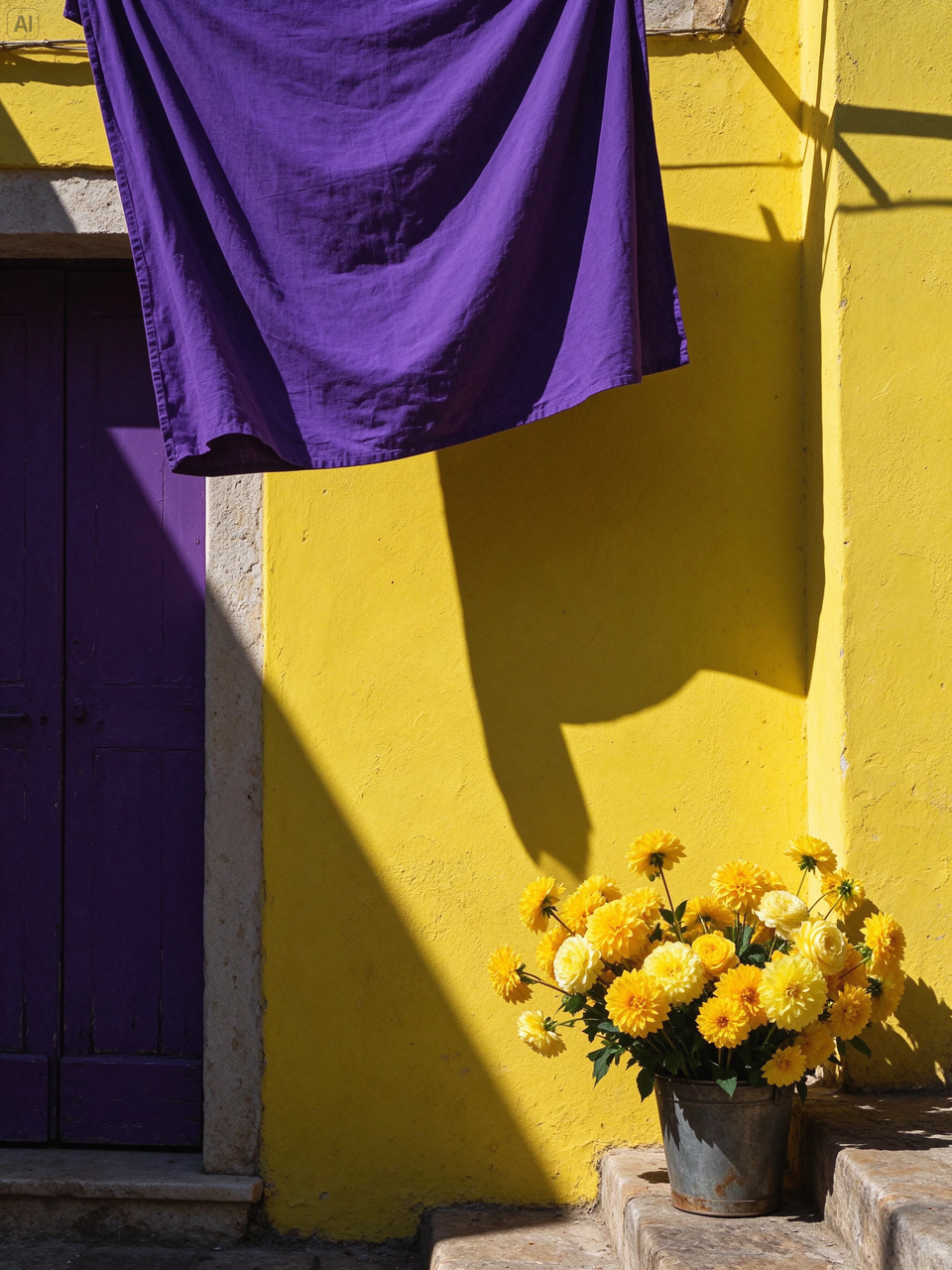
Official ByteDance sample: purple fabric, a yellow wall, and flowers show texture and hard sunlight in the same composition.

Official ByteDance sample: a father holding a sleeping baby illustrates skin, fabric, and soft indoor lighting. Both images are provider examples, not a head-to-head comparison.
For a product cutout or sticker, ask for RGBA output so you can place the asset directly on a new background. For a series of edits, keep an approved reference and compare the logo, edges, and lighting after each change. ByteDance demonstrated 100 successive edits, but a long run still needs those checks.
GPT Image 2.6: Composition controls and export formats
Choose Sunburst or Flare according to the job. Sunburst suits detailed compositions, while Flare suits quick previews. Quality sets rendering detail. Complexity sets how much planning the model does. Start low and raise it if text or objects land in the wrong place. Higher complexity can take longer and change other parts of the scene. The two Sunburst examples below hold quality at medium so you can compare the layouts.

Official OpenAI example at low complexity and medium quality: a paper-cut football celebration with a foreground banner.

Official OpenAI example at high complexity and medium quality: the same prompt produces a different arrangement of players, trophy, and signage.
For raster delivery, choose JPEG, PNG, or WebP. Use PNG or WebP when you need transparency. Custom dimensions must be multiples of 16, with an aspect ratio from 1:3 to 3:1, a maximum edge of 3,840 pixels, and 655,360–8,294,400 pixels in total. For static SVGs, use the generation endpoint, which creates a reference image before producing vector paths. For an animated GIF, budget for frame width × height × frame count across all animations in the request. Each GIF can contain 2–16 frames.
Seedream 5.5 vs GPT Image 2.6: Performance
ByteDance's published evaluation uses MagicArena and experienced evaluators across six production categories. Against Seedream 5.0 Pro, it reports gains in quality and usability. Its paired-image GSB assessment records expert preferences; these scores are not percentages of absolute image quality.
In ByteDance’s Chinese and English text tests, 0.4% of results showed severe text corruption and 1.7% showed minor corruption, including errors in tightly spaced small text. Against Seedream 5.0 Pro, Seedream 5.5 scored +55.62% on the image-to-image realism preference measure, and its reported usability more than doubled in both film and television work and office tasks. A separate demonstration ran through 100 successive edits.
The published summary does not provide enough detail to reproduce every evaluation here, including full prompt sets and sample counts. Its comparison with GPT Image 2.5 Sunburst concerns the previous OpenAI generation, so it cannot establish a win over GPT Image 2.6.
Third-party task comparisons
Pixel Dojo, CamClo AI, and ImagesArt publish tests conducted on their own image platforms. Their results are useful examples of output behavior, with platform-specific settings and small samples.
Pixel Dojo tested six prompts, using Seedream at 2K and GPT Image at High quality. Both models spelled the requested words correctly on all six prompts. Seedream took 31–47 seconds per image, compared with 44–74 seconds for GPT Image 2.6 at High quality.
CamClo AI tested five creative tasks using the same prompts and input photos. Each model won twice, with one tie. Its latency comparison used 2K output, with GPT Image in Quality mode at high.
ImagesArt compared five tasks and favored Sunburst in four, with one draw. Seedream had no overall task wins. The test covered generation and editing; seven images per model were produced across the five tasks.
| Platform test | Settings and sample | Seedream 5.5 | GPT Image 2.6 |
|---|---|---|---|
| Pixel Dojo | Six prompts; Seedream 2K; GPT High | 31–47 seconds; text correct on 6/6 | 44–74 seconds; text correct on 6/6 |
| CamClo AI | Five tasks; 2K; GPT Quality/high | 2 wins, 1 tie; about 20 seconds average | 2 wins, 1 tie; about 68 seconds average |
| ImagesArt | Five tasks; seven images each; GPT Sunburst | 0 wins, 1 tie; 15–37 seconds | 4 wins, 1 tie; 29–50 seconds |
These are within-platform observations, not a pooled benchmark. Matching a label such as 2K does not guarantee identical pixel counts: ImagesArt reports different dimensions for the models at its 2K, 3:4 setting. The results support testing Seedream for efficient photographic production and Sunburst for strict instructions, rather than declaring one universal winner.
Photorealism and text fidelity
For portraits and lifestyle imagery, Seedream is a useful first candidate when natural texture matters most. For packaging and advertisements, evaluate spelling, placement, and unwanted extra text separately: an image can spell every word correctly while still violating the brief.
The ImagesArt portrait and poster tasks illustrate that distinction. Seedream produced appealing imagery but added unrequested text; Sunburst won those rounds by following the text constraint more closely. For a campaign with mandatory wording, that difference can matter more than a small aesthetic preference.
Editing consistency
When you change a product’s color, check that the logo, framing, and lighting still match the approved image.
Seedream's long editing demonstration makes it a sensible starting point for extended revision chains. GPT Image's markup layer is useful when an application needs to point to a specific region. Compare unchanged areas as well as the edited object: logos, garment patterns, lighting, and face details are common acceptance criteria.
Speed at delivery quality
Flare is designed for faster iteration, but the third-party timings above are not a controlled Flare-versus-Seedream test. For an interactive application, measure end-to-end time at the intended resolution and quality, including retries. A faster first image offers little benefit if it takes several attempts to meet the brief.
Seedream 5.5 vs GPT Image 2.6: Pricing
Seedream official pricing
For mainland China, Volcano Engine bills for each input image and sets the output charge by pixel count. For an international deployment, check the price for your exact Seedream 5.5 model and region in BytePlus ModelArk before estimating the cost of a generation or edit.
GPT Image official and CometAPI rates
Sunburst and Flare share the same standard token rates. The table compares OpenAI standard pricing with the rates published for GPT Image 2.6 API in CometAPI, checked on November 17, 2026.
| Token category, per 1M tokens | OpenAI standard | CometAPI | Rate difference |
|---|---|---|---|
| Text input | $5.00 | $4.00 | 20% lower |
| Cached text input | $1.25 | $1.00 | 20% lower |
| Image input | $8.00 | $6.40 | 20% lower |
| Cached image input | $2.00 | $1.60 | 20% lower |
| Image output | $30.00 | $24.00 | 20% lower |
The actual cost of a generated image depends on the number of tokens used, output dimensions, quality level, and any additional inputs.
For SVG delivery, include both the reference image and the authoring model's token usage. The 20% figure above compares listed token rates; it does not establish a fixed per-image price or an end-to-end saving for every workflow.
Cost per accepted asset
For commercial production, the most useful metric is cost per accepted image rather than cost per initial generation.
Divide total generation and editing spend by the number of assets that pass review. Track manual cleanup time separately. This gives a practical answer when a lower-cost model needs more revisions or a more expensive model produces usable results sooner.
For Seedream 5.5 API in CometAPI, use the selected route's billing information when budgeting. A single illustrative estimate is insufficient to compare text-to-image requests with multi-reference edits.
Which Model Should You Choose for Your Workflow?
| Deliverable | Starting choice | What to check before accepting |
|---|---|---|
| Portraits and lifestyle photography | Seedream 5.5 | Natural skin, lighting, and material texture |
| Repeated product revisions | Seedream 5.5 | Preservation of product identity and unchanged areas |
| Posters and ads with required copy and layouts | GPT Image 2.6 Sunburst | Proofread every word, then check object positions, proportions, and brand details against the layout. |
| Rapid creative previews | GPT Image 2.6 Flare or Seedream 5.5 | Measured latency at the quality you accept |
| Vector icons, simple logos, and short animations | GPT Image 2.6 Sunburst or Flare for both SVG and GIF | For SVGs, inspect the editable paths and silhouette. For GIFs, play the loop and check the last-to-first frame transition and pixel budget. |
| Transparent product cutouts | Compare both on the same product | Alpha edges and product geometry |
A practical comparison brief
Use one real assignment with the same prompt, reference images, required text, and delivery dimensions. Record first-pass acceptance, number of edits, total cost, and elapsed time. Choose the model that meets your acceptance criteria within budget; use separate routes for previews and final delivery when that improves the result.
How Can You Use Seedream 5.5 and GPT Image 2.6 with CometAPI?
CometAPI provides an API gateway for accessing multiple AI models using a single account and authentication system.
The CometAPI release log lists Seedream 5.5 access from November 16 and GPT Image 2.6 access from November 5, 2026. Seedream supports up to 10 reference images and 1K, 1.5K, and 2K presets on the announced routes.
Use the image-generation endpoint with your CometAPI key. The examples below show a basic generation request for each model on CometAPI.
Seedream 5.5 API in CometAPI
The announced Seedream model IDs are doubao-seedream-5-5-261028 and dola-seedream-5-5-261028. This Bash request generates a 2K portrait using the doubao route.
curl https://api.cometapi.com/v1/images/generations \
  -H "Authorization: Bearer $COMETAPI_KEY" \
  -H "Content-Type: application/json" \
  -d '{
    "model": "doubao-seedream-5-5-261028",
    "prompt": "Photorealistic editorial portrait in natural afternoon light, detailed skin texture, soft shadows, 85mm photography",
    "size": "2K"
  }'
GPT Image 2.6 API in CometAPI
The GPT Image model IDs are gpt-image-2.6-flare and gpt-image-2.6-sunburst. This Bash request uses Sunburst at high quality for a product advertisement.
curl https://api.cometapi.com/v1/images/generations \
  -H "Authorization: Bearer $COMETAPI_KEY" \
  -H "Content-Type: application/json" \
  -d '{
    "model": "gpt-image-2.6-sunburst",
    "prompt": "Premium skincare product advertisement, glass bottle on a marble pedestal, natural reflections, accurate label typography, elegant composition",
    "size": "1536x1024",
    "quality": "high"
  }'
GPT Image results contain base64 image data in b64_json; other image routes can return a URL. Read the returned field and save the asset before starting the next edit. Advanced output modes described above refer to the official OpenAI API; use the controls supported by your selected CometAPI route.
Conclusion
Before committing a production pipeline, choose one representative job and define what makes its output usable. Run the candidates through generation, revision, and export, then compare the cost and time of the accepted assets. Keep the winning setup as a repeatable preset. This turns a broad model preference into a decision your team can apply to the next brief.