Gemini 4 Hydrogen is Google's execution-focused model for developers building coding assistants, document workflows, and agents. It combines a shared one-million-token context budget with four reasoning settings, making speed, task quality, and cost adjustable within one model. Its main appeal is completing practical work efficiently; the right setting depends on how much reasoning your application actually needs.
Key Takeaways
Gemini 4 Hydrogen targets iterative coding, debugging, and tool-driven execution, either on its own or alongside a planning model.
Its 1,048,576-token context budget is shared by input, reasoning, tool calls, and the final response.
LOW, MEDIUM, HIGH, and XHIGH offer different quality, latency, and cost profiles; HIGH is the default.
Text, images, audio, video, and supported office documents can be inputs; generated output is text.
Global Standard PayGo costs $1.50 per million input tokens and $7.50 per million output tokens, including reasoning.
Reviewed for clarity, source attribution and current API terminology.
What Is Gemini 4 Hydrogen?
Google DeepMind introduced Gemini 4 Hydrogen on November 12, 2026 for coding, agentic tasks, and everyday knowledge work. The model is proprietary and available through Google's developer and enterprise products.
The model card says Hydrogen is adapted from Gemini 4 Carbon. That establishes its model lineage, but does not by itself describe every architectural or training change. For developers, the useful distinction is its emphasis on rapid execution across repeated edits, tool calls, and verification.
What Are the Main Features of Gemini 4 Hydrogen?
Fast Coding, Debugging, and Repository Work
Hydrogen is designed for repository work: locating a bug, changing the relevant files, running tests, and checking the result. Google reports that Gemini 4 Hydrogen completes benchmarked tasks 2.5 times faster than Gemini 3.8 Flash at the default HIGH thinking level. This refers to task-completion performance in Google's evaluation, not a universal 2.5x reduction in API response latency. Actual results depend on prompt length, tool execution, task complexity, and the application's workflow., alongside a Terminal-Bench 4.1 increase from 18.2% to 57.0%. These are launch evaluation results, not a guarantee for every codebase.
Parallel file reads and searches can help an agent inspect independent parts of a repository before editing. In practice, the benefit depends on the tools, task dependencies, and how much work can safely run concurrently.
Four Adjustable Thinking Levels
Hydrogen supports four reasoning levels: LOW, MEDIUM, HIGH, and XHIGH. HIGH is the default. The setting controls how much reasoning the model applies before producing an answer, so it affects task quality, response time, and output-token usage.
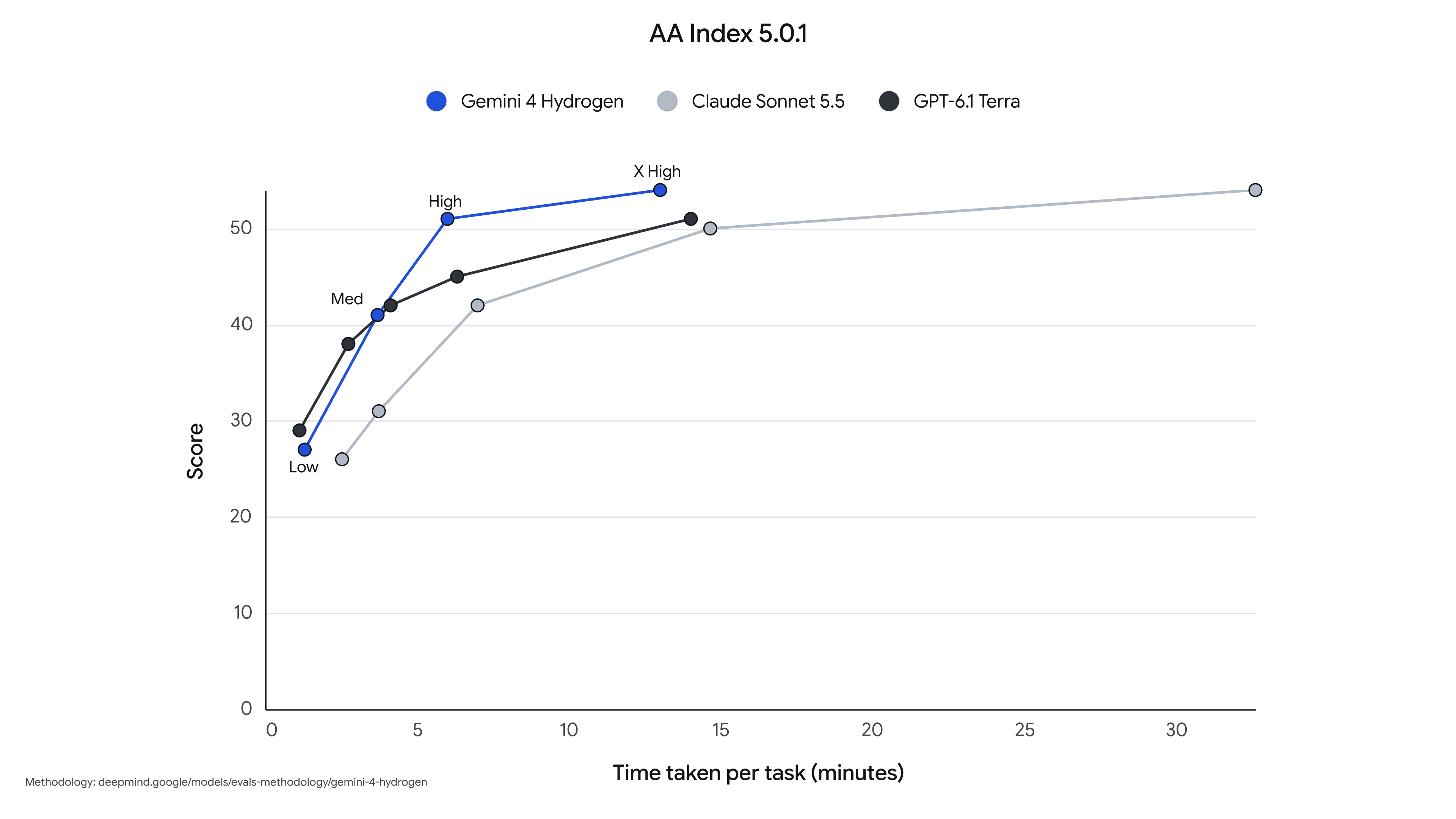
These Artificial Analysis Intelligence Index measurements are a November 13, 2026 snapshot of benchmark tasks, not the cost or latency of an ordinary API call. Index scores, workload mix, and provider performance can change; use the same benchmark version and reasoning level when comparing results.
The biggest practical decision is often between MEDIUM and HIGH, not HIGH and XHIGH. Moving from HIGH to XHIGH adds only three Artificial Analysis Intelligence Index points while increasing measured task cost from $1.87 to $3.16. For high-volume agent workloads, the additional reasoning effort should be justified by a measurable improvement in task completion quality.
The practical pattern is clear: LOW is suitable for straightforward tasks where speed matters; MEDIUM is a useful interactive setting; HIGH is a strong default for coding and agent execution; XHIGH is best reserved for tasks where the extra reasoning materially improves the result.
Google’s launch chart plots AA Index 5.0.1 score against task time. It is a fixed launch snapshot; its timing values should not be treated as a live service-level commitment.
Multimodal Knowledge Work and Office Documents
Google documents PDF, Microsoft Office, and OpenDocument inputs alongside text, images, audio, and video. An application can combine a spreadsheet, report, screenshots, and meeting recording, then return a written analysis or structured result.
Hydrogen returns text rather than generated images, audio, or video. Agentic video understanding is available but off by default; enable it deliberately when the workflow needs active video processing.
Tool Calling, Grounding, and Computer Use
Function calling, code execution, URL context, computer use, and grounding connect model responses to external tools and evidence. Select tools for the API surface you are using: a model capability alone does not configure credentials, tool permissions, or application functions.
Check Google's supported-feature matrix before reusing an existing integration. Hydrogen does not support RAG Engine or model tuning, and its caching workflow uses implicit rather than explicit cached-content resources.
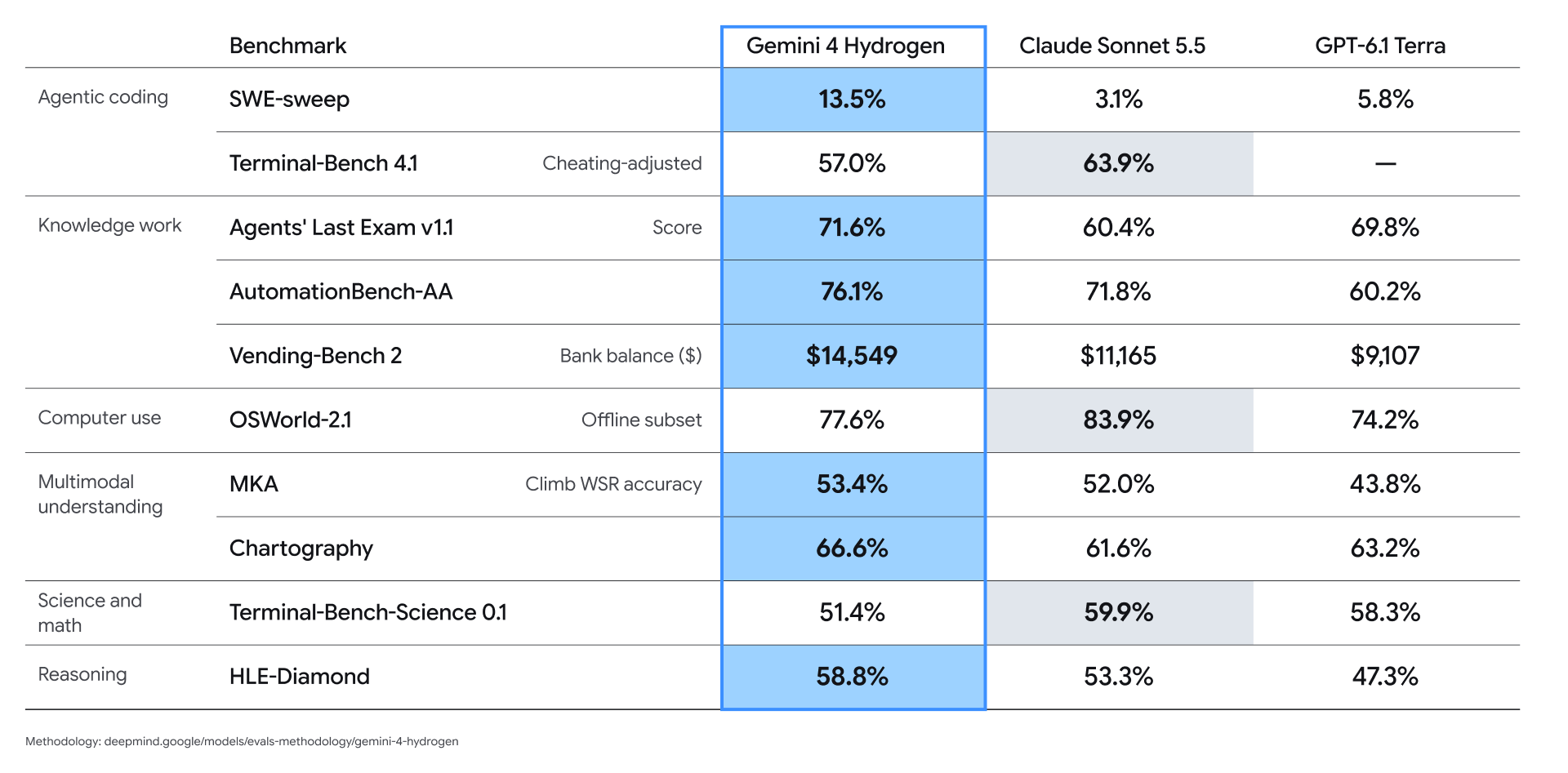
Read each row under its stated evaluation setting: Terminal-Bench 4.1 is cheating-adjusted; OSWorld-2.1 uses the offline subset; MKA reports Climb WSR accuracy; and Vending-Bench 2 reports simulated bank balance, not percentage accuracy. A dash means no result is provided in this comparison. The model-card summary does not specify a complete per-model harness, tool budget, or hardware configuration, so these results do not establish equal-condition API latency or cost.
Hydrogen has the highest displayed score in seven of the ten rows, including Chartography. Sonnet 5.5 leads Terminal-Bench 4.1, OSWorld-2.1, and Terminal-Bench-Science 0.1. These differences favor choosing evaluations that resemble your workload over treating one model as the universal winner.
Google’s original launch comparison preserves the benchmark labels and evaluation notes. The figures are vendor-reported results, not independent measurements performed for this article.
Gemini 4 Hydrogen vs Gemini 4 Carbon, Gemini 4 Argon, and Gemini 3.8 Flash
The most useful comparison is not simply which model has the highest score. Developers should consider task quality, latency, cost per completed task, context requirements, and whether the model can use the tools their application needs.
The table compares operating roles rather than undocumented architecture details. Google identifies Hydrogen as adapted from Carbon; model-family names alone do not establish identical internals or interchangeable API behavior.
Google’s promotional pricing terms provide the indicated discounts through 50% credits back on eligible net spend. The temporary effective rates above should not be read as an unconditional reduction to every billed charge. Rates are USD per million input/output tokens.
For a Gemini 3.8 Flash migration, the main integration change is the shared input/output budget. Hydrogen also changes reasoning defaults and caching behavior, so a model-ID swap alone is not a complete migration. Compare accepted task results, retries, and total token use before replacing a working deployment.
Carbon and Argon remain useful planning options for difficult, ambiguous work. A practical division of labor is to assign a bounded implementation task to Hydrogen and escalate unresolved decisions. Google’s Orchestrator evaluation on Terminal-Bench 4.0 reported near-Carbon task success with 24% less quota and 19% faster completion; this is a multi-model system result and should not be attributed to Hydrogen alone.
Where Can You Access Gemini 4 Hydrogen?
Official Google Access
You can try Gemini 4 Hydrogen in Google AI Studio and build applications with the Gemini API. For project-based enterprise deployments, use Gemini Enterprise Agent Platform with the authentication and setup described in Google's Hydrogen developer guide. The model ID is gemini-4-hydrogen.
For everyday use, Hydrogen is also available through the Gemini app and Google Search. Developers with eligible paid Google AI subscriptions can use it in Google Antigravity. Choose an API route when you need to integrate the model into your own application, and a Google interface when you want to work with it directly.
CometAPI Access
You can also access Gemini 4 Hydrogen API in CometAPI. This gives developers a CometAPI access route for adding Hydrogen to their applications alongside other supported models. Use your CometAPI account and API key, and follow the integration instructions for the supported request format.
How Much Does Gemini 4 Hydrogen Cost?
The table compares Google Cloud Global endpoint rates with Gemini 4 Hydrogen API in CometAPI. Prices are in USD per million tokens as of November 13, 2026. CometAPI's standard input and output rates are 20% below Google's Global Standard rates; output charges include reasoning tokens as well as the final response.
The 20% discount compares standard input and output usage only. Google's Priority, Batch, and cached-input rates are shown separately and are not the basis for that discount. The dash means a CometAPI cached-input rate is not quoted here, rather than that cache reads are free.
Non-global Standard pricing is $1.65 per million input tokens and $8.25 per million output tokens. Cached-input rates refer to cache reads. Cache-write pricing is scheduled to take effect on January 12, 2027 and is excluded from the example below.
Gemini 4 Hydrogen API Cost Example
This example assumes one request with 100,000 billable input tokens and 20,000 billable output tokens, including any reasoning tokens, with no cache discount or separately billed tools.
The same workload costs $0.24 through CometAPI: $0.12 for input plus $0.12 for output, saving $0.06 (20%) against Google Global Standard. Google Batch would cost approximately $0.15 and Priority $0.54 at their respective rates, before any separately billed tools. Actual spending depends on prompt length, reasoning-token use, tool calls, and the service tier.
The grounding rates include 5,000 Google Search grounding queries per month shared across Gemini 3 and Gemini 4, then $14 per 1,000 queries. Google Maps has its own stated 5,000-query allowance and the same excess-query rate. One user prompt may generate several billable queries.
What Are the Limitations of Gemini 4 Hydrogen?
It Can Still Hallucinate or Refuse Benign Requests
Google’s model card identifies hallucinations and reports a 5.57-percentage-point increase in unjustified refusals relative to Gemini 3.8 Flash in its automated safety evaluation. That figure concerns benign or borderline prompts in a particular test; it is not the refusal rate for all production traffic. Use current evidence for factual tasks and evaluate both incorrect answers and unnecessary refusals on your own inputs.
Short-Term GA Lifecycle
Hydrogen is a short-term generally available release with a minimum 45-day retirement notice policy. Keep the model configurable and plan how to evaluate a replacement. The notice policy is not a promise that a particular endpoint will remain available indefinitely.
Conclusion
Start with a small evaluation set drawn from your actual workload: a code change that must pass tests, a document task with verifiable answers, and a tool sequence with clear success criteria. Record completion quality, elapsed time, retries, and total billed tokens. Adopt Hydrogen where it improves those outcomes, and keep a fallback for cases it does not handle reliably. This turns a promising launch comparison into a deployment decision you can defend.
FAQ
How Can I Recover an Interrupted Gemini 4 Hydrogen Long Decode?
With a compatible Python SDK, an interrupted continuation can expose partial output and a continuation token through ContinuationInterruptedError. Preserve that state and follow the long-decode recovery procedure for your API surface. Retrying the original request from scratch can repeat work and charges; completed segments may already have been billed.
How Should I Organize Gemini 4 Hydrogen Prompts for Caching?
Keep stable instructions and shared reference material at the beginning, with changing user input later. The documented implicit-cache threshold is 4,096 tokens. Reusing a prefix can improve cache eligibility, but actual savings depend on cache hits and billed usage; do not assume every repeated prompt receives the cached-input price.
How Can I Make Gemini 4 Hydrogen Agent Results Easier to Verify?
Give each tool a narrow purpose and define an observable completion condition before the model starts. For a repository edit, require the relevant tests and inspect the diff; for document extraction, validate the output against a schema and retain the supporting passage. Evaluate the final artifact and tool evidence rather than accepting a confident completion message as proof.