
TL;DR
Gemini Omni 1.1 Flash is generally available through the paid Gemini Developer API under gemini-omni-1.1-flash, while Gemini Enterprise Agent Platform currently provides the preview endpoint gemini-omni-1.1-flash-preview.It adds more control over scenes, keyframes, references, and output resolution, making it especially useful when a clip needs several rounds of direction.
- Control: extend a scene to 40 seconds cumulatively and guide a shot with its first and last frames.
- Cost: draft at approximately $0.03 per second in 360p; reserve higher resolutions for selected takes.
- Quality: 1080p and 4K outputs use upscaling. They are not native-resolution generation claims.
- Evidence: official family-level evaluations favor editing and instruction following, but not every motion or reference metric.
- Access: Platform IDs differ: Gemini Developer API uses gemini-omni-1.1-flash, while Gemini Enterprise Agent Platform currently uses gemini-omni-1.1-flash-preview. Confirm the exact version behind any third-party route.
Google’s Omni project treats video creation as a multimodal conversation. The practical question is how well a creator can preserve a useful take, change an unwanted detail, and continue the scene without starting again.

What Is Gemini Omni 1.1 Flash?
Gemini Omni 1.1 Flash is Google DeepMind’s multimodal video generation and editing model. Google made the model generally available on August 27, 2026 under the stable identifier gemini-omni-1.1-flash.
Its model card describes native text, image, audio, and video input and video output with audio. Individual API operations support different input combinations, so the model’s broad multimodal design should not be read as a promise that every endpoint accepts every modality.
The model can create a clip, revise footage, work from references, interpolate between images, and extend a scene. Its conversational workflow lets an application retain creative context across iterations. For a product demonstration or storyboard, that means the first acceptable generation can become the starting point for a more controlled edit.
Gemini Omni 1.1 Flash Specifications
| Specification | Gemini Omni 1.1 Flash |
|---|---|
| Developer | Google DeepMind |
| Stable model ID | gemini-omni-1.1-flash |
| Release status / date | Generally available; August 27, 2026 |
| Context window | 1,048,576 tokens |
| API generation inputs | Text, image, video; support depends on operation |
| Output | Video with audio |
| Clip length | 3–10 seconds per generation |
| Frame rate | 24 FPS |
| Output resolutions | 360p, 720p, 1080p, 4K |
| Default resolution | 720p |
| 1080p / 4K | Upscaled output |
| Scene extension | 10-second increments, up to 40 seconds cumulative |
| Prior-video context for extension | Up to 10 seconds |
| First-and-last-frame control | Supported |
| Video reference for scene generation | Up to 3 seconds in supported workflows |
| Main workflow | Gemini API / Interactions API |
| Free API tier | Not available |
| Preview retirement | September 30, 2026 |
The three-second video-reference limit and ten-second prior-context limit describe different operations. Similarly, a ten-second output clip and a forty-second extension chain are different units of work. Keeping those distinctions explicit makes API planning and pricing comparisons more useful.
What Is New in Gemini Omni 1.1 Flash?
Continue a scene instead of stitching unrelated clips
The update examines up to ten seconds of prior footage, compared with the final second described for previous models, and supports 10-second extensions up to 40 seconds cumulatively. The extra context can help preserve characters, setting, and narrative direction across continuations.
This is not a single forty-second text-to-video request. Each continuation adds another segment to an existing sequence. Review the joins, character identity, and camera movement after every extension before approving the whole scene.
Define both ends of a shot
Creators can supply both the first and last frame and let the model generate the transition between them. This is useful for controlled product reveals, before-and-after sequences, camera moves, and shots that must connect with surrounding footage.
Use 360p for inexpensive drafts
Google reports up to 60% higher system throughput at 360p than at 720p, with roughly one-third of the video-output cost. This is a throughput comparison, not a guaranteed latency improvement for every request.
A practical loop is to test composition and movement in low-resolution drafts, revise the prompt or references, and approve a take before paying for higher-resolution delivery. Include discarded attempts when comparing the cost of an accepted clip.
Deliver 1080p and 4K through upscaling
The release supports a default 720p output and higher-resolution delivery, with 1080p and 4K generated through upscaling. Higher pixel dimensions do not establish native 4K scene generation or remove motion and consistency errors.
Use existing video as reference material
For supported scene-generation workflows, up to three seconds of video reference can carry timing, movement, and character context that a single still image cannot. This reference operation is separate from the longer context used when extending an existing clip.
Move off the preview endpoint
Google has scheduled the legacy Gemini API endpoint gemini-omni-flash-preview for retirement on September 30, 2026; this does not refer to the gemini-omni-1.1-flash-preview endpoint currently exposed by Gemini Enterprise Agent Platform. Developers should verify the new request configuration and outputs before redirecting production traffic.
What Do the Official Gemini Omni Flash Benchmarks Show?
Benchmark scope:
The official performance charts identify Gemini Omni Flash, without isolating a 1.1 checkpoint. Treat these as family-level evidence, not a measured improvement from the preview to version 1.1. Elo values are relative ratings, not percentages; sample counts describe evaluation size.
| Evaluation | Metric order | Samples | Gemini Omni Flash — Elo | Seedance 2.0 — Elo |
|---|---|---|---|---|
| Video editing | Overall / instruction | 504 | 1087 / 1082 | 946 / 960 |
| MovieGenBench text-to-video | Overall / instruction | 1,003 | 1113 / 1108 | 1070 / 1051 |
| Fast motion | Fast-motion quality | 500 | 1050 | 1112 |
| VBench image-to-video | Overall preference | 355 | 1057 | 1003 |
| Reference-to-video | Overall / speech / reference | 468 | 1004 / 1028 / 962 | 996 / 972 / 1038 |
Within these evaluations, the family’s strongest results are editing and instruction following. The picture changes for fast motion and reference adherence: Seedance 2.0 leads on those two metrics. A model can therefore be easier to direct without being the best choice for every action scene or reference-heavy task.
The image-to-video chart reports 1057 for Omni, 1054 for Grok Imagine Video, and 1053 for Kling v3 Pro. Such small point gaps should not be treated as a decisive quality advantage. The published charts do not supply confidence intervals for assessing statistical significance.
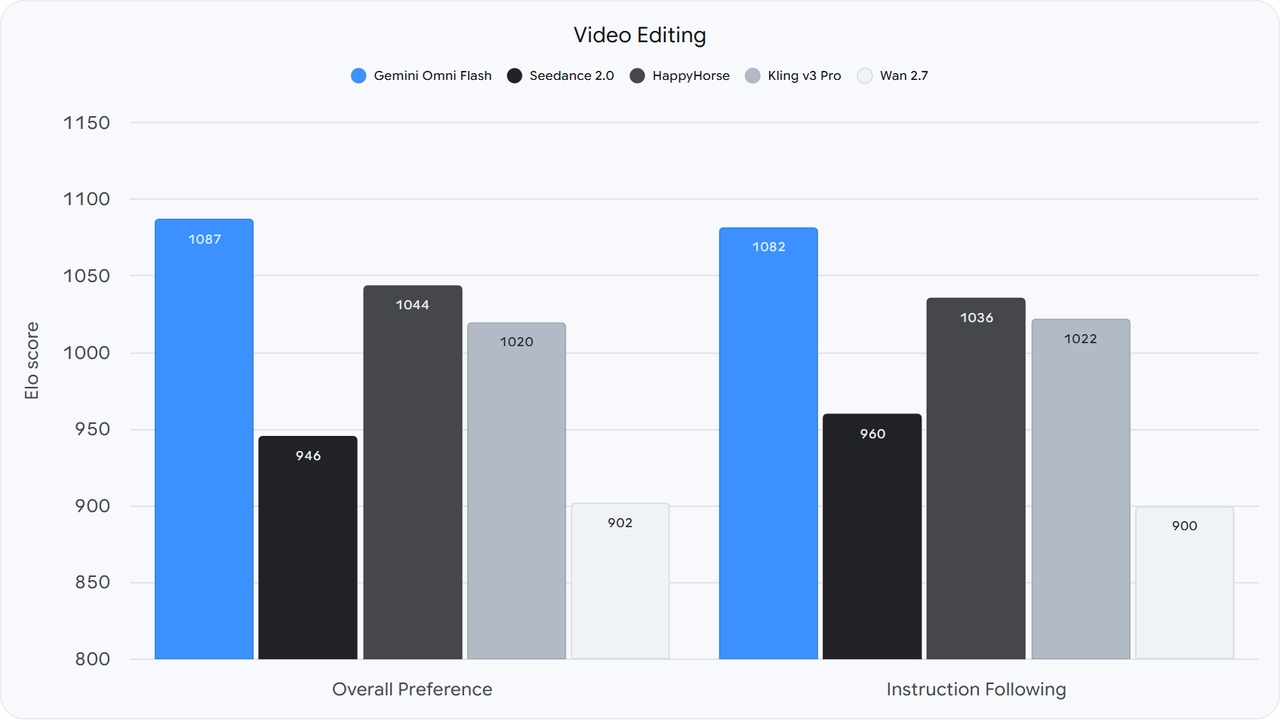
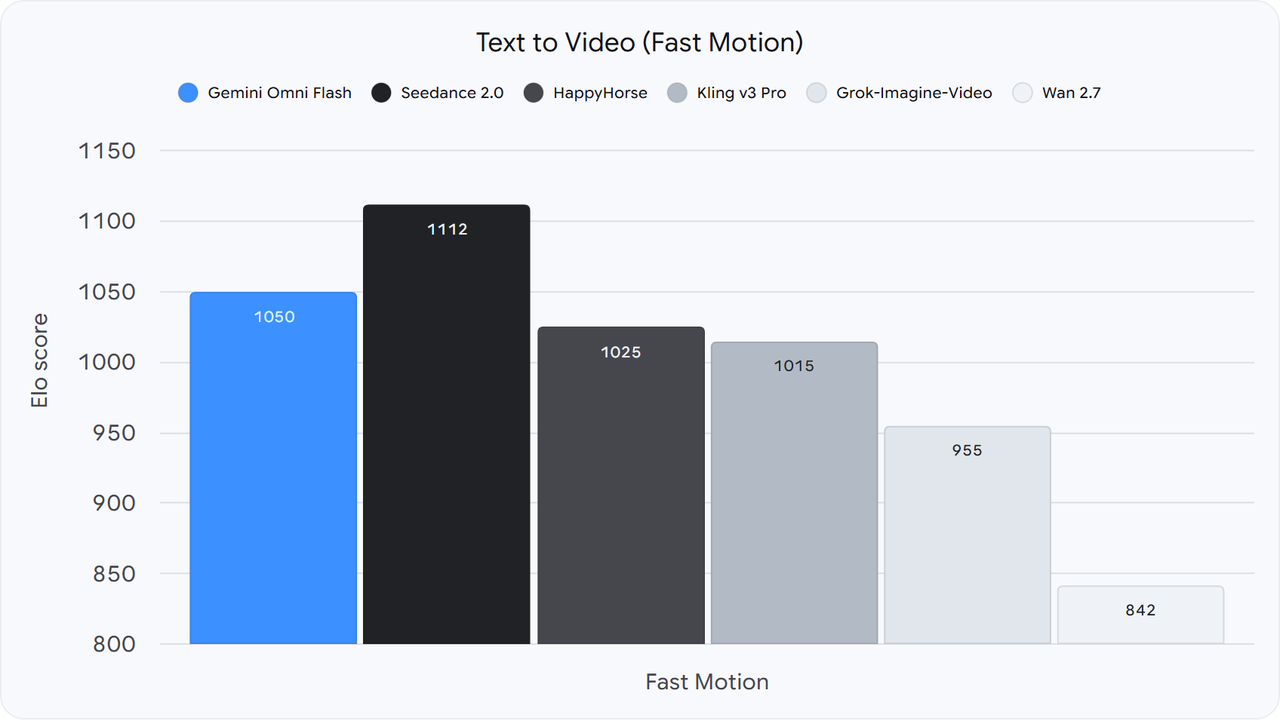
Google’s official video-editing and fast-motion graphics: screenshots of the original interactive benchmark charts.
For a production test, score the outputs your team actually accepts: prompt adherence, character continuity, movement, audio, and the number of corrective edits. Benchmark leadership is useful evidence, but the cost of reaching an acceptable take is the deployment decision.
Gemini Omni 1.1 Flash vs Gemini Omni Flash Preview
| Dimension | Gemini Omni 1.1 Flash | Gemini Omni Flash Preview |
|---|---|---|
| Lifecycle | Stable / generally available | Preview; scheduled retirement |
| Model ID | gemini-omni-1.1-flash | gemini-omni-flash-preview |
| Production direction | Recommended replacement | Migrate to the stable model |
| Shutdown date | No announced shutdown | September 30, 2026 |
| Prior context used for continuation | Up to 10 seconds | Final second, per launch comparison |
| 360p draft tier | Available | Not included in the earlier launch pricing |
| 1080p / 4K output | Available through upscaling | Absent from the earlier launch pricing |
| First-and-last-frame interpolation | Added with 1.1 | Not established by the cited preview comparison |
| Extension chain | Up to 40 seconds cumulative | No matched cumulative limit in the cited comparison |
| Independent benchmark gain | No version-isolated score established | Family-level results cannot quantify the upgrade |
The clearest upgrade is control and production lifecycle. The stable release exposes more ways to constrain a shot and replaces an endpoint approaching retirement. When the preview documentation does not address a capability, treat it as unconfirmed rather than assuming it is unsupported.
Gemini Omni 1.1 Flash Pricing
The stable model is available through Google’s paid API tier. Its token rates are $1.50 input and $17.50 video output per million tokens; text output is $9 per million tokens. These are Google rates, separate from any CometAPI route.
At 720p, billing uses 5,792 video-output tokens per second. Multiplying 5,792 by $17.50 per million gives $0.10136 per second, which explains the rounded $0.10 figure used in the launch comparison.
| Resolution | Google: Omni 1.1 Flash | Google: Veo 3.1 Fast | CometAPI: Veo 3.1 Fast |
|---|---|---|---|
| 360p | $0.03 | Not available | Not available |
| 720p | $0.10 | $0.10 | $0.08 |
| 1080p | $0.15 | $0.12 | $0.096 |
| 4K | $0.30 | $0.30 | $0.24 |
USD per generated second; checked September 8, 2026. Google’s Omni column uses rounded launch estimates. The two right-hand columns distinguish the original provider’s pricing from CometAPI’s pricing for the same named comparison model.
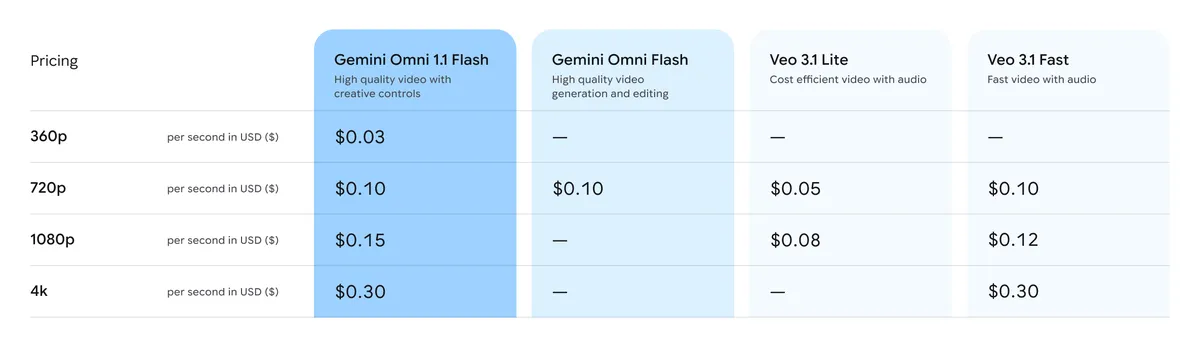
Google’s official launch pricing comparison, reproduced directly. This image shows Google pricing, not CometAPI charges.
Estimate the cost of a take
| Resolution | 3-second output | 10-second output | 40 seconds of generated output |
|---|---|---|---|
| 360p | ~$0.09 | ~$0.30 | ~$1.20 |
| 720p | ~$0.30 | ~$1.00 | ~$4.00 |
| 1080p | ~$0.45 | ~$1.50 | ~$6.00 |
| 4K | ~$0.90 | ~$3.00 | ~$12.00 |
Cost estimate:
These calculations multiply the rounded Google video-output rate by generated duration. They exclude input charges, text output, discarded attempts, and any separately billable activity. A forty-second extension chain can incur additional context processing; it is not a fixed-price package.
Generating experimental drafts at 4K costs about ten times as much per output second as drafting at 360p under these estimates. Evaluate composition and motion first, then budget for final delivery. Track total spend across all attempts divided by accepted takes to compare workflows fairly.
Gemini Omni 1.1 Flash vs Veo 3.1 Fast
| Dimension | Gemini Omni 1.1 Flash | Veo 3.1 Fast |
|---|---|---|
| Main purpose | Conversational creation and editing | Fast direct video generation |
| Text / image input | Supported | Supported |
| Video-conditioned work | References, edits, and extension | Supported operations depend on route |
| Audio output | Supported | Supported |
| Frame rate | 24 FPS | 24 FPS |
| 360p drafting | Available | No comparable documented tier |
| 720p | Supported | Supported |
| 1080p / 4K | Upscaled output | Supported; 8-second generation requirement |
| Standard clip duration | 3–10 seconds | 4, 6, or 8 seconds |
| Extension | Up to 40 seconds cumulative | Supported at 720p |
| First / last frame | Interpolation | Interpolation controls |
| Workflow emphasis | Iterative direction and creative context | Generation controls and direct output |
Google documents 720p, 1080p, and 4K at 24 FPS for the comparison route. Higher resolutions require eight-second generations, while extension output is limited to 720p. Gateway feature support should be checked separately from the original provider’s capability specification.
At Google’s published rates, the models are tied at 720p and 4K, while the direct-generation alternative costs less at 1080p. CometAPI’s rates are lower still for that route, as shown in the pricing section. Omni’s additional 360p tier serves a different need: inexpensive experimentation before delivery.
Choose Omni when repeated direction, scene continuity, keyframe constraints, and revisions determine success. Choose the alternative when a direct generation request and its existing controls already meet the production requirement. Neither a family-level Elo rating nor token pricing alone establishes the lower cost per accepted take.
Why Gemini Omni 1.1 Flash Matters
A production workflow rarely ends after the first successful generation. A director may like the camera move but dislike the ending pose. A marketer may need the same product composition with different background action. A storyboard artist may need the next shot to begin exactly where the previous one ends.
Those tasks require the system to preserve useful state while changing a specific constraint. Omni’s creative controls address that workflow: a reference helps define the scene, keyframes constrain its endpoints, and an extension carries it forward.
The practical opportunity is fewer full restarts. Measure how often a targeted edit produces an acceptable result, how many revisions it takes, and whether the final sequence preserves the original intent. That evaluation is more informative than choosing a model solely from a visual showcase.
Limitations of Gemini Omni 1.1 Flash
Google identifies continuing limits in consistency, complex motion, and text rendering. Longer extension chains create more opportunities for identity, geometry, lighting, or objects to drift, even when individual clips look convincing.
Higher-resolution output does not repair every generation error. Inspect the scene itself before treating a 4K file as a finished asset. Similarly, the broad multimodal model design does not establish identical capabilities across every API operation.
The official Elo comparison also argues for task-specific evaluation. Editing quality, fast motion, and reference adherence measure different things; an overall preference lead should not be generalized to all three.
Is Gemini Omni 1.1 Flash Available Through CometAPI?
Gemini Omni Fast API in CometAPI provides Omni-family routes such as omni-fast and omni-fast-v2v. The public documentation checked for this article does not establish that these identifiers map to Google’s stable gemini-omni-1.1-flash checkpoint.
Version check:
Omni-family access and confirmed 1.1 access are different claims. Before migrating, verify the exact model version, operation support, and billing on the route available to your account. A similar product name is not sufficient evidence of an alias.
For other Google video workflows, Veo 3.1 API in CometAPI offers an alternative integration path. Compare supported operations and the provider-specific prices before selecting a route.
Is Gemini Omni 1.1 Flash Worth Using?
The model is most compelling when a usable take needs several rounds of direction. Advertising concepts, storyboards, product visualization, and short narrative scenes can benefit from cheap drafts and tighter control of continuity and endpoints.
The strongest case is a workflow where those controls reduce discarded takes or manual repair. If your existing model already produces the desired clip reliably, benchmark the additional editing control before changing production traffic. For highly dynamic action or strict reference fidelity, test alternatives on those specific requirements.
FAQ
Is 1.1 the same as the earlier Omni Flash preview?
It is the stable successor with additional controls and a different Google model ID. The legacy Gemini API endpoint gemini-omni-flash-preview is scheduled to retire; it is distinct from the Gemini Enterprise Agent Platform preview endpoint gemini-omni-1.1-flash-preview.
Can it generate a forty-second video?
It can build a sequence of up to forty seconds through successive extensions. That cumulative duration is different from a normal single generation, which produces a shorter clip.
Does it generate native 4K?
No. The documented 1080p and 4K options use upscaling. Treat those as delivery resolutions, not evidence of native 4K generation.
How much does it cost?
Google’s rounded video-output estimates range from $0.03 per second at 360p to $0.30 at 4K. Input, text output, and retries can add cost. Use the provider-labeled pricing table above rather than applying one platform’s rate to another.
Does it have a free API tier?
The stable model is available on the paid Gemini API tier. Access through a consumer subscription is a separate product and billing arrangement.
Do the benchmark scores prove that 1.1 beats every alternative?
No. The displayed charts identify the Omni Flash family, not a separate 1.1 checkpoint. Results also differ by metric: the family performs well in editing, while other models lead in fast motion or reference adherence.
Conclusion
Gemini Omni 1.1 Flash makes conversational video creation more practical through scene extension, keyframe constraints, video references, inexpensive drafts, and higher-resolution delivery. Its value is the ability to keep directing a promising take instead of discarding it after every mismatch.
Use the official family-level benchmarks as directional evidence, keep Google and CometAPI pricing separate, and verify the exact version behind the chosen route. The deciding measure is how reliably the workflow produces an acceptable clip at a sustainable total cost.