
OpenAI unveiled ChatGPT Images 2.0 on April 21, 2026, powered by the new GPT Image 2 (gpt-image-2) model. This release marks a fundamental shift in AI image generation, moving beyond rapid diffusion-based outputs toward deliberate, reasoning-driven creation. The model excels in precise text rendering, complex layouts, multilingual support, and structured visuals like infographics, slides, maps, and consistent character sheets.
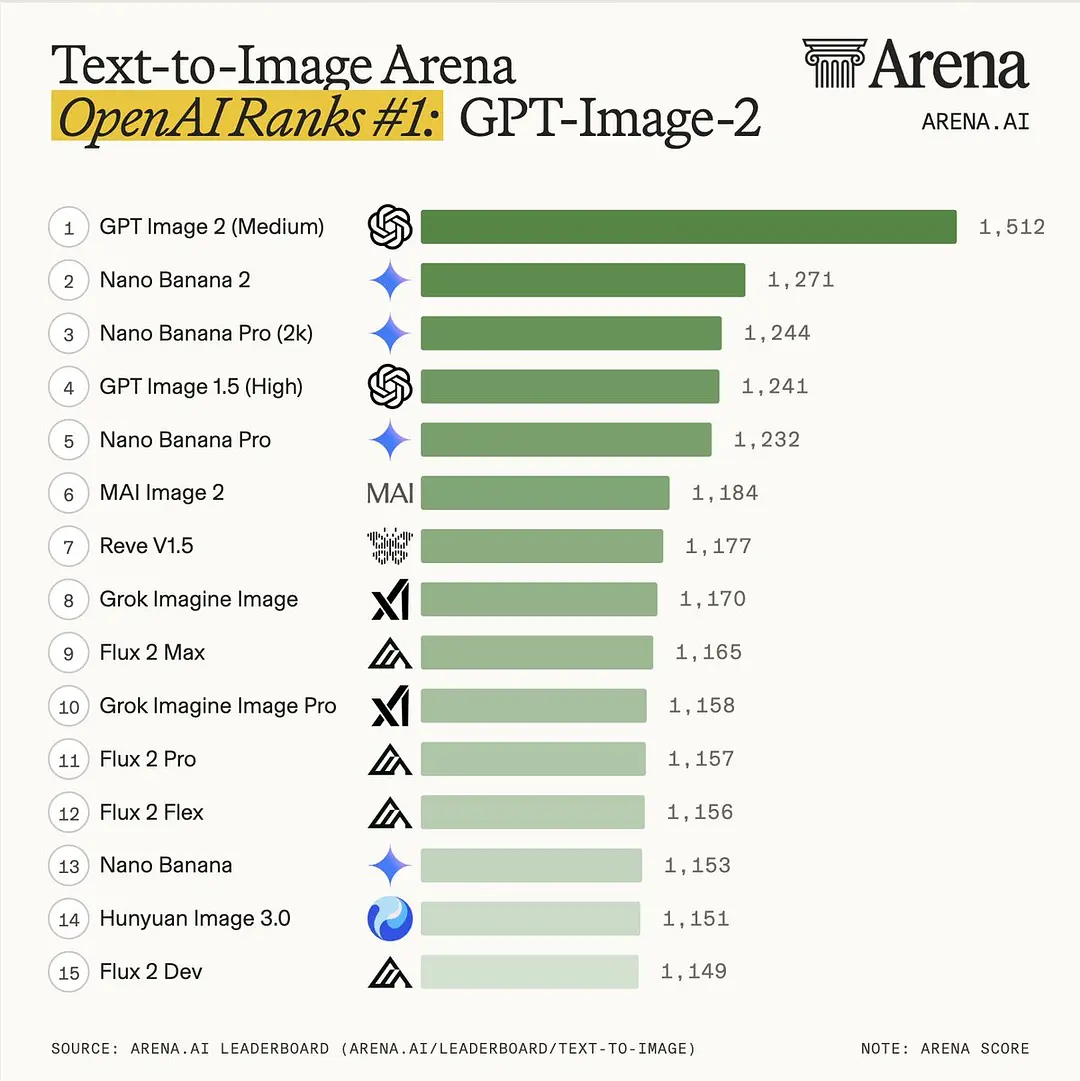
Early testers and Image Arena benchmarks confirm GPT Image 2 has claimed the #1 spot across leaderboards, with a record-breaking +242 ELO lead in text-to-image categories. It outperforms predecessors and competitors in instruction fidelity, typography, and production-ready usability.
What Is GPT Image 2?
GPT Image 2 is OpenAI’s native, next-generation image model (model ID: gpt-image-2 / snapshot gpt-image-2-2026-04-21). Unlike earlier DALL·E variants, it is deeply integrated with ChatGPT’s reasoning engine (O-series). This allows it to “think” before generating pixels, plan layouts, verify outputs, and even search the web for up-to-date references.
Key architectural advances:
- Autoregressive + reasoning hybrid instead of pure diffusion.
- Native support for image editing, reference-image consistency, and multi-image output.
- Built-in metadata tagging for AI-generated content (safety & transparency).
It powers ChatGPT Images 2.0, rolling out globally to Free, Plus, Pro, Business, Enterprise, and Codex users on April 21, 2026.
The model was tested under codenames like “duct tape” on LM Arena (now Image Arena) for weeks before official release, where it demonstrated superior performance in realistic screenshots, functional QR codes, and complex arrangements.
GPT Image 2 positions image generation as a “visual thought partner,” capable of understanding intent deeply rather than approximating prompts loosely.
Instant Mode vs Thinking Mode: Two Speeds, Two Capabilities
OpenAI ships GPT Image 2 with two explicit modes inside ChatGPT (toggleable in the image creator interface):
| Feature | Instant Mode | Thinking Mode (Paid users) |
|---|---|---|
| Speed | 3–8 seconds per image | 15–60+ seconds (reasoning time) |
| Images per prompt | 1 | Up to 8 consecutive, consistent images |
| Reasoning / Web search | None | Full O-series reasoning + live web search |
| Self-checking / iteration | Basic | Full self-review + refinement loop |
| Best for | High-volume banners, mockups, quick tests | Complex infographics, manga pages, multi-scene stories, UI kits |
| Availability | All ChatGPT users | Plus / Pro / Business / Enterprise |
| Quality edge | Excellent baseline | Noticeably sharper lighting, text, consistency |
Instant Mode is the default fast path—perfect for daily use.
Instant is the standard experience for everyone, while Thinking is the more advanced workflow. Thinking mode uses reasoning and tools to integrate live web search data, generate multiple images from a single prompt, and produce a more well-researched final image. Thinking can plan and refine image outputs before generating them.
A practical way to frame it is this: Instant mode is for speed; Thinking mode is for accuracy, consistency, and composition quality.
In practice, Thinking mode transforms image creation from reactive to proactive. For example, a prompt for “a professional infographic on 2026 AI trends” can trigger web research, accurate data visualization, and polished layout—features previously requiring multiple tools or manual editing.
Understanding Complex Text Structure and Multilingual Support
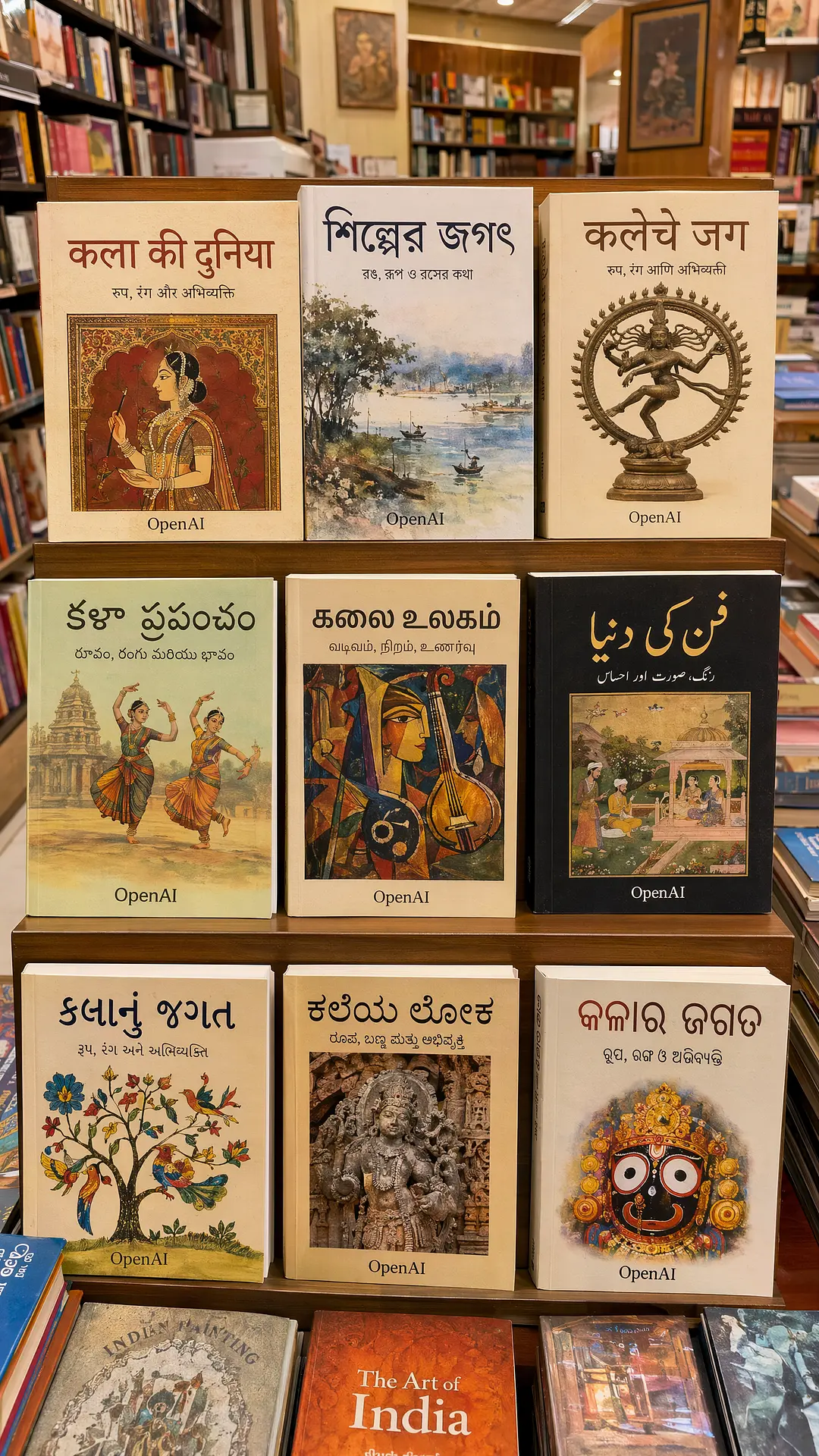
Early image generation models commonly suffered from garbled text issues. The root cause was that the diffusion model learned visual texture patterns, while text only occupied a very small portion of the image pixels; the model did not truly understand the text structure. Images 2.0 systematically solved this problem.
GPT Image 2 achieves ~99% character-level text accuracy in blind tests—described as “the gap between GPT Image 2 and Nano Banana 2 is as large as Nano Banana 2 was to DALL·E.”
- Latin & non-Latin scripts: Flawless English, Chinese, Hindi, Japanese, Arabic, Korean, etc.
- Complex layouts: Newspaper front pages with curved headlines, UI mockups with micro-copy, infographics with data tables, manga speech bubbles.
- Typographic fidelity: Correct kerning, font weight matching, alignment, even subtle stylistic constraints (“in the style of 2026 Apple product packaging”).
- Dense layout and style constraints: For multi-paragraph, multi-column, high-information-density layouts, character and line spacing will remain correct, and different font styles, handwritten feel, and printed feel will be faithfully reproduced.
Prompt example: “A realistic iPhone 17 Pro box with Japanese and English text, 2K resolution, studio lighting.” The output renders perfectly legible product copy—no more garbled “lorem ipsum” artifacts.
Aspect Ratio, Resolution & Technical Specs
- Resolution: Native 2K (2048×2048 or equivalent) in ChatGPT; up to 4K beta (4096×4096) via API. Outputs above 2560×1440 are marked experimental but usable.
- Aspect Ratios: Continuous range from 3:1 (ultra-wide banners) to 1:3 (tall stories). Any ratio where edges are multiples of 16 px, long:short ≤ 3:1, and total pixels between 655,360–8,294,400.
- Popular sizes: 1024×1024, 1536×1024, 2048×1152 (16:9), 3840×2160 (4K landscape).
- Knowledge cutoff: December 2025. Thinking mode’s web search closes the gap for 2026 events, brands, and products.
GPT Image 2 vs Nano Banana 2: Head-to-Head Comparison
Google’s Nano Banana 2 (Gemini 3.1 Flash Image) was the previous king of speed and photorealism. GPT Image 2 dethroned it immediately.
| Category | GPT Image 2 (OpenAI) | Nano Banana 2 (Google) | Winner |
|---|---|---|---|
| Text Rendering Accuracy | ~99% (near-perfect) | Strong but lower in non-Latin | GPT Image 2 |
| Multi-Image Consistency | Up to 8 images with identity lock | Good but limited reference support | GPT Image 2 |
| Structural Control / Layout | Best-in-class (UI, infographics) | Excellent | GPT Image 2 |
| Photorealism & Speed | Very high; Instant mode ~3–8s | Slightly faster, Flash-optimized | Nano Banana 2 |
| Web Search / Reasoning | Built-in Thinking mode | Available in Pro tier | Tie |
| Resolution | 2K standard, 4K beta | Native 4K | Nano Banana 2 |
| Image Arena ELO (Text-to-Image) | #1 with +242 lead | #2 | GPT Image 2 |
| API Price (est. 1024×1024 high) | $0.15–0.21 (CometAPI cheaper) | Subscription + per-image | CometAPI route |
Verdict: Choose GPT Image 2 for precision, text, and complex multi-panel work. Choose Nano Banana 2 when raw speed and photorealistic “vibe” matter most. CometAPI gives you both with one key.
Image Arena review: how GPT Image 2 compares in public rankings
Within hours of launch, gpt-image-2 claimed #1 across all Image Arena categories (Text-to-Image, Image Edit, etc.) with an unprecedented +242 ELO advantage in the main Text-to-Image leaderboard.
- Public benchmarking is one of the clearest signs that this release is competitive. On the Apr 19 snapshot of the Text-to-Image Arena leaderboard, gpt-image-2 (medium) was ranked #1 with a score of 1512±8, while gemini-3.1-flash-image-preview (nano-banana-2) was ranked #2 with a score of 1270±5.
- Single image editing: 1513 points, leading second place Nano-banana-pro (gemini-3-pro-image) by 125 points
- Multiple image editing: 1464 points, leading second place Nano-banana-2 by 90 points
All 7 text-based image subcategories achieved #1 ranking, representing a significant improvement over the previous generation GPT-Image-1.5-High-Fidelity:
- 1 Product, Branding & Commercial Design, +277 points
- 1 3D Imaging & Modeling, +274 points
- 1 Cartoon, Anime & Fantasy, +296 points
- 1 Realistic & Cinematic Imagery, +247 points
- 1 Art, +197 points
- 1 Portrait, +296 points
- #1 Text Rendering, +316 points

How to Access GPT Image 2
In ChatGPT:
- Log into chatgpt.com (or the mobile app).
- Start a new conversation or use the dedicated Images interface.
- For basic use: Type your prompt and generate (Instant mode available to all users).
- For advanced: Select “Thinking” from the model dropdown (Plus/Pro/Business/Enterprise required for full capabilities).
- Upload reference images for editing or style transfer.
Via API (gpt-image-2):
- Available immediately in the OpenAI API and Codex for developers.
- Integrate into apps, automation workflows, or custom tools.
- Supports standard image generation and advanced parameters for quality/resolution.
Third-Party Platforms: Providers like fal.ai, Pollo AI, ComfyUI (via partner nodes), and others offer hosted access, often with additional tools or lower barriers.
For seamless, high-volume API access without managing OpenAI keys directly, CometAPI aggregates leading models including GPT Image 2 equivalents and alternatives. It offers competitive pricing, unified endpoints, usage monitoring, and easy integration—ideal for developers scaling image generation in web/apps without rate-limit headaches or complex billing. Check Cometapi’s dashboard for current GPT Image 2 support and bundled multi-model plans to combine strengths of OpenAI and Google models.
Pricing: How Much Does GPT Image 2 Cost?
ChatGPT Subscription Tiers:
- Free tier: Basic Instant mode access with daily limits.
- Plus (~$20/month): Higher limits + Thinking mode.
- Pro/Team/Enterprise: Advanced outputs, higher volume, priority access.
OpenAI API Pricing (gpt-image-2):
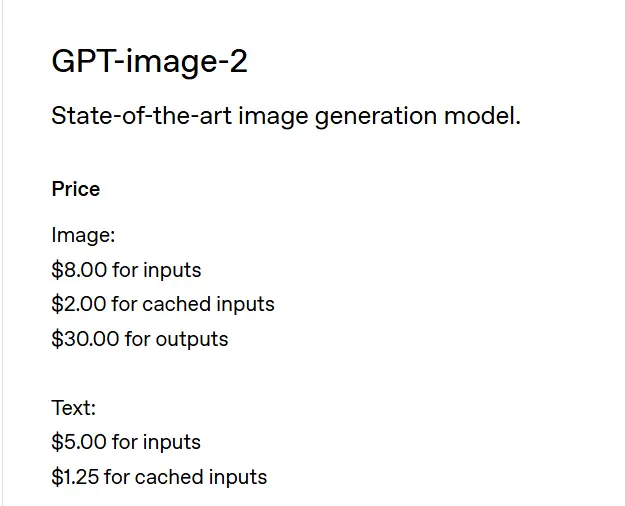
- Image Input: $8/million tokens; Image Output: $30/million tokens
- Text Input: $5/million tokens; Text Output: $10/million tokens
- Converted to per image: Approximately $0.006 to $0.211, depending on output quality and resolution
- API Resolution: 2K standard, 4K currently in beta
CometAPI pricing (as of April 2026): $6.4 / 1M (input/output units) — 20–40% below official rates. Perfect for high-frequency production apps, marketing automation, or SaaS products. CometAPI also offers Nano Banana 2 at competitive per-second rates, giving you instant A/B testing between the two leaders.
CometAPI solves this with:
- Single API key for 500+ frontier models.
- Transparent, usage-based pricing with no minimums.
- OpenAI-compatible format—drop-in replacement.
- Global low-latency endpoints (Tokyo users benefit from Asia-optimized routing).
- Recommended for high-volume text-to-image workloads.
Whether you’re building an AI design tool, e-commerce product visualizer, or automated social content engine, CometAPI delivers GPT Image 2 (and Nano Banana 2) cheaper and faster than going direct. Sign up at CometAPI and start generating in minutes.
Practical Use Cases & Pro Tips
- Marketing teams: Generate 8-panel Instagram carousels or full product catalogs in one prompt.
- UI/UX designers: Instant realistic app screenshots with correct micro-copy in any language.
- Content creators: Manga pages, storyboards, children’s book illustrations with consistent characters.
- Educators & analysts: Infographics, maps, data visualizations with accurate text.
- Pro tip: In Thinking mode, add “self-check for text accuracy and layout balance” to the prompt for even higher fidelity.
The Future of Visual AI Is Here
GPT Image 2 isn’t just another image model—it’s the first truly agentic visual creator. By combining instant speed with deep reasoning, perfect multilingual text, and batch consistency, OpenAI has set a new bar that competitors will chase for months.
For individuals, the ChatGPT interface makes professional-grade visuals accessible in seconds. For developers and businesses, the API + CometAPI combination offers unmatched cost-performance and flexibility.
Ready to start generating?
Head to chatgpt.com/images for instant access, or visit CometAPI for production-grade API access at the lowest rates. Whether you need one stunning banner or 10,000 product images daily, GPT Image 2 + CometAPI is the winning stack in 2026.