TLDR
Tencent’s Hy4 flash (released November 16, 2026) is the most cost-efficient model in the Hy (Hunyuan) family. It packs 224 billion total parameters (including 64B Engram) but activates only 12B per token, delivers native multimodal (text + image) support and a full 1-million-token context window, and is priced at roughly $0.070 input / $0.281 output / $0.003 cached per million tokens. On Tencent’s internal WorkIndex of everyday office tasks it achieves roughly 1/13 the cost of Hy4 Preview and 1/20 the cost of full Hy4 while matching or slightly exceeding Preview quality and approaching Claude Haiku 5.5 in blind user satisfaction.
For high-volume productivity work it is one of the strongest value propositions currently available. CometAPI offers the simplest OpenAI-compatible way to call Hy4 flash alongside Claude, GPT and other models under a single key.
Key Takeaways
- Release date: November 16, 2026 (API + products); open weights followed shortly after.
- Architecture: 224B total (64B Engram) / 12B active, hybrid attention + LatentMoE, designed for extreme efficiency and long context.
- Pricing (list): $0.070 / $0.281 / $0.003 (input / output / cached) per 1M tokens — roughly 1/10–1/12 of full Hy4.
- Performance focus: Everyday office agents (slides, documents, spreadsheets, search, visual understanding, light computer use). Strong cost-per-task and speed; full Hy4 remains better for long-horizon software engineering.
- Availability: Tencent Cloud TokenHub (
hy4-flash), WorkBuddy (free until Nov 30), Yuanbao, WeCom, QQ, ima, Marvis, OpenRouter; open weights on Hugging Face / ModelScope / GitCode. - Best use cases: High-volume productivity automation where cost and latency matter more than absolute frontier intelligence.
- Recommendation: Route routine work to Hy4 flash and complex coding/agents to Hy4 or Claude Opus-class models via a unified gateway such as CometAPI.
What Exactly Is Hy4 Flash?
Hy4 flash is Tencent’s efficiency-focused member of the Hy4 generation. While the full Hy4 (released earlier in November 2026) targets maximum capability, Hy4 flash is deliberately engineered for the highest possible quality-per-dollar on the repetitive, multimodal, long-context workloads that dominate real office and agent pipelines.
Core specifications (official):
- Total parameters: 224B (including 64B Engram n-gram memory table)
- Active parameters per token: 12B
- Context window: 1,048,576 tokens
- Modalities: Text + image input → text output
- Native support for function calling, structured JSON, and tool use
- Claimed decode speed: >150 tokens/s under optimized serving (megakernels + 4-bit quantization + DFly speculative decoding)
The design inherits and refines techniques first previewed in earlier Hy models: hybrid sparse/sliding-window attention, LatentMoE experts operating in a compressed latent space, and a large Engram lookup table that replaces dense computation with memory retrieval. The result is a dramatically smaller KV cache (reported as 1/6 of Hy4 and 1/24 of Hy3) and much lower serving cost at scale.
How Hy4 flash work
Tencent optimized Hy4 flash around three pillars:
- Sparse efficiency : Only 12B parameters fire per token. The model uses 512 routed experts (16 active) plus shared experts in most layers, combined with hybrid attention that interleaves sparse selection (up to ~2k tokens) with short sliding windows.
- Engram memory : A 64B-parameter n-gram (bigram/trigram) table retrieved by hash. This external knowledge store reduces the need for the dense network to memorize frequent patterns, cutting both training and inference cost.
- Serving stack : Megakernels, 4-bit quantization and a small DFly2 speculative drafter enable the >150 tok/s claim and keep latency low even at high concurrency.
These choices make Hy4 flash particularly well-suited to long documents, multi-turn agent loops with heavy prompt caching, and multimodal office tasks where the model must repeatedly read images, charts or large files.
Pricing and Cost-Per-Task Reality
Official list pricing on Tencent Cloud TokenHub (USD equivalent):
| Token type | Hy4 flash | Full Hy4 | Approximate ratio |
|---|---|---|---|
| Cached input | $0.003 | $0.042 | ~1/14 |
| Input | $0.070 | $0.834 | ~1/12 |
| Output | $0.281 | $2.501 | ~1/9 |
Through November 30, 2026 TokenHub offers 50% off list prices, and WorkBuddy access is free.
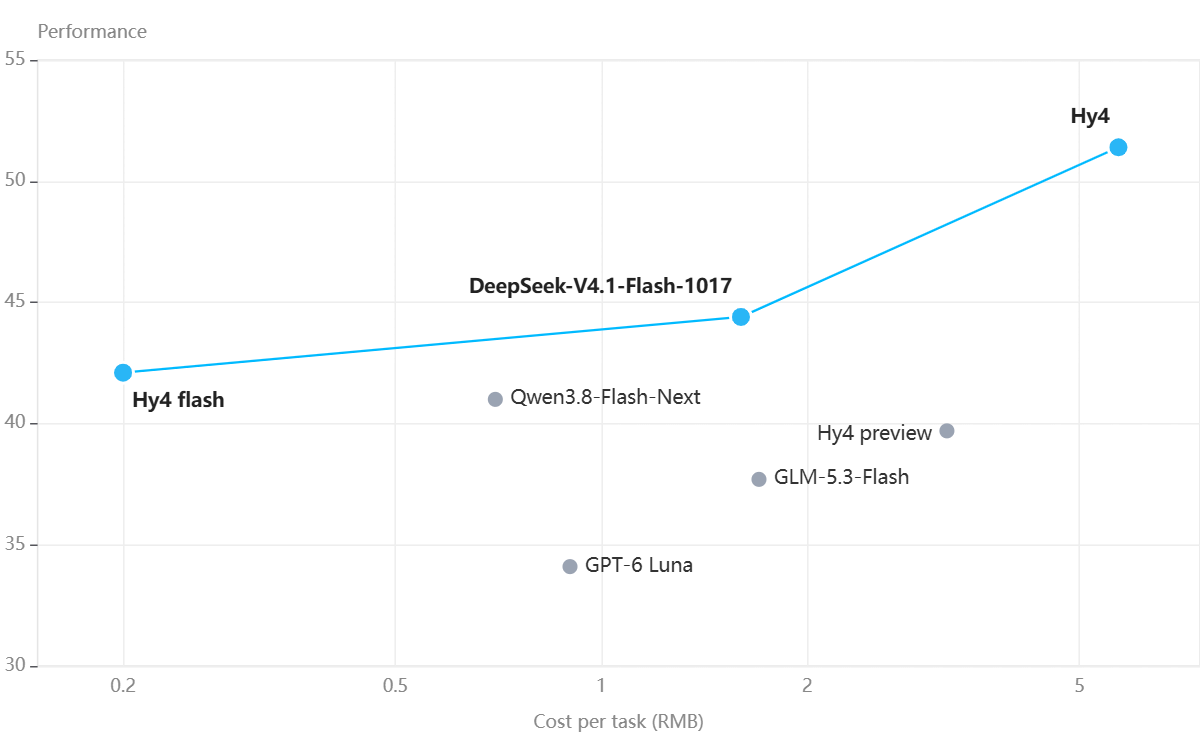
More important than list price is cost per completed task. On Tencent’s internal WorkIndex (PowerPoint creation/editing, document editing, spreadsheet repair, audio/video processing, visual understanding, etc.):
| Evaluation | Reported result |
|---|---|
| Decoding speed | Over 150 tokens/second |
| Overall performance | Slightly better than Hy4 Preview, according to Tencent |
| WorkIndex task cost vs Hy4 Preview | Approximately 1/13 |
| WorkIndex task cost vs Hy4 | Approximately 1/20 |
| WorkIndex task cost vs DeepSeek-V4.1-Flash-1017 | Approximately 1/8 |
| Output length reduction | Approximately 50% through reinforcement learning |
How to interpret these results
The WorkIndex evaluation is an internal Tencent benchmark built around typical WorkBuddy productivity tasks. It considers output quality, output length, and end-to-end completion time.
The reported cost ratios are particularly important:
- Compared with Hy4 Preview, Hy4 Flash reportedly reduces task costs by approximately 92.3%.
- Compared with Hy4, it reportedly reduces task costs by approximately 95%.
- Compared with DeepSeek-V4.1-Flash-1017, it reportedly reduces task costs by approximately 87.5%.
These are internal task-cost comparisons, not standardized benchmark accuracy improvements. They should not be presented as direct evidence that Hy4 Flash is 13 or 20 times more intelligent or faster.
In a blind evaluation with 85 internal WorkBuddy users across 259 tasks in 27 categories, Hy4 flash delivered user satisfaction scores nearly identical to Claude Haiku 5.5 while recording the lowest cost and shortest end-to-end completion time of any model tested.
Hy4 Flash Performance Benchmarks
Tencent publishes both public agent benchmarks and the internal WorkIndex. Representative self-reported numbers (highest reasoning setting):
| Benchmark | Hy4 flash | Full Hy4 | Notes |
|---|---|---|---|
| DeepSWE v1.1 | 64.6 | 74.9 | Strong but trails flagship |
| Terminal-Bench 4.0 | 19.2 | 44.4 | Clear gap on heavy terminal work |
| OSWorld 2.1 (partial) | 68.1 | 78.9 | Competitive computer-use |
| APEX-Agents | 63.1 | 75.2 | Solid agent score |
| WorkIndex (internal) | 42.1 | 51.4 | Best cost/quality trade-off |
How to Use Hy4 Flash
1. Via Tencent products (easiest for Chinese users / WorkBuddy)
- Open WorkBuddy → select Hy4 flash (free until Nov 30).
- Available inside Yuanbao, WeCom AI assistant, QQ, ima, Marvis.
2. Via Tencent Cloud TokenHub API
Model ID: hy4-flash
Standard OpenAI-compatible chat completions endpoint. Prompt caching is supported and highly recommended for multi-turn or agent loops.
3. Via CometAPI
Model slug typically hy4-flash. Pricing remains extremely competitive. Function calling and structured outputs are supported.
4. Local / self-hosted (open weights)
Weights for instruct, FP8, and base models are available on Hugging Face, ModelScope and GitCode under the Tencent Hy License. Official vLLM and SGLang images exist; llama.cpp support was still maturing as of mid-November 2026. Hardware requirements are substantial (hundreds of GB for full precision; quantized versions are more practical).
Practical tips for best results
- Always enable prompt caching on repeated system prompts or long documents.
- Use the model for tasks where output length is moderate — the post-training focus on concise answers helps keep costs low.
- For hybrid pipelines, route simple/medium tasks to Hy4 flash and escalate hard coding or research tasks to full Hy4 or a stronger closed model.
- Multimodal: feed screenshots, charts or PDFs directly; the vision encoder is production-ready for office use cases.
What Do You Need Before Calling the Hy4 Flash API?
Use Python 3.10 or later and keep the following files in one project folder. The CometAPI Chat Completions interface uses the OpenAI Python SDK with a CometAPI key and endpoint. The SDK is the client library; Hy4 Flash is the model serving the request.
Prepare your account and API key
Before you begin, have Python 3.10 or later, pip, a CometAPI account with Hy4 Flash access and available credit, and a connection to the API endpoint. Keep all example files in one project folder.
Create an account at CometAPI, open the API console, and generate an API key.
Choose the command for your terminal and replace YOUR_COMETAPI_KEY with your key. Run later commands in that same terminal session.
export COMETAPI_KEY="YOUR_COMETAPI_KEY"$env:COMETAPI_KEY="YOUR_COMETAPI_KEY"
Install the Python client library
python -m pip install --upgrade openai
Run the remaining commands in the same terminal session. If you use a virtual environment, activate it before installing the SDK.
How to Use the Hy4 Flash API with Python
Begin with one short text request. You will configure the client, send a support ticket, and inspect the returned classification before adding streaming, images, or tools.
Step 1: Configure the model and client
Save the following as hy4_client.py. Every example below imports this client, so you only need to configure the key, endpoint, timeout, and retry policy once.
import os
from openai import OpenAI
MODEL = "hy4-flash"
client = OpenAI(
api_key=os.environ["COMETAPI_KEY"],
base_url="https://api.cometapi.com/v1",
timeout=120.0,
max_retries=2,
)
Step 2: Send a text request
Save this as first_request.py. It sends a small classification task and prints the answer, completion status, and usage details. A returned answer verifies the connection before you add images or tools.
from hy4_client import client, MODEL
response = client.chat.completions.create(
model=MODEL,
messages=[
{"role": "system", "content": "Classify tickets as billing, bug, or feature."},
{"role": "user", "content": "I was charged twice for my subscription."},
],
)
choice = response.choices[0]
print(choice.message.content or "")
print("Finish reason:", choice.finish_reason)
if response.usage:
print("Usage:", response.usage.model_dump())
Step 3: Run the script and check the result
python first_request.py
Run python first_request.py from the project folder. A successful result identifies the ticket as a billing issue, reports a stop finish reason, and includes token usage when supplied by the service. If the answer is empty or the request fails, use the troubleshooting section before adding another capability.
Extend the first request when needed
| Capability | Change to the request | What to check |
|---|---|---|
| Streaming | Set stream=True; read each chunk’s delta.content. | Skip empty events and inspect finish_reason before treating the answer as complete. |
| Image input | Send text and an image_url item, using an accessible URL or a correctly labelled base64 data URL. | Use a readable image and ask about specific labels or regions. |
| JSON extraction | Request the fields explicitly and set response_format to {"type":"json_object"}. | Parse the result, validate field names and types, and check values against the source. |
Add a tool only when external information is needed
Define an allowed function and its argument schema in tools. When the model requests it, preserve the assistant message, validate the arguments and user access, then execute the function in your backend. Append its result with the matching tool_call_id and send the updated messages back for the final answer. Limit additional tool rounds; the model may also answer without calling a tool.
Connect the application and handle failures
Keep the API key on your backend. Authenticate the user, apply usage limits, and return the answer or stream to the interface. Record completion status and billed usage without logging keys or private input.
For 401/403, check credentials and access; for 400, simplify the request; for 429 or temporary server errors, use bounded retries and backoff. Mark truncated or disconnected responses as incomplete. The shared client already uses a 120-second timeout and two SDK retries, so avoid adding an unlimited retry loop.
How to Add Tools to a Hy4 Flash Agent
A tool-enabled application sends function definitions, receives the model’s requested call, executes an allowed function, and returns the result with the matching tool_call_id. The Chat Completions tool-calling flow preserves the assistant message before appending tool results.
For a customer lookup, the essential sequence is: define the function, let the model request it, run it in your application, and return the result so the model can answer. The model proposes a call; your application controls execution.
- Define the lookup. Describe get_customer_info in tools, with customer_id as a required string. Keep the implementation in your backend.
- Ask the model. Send the user’s question, messages, and tools with tool_choice="auto". If the model answers directly, check completion status and display the answer.
- Handle a requested call. Preserve the assistant message, validate the function name and JSON arguments, and check access before running the lookup. Append each result as a tool message with its matching tool_call_id.
- Finish the response. Send the updated messages back to the model. For the fictional record used here, the final answer should identify customer 10086 as having the Pro plan and active status. Bound any additional tool rounds.
The lookup result should lead to an answer identifying the Pro plan and active status. When replacing the local dictionary with a real service, check the signed-in user’s permission before returning a customer record. Add a stable operation ID before introducing tools that create or modify records.
Hy4 Flash compatibility with OpenAI Chat Completions, OpenAI Responses, and Anthropic Messages protocols.
Hy4 Flash API Price
Compare uncached input, output, and cache-hit rates separately. The table below uses CNY per million tokens from Tencent’s pricing page and the CNY comparison table on CometAPI’s Hy4 Flash page, checked November 17, 2026. Tencent’s 50% launch offer applies to usage before November 30, 2026 at 12:00 Beijing time.
| Usage per 1M tokens | Tencent list (CNY) | Tencent launch (CNY) | CometAPI CNY table* |
|---|---|---|---|
| Uncached input | ¥0.50 | ¥0.25 | ¥0.40 |
| Output | ¥2.00 | ¥1.00 | ¥1.60 |
| Cached input | ¥0.02 | ¥0.01 | ¥0.016 |
For 100 million uncached input tokens and 10 million output tokens, the Tencent list-price total is ¥70; the launch-price total is ¥35. Keep the billing period and price basis attached to each estimate.
For 100 million uncached input tokens and 10 million output tokens, the same workload gives:
- Tencent list: 100 × ¥0.50 + 10 × ¥2.00 = ¥70.
- Tencent launch: 100 × ¥0.25 + 10 × ¥1.00 = ¥35.
- CometAPI, using its CNY table: 100 × ¥0.40 + 10 × ¥1.60 = ¥56, conditional on those CNY rates applying to your account.
On that CNY basis, CometAPI is ¥14 below Tencent’s list-price example, but ¥21 above Tencent’s launch-price example. Its advertised 20% discount is against the list price; it does not stack with Tencent’s 50% promotion. If your CometAPI account instead bills those numerical rates in USD, the same calculation is $56, which is not a ¥56 quote.
Best Use Cases for Hy4 Flash
| Use case | Why Hy4 Flash fits |
|---|---|
| High-volume AI agents | Lower reported task costs and function calling |
| Coding assistants | Long context, reasoning, and tool integration |
| Document processing | Large context and image understanding |
| Enterprise productivity | Structured outputs and workflow execution |
| Data extraction | Long-context processing and JSON output |
| Multimodal assistants | Text and image inputs |
| Automated research | Multi-step reasoning and external tool calling |
Overall recommendation: Hy4 Flash is particularly attractive for developers who need to deploy reasoning-capable AI agents at scale without paying flagship-model inference costs for every request.
Conclusion
Hy4 Flash is worth evaluating when everyday coding, document work, or agent tasks need an economical model with text, image, and tool support. Start with one working request, then add the capability your task needs. Let the quality and cost of completed work—not model size or a headline token rate—decide whether it belongs in your application.
FAQ
How should Hy4 Flash handle scanned PDFs?
Convert the relevant PDF pages to clear images and submit them through image input, or extract readable text before making a text request. Keep page numbers with each chunk and ask for evidence alongside extracted values. Split long documents by section so that an answer remains traceable to a manageable source, rather than sending an entire archive in one request.
How should I save Hy4 Flash conversation history?
Store the messages your application needs to resume the conversation, including assistant tool calls and their paired tool results. Send the relevant history with the next Chat Completions request. Before pruning older content, preserve the current task, essential facts, and unresolved actions; do not separate a pending tool call from its result.
How do I prepare a Hy4 Flash batch job?
Run a small sample containing typical inputs and known failure cases. Assign each item a stable ID and save its status, validated result, and usage separately. Limit the number of concurrent requests, retry only failed items within a fixed budget, and reconcile completed IDs before restarting a job. This makes partial failures recoverable without repeating the entire batch.
Is Hy4 flash open source?
Yes. Instruct, FP8 and base weights were released under the Tencent Hy License and are available on major model hubs.
How does it compare to Claude Haiku 5.5?
In Tencent’s blind internal tests it matched Haiku-level satisfaction at substantially lower cost and faster completion times on office workloads. Independent long-horizon coding benchmarks still favor stronger models.