Released on November 11, 2026, MiniMax H3-Image is an open-weight model for image generation and editing. It generates images at approximately 16 megapixels without an external upscaler and accepts up to 16 reference images for editing. Its main applications include product visuals, concept art, and multi-reference scene composition.
The API offers two variants: Standard for lower cost and Highspeed for lower latency. MiniMax’s published 4K text-to-image results show median generation times of 16.0 seconds and 10.3 seconds, respectively.
Key Takeaways
MiniMax H3-Image generates approximately 16MP images natively, with six sampling steps and no external upscaler in the documented model pipeline.
MiniMax H3-Image editing accepts up to 16 reference images, allowing products, characters, rooms, and layouts to be combined in one request.
Reviewed for clarity, source attribution and current API terminology.
Standard and Highspeed offer the same documented API parameters and limits; Highspeed trades higher image-token prices for lower measured latency.
CometAPI lists H3-Image at 20% below MiniMax’s regular API rates. MiniMax also offers a separate, temporary 50% launch discount for eligible 4K requests.
Open weights enable local deployment under a custom license. The native API supports JPEG, PNG, and WebP, but does not support transparent backgrounds or masked edits.
What Is MiniMax H3-Image, and How Does It Work?
MiniMax H3-Image builds on the MiniMax H3 architecture and unifies text-to-image generation and reference-based editing in a single checkpoint.
MiniMax H3-Image Architecture
The official architecture description identifies three main components: an unchanged H3 text encoder based on Qwen3-VL, a 33.1-billion-parameter diffusion transformer with the audio branch removed, and an image VAE. The 33.1B figure describes the diffusion transformer, not every component in the full pipeline.
The image-generation backbone uses a dense, single-stream transformer that operates on packed text and image tokens. Its 50 layers process visual information before predicting the target image representation.
The VAE transforms image content into a compressed latent representation and decodes the generated latent into a final high-resolution image.
The checkpoint is distilled to six sampling steps without classifier-free guidance. MiniMax’s hosted API also uses prompt enhancement to turn shorter instructions into a more detailed description before generation.
Native generation around 16MP; hosted API output tiers of 1K, 2K, and 4K
Maximum custom API output area
20,000,000 pixels
Reference images
Up to 16
Maximum API prompt length
32,000 Unicode characters; about 4,096 tokens take effect when prompt enhancement is disabled
Images per API request
1–10; Base64 responses have additional total-area limits
Output formats
JPEG, PNG, WebP
API output aspect ratio range
1:3 to 3:1
API variants
Standard, Highspeed
Model weights
Publicly downloadable
License
MiniMax-H3-Image Community License Agreement
The model uses a 33.1B-parameter diffusion transformer with 50 layers, a hidden size of 5,376, and 56 attention heads. It generates images in six sampling steps without classifier-free guidance.
What Are MiniMax H3-Image's Main Features?
Native 4K and 16-Megapixel Image Generation
A 4096 × 4096 output contains 16,777,216 pixels, which is 16 times the pixel count of a 1024 × 1024 image.
In MiniMax’s API, the 4K tier targets roughly 16.8 million pixels, with dimensions that vary by aspect ratio.
MiniMax H3-Image generates approximately 16.8MP images across common aspect ratios. Documented sizes include 4096 × 4096 at 1:1, 4736 × 3552 at 4:3, 5024 × 3360 at 3:2, 5472 × 3072 at 16:9, and 6272 × 2688 at 21:9.
More pixels are particularly useful when creators need to crop a generated image, inspect small details, or prepare multiple designs from one original composition.
Photorealistic Images and Natural Textures
MiniMax's published examples demonstrate several visual styles, ranging from everyday photography to surreal editorial compositions.
MiniMax’s examples show detailed textures, reflections, and lighting across photographic and stylized scenes. For product imagery, evaluate material texture, shape, color, and branding using your own reference images.
Multi-Reference Image Generation With Up to 16 Images
Instead of creating a room from a text-only description, users can provide a photograph of an empty room alongside individual furniture images. The model can then synthesize a furnished interior based on those references.
For a catalog or campaign, assign each reference a clear role in the prompt. Review whether the output preserves the product’s shape, color, branding, and relative scale before treating it as a finished asset.
Spatial Understanding and Instruction-Based Editing
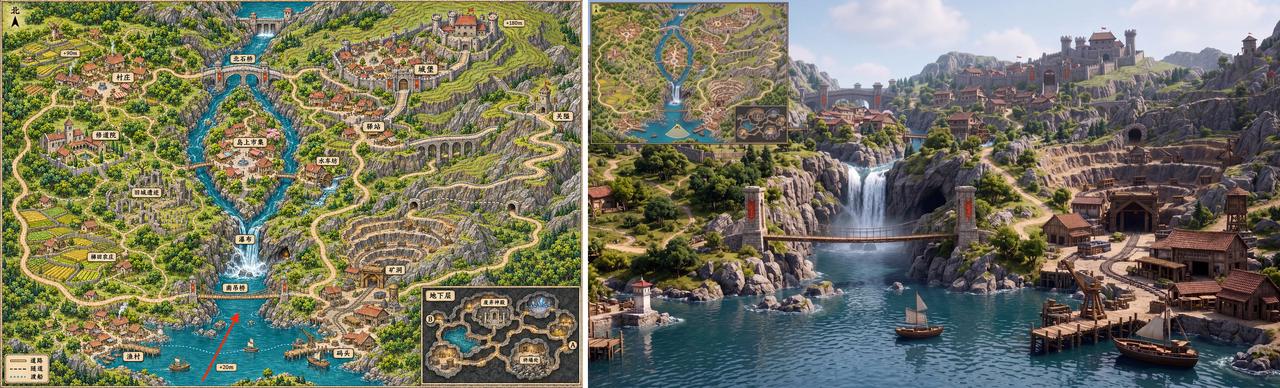
One official demonstration starts with a flat game map and generates a first-person environment based on a selected location.
The task requires more than a simple style transfer. The model must interpret spatial relationships between paths, buildings, water, and other environmental elements.
For technical users, this creates opportunities to convert rough references into more polished visual representations without rebuilding every detail manually.
Open-Weight Deployment and License Conditions
The official deployment instructions cover SGLang, vLLM-Omni, Diffusers, and ComfyUI. The listed components include a 66.28GB diffusion transformer, a 2.34GB image VAE, and a separately downloaded 66.7GB text encoder. These are file sizes, not a guaranteed minimum GPU-memory requirement.
For commercial deployment, check the community license against your location, business model, and revenue. Its general territorial grant excludes the United States, European Union, United Kingdom, and South Korea. You need separate prior written authorization to provide a hosted service to third parties, or if your annualized revenue and/or that of your affiliates exceeds US$1 million. Publicly downloadable weights do not remove these conditions.
How Fast Is MiniMax H3-Image?
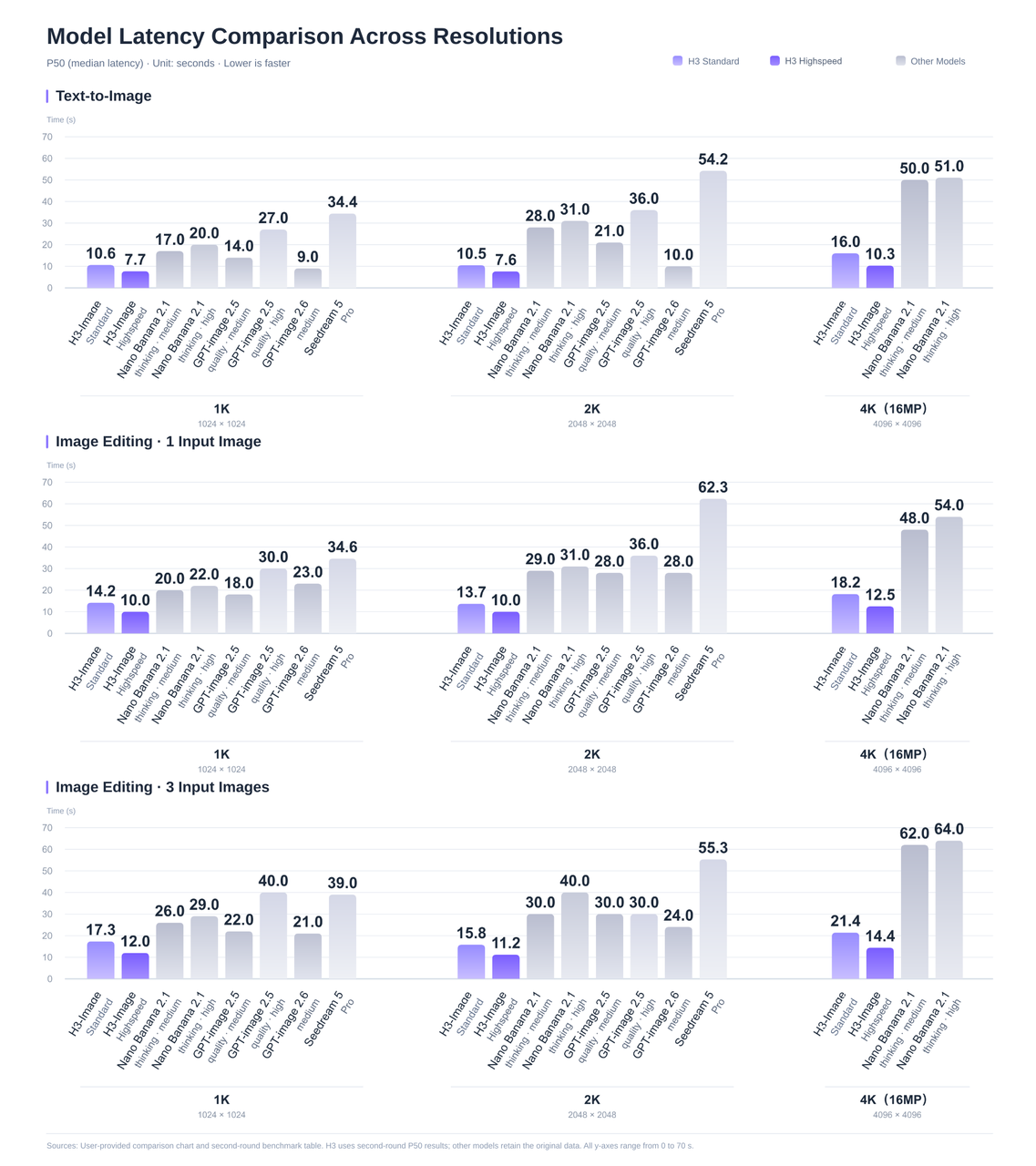
MiniMax published a detailed latency comparison covering text-to-image generation and image editing at different output resolutions.
The results use P50, or median, generation latency in seconds. Lower values indicate faster image generation.
MiniMax reports P50, or median, generation times. Hardware, concurrency, sample size, and timing boundaries are not fully disclosed, so use these figures as a reference for the listed configurations and test representative requests before setting response-time expectations.
MiniMax H3-Image Standard vs Highspeed
Task
Resolution
Standard P50
Highspeed P50
Standard latency ÷ Highspeed latency
Text-to-image
1K
10.6 s
7.7 s
1.38×
Text-to-image
2K
10.5 s
7.6 s
1.38×
Text-to-image
4K
16.0 s
10.3 s
1.55×
Image edit, 1 reference
4K
18.2 s
12.5 s
1.46×
Image edit, 3 references
4K
21.4 s
14.4 s
1.49×
For example, the 4K image has 16 times as many pixels as the 1K image, but Standard-mode generation time increases from 10.6 to 16.0 seconds.
When Should You Choose MiniMax H3-Image?
MiniMax H3-Image is worth considering when your workflow requires detailed, high-resolution still images, several visual references, or local deployment.
Large images for cropping and reuse. Native output of approximately 16 megapixels provides room to crop a composition or create multiple layouts from one image.
Scenes built from multiple references. Support for up to 16 reference images makes it useful for combining products, characters, furniture, and environments in a single composition.
Local deployment and customization. Downloadable weights let teams build their own generation workflows under the MiniMax-H3-Image Community License. Deployment options and license conditions are covered below.
Check the required delivery format before choosing the model. The native API outputs JPEG, PNG, and WebP, but does not support transparent backgrounds or masked edits. Workflows that require transparent cutouts, precise masked revisions, SVG files, or animation need additional tools or a model that supports those capabilities.
For product and campaign work, test a representative brief and check product shape, color, branding, text accuracy, and consistency across references. Compare the cost of an accepted asset, including any regeneration and editing rounds.
These are MiniMax’s regular-price examples, with 1024 × 1024 references for editing; your bill depends on actual token usage, which is returned in the response’s usage fields.
MiniMax launch offer: The direct-API promotion cuts the total request cost by 50% for Standard and Highspeed when the delivered image contains at least 16,600,000 pixels, for eligible requests before November 17, 2026, at 16:00 UTC. A 4K label alone does not establish eligibility; the delivered dimensions determine whether the discount applies.
CometAPI pricing:CometAPI lists H3-Image at 20% below MiniMax’s regular rates. At the same token usage as the Standard 4K example, that is approximately $0.05503 per image ($0.06879 × 0.8). This is separate from MiniMax’s direct-API launch offer; the discounts are not combined here.
What Should You Check Before Integrating MiniMax H3-Image?
Provider Route and Model Identifier
Developers can access the MiniMax H3-Image API in CometAPI with model ID H3-image and pricing at 20% below MiniMax’s regular API rates. Use the CometAPI documentation for the supported endpoint and parameters, then track actual token usage to estimate production costs.
For direct MiniMax access, the API guide documents MiniMax-H3-Image and MiniMax-H3-Image-Highspeed. Text-to-image uses POST /v1/images/generations, and editing uses POST /v1/images/edits. Both support synchronous responses, with optional streaming of completed images.
Output Requirements and Production Review
Before a larger batch, test a small set of representative briefs: a detailed product image, a multi-reference scene, and an edit that must preserve an existing subject. Review product fidelity, text accuracy, reference consistency, response time, and actual billed usage.
The native API’s documented limitations include masked edits and transparent backgrounds. Saving a PNG does not make its background transparent. If your production brief depends on either capability, include that requirement in model selection rather than discovering the mismatch after generation.
Conclusion
Choose the workflow first. H3-Image is a candidate when the deliverable is a large raster image assembled from a detailed brief or several references. A workflow built around transparent cutouts, precise masks, vectors, or animation calls for a different capability set.
Run a representative pilot before choosing Standard, Highspeed, or local deployment. Compare accepted outputs, editing effort, end-to-end latency, and billed cost. That gives you a practical basis for deciding whether the model improves your production process.
To evaluate it within an existing multi-model workflow, start with the MiniMax H3-Image API in CometAPI and verify the current route configuration before scaling up.
FAQ
Why can a long H3-Image prompt lose detail?
The direct API accepts up to 32,000 Unicode characters, but disabling prompt enhancement limits effective input to about 4,096 tokens. Put essential subject, layout, and preservation instructions early. If an output misses a constraint, check whether enhancement was disabled and whether the meaningful instructions extended beyond that effective range.
Why does an H3-Image size request return HTTP 400?
The size parameters use two mutually exclusive modes. Supply size as WIDTHxHEIGHT, or leave size omitted/auto and use aspect_ratio and area. Do not send aspect_ratio or area with an explicit size, even with the value auto. Explicit dimensions must also satisfy the permitted area and aspect-ratio ranges.
Can H3-Image return ten 4K images as Base64?
The request count supports up to ten images, but Base64 responses have a total-area cap: 20,000,000 pixels for PNG and 80,000,000 for JPEG or WebP. At 4096 × 4096, that allows one PNG or up to four JPEG/WebP images per Base64 response. Use URL responses or smaller batches when your request would exceed those limits.
What if only part of an H3-Image batch succeeds?
A successful HTTP response does not mean every requested image succeeded. Inspect each data item for an image result or an error, save successful outputs, and handle failed items separately. MiniMax’s API response contract states that only successful images are charged. Returned image URLs are not guaranteed to remain available, so download and store the assets you need.