

TL;DR
Muse Ember is Meta’s smallest multimodal reasoning model, built for high-volume agent tasks such as routing, extraction, tool calling, and focused coding. Meta introduced Muse Ember on November 9, 2026.
Its 1,048,576-token context window accommodates substantial source material. Meta offers access through Model API and Muse Code; CometAPI lists muse-ember, with activation status covered below. Start with a repeated task whose output you can check, then compare cost per successful result, including reasoning, tools, and retries.
Key Takeaways
- Role: Muse Ember is built for repeated agent execution, including classification, extraction, tool calls, and bounded coding tasks.
- Inputs and capacity: Muse Ember accepts text, images, audio, and video, with a 1M-token context window and up to 512K output tokens.
- Performance: Meta's results favor Muse Ember on several agent benchmarks, while independent analytics testing shows that low token prices do not always produce the lowest task cost.
- Pricing: Requests above 200K input tokens enter a higher price tier; total task cost also depends on reasoning and tool use.
- Access: Meta Model API and Muse Code are available; CometAPI’s listing currently marks the model as Coming soon.
What Is Muse Ember Best Used For?
Muse Ember handles the execution steps in an agent workflow while a larger model manages planning. It fits high-volume tasks with clear inputs, a limited scope, and a result your application can verify. Its core jobs are:
- Classification and routing: Label requests and send them to the right queue or service.
- Extraction: Turn documents and media into structured fields with source evidence.
- Tool calling: Select a function and supply the arguments your application executes.
- Batch processing: Apply a repeatable operation across files or records.
Support-Ticket Routing
A practical support workflow can ask Ember to extract an order reference, assign a category, and flag missing information. Your application can validate the reference against its records before routing the ticket. Keep refunds, account changes, and other consequential actions behind the application's own authorization checks.
Document Extraction with Evidence
For invoice or contract processing, request both the extracted value and the page or passage that supports it. Treat absent and unreadable fields as explicit outcomes instead of inviting the model to guess. This produces records that reviewers can inspect without rereading every document.
Focused Coding Work
Give a coding worker a small ownership boundary: the files it may change, the behavior to preserve, and the tests that define completion. Meta's parallel code-migration example illustrates this division of work. The surrounding agent runs commands and checks results; the model's response alone is not evidence that a change passed its tests.
Meta's Muse Ember launch visual accompanies its guide to combining an execution model with a larger planning model.
Meta says Muse Ember is the first model trained using Muse Wonder Full, extending its strategy of using larger models to develop specialized models.
Muse Ember Specifications
The core specifications are:
| Specification | Muse Ember |
|---|---|
| Developer | Meta Superintelligence Labs |
| Announcement date | November 9, 2026 |
| Model category | Multimodal reasoning and agent execution |
| Context window | 1,048,576 tokens |
| Maximum output | 524,288 tokens |
| Input modalities | Text, images, audio, video |
| File inputs | Supported through the Responses API |
| Output modality | Text |
| Reasoning effort | Minimal, Low, Medium, High, XHigh, Max |
| Default reasoning effort | Max |
| Tool calling | Supported |
| Structured output | Supported |
| Search grounding | Supported through the Model API |
Meta has not released Muse Ember’s weights or disclosed its parameter count. The request and token limits apply per team, with all API keys in that team sharing the model's allowance.
Context and Multimodal Inputs
For PDF workflows, Meta extracts text from the first 100 pages and images from the first 50, so split longer files before processing. Send the material needed for the task; reasoning tokens share the 524,288-token output allowance with the final answer.
Use screenshots when layout matters, scans for document extraction, audio for meeting analysis, and video for events that unfold over time. A transcript is enough for a text-only summary. Files are supported through the Responses API, and results are returned as text.
Configurable Reasoning Effort
Muse Ember offers six reasoning levels: Minimal, Low, Medium, High, XHigh, and Max. Meta defaults to Max; none is unsupported and returns HTTP 400. Start routine routing and classification at a lower level, then increase it only when the gain in accepted answers justifies the extra latency and output-token cost.
Tool Calling and Structured Output
Muse Ember supports tool calling and structured output. Tool calls connect model decisions to application functions, while structured output makes extracted fields easier to validate and pass to the next step.
This illustrative support-ticket result gives a routing application a category, a priority, and a review flag:
{
  "category": "billing",
  "priority": "high",
  "requires_human_review": true
}
Meta Model API also supports search grounding and computer-use workflows. The connected application provides the tools, executes actions, and controls permissions.
How Does Muse Ember Perform on Benchmarks?
Meta’s launch results use maximum reasoning effort. Agents’ Last Exam covers the Linux subset in Meta’s internal evaluation, while Terminal-Bench uses each model’s best published harness. They combine externally reported Artificial Analysis results with Meta's internal evaluations; the Personal Superintelligence Index is Meta's internal composite, not a separate independent leaderboard.
Muse Ember Benchmark Results
| Benchmark | Muse Ember | Claude Haiku 5.5 | GPT-6 Luna |
|---|---|---|---|
| AutomationBench-AA | 37.8 | 13.9 | 20.2 |
| Agents' Last Exam | 61.6 | 57.0 | 57.1 |
| Personal Superintelligence Index | 46.8 | 36.1 | 37.0 |
| Terminal-Bench 4.0 | 40.9 | 39.2 | 16.4 |
| Coding Agent Index-AA | 46 | 37 | 31 |
| FrontierCode 2.0-AA | 27.2 | 34.9 | 25.2 |
| GDP.pdf-AA | 22.8 | 20.8 | 22.8 |
| OSWorld 2.1 (partial score) | 69.5 | 68.9 | 50.5 |
| OSWorld 2.1 (binary score) | 33.8 | 27.8 | 17.0 |
| PerceptionBench (with tools) | 80.6 | 78.6 | 62.8 |
| Artificial Analysis Intelligence Index | 36 | 36 | 28 |
Terminal-Bench 4.0 uses mini-swe-agent for Muse Ember, Claude Code for Haiku 5.5, and Codex for GPT-6 Luna. These are not identical execution environments. OSWorld 2.1 reports both partial-credit and binary scores, while PerceptionBench includes tools. The Artificial Analysis Intelligence Index results are from version 5 as published on November 9, 2026.
Muse Ember Benchmark Analysis
Agent execution is Muse Ember's strongest area.
On AutomationBench-AA, Muse Ember scores 37.8, compared with 13.9 for Haiku 5.5 and 20.2 for GPT-6 Luna. This supports Meta's positioning of Muse Ember as a model for end-to-end business workflows and repeated agent operations.
Coding performance is competitive, but not universally superior.
Muse Ember scores 40.9 on Terminal-Bench 4.0 and 46 on Coding Agent Index-AA. However, it scores 27.2 on FrontierCode 2.0-AA, below Haiku 5.5's 34.9. This suggests that Muse Ember is a useful candidate for bounded coding subtasks, while more difficult engineering work should be tested against stronger alternatives.
Multimodal and computer-use results are promising.
Muse Ember scores 80.6 on PerceptionBench with tools and 69.5 on OSWorld 2.1 partial-credit scoring. These results support its positioning for workflows involving visual understanding and computer interaction.
General intelligence is comparable to Haiku 5.5.
Muse Ember and Haiku 5.5 both round to 36 on the Artificial Analysis Intelligence Index, ahead of GPT-6 Luna at 28. For a selection decision, pair that broad comparison with the task-specific results above.
Muse Ember Intelligence vs. Cost Per Task
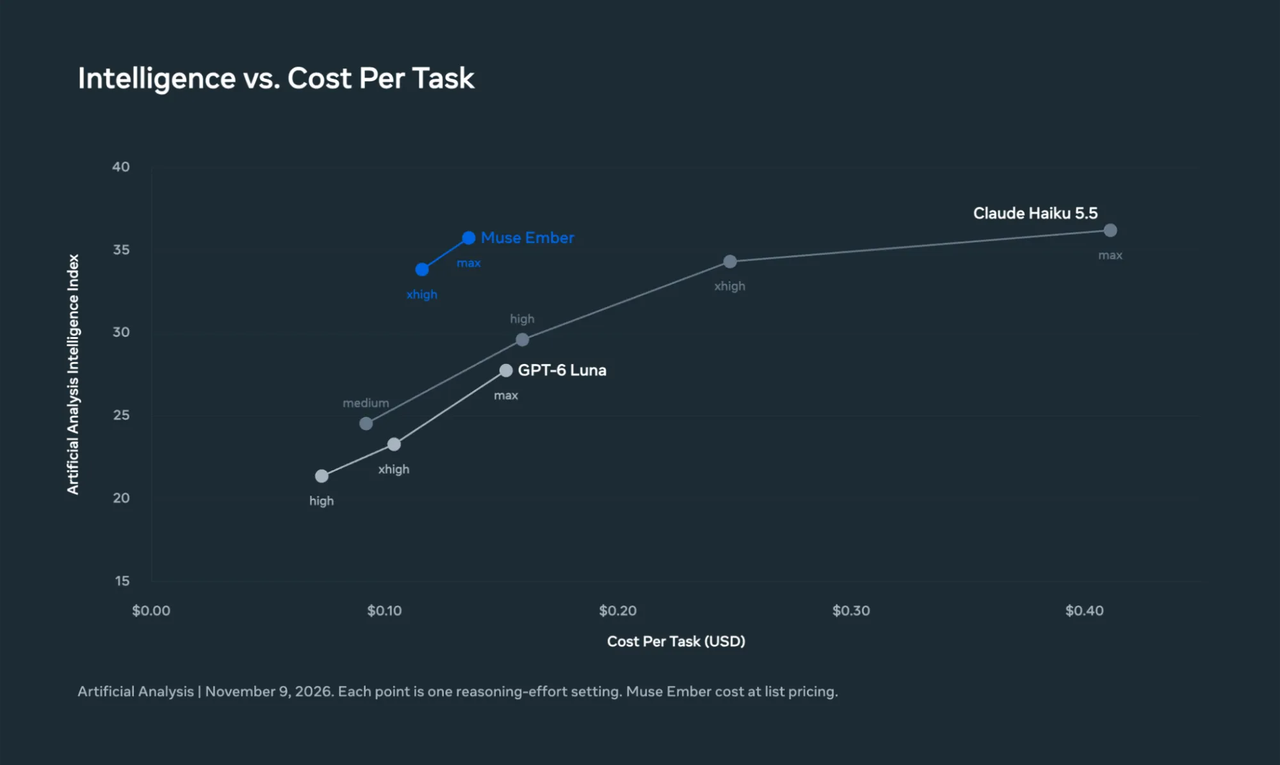
Meta's chart compares Artificial Analysis Intelligence Index scores with estimated cost per task at different reasoning-effort settings.
At maximum reasoning effort, Muse Ember scores 35.8 on the Artificial Analysis Intelligence Index at an estimated $0.136 per task. Haiku 5.5 scores 36.2 at $0.411, while GPT-6 Luna scores 27.8 at $0.152. On this benchmark, Ember comes close to Haiku’s score for roughly one-third of the task cost and exceeds Luna’s score at a slightly lower cost.
These estimates use benchmark token consumption and list prices. The next evaluation shows why tool activity matters when choosing a model for a specific workflow.
Independent Data-Analysis Results
Plotly's November 10, 2026 data-analysis evaluation tested 43 questions in Plotly Studio Embedded against a synthetic wind-energy dataset. Muse Ember ran through OpenRouter; the reported costs use the prices available when each model ran. They are workload-specific results, not a Meta-native API billing test.
| Evaluation metric | Muse Ember | GPT-6 Luna | Claude Haiku 5.5 |
|---|---|---|---|
| Questions passed | 38/43 | 38/43 | 37/43 |
| Full test cost | $1.04 | $0.13 | $0.38 |
| Median time per question | 28 seconds | 18 seconds | 14 seconds |
For this data-analysis workload, GPT-6 Luna delivered the same 38/43 pass count as Ember for one-eighth of the total cost, with a lower median response time. Haiku was fastest at 14 seconds per question, with 37/43 passes. Luna is the stronger starting candidate for a similar cost-sensitive analytics workflow; Ember’s low token rate alone does not make it the cheaper choice.
Plotly found that Muse Ember made an average of 78 queries on questions involving hidden patterns, compared with a median of 25 across the tested models. The additional tool activity increased its token consumption and total cost.
The test also showed strengths: Muse Ember answered all 20 clearly defined analytics questions, all five ambiguous questions, all five impossible requests, and all three data-quality checks correctly. It struggled most with hidden patterns in the data.
Plotly ran each model once and observed variation of up to three questions when repeating other models. Treat the 38-versus-37 pass counts as close; the clearer difference here is tool usage and total cost.
Muse Ember vs Muse Wonder vs Muse Spark
Choose a Muse model by the responsibility it will own: planning, the main agent loop, or repeated execution.
| Dimension | Muse Wonder | Muse Spark 1.3 | Muse Ember |
|---|---|---|---|
| Primary role | Frontier reasoning and complex engineering | Main coding and agent model | High-volume execution |
| Main strength | Planning, long-running tasks, complex coding | Coding and agentic workflows | Repetitive subtasks and tool calls |
| Typical workload | Repository-scale engineering | Main agent execution | Classification, routing, extraction |
| API model ID | muse-wonder-1.0 | muse-spark-1.3 | muse-ember-1.0 |
| Context window | 1M tokens | 1M tokens | 1M tokens |
| Default reasoning | Max | High | Max |
| Standard input price / 1M | $4.00 | $1.25 | $0.10 |
| Standard output price / 1M | $20.00 | $4.25 | $0.50 |
The table uses Meta's Standard-mode token prices. Ember's prices here apply to requests up to 200K input tokens; Wonder and Spark do not carry Ember's long-context premium.
Muse Model Selection
Choose Wonder for difficult planning, repository-wide engineering, and recovery across long sequences of steps. Choose Spark to run the main coding or agent loop. Choose Ember for repeated subtasks with independently verifiable outputs, such as routing, extraction, and targeted file changes.
For example, a repository migration can assign dependency analysis to a larger model and a narrowly scoped file change to Ember. The handoff should name the files, expected behavior, and acceptance checks. That division is useful only when coordinating and reviewing the smaller tasks costs less than completing the whole job with the main model.
To choose between them, run the same representative tasks through your candidates with the same acceptance checks. First reject configurations that miss your required success rate or latency target. Among those that pass, compare total spend divided by accepted results, including retries and tool calls. Assign Ember the task types where it lowers that cost, and route unresolved cases back to Spark or Wonder.
How Much Does Muse Ember Cost?
The table pairs Meta’s official rates with a 20%-discount estimate for CometAPI, in USD per million tokens. Each cell shows Meta / discounted estimate. CometAPI’s listing does not yet publish a live tariff; use the discounted figures for budget planning.
| Usage per 1M tokens (Meta / 20%-off estimate) | Up to 200K input tokens | Over 200K input tokens |
|---|---|---|
| Input | $0.10 / $0.08 | $0.30 / $0.24 |
| Cached input | $0.004 / $0.0032 | $0.012 / $0.0096 |
| Output | $0.50 / $0.40 | $1.50 / $1.20 |
The request's total input tokens, including cached input, determine the tier. A request above 200K input tokens uses the higher rates for the full request, including its output. With Meta's previous_response_id, stored conversation history counts toward that input total.
Typical Muse Ember Request Costs
With uncached input and 20K billed output tokens, including reasoning, a 200K-input request costs $0.0300 at Meta’s rates, or $0.0240 in the 20%-discount scenario. Increasing the input to 220K moves the full request into the higher tier: the same 20K output then brings the total to $0.0960 at Meta’s rates, or an estimated $0.0768 with the discount. These examples exclude separate tool charges. Keeping relevant context within the lower tier can save more than a 20% discount alone.
| Scenario | Input tokens | Billed output tokens | Meta cost | CometAPI cost |
|---|---|---|---|---|
| Standard request | 200K | 20K | $0.0300 | $0.0240 |
| Long-context request | 220K | 20K | $0.0960 | $0.0768 |
Reasoning tokens count as billed output. For Meta's native API, web search grounding costs an additional $2.50 per 1,000 queries, and Ember has no Contributor-mode variant. The token-price comparison above does not apply the 20% discount to separate tool charges.
How to Access Muse Ember
CometAPI listing: the model page identifies the model as muse-ember, but its catalog status is Coming soon as of November 16, 2026. Follow that page for activation and pricing; for access now, use Meta Model API or Muse Code.
Through Meta Model API: use muse-ember-1.0 with https://api.meta.ai/v1. The native API supports Responses, Chat Completions, and Messages formats. File inputs use Responses. Keep each provider’s endpoint and model identifier together when configuring your client.
Native API limits and other access: Meta lists 3,000 requests per minute and 4,000,000 tokens per minute per team, shared by the team’s API keys. Muse Ember is also available in Muse Code. Check your chosen route’s limits when sizing a batch, and use Meta’s integration guide for native API setup.
What Are the Limitations of Muse Ember?
Three factors determine whether Ember is a good fit for your next workflow:
- Complex engineering remains workload-dependent. Ember trails Haiku 5.5 on FrontierCode 2.0-AA despite its stronger Terminal-Bench result. A narrow coding win does not establish suitability for every repository-scale change.
- Long context and low token prices do not guarantee low task cost. Large requests move to a higher price tier, and repeated tool use can consume enough tokens to outweigh the low per-token rate.
- Tool support still requires an application. The surrounding system executes calls, controls permissions, and validates results. A model's ability to request an action does not by itself provide a reliable workflow.
Conclusion
Adopt Ember where the acceptance criteria are clear enough to measure. A useful first deployment is a high-volume step that already has a known result, such as routing labeled tickets or extracting fields from reviewed documents. Compare successful-task cost, error rates, and latency against your current model before expanding its role. That evidence will tell you whether Ember reduces the cost of your workflow while preserving the quality it needs.
FAQ
How should you validate Muse Ember extraction results?
Build a reference set of documents with human-checked answers, including missing fields, unreadable scans, and conflicting values. Measure accuracy by field rather than treating every valid JSON response as a success. Check whether each extracted value is supported by the cited source passage, and send mismatches to review. This separates formatting reliability from factual reliability.
When should a Muse Ember subtask return to the main agent?
Define escalation conditions before execution: a required file is outside the assigned scope, the sources disagree, an acceptance check fails repeatedly, or the task requires a decision the worker was not authorized to make. Return the evidence, attempted steps, and unresolved question to the main agent. A clear handoff is more useful than allowing the worker to broaden its assignment indefinitely.
What should you log when testing Muse Ember in production?
Record the exact provider and model identifier, reasoning setting, input and billed output tokens, cached tokens, tool-call count, retries, latency, and final acceptance result. Keep the validation outcome alongside the usage record so you can calculate cost per accepted task. Compare similar task types separately; an average across routing, coding, and long-document work can hide where the model is helping or adding cost.
How can you prevent duplicate actions in a Muse Ember workflow?
Make the application responsible for action identity and completion state. For an operation such as creating a ticket, assign a stable operation key, check whether it has already completed, and use the destination API's idempotency support when available. After a timeout, inspect the action's status before retrying. This design avoids treating an uncertain response as proof that the original action never happened.