Seedream 5.5 is ByteDance Seed's image generation and editing model, introduced on November 9, 2026. Its main advances are stable multi-turn editing, native RGBA transparency, and improved realism and text rendering. For designers, the appeal is a workflow that keeps approved details intact while individual elements change.
This guide explains the features, the limits of ByteDance's published benchmarks, and what developers need to know about access and pricing. The release announcement establishes the model's capabilities; API availability and charges depend on the provider and account. Access information below reflects November 10, 2026.
Key Takeaways
Editing consistency: ByteDance demonstrates 100 successive edits with Seedream 5.5; this is a demonstration, not a documented API session limit.
Reviewed for clarity, source attribution and current API terminology.
Reusable assets: Native RGBA output supports full and partial transparency for compositing and design.
Image and text quality: More natural textures accompany reported severe and minor text corruption rates of 0.4% and 1.7% in ByteDance's evaluation.
Task-dependent results: The published comparisons favor Seedream 5.5 in text structure and text-to-image realism, while Nano Banana 2.1 leads the image-to-image realism comparison.
Access and cost: CometAPI pricing is 20% below the corresponding official rate. API availability and promotional offers are separate considerations when choosing an access channel.
Seedream 5.5 at glance
Specification
Details
Developer
ByteDance Seed
Release date
November 9, 2026
Model category
Multimodal AI image generation and editing
Input modalities
Text prompts and reference images
Output modality
Images
Image editing
Multi-turn editing
Demonstrated editing rounds
Up to 100 successive rounds
Editing consistency
Pixel-level preservation of unedited regions
Transparency
Native RGBA output
Alpha channel
Full and partial transparency
Text rendering
Improved Chinese and English text, including dense small text
Image quality
Improved lighting, materials, and skin textures
Main applications
E-commerce, marketing, film and television, gaming, office productivity, and fashion design
Maximum resolution
Not specified in the launch announcement
Model parameters
Not specified in the launch announcement
Open weights
What Is Seedream 5.5?
Seedream 5.5 is a multimodal AI image generation and editing model developed by ByteDance Seed. Released on November 9, 2026, it is the latest major development in the Seedream image model family.
It accepts text prompts and reference images for creating or revising visual assets. The useful distinction is between making a convincing first image and retaining control over later revisions: an approved face, product shape, or composition should remain stable when another element changes.
The 100-round figure refers to a demonstrated successive editing workflow, rather than a guaranteed API session limit. Similarly, the model's maximum output resolution and detailed API parameter specifications have not been fully established in the launch materials.
What Are the Main Features of Seedream 5.5?
Multi-Turn Editing with Pixel-Level Preservation
One of the biggest problems with traditional AI image editing is that even a small modification can unintentionally change other parts of an image.
For example, asking an image model to change someone's clothing may also alter facial details, background colors, lighting, or the position of nearby objects.
Repeated editing makes this problem worse. Each new generation uses the previous image as its input, and small inconsistencies can accumulate over time.
Seedream 5.5 addresses this problem through targeted training designed to preserve unedited regions at the pixel level.
Its official demonstration uses the same portrait as the starting point for 100 consecutive editing rounds. The model repeatedly modifies clothing, accessories, and tabletop objects while maintaining the original subject's appearance and composition.
Even small elements, including rings and eyeglass frames, remain recognizable after successive changes.
The practical advantage is that designers can refine individual elements without rebuilding an entire image after every instruction.
Native RGBA Transparent Image Generation
Seedream 5.5 introduces native RGBA generation, allowing users to create images with an actual alpha channel rather than relying on a simulated transparent background.
Previously, generating a product image with a transparent background often required a separate background removal tool. Fine details such as hair, feathers, glass edges, and partially transparent materials could become distorted during the process.
Seedream 5.5 can directly generate transparent or semi-transparent assets from text descriptions and reference images.
Its official demonstration includes a snowy owl with detailed feathers, individual feather gaps, and clearly defined claws.
Instead of generating a complete poster every time, designers can create individual assets and combine them in subsequent production stages.
More Realistic Images and Natural Textures
Seedream 5.5 also improves the realism of generated images.
ByteDance specifically highlights improvements in lighting, material rendering, skin textures, and shadow transitions.
The model aims to reduce several common visual artifacts:
Excessively glossy skin.
Overexposed highlights.
Unnatural material reflections.
Inconsistent lighting.
Rough or artificial surface textures.
For example, an AI-generated product photograph should reproduce the appearance of glass, metal, fabric, and other materials convincingly. Similarly, portrait images need natural skin textures and realistic lighting rather than an overly polished appearance.
Improved Text Rendering and Complex Layouts
Text rendering has historically been one of the most difficult challenges for AI image generators.
Models may produce visually attractive posters but struggle with exact spelling, complex Chinese characters, small typography, and dense information layouts.
The model demonstrates better performance in:
Chinese and English text generation.
Dense small-text layouts.
Complex character structures.
Newspaper-style compositions.
Infographics and educational illustrations.
Marketing posters and product packaging.
ByteDance's official examples include a butterfly infographic with detailed Chinese annotations and a Shakespeare-themed newspaper layout containing multiple paragraphs of small English text.
These improvements make the model more suitable for image generation tasks where text is an essential part of the visual design rather than a decorative element.
How Does Seedream 5.5 Perform in Benchmarks?
The official evaluation description covers professional production, text structure, realism, and text corruption. These are ByteDance-reported results, not an independent test of this article.
MagicArena uses experienced evaluators to assess image quality and usability. The separate text-structure and realism evaluations use paired-image GSB (Good/Same/Bad) judgments for text-to-image and image-to-image tasks. The announcement does not provide a complete reproducibility package: sample sizes, full prompts, generation settings, evaluator counts, and hardware or serving conditions are not specified. Treat the scores as evidence about these test tasks, rather than a universal ranking.
Overall Performance Across Six Production Categories
ByteDance used its MagicArena evaluation platform, with experienced image-generation evaluators assessing output quality and usability.
The six evaluation categories were:
E-commerce.
Marketing.
Film and television.
Gaming.
Office productivity.
Fashion design.
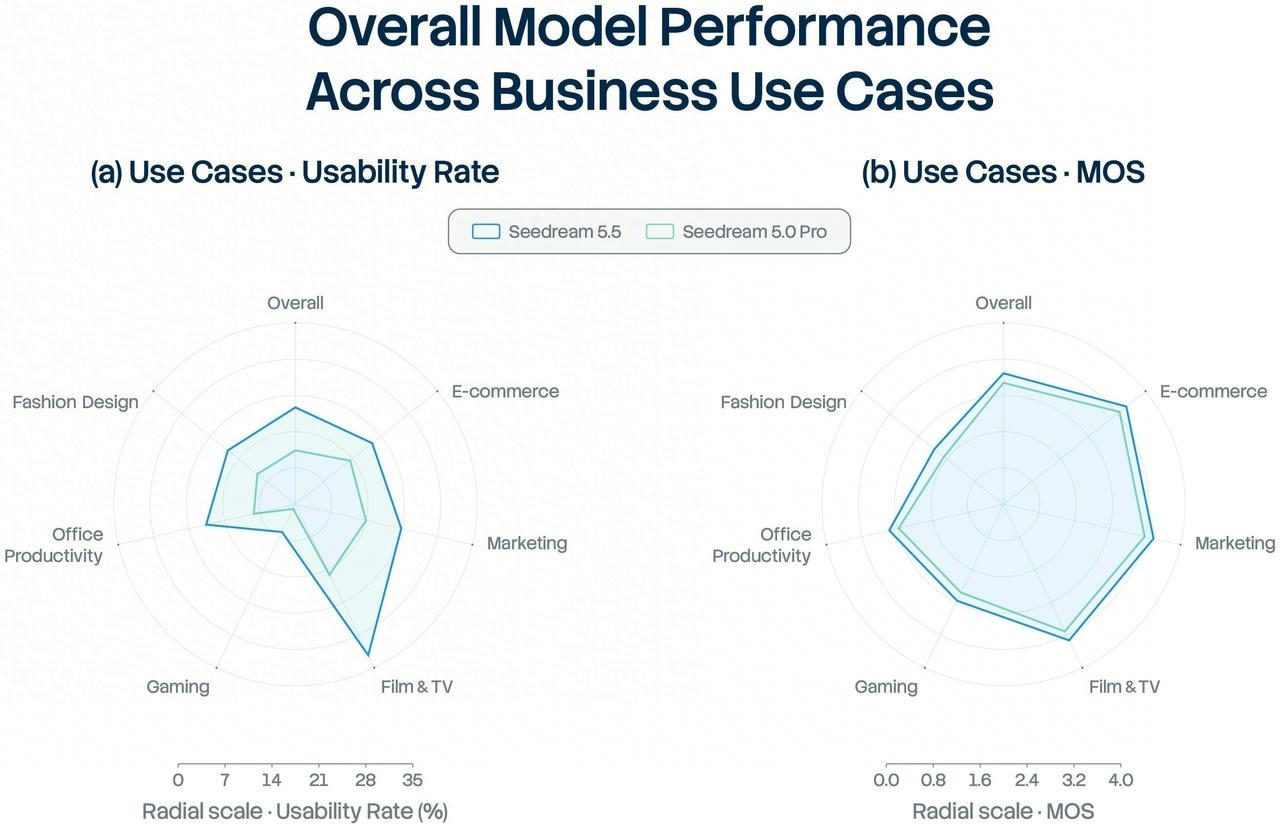
Compared with Seedream 5.0 Pro, Seedream 5.5 improved both image quality scores and usability rates across all six categories.
The most notable result was in film and television and office productivity, where the usability rate increased to more than twice that of the previous version.
The table below gives approximate readings from the published radar chart. Usability is the share of outputs judged usable; MOS means mean opinion score. The chart has no numeric labels at individual points, so these rounded estimates are not exact published measurements.
Use case
Usability: 5.5
Usability: 5.0 Pro
MOS: 5.5
MOS: 5.0 Pro
E-commerce
~19%
~14%
~3.5
~3.3
Marketing
~21%
~14%
~3.4
~3.2
Film and television
~32%
~15%
~3.3
~3.1
Gaming
~5%
Near 0%
~2.4
~2.2
Office productivity
~18%
~8%
~2.6
~2.4
Fashion design
~17%
~9%
~2.0
~1.8
The largest usability gain is in film and television. Gaming remains difficult despite improving from a very low baseline. Higher MOS scores across every category suggest better perceived quality, but a visually stronger result still may not meet the requirements for a usable production asset.
Text Structure and Image Realism Benchmarks
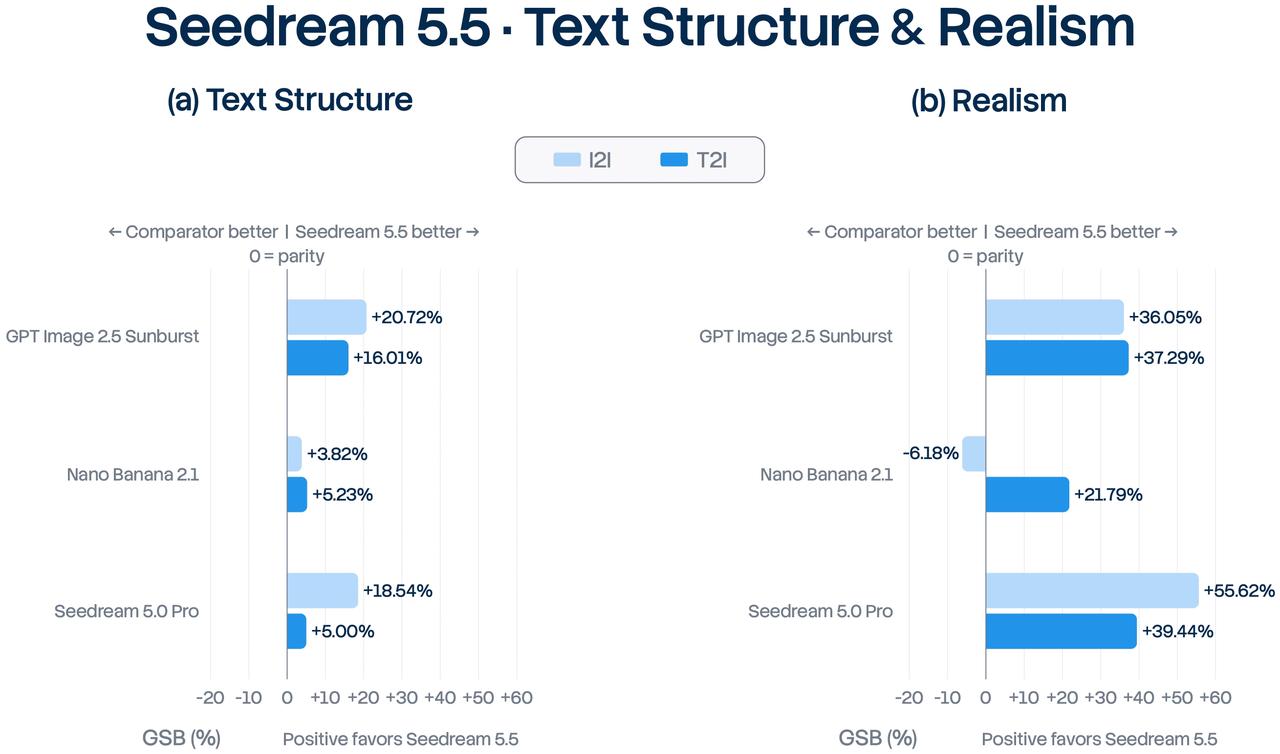
ByteDance also compared Seedream 5.5 against three models using GSB (Good/Same/Bad) preference evaluations.
The evaluation covered two tasks:
Text-to-image (T2I): Generating an image directly from a text prompt.
Image-to-image (I2I): Editing or generating an image using an existing image as input.
The following table presents the numerical results from ByteDance's published comparison chart.
Evaluation metric
GPT Image 2.5 Sunburst
Nano Banana 2.1
Seedream 5.0 Pro
Text structure (T2I)
+16.01%
+5.23%
+5.00%
Text structure (I2I)
+20.72%
+3.82%
+18.54%
Realism (T2I)
+37.29%
+21.79%
+39.44%
Realism (I2I)
+36.05%
-6.18%
+55.62%
These figures represent Seedream 5.5's relative GSB preference scores against each comparator. The percentages are GSB preference scores from pairwise expert evaluations. They indicate the relative preference outcome in the tested comparison, not a percentage increase in image quality, accuracy, or overall benchmark performance.
The results reveal several important findings.
Text structure: Seedream 5.5 leads both competitors in text-to-image and image-to-image text structure. Its advantage is particularly noticeable against GPT Image 2.5 Sunburst.
Text-to-image realism: Seedream 5.5 achieves positive preference scores against both competitors, with +37.29% against GPT Image 2.5 Sunburst and +21.79% against Nano Banana 2.1.
Image-to-image realism: The comparison is more nuanced. Seedream 5.5 scores +36.05% against GPT Image 2.5 Sunburst but -6.18% against Nano Banana 2.1. This means Nano Banana 2.1 has a slight preference advantage in this particular editing evaluation.
Improvement over the previous generation: Against Seedream 5.0 Pro, Seedream 5.5 achieves +55.62% in image-to-image realism, indicating a substantial improvement in the model's own generation family.
The +55.62% figure is a GSB preference score against Seedream 5.0 Pro, not a 55.62% increase in absolute image quality or an advantage over every competing model.
Text Rendering Accuracy
Another important benchmark measures the frequency of text corruption in generated images.
ByteDance evaluated Chinese and English text, including densely arranged small typography.
Text corruption metric
Seedream 5.5
Seedream 5.0 Pro
Nano Banana 2.1
GPT Image 2.5 Sunburst
Severe text corruption
0.4%
2.8%
1.7%
0.7%
Minor text corruption
1.7%
2.6%
3.0%
7.4%
Seedream 5.5 records the lowest severe and minor text corruption rates among the four models in this evaluation.
This is particularly relevant for posters, infographics, packaging, and editorial graphics, where a single incorrect character can make an otherwise attractive image unusable.
What Are the Best Use Cases for Seedream 5.5?
E-commerce Product Photography
Start with an approved product reference and request one change at a time, such as a background or lighting adjustment. Compare the result with the reference before moving on: a convincing photograph is still unsuitable if a label, seam, or product dimension has changed.
Advertising and Editorial Design
Use image generation to explore compositions, then check the chosen layout at its final display size. For posters and infographics, compare every visible word with the approved copy. Keep text that changes frequently, such as prices and campaign dates, editable in your layout tool.
Transparent Assets and Compositing
Build a small asset set that can be reused across layouts: a product cutout, decorative elements, or a character. Inspect the alpha edges against both light and dark backgrounds before compositing. This exposes halos and lost fine detail that a checkerboard preview can hide.
Character and Fashion Iteration
Use a stable reference image and describe the exact garment, accessory, or hairstyle change. Save approved intermediate versions so you can return to an earlier state if later edits change the face, silhouette, or proportions.
How Can You Access Seedream 5.5?
Creative Tools and Playground Access
The Seedream 5.5 experience links provide a starting point for exploring ByteDance's creative tools and BytePlus playground. After signing in, confirm that Seedream 5.5 is the selected model. A working consumer or playground experience does not by itself establish access to a developer API. Seedream 5.5 Pro version will follow. The same announcement discusses future work on more complex contextual inputs and creative instructions, without establishing a full Pro specification or release date.
Official API Access and Account Requirements
Start with BytePlus for official international access. Its Seedream product page promotes Seedream 5.5, and the launch announcement links to its playground. Sign in to check which model is enabled for your account. Before calling an API, confirm Seedream 5.5 access, the exact model ID, authentication requirements, supported image inputs, and billing in the provider console or with support. Playground access alone does not confirm those API permissions.
CometAPI now supports Seedream 5.5, giving developers access to the model through its API platform. Explore the Seedream 5.5 model page to get started with image generation and editing for product visuals, marketing assets, and creative applications.
To begin, sign in to CometAPI, create an API key, and follow the API documentation to configure your first image request. Check the supported input options and output formats for your workflow, then test a small batch before scaling up.
Pricing and Production Budgets
CometAPI will offers Seedream 5.5 at 20% below the corresponding official price: you pay 80% of the official rate for the same model and billing configuration. To estimate the CometAPI charge, multiply the applicable official rate by 0.8, keeping the resolution, operation type, and billing unit consistent.
FAQ
What is Seedream 5.5?
Seedream 5.5 is ByteDance Seed's image generation and editing model, announced on November 9, 2026. It creates images from prompts and revises images using visual references.
What are the main improvements in Seedream 5.5?
Its main upgrades are more stable repeated edits, native transparent assets, and clearer text with more natural lighting and textures. These features are useful for product visuals, posters, and iterative design.
Can Seedream 5.5 generate transparent PNG images?
It supports native RGBA output with full or partial transparency. For transparent PNG files, choose an access channel that explicitly supports PNG export with an alpha channel; export formats depend on the service.
Can Seedream 5.5 preserve image details across 100 editing rounds?
ByteDance demonstrates 100 successive edits while retaining unedited details. This shows the intended workflow, but it is not a guarantee that every image will remain unchanged or that an API provides a 100-round session.
Is Seedream 5.5 better than Nano Banana 2.1?
It depends on the task. In ByteDance's published comparisons, Seedream 5.5 leads in text structure and text-to-image realism, while Nano Banana 2.1 leads in image-to-image realism. Test both with your own assets before choosing.
Is Seedream 5.5 API available on CometAPI?
Yes. CometAPI supports Seedream 5.5 through its API platform. Visit the model page and follow the API documentation to get started.
How much does Seedream 5.5 API cost?
A verified per-image CometAPI price is not established by the public page reviewed for this guide. Its advertised 20% discount does not resolve the conflicting billing information. Confirm the image price and any input-image charges for your chosen settings.
Does Seedream 5.5 support image-to-image editing through its API?
The model supports image-based editing. API access to that capability depends on the provider: confirm that its Seedream 5.5 endpoint accepts reference images and check the input format, image-count limits, and output options. Do not assume parameters from an earlier model will work unchanged.
Conclusion
Start with a contained production task whose success you can measure, such as a small set of product variants or campaign assets. Define what must remain unchanged, how text will be checked, and how much correction time is acceptable. Then compare the finished results with your existing workflow.
Adopt Seedream 5.5 where the trial improves accepted-output cost or saves editing time. For automated pipelines, make provider access and documented request behavior part of that decision. This turns an encouraging model demonstration into a practical choice for your team.
No downloadable weights linked in the launch announcement