
Quick Answer
Navigate to Admin Panel → Settings → External Connections in your Open WebUI instance and enable the External Link OpenAI API toggle. Set the API Address to https://api.cometapi.com/v1 and paste your CometAPI key into the designated field. Once saved, you can immediately select from over 500 models, including GPT 5.5 and Claude Opus 4.7, directly from the model selection dropdown.
Integrating CometAPI with Open WebUI allows you to power a self-hosted chat interface with the world's most advanced frontier models. By using CometAPI as your unified gateway, you eliminate the overhead of managing multiple provider accounts while reducing your total API expenditure by 20% to 40%. This setup provides a stable, high-availability foundation for private AI workstations that require flagship intelligence and cost efficiency.
Why Use CometAPI with Open WebUI
Open WebUI is often used to manage local models via Ollama, but production-grade workflows frequently require the reasoning depth of proprietary frontier models. Using CometAPI as your external OpenAI-compatible backend provides three foundational benefits for professional users.
First, it centralizes credential management. Instead of configuring separate connections for OpenAI, Anthropic, and Google, you use one "master key" to unlock the entire industry catalog. This architecture allows you to switch between the latest models—such as moving from GPT-5.4 to GPT 5.5.
Second, the integration offers institutional pricing. Every model in the catalog is priced permanently below official retail rates. For high-volume research or engineering teams processing millions of tokens, these savings translate into substantial monthly margin reclamation without sacrificing performance or latency (the time it takes for a model to respond).
Finally, CometAPI provides enterprise-grade reliability. The service is backed by a 99.9% Service Availability SLA (Service Level Agreement) and intelligent multi-region routing.
Key Advantages of This Setup:
- One Interface for Everything: Chat with frontier models alongside local Ollama instances.
- Cost Savings: Significant reductions for high-volume use.
- Privacy & Control: Self-hosted Open WebUI keeps conversations local where possible.
- Scalability: Switch models instantly without code changes.
- Multimodal Support: Handle text, images, video, and more in one place.
Understanding Open WebUI Architecture and OpenAI Compatibility
Open WebUI acts as a versatile frontend. It natively supports:
- Ollama for local models.
- OpenAI-compatible APIs for cloud providers.
- Custom pipelines and functions.
OpenAI Compatibility is key: Providers expose /v1/chat/completions, /v1/models, etc. CometAPI fully implements this, making integration plug-and-play.
Recent Updates (as of May 2026):
- Enhanced model auto-detection.
- Improved streaming and token usage visibility.
- Better support for long-context and agentic workflows.
Prerequisites
Before starting the configuration, ensure you have the following ready:
- A running instance of Open WebUI (Self-hosted via Docker or accessed via the official demo) .
- A CometAPI account.
- A CometAPI API Key (available with free trial credits upon registration at CometAPI).
How to Set Up Open WebUI with CometAPI
Get your CometAPI API key
Log in to your CometAPI dashboard and navigate to the API Token section. Click Add API Key to generate your unique credential.
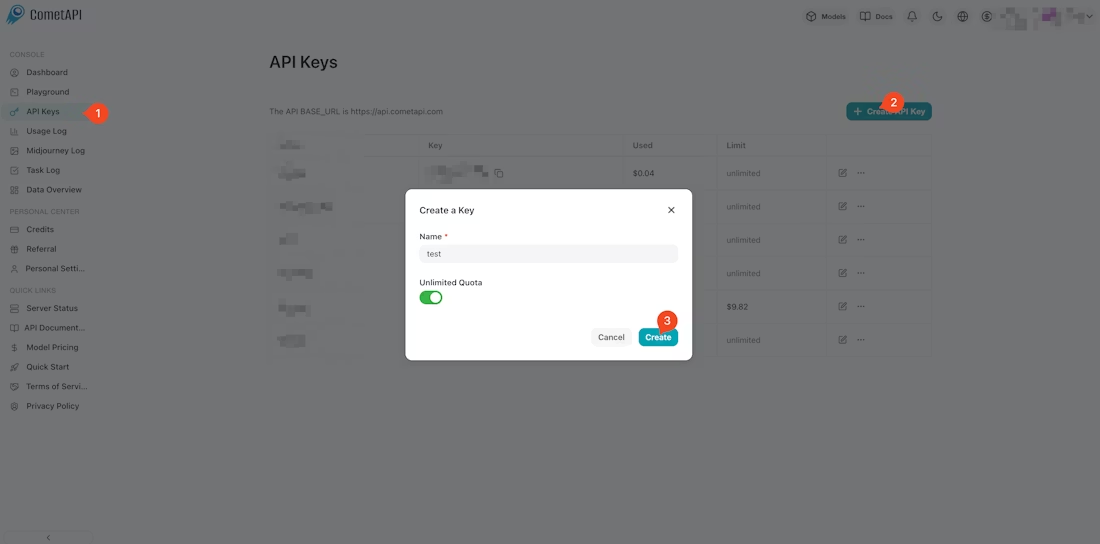
Copy your secret key (formatted as sk-xxxx) and take note of the unified Base URL: https://api.cometapi.com/v1.
Add an external OpenAI connection
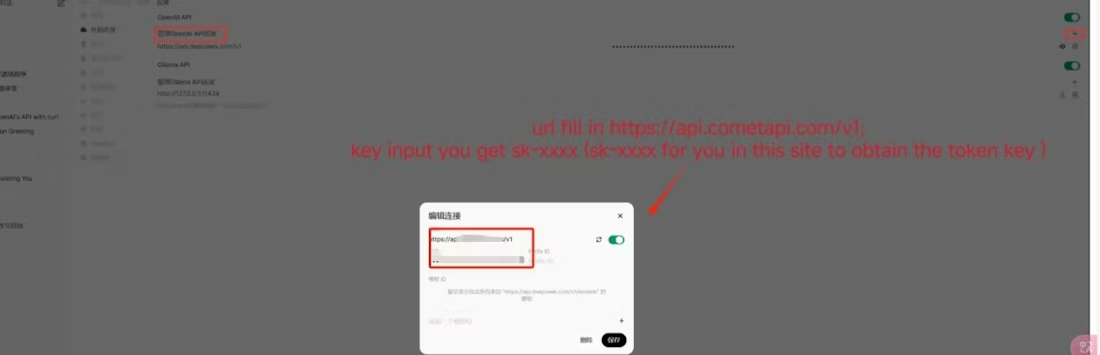
Open your Open WebUI interface and log in as an administrator. Navigate to Admin Panel → Settings → External Connections .
- Enable the toggle for External Link OpenAI API.
- API Address: Enter
https://api.cometapi.com/v1. - Key: Paste your CometAPI secret key.
Click Save to apply the configuration. This tells Open WebUI to fetch the available model list from CometAPI and route all chat completions through the unified gateway .
Test the connection
Return to the main chat interface and click the model selection dropdown at the top. You should now see a list of over 500 models populated from the CometAPI catalog . Select a flagship model ID, such as GPT 5.5 or Claude Opus 4.7, and send a test message. A successful reply verifies that your instance is communicating correctly with the infrastructure.
Real-World Use Case Examples
Collaborative Research Lab
Configure Open WebUI to use Claude Opus 4.7. Utilize its 1-million-token context window to analyze massive sets of research papers or legal PDFs. By routing through CometAPI, you process these documents at a 20% discount ($4/M tokens vs $5/M tokens) while benefiting from multi-region stability.
Enterprise Development Assistant
Switch between GPT-5.3 Codex for active development and DeepSeek V4 Pro for repository-wide refactoring. Open WebUI's interface allows your engineers to switch between these "coding specialists" instantly within the same thread, utilizing the unified endpoint to keep billing consolidated under one invoice.
Troubleshooting Common Issues
API returns a 401 Unauthorized error
This error indicates an authentication failure. Verify that your API key was copied correctly without leading or trailing spaces. Ensure your account has a positive credit balance; while registration is free, you must have active credits to make production calls.
Model list fails to load
If models do not appear in the dropdown, check the API Address field. Ensure it is exactly https://api.cometapi.com/v1. If your specific version of Open WebUI handles pathing differently, try removing the /v1 suffix and using https://api.cometapi.com .
Connection timeouts during reasoning
Some advanced reasoning models take longer to generate the first token. Ensure that your Open WebUI network timeout is set to at least 60 seconds. For daily high-frequency chat, switch to "Flash" tier models like DeepSeek V4 Flash, which are optimized for sub-second responses.
Conclusion: Build Your Ultimate AI Workspace Today
Connecting Open WebUI to CometAPI delivers a powerful, economical, and future-proof AI platform. You gain access to hundreds of top models through one elegant interface, with substantial cost savings, low latency, and full customization.
Ready to Get Started?
- Install OpenWebUI.
- Sign up for CometAPI and grab your key + 1M free tokens.
- Follow the connection steps above.
- Visit CometAPI for API docs, pricing, and the latest model list. Experiment today and transform how you interact with AI.
FAQ
Q: Do I need separate keys for GPT, Claude, and Gemini in Open WebUI?
A: No. One CometAPI key gives you access to over 500 models from all major providers.
Q: Is CometAPI really 20-40% cheaper than official providers?
A: Yes. CometAPI uses bulk purchasing power to secure wholesale rates, which are passed to users as permanent discounts on every call.
Q: Can I use CometAPI alongside local Ollama models?
A: Yes. Open WebUI supports multiple external connections. you can maintain Ollama for local, lightweight models and use CometAPI for frontier-level reasoning within the same UI.
Q: Does this integration support image and document uploads?
A: Yes. Any vision-capable model (like GPT 5.5 or Claude 4.7) will support multimodal inputs through the Open WebUI interface when connected via the CometAPI gateway.
Q: Are my conversations private?
A: CometAPI follows a strict zero-data-retention policy. Prompts and completions are never stored or used to train future model iterations.