How to Use Deepseek v3.2 API
DeepSeek released DeepSeek V3.2 and a high-compute variant DeepSeek-V3.2-Speciale, with a new sparse-attention engine (DSA), improved agent/tool behaviour and a “thinking” (chain-of-thought) mode that surfaces internal reasoning. Both models are available via DeepSeek’s API (OpenAI-compatible endpoints) and model artifacts / technical reports are published publicly.
What is DeepSeek V3.2?
DeepSeek V3.2 is the production successor in the DeepSeek V3 family — a large, long-context generative model family that is explicitly engineered for reasoning-first workflows and agent use. V3.2 consolidates prior experimental improvements (V3.2-Exp) into a mainstream model line exposed via DeepSeek’s app, web UI and API. It supports both fast, conversational outputs and a dedicated thinking (chain-of-thought) mode suitable for multi-step reasoning tasks such as math, debugging, and planning.
Why V3.2 matters (quick context)
DeepSeek V3.2 is notable for three practical reasons:
- Long context: Up to 128k token context windows, which makes it suitable for long documents, legal contracts, or multi-document research.
- Reasoning-first design: The model integrates chain-of-thought (“thinking”) into workflows and into tool usage — a shift toward agentic apps that need intermediate reasoning steps.
- Cost & efficiency: The introduction of DSA (sparse attention) reduces compute for long sequences, enabling much cheaper inference for large contexts.
What is DeepSeek-V3.2-Speciale and how does it differ from the base v3.2?
What makes the “Speciale” variant special?
DeepSeek V3.2-Speciale is a high-compute, high-reasoning variant of the v3.2 family. Compared with the balanced v3.2 variant, Speciale is tuned (and post-trained) specifically for multi-step reasoning, math, and agentic tasks; it uses extra reinforcement learning from human feedback (RLHF) and expanded internal chain-of-thought during training. That temporary endpoint and the Speciale API access were announced as time-bounded (reference a December 15, 2025 endpoint expiry for the Speciale path).
Performance and benchmarks
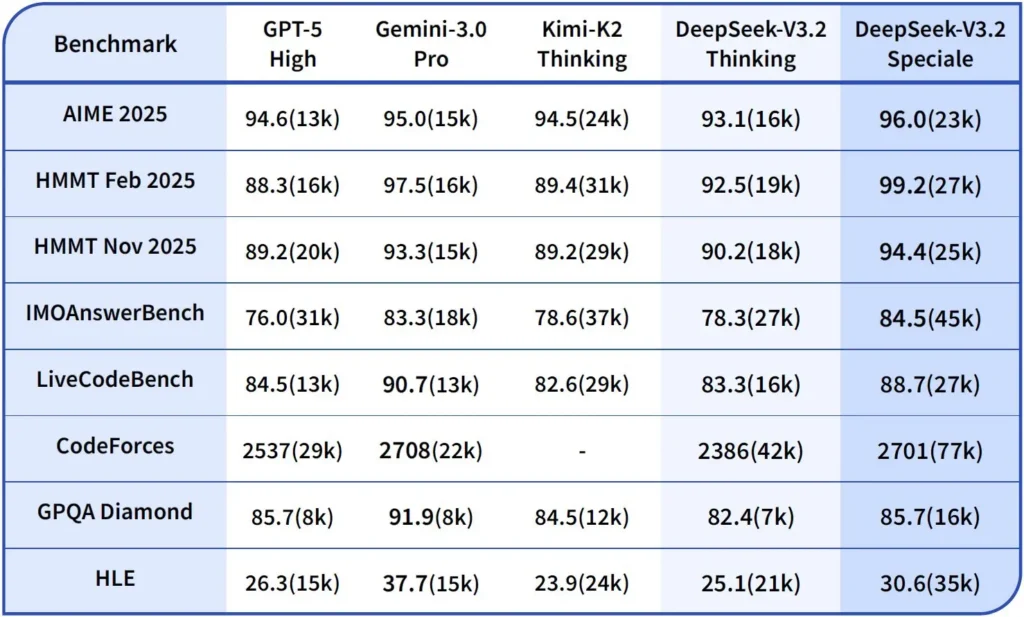
DeepSeek-V3.2-Speciale is the high-compute, reasoning-optimized variant of V3.2. The Speciale version integrates the previous mathematical model DeepSeek-Math-V2, It’s positioned as the model to use when the workload requires the deepest possible chain-of-thought, multi-step problem solving, competitive reasoning (e.g., mathematical olympiad style), and complex agentic orchestration.
It can prove mathematical theorems and verify logical reasoning on its own; It has achieved remarkable results in multiple world-class competitions:
- IMO (International Mathematical Olympiad) Gold Medal
- CMO (Chinese Mathematical Olympiad) Gold Medal
- ICPC (International Computer Programming Contest) 2nd Place (Human Contest)
- IOI (International Olympiad in Informatics) 10th Place (Human Contest)
What is Reasoning Mode in DeepSeek v3.2?
DeepSeek exposes an explicit thinking / reasoning mode which causes the model to produce a Chain-of-Thought (CoT) as a discrete part of the output before the final answer. The API surfaces this CoT so client applications can inspect, display, or distill it.
Mechanics — what the API provides
reasoning_contentfield: when thinking mode is enabled the response structure includes areasoning_contentfield (the CoT) at the same level as the finalcontent. This lets clients programmatically access the internal steps.- Tool calls during thinking: V3.2 claims to support tool calls within the thinking trajectory: the model can interleave reasoning steps and tool invocations, which improves complex task performance.
How DeepSeek v3.2 API implements reasoning
Version 3.2 introduces a standardized reasoning chain API mechanism to maintain consistent reasoning logic across multi-turn conversations:
- Each reasoning request contains a
reasoning_contentfield within the model; - If the user wants the model to continue reasoning, this field must be passed back to the next turn;
- When a new question begins, the old
reasoning_contentmust be cleared to prevent logical contamination; - The model can execute the “reasoning → tool call → re-reasoning” loop multiple times in reasoning mode.
How do I access and use DeepSeek v3.2 API
Short: CometAPI is an OpenAI-style gateway that exposes many models (including DeepSeek families) via https://api.cometapi.com/v1 so you can swap models by changing the model string in requests. Sign up at CometAPI and get your API key first.
Why use CometAPI vs direct DeepSeek?
- CometAPI centralizes billing, rate-limits and model selection (handy if you plan to switch providers without changing code).
- Direct DeepSeek endpoints (e.g.,
https://api.deepseek.com/v1) still exist and sometimes expose provider-specific features; choose CometAPI for convenience or the direct vendor endpoint for provider-native controls. Verify which features (e.g., Speciale, experimental endpoints) are available through CometAPI before relying on them.
Step A — Create a CometAPI account and get an API key
- Go to CometAPI (signup / console) and generate an API key (the dashboard typically shows
sk-...). Keep it secret. CometAPI
Step B — Confirm the exact model name available
- Query the models list to confirm the exact model string CometAPI exposes (model names can include variant suffixes). Use the models endpoint before hardcoding names:
curl -s -H "Authorization: Bearer $COMET_KEY" \
  https://api.cometapi.com/v1/models | jq .
Look for the DeepSeek entry (e.g. deepseek-v3.2 or deepseek-v3.2-exp) and note the exact id. CometAPI exposes a /v1/models listing.
Step C — Make a basic chat call (curl)
Replace <COMET_KEY> and deepseek-v3.2 with the model id you confirmed:
curl https://api.cometapi.com/v1/chat/completions \
  -H "Content-Type: application/json" \
  -H "Authorization: Bearer <COMET_KEY>" \
  -d '{
    "model": "deepseek-v3.2",
    "messages": [
      {"role":"system","content":"You are a helpful assistant."},
      {"role":"user","content":"Summarize DeepSeek v3.2 in two sentences."}
    ],
    "max_tokens":300
  }'
This is the same OpenAI-style call pattern — CometAPI forwards to the selected provider.
Compatibility and Precautions
- Supports enabling Think Mode in the Claude Code environment;
- In the command line (CLI), simply enter the model name deepseek-reasoner;
- However, it may not be compatible with non-standard tools such as Cline and RooCode for the time being;
- It is recommended to use non-Think Mode for ordinary tasks and Think Mode for complex logical reasoning.
Practical adoption patterns: a few example architectures
1 — Assistive agent for developer workflows
- Mode: Speciale (thinking mode) invoked for complex code generation and test creation; fast chat mode for inline assistant.
- Safety: Use CI pipeline checks and sandboxed test execution for generated code.
- Hosting: API or self-hosted on vLLM + multi-GPU cluster for large context.
2 — Document analysis for legal/finance teams
- Mode: V3.2 with DSA long-context optimizations to process long contracts and produce structured summaries and action lists.
- Safety: Human attorney sign-off for downstream decisions; PII redaction before sending to hosted endpoints.
3 — Autonomous data pipeline orchestrator
- Mode: Thinking mode to plan multi-step ETL tasks, call tools to query databases and call validation tests.
- Safety: Implement action confirmation and verifiable checks before any irreversible operation (e.g., destructive DB write).
Each of the above patterns is feasible with V3.2 family models today, but you must pair the model with verification tooling and conservative governance.
How do I optimize cost and performance with v3.2?
Use the dual modes deliberately
- Fast mode for micro-interactions: Use the non-thinking tool mode for short retrievals, format conversions, or direct API calls where latency matters.
- Thinking mode for planning and verification: Route complex tasks, multi-action agents, or safety-sensitive decisions to thinking mode. Capture the intermediate steps and run a verification pass (automated or human) before executing critical actions.
Which model variant should I pick?
- deepseek-v3.2 — balanced production model for general agentic tasks.
- deepseek-v3.2-Speciale — specialized heavy-reasoning variant; may be API-only initially and used when you need the best possible reasoning/benchmark performance (and accept potentially higher cost).
Practical cost controls and tips
- Prompt engineering: keep system instructions concise, avoid sending redundant context. Explicit system instructions: Use system prompts that declare mode intent: e.g., “You are in THINKING mode — list your plan before calling tools.” For tool mode, add constraints like “When interacting with the calculator API, only output JSON with the following fields.”
- Chunking + retrieval augmentation: use an external retriever to only send the most relevant segments for each user question.
- Temperature and sampling: Lower temperature for tool interactions to increase determinism; raise it in exploratory or ideation tasks.
Benchmark and measure
- Treat outputs as untrusted until verified: Even reasoning outputs can be incorrect. Add deterministic checks (unit tests, type checks) before taking irreversible actions.
- Run A/B tests on a sample workload (latency, token usage, correctness) before committing to a variant. v3.2 reported large gains on reasoning benchmarks, but real app behavior depends on prompt design and input distribution.
FAQs
Q: What is the recommended way to get CoT from the model?
A: Use the deepseek-reasoner model or set thinking/thinking.type = enabled in your request. The response includes reasoning_content (CoT) and the final content.
Q: Can the model call external tools while in thinking mode?
A: Yes — V3.2 introduced the ability for tools to be used in both thinking and non-thinking modes; the model can emit structured tool calls during internal reasoning. Use strict mode and clear JSON schemas to avoid malformed calls.
Q: Does using thinking mode increase cost?
A: Yes — thinking mode outputs intermediate CoT tokens, which increases token usage and therefore cost. Design your system to enable thinking only when necessary.
Q:What endpoint and base URL should I use?
A: CometAPI provides OpenAI-compatible endpoints. The default base URL is https://api.cometapi.com and the primary chat endpoint is /v1/chat/completions (or /chat/completions depending on the base URL you pick).
Q: Is special tooling required to use tool calling?
A: No — the API supports structured function declarations in JSON. You need to provide the tools parameter, the tool schemas and handle the JSON-function lifecycle in your application: receive function-call JSON, execute the function, then return results to the model for continuation or closure. Thinking mode adds a requirement to pass back reasoning_content alongside tool results.
Conclusion
DeepSeek V3.2 and DeepSeek-V3.2-Speciale represent a clear push toward open, reasoning-centric LLMs that make chain-of-thought explicit and support agentic tool workflows. They offer powerful new primitives (DSA, thinking mode, tool-use training) that can simplify building trustworthy agents—provided you account for token costs, careful state management, and operational controls.
Developers can access Deepseek v3.2 API etc through CometAPI, the latest model version is always updated with the official website. To begin, explore the model’s capabilities in the Playground and consult the API guide for detailed instructions. Before accessing, please make sure you have logged in to CometAPI and obtained the API key. CometAPI offer a price far lower than the official price to help you integrate.
Ready to Go?→ Free trial of deepseek v3.2 !
If you want to know more tips, guides and news on AI follow us on VK, X and Discord!