
TLDR , xAI officially launched Quality Mode for its Grok Imagine API On May 6, 2026, marking a significant advancement in AI-powered image generation and editing. Targeted at enterprise developers and creative teams, this model delivers higher realism, stronger multilingual text rendering, and superior creative control compared to previous versions.
Grok Imagine API at a Glance
| Feature | Grok Imagine Image Standard | Grok Imagine Image Quality |
|---|---|---|
| Visual Realism | High | Significantly Enhanced |
| Text Rendering | Good | Improved Multilingual Accuracy |
| Creative Control | Standard | Advanced Prompt Adherence |
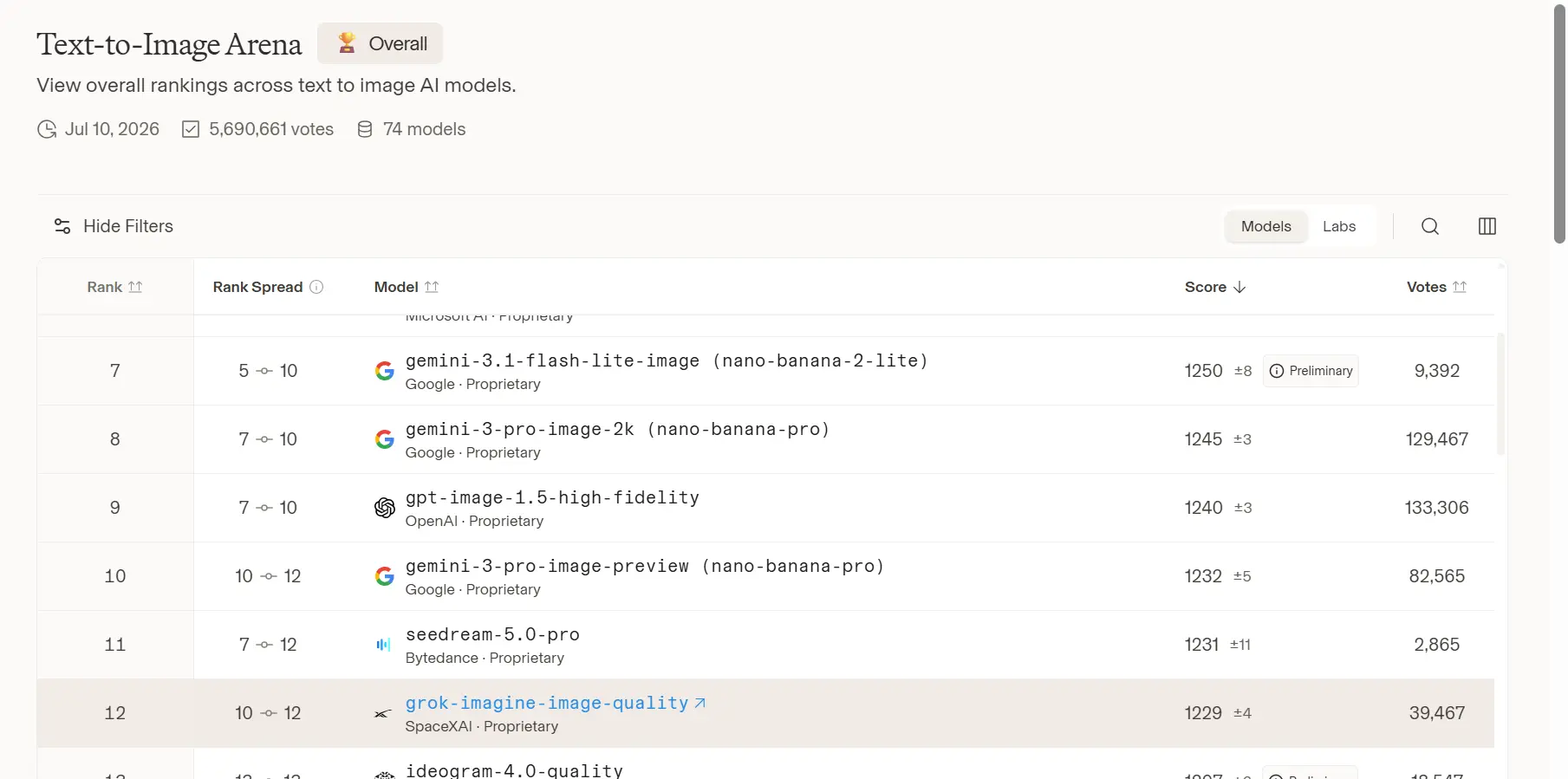
| Benchmark Ranking | Competitive | Top 5 in LMArena |
| Enterprise API Access | Yes | Yes |
| Pricing | Variable | From $0.01 per input image |
| Realism Level | Good | Photorealistic Editorial Grade |
| Best for | Legacy workflows still migrating | New production image generation and editing |
| Price / limits | $0.07 per output image; $0.002 per input image, it will be deprecated on May 15, 2026. | $0.05 per output image; $0.01 per input image; 1K/2K; up to 10 images/request; 300 RPM |
Grok Imagine Quality Mode isn't just an incremental update—it's a leap forward designed for production workflows where quality, consistency, and brand fidelity matter most. Whether generating photorealistic product visuals, marketing assets, or complex scene compositions with embedded text, this model sets new standards.
As a leading AI API aggregator, CometAPI.com makes accessing cutting-edge models like Grok Imagine Quality seamless, with competitive pricing, unified billing, and easy integration.
What is the Grok Imagine Image Quality Model?
Grok Imagine Image Quality (model identifier: grok-imagine-image-quality) is xAI's premium image generation and editing model. It prioritizes fidelity, detail, and adherence over raw speed, making it ideal for professional applications.
Key Capabilities
- Higher Realism: Fine details, accurate textures, natural skin pores/imperfections, realistic lighting, physics, and material rendering.
- Stronger Text Rendering: Clean, legible, multilingual text integration in images — a historical weakness for many AI generators.
- Superior Creative Control: Tighter prompt adherence, deeper scene understanding, consistent character/brand outputs, and effective reference image usage.
- Resolution: Supports up to 2K (2048x2048) outputs.
- Editing Features: Image-to-image transformations, style transfers, object addition/removal, and multi-step refinements.
It builds on xAI's Aurora engine foundation and integrates seamlessly with video generation for end-to-end workflows (image-to-video with native audio).
Benchmark Performance and Rankings
Grok Imagine Image ranks among the strongest models on independent leaderboards and specifically highlights Text-to-Image Arena — 12, citing the Arena state as of July, 2026.
Artificial Analysis and Other Metrics:
- High Elo scores in image quality arenas, particularly for photorealism, composition, and text rendering.
- Competitive latency-quality trade-off; Quality Mode prioritizes fidelity (e.g., ~4-20+ seconds per image depending on platform and resolution).
Core advantages of Grok Imagine Image Quality
1) Better realism and texture fidelity
Judging from the official case studies, this mode is able to capture extremely natural skin textures, pore details, and complex light and shadow variations. Whether simulating the film texture of medium format editorial photography or recreating the dappled shadows of trees on an Italian summer afternoon, the new model demonstrates greater professionalism in material representation and architectural composition.
Quality Mode significantly improves:
- Depth of field accuracy
- Skin texture realism
- Lighting gradients
- Architectural composition
- Material rendering (fabric, metal, glass)
2) Stronger text rendering
Text inside images is one of the classic pain points for image models. xAI specifically calls out clean, multilingual text capabilities, which is a notable selling point for banners, posters, packaging concepts, social graphics, and event assets.
3) Better prompt following
Grok Imagine Image Quality offers tighter prompt following, deeper scene and world understanding, and more consistent brand results. That matters because many image models can make pretty pictures, but they break down the moment you ask for specific composition, layout, or brand constraints. xAI is clearly leaning into that gap.
Quality Mode offers tighter prompt following and deeper scene understanding. That means the model is optimized not only for visual polish, but also for adherence to your creative brief. In practice, this is what reduces “close, but not quite” outputs.
How to Use Grok Imagine Image API in CometAPI
Grok Imagine Image uses flat per-image pricing rather than token-based image pricing like text models. Second, the platform limits requests to a maximum of 10 images per request, generated URLs are temporary, and content moderation is applied to generated outputs. Those are the kinds of details that matter when you are shipping to users instead of testing in a sandbox.
Step 1: Access via xAI or Aggregator
Access CometAPI for unified access and better rates.
Step 2: Authentication and Setup
- Obtain API key from CometAPI dashboard.
- Use Python SDK or REST/compatible clients.
Key Parameters
- Seed: For reproducibility.
- Prompt: Detailed natural language.
- Reference Images: For consistency.
- Resolution: 1K or 2K.
- Editing Modes: Image-to-image, inpainting, etc.
Multi-image editing
The images.edit() method in the OpenAI SDK does not support xAI image editing because OpenAI's workflow uses the <script> tag for multipart/form-data, while xAI requires the <script> tag for application/json. xAI recommends using its own SDK, the Vercel AI SDK, or sending a direct HTTP request for image editing. The CometAPI implements xAI's image API mode. This is an important implementation detail for any user needing to deliver practical applications.
Grok Imagine Image Quality Model also supports multi-image editing with up to three source images. This as useful for combining subjects, transferring styles across references, and composing scenes from multiple visual inputs. That is a serious creative lever for ads, product visuals, character consistency, and reference-driven design.
How to prompt Grok Imagine-Image Quality
Use a production-style prompt structure
A reliable prompt usually has five parts: subject, scene, style, camera/composition, and constraints.
For example:
Subject: “A luxury electric SUV on a wet city street at night”
Scene: “Neon reflections, light rain, downtown skyline”
Style: “Photorealistic commercial photography”
Composition: “Low angle, cinematic framing, shallow depth of field”
Constraints: “No extra text, logo centered on the grille, realistic wheels”
This kind of structure works well with a model that emphasizes scene understanding and prompt adherence.
Be explicit about typography
Because xAI highlights stronger text rendering, this model is a good fit for posters, ads, and social graphics that need legible copy. Still, the prompt should specify the exact text, placement, and hierarchy. For instance: “Place the headline at top center, use clean sans-serif typography, and keep the tagline below the product.” That is a practical prompting habit, not a guarantee, but it takes advantage of the model’s stated text strengths.
Tell the model what not to do
Negative constraints help a lot in marketing and brand work. Add phrases like: “no distorted hands,” “no extra fingers,” “no blurred text,” “no cropped subject,” or “no watermark.” Even when a model is strong, constraints usually improve consistency.
Use reference images for precision
xAI’s image editing docs show that you can provide a source image as a public URL or a base64-encoded data URI, then describe the edit in natural language. That is extremely useful for style transfers, product redesigns, and iterative creative work.
Try prompt patterns by use case
Product hero image: “Create a premium hero shot of a matte-black electric truck parked on red Martian terrain, cinematic lighting, clean reflections, luxury automotive advertising style, no extra objects, add the tagline ‘Drive Beyond Earth’ in a centered headline.”
Brand ad variation: “Create a social ad in 1:1 format for a coffee brand, warm morning light, minimalist tabletop composition, include visible packaging, leave empty space for copy, modern editorial style.”
Style transfer: “Render this image as an oil painting in the style of impressionism.” xAI’s docs explicitly show style transfer across photo, oil painting, pencil sketch, pop art, anime, and watercolor.
Multilingual poster: “Create a Japanese travel poster with bold headline text, cherry blossoms, Mount Fuji silhouette, and modern minimalist layout.” This is the kind of prompt that benefits from xAI’s stated text-rendering improvements.
Prompting tips that actually help
Use aspect_ratio deliberately. xAI documents 1:1 for social and thumbnails, 16:9 for widescreen, 9:16 for stories and mobile, and several other ratios for banners, portraits, and modern smartphone displays. The ratio choice changes the composition more than many people expect.
Use resolution deliberately too. Grok Imagine Image Quality currently supports 1K and 2K outputs. If the image is for a high-visibility landing page, hero banner, or print-like campaign asset, 2K is the safer default; for fast iteration or internal review, 1K is usually enough.
Use multi-image editing when you need consistency. A single reference image is good; multiple references are better when you need subject alignment, a product in context, or a composite scene that still feels coherent. Grok Imagine Image Quality explicitly support up to three source images in one edit.
CometAPI Advantages for Grok Imagine Users:
- Competitive Pricing: Often lower effective rates than direct with usage-based plans.
- Unified Endpoint: Switch between Grok Imagine Image Quality, base models, video, Grok 4.5 reasoning, and competitors (Claude, Gemini, etc.) without code changes.
- Reliability: Load balancing, fallback, and high availability.
- Monitoring & Analytics: Track usage, costs, and performance.
- Easy Onboarding: $1 credit on signup; comprehensive docs and SDKs.
- Scalability: Perfect for startups to enterprises building image-heavy apps, marketing tools, or creative platforms.
Recommendation: For developers prioritizing speed-to-market and cost-efficiency, start with CometAPI's Grok integration. It handles authentication, rate limits, and optimizations so you focus on building. Visit CometAPI to get your key and test Grok Imagine Image Quality today.
Future Outlook and Conclusion
xAI's rapid iteration—evident in Quality Mode's release and ongoing video enhancements—positions Grok Imagine as a leader in multimodal AI. Expect further improvements in speed, resolution, and video integration.
Grok Imagine Quality Mode represents the state-of-the-art for high-fidelity, controllable image generation in 2026. Its combination of realism, text prowess, and enterprise features makes it indispensable for professional creators and developers.
Ready to integrate? Head to CometAPI for frictionless access to Grok Imagine Quality and the full xAI suite — plus hundreds of other models — under one roof. Sign up today, claim your credits, and elevate your visual content pipeline.