
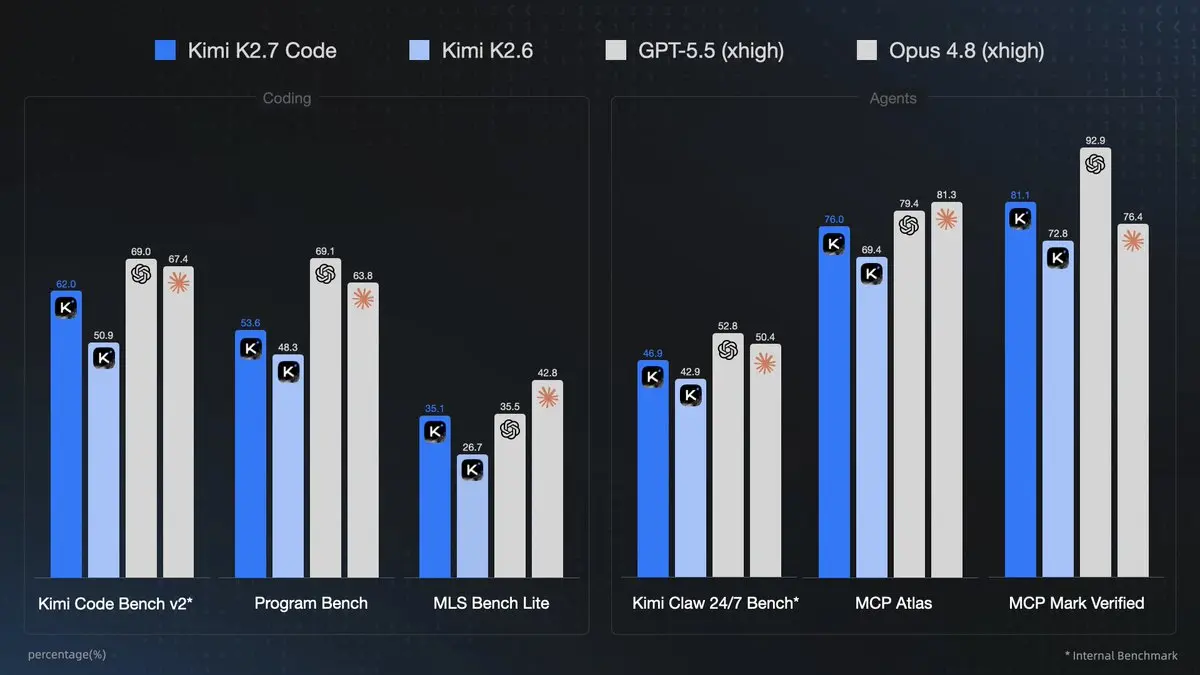
Kimi K2.7 Code, released by Moonshot AI on June 12, 2026, stands as the company's most capable coding-focused model yet. This 1T-parameter Mixture-of-Experts (MoE) model activates roughly 32B parameters per token, features a 256K–262K token context window, native multimodal support (text + vision), forced thinking mode, and enhanced agentic tool-calling capabilities. It delivers significant gains over K2.6, including +21.8% on Kimi Code Bench v2, improved instruction following in long contexts, and ~30% lower reasoning token usage for more efficient agent workflows.
For developers and teams seeking cost-effective, high-performance access without managing multiple API keys, CometAPI provides seamless integration. CometAPI offers competitive pricing (around $0.76/1M tokens for Kimi K2.7 Code) alongside 500+ other models, making it ideal for production scaling, testing, and unified workflows.
What Kimi K2.7 Code is
Kimi K2.7 Code is a coding-focused agentic model built on the Kimi K2.6 architecture. It is a 1T-parameter MoE model with 32B active parameters, a 256K context window, and strong long-horizon coding and agentic performance. In practice, that means it is designed to understand a big codebase, plan changes across files, call tools, verify outputs, and keep going without losing the thread.
The most important product distinction is simple: K2.7 Code is not a “chat-first” model with coding as an add-on. It is a code-first, thinking-first model that is meant for software engineering workflows where reasoning, tool use, and iteration are part of the job. That is why it is especially attractive for coding agents, IDE assistants, repo reviewers, and automated testing pipelines.
Why Kimi K2.7 Code Stands Out in 2026
- Coding Supremacy: Superior long-context instruction following and higher end-to-end task success rates. Ideal for full-stack app development, debugging large codebases, and iterative refinement.
- Multimodal Native Support: Text + images + videos for vision-to-code tasks (e.g., generate React components from a video demo).
- Agentic Power: Reliable multi-step tool calling with preserved reasoning content.
- Efficiency: 30% lower reasoning token usage translates to cost and speed gains.
How to use Kimi K2.7 Code API through CometAPI
CometAPI exposes Kimi K2.7 Code through an OpenAI-compatible endpoint, which is exactly what most teams want: one integration pattern, many model options. CometAPI’s model page lists Kimi K2.7 Code at $0.76/M input tokens and $3.19998/M output tokens(use kimi-k2.7-code).
Step 1: get your CometAPI key
Create a CometAPI account and generate an API key from the CometAPI console. For production systems, store the key in environment variables or secret managers rather than hardcoding it into your application. CometAPI’s own documentation recommends OpenAI-compatible SDK patterns to accelerate adoption.
Step 2: install the OpenAI SDK
The Kimi API is OpenAI-compatible, and CometAPI follows the same basic pattern. In Python:
pip install --upgrade openai
Step 3: send your first text request
Here is a clean Python example for CometAPI:
import os
from openai import OpenAI

client = OpenAI(
    api_key=os.environ["COMETAPI_KEY"],
    base_url="https://api.cometapi.com/v1",
)

response = client.chat.completions.create(
    model="kimi-k2.7-code",
    messages=[
        {"role": "system", "content": "You are a senior software engineer."},
        {"role": "user", "content": "Refactor this Python function for readability and add type hints."}
    ],
    max_completion_tokens=2048,
    stream=False,
)

print(response.choices[0].message.content)
That request shape works because CometAPI and Kimi both follow OpenAI-style chat completion semantics, and K2.7 Code supports messages, tools, streaming, and multimodal content blocks in the same endpoint family.
Step 4: use streaming for a better product experience
For interactive coding assistants, streaming should be your default. CometAPI explicitly recommends streaming for production UX, and Kimi’s chat endpoint supports stream: true. Streaming matters because code-generation tasks often feel better when users can watch the model think, sketch a plan, and then produce code progressively.
response = client.chat.completions.create(
    model="kimi-k2.7-code",
    messages=[
        {"role": "system", "content": "You are a coding assistant."},
        {"role": "user", "content": "Write a fast API route in FastAPI for uploading CSV files."}
    ],
    stream=True,
    max_completion_tokens=2048,
)

for event in response:
    delta = event.choices[0].delta
    if getattr(delta, "content", None):
        print(delta.content, end="")
Multimodal Tool Capability: File Uploads, Supported Formats, Workflow
Kimi K2.7 Code supports native multimodal inputs, enabling vision-to-code workflows like analyzing screenshots, diagrams, videos, or documents for code generation/extraction.
Kimi K2.7 Code supports multimodal messages with text, image_url, and video_url blocks. Official docs also provide file management endpoints for extraction, image understanding, and video analysis. The upload API currently allows up to 1,000 files per user, each file up to 100 MB, with a 10 GB total upload cap, and the file parsing service is currently free but may be rate-limited during peak traffic.
When to use file upload instead of base64
Use file upload when the asset is large, reused across multiple prompts, or likely to hit request-body limits. Recommend file upload for very large videos and for images or videos referenced multiple times. Request-body size is a practical constraint, and the vision docs say URL-formatted images are not supported there, with base64 required for direct image content.
File Upload Restrictions:
- Request body size limits apply (use file upload API for large videos instead of base64).
- For repeated use or large files: Upload via
/v1/filesendpoint and reference by ID. - No URL-formatted images (base64 only for inline). Image quantity flexible but total size ≤~100MB per request.
Supported Formats:
- Images: png, jpeg, webp, gif (recommended ≤4K resolution).
- Videos: mp4, mpeg, mov, avi, x-flv, mpg, webm, wmv, 3gpp (recommended ≤2K resolution).
- Documents: For file uploads, Kimi accepts a wide range of formats including PDFs, DOCX, XLSX, PPTX, Markdown, HTML, JSON, images (with OCR),many code files, and common image types.
Sample workflow: upload a PDF, extract content, then analyze it
import os
from pathlib import Path
from openai import OpenAI

client = OpenAI(
    api_key=os.environ["COMETAPI_KEY"],
    base_url="https://api.cometapi.com/v1",
)

# 1) Upload the file for extraction
file_obj = client.files.create(
    file=Path("system-design-spec.pdf"),
    purpose="file-extract",
)

# 2) Fetch extracted content
extracted_text = client.files.content(file_id=file_obj.id).text

# 3) Send the extracted text to Kimi K2.7 Code
response = client.chat.completions.create(
    model="kimi-k2.7-code",
    messages=[
        {"role": "system", "content": "You are a technical reviewer."},
        {
            "role": "user",
            "content": (
                "Review the following design document and identify missing API edge cases:\n\n"
                f"{extracted_text}"
            ),
        },
    ],
    max_completion_tokens=3000,
)

print(response.choices[0].message.content)
Sample workflow: analyze an image inline
import base64
from pathlib import Path
from openai import OpenAI
import os

client = OpenAI(
    api_key=os.environ["COMETAPI_KEY"],
    base_url="https://api.cometapi.com/v1",
)

img_path = Path("ui-mockup.png")
img_b64 = base64.b64encode(img_path.read_bytes()).decode("utf-8")

response = client.chat.completions.create(
    model="kimi-k2.7-code",
    messages=[
        {
            "role": "user",
            "content": [
                {"type": "text", "text": "Review this UI mockup for accessibility issues."},
                {"type": "image_url", "image_url": {"url": f"data:image/png;base64,{img_b64}"}},
            ],
        }
    ],
    max_completion_tokens=1500,
)

print(response.choices[0].message.content)
Sample workflow: video analysis with a tool loop
The official quickstart demonstrates a multimodal tool loop where the model asks to inspect a video clip, your code extracts that clip, and you feed the result back as tool output. That is the right mental model for K2.7 Code: the model plans, the tool executes, and the model continues with the new evidence.
mental model for K2.7 Code: the model plans, the tool executes, and the model continues with the new evidence.
import base64
from pathlib import Path
from openai import OpenAI
import os

client = OpenAI(
    api_key=os.environ["COMETAPI_KEY"],
    base_url="https://api.cometapi.com/v1",
)

img_path = Path("ui-mockup.png")
img_b64 = base64.b64encode(img_path.read_bytes()).decode("utf-8")

response = client.chat.completions.create(
    model="kimi-k2.7-code",
    messages=[
        {
            "role": "user",
            "content": [
                {"type": "text", "text": "Review this UI mockup for accessibility issues."},
                {"type": "image_url", "image_url": {"url": f"data:image/png;base64,{img_b64}"}},
            ],
        }
    ],
    max_completion_tokens=1500,
)

print(response.choices[0].message.content)
Parameters differences in request body vs K2.6
This is the section teams usually skim too fast, and that is where the pain starts. K2.7 Code shares the same general chat-completions shape as K2.6, but several request-body behaviors are locked down. That temperature is fixed at 1.0, top_p at 0.95, n at 1, and both presence_penalty and frequency_penalty at 0.0. More importantly, the model will error if you try to disable thinking.
Here is the practical version for engineers: do not tune K2.7 Code like a general-purpose creative model. Keep the defaults, focus on good prompts, and spend your effort on task framing, tool design, and verification. In other words, the model is less about “randomness control” and more about “workflow control.
Kimi K2.7 Code vs K2.6: the request-body differences that matter
| Feature | Kimi K2.7 Code | Kimi K2.6 | Why it matters |
|---|---|---|---|
| Thinking mode | Always on; "disabled" errors | Can be enabled or disabled | K2.7 is simpler for agent workflows because you do not toggle thinking per request. |
| Preserved Thinking | Always on; thinking.keep is treated as "all" | Optional via thinking.keep | Multi-turn coding sessions must keep reasoning_content intact. |
| Temperature | Fixed at 1.0 | Configurable | You should not tune K2.7 with arbitrary sampling values. |
| Top-p | Fixed at 0.95 | Configurable | Keep the model on its supported defaults. |
| n | Fixed at 1 | Configurable | You get one result per request, which fits agent loops well. |
| Penalties | Fixed at 0.0 | Configurable | Avoid passing unsupported tuning knobs. |
| Context | 256K | 256K | Both can handle large repos, but K2.7 is more coding-specialized. |
| Output speed | High-speed variant ~180 tokens/s, up to 260 in short contexts | Not highlighted the same way | Useful when latency matters more than absolute control. |
The main takeaway is that K2.7 Code is intentionally less configurable than K2.6 in exchange for a more opinionated coding experience. You should rely on default values rather than manually fighting the model’s fixed behavior. That is a feature, not a bug, for coding agents.
Source: Official Moonshot docs. K2.7 Code forces thinking mode and preserved reasoning for reliable multi-step coding. Use extra_body for thinking params if SDK limitations arise.
These constraints reduce variability in agent loops, improving success rates but requiring workflow adjustments from general K2.6 usage.
Tool Use Compatibility and Precautions
Kimi K2.7 Code offers strong multi-turn tool calling, compatible with OpenAI/Anthropic formats. It supports official tools (web search, code runner, Excel, memory, etc.) and custom functions.
Compatibility Highlights:
- Full function/tool calling with parallel and sequential support.
- Interleaved thinking + tool calls preserved across turns.
- Works well with agent frameworks like Kimi Code CLI, Hermes Agent, VS Code extensions, Cline/RooCode.
Precautions (Critical for Stability):
- tool_choice: Strictly "auto" or "none". Other values cause errors.
- Multi-step: Always retain the full assistant message (including reasoning_content) in subsequent messages array. Dropping it triggers errors.
- Context Management: With 256K context, summarize or prune judiciously; vision adds token overhead.
- Rate Limits/Budgets: Set daily spending limits on Moonshot/CometAPI projects. Monitor for peak-time parsing delays on files.
- Vision + Tools: Large files must use upload endpoint; test resolution limits.
- Error Handling: Implement retries for tool call loops; model may need explicit guidance in system prompts for complex agents.
Why CometAPI is a smart way to ship this model
CometAPI’s biggest advantage is not just access; it is integration friction reduction. The platform presents Kimi K2.7 Code through a single OpenAI-compatible endpoint, which means you can reuse the same SDKs, middleware, retries, streaming code, and observability pattern you already use for other providers. CometAPI’s model page also positions the service as a lower-cost route versus the official list price, with a published 20% discount on the K2.7 Code pricing page.
Conclusion: Start Building with CometAPI Today
If your product involves repo-scale coding, multi-step debugging, tool orchestration, or multimodal analysis, Kimi K2.7 Code deserves a serious look. The model’s strongest signals are not generic chat polish; they are long-context reliability, preserved reasoning, fixed-but-predictable request behavior, and better vendor-reported coding benchmark results than K2.6. Add CometAPI on top, and you get a very practical path to production: one OpenAI-compatible integration, one model switch, and a cleaner way to ship coding agents at scale.
Sign up at CometAPI, grab your key, and test Kimi K2.7 Code in minutes. For custom integrations or enterprise support, explore CometAPI docs.