
TLDR MiniMax M3 combines a 1,000,000-token context window, native text-image-video understanding, strong coding and agentic performance, and MiniMax Sparse Attention (MSA). Developers can call MiniMax M3 through CometAPI’s OpenAI-compatible gateway at https://api.cometapi.com/v1 with model ID minimax-m3.
This guide covers the model’s specifications, official benchmark data, API setup, streaming, reasoning controls, multimodal requests, tool calling, pricing, and comparisons with other 2026 frontier APIs.
Key Takeaways
- MiniMax M3 supports up to 1M tokens of context, enabling repository-scale coding and long-running agent sessions.
- The model is natively multimodal from training step zero and accepts text, image, and video input.
- Its MiniMax Sparse Attention architecture is designed to make million-token context more computationally practical. Official results include 59.0% on SWE-Bench Pro and 66.0% on Terminal-Bench 2.1, alongside strong agent and tool-use scores.
- MiniMax’s OpenAI-compatible API supports adaptive or disabled thinking, streaming, tools, and reasoning_split.
- On CometAPI, the current model ID is minimax-m3 and the main endpoint is /v1/chat/completions.
What Is MiniMax M3?
MiniMax M3 is designed around three workloads that increasingly define frontier developer models: large-scale software engineering, autonomous agent execution, and multimodal long-context reasoning. MiniMax describes M3 as a model that reaches frontier-level performance on coding and agentic tasks while combining 1M context, native multimodality, and MSA. The practical result is a model aimed less at isolated chat turns and more at workflows that accumulate files, tool results, screenshots, code changes, and reasoning state over time.
M3 is available through MiniMax’s own API ecosystem and through CometAPI’s MiniMax M3 endpoint. For developers who already use the OpenAI SDK, the CometAPI route keeps the familiar Chat Completions shape while making it easier to compare M3 with models from Anthropic, Google, Moonshot AI, and other providers.
MiniMax M3 Technical Specifications
| Specification | MiniMax M3 |
|---|---|
| Provider | MiniMax |
| Official release | June 1, 2026 |
| CometAPI model ID | minimax-m3 |
| Official API model ID | MiniMax-M3 |
| Architecture | MiniMax Sparse Attention (MSA) |
| Context window | Up to 1,000,000 tokens; MiniMax model page notes a guaranteed minimum of 512K |
| Input modalities | Text, image, video |
| Output | Text |
| Reasoning control | thinking.type = adaptive or disabled |
| Tool calling | Supported |
| Streaming | Supported |
| OpenAI-compatible API | Supported |
| CometAPI endpoint | POST /v1/chat/completions |
The context and modality figures above are confirmed in MiniMax’s API documentation, while the model architecture and release positioning come from the official M3 release.
What Makes MiniMax M3 Different?
MiniMax Sparse Attention and 1M Context
A million-token context window is useful only if the serving architecture can process it at acceptable speed and cost. M3 addresses that problem with MiniMax Sparse Attention (MSA), which first identifies relevant KV blocks and then performs sparse attention over selected regions instead of applying full quadratic attention everywhere.
MiniMax reports that at a 1M context length, M3 uses about 1/20 of the previous generation’s per-token compute, with more than 9x faster prefill and more than 15x faster decoding. These are vendor-reported engineering results rather than third-party serving measurements, but they explain why MSA is central to M3’s long-context design.
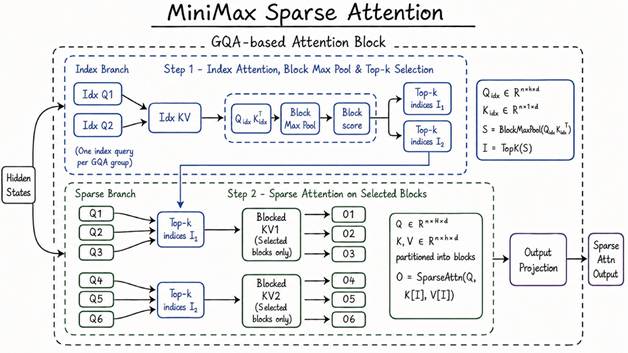
Figure 1. MiniMax Sparse Attention architecture. Source: MiniMax official M3 release
Native Multimodality
MiniMax says M3 underwent mixed-modality training from step zero, rather than adding a separate vision layer after text pretraining. In the OpenAI-compatible API, M3 accepts text, image, and video content parts. Images can be supplied with image_url and videos with video_url; supported image formats include JPEG, PNG, GIF, and WEBP, while supported video formats include MP4, AVI, MOV, and MKV.
For developers, that makes one model usable for tasks such as screenshot-based debugging, chart interpretation, UI review, technical-document analysis, and video understanding without having to route every visual input through a separate model.
Coding and Agentic Workflows
M3’s strongest public positioning is not generic chat. MiniMax focuses on bug fixing, frontend and backend development, terminal execution, performance optimization, tool invocation, and long-horizon collaboration. The official M3 benchmark set therefore emphasizes software-engineering and agent benchmarks rather than only academic QA tests.
| Benchmark | What It Tests | MiniMax M3 |
|---|---|---|
| SWE-Bench Pro | Real-world software engineering | 59.0% |
| Terminal-Bench 2.1 | Terminal-based agent tasks | 66.0% |
| SWE-fficiency | Efficient software engineering | 34.8% |
| KernelBench Hard | GPU kernel optimization | 28.8% |
| MCP Atlas | MCP / tool-use agent capability | 74.2% |
| BrowseComp | Autonomous browsing and retrieval | 83.5 |
| PostTrainBench | Autonomous post-training workflow | 0.37 |
Configurable Thinking
In MiniMax’s OpenAI-compatible API, M3 supports explicit reasoning control: thinking can be set to adaptive or disabled. If the field is omitted on MiniMax’s OpenAI-compatible endpoint, thinking is on by default. For production integrations, setting the field explicitly is safer because it makes latency and behavior easier to reproduce across environments.
Long-Horizon Agent Performance
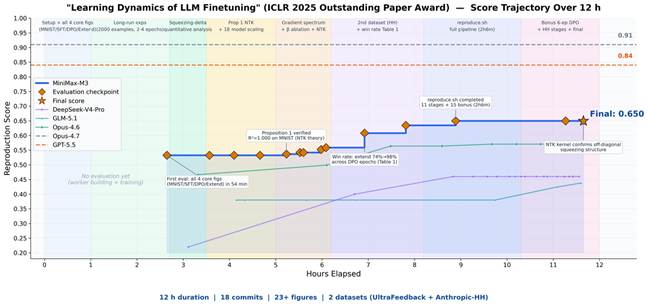
MiniMax also published two long-running case studies that show why M3’s context design matters. In a paper-reproduction task, M3 ran autonomously for nearly 12 hours, producing 18 commits and 23 experimental figures while reproducing the core experiments of an ICLR 2025 Outstanding Paper. The task required reading figures and formulas, editing code, tracking experiments, and retaining a long execution history.
In a separate CUDA kernel optimization exercise, MiniMax reports 147 benchmark submissions and 1,959 tool calls over roughly 24 hours, with Hopper FP8 hardware peak utilization rising from 7.6% to 71.3%, equivalent to a reported 9.4x speedup. These examples are controlled demonstrations rather than guarantees for every production agent, but they illustrate the intended use case: persistent tool loops where progress may arrive only after many iterations.
Why Use MiniMax M3 API Through CometAPI?
CometAPI exposes M3 through the same general API environment used for hundreds of other models. That matters when a team wants to benchmark multiple providers, keep one billing surface, or maintain fallback routes without rebuilding the application around every vendor-specific SDK.
- OpenAI-compatible integration: existing OpenAI SDK clients can be reused by changing the base URL, API key, and model ID.
- One key for multiple model providers, making A/B tests and fallback routing easier to implement.
- Centralized usage and model-level cost tracking instead of separate provider dashboards.
- Fast model switching when a workload needs a different balance of quality, latency, modality support, or price.
The live MiniMax M3 CometAPI page currently lists model ID minimax-m3, POST /v1/chat/completions, and OpenAI SDK examples.
How to Use MiniMax M3 API with CometAPI
Step 1: Create a CometAPI Account and Get an API Key
Create or sign in to your CometAPI account, then generate an API token from the token console. Store the token in an environment variable rather than committing it to source control.
export COMETAPI_KEY="your-key-here"
Step 2: Configure the OpenAI Client
The CometAPI OpenAI-compatible base URL is:
https://api.cometapi.com/v1
Install the OpenAI SDK and point the client at CometAPI:
pip install openai

   from openai import OpenAI
   import os

   client = OpenAI(
      api_key=os.environ["COMETAPI_KEY"],
      base_url="https://api.cometapi.com/v1",
   )
Step 3: Make Your First MiniMax M3 Request
Use the CometAPI model ID minimax-m3. A minimal cURL request looks like this:
curl   https://api.cometapi.com/v1/chat/completions \
  -H "Authorization: Bearer   $COMETAPI_KEY" \
  -H "Content-Type:   application/json" \
  -d '{
    "model":   "minimax-m3",
    "messages": [
      {
        "role":   "system",
        "content": "You   are a precise software engineering assistant."
      },
      {
        "role":   "user",
        "content":   "Review this migration plan and list three high-risk failure   modes."
      }
    ],
    "max_completion_tokens":   1200,
    "reasoning_split": true
  }'
Python:
completion = client.chat.completions.create(
    model="minimax-m3",
    messages=[
        {"role":   "system", "content": "You are a precise technical   assistant."},
        {"role":   "user", "content": "Explain how sparse attention   helps long-context coding agents."},
    ],
    max_completion_tokens=1200,
      extra_body={"reasoning_split": True},
   )

   print(completion.choices[0].message.content)
CometAPI’s live M3 page uses the same reasoning_split pattern in its Python example. This switch changes how reasoning content is returned; it does not itself turn thinking on or off.
Step 4: Enable Streaming
Streaming is useful for chat interfaces, coding assistants, and long completions because users can see output as it arrives. MiniMax’s OpenAI-compatible documentation confirms streaming support for M3.
stream = client.chat.completions.create(
    model="minimax-m3",
    messages=[{"role":   "user", "content": "Create a phased plan for   migrating a monolith to services."}],
    stream=True,
    max_completion_tokens=3000,
   )

   for chunk in stream:
    delta = chunk.choices[0].delta
    if delta.content:
        print(delta.content,   end="", flush=True)
Step 5: Enable or Disable Thinking
MiniMax defines adaptive and disabled thinking modes for M3. Use adaptive thinking for hard coding, planning, and agent tasks; disable it for simple extraction, classification, or latency-sensitive responses. When using provider-specific fields through an OpenAI-compatible router, validate them in the CometAPI playground before production because pass-through behavior can evolve.
# Deeper reasoning
   completion = client.chat.completions.create(
    model="minimax-m3",
    messages=[{"role":   "user", "content": "Find the root cause of this   distributed transaction failure."}],
    extra_body={"thinking":   {"type": "adaptive"}},
   )

   # Faster direct answer
   completion = client.chat.completions.create(
    model="minimax-m3",
    messages=[{"role":   "user", "content": "Extract the invoice number from   this text."}],
    extra_body={"thinking":   {"type": "disabled"}},
   )
Step 6: Use Image Input
M3’s OpenAI-compatible API accepts image_url content parts. The same typed-content pattern is the natural way to send screenshots, diagrams, or charts through an OpenAI-style route.
response = client.chat.completions.create(
    model="minimax-m3",
    messages=[{
        "role":   "user",
        "content": [
            {"type":   "text", "text": "Review this dashboard screenshot   and identify the likely UI problems."},
            {
                "type":   "image_url",
                "image_url":   {
                    "url":   "https://example.com/dashboard.png",
                    "detail":   "default"
                }
            }
        ]
    }]
   )
MiniMax documents JPEG, PNG, GIF, and WEBP support, with image detail levels of low, default, or high. The provider also publishes request-size limits, so check the latest multimodal API limits before sending large assets.
Step 7: Use Video Input
M3 also supports video_url content parts. MiniMax documents MP4, AVI, MOV, and MKV, and supports larger videos through its Files API.
response = client.chat.completions.create(
    model="minimax-m3",
    messages=[{
        "role":   "user",
        "content": [
            {"type":   "text", "text": "Summarize the workflow in this   product demo and list every visible error state."},
            {
                "type":   "video_url",
                "video_url":   {"url": "mm_file://your_file_id", "detail":   "default"}
            }
        ]
    }]
   )
If your application routes multimodal requests through CometAPI, confirm the exact file transport supported by the active M3 route; the provider-native mm_file:// identifier belongs to MiniMax’s Files workflow.
Step 8: Add Function and Tool Calling
MiniMax M3 supports tool definitions in the OpenAI-compatible API. A production agent should execute the requested tool, append the complete assistant tool-call message to conversation history, then return the tool result to the model. MiniMax explicitly warns that preserving the complete response is important for reasoning continuity.
tools = [{
    "type":   "function",
    "function": {
        "name":   "get_build_status",
        "description":   "Get the current CI build status for a repository.",
        "parameters": {
            "type":   "object",
            "properties": {
                "repo":   {"type": "string"},
                "branch":   {"type": "string"}
            },
            "required":   ["repo", "branch"]
        }
    }
   }]

   response = client.chat.completions.create(
    model="minimax-m3",
    messages=[{"role":   "user", "content": "Check whether the main branch of   acme/payments is passing CI."}],
    tools=tools,
   )
Step 9: Use Long Context and Prompt Caching Wisely
A 1M-token context window does not mean every request should contain 1M tokens. Pack only the files, logs, documents, and tool outputs that are relevant to the task. MiniMax’s automatic prompt caching can reduce cost and processing time when repeated prefixes such as system prompts, tool lists, or conversation history recur across requests.
For repository-scale agents, a good pattern is to keep a stable project summary and tool schema, retrieve only the files relevant to the current step, and periodically compress stale history rather than letting the session grow without bound.
Important MiniMax M3 API Parameters
| Parameter | Purpose | Notes |
|---|---|---|
| model | Model identifier | minimax-m3 on CometAPI; MiniMax-M3 direct |
| messages | Conversation and tool history | Required for Chat Completions |
| max_completion_tokens | Generation length limit | Preferred over legacy max_tokens for new integrations |
| temperature | Sampling randomness | 0-2; MiniMax default 1 |
| top_p | Nucleus sampling | 0-1; MiniMax M3 default 0.95 |
| thinking | Reasoning behavior | adaptive or disabled |
| reasoning_split | Reasoning output format | Separates reasoning fields when enabled |
| stream | Incremental output | Use for interactive applications |
| stream_options.include_usage | Streaming usage metadata | Useful for cost monitoring |
| tools | Function definitions | Use for agent workflows |
| service_tier | Admission priority | standard or priority on MiniMax direct API |
| image_url | Image content part | JPEG, PNG, GIF, WEBP |
| video_url | Video content part | MP4, AVI, MOV, MKV |
The parameter definitions above follow MiniMax’s current OpenAI-compatible API reference. Some provider-specific fields may require pass-through support when routed through an aggregator, so test non-standard fields against the current CometAPI endpoint before rollout.
MiniMax Official API vs CometAPI
| Item | MiniMax Official | CometAPI |
|---|---|---|
| Model ID | MiniMax-M3 | minimax-m3 |
| OpenAI-compatible | Yes | Yes |
| Anthropic-compatible | Yes; MiniMax recommends it for advanced features | CometAPI article focuses on OpenAI-compatible routing |
| Base URL | https://api.minimax.io/v1 | https://api.cometapi.com/v1 |
| Primary advantage | Direct provider feature access | One key and common routing across many providers |
| Best for | Teams standardized on MiniMax-native behavior | Teams comparing or operating multiple model vendors |
MiniMax officially supports both Anthropic-compatible and OpenAI-compatible invocation. The direct Anthropic route is recommended by MiniMax for advanced thinking behavior; CometAPI’s M3 model page currently emphasizes the OpenAI-style /v1/chat/completions integration.
MiniMax M3 API Pricing
Pricing deserves careful treatment because the effective direct MiniMax rate and the list rate shown on the CometAPI comparison are not currently the same. As of August 10, 2026, CometAPI lists M3 at $0.48/M input and $1.92/M output. The same CometAPI page compares those rates against a MiniMax list price of $0.60/M input and $2.40/M output.
However, MiniMax’s current pay-as-you-go pricing page shows a permanent 50% discount on standard M3 traffic: for requests with no more than 512K input tokens, the effective direct price is $0.30/M input, $1.20/M output, and $0.06/M cache read. Above 512K input, the discounted direct rates are $0.60/M input, $2.40/M output, and $0.12/M cache read.
| Route / Tier | Input | Output | Pricing Note |
|---|---|---|---|
| CometAPI M3 | $0.48/M | $1.92/M | Unified multi-model route |
| MiniMax direct, <=512K input | $0.30/M | $1.20/M | Current discounted standard rate |
| MiniMax direct, >512K input | $0.60/M | $2.40/M | Current discounted long-input tier |
This means CometAPI is currently below MiniMax’s nominal list price but not below the provider’s discounted direct <=512K rate. For high-volume deployments, compare live prices rather than relying on a fixed “20% cheaper” claim. Pricing can change independently on either platform.
Example Cost
At CometAPI’s current M3 rate, a request with 100,000 input tokens and 5,000 output tokens would cost approximately:
| Input: 0.10 x $0.48 = $0.048 Output: 0.005 x $1.92 = $0.0096 Total: $0.0576 |
|---|
The same request can cost less on MiniMax direct if it qualifies for the provider’s current discounted <=512K tier, but multi-model teams may still value the operational simplicity of a unified gateway.
MiniMax M3 vs Claude Sonnet 5 vs Gemini 3.6 Flash vs Kimi K3
All four models target agentic and coding workloads, and all provide very large context windows. Their differences are more visible in modality support, reasoning controls, provider ecosystems, and current CometAPI pricing. Official provider documentation confirms a 1M context window for Claude Sonnet 5, a large-context multimodal API for Gemini 3.6 Flash, and a 1M-token flagship Kimi K3.
| Model | Context | Input | Reasoning | Best Fit | CometAPI Input / Output per M |
|---|---|---|---|---|---|
| MiniMax M3 | 1M | Text, image, video | Adaptive or disabled | Coding agents, long context, multimodal workflows | $0.48 / $1.92 |
| Claude Sonnet 5 | 1M | Text, image, documents | Adaptive thinking; effort control | Coding agents, professional work, tool use | $1.60 / $8.00 |
| Gemini 3.6 Flash | ~1.05M | Text, image, video, audio, PDF | Thinking levels | Fast multimodal agents, Google tools | $1.20 / $6.00 |
| Kimi K3 | 1M | Text + native visual understanding | Always reasons; reasoning_effort controls depth | Long-horizon coding and knowledge work | $2.40 / $12.00 |
Current CometAPI token prices in the table are taken from the live model pages for MiniMax M3, Claude Sonnet 5, Gemini 3.6 Flash, and Kimi K3.
Figure 4. Current CometAPI token-price comparison, checked August 10, 2026. Model-page sources: M3, Gemini 3.6 Flash, Claude Sonnet 5, and Kimi K3.
Which Model Should You Choose?
- MiniMax M3 if your priority is low CometAPI token pricing, 1M context, native image/video understanding, and long-running coding or tool-use agents.
- Claude Sonnet 5 when you prioritize polished coding agents, professional knowledge work, and mature Anthropic-style tool workflows.
- Gemini 3.6 Flash when multimodality, fast agent loops, Google-native tools, audio/PDF inputs, and throughput matter most.
- Kimi K3 when the workload centers on long-horizon coding, deep knowledge work, and an always-reasoning model with a 1M context window.
Do not select purely from one benchmark or token price. Build a small evaluation set from your own repository, documents, tool calls, and failure cases, then compare successful-task rate, latency, total tokens, retries, and human correction time.
MiniMax M3 API Best Practices
- Set thinking explicitly. Use adaptive for genuinely difficult work and disabled for simple tasks where latency matters. Explicit settings are easier to benchmark and reproduce.
- Use the 1M window selectively. A large context window is a capacity ceiling, not a target. Retrieve and compress before sending large repositories or document collections.
- Preserve tool-call history. For multi-turn function calling, keep the complete assistant response and tool-call objects so reasoning continuity is not broken.
- Stream long responses. Streaming improves perceived latency for coding, research, and agent applications even when total completion time is unchanged.
- Exploit repeated-context caching. Stable system prompts, tool schemas, and repeated history are good candidates for prompt caching when the active route supports it.
- Measure cost per successful task. Token price matters, but retries, tool loops, long reasoning traces, and failure recovery often dominate the final economics of an agent.
- Retest provider-specific parameters. OpenAI-compatible gateways can differ in how they pass non-standard fields. Validate thinking, reasoning_split, multimodal payloads, and tool behavior before production.
Conclusion
MiniMax M3 is a strong API option for developers who need coding, agentic execution, native visual understanding, and very long context in one model. Its technical story is unusually coherent: MSA addresses the serving challenge of 1M context, native multimodal training broadens the input surface, and the public benchmark set is focused on the software-engineering and tool-use workloads developers actually care about.
For most CometAPI users, the quickest starting point is straightforward: create a key, set the base URL to https://api.cometapi.com/v1, call model minimax-m3, and benchmark it against your real production tasks. Then decide whether to enable deeper thinking, add multimodal input, or build a tool loop. Because pricing and route behavior can change, re-check the live CometAPI M3 page and MiniMax API documentation before final production rollout.