
TL;DR
DeepSeek V4.1 Flash is DeepSeek's efficiency-oriented multimodal model for coding, reasoning, agents, and long-context workloads. The official technical documentation specifies a 552B Mixture-of-Experts design with 8B active parameters for input and 16B for output, plus native visual understanding and a much smaller KV-cache footprint.
For developers using the DeepSeek V4.1 Flash API in CometAPI, the practical integration is OpenAI-compatible: use https://api.cometapi.com/v1 as the base URL, set the model to deepseek-v4.1-flash, and call the standard Chat Completions interface.
One naming difference matters: DeepSeek's first-party API uses deepseek-flash, while CometAPI uses deepseek-v4.1-flash. Treat model identifiers as provider-specific configuration.
Key Takeaways
- DeepSeek V4.1 Flash combines a 552B MoE backbone, native image understanding, and an asymmetric input/output compute profile.
- In CometAPI, use deepseek-v4.1-flash; on DeepSeek's first-party API, use deepseek-flash.
- CometAPI publishes base pricing from $0.12/M input tokens, while DeepSeek's off-peak cache-miss input price is $0.15/M.
- The largest measured differences are concentrated in coding, terminal, repository, automation, and tool-assisted agent benchmarks.
- Before production rollout, validate advanced fields such as thinking controls, vision payloads, streaming, tool calls, and structured output on the exact provider route you will deploy.
What Is the DeepSeek V4.1 Flash API?
DeepSeek V4.1 Flash is the latest Flash model built on a 552B-parameter Mixture-of-Experts architecture. Its Causal Encoder-Decoder design activates 8B parameters for input processing and 16B for output generation.
For integration planning, the official DeepSeek API exposes a 1M-token context window and a maximum output of 384K tokens. The upstream service supports OpenAI-compatible Chat Completions and Responses APIs, an Anthropic-compatible API, streaming, JSON output, tool calls, and native image input. This guide uses the CometAPI Chat Completions route, so verify feature passthrough on that route before production deployment.
| Specification | DeepSeek V4.1 Flash official API details |
|---|---|
| Architecture | 552B MoE, Causal Encoder-Decoder |
| Active parameters | 8B for input; 16B for output |
| Context length | 1M tokens |
| Maximum output | 384K tokens |
| Interfaces | Chat Completions, Responses API, Anthropic-compatible API |
| Streaming | Supported |
| Structured output | JSON output and JSON Schema through supported endpoints |
| Tool calls | Supported, including thinking-mode tool use |
| Vision input | JPEG, PNG, GIF, and WebP |
| Image limits | 32 MiB inline; 64 MiB per file; up to 600 images per request |
| First-party model ID | deepseek-flash |
| CometAPI model ID | deepseek-v4.1-flash |
Provider note: model IDs and advanced request fields are route-specific. Use deepseek-v4.1-flash for CometAPI examples in this guide and test vision, tool calls, structured output, and thinking controls on the deployed endpoint.
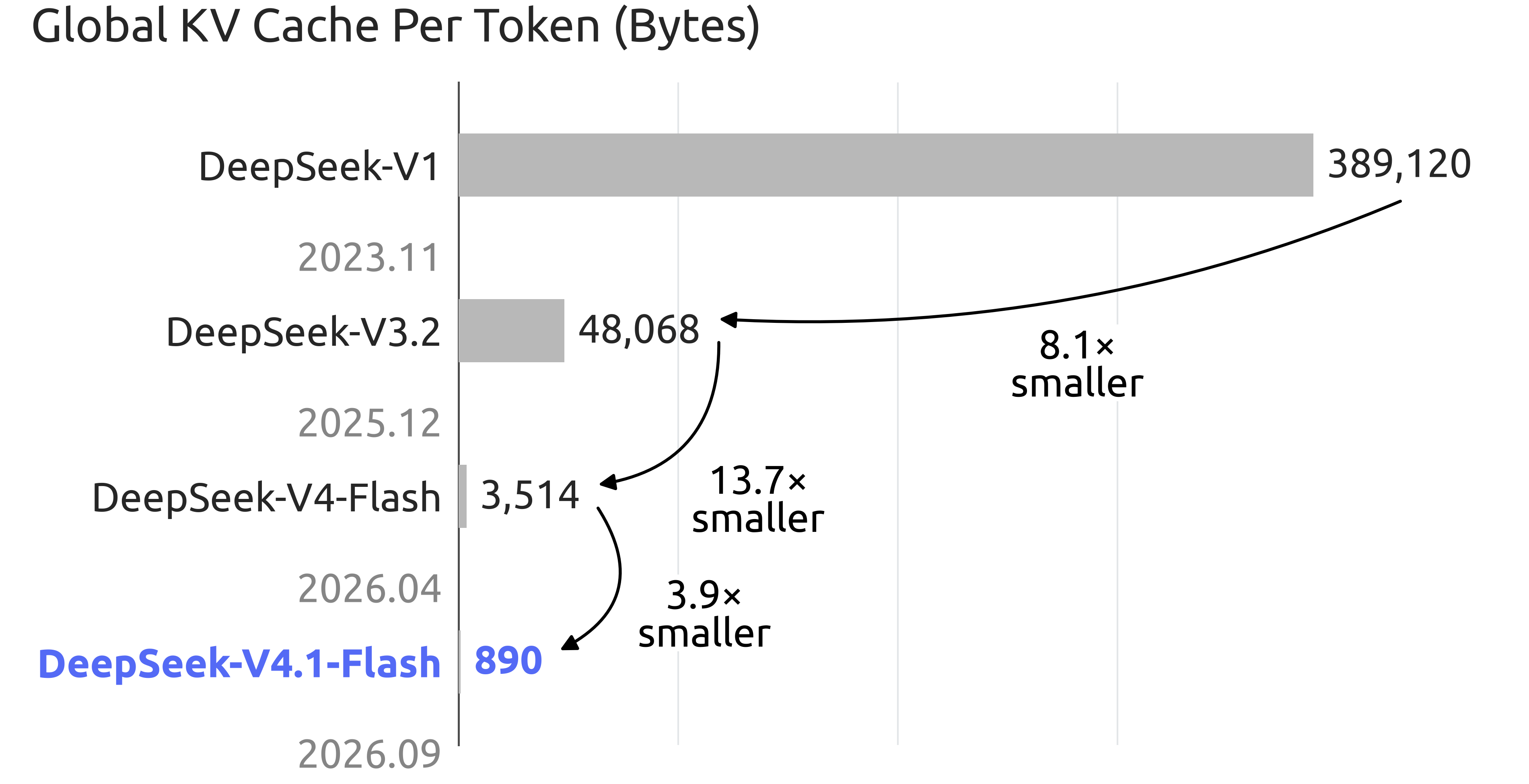
DeepSeek also reports that the global KV cache is about 890 bytes per token, versus 3,514 bytes per token for the previous V4 Flash generation. That reduction matters most for long-running agents that repeatedly reuse large prompts, tool schemas, and conversation history.
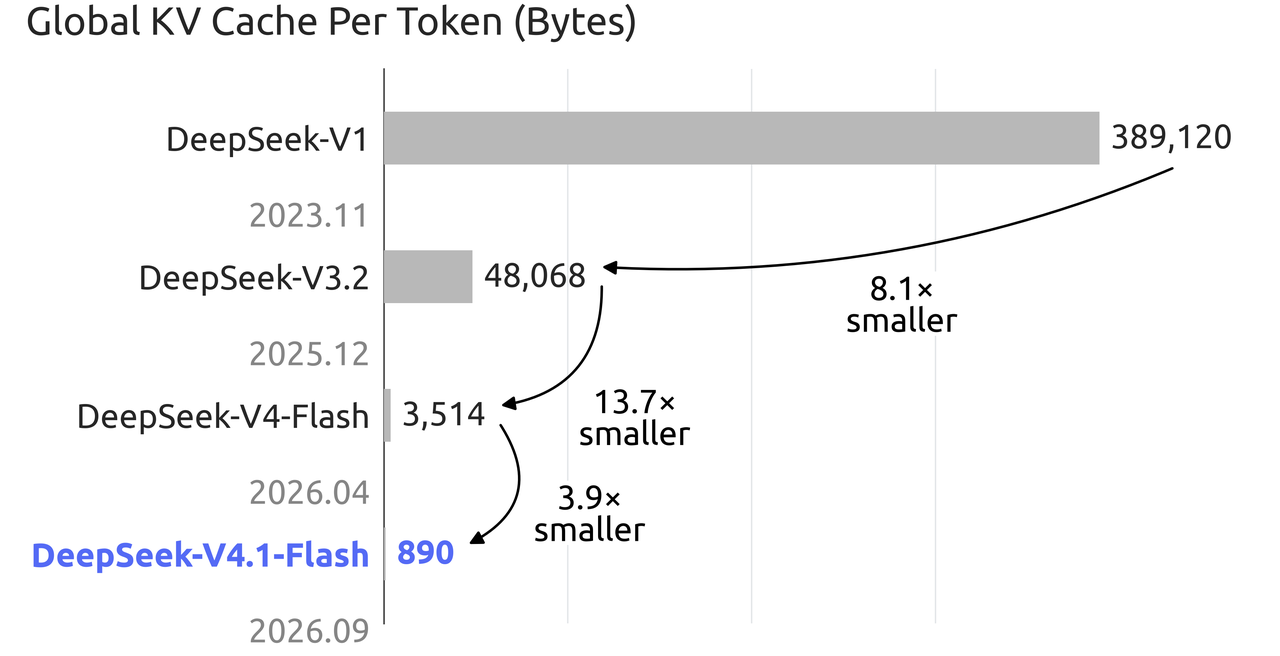
Official DeepSeek KV-cache comparison ? official image source
How Strong Is DeepSeek V4.1 Flash for Coding and AI Agents?
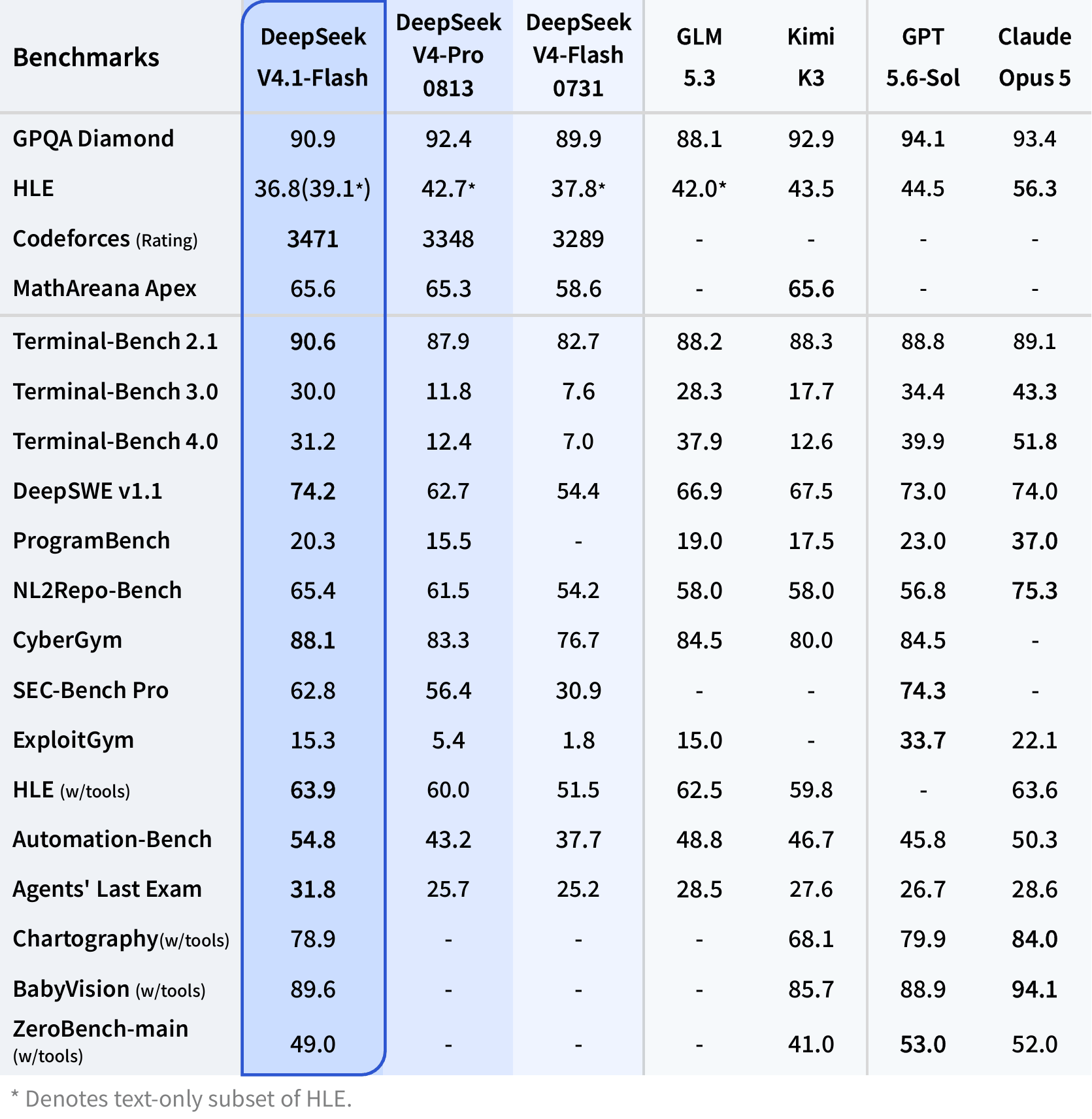
This guide focuses on benchmark evidence that directly informs API selection. DeepSeek characterizes V4.1 Flash as exceeding flagship models, including V4 Pro, across its published evaluation package. The most actionable gains appear in terminal work, software engineering, repository tasks, automation, and tool-assisted agents; production teams should still validate the model on their own prompts and completion criteria.
| Benchmark | DeepSeek V4.1 Flash | DeepSeek V4 Pro | DeepSeek V4 Flash |
|---|---|---|---|
| GPQA Diamond | 90.9 | 92.4 | 89.9 |
| Terminal-Bench 2.1 | 90.6 | 87.9 | 82.7 |
| DeepSWE v1.1 | 74.2 | 62.7 | 54.4 |
| NL2Repo-Bench | 65.4 | 61.5 | 54.2 |
| HLE with tools | 63.9 | 60.0 | 51.5 |
| Automation-Bench | 54.8 | 43.2 | 37.7 |
| Agents' Last Exam | 31.8 | 25.7 | 25.2 |
The practical conclusion is narrower than "V4.1 is smarter." DeepSeek V4.1 Flash is especially attractive for repeated tool use, terminal actions, repository-scale coding, automation, and long agent trajectories. Pure knowledge or reasoning workloads may produce a different ranking.
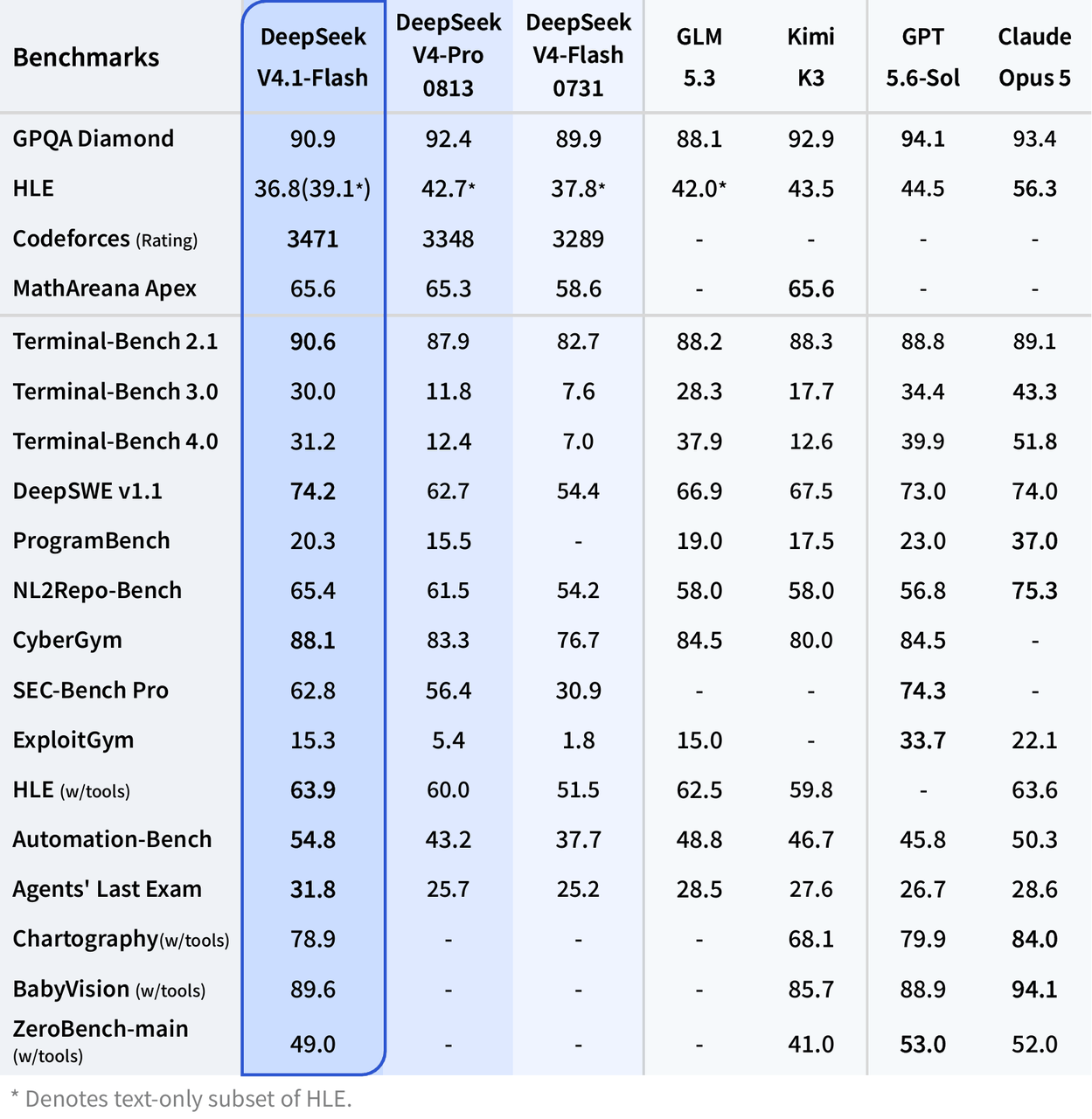
Official DeepSeek benchmark results ? official image source
Why Use the DeepSeek V4.1 Flash API Through CometAPI?
The main integration advantage is that DeepSeek V4.1 Flash API in CometAPI can be called through the same OpenAI-compatible client pattern used for other models, reducing SDK churn in multi-model applications.
| Setting | Value |
|---|---|
| Base URL | https://api.cometapi.com/v1 |
| Chat endpoint | /chat/completions |
| Model ID | deepseek-v4.1-flash |
| Authentication | Bearer API key |
| Python SDK | OpenAI SDK compatible |
| JavaScript SDK | OpenAI SDK compatible |
This also avoids a common integration mistake: copying DeepSeek's first-party identifier into a CometAPI request. The provider routes refer to the same model family, but the documented model IDs are different.
| Dimension | CometAPI DeepSeek V4.1 Flash | DeepSeek official API |
|---|---|---|
| Base URL | https://api.cometapi.com/v1 | https://api.deepseek.com |
| Model | deepseek-v4.1-flash | deepseek-flash |
| Interface | OpenAI-compatible | OpenAI-compatible |
| Base/off-peak input | $0.12/M base | $0.15/M off-peak cache miss |
| Base/off-peak output | $0.48/M base | $0.60/M off-peak |
| Cache read/hit | $0.0024/M base | $0.003/M off-peak |
Connect to DeepSeek V4.1 Flash with CometAPI
Configure Your API Key and Base URL
Create a CometAPI API key, store it in an environment variable, and configure the OpenAI-compatible base URL as https://api.cometapi.com/v1. Do not embed production credentials in source code.
export COMETAPI_KEY="YOUR_COMETAPI_KEY"
``````sh
$env:COMETAPI_KEY="YOUR_COMETAPI_KEY"
Make Your First API Request
Use the CometAPI model identifier deepseek-v4.1-flash with the standard Chat Completions endpoint.
curl "https://api.cometapi.com/v1/chat/completions"
  -H "Content-Type: application/json"
  -H "Authorization: Bearer ${COMETAPI_KEY}"
  -d '{
    "model": "deepseek-v4.1-flash",
    "messages": [
      {
        "role": "user",
        "content": "Explain three ways to reduce latency in a high-throughput API service."
      }
    ]
  }'
A successful response uses the familiar OpenAI-style completion structure, so applications already reading choices[0].message.content require minimal migration work.
Python SDK Example
pip install openai
``````python
import os
from openai import OpenAI

client = OpenAI(
    api_key=os.environ["COMETAPI_KEY"],
    base_url="https://api.cometapi.com/v1",
)

response = client.chat.completions.create(
    model="deepseek-v4.1-flash",
    messages=[
        {
            "role": "user",
            "content": "Write a Python retry helper with exponential backoff."
        }
    ],
)

print(response.choices[0].message.content)
For production, add explicit timeouts, bounded retries, request logging, and usage monitoring.
JavaScript SDK Example
npm install openai
``````js
import OpenAI from "openai";

const client = new OpenAI({
  apiKey: process.env.COMETAPI_KEY,
  baseURL: "https://api.cometapi.com/v1",
});

const response = await client.chat.completions.create({
  model: "deepseek-v4.1-flash",
  messages: [
    {
      role: "user",
      content: "Create a typed rate limiter interface for an Express API."
    }
  ],
});

console.log(response.choices[0].message.content);
The client abstraction remains unchanged while the base URL and model ID become provider configuration.
DeepSeek V4.1 Flash API Features
Configure Reasoning and Thinking Mode
DeepSeek documents both thinking and non-thinking operation. When routing through CometAPI, verify that vendor-specific fields are passed through exactly as expected before relying on them as a production contract.
response = client.chat.completions.create(
    model="deepseek-v4.1-flash",
    messages=[
        {
            "role": "user",
            "content": "Design a fault-tolerant distributed job scheduler."
        }
    ],
    reasoning_effort="high",
    extra_body={
        "thinking": {"type": "enabled"}
    },
)
Test each supported effort level against your own latency, token-use, and task-completion targets because provider mappings can differ.
Analyze Images with Vision Input
DeepSeek V4.1 Flash accepts JPEG, PNG, GIF, and WebP images. Official limits include 32 MiB per inline image, 64 MiB per file-based image, up to 600 images per request, and an 8,192-character limit for external image URLs. Images belong in user or developer messages, not system or assistant messages.
response = client.chat.completions.create(
    model="deepseek-v4.1-flash",
    messages=[
        {
            "role": "user",
            "content": [
                {"type": "text", "text": "Identify the three most important anomalies."},
                {
                    "type": "image_url",
                    "image_url": {"url": "https://example.com/dashboard.png"}
                }
            ]
        }
    ],
)
Validate image size, URL accessibility, preprocessing, token use, and latency on the exact CometAPI route used in production.
Stream Responses with SSE
Streaming reduces perceived latency by delivering incremental output to interactive coding, chat, and agent interfaces.
stream = client.chat.completions.create(
    model="deepseek-v4.1-flash",
    messages=[
        {
            "role": "user",
            "content": "Explain distributed-cache invalidation."
        }
    ],
    stream=True,
)

for chunk in stream:
    if chunk.choices and chunk.choices[0].delta.content:
        print(chunk.choices[0].delta.content, end="", flush=True)
Production clients should handle interrupted streams, empty deltas, timeout recovery, retry boundaries, and final usage accounting.
How Much Does the DeepSeek V4.1 Flash API Cost?
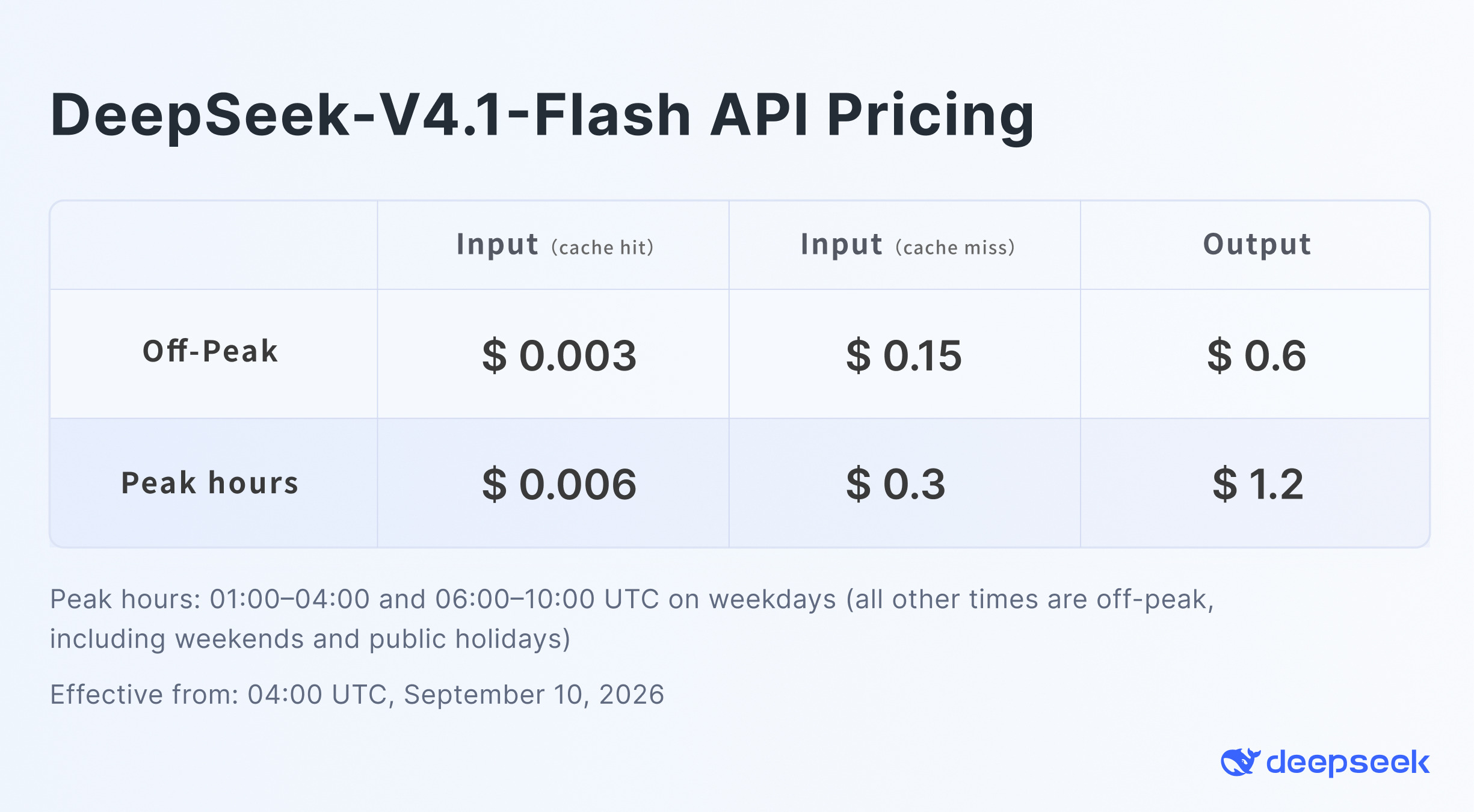
DeepSeek's documented API pricing uses peak and off-peak windows. The official pricing image shows off-peak rates of $0.003/M cache-hit input, $0.15/M cache-miss input, and $0.60/M output; peak rates are double.
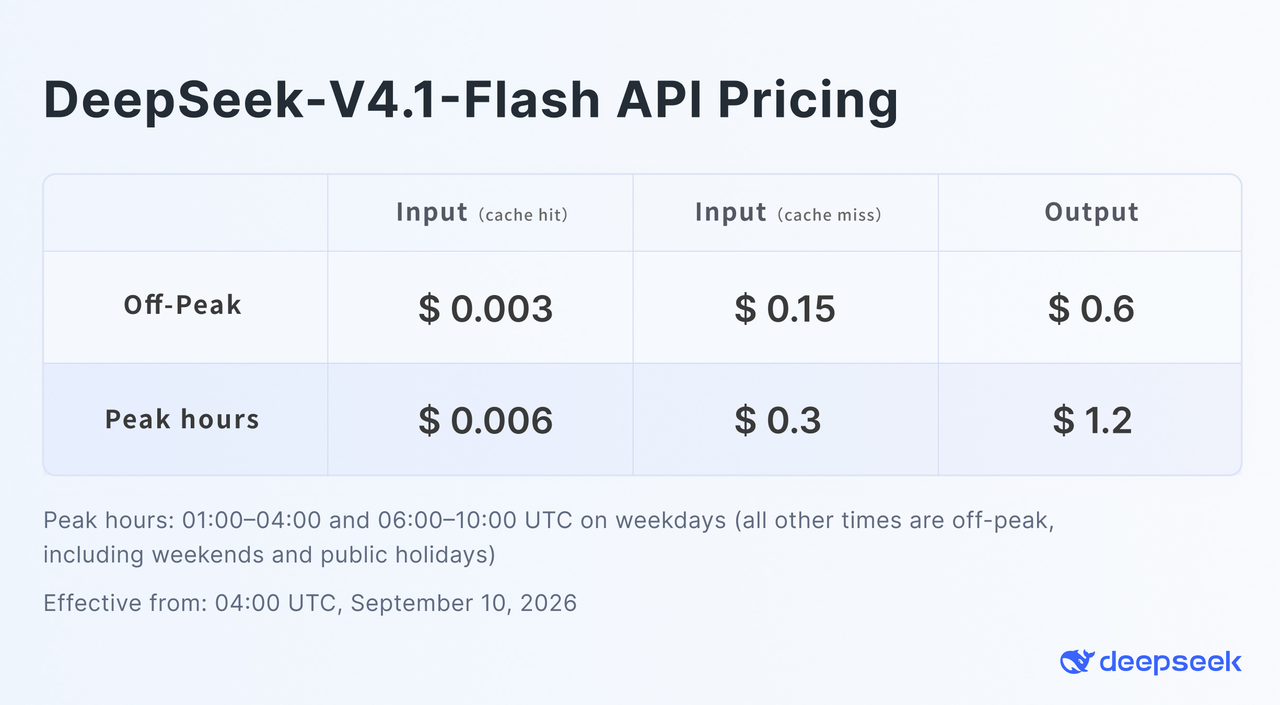
Official DeepSeek V4.1 Flash API pricing ? official image source
| Token category | CometAPI DeepSeek V4.1 Flash | DeepSeek official pricing |
|---|---|---|
| Input / cache miss | $0.1200/M base | $0.15/M off-peak |
| Output | $0.4800/M base | $0.60/M off-peak |
| Cache read / cache hit | $0.0024/M base | $0.003/M off-peak |
| Peak multiplier | 2x during matching windows | 2x during matching windows |
| Weekday peak window 1 | 01:00-04:00 UTC | 01:00-04:00 UTC |
| Weekday peak window 2 | 06:00-10:00 UTC | 06:00-10:00 UTC |
A simple base-rate example for 100M cache-miss input tokens and 20M output tokens is:
Input:
100 x $0.12 = $12.00

Output:
20 x $0.48 = $9.60

Total base cost:
$21.60
Actual production cost depends on cached-token mix, peak multipliers, request conditions, and the current provider rate. The large difference between cache-hit and cache-miss pricing makes stable reusable prefixes - system instructions, tool schemas, and common context - an important cost lever.
DeepSeek V4.1 Flash API vs V4 Pro vs V4 Flash
| Dimension | DeepSeek V4.1 Flash | DeepSeek V4 Pro | DeepSeek V4 Flash |
|---|---|---|---|
| Primary positioning | Efficient reasoning, agents, vision | High-end V4 reasoning | Previous fast V4 tier |
| Native vision | Yes | Model-dependent / route-specific | Separate vision route in prior generation |
| Thinking | Yes | Yes | Yes |
| Agent performance | Strongest of the three on many published agent tests | Strong | Lower than V4.1 on published tests |
| First-party canonical ID | deepseek-flash | deepseek-v4-pro | Legacy/compatibility alias |
| CometAPI ID | deepseek-v4.1-flash | deepseek-v4-pro | deepseek-v4-flash |
| Best fit | New high-volume agent/coding workloads | Workloads validated specifically on Pro | Legacy compatibility and comparisons |
Current status: DeepSeek's live
Models & Pricing documentation
states that DeepSeek V4 Pro remains available after September 14, 2026, with unchanged billing. Verify the live documentation before relying on routing or migration behavior.
What Should You Test Before Putting DeepSeek V4.1 Flash API into Production?
- Model routing: confirm deepseek-v4.1-flash in CometAPI and keep provider-specific IDs in configuration rather than application logic.
- Prompt regression: run representative production prompts and compare task completion, not only benchmark scores.
- Structured output: validate every JSON response against the application schema and define a repair or retry path.
- Tool calls: test argument types, malformed calls, parallel calls, and loop termination conditions.
- Thinking controls: verify which fields CometAPI passes through and measure the latency and token impact of each setting.
- Vision: test real screenshots and documents, including size limits, inaccessible URLs, and unsupported message roles.
- Streaming: handle empty deltas, interrupted connections, retry boundaries, and final usage accounting.
- Long context and caching: measure answer quality, cache-hit ratio, and cost as prompt length increases.
- Reliability: record p50, p95, and p99 latency; exercise 429, 5xx, timeout, and fallback paths.
- Cost control: track input, cached input, reasoning, and output tokens per completed task.
For agent workloads, compare cost per completed task - not only dollars per million tokens. A model can be more expensive per output token and still be cheaper end-to-end if it reduces retries and tool calls; the reverse is also true when higher reasoning effort adds tokens without improving task completion.
Is the DeepSeek V4.1 Flash API Worth Using?
For new DeepSeek integrations, DeepSeek V4.1 Flash is a strong default candidate for the Flash family because it combines better published agentic performance with native vision and aggressive pricing.
Its strongest use cases are not generic chat alone. The better fit is coding agents, automated software engineering, long-context analysis, multimodal assistants, high-volume workflow automation, and tool-using agents where repeated context can dominate total cost.
For developers who want to keep an OpenAI-style SDK architecture, the DeepSeek V4.1 Flash API in CometAPI offers the integration pattern used throughout this guide: keep the standard client interface, point it at https://api.cometapi.com/v1, and use deepseek-v4.1-flash.
DeepSeek V4.1 Flash API FAQ
How should I organize provider-specific model IDs?
Store the provider, base URL, and model ID together in environment-specific configuration. This prevents a first-party ID such as deepseek-flash from being sent accidentally to a CometAPI route that expects deepseek-v4.1-flash.
How can I improve cache reuse in long-running agents?
Keep stable system instructions, tool schemas, and shared reference context at the beginning of the prompt. Append volatile user input and tool results later so the reusable prefix changes less often.
What is the safest way to compare V4.1 Flash with V4 Pro?
Replay the same production task set, cap retry budgets, and compare completion rate, latency, tool-call count, and total tokens. A lower per-token price does not guarantee a lower cost per successful task.
What fallback policy should an agent use?
Define which failures are retryable, set a strict retry ceiling, and select a fallback model only after preserving the tool state needed to resume safely. Log every fallback so silent quality drift is visible.
How should image inputs be validated before sending them?
Check the real file signature, supported format, byte size, URL accessibility, and message role. Strip unnecessary metadata and avoid sending sensitive images unless your retention and access policies explicitly allow it.
When should I consider the Responses API instead of Chat Completions?
Use Chat Completions when maintaining an existing OpenAI-compatible message workflow. Consider the Responses API when the application benefits from typed input items, tool-output images, or JSON Schema output, then confirm that the selected provider route supports the required fields.
How should I handle schema validation failures?
Reject invalid output before it reaches downstream systems, record the validation error, and retry with a bounded repair prompt. If repeated repair fails, route the task to a safe fallback rather than accepting plausible but invalid JSON.