
TL;DR
Kling 3.0 and Kling 3.0 Omni are closely related video-generation models, but they solve different production problems. The Kling VIDEO 3.0 is the better default when prompts carry most of the creative direction. Omni is the best specialist when images, video clips, Elements, products, characters, or voices must remain recognizable across shots.
Neither model wins every dimension. Current independent preference data gives the Kling VIDEO 3.0 a roughly 10-point lead at 1080p Pro, while the 720p Standard variants are separated by fewer than two points. Choose by workflow and accepted-output rate, not by the word “Omni.”
Key Takeaways
- Choose Kling VIDEO 3.0 for prompt-first ideation, cinematic exploration, dialogue, and Multi-Shot storytelling.
- Choose Omni for multi-image references, video-derived Elements, reusable voices, branded products, and recurring characters.
- Both models support native audio, Multi-Shot creation and up to 15-second output. Kling announced native 4K for the VIDEO 3.0 series; check the selected model and product workflow for 4K availability.
- Kling VIDEO 3.0 currently leads the 1080p Pro Quality Elo comparison; the 720p results are effectively tied.
- Official no-video-input credit rates are the same at equivalent resolution and audio settings.
- Production teams should compare cost per accepted clip, including retries and review, rather than price per generated second alone.
Information date:
September 8, 2026. Quality Elo, product availability, credit requirements, and gateway pricing can change. Confirm the live route and submitted configuration before production budgeting.
Kling 3.0 vs Kling 3.0 Omni: Features and Specifications
| Workflow Comparison | Kling VIDEO 3.0 | Kling VIDEO 3.0 Omni | Decision |
|---|---|---|---|
| Primary workflow | Prompt-led creation | Reference-driven creation | Choose by where creative control lives |
| Text-to-video | Yes | Yes | Standard is the simpler default |
| Image-to-video | Yes | Yes | Tie for a single start image |
| Multi-image references | Available through reference workflows | Core workflow | Omni |
| Video-derived Elements | Supported through Element workflows | Explicitly emphasized | Omni |
| Reusable character voice | Voice can be bound to a subject | Dedicated Element Voice Control | Omni |
| Native audio | Yes | Yes | Tie for general audio generation |
| Multi-Shot | Yes | Yes | Workflow determines the winner |
| Maximum duration | Up to 15 seconds | Up to 15 seconds | Tie |
| Best fit | Exploration and prompt-led storytelling | Identity persistence and production continuity | Depends on the brief |
| Predecessor | VIDEO 2.6 | VIDEO O1 | Different workflow lineage |
| Dialogue language and voice | Chinese, English, Japanese, Korean and Spanish are listed in the standard guide | Voice binding for reusable character Elements | Confirm the required language and voice mode |
| Published parameter count | Not disclosed | Not disclosed | Do not infer model size |
| Native 4K availability | Series-level announcement; verify the selected workflow | Omni guide lists 720p and 1080p; verify the selected route | Do not promise 4K until tested |
Comparison result: Kling VIDEO 3.0 is the stronger general default. Omni becomes valuable when reference fidelity is a production requirement rather than optional inspiration.
What Are Kling VIDEO 3.0 and Kling VIDEO 3.0 Omni?
Kuaishou launched the 3.0 family in February 2026. The standard video branch builds on VIDEO 2.6 and expands prompt-led creation with native audio, Multi-Shot, start and end frames, Element references, multilingual dialogue, and flexible duration.
Omni builds on VIDEO O1. Kling’s official Omni guide positions it around unified multimodal input, video Element references, voice-driven characters, direct audiovisual output, and storyboard control.
The distinction is not “basic versus premium.” It is invention versus preservation. Standard is optimized for describing a scene and letting the model construct it. Omni is optimized for supplying assets that the model should preserve while changing motion, camera position, setting, or shot structure.
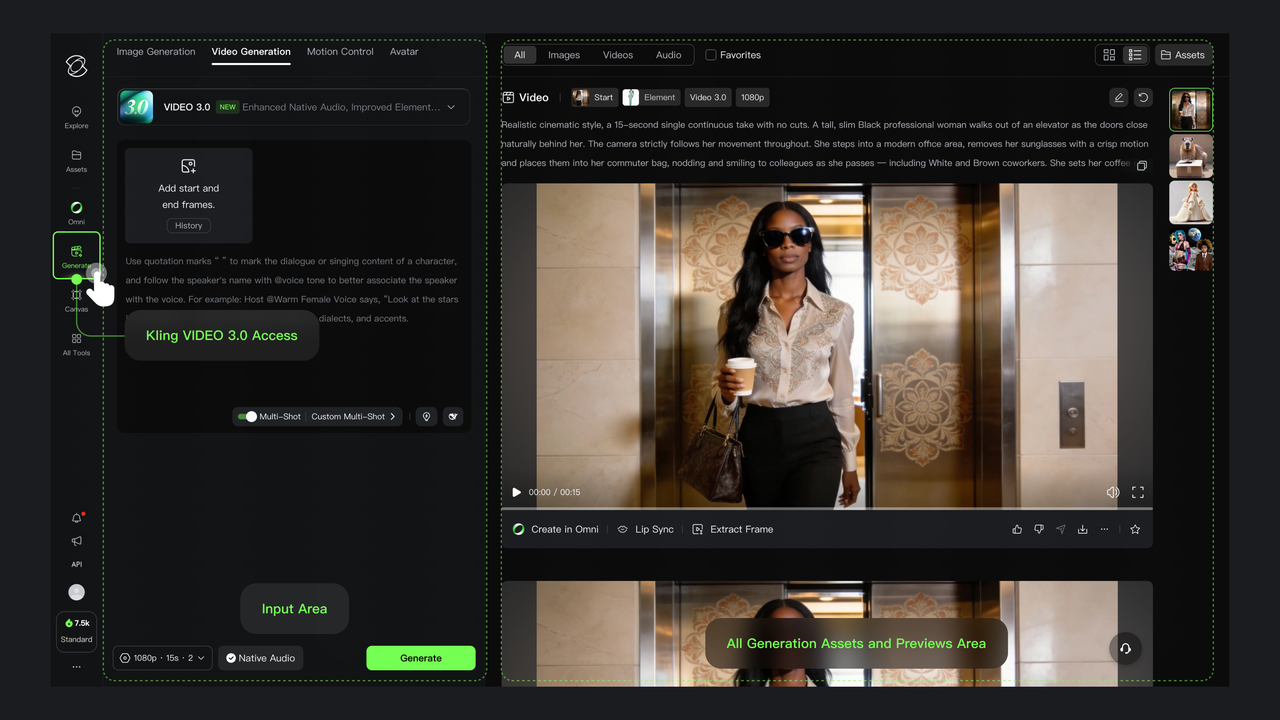
Official Kling AI VIDEO 3.0 interface and workflow.
Prompt-Led Creation: Where Standard Wins
The standard interface centers the text brief, start/end frames, Elements, duration, resolution, native audio, and Multi-Shot controls in one generation flow. Its Multi-Shot controls can plan transitions automatically or accept shot-by-shot instructions.
This makes Kling VIDEO 3.0 a strong choice for:
- exploring camera movement, framing, mood, and pacing;
- creating dialogue scenes from written direction;
- testing several visual concepts before assets are approved;
- animating a single start image;
- building prompt-led sequences in which variation is useful.
Decision: choose standard when the prompt should do most of the creative work. It reduces setup overhead without giving up native audio, Elements, or Multi-Shot generation.
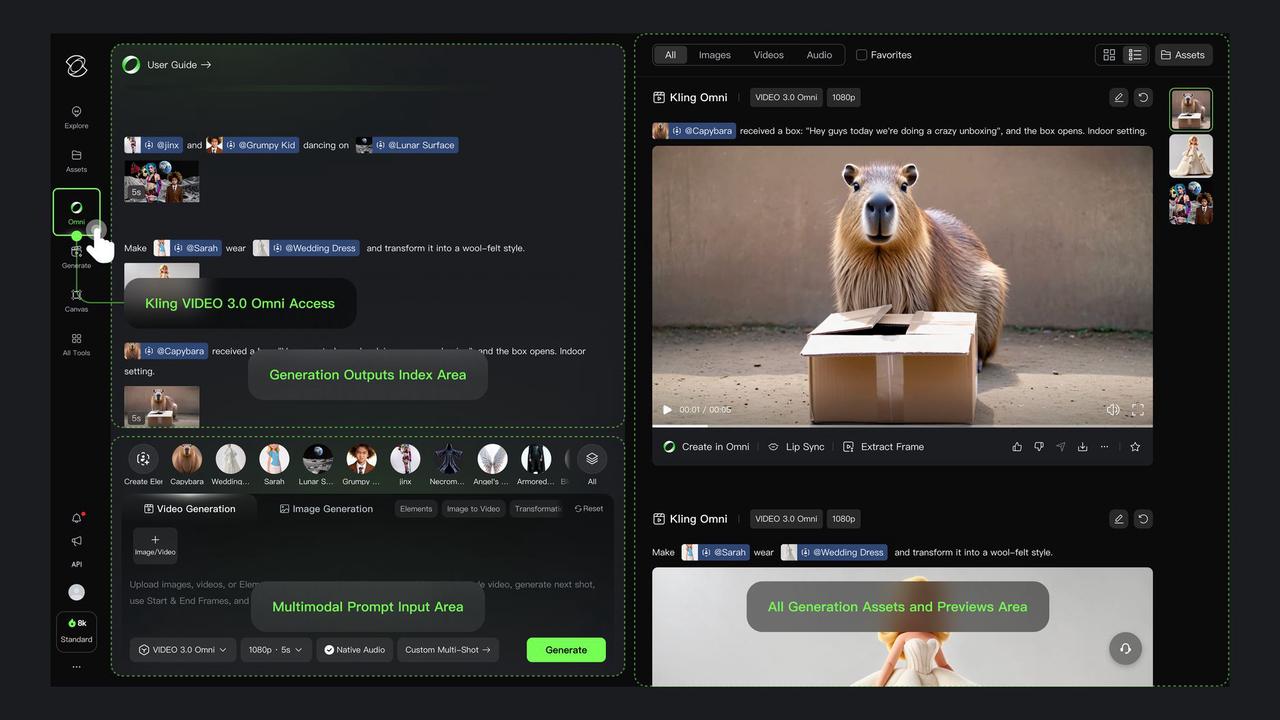
Official Kling AI VIDEO 3.0 Omni multi-reference interface and output workflow.
Reference-Led Creation: Where Omni Wins
Omni treats images, videos, Elements, and text as a combined creative specification. The official documentation highlights video references and voice control as differentiators for recurring subjects and products.
Choose Omni when the brief requires:
- multiple reference angles of the same character or product;
- a reusable character Element created from a recommended 3–8-second single-person video; ordinary Omni video input accepts 3–10 seconds;
- several referenced people or objects in one scene;
- a reusable appearance-and-voice identity;
- continuity across changing locations, camera angles, and shots.
Decision: choose Kling VIDEO 3.0 Omni when keeping approved assets consistent across shots saves more work than collecting reference images or video, creating Elements, binding a voice, and reviewing the outputs. It is a control specialization, not a universal quality upgrade.
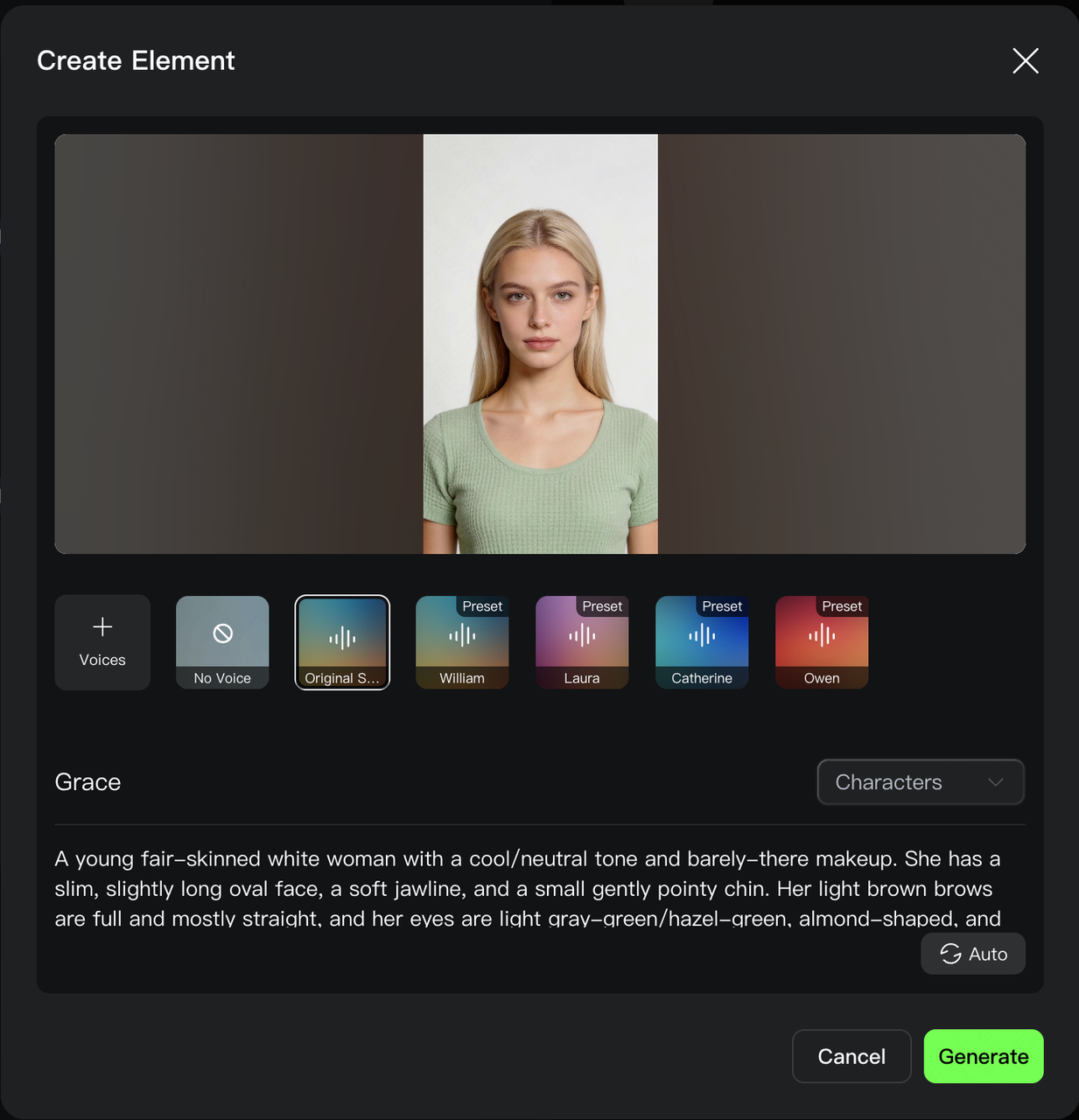
Official Kling AI Element Voice Control interface.
Character, Product, and Voice Consistency
Standard can bind a subject and maintain it through zooming, panning, tilting, and scene development. That is sufficient for many isolated clips and simple sequences.
Omni goes further by making reference assets a central control surface. Users can construct an Element from multiple images or a short character video and bind a voice to that Element. The voice-binding workflow allows the identity to be reused without redefining the voice in every prompt.
| Continuity requirement | Recommended branch | Reason |
|---|---|---|
| One-off character clip | Standard | Lower setup cost |
| Recurring character across scenes | Omni | Reference persistence is central |
| Early product concept | Standard | Variation is useful |
| Approved product packaging | Omni | Shape, color, and labels should not drift |
| General dialogue and ambience | Either | Both support native audio |
| Reusable character voice | Omni | Voice can travel with the Element |
Kling VIDEO 3.0 vs Kling VIDEO 3.0 Omni: Benchmark Performance
Kling does not publish one official numerical head-to-head benchmark that proves either branch is universally better. The comparison below therefore uses Artificial Analysis Video Arena Quality Elo, a live relative preference metric.
| Configuration | Standard live score | Omni live score | Result on September 8, 2026 |
|---|---|---|---|
| 1080p Pro | 1237.93 | 1227.49 | Standard +10.44 |
| 720p Standard | 1212.33 | 1214.08 | Omni +1.75; effectively close |
The 720p values come from the standard 720p result and the Omni 720p result.
Benchmark result: standard currently leads at 1080p Pro, while the two 720p variants are too close to support a broad quality claim. Omni should be purchased for reference control and continuity, not because its name guarantees a better-looking result.
Benchmark note:
Quality Elo changes as votes and participating implementations change. Preserve the measurement date and recheck the live values before publication.
Pricing: Official Credits vs CometAPI
Official Kling credits and gateway prices are different billing surfaces and should not be mixed. Kling’s official credit guide is the appropriate source for the web product. The gateway’s live catalog is the appropriate source for API budgeting.
Official Kling Credits
| No-video-input configuration | Kling VIDEO 3.0 | Omni branch |
|---|---|---|
| 720p, native audio off | 6 credits/s | 6 credits/s |
| 1080p, native audio off | 8 credits/s | 8 credits/s |
| 720p, native audio on | 9 credits/s | 9 credits/s |
| 1080p, native audio on | 12 credits/s | 12 credits/s |
Official-credit result: Omni is not automatically more expensive when no video reference is supplied. Extra cost appears in richer input modes, particularly video-reference workflows.
Gateway Pricing
| Kling Video API in CometAPI | Kling VIDEO 3.0, 5 seconds | Omni branch, 5 seconds |
|---|---|---|
| 720p, no native audio / no video input | $0.336 | $0.336 |
| 1080p, no native audio / no video input | $0.448 | $0.448 |
| 720p, native audio | $0.504 | $0.448 |
| 1080p, native audio | $0.672 | $0.560 |
| 720p, video input | Not shown as the same input mode | $0.504 |
| 1080p, video input | Not shown as the same input mode | $0.672 |
Gateway-price result: compare the exact route, resolution, audio mode, duration, and input type. A family-level price is not sufficient for a production estimate.
Cost note:
the cheapest generation is not necessarily the cheapest accepted clip. Include retries, rejected outputs, human review, editing, storage, and the cost of fixing identity drift.
Which Model Wins by Use Case?
| Use case | Recommended branch | Why |
|---|---|---|
| Pure text-to-video | Standard | Prompt carries the creative direction |
| Fast concept exploration | Standard | Variation is useful and setup stays light |
| Single-image animation | Either | Both support image-led generation |
| Multiple reference images | Omni | Reference mixing is a core workflow |
| Recurring characters | Omni | Identity must survive across scenes |
| Approved branded products | Omni | Product details should not drift |
| Reusable character voice | Omni | Voice can be bound to an Element |
| Prompt-led Multi-Shot story | Standard | Shot planning starts in the prompt |
| Reference-led Multi-Shot campaign | Omni | Fixed assets must remain consistent |
| Native 4K delivery | Verify the selected Kling VIDEO 3.0 or Omni route | The series-level announcement does not establish every workflow’s availability |
Recommended Production Workflow
- Explore with standard. Test prompts, framing, camera movement, pacing, dialogue, and story beats while variation is still valuable.
- Approve the assets. Lock the character, product, costume, setting, or voice that must persist.
- Move reference-critical shots to Omni. Use multi-image, video, Element, and voice references where drift would be costly.
- Measure accepted-output rate. Record retries, review time, identity failures, latency, and realized cost for each route.
- Keep workload-based routing. Do not force every job through the more complex reference workflow.
Recommended default:
explore with standard; lock with Omni. Change this rule only when representative tests show a better cost-per-accepted-clip result.
Limitations and Decision Risks
- Neither branch has a publicly disclosed parameter count or complete training-data specification.
- Independent preference scores are live and may move after publication.
- Native 4K, audio, video-reference, and duration options can vary by product surface and route.
- A strong leaderboard result does not guarantee identity persistence in a branded workflow.
- Web-product credits, first-party developer prices, and gateway prices are not interchangeable.
Switching condition: use Omni as the default only if its reduction in rejected or drifting outputs offsets its reference preparation and route cost. Otherwise, keep standard as the default and escalate selected jobs.
Final Verdict
Kling VIDEO 3.0 is the better default for most prompt-first video generation. It offers native audio, Multi-Shot control, Element references and flexible duration. Kling announced native 4K for the VIDEO 3.0 series, but production teams should confirm the selected workflow and route before promising 4K delivery.
Omni is better when production depends on preserving a person, product, scene, or voice across changing shots. Its advantage is control and continuity—not guaranteed visual superiority.
For most teams, the strongest operating model is hybrid: use standard to explore and Omni to preserve approved assets.
FAQ
Is Omni always higher quality?
No. The current 1080p Pro preference score favors standard, while the 720p results are nearly tied. Omni’s clearest advantage is reference control.
Do both models support native audio?
Yes. Both support generated dialogue, sound effects, and ambience. Omni adds a more explicit reusable voice workflow for character Elements.
Can both generate 15-second videos?
Yes. The official guides describe output of up to 15 seconds in supported 3.0 workflows.
Is native 4K exclusive to Omni?
Kling officially announced native 4K for the VIDEO 3.0 series. Its Omni guide lists 720p and 1080p modes, so verify 4K availability for the exact Omni workflow or API route before committing to it.
Which model is better for advertising?
Use standard while exploring campaign concepts. Use Omni after a product, spokesperson, recurring character, or voice becomes an approved asset that must remain stable.
Which model is cheaper?
Official no-video-input credit rates are equal at comparable resolution and audio settings. Gateway cost depends on the exact route and configuration; production cost also depends on retries and acceptance rate.
What is the simplest selection rule?
Use standard when the prompt should invent. Use Omni when references must be preserved.