The OpenAI Agents API is a managed platform for building AI agents that reason, use tools, execute code, and complete multi-step tasks. It is designed for applications that need to continue work across turns, execute tools, and recover from interruptions without implementing the entire agent loop themselves. This guide helps developers evaluate its capabilities, integration options, and costs.
Unlike a conventional LLM API, the OpenAI Agents API supports persistent sessions, managed execution environments, multi-agent coordination, streaming events, and artifacts. Developers can use native OpenAI Agents API endpoints for managed execution, or integrate supported OpenAI models through CometAPI to build custom agent workflows. These are distinct integration paths.
Key Takeaways
OpenAI Agents API manages persistent sessions and multi-step execution, reducing the orchestration developers must operate.
Its core capabilities include sandboxed code execution, tools and MCP connections, subagents, and saved artifacts.
Reviewed for clarity, source attribution and current API terminology.
OpenAI Agents API costs combine model tokens, eligible tools, and optional hosted compute; evaluate cost per completed task.
Customer-reported gains provide workload-specific evidence, rather than a standardized benchmark for every application.
Native managed execution and custom agents using CometAPI are separate integration choices with different infrastructure responsibilities.
What Is the OpenAI Agents API?
The OpenAI Agents API is a managed execution service for applications that perform multi-step tasks using reasoning models and external tools. It exposes the Codex agent harness as a service. Instead of manually managing model calls, tool execution, session state, and task recovery, developers can delegate much of that coordination to the runtime.
A conventional chatbot generates an answer; an agent can plan steps, run code in an authorized environment, inspect errors, retry, and deliver generated files. This makes the API suited to operational workflows rather than chat alone.
OpenAI Agents API Workflow
An agent workflow brings together four parts: the agent defines the model, instructions, and available tools; the environment provides compute and file access; the session preserves context and saved work; and events and items expose progress and results. Together, these components let your application submit a task, follow its execution, and continue the work in later turns. See the Agents API overview for the underlying concepts.
Typical workflow: create a session; submit an objective; let the model reason and choose permitted tools; execute those tools; inspect intermediate results; and stream progress and final artifacts. The session can be continued as needed.
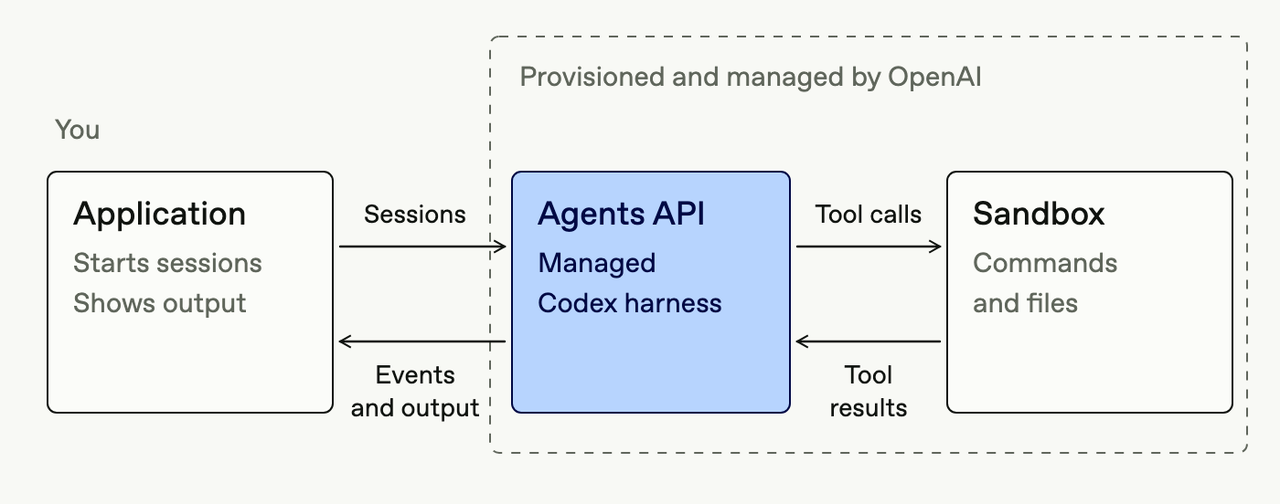
The official diagram shows the application exchanging input and events with the managed harness and sandbox. Architecture diagram from the OpenAI Agents API architecture documentation; original artwork by OpenAI.
What Are the Main OpenAI Agents API Features?
The managed harness capabilities cover code execution, context management, tool connections, steering, and delegation. Availability also depends on the configured environment and tools.
Feature
Specification
Practical benefit
Managed runtime
Codex-based harness
Reduces orchestration code
Session persistence
Multi-turn state
Supports follow-up work
Context management
Managed compaction
Extended workflows
Hosted execution
Linux sandbox; Python and Node.js
Real code execution
Self-hosted environment
Developer-managed compute
Infrastructure control
Multi-agent execution
Configurable subagents
Parallel subtasks
Tool connections
Functions and MCP
Integrates services
Computer use
Controlled UI interaction
Interface automation
Streaming and webhooks
Progress events
Responsive applications
Artifacts
Saved files
Deliverable reports
Persistent Sessions and Context Management
Sessions preserve configuration, conversation context, and saved work across turns. Developers can submit a new instruction to an existing session; context management helps sustain extended tasks while reducing the need to write custom transcript-compression logic.
Sandboxed Code Execution
Environment
Infrastructure
Best use
none
No local execution
Remote-tool workflows
openai_hosted
OpenAI-managed sandbox
Code, analysis and file processing
self_hosted
Developer-controlled compute
Custom infrastructure
Hosted environments can execute Python, Node.js, and command-line programs in an isolated workspace. A self-hosted environment lets the managed agent use developer-controlled compute. Developers operate and secure that environment, while the Agents API continues to manage the agent harness and session state.
Multi-Agent Collaboration
A coordinating agent can delegate independent tasks to specialist subagents. Research agents might examine separate sources while a primary agent reconciles evidence. Parallelism can improve throughput, but additional model calls and coordination may increase expense. The API supports configurable concurrency and subagent settings.
OpenAI Agents API vs Agents SDK vs Responses API vs AgentKit
Dimension
Agents API
Agents SDK
Responses API
AgentKit
Purpose
Managed execution
Code-first orchestration
Inference and tools
Agent components
Agent loop
Managed
App/SDK
Developer-managed
Depends on component
Infrastructure
Hosted or external
Developer-controlled
App plus hosted tools
Varies
Multi-agent
Built-in coordination
Handoffs
Custom
Component-specific
Best for
Durable autonomous tasks
Customized agents
Fine-grained control
Embedded agent tooling
The Agents API provides managed execution; Agents SDK suits applications that own their orchestration stack; Responses API is appropriate for inference and lighter tool workflows; AgentKit supplies complementary development components rather than another equivalent hosted agent runtime.
How to Get Started With the OpenAI Agents API
Step 1: Configure API Access
Use an OpenAI Platform project key with the agent and inference permissions required by the quickstart prerequisites. The curl examples target a Bash-compatible shell with curl installed; the PowerShell example only sets the environment variable. Keep keys outside source control.
Bash code example: Run the following commands in a Bash-compatible terminal.
export OPENAI_API_KEY="your-openai-api-key"
PowerShell code example: Set the API key in the current PowerShell process.
$env:OPENAI_API_KEY="your-openai-api-key"
Step 2: Create Your First Agent
Bash code example: Run the following commands in a Bash-compatible terminal.
curl --no-buffer --fail-with-body \
  https://api.openai.com/v1/agents/sessions \
  -H "Authorization: Bearer $OPENAI_API_KEY" \
  -H "OpenAI-Beta: agents=v1" \
  -H "Content-Type: application/json" \
  -d '{
    "agent": {
      "model": "gpt-6-astra",
      "instructions": "Write reliable Python code, execute it, and report observed results."
    },
    "environment": {"type": "openai_hosted", "container_size": "small"},
    "input": "Calculate the mean and standard deviation of [12,15,19,20,24] in Python.",
    "stream": true
  }'
The session begins its first turn and streams status events as the agent runs tools and prepares a response.
Step 3: Enable Multi-Agent Execution
Bash code example: Run the following commands in a Bash-compatible terminal.
curl --no-buffer --fail-with-body \
  https://api.openai.com/v1/agents/sessions \
  -H "Authorization: Bearer $OPENAI_API_KEY" \
  -H "OpenAI-Beta: agents=v1" \
  -H "Content-Type: application/json" \
  -d '{
    "agent": {
      "model": "gpt-6-astra",
      "instructions": "Delegate independent analyses and reconcile the results.",
      "multi_agent": {"enabled": true, "max_concurrent_subagents": 2}
    },
    "environment": {"type": "none"},
    "input": "Compare two release changes: date filtering in search and export URL behavior.",
    "stream": true
  }'
Step 4: Continue an Existing Session
Bash code example: Run the following commands in a Bash-compatible terminal.
curl --fail-with-body \
  "https://api.openai.com/v1/agents/sessions/$SESSION_ID/events" \
  -H "Authorization: Bearer $OPENAI_API_KEY" \
  -H "OpenAI-Beta: agents=v1" \
  -H "Content-Type: application/json" \
  -d '{"events":[{"type":"agent.session.input.message","input":[{"role":"user","content":[{"type":"input_text","text":"Summarize the findings in an executive report."}]}]}]}'
Store session identifiers, apply retry safeguards, and distinguish new instructions from messages used to steer active work.
Step 5: Inspect Results and Clean Up
Bash code example: Run the following commands in a Bash-compatible terminal.
Reasoning effort affects latency, token consumption, and planning depth. Select the effort supported by the chosen model and interface using the official GPT-6 guidance; model-level settings should not be assumed to apply identically to every endpoint.
How to Build an AI Agent With CometAPI?
CometAPI can supply model inference for a custom agent application. Your application remains responsible for the agent loop, tool execution, session state, recovery, and any routing between supported models. This gives you control over orchestration, while also making that infrastructure yours to operate.
Choose native Agents API integration when you want OpenAI to manage agent execution and session state. Choose a CometAPI-based application when you want to build and operate your own orchestration around supported model APIs. Access to a model through CometAPI does not by itself establish support for native Agents API session endpoints; check the interface you intend to use. Costs also follow different paths: native usage is billed by OpenAI, while a custom application combines CometAPI charges with your infrastructure costs.
Step 1: Connect to CometAPI
Bash code example: Run the following commands in a Bash-compatible terminal.
Python code example: Send a model-inference request and print the response.
import os
from openai import OpenAI

client = OpenAI(
    api_key=os.environ["COMETAPI_KEY"],
    base_url="https://api.cometapi.com/v1",
)

response = client.responses.create(
    model="gpt-6-astra",
    input=(
        "Analyze an API latency spike after a database migration. "
        "Identify possible causes and prioritize diagnostic steps."
    ),
)
print(response.output_text)
Developers can access GPT-6 Astra API in CometAPI. The example above performs model inference; implementing the tool loop described below is a separate application responsibility.
Step 2: Add a Tool-Execution Layer
A custom controller can prompt the model, inspect tool-call requests, authorize and execute actions, return results, and repeat until completion or a predefined limit. Set limits on turns, tool calls, execution time and spending; require independent confirmation for destructive operations.
What Are the Best OpenAI Agents API Applications?
Software engineering: Analyze issues, generate code changes, run tests, and prepare reviews, with approval before merging or deploying changes.
Data analysis and reporting: Process uploaded datasets, run Python calculations, create charts, and turn the results into reports that support decisions.
IT incident response: Inspect alerts, correlate logs, consult runbooks, and recommend remediation, with human authorization for risky actions.
Customer support automation: Retrieve relevant records, summarize tickets, draft responses, and route unresolved cases through permitted CRM access.
Research and document processing: Compare documents, check claims, extract facts, and prepare findings with supporting citations.
Evaluate Your Workflow
Start with a representative task from your own workload and define what successful completion looks like. Compare the agent with your current process using the same inputs and acceptance criteria. Include follow-up requests and tool failures so the evaluation tests recovery as well as the ideal path.
Metric
Measures
Reason
Task completion
Successful objectives
End-to-end usefulness
Tool success
Correct integrations
Failure detection
Recovery rate
Completion after failure
Durability
Time to completion
Elapsed time
Latency
Cost per completed task
Expense / successful task
Efficiency
Human intervention
Manual actions
Autonomy
Safety compliance
Policy adherence
Risk control
Read these measures together. A workflow that completes more tasks may still be a poor fit if it requires frequent manual correction or exceeds your time and cost limits. Use the results to decide where to automate, where to retain human review, and which failures to address before expanding usage.
How Much Does the OpenAI Agents API Cost?
There is no separate managed harness platform fee. Model tokens, eligible tool calls, and optional hosted compute determine total usage cost. The model rates below are USD per million tokens for Standard processing with short-context prompts (up to 272K input tokens), checked on October 21, 2026. Longer prompts, other processing tiers, cache writes, and regional processing can change the applicable rate.
OpenAI model pricing
Input / 1M
Cached input / 1M
Output / 1M
GPT-6 Astra
$10.00
$1.00
$50.00
GPT-6.1 Sol
$2.00
$0.10
$10.00
GPT-6 Luna
$0.10
$0.01
$0.50
For model access through CometAPI, developers can use GPT-6.1 Sol and GPT-6 Luna. The table above shows OpenAI rates; CometAPI billing follows its own applicable rates.
Resource or tool
Configuration / billing basis
Rate
Hosted container — Small
1 GB memory; 20-minute period
$0.03 per period
Hosted container — Medium
4 GB memory; 20-minute period
$0.12 per period
Hosted container — Large
16 GB memory; 20-minute period
$0.48 per period
Web search
Per 1,000 calls; content tokens billed separately
$10 per 1,000 calls, plus content tokens
File search storage
Per GB per day, after the free allowance
$0.10 per GB/day
Example: Estimating a Task Cost
Component
Illustrative calculation
Cost
Input tokens
50,000 × $10 / 1M
$0.50
Output tokens
10,000 × $50 / 1M
$0.50
Web searches
2 × $0.01
$0.02
Small container
One 20-minute period
$0.03
Total
Excluding incidental charges
$1.05
This illustrative $1.05 total assumes the token volumes shown, two searches, one small-container 20-minute period, and no extra billable search-content tokens or cache writes. Actual cost also depends on retries, subagent usage, cache behavior, and the sandbox billing rules that apply to the session. Track cost per successfully completed task across a representative workload.
What Are the Limitations of the OpenAI Agents API?
Data limits. The Agents API currently supports data residency only in the United States and does not support Zero Data Retention (ZDR). A self-hosted sandbox does not change its ZDR eligibility. Before sending sensitive material, check whether the service's retention and residency terms meet your requirements.
API and model compatibility. Public-beta interfaces can change, and supported features can vary by model. Test the exact model, endpoint, reasoning settings, and tools your application uses. Repeat integration checks when you change a model or adopt an API update.
Execution control. Multi-step tasks can accumulate tokens, take variable amounts of time, and encounter tool failures. Set budgets and limits on turns and runtime, grant only the permissions the task needs, and monitor long-running work asynchronously. Plan how to recover from interrupted tool calls and require human approval for actions with significant consequences.
FAQ
How should OpenAI Agents API clients retry follow-up messages?
Reuse the same submission key when retrying the same logical message, following the session input and retry pattern. Keep the session ID and submission key together in application state. A separate user instruction should use its own key; a lost HTTP response should not automatically be treated as a new instruction.
Can an OpenAI Agents API session change models?
The session settings endpoint supports updating the model, reasoning effort, and service tier. Updates affect later turns; an active turn keeps its existing settings. Confirm that the resulting configuration is supported by the selected model, and create a new session when you need to change settings that this endpoint does not accept.
How does OpenAI Agents API restrict sandbox network access?
OpenAI-hosted environments support enabled, disabled, or restricted outbound access. Restricted mode uses explicit host allowlists, and redirects or subdomains may need their own entries. Configure the sandbox network policy for the services a task needs; network access and application credentials are separate controls.
Conclusion
Evaluate the Agents API on a representative task that requires several tool calls and at least one follow-up turn. Measure completion rate, recovery behavior, latency, and cost per successful task. These results will show whether managed execution meets your application’s requirements.