它遵循 Google Cloud IAM 角色控制,意味着你可以使用標準「Storage Object Viewer」權限進行存取控管。
好處:無需中介檔案,提高安全與效能,適用於跨雲環境的資料擷取。
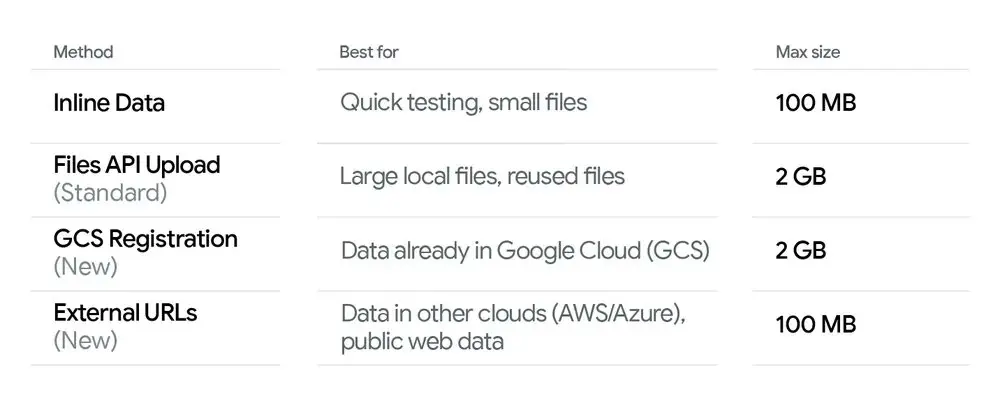
(2) Direct connection to Google Cloud Storage (GCS):
對於已在 Google 生態系中的資料,整合更為緊密。你現在可以對 GCS 檔案進行 Object Registration。
無需上傳,你只需「註冊」該檔案的 gs:// URI。
此過程幾乎是瞬時完成,因為在你的客戶端與 API 之間並未發生任何實際資料傳輸。
How do you use the new features? — Usage examples (Python SDK)
以下是三個實用的同步 Python 範例,展示常見模式:(A)行內位元組(來自本機檔案)、(B)外部 HTTPS 或簽名 URL、(C)引用 GCS URI(已註冊的物件)。這些程式碼片段使用官方 Google Gen AI Python SDK(google-genai),請依你的環境調整模型名稱、驗證與環境變數。你可以使用 CometAPI 的 API 金鑰存取 Gemini API,這是一個 AI API 聚合平台,提供更便宜的 API 呼叫價格以協助開發者。
Prerequisite: pip install --upgrade google-genai and set your credentials / environment variables (for Developer API API_KEY, for Vertex AI set GOOGLE_GENAI_USE_VERTEXAI, GOOGLE_CLOUD_PROJECT, GOOGLE_CLOUD_LOCATION).
Example A: Inline bytes (local file → send up to 100 MB)
# Example A: send a local file's bytes inline (suitable up to 100 MB)from google import genaifrom google.genai import types# Create client (Developer API)client = genai.Client(api_key="YOUR_GEMINI_API_KEY")MODEL = "gemini-2.5-flash" # choose model; production models may differfile_path = "large_document.pdf" # local file <= ~100 MBmime_type = "application/pdf"# Read bytes and create an inline Partwith open(file_path, "rb") as f: data = f.read()part = types.Part.from_bytes(data=data, mime_type=mime_type)# Send the file inline with a textual promptresponse = client.models.generate_content( model=MODEL, contents=[ "Please summarize the attached document in one paragraph.", part, ],)print(response.text)client.close()
Example B: External HTTPS / signed URL (Gemini fetches the payload)
# Example B: reference a public HTTPS URL or a signed URL (Gemini fetches it)from google import genaifrom google.genai import typesclient = genai.Client(api_key="YOUR_API_KEY")MODEL = "gemini-2.5-flash"# Public or signed URL to a PDF/image/audio/etc.external_url = "https://example.com/reports/quarterly_report.pdf"# or a pre-signed S3/Azure URL:# external_url = "https://s3.amazonaws.com/yourbucket/obj?X-Amz-..."part = types.Part.from_uri(file_uri=external_url, mime_type="application/pdf")response = client.models.generate_content( model=MODEL, contents=[ "Give me the three key takeaways from this report.", part, ],)print(response.text)client.close()
Example C: Reference a GCS object (gs://) directly
# Example C: reference a GCS file (ensure service account has storage access)from google import genaifrom google.genai import types# For Vertex AI usage, standard practice is to use ADC (Application Default Credentials)client = genai.Client(vertexai=True, project="your-project-id", location="us-central1")MODEL = "gemini-3-pro" # example model idgcs_uri = "gs://my-bucket/path/to/manual.pdf"part = types.Part.from_uri(file_uri=gcs_uri, mime_type="application/pdf")response = client.models.generate_content( model=MODEL, contents=[ "Extract the section titles from the attached manual and list them.", part, ],)print(response.text)client.close()