Technical Specifications of Gemini 3.6 Flash
| Item | Gemini 3.6 Flash |
|---|---|
| Provider | Google DeepMind |
| Model ID | gemini-3.6-flash |
| Model family | Gemini 3.x |
| Availability | General Availability (GA) |
| Input types | Text, Image, Video, Audio, PDF |
| Output types | Text |
| Context window | 1,048,576 tokens |
| Maximum output | 65,536 tokens |
| Thinking | Supported (medium / high) |
| Function calling | Yes |
| Code execution | Yes |
| File Search | Yes |
| URL Context | Yes |
| Search Grounding | Yes |
| Computer Use | Preview |
| Structured Output | Yes |
| Caching | Supported |
Source: Google Gemini API documentation.
What is Gemini 3.6 Flash?
Gemini 3.6 Flash is Google's newest production-ready Flash model, designed to deliver frontier-level intelligence while maintaining the low latency and cost efficiency that the Flash series is known for. It is optimized for coding, multimodal understanding, reasoning, and agentic workflows.
Compared with Gemini 3.5 Flash, the model improves code generation quality, reasoning accuracy, tool usage, and token efficiency while supporting a massive 1 million-token context window. Google positions it as the default workhorse model for developers building AI agents and complex automation systems.
Main Features of Gemini 3.6 Flash
- Supports 1M-token long-context processing.
- Native multimodal inputs including text, images, video, audio, and PDF documents.
- Strong improvements in code generation and software engineering tasks.
- Built-in support for Function Calling, File Search, URL Context, Search Grounding, and Computer Use.
- More token-efficient than Gemini 3.5 Flash, reducing inference cost while maintaining higher quality.
- Designed for multi-step AI agents and autonomous workflows.
Benchmark Performance
Google reports that Gemini 3.6 Flash delivers stronger coding, reasoning, and multimodal performance than Gemini 3.5 Flash while using significantly fewer output tokens. The company highlights improved performance on internal coding and agentic benchmarks and states the model can reduce output token usage by up to 65% on certain software engineering evaluations such as DeepSWE, lowering overall inference costs. Google has not published comprehensive public benchmark tables (e.g., MMLU, GPQA, SWE-bench Verified) for this release.
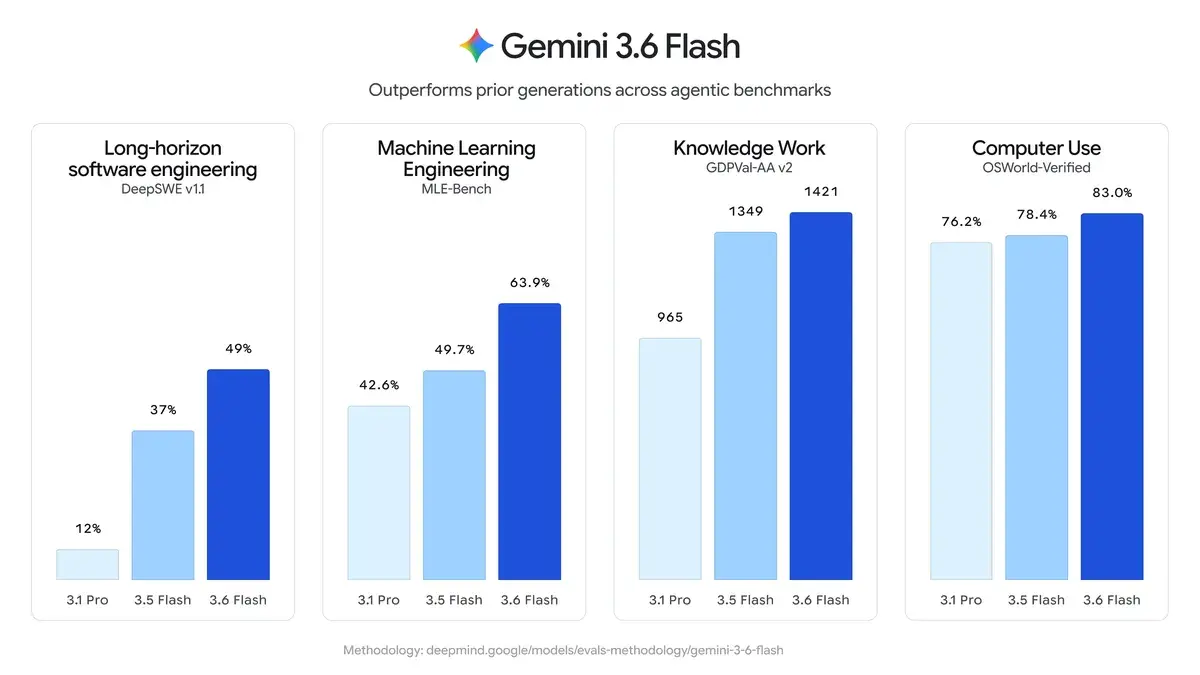
Gemini 3.6 Flash vs Gemini 3.5 Flash vs Gemini 3.1 Pro
| Aspect | Gemini 3.6 Flash | Gemini 3.5 Flash | Gemini 3.1 Pro |
|---|---|---|---|
| Release | July 21, 2026 (GA) | Earlier 2026 | ~Feb 2026 (Preview) |
| Positioning | Efficient workhorse for agents, coding, multimodal | Previous agentic Flash model | Advanced Pro-tier reasoning |
| Pricing (per 1M tokens) | Input: $1.50Output: $7.50 | Input: $1.50Output: $9.00 | Higher (e.g., ~$2 input / $12 output) |
| Token Efficiency | 17% fewer output tokens vs 3.5 Flash; fewer steps/tool calls | Baseline | Less efficient in agentic workflows |
| Speed | High (Flash family) | High | Slower than Flash models |
| Context Window | 1M tokens | 1M tokens | Likely similar |
| Strengths | Coding, knowledge work, multimodal (charts/documents), computer use, agentic efficiency | Good agentic/coding balance | Deeper reasoning on complex problems |
Quick Summary
- 3.6 Flash → Best overall choice for most users right now: faster, cheaper per task, more efficient than 3.5 Flash, and outperforms 3.1 Pro on many practical/agentic benchmarks.
- 3.5 Flash → Solid predecessor; still capable but being superseded by 3.6 Flash (higher output token cost, less efficient).
- 3.1 Pro → Stronger in some deep reasoning scenarios but slower, more expensive, and generally lags the newer Flash models in speed, efficiency, and many real-world/agentic tasks.
Limitations
- Image generation is not supported directly.
- Audio generation is unavailable.
- Computer Use remains in Preview.
- Some legacy generation parameters (
temperature,top_p,top_k) have been removed from the new API interface. - Best performance is achieved through the latest Gemini Interactions API.
How to Access Gemini 3.6 Flash API
Step 1: Get API Access
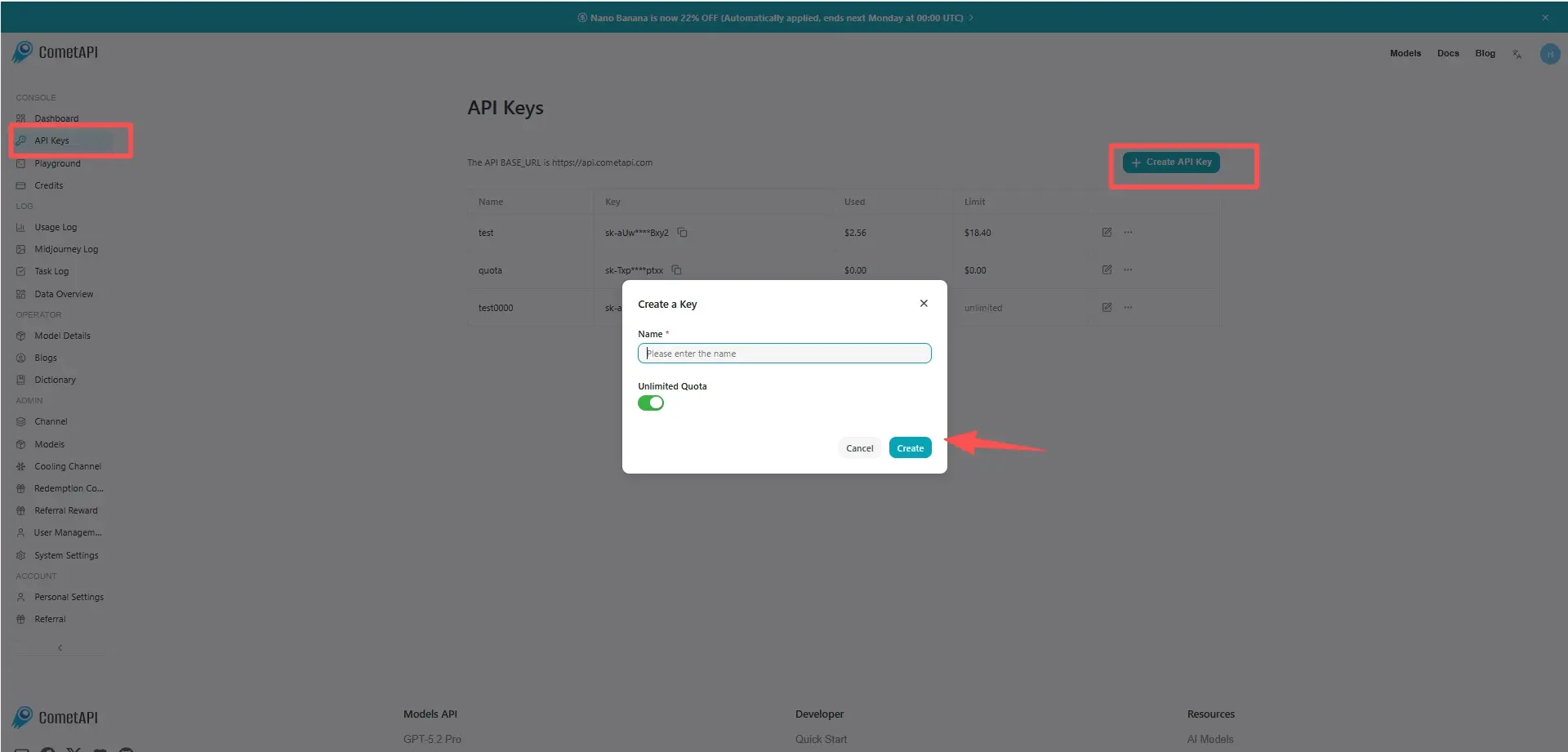
Log in to cometAPI. If you are not our user yet, please register first. Sign into your CometAPI console. Get the access credential API key of the interface. Click “Add Token” at the API token in the personal center, get the token key: sk-xxxxx and submit.
Step 2: Send Requests to Gemini 3.6 Flash API
Select the “ gemini-3.6-flash" "gemini-3.6-flash-thinking” endpoint to send the API request and set the request body. The request method and request body are obtained from our website API doc. Our website also provides Apifox test for your convenience. Replace <YOUR_API_KEY> with your actual CometAPI key from your account. base url is Gemini Generating Content
Insert your question or request into the content field—this is what the model will respond to . Process the API response to get the generated answer.
Step 3: Process Responses
The API returns structured candidate responses including generated text, citations, safety metadata, and optional tool outputs.