
TL;DR Seedream 5.0 Pro is ByteDance Seed’s professional multimodal image model for high-precision generation and editing. Officially released on July 8, 2026, it focuses on complex information visualization, interactive precision editing, realistic imagery, and native multilingual generation.
Through CometAPI, developers can call the model with ID seedream-5-0-pro-260628 using the Images API. Current CometAPI pricing starts at $0.045 per request. Public Arena results show a particularly strong position in image editing, including a #2 rank in the multi-image edit leaderboard snapshot used in this article.
Key Takeaways
- Seedream 5.0 Pro is positioned for professional image production rather than only one-shot image generation.
- ByteDance highlights four core capability breakthroughs: complex information visualization, interactive precision editing, realistic imagery and portrait texture, and multilingual generation.
- CometAPI exposes the model as seedream-5-0-pro-260628 through POST /v1/images/generations.
- The CometAPI route supports text-to-image plus single- and multi-reference workflows, with up to 10 reference images and up to 2K output.
- Independent Arena snapshots place the model at #8 in text-to-image, #5 in single-image editing and #2 in multi-image editing.
- The main deployment question is not simply “Is it the best image model?” but whether your workload values precision editing, layout control, multi-reference composition, multilingual typography, and repeatable production workflows.
What Is Seedream 5.0 Pro?
Seedream 5.0 Pro is a multimodal image generation and editing model developed by ByteDance Seed. The company describes it as a model with advanced reasoning, efficient content creation, and professional production capabilities. Its public launch focused on a practical shift in image generation: moving from visually attractive outputs toward assets that can survive real design workflows.
Compared with earlier Seedream releases, ByteDance says the model improves image-text alignment, structural coherence, text rendering, and visual aesthetics. More importantly, it adds stronger spatial control and region-aware editing, which matters when the user needs to change one object, one material, one text block, or one part of a composition without rebuilding the entire scene.
Technical Specifications of Seedream 5.0 Pro API
| Item | Specification |
|---|---|
| Developer | ByteDance Seed |
| Public release | July 8, 2026 |
| CometAPI model ID | seedream-5-0-pro-260628 |
| Model type | Multimodal image generation & image editing |
| Input modes | Text prompt, single image, multiple reference images |
| Generation modes | Text-to-image, image editing, multi-reference image fusion |
| Maximum reference images | Up to 10 |
| CometAPI output resolution | Up to 2K, aspect-ratio dependent |
| Output formats | PNG, JPEG |
| Response formats | URL or Base64 JSON |
| Streaming | Not supported on current CometAPI route |
| Batch generation | Not supported on current CometAPI route |
| CometAPI endpoint | POST /v1/images/generations |
| CometAPI starting price | $0.045 / request |
The API-facing limits above follow the current CometAPI Seedream 5.0 Pro model page. The public launch date and capability positioning follow ByteDance Seed’s official release. The “260628” suffix is a model snapshot identifier and should not be confused with the July 8 public announcement date.
What Makes Seedream 5.0 Pro Different?
Complex Information Visualization
AI image generation becomes much harder when an image must carry data, labels, charts, diagrams, and visual hierarchy at the same time. ByteDance specifically optimized Seedream 5.0 Pro for high-density infographics and complex information organization. The model is expected to reason about the requested content before arranging it into a usable composition.
The official “Antarctic Research Station” example combines a central station image with a timeline, bar chart, pie chart, line chart, weather panel, workflow, and field photography. This is a useful demonstration of why Seedream 5.0 Pro is better understood as a design-oriented model rather than merely a photorealistic generator.
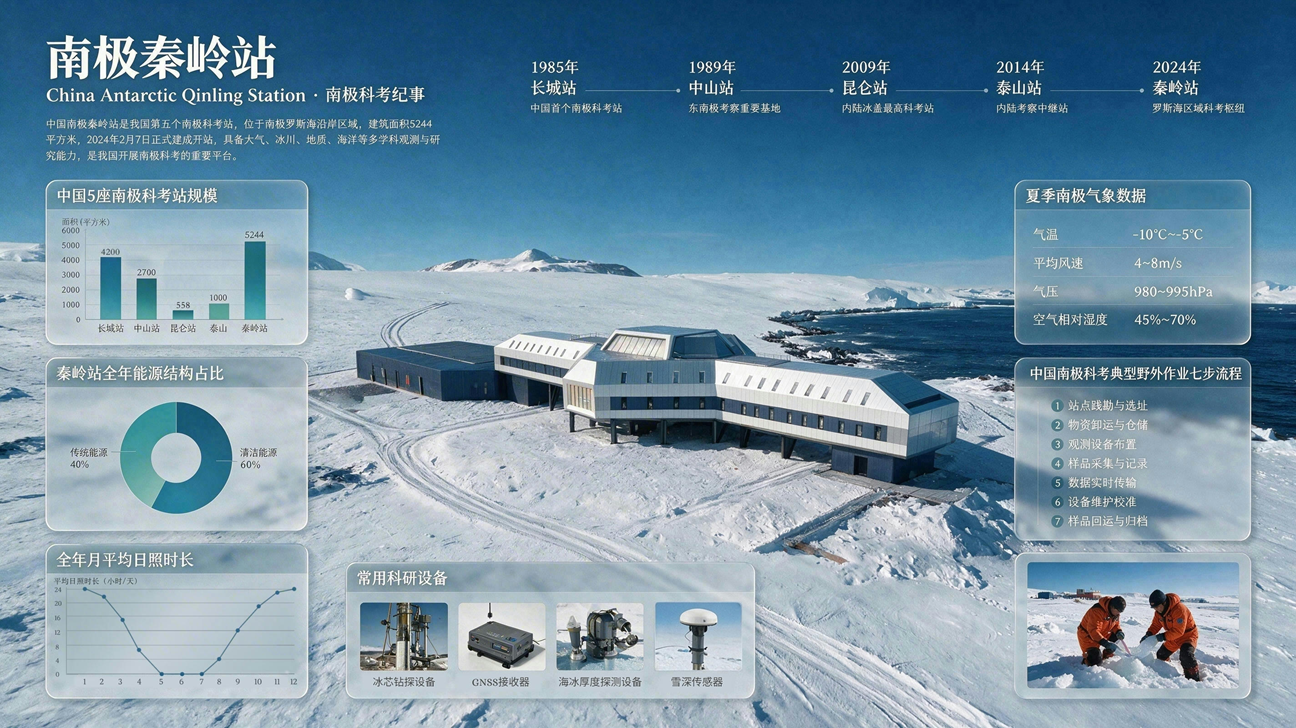
Figure 1. Official Seedream 5.0 Pro infographic example. Source: ByteDance Seed.
Interactive Precision Editing
Text prompts are good at describing what should change, but they are often weak at specifying exactly where a change should happen. ByteDance says Seedream 5.0 Pro combines spatial grounding with regional semantics to support point selection, lasso selection, sketch guidance, color and material replacement, layer separation, and multi-image fusion.
A particularly notable capability is layer separation. In ByteDance’s demonstration, the model can separate a complete poster into more than 10 independent layers, including text, subject, background, and decorative elements, while reconstructing background regions that were originally occluded. This moves the workflow closer to editable design assets instead of a single flattened generation.
Realistic Imagery and Portrait Texture
Seedream 5.0 Pro also targets commercial realism. ByteDance reports improvements in real-world lighting, object materials, reflections, skin texture, and portrait rendering. That matters for product photography, advertising, architectural visualization, and portrait work where a model can look impressive at first glance but fail on material behavior or subtle lighting transitions.
Native Multilingual Image Generation
For global campaigns, text rendering is often the failure point. Seedream 5.0 Pro natively supports more than ten commonly used languages, including French, German, Russian, Japanese, Korean, Spanish, and Arabic in addition to Chinese and English. The official release specifically highlights correct right-to-left Arabic layout and localized typography behavior.
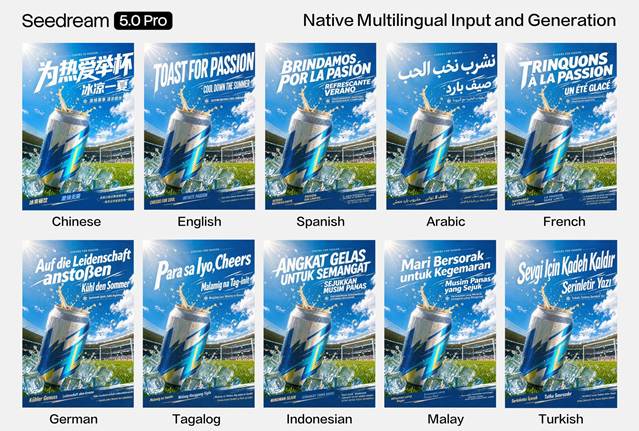
Figure 2. Official multilingual generation example. Source: ByteDance Seed.
How Good Is Seedream 5.0 Pro? Benchmark Performance
The following scores are snapshots rather than permanent properties of the models. Text-to-image and single-image edit scores are from the Arena leaderboard dated August 7, 2026; multi-image edit scores are from the July 24, 2026 snapshot.
| Model | Text-to-Image | Single-Image Edit | Multi-Image Edit |
|---|---|---|---|
| GPT Image 2 | 1380 ± 5 (#1) | 1463 ± 4 (#1) | 1454 ± 5 (#1) |
| Seedream 5.0 Pro | 1257 ± 5 (#8) | 1393 ± 4 (#5) | 1414 ± 6 (#2) |
| Nano Banana 2 | 1263 ± 5 (#6) | 1385 ± 4 (#10) | 1365 ± 5 (#5) |
| Seedream 5.0 Lite | 1136 ± 4 (#35) | 1293 ± 3 (#25) | 1270 ± 4 (#16) |
What the results suggest: Seedream 5.0 Pro is competitive but not the current overall text-to-image leader. Its clearest quantitative strength is editing. It rises from #8 in text-to-image to #5 in single-image edit and #2 in multi-image edit. That pattern aligns closely with ByteDance’s product positioning around precise editing, spatial control, and multi-image composition.
The same pattern is visible inside the Seedream family. On the cited Arena snapshots, Seedream 5.0 Pro substantially outperforms Seedream 4.5 and Seedream 5.0 Lite across all three categories, with the largest practical gap appearing in multi-image editing.
Seedream 5.0 Pro vs Seedream 5.0 Lite vs GPT Image 2 vs Nano Banana 2
There is no single image model that wins every workflow. A more useful comparison is to separate generation quality, editing strength, multi-image composition, resolution, search/grounding features, cost, and production fit.
| Dimension | Seedream 5.0 Pro | Seedream 5.0 Lite | GPT Image 2 | Nano Banana 2 |
|---|---|---|---|---|
| Primary positioning | Professional design and precision editing | General-purpose Seedream generation with reasoning/search | Frontier general image generation and editing | Fast multimodal image generation with Google ecosystem strengths |
| Arena text-to-image | 1257 ± 5 | 1136 ± 4 | 1380 ± 5 | 1263 ± 5 |
| Arena single-image edit | 1393 ± 4 | 1293 ± 3 | 1463 ± 4 | 1385 ± 4 |
| Arena multi-image edit | 1414 ± 6 | 1270 ± 4 | 1454 ± 5 | 1365 ± 5 |
| Reference workflow | Up to 10 references on CometAPI | General image/reference workflow | High-fidelity image inputs | Multi-image workflows; CometAPI page highlights broad reference support |
| Resolution on cited CometAPI route | Up to 2K | Model-specific / check live page | Flexible image sizes | Up to 4K options on CometAPI page |
| Standout strengths | Precision editing, dense layouts, layer-aware workflows, multilingual typography | Reasoning/search-enhanced general creation | Highest Arena scores in this comparison; strong general editing | Speed, multimodal workflow, search-enhanced creation |
| Best fit | Commercial design, product editing, multilingual campaigns, complex visual assets | General image creation and lower-cost Seedream usage | Maximum overall image quality and broad editing | Fast iteration, Google-oriented multimodal apps |
Choose Seedream 5.0 Pro when your workflow depends on precise regional changes, design-oriented layouts, multi-reference composition, multilingual typography, or iterative commercial asset production.
Choose GPT Image 2 when the highest overall Arena performance in general generation and editing matters more than staying inside the Seedream ecosystem.
Choose Nano Banana 2 when you value fast multimodal iteration, Google-oriented workflows, search-enhanced generation, or higher-resolution options exposed by its current CometAPI page.
Choose Seedream 5.0 Lite when you want a lower-cost Seedream option for general-purpose generation and do not need the Pro model’s strongest editing behavior.
Why Use Seedream 5.0 Pro API via CometAPI?
CometAPI provides a unified API platform for image, video, language, and multimodal models. For Seedream 5.0 Pro, the practical advantage is not only access to the model itself; it is the ability to keep authentication, billing, and model switching inside one platform while testing alternatives such as GPT Image 2, Nano Banana 2, and Seedream 5.0 Lite.
- One API key and centralized model management.
- A standard image generation route for Seedream 5.0 Pro.
- Simpler A/B testing across multiple image models.
- Centralized usage and cost monitoring instead of maintaining separate provider accounts.
- A straightforward path to combine image generation with language or video models in a larger multimodal application.
What You Need Before You Start
Create a CometAPI Account and API Key
Create or sign in to your CometAPI account, then generate an API key from the console. Store the key as an environment variable rather than hard-coding it in your source code.
export COMETAPI_KEY="your_api_key"
Know the Model ID and Endpoint
The current CometAPI model ID is seedream-5-0-pro-260628. The working quickstart on the model page uses:
POST https://api.cometapi.com/v1/images/generations
Seedream 5.0 Pro API Parameters
| Parameter | Type | Purpose | Example / Note |
|---|---|---|---|
| model | string | Model identifier | seedream-5-0-pro-260628 |
| prompt | string | Natural-language image instruction | Create a premium product poster... |
| size | string | Output size preset | 2K |
| output_format | string | Output image format | png |
| watermark | boolean | Whether to add a watermark | false |
| reference image(s) | model-specific | Optional images for editing or multi-reference workflows | Use the live CometAPI image reference schema |
| response | JSON | Generated image location or encoded data | URL or Base64, depending on route/options |
For production integrations, treat the live CometAPI model page and API documentation as the source of truth for reference-image field names and any newly added parameters. Seedream image APIs evolve quickly, so it is better to avoid copying an older Seedream 4.x payload into a 5.0 Pro integration without testing.
How to Use Seedream 5.0 Pro API with CometAPI
Step 1: Make Your First Text-to-Image Request with cURL
The simplest verified request follows the payload shown on the current CometAPI Seedream 5.0 Pro quickstart.
curl --location --request POST "https://api.cometapi.com/v1/images/generations"
\ --header "Authorization: Bearer $COMETAPI_KEY"
\ --header "Content-Type: application/json"
\ --data-raw '{ "model": "seedream-5-0-pro-260628", "prompt": "Create a premium skincare product poster: frosted glass bottle centered on a stone pedestal, soft side lighting, restrained luxury typography, subtle botanical accents, clean commercial photography, high material realism.", "size": "2K", "output_format": "png", "watermark": false }'
If the request succeeds, the response contains generated image data, typically as an image URL or response payload according to the active route.
Step 2: Generate Images with Python
import json
 import os
 import requests

 COMETAPI_KEY = os.environ["COMETAPI_KEY"]
 BASE_URL = "https://api.cometapi.com/v1"

 headers = {
    "Authorization": f"Bearer {COMETAPI_KEY}",
    "Content-Type": "application/json",
 }

 payload = {
    "model": "seedream-5-0-pro-260628",
    "prompt": (
        "Create a premium skincare product poster: frosted glass bottle "
        "centered on a stone pedestal, soft side lighting, restrained luxury "
        "typography, subtle botanical accents, clean commercial photography."
    ),
    "size": "2K",
    "output_format": "png",
    "watermark": False,
 }

 response = requests.post(
    f"{BASE_URL}/images/generations",
    headers=headers,
    json=payload,
    timeout=120,
 )
 response.raise_for_status()
 result = response.json()
 print(json.dumps(result, indent=2, ensure_ascii=False))

 if result.get("data"):
    print("Image URL:", result["data"][0].get("url"))
Step 3: Call the API with JavaScript
const apiKey = process.env.COMETAPI_KEY;
 const response = await fetch("https://api.cometapi.com/v1/images/generations", {
  method: "POST",
  headers: {
    "Authorization": `Bearer ${apiKey}`,
    "Content-Type": "application/json",
  },
  body: JSON.stringify({
    model: "seedream-5-0-pro-260628",
    prompt: "Create an editorial travel poster with accurate Japanese title text, layered map elements, clean hierarchy, and realistic photography.",
    size: "2K",
    output_format: "png",
    watermark: false,
  }),
 });

 const result = await response.json();
 console.log(result);
Step 4: Use Reference Images for Editing and Composition
CometAPI’s current model page states that the route supports single-image and multiple-reference-image workflows, and its changelog confirms text-to-image, single-image reference generation, and multi-image reference generation.
A practical workflow is: upload or host the reference asset, pass it using the current reference-image field defined by the live API route, and write a prompt that clearly separates what must change from what must remain unchanged. Because reference-image field names can change as provider-native formats are normalized, verify the live schema before production deployment rather than relying on an unverified historical payload.
Keep the product shape, camera angle, label, shadows, and background unchanged. Change only the sofa upholstery to dark green velvet (#1F4D3A), preserve the original folds and lighting, and do not alter any surrounding object.
Step 5: Build a Repeatable Production Workflow
- Generate or ingest a base asset. Start from text or an approved product/brand reference.
- Constrain the change. Describe the target object, region, material, color, text block, or layout change precisely.
- Preserve invariants. Explicitly state what must not change: identity, logo, product geometry, lighting, camera, background, typography, or composition.
- Evaluate the output. Check visual quality, text accuracy, identity consistency, and unintended edits.
- Iterate locally. Prefer targeted revisions over full regeneration when you already have an approved composition.
- A/B test models. For difficult prompts, compare Seedream 5.0 Pro with GPT Image 2 or Nano Banana 2 using the same task definition.
Practical Use Cases for Seedream 5.0 Pro API
E-commerce Product Editing
Use a product photo as the stable reference and modify material, color, packaging, background, props, or campaign styling while preserving product geometry and identity. This is a strong fit for Seedream 5.0 Pro because the model is explicitly designed around region-aware and reference-guided editing.
Advertising and Poster Production
The model’s dense-layout and typography improvements make it suitable for promotional posters, launch graphics, event materials, price cards, and other designs where image quality alone is not enough.
Infographics and Educational Content
Seedream 5.0 Pro can be used for chart-heavy educational visuals, technical explainers, process diagrams, and information-rich social content. The official launch specifically uses high-density infographic generation as a flagship capability.
UI / UX and Concept Mockups
For product teams, the model can quickly explore landing pages, application concepts, dashboard-style layouts, interface mood boards, and visual directions before designers move into a structured design tool.
Multilingual Campaign Localization
Because the model supports more than ten languages and language-aware typography, teams can explore localized creative variants rather than simply translating a finished English poster. Human review is still essential for brand copy and final text accuracy.
Seedream 5.0 Pro API Pricing
CometAPI currently lists $0.045 per request for Seedream 5.0 Pro. At that rate, the simple request-level estimates are:
| Usage | Estimated CometAPI Cost |
|---|---|
| 1 request | $0.045 |
| 10 requests | $0.45 |
| 100 requests | $4.50 |
| 1,000 requests | $45.00 |
On ByteDance’s Volcano Engine AI Hub, the model is currently listed at ¥0.02 per input image and ¥0.30 per output image. These pricing structures are not presented identically, so compare the actual workload you plan to run rather than assuming one headline number maps perfectly to another.
Pricing changes frequently. Before publishing or deploying, check the live model page rather than hard-coding a long-term cost assumption into your product plan.
Best Practices for Seedream 5.0 Pro API
Use an Art-Directed Prompt Structure
A compact but reliable structure is:
Subject + Composition + Position + Visual hierarchy + Material + Lighting + Typography + Constraints
For example, “Place the product in the center” is more controllable than simply listing the product among many scene elements. “Keep the label unchanged” is more useful in an editing task than asking for a broadly similar product.
Separate Change Instructions from Preservation Instructions
For editing prompts, explicitly distinguish the requested modification from invariants. A strong prompt often contains two parts: “change X” and “do not change Y.” This reduces unintended drift in identity, composition, lighting, and text.
Assign Roles to Reference Images
When multiple references are involved, describe what each one contributes: identity, pose, material, composition, brand palette, or typography. This is clearer than asking the model to “combine these images” without specifying the intended relationship.
Use Exact Colors and Text When They Matter
For brand assets, specify exact HEX colors and quote the required display text. Then validate the generated text before publishing. Even strong image models can still make small-text errors in dense layouts.
Benchmark on Your Own Production Prompts
Arena rankings are useful directional evidence, but your production workload may prioritize different qualities. Test the same prompt set across Seedream 5.0 Pro, GPT Image 2, and Nano Banana 2 using your own product images, languages, typography, and revision loops.
Limitations and Things to Watch
- The current CometAPI route is listed at up to 2K output, so do not assume the Pro API has the same 4K behavior as other Seedream variants.
- Streaming and batch generation are not supported on the current CometAPI Seedream 5.0 Pro route.
- Dense small text can still fail. ByteDance itself says there is room to improve finer-grained text rendering and pixel-level editing consistency.
- Point/lasso/layer workflows shown in ByteDance’s product demonstrations may not map one-to-one to every third-party API route. Verify which controls are actually exposed by your chosen endpoint.
- Arena scores are preference-based snapshots, not guarantees that one model will outperform another on every commercial task.
- Always review generated logos, product labels, people, legal copy, and factual infographic content before publishing.
FAQs about Seedream 5.0 Pro API
What is the Seedream 5.0 Pro API?
Seedream 5.0 Pro is ByteDance Seed’s professional image generation and editing model. Through CometAPI, developers can call it from an image generation endpoint to create images from text and use supported reference-image workflows.
Can Seedream 5.0 Pro edit existing images?
Yes. CometAPI describes the model as supporting image editing, single-image reference generation, and multi-reference workflows. ByteDance’s official release goes further in the product experience, highlighting region-aware editing, material/color replacement, layer separation, and multi-image fusion.
What resolution does Seedream 5.0 Pro support on CometAPI?
The current CometAPI page lists output up to approximately 2K, depending on aspect ratio and size constraints. This is why you should not automatically transfer 4K claims from Seedream 4.5 or other variants to the Pro route.
Is Seedream 5.0 Pro better than Seedream 5.0 Lite?
For the public Arena snapshots used here, yes in all three measured categories: text-to-image, single-image edit, and multi-image edit. The gap is especially large in editing. However, Seedream 5.0 Lite can still make sense when cost and general-purpose generation matter more than the Pro model’s editing strengths.
Is Seedream 5.0 Pro better than GPT Image 2?
Not across the board. GPT Image 2 leads the cited Arena snapshots in text-to-image, single-image edit, and multi-image edit. Seedream 5.0 Pro remains highly competitive and is especially compelling when its design-oriented controls, multilingual layouts, Seedream workflow, and price fit your application better.
Is Seedream 5.0 Pro better than Nano Banana 2?
The answer depends on the task. Nano Banana 2 is slightly ahead in the cited text-to-image Arena snapshot, while Seedream 5.0 Pro is ahead in both single-image and multi-image editing. For professional iterative editing, Seedream 5.0 Pro has the stronger public result in these snapshots.
Conclusion and Next Steps
Seedream 5.0 Pro is most interesting when image generation becomes a production workflow rather than a one-shot creative demo. Its public positioning centers on complex information design, localized editing, multi-image composition, realistic material and portrait rendering, and multilingual typography. Independent Arena results reinforce that positioning: the model is strong in general image generation, but its clearest relative advantage appears in editing, especially multi-image editing.
For developers, the fastest way to evaluate it is to create a CometAPI key, call seedream-5-0-pro-260628 through /v1/images/generations, and test it on a representative set of real creative tasks. Compare quality, revision accuracy, text rendering, reference consistency, latency, and total cost against alternatives instead of choosing a model from a single leaderboard score.
Start with a simple text-to-image call, then move to reference-guided workflows once the base integration is stable. If the application needs multiple providers, use the same evaluation set for GPT Image 2, Nano Banana 2, and Seedream 5.0 Lite to determine the best routing strategy for your product.
Editorial note: Benchmark rankings and API pricing are time-sensitive. Figures and tables in this draft use public data available on August 10, 2026; re-check live pages immediately before publication.